10 Best Jbod Enclosure (November 2026) Expert Guide
Written by Jamie · Updated November 2026
Finding the right Jbod enclosure helps you expand storage without complex network setups. These direct attached units support multiple drives for backups and media libraries.
We evaluated ten models based on speed, capacity, cooling, and build quality. Each entry offers unique features for different user needs and budget levels.
Each pick shows strengths in specific areas like RAID support or raw throughput. Prices and availability change often so check current listings before purchasing.
Top 3 Picks for Best Jbod Enclosure
Best Budget
CENMATE Aluminum 4 Bay Hard Drive Enclosure with Cooling Fan for 2.5“/3.5" SATA HDD/SSD with USB A/C 3.0, Support Hot Swappable, Tool-Free HDD Enclosure, DAS(NO RAID/NAS)
As an Amazon Associate we earn from qualifying purchases.
Top 10 Best Jbod Enclosure in 2026 Compared
This side-by-side comparison highlights key differences across all ten models including interface speed, drive capacity, and special features like RAID support.
Hybrid 2*2.5/3.5" SATA HDD/SSD(Support RAID 1/0/JBOD/NORMAL)+3* M / B+M Key M.2 NVMe Enclosure with Fan, USB A/C 3.2 Gen 2, Hard Drive Enclosure Support 68TB(2*22TB HDD+3*8TB 2230/42/60/80/110 SSDs)
The TERRAMASTER D4-320 stands out as a top Jbod enclosure for professionals needing fast direct attached storage. With a 4.2 rating it delivers reliable performance for backups and media work.
Pros
High-speed 10Gbps data transfer
Hot swappable without power down
Tool-free drive installation
Compatible with Mac Windows Linux
Quiet operation with sound damping
Cons
No RAID function support
Slightly higher price
We may earn a commission when you buy through this link, at no additional cost to you.
Its USB 3.2 Gen 2 interface enables read speeds up to 1000MB/s when using four HDDs. The tool-free push-lock trays make drive management effortless and hot swap support keeps workflows uninterrupted.
While it lacks RAID capabilities users benefit from simple independent disk access. Noise is well controlled thanks to sound absorbing panels making it suitable for office environments.
This model is ideal for Mac and Linux users needing plug-and-play compatibility. Its balanced feature set justifies the cost for those valuing speed and convenience.
Lightning Fast Data Transfer
The 10Gbps USB 3.2 connection ensures large video files move quickly without bottlenecks slowing production pipelines.
Effortless Drive Management
Push-lock tool-free trays allow quick swaps without tools keeping maintenance simple and fast for busy users.
The CENMATE Aluminum 4 Bay offers excellent value for home users needing expandable storage. With a 4.3 rating it balances cost and performance well for basic backups.
Pros
Affordable price point
Metal chassis for heat dissipation
Universal OS compatibility
Tool-free hot swap support
Dual USB A and C ports
Cons
Fan noise up to 50 dB
5Gbps speed limit
We may earn a commission when you buy through this link, at no additional cost to you.
Its aluminum build helps manage heat during heavy use while the included fan keeps drives cool. Dual USB A and C cables ensure it works with older and newer devices.
Trade-offs include slower 5Gbps transfer rates and noticeable fan noise. However these are acceptable given the low cost and solid reliability for daily tasks.
Ideal for budget conscious buyers or those upgrading from USB 2.0. It remains a practical choice for casual users prioritizing affordability over raw speed.
Stable Power Supply
A dedicated 12V adapter ensures consistent performance during sustained transfers without power drops or instability.
Wide Compatibility
Supports Windows Mac and Linux making it easy to share files across different systems without extra drivers.
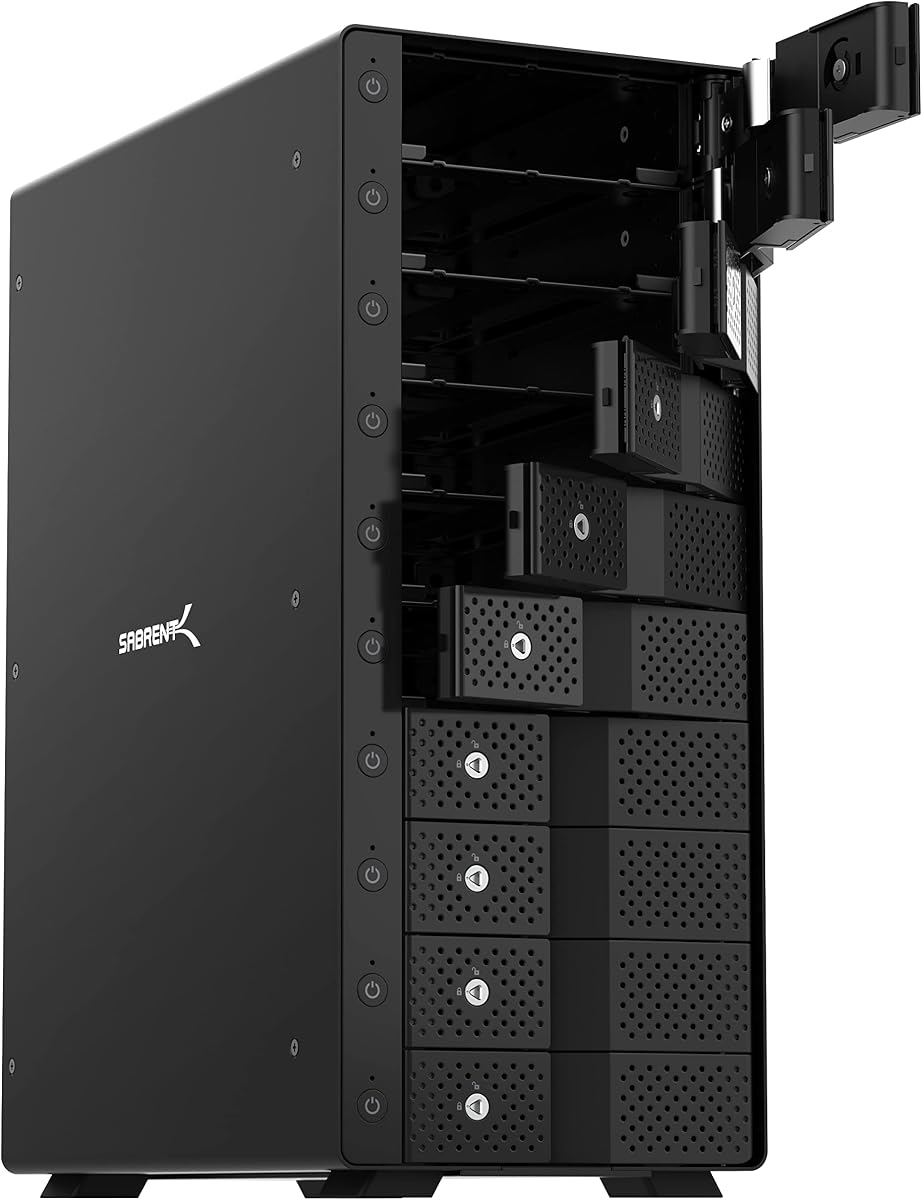
The SABRENT 10-Bay delivers high capacity for video editors and IT admins with a 4.1 rating. Its ten independent bays allow flexible storage expansion without rebuilding arrays.
Pros
Massive 200TB total capacity
USB 3.2 Gen 2 10Gbps
Per-drive power switches
No trays needed for installation
Secure Kensington lock slot
Cons
Higher price point
Requires USB 3.2 Gen 2 port
We may earn a commission when you buy through this link, at no additional cost to you.
Each drive has its own switch and LED status providing granular control. Tray-less hot swap lets you add drives quickly without tools or downtime during busy work.
It needs a USB 3.2 Gen 2 host port for full speed which may require upgrades. Despite this the build quality and cooling system ensure stable long term operation.
Best suited for professionals needing maximum capacity and speed in one unit. The flexibility supports growing storage needs as projects expand over time.
Scalable Storage Solution
Add drives as needed and mix capacities freely thanks to independent mounting and direct access for each bay.
Efficient Cooling
Dual 120mm fans keep temperatures under control during heavy loads preventing throttling and extending drive lifespan.
The IO CREST 8-Bay offers solid capacity for small servers needing a 4.0 rating. Eight bays provide ample space for archival storage without network complexity.
Pros
Eight drive bays for scaling
Independent power control per drive
Supports up to 24TB per drive
Smart fan with thermal sensor
Durable steel chassis
Cons
Older USB 3.0 standard
No hot swap feature
We may earn a commission when you buy through this link, at no additional cost to you.
Independent switches let you power off unused drives saving energy and noise. The steel housing and smart fan ensure heat is managed effectively during long operations.
Its USB 3.0 interface limits speed to 5Gbps which is slower than newer options. Lack of hot swap means powering down to swap drives which adds friction.
This enclosure works well for static storage setups where drives rarely change. Users prioritizing capacity and stability over transfer speed will appreciate the design.
Individual Drive Control
Power off specific drives when not in use to reduce heat and energy consumption effectively.
Thermal Management
Smart fan adjusts speed based on thermal sensors protecting drives from overheating during heavy loads.
The QNAP TR-004 excels for existing QNAP users needing a 4.2 rating. Hardware RAID adds redundancy making it more robust than standard JBOD setups.
Pros
Hardware RAID support included
Direct integration with QNAP NAS
USB Type-C fast interface
Lockable drive bays
Diskless for flexible setup
Cons
Limited to QNAP ecosystems
NAS apps not installable
We may earn a commission when you buy through this link, at no additional cost to you.
It expands QNAP NAS storage directly and can act as external backup. Lockable bays secure drives which is useful in shared office environments.
It works primarily with QNAP systems and does not support running NAS apps on it. This limits standalone use but enhances integration for those invested in QNAP.
Ideal for QNAP owners wanting reliable RAID expansion without network overhead. Its hardware RAID speeds up rebuilds compared to software alternatives.
Hardware RAID Capabilities
Supports RAID 0 1 5 JBOD providing flexibility for performance or redundancy without software overhead.
Seamless NAS Integration
Designed to expand QNAP NAS capacity directly offering a simple way to boost storage within existing systems.
The QNAP TL-R1200C-RP serves businesses needing rack mounted expansion with a 4.1 rating. Twelve bays offer vast storage for media archives or server backups.
Pros
Twelve drive bays for scale
Rackmount design for server rooms
Redundant power for uptime
USB 3.2 Gen 2 10Gbps
Compatible with QNAP NAS
Cons
Requires rack space
Higher cost for enterprise
We may earn a commission when you buy through this link, at no additional cost to you.
Redundant power supplies ensure uptime during power issues critical for server rooms. USB 3.2 Gen 2 delivers fast data transfer for large file workflows.
Its rackmount design means it fits standard racks limiting home use. The cost reflects enterprise durability and features not needed for casual users.
Perfect for data centers or studios with existing rack infrastructure. It provides reliable high capacity storage for demanding professional environments.
Enterprise Grade Reliability
Redundant power and rackmount build ensure stable operation in professional server environments.
High Speed Connectivity
USB 3.2 Gen 2 10Gbps ensures fast transfers even with multiple drives active simultaneously.
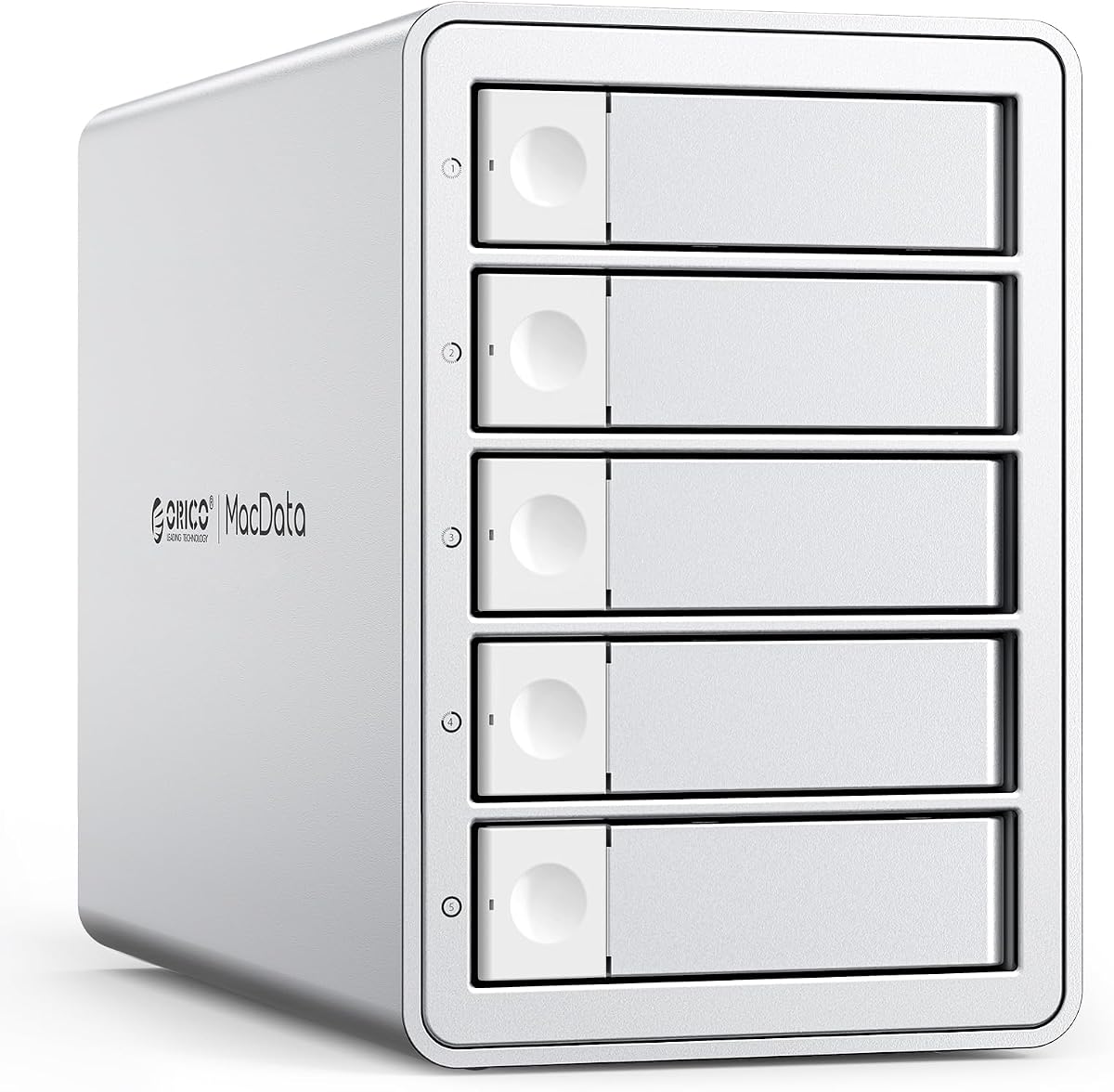
The ORICO 5 Bay RAID is a versatile choice for RAID users with a 4.7 rating. Eight modes allow balancing speed and redundancy for critical data needs.
Pros
Eight hardware RAID modes
Built-in power no adapters
58 aluminum alloy chassis
Supports SSDs and HDDs
High capacity for backups
Cons
No USB Type-C
Fan may be audible
We may earn a commission when you buy through this link, at no additional cost to you.
Its built-in 150W power supply eliminates external adapters keeping desks tidy. The aluminum shell and silent fan help dissipate heat during heavy operations.
It lacks USB Type-C but 5Gbps via Type-A remains adequate for most backups. Silent cooling ensures noise stays low in office environments.
Best for users needing RAID without software configuration. The hardware switches simplify setup making RAID accessible to non-experts.
Multiple RAID Options
Eight RAID modes let you choose the right balance of speed and redundancy for your workflows.
Clean Power Design
Built-in power supply removes cable clutter reducing desk mess for a cleaner workspace.
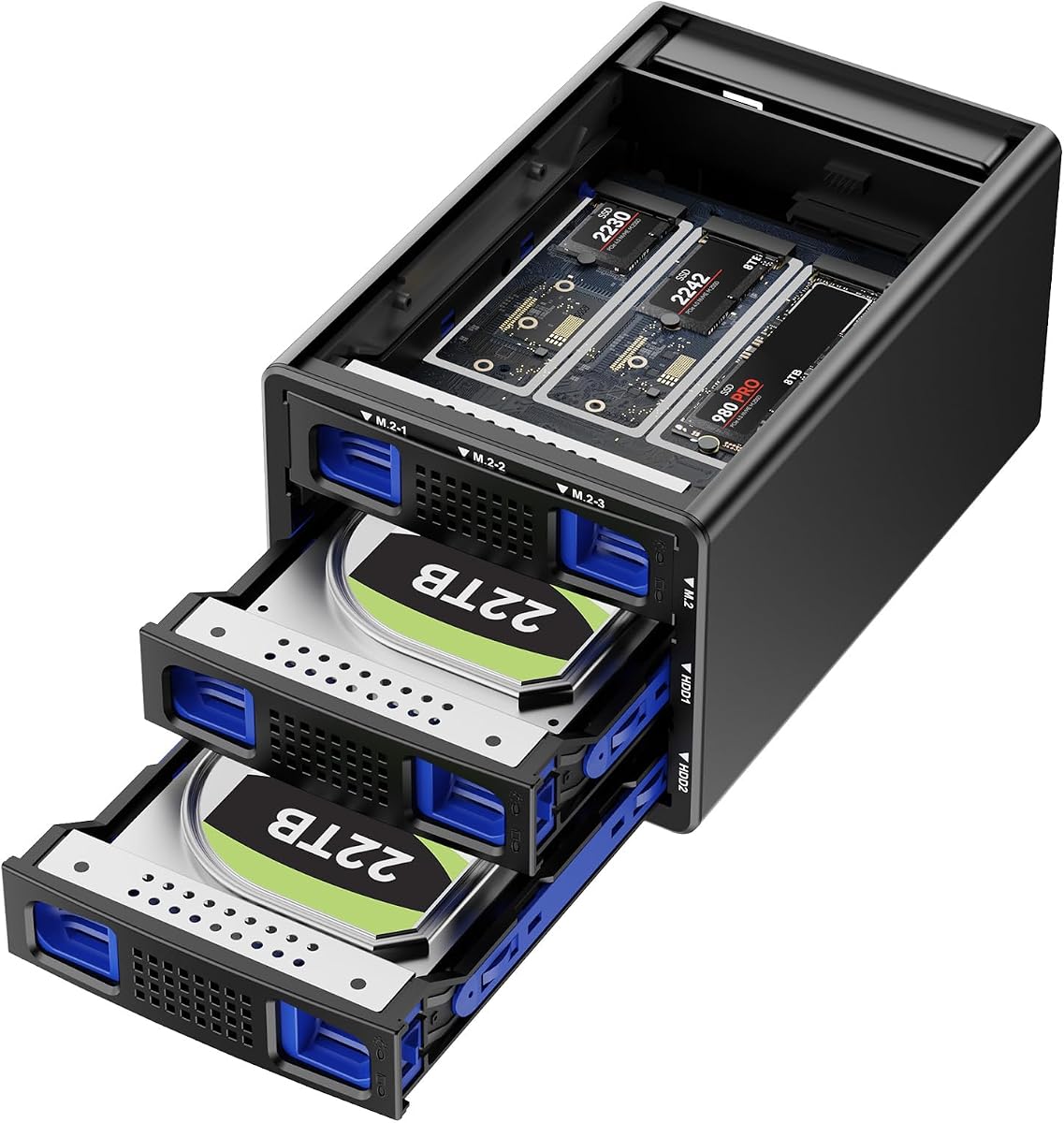
Hybrid 2*2.5/3.5" SATA HDD/SSD(Support RAID 1/0/JBOD/NORMAL)+3* M / B+M Key M.2 NVMe Enclosure with Fan, USB A/C 3.2 Gen 2, Hard Drive Enclosure Support 68TB(2*22TB HDD+3*8TB 2230/42/60/80/110 SSDs)
USB 3.2 Gen 2 Type-A and C
Two SATA bays plus three M.2 NVMe
Supports RAID and Normal modes
Up to 68TB total capacity
This hybrid enclosure allows mixing fast NVMe with high capacity HDDs with a 4.6 rating. It supports both interfaces in one unit for optimized workflows.
Pros
Hybrid SATA and NVMe support
USB 3.2 Gen 2 10Gbps
Tool-free installation design
Silent cooling fans included
Plug and play compatibility
Cons
Setup requires careful drive mapping
Limited software features
We may earn a commission when you buy through this link, at no additional cost to you.
NVMe drives provide speed for active projects while HDDs store archives. USB 3.2 Gen 2 ensures full speed for both drive types without bottlenecks.
Drive mapping requires attention to match RAID modes properly. Without clear documentation this may confuse first time users.
Ideal for power users needing tiered storage in a single box. It bridges HDD and SSD performance gaps cost effectively for workstations.
Dual Interface Support
Mix NVMe SSDs and SATA drives to balance speed and capacity in one enclosure.
Silent Operation
Silent fans and aluminum build keep noise low for office environments.
We may earn a commission when you buy through this link, at no additional cost to you.
Buying Guide – How to Choose the Best Jbod Enclosure
Selecting the right Jbod enclosure depends on your storage needs interface preferences and budget. This guide covers key factors to consider.
Interface and Speed
USB 3.2 Gen 2 offers up to 10Gbps which is ideal for video editing. USB 3.0 reaches 5Gbps which suits basic backups.
Choose interfaces that match your computer ports to avoid bottlenecks in data transfer.
Drive Capacity
Check total capacity limits to ensure future expansion. Most enclosures support up to 10TB or more per drive.
Calculate total storage by multiplying bays by max drive size to avoid running out of space.
RAID vs JBOD
JBOD treats drives independently which is simple and flexible. RAID adds redundancy but reduces usable capacity.
Select JBOD if you need easy expansion or RAID if data protection is priority.
Cooling and Noise
Active fans keep drives cool but add noise. Aluminum cases dissipate heat passively but may need fans under heavy load.
Consider noise levels for office or home use to avoid distraction during work.
Tool-Free Installation
Tool-free trays let you swap drives without tools which saves time. Look for push-lock or slide mechanisms for easy access.
Ensure the design is secure enough to prevent accidental dislodging during transport.
Power Supply
External adapters add cables while built-in power reduces clutter. Multiple drives require stable power to prevent data loss.
Choose built-in power for clean setups if portability is not a priority.
Compatibility
Verify OS support like Windows Mac or Linux for plug-and-play use. Some enclosures require drivers which complicates setup.
Ensure cross-platform support if you share files between different operating systems.
Build Quality
Metal enclosures like aluminum protect against impact and heat better than plastic. Look for solid construction for long-term durability.
Higher build quality often correlates with reliable performance over time.
How to Use and Care for Your Jbod Enclosure
Connect the enclosure to your computer using the provided cables. Install drivers if needed though most support plug-and-play.
Format drives through your OS file manager before first use. This ensures proper file systems for your working.
Keep the enclosure in a well-ventilated space to avoid overheating. Clean dust from vents regularly to maintain cooling efficiency.
Frequently Asked Questions
What is the difference between a JBOD and a RAID enclosure?
A JBOD enclosure treats each drive independently allowing separate access and easy capacity expansion. A RAID enclosure combines drives into a single volume for redundancy or speed.
Do I need to install drivers for a JBOD enclosure?
Most modern JBOD enclosures work plug-and-play with Windows Mac and Linux. Some models may include drivers but they are rarely required for basic use.
Can I hot-swap drives in a JBOD enclosure?
Many JBOD enclosures support hot-swap allowing you to remove drives while the system runs. Check the product specs to confirm this feature before purchase.
How do I format drives for a JBOD enclosure?
Use your operating system disk management tool to format drives after connecting. Choose APFS for Mac exFAT for cross-platform or NTFS for Windows use.
Is a JBOD enclosure better than a NAS?
JBOD enclosures are simpler and cheaper since they connect directly via USB. NAS units offer network access but require setup and higher costs.
What cable should I use for fastest transfer speeds?
Use a high-quality USB 3.2 Gen 2 Type-C cable for 10Gbps speeds. Avoid older cables that limit bandwidth and slow down file transfers.
How do I keep my JBOD enclosure cool?
Place the enclosure in open space away from walls. Clean vents regularly and avoid covering fans during operation to maintain cooling.
Final Thoughts on Choosing the Best Jbod Enclosure
The TERRAMASTER D4-320 leads with speed and tool-free design for professionals. Budget buyers benefit from CENMATE while SABRENT offers unmatched capacity.
Prioritize interface speed and RAID needs based on your workflow. Ensure compatibility with your OS and existing hardware to avoid issues.
Check current prices and availability before purchasing as deals change often. Compare specs carefully to match your long-term storage goals.