
Sceptre 24-inch Prime Monitor
4.6Editor score
99 percent sRGB color coverage
Dual HDMI ports available
Built-in speaker system
Finding the right HDMI LED monitor can transform your workspace or gaming setup significantly. Modern displays offer high refresh rates and vibrant colors that enhance productivity and entertainment experiences alike.
We evaluated ten popular models based on screen quality, connectivity options, and eye comfort features. Our analysis focuses on real-world performance and build quality to ensure you make an informed decision.
Each selection highlights specific strengths like color accuracy or smooth motion handling. Please note that availability and configurations may vary by retailer so always verify current details before purchasing.
4.6Editor score
4.6Editor score

4.7Editor score
As an Amazon Associate we earn from qualifying purchases.
The following table provides a side-by-side overview of the most important technical specifications for each model to help you quickly identify the best fit for your needs.





The Sceptre 24-inch Prime Monitor stands out as a budget-friendly option that does not compromise on essential features like refresh rate and color accuracy. With a 4.6 star rating it has garnered positive feedback for its value proposition in the entry-level market segment.
We may earn a commission when you buy through this link, at no additional cost to you.
Its 99 percent sRGB color gamut ensures that images appear vibrant and true to life which is a rare find at this price point. The inclusion of two HDMI ports allows for easy switching between a laptop and a gaming console without needing extra adapters.
While the monitor offers a 100Hz refresh rate for smoother motion it lacks advanced ergonomic adjustments like height or pivot. The built-in speakers provide a baseline audio solution but users seeking high-fidelity sound may prefer external options.
This model is ideal for students or home office users who need a reliable display for documents and media consumption without breaking the bank. It delivers a solid mix of performance and affordability that meets the needs of casual users.
The 99 percent sRGB coverage provides rich visuals that surpass typical budget displays making it suitable for light photo editing or media viewing.
Dual HDMI ports plus a VGA input ensure compatibility with older devices and modern laptops simultaneously without requiring constant cable swaps.
We may earn a commission when you buy through this link, at no additional cost to you.
The Sceptre E275W offers a larger 27-inch canvas which is appealing for those who need more screen real estate for multitasking. It maintains the strong color gamut found in its smaller sibling but operates at a lower refresh rate.
We may earn a commission when you buy through this link, at no additional cost to you.
With a 75Hz refresh rate this monitor delivers smooth enough motion for general productivity and casual gaming though it may not satisfy competitive gamers. The 99 percent sRGB coverage remains a highlight ensuring that colors look punchy and accurate.
The stand allows for some tilt adjustment which helps in finding a comfortable viewing angle. However it lacks height adjustment meaning you might need a monitor arm if you require precise ergonomic alignment for long work sessions.
This display is well-suited for users who prioritize screen size over high-speed performance. It serves as a robust secondary monitor or a primary display for general office work and media consumption.
The 27-inch format provides ample space to arrange multiple windows side by side without feeling cramped during complex tasks.
Accurate color reproduction ensures that photos and graphics look consistent across different viewing angles on this larger panel.
We may earn a commission when you buy through this link, at no additional cost to you.
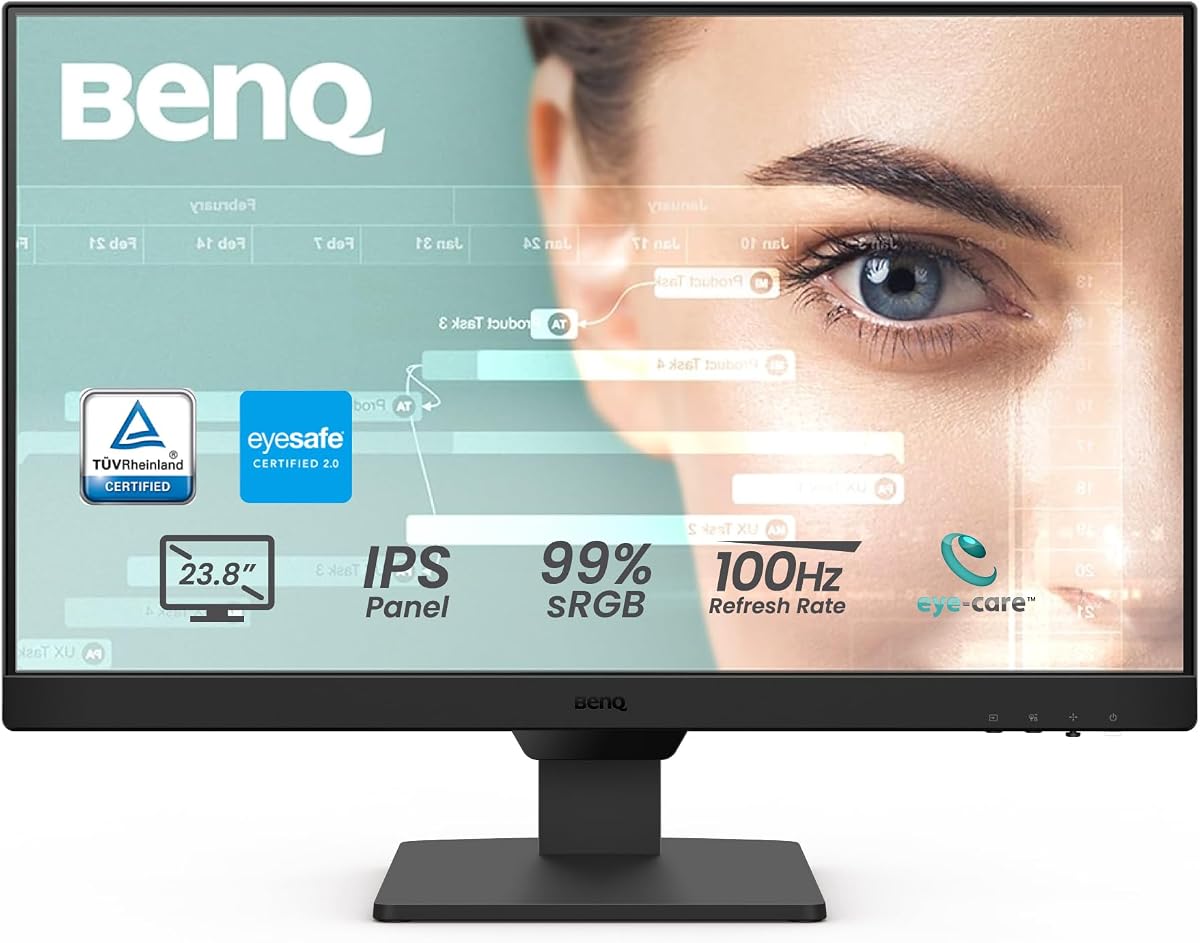
The BenQ GW2490 earns the Editor's Choice award due to its comprehensive focus on eye health and visual comfort. Its 100Hz refresh rate and IPS panel ensure that visuals are both smooth and color-accurate for a wide range of tasks.
We may earn a commission when you buy through this link, at no additional cost to you.
Features like Low Blue Light technology and Adaptive Brightness adjust the screen output to reduce strain during long hours of use. This makes it a top contender for writers developers and anyone who spends significant time staring at a screen.
The thin bezels contribute to a modern look and make it easier to set up a multi-monitor configuration without heavy borders interrupting the view. While it does not offer a fully adjustable stand it is VESA compatible for third-party mounting solutions.
If your primary concern is protecting your eyes while maintaining a high-quality viewing experience this model offers the best balance of features. It is particularly recommended for those who work from home or study for extended periods daily.
Low Blue Light Plus filters harmful radiation without washing out colors ensuring long-term comfort during daily use.
The 100Hz refresh rate reduces motion blur significantly compared to standard 60Hz displays making scrolling and gaming more fluid.
We may earn a commission when you buy through this link, at no additional cost to you.
The Dell SE2426H delivers premium performance with a 144Hz refresh rate and a 1ms response time that caters to fast-paced gaming and fluid motion. It also holds a TÜV 3-Star eye comfort certification which validates its ability to reduce harmful blue light.
We may earn a commission when you buy through this link, at no additional cost to you.
Powered by IPS technology it ensures consistent colors across wide viewing angles which is ideal for collaborative work or media sharing. The ultra-thin bezels enhance the visual experience and add a sleek touch to any desk setup.
While the stand is limited to tilt adjustments the high quality of the panel and the robust build justify the investment for users seeking speed and clarity. It avoids the trade-off between performance and eye comfort that many competitors struggle with.
This monitor is best suited for gamers and professionals who need a reliable high-speed display without compromising on visual health. It represents a high-end choice that balances technical specifications with user well-being effectively.
The 144Hz refresh rate combined with a 1ms response time ensures sharp visuals during fast action and rapid motion.
TÜV certification guarantees that the display reduces harmful blue light without sacrificing color accuracy or image quality.
We may earn a commission when you buy through this link, at no additional cost to you.
The Philips 241V8LB utilizes a VA panel which typically offers deeper blacks and higher contrast than standard IPS panels. This makes it an excellent choice for movie watching and tasks that require distinct shadow detail in dark environments.
We may earn a commission when you buy through this link, at no additional cost to you.
It supports a 100Hz refresh rate and includes Flicker-Free technology to minimize eye strain during long work sessions. The virtually bezel-free design on three sides allows for a larger viewing area and easier integration into multi-monitor setups.
While the response time on VA panels can sometimes lead to slight ghosting in very fast scenes the overall picture quality remains sharp and clear for most users. It is a practical option for those who value contrast over raw speed.
This monitor is well-positioned for users who prioritize media consumption and document reading. Its balance of refresh rate and contrast performance provides a satisfying experience without requiring a premium budget.
The VA panel technology delivers superior contrast ratios making dark scenes appear richer and more detailed than on standard screens.
Flicker-Free technology ensures that the backlight does not flicker at low brightness levels protecting your eyes from fatigue.
We may earn a commission when you buy through this link, at no additional cost to you.
The Dell P2425H stands out primarily for its fully ergonomic stand that allows for height tilt pivot and swivel adjustments. This level of adjustability is crucial for maintaining a healthy posture during extended work hours or daily office use.
We may earn a commission when you buy through this link, at no additional cost to you.
It offers a standard Full HD resolution with a 1500:1 contrast ratio which ensures clear and crisp text for productivity tasks. While it does not feature a high refresh rate it focuses on stability and comfort for professional environments.
The build quality is robust and designed to withstand daily use in demanding settings. It serves as a dependable tool for business users who need a reliable display that can be tailored to their specific physical needs.
If you prioritize physical comfort and desk setup flexibility over gaming performance this model is a strong choice. Its ergonomic features make it a top pick for office workers who spend most of their day seated at a computer.
Height tilt pivot and swivel adjustments ensure that you can align the screen perfectly to reduce neck and eye strain.
Dell's reputation for build quality ensures that this monitor remains stable and functional throughout years of daily office use.
We may earn a commission when you buy through this link, at no additional cost to you.
The BenQ BL2490 is designed with an anti-glare coating that helps reduce reflections from windows or overhead lighting. This feature is particularly valuable in bright office environments where screen glare can distract from productivity.
We may earn a commission when you buy through this link, at no additional cost to you.
It offers a 100Hz refresh rate and a perfect 5.0 star rating indicating high user satisfaction with its performance and reliability. The 1300:1 contrast ratio and 250 cd per square meter brightness provide a balanced viewing experience for daily tasks.
While it lacks height adjustment the tilt mechanism is sufficient for most users who do not require extensive physical customization. The inclusion of both HDMI and DisplayPort inputs ensures flexible connectivity options for various devices.
This model is recommended for office workers who need a glare-free surface for long periods of document editing. Its high rating and anti-glare focus make it a trustworthy choice for professional use.
The anti-glare coating minimizes reflections from ambient light sources ensuring that the screen remains clear and readable.
A 100Hz refresh rate provides smooth scrolling and window management which improves workflow efficiency significantly.
We may earn a commission when you buy through this link, at no additional cost to you.
The LG 24U411A-B stands out with its HDR10 support and 120Hz refresh rate which cater to media consumption and casual gaming. The IPS panel ensures that colors remain vibrant and accurate from almost any viewing angle.
We may earn a commission when you buy through this link, at no additional cost to you.
Features like Reader Mode and Flicker Safe technology are designed to make reading text more comfortable and reduce eye fatigue. The slim stand base adds a modern aesthetic though it does not offer height adjustment for ergonomic optimization.
While true HDR performance often requires higher brightness this model still benefits from the wider color range and contrast adjustments available in HDR10. It is a solid option for users who want a versatile screen for both work and entertainment.
This monitor is ideal for those who stream content and need a display that handles media well. Its mix of speed and color fidelity makes it a practical choice for a multi-purpose home office setup.
HDR10 support brings out more detail in bright and dark areas of video content enriching the viewing experience.
Reader Mode warms the screen tones to mimic paper making it easier to read long documents without strain.
We may earn a commission when you buy through this link, at no additional cost to you.
The Acer KB220Q H2bi offers a compact 21.5-inch footprint that fits easily on smaller desks without sacrificing refresh rate or color quality. It is designed to maximize screen real estate with a ZeroFrame design that minimizes bezels on three sides.
We may earn a commission when you buy through this link, at no additional cost to you.
With a 100Hz refresh rate and Adaptive-Sync support it provides smooth visuals that are helpful for light gaming or multimedia use. It is a cost-effective solution for users who need a reliable display for basic productivity tasks.
While the size may be restrictive for multitasking heavy workloads it excels as a secondary screen or for budget-conscious buyers. The design ensures that the display feels larger than its physical dimensions due to the minimal border.
This monitor is best suited for small workspaces or entry-level office setups. It balances performance and space efficiency to deliver a functional experience for students or small business users.
The near bezel-less design allows you to focus more on content rather than the monitor frame which enhances productivity.
100Hz refresh rate ensures that animations and video playback appear smooth and fluid to the human eye.
We may earn a commission when you buy through this link, at no additional cost to you.
The Dell 24 Plus Monitor combines high-speed performance with full ergonomic adjustability making it a complete package for modern workspaces. Its 144Hz refresh rate and 1ms response time ensure that motion looks crisp and free from artifacts.
We may earn a commission when you buy through this link, at no additional cost to you.
The stand offers height tilt pivot and swivel adjustments which allow for a highly customizable setup. Additionally the integrated speakers provide a convenient audio option for video calls without needing external devices.
While the speakers are not high-fidelity they are useful for casual use and save desk clutter. The Ash White finish adds a stylish touch that complements contemporary office designs and home setups effectively.
This monitor is ideal for users who want a premium all-in-one experience. It balances performance adjustability and aesthetics to deliver a top-tier experience for professionals who demand quality and convenience.
Height tilt pivot and swivel adjustments let you fine-tune the display to suit your specific ergonomic needs and comfort.
A 144Hz refresh rate ensures smooth visuals for gaming and video which enhances the overall viewing experience significantly.
We may earn a commission when you buy through this link, at no additional cost to you.
Selecting the right HDMI LED monitor involves balancing several key factors to ensure you get a display that meets your specific needs.
The refresh rate determines how many times per second the screen updates the image measured in Hertz. A higher refresh rate like 100Hz or 144Hz makes motion appear smoother and is ideal for gaming or fast scrolling.
Look for a refresh rate that matches your activities with 100Hz being a sweet spot for general productivity and light gaming.
IPS panels offer better color accuracy and wider viewing angles while VA panels provide higher contrast ratios for deeper blacks. TN panels are faster but have worse color and viewing angles.
Choose IPS for color-critical work or VA for media consumption to get the best visual experience for your specific tasks.
Monitor sizes range from 21.5 to 27 inches and resolution typically refers to 1080p Full HD. Larger screens provide more space but require higher resolution to maintain sharpness.
Select a size that fits your desk comfortably with 24 inches being a versatile standard for most home and office setups.
HDMI is the standard port for modern devices but having multiple inputs allows you to connect multiple computers or consoles. DisplayPort is also useful for high refresh rate connections.
Ensure the monitor has at least two HDMI ports or a mix of HDMI and DisplayPort to suit your connectivity needs easily.
Features like Low Blue Light and Flicker-Free technology help reduce eye strain during long work sessions. TÜV certifications validate these claims for better reliability.
Prioritize eye care features if you work long hours to protect your vision and maintain comfort throughout the day.
Adjustability features like height tilt pivot and swivel allow you to position the screen for optimal posture. A fixed stand limits your ability to customize the view.
Look for a stand that offers height and tilt adjustment to ensure a comfortable and healthy viewing position over time.
Color gamut refers to the range of colors a monitor can display with sRGB being a common standard. Higher coverage ensures images look vibrant and true to life.
Aim for at least 99 percent sRGB coverage if you deal with images or videos to ensure accurate color reproduction.
Extra features like built-in speakers VESA mounting holes or anti-glare coatings add convenience and functionality to the display. These can enhance the overall user experience.
Evaluate which extras matter most to you such as audio or mounting options to narrow down your choices effectively.
Connect the monitor to your power source and link it to your computer using an HDMI cable. Select the correct input source on the monitor menu to display your desktop.
Adjust the brightness and contrast settings to match the lighting conditions in your room. Use eye care modes if available to reduce strain during long work sessions.
Clean the screen with a soft dry cloth to avoid scratching the surface. Avoid using harsh chemicals or spraying liquids directly on the panel to maintain its lifespan.
A 60Hz monitor updates the image 60 times per second while a 100Hz monitor updates it 100 times per second. The higher rate results in smoother motion and less blur during fast-moving scenes. This makes a 100Hz monitor preferable for gaming or smooth scrolling in documents.
IPS panels generally offer better color accuracy and faster response times which are beneficial for competitive gaming. However VA panels provide better contrast which is good for single-player games with dark scenes. The choice depends on whether you prioritize color or contrast.
Yes most of these monitors include HDMI ports which are compatible with modern gaming consoles like PlayStation and Xbox. Ensure you check the refresh rate support to get the best performance from your console.
Most models listed support VESA mounting but it is best to check the specific specifications for each product. VESA mounting allows you to use a third-party stand or wall mount for more flexibility in your setup.
Low Blue Light technology reduces the amount of blue light emitted by the screen which can help reduce eye strain. It adjusts the color temperature to warmer tones making the display more comfortable to view for long periods.
If you play games or edit video a higher refresh rate provides a noticeable improvement in smoothness. For basic office work the difference is less significant so a standard refresh rate may suffice depending on your budget.
Our top picks highlight a range of options from budget-friendly choices to premium models with advanced features. Each monitor offers a unique combination of refresh rate and eye care technology to suit different needs.
When selecting a display prioritize factors like size and refresh rate that align with your primary use cases. Ensure the monitor has the connectivity options you require for a seamless setup experience.
Remember that availability and details may vary so always check the current specifications before making a purchase. Investing in the right monitor can significantly improve your daily workflow and entertainment experience.