
Nektar SE49
4.5Editor score
DAW integration included
Affordable price point
Full-size velocity keys
This guide compares the top 49 key MIDI keyboards for music production, highlighting features, integration, and value to help you choose the right controller.
Finding the right 49 key MIDI keyboard can transform your music production setup. These controllers offer a balance between portability and playability, making them ideal for producers who need expressive keys without taking up too much desk space. Whether you are composing symphonies or crafting electronic beats, a quality 49 key MIDI keyboard provides the tactile feedback necessary for nuanced performances.
We evaluated ten top-rated models based on key feel, software integration, control options, and overall value. Our analysis focuses on how well each controller works with major digital audio workstations and whether it offers enough physical controls like faders and knobs to streamline your workflow. We looked at build quality, connectivity options, and the included software bundles to ensure you get a complete package.
Each pick in this list highlights specific strengths, from budget-friendly options to premium controllers with advanced features. You will find detailed breakdowns of what makes each model stand out and who it is best suited for. Please note that availability and pricing can fluctuate over time, so checking the current listings is recommended before making your final purchase decision.
4.5Editor score

4.7Editor score

4.4Editor score
Here is a side-by-side comparison of all ten models featured in this guide to help you quickly identify the features that matter most for your specific production needs.




The Novation Launchkey 49 MK4 stands out as a top-tier controller for modern producers. It offers a robust set of features that cater to both beginners and professionals looking for a versatile workflow tool.
We may earn a commission when you buy through this link, at no additional cost to you.
Its standout feature is the seamless integration with major digital audio workstations. This means you can control mixing, transport, and plugin parameters without touching your mouse. The 16 FSR pads add significant value for drummers and beatmakers.
While it lacks a traditional MIDI DIN output, which might limit some hardware setups, the USB connectivity is stable and efficient. The software suite provided adds substantial value, giving you access to industry-standard tools right out of the box.
This controller is perfect for anyone who wants a streamlined production experience. Whether you are scoring film music or producing pop tracks, the Launchkey 49 MK4 delivers the control and expressiveness you need.
Launchkey provides custom integration scripts for Ableton Live, Logic Pro, and more, allowing you to control mixing and transport directly from the hardware.
The 16 FSR pads are polyphonic aftertouch capable, serving as drum triggers, clip launchers, and even step sequencers for complex patterns.
We may earn a commission when you buy through this link, at no additional cost to you.
The M-AUDIO Keystation 49 MK3 is designed for users who want a straightforward, reliable MIDI controller without unnecessary complexity. It focuses on the core experience of playing keys and sending MIDI data efficiently.
We may earn a commission when you buy through this link, at no additional cost to you.
Its plug-and-play nature is a major benefit. You can connect it to your Mac or PC without installing drivers, making it ideal for on-the-go production or quick recording sessions. The keys are velocity-sensitive, providing dynamic expression.
The lack of knobs or faders limits its ability to control software parameters directly. However, for composers who primarily need input for notes and chords, this simplicity is actually a benefit that keeps the workflow uncluttered.
This keyboard is an excellent choice for hobbyists and producers who already have dedicated hardware for mixing. It gets the job done reliably and offers a great entry point into the world of MIDI control.
The USB connection allows for immediate use with Mac, PC, and iOS devices via an adapter, ensuring you can start creating music instantly.
Full-size velocity-sensitive keys capture subtle nuances in your playing, helping you create more dynamic and emotional performances.
We may earn a commission when you buy through this link, at no additional cost to you.
The Nektar SE49 proves that you do not need to spend a fortune to get a capable MIDI controller. It offers essential features wrapped in a package that delivers amazing value for the price.
We may earn a commission when you buy through this link, at no additional cost to you.
Its standout feature is the included DAW integration software, which works with most popular digital audio workstations. This means you can get control over transport and mixing even with a budget-friendly device. It also comes with Bigwig Studio.
The build quality is basic, reflecting its price point. However, for someone just starting out or needing a secondary controller for travel, this is a minor trade-off. It provides the core functionality needed to record and play music.
We recommend this controller for students and beginners who need a reliable interface without breaking the bank. It is a practical tool that allows you to focus on music creation rather than complex features.
For under ninety dollars, you get a full 49-key controller with software that normally costs extra, making it one of the best value options available.
The controller works seamlessly with Mac, PC, and iOS, ensuring you can use it with your existing computer setup without extra adapters.
We may earn a commission when you buy through this link, at no additional cost to you.
The M-AUDIO Oxygen 49 MKV strikes a great balance between keybed quality and control surface features. It is designed to give you hands-on control over your virtual instruments and DAW environment.
We may earn a commission when you buy through this link, at no additional cost to you.
Its auto-mapping feature is a significant time-saver. The controller automatically assigns knobs and faders to relevant parameters in your DAW, allowing you to tweak sounds instantly without manual configuration. The NKS integration is a major bonus.
While the key feel is responsive, some users might find it slightly less weighted than premium models. This is acceptable given the price and the wealth of controls it offers. The included software package is also very generous.
This model is ideal for producers who need extensive control over synths and effects. Whether you are tweaking sound design or automating tracks, the Oxygen 49 MKV provides the tactile interface you need.
Native Kontrol Standard support lets you browse and control Native Instruments presets directly from the keyboard, streamlining your workflow.
Smart Chord and Smart Scale modes help you play complex harmonies easily, while the built-in arpeggiator adds rhythmic patterns instantly.
We may earn a commission when you buy through this link, at no additional cost to you.
The Arturia KeyLab Essential mk3 is a visually impressive controller that enhances your production setup with its bright display and responsive pads. It focuses on making the interaction between hardware and software intuitive.
We may earn a commission when you buy through this link, at no additional cost to you.
The 2.5-inch LCD screen provides real-time feedback on what you are controlling, which helps avoid confusion during recording sessions. The RGB-backlit pads add a professional touch and ensure you can see them even in low-light environments.
It relies heavily on software integration to deliver its full potential. While this is a strength for those deep in the Arturia ecosystem, it might feel limiting for others. However, the included Analog Lab V is a powerful sound engine.
This keyboard is suited for producers who value aesthetics and detailed feedback. If you want a controller that looks great and offers a modern interface for sound selection, the KeyLab Essential mk3 is a strong contender.
The bright 2.5-inch display gives you immediate visual feedback on parameters, allowing you to see changes in real-time while mixing.
Included Analog Lab V offers 2000 presets ranging from vintage synths to modern orchestral sounds, giving you a huge sonic palette.
We may earn a commission when you buy through this link, at no additional cost to you.
This generic controller is a basic option for those who need a simple way to input notes into their software without needing advanced features. It focuses on the fundamentals of MIDI input.
We may earn a commission when you buy through this link, at no additional cost to you.
Its compact profile makes it easy to fit into small workspaces. The ABS construction ensures it is durable enough for regular handling, though it lacks the premium feel of higher-end models. It is designed for practical use.
It lacks the software bundles and advanced controls found in branded units. This makes it less versatile but also less expensive. It is a straightforward tool that does the job if you do not need extra buttons or pads.
We recommend this only for very simple setups or as a backup controller. If you need reliable integration or specific creative tools, a branded model might be a better investment for long-term use.
This controller provides the essential inputs for recording and arranging music without any frills, making it suitable for simple desktop setups.
Measuring approximately 66 cm wide, it fits easily on desks and in music rooms, ensuring it does not clutter your workspace unnecessarily.
We may earn a commission when you buy through this link, at no additional cost to you.
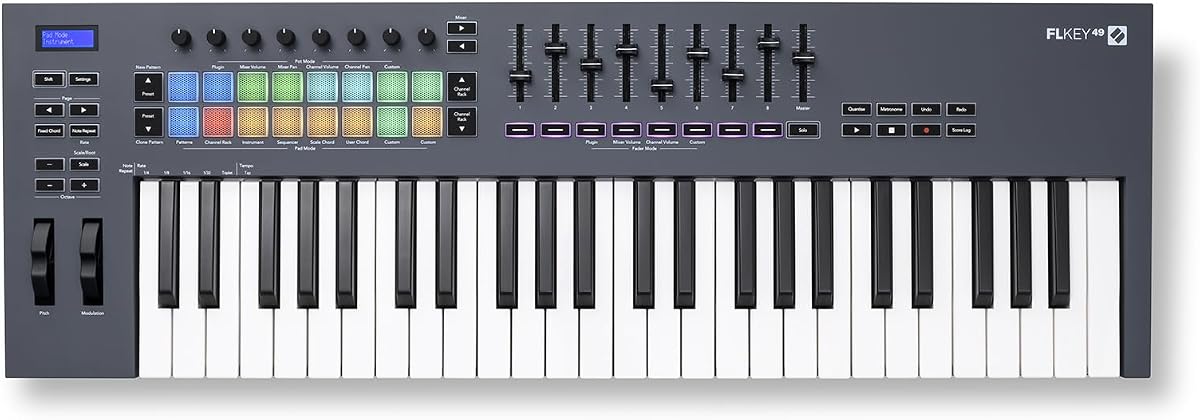
The Novation FLkey 49 is specifically designed to complement FL Studio users. It maps directly to the software's interface, allowing you to control mixing and channel racks hands-on.
We may earn a commission when you buy through this link, at no additional cost to you.
Its standout feature is the sequencer mode which maps pads directly to FL Studio's step sequencer. This allows you to program beats quickly without navigating the screen. The dedicated faders and pots make mixing tasks intuitive.
While it works with other DAWs, its true power is unlocked with FL Studio. If you use a different software, you might find the mapping less useful. However, for dedicated FL users, it is an essential hardware upgrade.
This controller is perfect for beatmakers and producers who live in FL Studio. It removes the need to touch your mouse for core functions, helping you stay in the creative flow for longer periods.
The controller maps the mixer and channel rack controls from the screen to your hands, making mixing and arrangement tasks much faster.
Pads map directly to the step sequencer, allowing you to program complex beats and patterns without ever needing to use your mouse.
We may earn a commission when you buy through this link, at no additional cost to you.
The M-AUDIO Oxygen Pro 49 is a feature-rich controller designed for users who need advanced capabilities like aftertouch and MIDI DIN output. It serves as a central hub for a professional studio.
We may earn a commission when you buy through this link, at no additional cost to you.
Aftertouch on the keys allows for expressive modulation while playing, adding depth to your performances. The 16 RGB pads are versatile for drumming and clip launching. The MIDI DIN output allows connection to external hardware synthesizers.
While packed with features, it might be overwhelming for casual users. The setup process can take time to master, but the payoff is significant control. The software bundle is extensive, offering virtual instruments and expansion packs.
This keyboard is ideal for producers who need to connect to external gear and require expressive key controls. It is a robust tool that supports both internal and external hardware production workflows.
The velocity-sensitive keys include aftertouch, letting you add expressive modulation to notes by pressing harder after striking a key.
A 5-pin MIDI output allows you to connect to vintage or external hardware synths, expanding your setup beyond just computer-based instruments.
We may earn a commission when you buy through this link, at no additional cost to you.
The midiplus AK490 is a straightforward MIDI controller that focuses on the core essentials. It provides a reliable interface for those who need MIDI input and basic hardware connectivity without extra frills.
We may earn a commission when you buy through this link, at no additional cost to you.
Its MIDI DIN output is a key feature that many modern controllers omit. This allows you to connect to older hardware synths easily. The basic layout includes pitch and mod wheels, octave buttons, and a sustain pedal input.
It lacks the advanced software and control surface features of higher-end models. This makes it less versatile but also very simple to use. It is a solid choice for a secondary controller or a simple recording setup.
We recommend this for users with external hardware gear who need a simple controller. It gets the job done without unnecessary complexity, making it a practical choice for specific niche needs.
The included MIDI DIN jack allows you to connect to older hardware synthesizers and sound modules, expanding your setup options.
With pitch and mod wheels and a sustain jack, this controller covers the essential expressive tools needed for basic piano and synth playing.
We may earn a commission when you buy through this link, at no additional cost to you.
The Arturia KeyLab mk3 represents the premium end of the spectrum with its high-quality build and modern features. It is designed for professional environments where aesthetics and durability matter.
We may earn a commission when you buy through this link, at no additional cost to you.
Its build quality is exceptional, with solid encoders and a robust chassis. The USB-C power ensures reliable connectivity and modern compatibility. The inclusion of aftertouch adds significant expressive value for detailed performance work.
The higher price tag might be a barrier for some users. However, the investment pays off in long-term durability and performance. It integrates deeply with Arturia software, making it a complete solution for sound design.
This controller is ideal for professionals who need a reliable, high-end interface. Whether you are scoring for media or producing albums, the KeyLab mk3 offers the precision and build quality needed for studio standards.
The chassis and components are built to professional standards, ensuring longevity and reliability in demanding studio environments.
USB-C power ensures you can connect to modern computers easily while maintaining a stable and efficient power supply.
We may earn a commission when you buy through this link, at no additional cost to you.
Choosing the right MIDI controller involves evaluating several factors to ensure it fits your workflow and studio setup. This guide highlights the most important considerations.
The keybed is the most important part of a keyboard. Look for velocity-sensitive keys that respond well to your playing dynamics. Semi-weighted or full-weighted keys offer a more realistic feel than unweighted ones, which is crucial for expressive playing.
A good keybed should feel durable and responsive, allowing you to play comfortably for long periods without fatigue. Test the keys if possible to ensure they match your preferred style.
Consider how much control you need over your software. Knobs, faders, and buttons allow you to manipulate parameters without touching your mouse. If you tweak synths often, a controller with many assignable controls is essential.
More controls provide a faster workflow but can clutter your desk. Balance the number of physical controls with your actual needs to find the right fit for your workspace.
Look for controllers that offer integration scripts for your specific Digital Audio Workstation. This allows you to control transport, mixing, and plugins directly. It saves time and keeps your hands on the hardware.
Check if the controller supports major DAWs like Logic, Ableton, or FL Studio. Good integration ensures you can focus on music rather than technical setup.
If you need to take your setup on the road, weight and size matter. A 49-key keyboard is a good middle ground, but some models are lighter and more compact than others. USB bus power is a plus for travel.
Consider where you will store it when not in use. A compact profile ensures it fits comfortably on smaller desks or in bags without taking up too much room.
Many controllers come with free software like DAWs or virtual instruments. This can save you money and get you started faster. Check if the included tools are relevant to your production style.
Some software requires registration or updates. Make sure the provided content is up-to-date and useful for your specific genre, whether it be electronic or orchestral.
Modern controllers usually connect via USB, but some offer MIDI DIN outputs for hardware synths. If you use external gear, ensure the controller has the necessary ports. USB-C is becoming a standard for better durability.
Check for sustain pedal inputs if you need them for piano-style performances. Reliable connectivity ensures your keyboard communicates effectively with your computer or interface.
A sturdy controller withstands frequent use and travel. Look for robust materials like metal or high-quality plastic that feel solid. A sturdy build ensures the controls and keys last for years.
Avoid models that feel flimsy or have loose buttons. Investing in a durable controller means you will not have to replace it soon, saving money in the long run.
Prices vary significantly from basic to premium models. Determine how much you can spend and what features are non-negotiable. Sometimes paying more gets you better build quality and software included.
Consider the total cost including cables or adapters. A good balance of price and features ensures you get the best value for your specific production needs.
Start by connecting your keyboard to your computer via USB. Ensure you have the necessary drivers installed if required. Most modern models are plug-and-play, allowing immediate use without complex setup steps.
Regularly clean the keys and surface to prevent dust buildup. Use a soft cloth to wipe down the exterior. Avoid using harsh chemicals that might damage the sensitive electronic components or the paint finish.
Store the controller in a safe, dry place when not in use. Protect it from extreme temperatures and moisture to maintain optimal performance. Use a cover or case if you plan to transport it frequently.
No, a MIDI keyboard itself does not produce sound. It sends digital signals to your computer software. You need a DAW and virtual instruments to generate the actual audio. The keyboard acts as a controller for your computer-based sounds.
Velocity measures how hard you press a key to determine volume. Aftertouch measures how hard you press down after the key is struck to control modulation like vibrato. Both add expression, but aftertouch is a more advanced feature found on premium models.
Yes, you can connect many USB MIDI keyboards to phones using an adapter. iOS devices need a USB Camera Adapter. Android support varies by device. This allows you to use your phone as a music production tool.
Higher-priced models often feature better build quality, more controls, and advanced software integration. They may include premium keybeds or exclusive sound libraries. Cheaper models are great for basics but might lack these extra professional features.
Most modern controllers are plug-and-play on Mac and PC without drivers. However, some advanced features may require specific software from the manufacturer. Always check the product description for software requirements before buying.
Yes, a 49 key keyboard is often ideal for beginners. It offers enough range for chords and melodies without taking up too much desk space. It is a versatile size that grows with your skills as you progress.
Choosing the right 49 key MIDI keyboard depends on your specific production needs. The Launchkey 49 MK4 stands out as a top all-around choice, while the Nektar SE49 offers incredible value for those on a budget.
Prioritize features that matter most to you. Whether it is the control surface, software integration, or key feel, select a model that enhances your creative process. A good controller should feel like an extension of your instrument.
Always check the latest availability before making your final decision. Models may have stock changes or updates. Use the comparison table and detailed reviews above to guide your choice toward the best fit for your studio.