
PC Power Button Desktop Power Button
4.6Editor score
1 to 2 Splitter included
1.7M extension cable
Adhesive mounting stickers
An external PC power button allows you to control your desktop computer from a convenient location, which is essential for cases hidden under desks or in hard-to-reach areas. These switches connect directly to your motherboard headers, offering a reliable alternative to damaged front panel buttons or cumbersome reach-around scenarios.
We evaluated ten leading external power switch models based on cable length, build quality, installation ease, and additional features like USB hubs or wireless connectivity. Each product was assessed for compatibility with standard ATX motherboards and the clarity of included mounting instructions for DIY builders.
Every pick highlights unique strengths such as budget-friendly pricing, premium materials, or specialized functionalities like reset switches and LED indicators. Please note that product availability and pricing may change over time, so verify current details before making your final purchase decision.
4.6Editor score
4.5Editor score

4.3Editor score
As an Amazon Associate we earn from qualifying purchases.
The following comparison table outlines the key specifications and features of each external power button model, helping you quickly identify the best fit for your desktop setup based on cable length, included accessories, and unique capabilities like wireless control or USB expansion.




This external power button offers a highly effective solution for users needing easy access to their PC's power switch without moving the entire tower. With a 4.6-star rating, it balances cost and functionality exceptionally well for standard desktop setups.
We may earn a commission when you buy through this link, at no additional cost to you.
The inclusion of a 1 to 2 splitter board is a standout feature, allowing you to keep your original case button functional while adding the external switch. The 1.7-meter cable provides ample length for routing through chassis openings to a convenient desk or rack location.
While the construction is primarily plastic, it is durable enough for typical home use. The adhesive backing is strong but requires careful placement since it is not reusable once mounted. Most users find the installation process straightforward if they follow the manual.
This switch is ideal for budget-conscious builders or those repairing a damaged front panel. Its compatibility with standard headers ensures it works with most motherboards, making it a versatile addition to any desktop configuration needing remote power control.
The splitter board enables simultaneous use of both the original case button and the external switch for added flexibility.
The 1.7M cable allows for tidy routing behind desks or through expansion slots without tension or strain.
We may earn a commission when you buy through this link, at no additional cost to you.
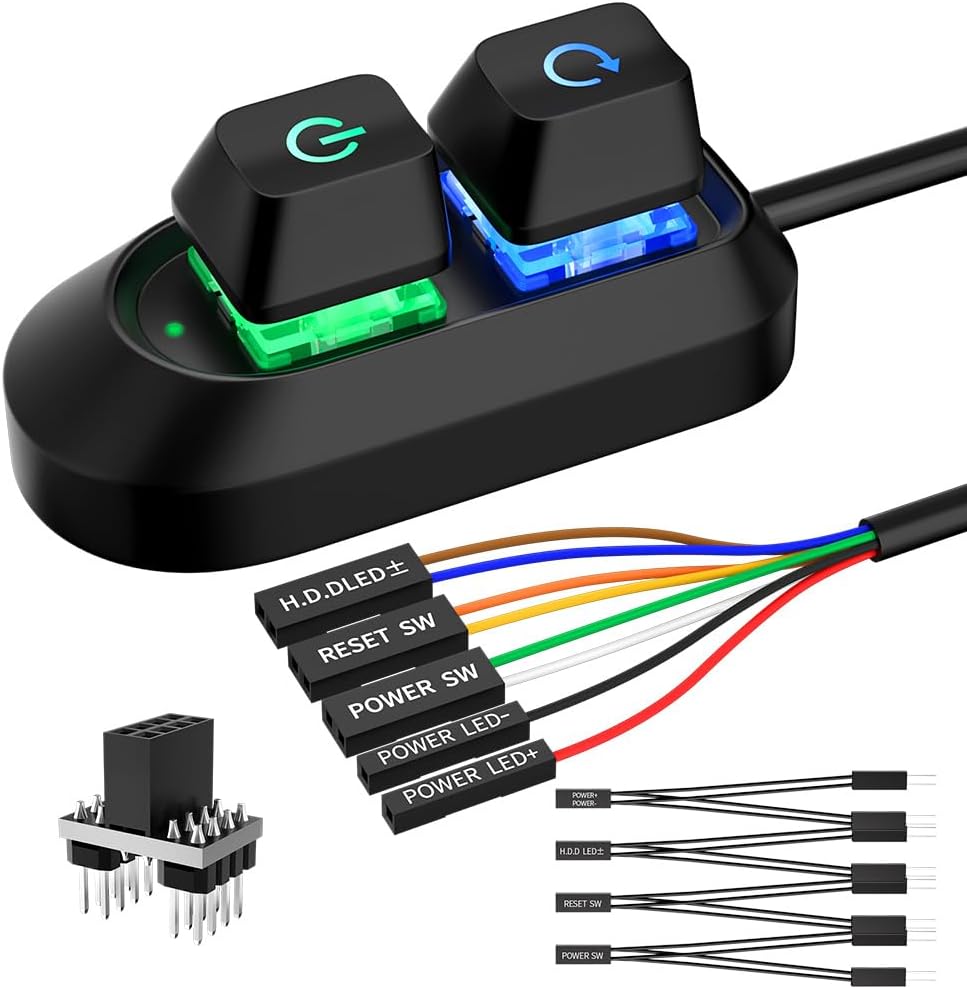
This model goes beyond a simple power switch by including reset and LED connections, making it a comprehensive replacement solution. Rated at 4.5 stars, it appeals to users wanting full control over their system states from a new convenient location.
We may earn a commission when you buy through this link, at no additional cost to you.
The package includes both a splitter board and a splitter cable, giving you flexibility based on your available space. This ensures you can maintain original functionality while integrating the new switch seamlessly. The 2-meter cable is among the longest options available.
Installation involves connecting multiple headers, which might slightly increase complexity compared to single-function switches. However, the clear labeling of POWER SW, RESET SW, and HDD LED makes the process manageable even for novices who check their motherboard manual.
Choose this if you need to restore lost functionality like a broken reset button or HDD activity light. It is perfect for test benches or custom builds where you want full access to all front-panel features without opening the case repeatedly.
Includes connections for power, reset, and LEDs allowing complete front panel control from your external button.
The strong adhesive sticker ensures the switch stays put on smooth surfaces like glass desks or metal panels.
We may earn a commission when you buy through this link, at no additional cost to you.
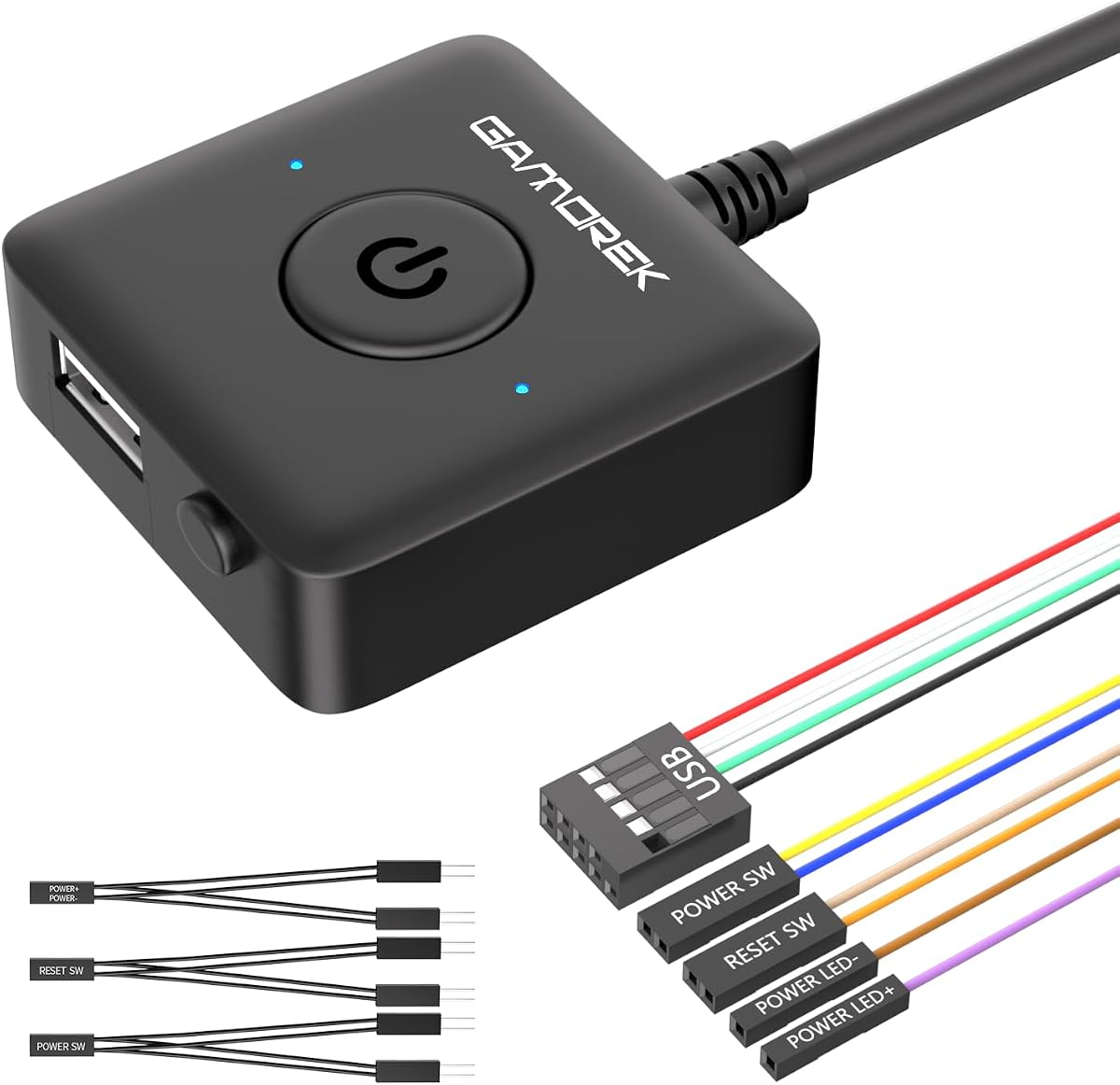
This unique device merges a standard external power switch with a four-port USB 3.0 hub, offering exceptional utility for desktop setups. It simplifies cabling by consolidating power control and peripheral access into a single compact unit mounted near your desk.
We may earn a commission when you buy through this link, at no additional cost to you.
The USB ports support data transfer speeds up to 5.0Gbps, making them suitable for external drives, keyboards, and mice. Connecting the green USB header to the motherboard is straightforward, and the black USB 3.0 plug ensures high-speed connectivity for your devices.
The shorter 1.2M cable might limit placement options compared to others, so measure your setup carefully before installation. Additionally, the price is higher due to the added functionality, but it often replaces the need for a separate hub entirely.
Ideal for users with limited USB ports or those who want a centralized control point. It transforms a simple power button into a versatile desk hub, streamlining your workspace and reducing cable clutter around your PC case.
Eliminates the need for a separate USB hub by integrating power switch control into one device.
USB 3.0 ports provide fast data transfer rates compatible with modern high-performance storage solutions.
We may earn a commission when you buy through this link, at no additional cost to you.
The standout feature of this switch is its impressive 118-inch cable, which offers unparalleled flexibility for routing power control to distant locations. With a 4.6-star rating, it is perfect for complex setups where standard cables fall short.
We may earn a commission when you buy through this link, at no additional cost to you.
This extra length allows you to place the PC in a hidden corner or under a floor desk while keeping the button accessible on a high shelf or wall. The standard 4-pin connector ensures compatibility with nearly all ATX motherboards without adapters.
While the cable is long, it might require management solutions to prevent tangling or tripping hazards. The included splitter allows you to keep the original button active, which is useful for scenarios requiring dual access points.
Choose this if your PC is exceptionally far from where you need the button. It is an excellent repair solution for damaged chassis buttons where the only goal is restoring power control without needing additional features like reset or LEDs.
The 118-inch cable lets you control your PC from across the room or behind heavy furniture easily.
Works with 90% of ATX motherboards using standard headers without requiring custom wiring or adapters.
We may earn a commission when you buy through this link, at no additional cost to you.
This switch stands out with its acrylic material body, offering a more premium look compared to standard plastic alternatives. It holds an impressive 4.8-star rating, reflecting user satisfaction with its durability and aesthetic appeal.
We may earn a commission when you buy through this link, at no additional cost to you.
It includes full control features: one boot button, one restart button, one power indicator, and one hard disk indicator. This comprehensive set replaces the functionality of a full front panel, making it ideal for hidden cases or wall mounts.
While it shares features with other top models, the acrylic finish gives it a unique, modern aesthetic that fits well in professional or gaming setups. It is recommended for water-cooled chassis DIY where looks matter as much as functionality.
If you want a switch that looks as good as it performs, this is a strong choice. It balances high ratings with full functionality, making it a reliable repair option for damaged chassis buttons that need to look great.
The acrylic body provides a sleek, durable finish that enhances the look of any modern desk setup.
Includes all standard front panel connections including boot, reset, and drive activity lights for full control.
We may earn a commission when you buy through this link, at no additional cost to you.
This model adds visual flair to your setup with a seven-color breathing LED effect that enhances the look of your desk. With a 4.5-star rating, it combines reliable function with aesthetic appeal for users who value style.
We may earn a commission when you buy through this link, at no additional cost to you.
The LED requires no software or configuration, making it a plug-and-play enhancement for your workspace. It operates on a safe low-voltage design, ensuring consistent performance without risking your system components or motherboard headers.
The 2-meter cable provides solid reach for most standard desks, allowing clean cable management and flexible positioning. While the RGB feature is nice, it is a passive glow that does not offer customization beyond the default effect.
Choose this if you want to add a subtle glow to your setup while replacing a faulty switch. It is perfect for gaming setups where visual consistency matters, providing a reliable control point with an added style touch.
The seven-color breathing LED adds a clean ambient glow to your setup without any software setup.
Low-voltage design ensures safe and stable connection to motherboard headers without system risk.
We may earn a commission when you buy through this link, at no additional cost to you.
This switch includes a built-in USB connection, extending easy-access USB functionality to your desk alongside power control. With a 4.7-star rating, it is a favorite for users who want to keep their desktop build cleaner and more organized.
We may earn a commission when you buy through this link, at no additional cost to you.
The included PCI bracket helps route cables neatly inside ATX and MATX cases, reducing clutter inside the chassis. You can connect USB devices like flash drives or card readers directly at your desk rather than reaching for rear ports.
Installation involves connecting a 9-pin USB header, which may not be available on older motherboards. The reset switch adds value for users needing quick restarts without touching the main case buttons or opening the system.
Ideal for workstations where peripheral access speed matters. It streamlines your workflow by placing power and a USB port within arm's reach, making it a practical upgrade for office setups or gaming desks with heavy peripheral use.
Connects to USB headers to bring a front-facing port to your desk for faster device access.
Includes a bracket that helps secure and organize cables for cleaner internal case management.
We may earn a commission when you buy through this link, at no additional cost to you.
This switch is incredibly light and small, weighing only 1 ounce with dimensions of 2.1cm square. It rates highly at 4.7 stars for users who need a discreet control point that does not draw attention in a minimalist workspace.
We may earn a commission when you buy through this link, at no additional cost to you.
The 2-meter cable ensures flexibility while the small profile allows it to blend into surfaces like desks or shelves. It includes a power switch splitter cable, so you can keep the original button working alongside the new external switch.
While small, the tactile feedback might be less pronounced on larger buttons. However, it is perfect for tight spaces or where you prefer a low-profile control element. The adhesive plate sticks firmly to smooth surfaces without slipping.
Choose this if you want a subtle power button that is easy to hide or place in inconspicuous spots. It is excellent for hidden PC setups where a large external switch would look out of place on a clean desk.
Its tiny size makes it easy to mount on small surfaces or hide behind monitors for a clean look.
At just 1 ounce, it places almost no physical strain on the adhesive mounting surface.
We may earn a commission when you buy through this link, at no additional cost to you.
Constructed with aluminum, this switch offers superior durability compared to standard plastic models. It holds a 4.6-star rating and is ideal for users who need a robust solution for frequent use in computer labs or gaming lounges.
We may earn a commission when you buy through this link, at no additional cost to you.
The package includes a 1 to 2 splitter board and cable, allowing you to maintain original functionality while adding the new aluminum button. The 2-meter cable ensures you can reach your desk easily without tension.
The stronger adhesive sticker helps the heavier aluminum body stay securely in place. While it costs more than basic models, the material quality justifies the price for setups where durability and aesthetics are priorities.
Choose this if you want a switch that feels substantial and looks premium. It is perfect for repairs where the original plastic button broke, offering a long-term solution that withstands wear and tear over years.
Aluminum construction ensures the switch resists cracking and damage from frequent daily use.
Includes connections for reset switches so you can manage restarts conveniently from the desk.
We may earn a commission when you buy through this link, at no additional cost to you.
This model offers unique convenience by eliminating the need for a physical button on your desk. Instead, a wireless remote allows you to power on your PC from up to 50 feet away, ideal for media centers or living room setups.
We may earn a commission when you buy through this link, at no additional cost to you.
It includes a PCIe receiver board that connects to your motherboard headers. The one-button operation is intuitive, with short presses for power on and long presses for safe shutdown. Setup is plug-and-play with no software or drivers needed.
Installation requires an available PCIe slot, which might be a constraint for older motherboards. Some users may need to disable ErP/EUP Ready in BIOS for the remote to function correctly, but once done, it works reliably.
Choose this if you want the ultimate convenience of controlling your PC from anywhere in the room. It is perfect for home theater PCs or setups where a wired switch would be cumbersome to install or route.
Control your PC from up to 50 feet away, eliminating the need to crawl under desks or reach behind cases.
Works with standard desktop motherboards via POWER SW header connection without requiring specific drivers.
We may earn a commission when you buy through this link, at no additional cost to you.
Selecting the right external power button involves considering cable length, installation options, and specific features like reset switches or USB hubs to match your PC setup.
Measure the distance from your motherboard to where you want the button placed. Options range from 1.6 meters to 2 meters, so ensure the cable reaches your desk without tension. Longer cables offer more flexibility but may need management to keep the desk tidy.
Always measure the path from the front panel to your preferred location before purchasing to avoid cable strain.
Most switches use adhesive backing for easy mounting on smooth surfaces like desks or shelves. Check if the sticker is reusable if you plan to move the button later. Some premium models include brackets or clips for more secure installation options.
Adhesive mounting is the simplest choice for non-invasive setup on clean flat surfaces.
Ensure the switch connects to standard POWER SW headers on your motherboard. Most ATX boards support these headers, but check your manual to confirm pin layouts. Some advanced switches also require RESET SW or USB headers.
Verify header availability on your specific motherboard model before installing complex switches.
Some models offer added value like reset buttons, USB hubs, or wireless remote control. Decide if you need these extra functions based on your workflow. Basic switches are cheaper, while feature-rich ones might replace other peripherals entirely.
Prioritize features like reset buttons if you frequently restart your system without opening the case.
Buttons made from acrylic or aluminum offer better durability and aesthetics than basic plastic. Look for models with strong materials if the switch will be used frequently or in high-traffic areas. Build quality often correlates with long-term reliability.
Choose durable materials like aluminum for frequent use environments like gaming stations.
A 1 to 2 splitter allows both the original and external buttons to work simultaneously. This is helpful if you want to retain access to the case button while adding a new external option. Check if splitters are included in the package.
Ensure the switch includes a splitter if you want to keep your original front panel button active.
Some switches include LED lights to show power status or hard drive activity. These lights can add visual feedback but might be distracting in dark rooms. Check if LEDs are configurable or fixed brightness options.
LED indicators provide useful status information without opening the computer case.
Review installation manuals and user feedback to gauge complexity. Simple switches require only connecting a few pins, while others need USB headers or PCIe slots. Choose based on your comfort level with hardware modification.
Stick to basic plug-and-play switches if you are not experienced with motherboard headers.
Begin by identifying the POWER SW header on your motherboard, usually located near the bottom edge. Align the switch connector correctly to ensure proper function, and use the included splitter if you want to keep the original button active.
Mount the button securely on a flat, smooth surface using the adhesive backing. Press firmly for a few seconds to ensure it sticks well, and avoid placing it near liquids or extreme temperatures to protect the electronics.
Test the switch by turning your PC on and off. If it does not respond, double-check the connections and BIOS settings. Clean the button with a dry cloth to remove dust, and avoid using chemicals that could damage the plastic or adhesive.
No, external power buttons do not damage your PC when installed correctly. They connect directly to standard motherboard headers like the original front panel switches. As long as you follow the wiring guide, they are safe for daily use.
A splitter divides the signal so both the original case button and the new external switch can work together. This allows you to keep the front button functional while adding remote control convenience. It is useful for repairs and setups requiring dual access.
No, these switches are designed for desktop motherboards with POWER SW headers. Laptops have integrated power buttons and do not expose these headers externally. Using one with a laptop will not work and could damage the device.
Most external switches are hardware devices that do not require software or drivers. They connect directly to motherboard pins and function immediately after installation. Wireless models may need minimal BIOS adjustments but no drivers.
You can route the external switch cable through the case openings or back panels. Disconnect the broken original button and connect the new switch directly to the motherboard. This restores power control without needing case replacement.
Wireless remotes may fail if BIOS settings like ErP/EUP Ready are enabled. Check your motherboard BIOS and disable these energy-saving options. Also ensure the PCIe receiver is fully inserted and connected to the correct headers.
We reviewed ten top options ranging from budget switches to premium wireless solutions, offering choices for every desktop setup. Each model provides a unique balance of cable length, durability, and features to meet your specific needs for remote PC control.
Prioritize cable length and mounting options when selecting a switch to ensure it fits your workspace layout. If you want extra utility, consider models with USB hubs or reset buttons to replace other peripherals in your desk setup.
Remember to verify current availability and compatibility before purchasing to ensure a smooth installation. These switches offer a practical and affordable way to modernize your PC control, making daily use more convenient and comfortable.