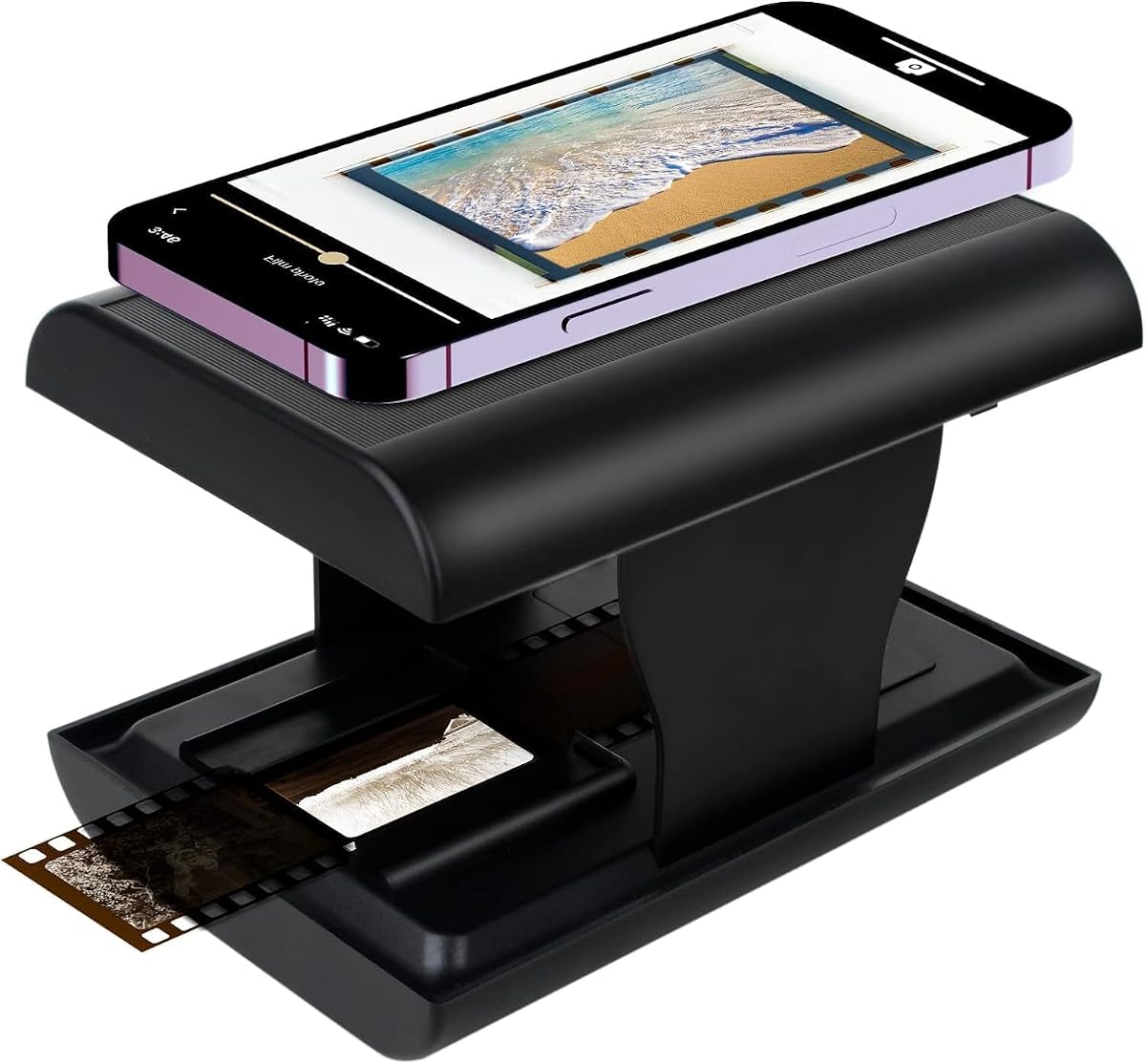
TCNEWCL 35mm Negative Slide Scanner
4.3Editor score
Foldable portable design
Uses smartphone camera lens
Free app for editing
Digitizing your film collection is essential for preserving memories before they fade. A good Black and White Negative Scanner converts old slides and negatives into high quality digital files easily without needing expensive lab services or complex computer setups for home users.
We compared ten leading models based on resolution speed ease of use and compatibility with various film formats. Each product was evaluated for its ability to handle black and white negatives specifically while offering convenient features like built-in screens or direct SD card saving for modern workflows.
Each pick shows key strengths and potential limitations to help you decide which scanner fits your needs. Prices and availability can change so please verify current details before purchasing. This guide focuses on factual specifications and user feedback to provide a clear overview.
4.3Editor score

4.2Editor score

4.3Editor score
As an Amazon Associate we earn from qualifying purchases.
The following table provides a side by side overview of all ten products included in this guide. It highlights key specifications and capabilities to help you quickly compare features like resolution film support and connectivity options across different price points.


The BEONEGLOBAL ClearScan MINI stands out as a top choice for those seeking a balance between quality and usability. With a 4.2 rating from users, it offers a reliable way to digitize your film collection without the hassle of computer dependency. Its standout quality lies in the premium CMOS sensor that ensures detailed captures.
We may earn a commission when you buy through this link, at no additional cost to you.
The scanner features an ergonomic design with front-facing buttons that make operation intuitive. You can adjust brightness, color, and orientation directly on the device before saving to an SD card. This level of control is rare at this price point and enhances the workflow for preserving memories effectively.
One trade-off is that the SD card is not included, which might require an additional purchase. Additionally, it primarily supports 35mm, 135, and 126 formats, so other film types may need adapters. However, for standard negatives, the clarity and speed make these minor issues acceptable.
This device is ideal for hobbyists and families looking to preserve old photos quickly. If you value ease of use and image fidelity, the ClearScan MINI is a strong recommendation. It simplifies the process of converting physical film into shareable digital files for modern storage.
The button layout allows natural hand positioning reducing strain during long scanning sessions.
The 16MP CMOS sensor captures fine details ensuring your negatives look true to life digitally.
We may earn a commission when you buy through this link, at no additional cost to you.
The KODAK Slide N Scan Max is designed for versatility, accommodating a wide range of film types including 135, 110, and 126. With a 4.2 rating, it appeals to users who have mixed film collections and want a single device for all needs. The smooth tray system feeds film efficiently.
We may earn a commission when you buy through this link, at no additional cost to you.
Its ability to save directly to SD cards eliminates the need for a computer, making it perfect for on the go digitization. The one-touch editing software simplifies adjustments, ensuring you get usable files quickly. This convenience is a major draw for those who prefer standalone devices.
While the price is higher than some options, the universal support justifies the investment for many collectors. The 22MP interpolation provides large files, though native resolution is lower. For most home users, this difference is negligible compared to the benefit of supporting diverse film formats.
This scanner is recommended for families with varied film archives needing a comprehensive solution. Its ease of use and broad compatibility make it a solid choice for preserving history. The straightforward workflow ensures you can focus on memories rather than technical setup.
Supports 135 110 and 126 formats allowing one device to handle diverse film collections efficiently.
Direct SD saving removes computer dependency streamlining the process for quick and easy digitization sessions.
We may earn a commission when you buy through this link, at no additional cost to you.
The TCNEWCL 35mm Negative Slide Scanner offers an incredibly affordable entry point for digitizing film. With a 4.3 rating, users appreciate its simplicity and portability. It relies on your smartphone camera to capture images, making it a cost-effective solution for those who do not want dedicated hardware.
We may earn a commission when you buy through this link, at no additional cost to you.
Its foldable design allows it to fit into small spaces, perfect for travel or limited desk space. The built-in LED provides necessary lighting, and the free app handles editing tasks like cropping and filtering. This approach leverages technology most people already own to reduce costs significantly.
The main limitation is that image quality depends on your phone camera camera capabilities. Manual alignment might take practice, but it becomes easier with use. For casual users or those on a tight budget, these trade-offs are acceptable for the convenience and low cost offered.
This device is best for travelers or those testing the waters of film digitization. It removes financial barriers while still providing a functional way to scan negatives. If you already have a good smartphone, this can be a surprisingly effective tool for preserving memories.
Using your existing phone camera keeps costs low while delivering decent results for standard 35mm film scans.
The foldable form factor makes it easy to carry anywhere allowing you to scan on the go easily.
We may earn a commission when you buy through this link, at no additional cost to you.
The Magnasonic All-in-One 24MP is designed for users who want a large preview screen and TV connectivity. With a 4.3 rating, it stands out for its 5 inch display which allows easy viewing of scanned images. The HDMI output lets you project memories on a big screen instantly.
We may earn a commission when you buy through this link, at no additional cost to you.
It supports a wide range of formats including Super 8 film, making it versatile for home movie archives. The SD card slot allows storing up to 128GB without a computer. This feature set provides a complete ecosystem for viewing and sharing digital memories within the home environment.
The only notable trade-offs are the missing HDMI cable and its larger footprint compared to compact models. However, for those with a dedicated workspace or living room setup, these are minor inconveniences. The image quality and viewing options make it a strong choice for media enthusiasts.
This scanner is ideal for families wanting to view scans on a TV without a computer. Its ability to handle film types like Super 8 adds significant value. If you prioritize viewing experience and file storage flexibility, this model offers a robust solution.
The 5 inch display makes reviewing scanned images easy without needing an external monitor or computer.
Supports Super 8 alongside standard negatives expanding the range of media you can digitize with one device.
We may earn a commission when you buy through this link, at no additional cost to you.
The Memory Vault Box Negative Scanner is focused on simplicity and preserving family history. With a 3.4 rating, it aims to make digitization accessible for grandparents and beginners. The kit includes holders and cables, allowing you to start scanning immediately without hunting for accessories.
We may earn a commission when you buy through this link, at no additional cost to you.
Its automatic enhancement technology improves brightness and color of faded images, which is crucial for old negatives. The simple button controls and LCD preview screen ensure you do not need technical skills to use it. This focus on user-friendliness makes it a strong option for non-tech-savvy users.
The lower rating may reflect basic features compared to higher-end models. Additionally, it is limited to 135 film which restricts versatility. However, for those with a collection of 35mm slides and negatives, the ease of use and complete kit provide significant value for preserving memories.
This device is best for households with older members who need an easy way to digitize photos. If your goal is straightforward conversion without complex editing, it delivers well. The included accessories and simple interface reduce the barrier to entry for archiving memories.
Built-in technology automatically improves brightness and color to restore faded memories effectively.
Includes holders brushes and cables so you can start digitizing right away without extra purchases.
We may earn a commission when you buy through this link, at no additional cost to you.
The HP Film & Slide Scanner HPFS500 brings a premium feel with its 5-inch touchscreen display. With a 4.3 rating, it offers a modern interface that makes navigation intuitive. The ability to use gallery mode as a picture frame adds a decorative touch to your workspace.
We may earn a commission when you buy through this link, at no additional cost to you.
USB-C power ensures compatibility with modern adapters and computers, offering versatile operation. The 13MP sensor delivers sharp images suitable for high-quality digital archives. This device caters to users who want a sleek design and advanced features without sacrificing performance.
The higher price reflects the premium build and features like the touchscreen and USB-C. Some users might need to buy specific SD cards for optimal performance. However, for those investing in a long-term solution for home preservation, the quality and usability justify the investment well.
This scanner is recommended for tech-savvy users who appreciate modern connectivity and design. Its ability to serve as a digital frame makes it multifunctional. If you want a high-quality scanner that also looks great on a desk, this is a top choice.
The 5 inch touch display simplifies navigation and editing making the scanning process more intuitive.
Gallery mode allows you to use the device as a digital picture frame for your favorite scans.
We may earn a commission when you buy through this link, at no additional cost to you.
The BEONEGLOBAL ClearScan Mini is excellent for those who need portability without sacrificing quality. With a 4.2 rating, it balances high-resolution output with a design that is easy to carry. It supports common film formats like 35mm and 126, covering most home users needs.
We may earn a commission when you buy through this link, at no additional cost to you.
Its lightweight build allows you to take it anywhere, ensuring you can scan memories while visiting family or traveling. The quick scanning process means you do not spend hours waiting for results. Built-in editing options add convenience, letting you tweak images immediately.
The main limitation is that it requires you to buy an SD card separately. Also, it is not designed for older film formats like Super 8. However, for standard negatives, the combination of speed and clarity makes it a practical choice for preserving family history on the go.
This device is ideal for travelers or those with limited storage space. If you value convenience and performance in a small package, it delivers well. The intuitive interface ensures that even casual users can digitize negatives without frustration.
Lightweight and compact so you can scan memories anywhere without needing a full workstation setup.
Fast processing times let you convert multiple negatives quickly saving time on your preservation project.
We may earn a commission when you buy through this link, at no additional cost to you.
The KODAK Slide N Scan Max excels in converting slides to digital efficiently. With a 4.2 rating, it provides a streamlined experience that avoids complex setups. The one-touch editing feature simplifies adjustments, making it easy to get shareable images quickly.
We may earn a commission when you buy through this link, at no additional cost to you.
Its ability to support multiple formats like 110 and 126 adds flexibility to your workflow. Direct SD saving means you can save files to a drive without a PC. This level of efficiency is ideal for users who want to focus on scanning rather than technical configuration.
While the price is higher than some basic models, the convenience and format support justify the cost. The software is straightforward, which might be a limitation for advanced editors. For general archiving, these factors are acceptable trade-offs for the time saved.
This scanner is recommended for those with mixed slide collections needing a reliable solution. Its straightforward operation makes it accessible for various skill levels. If you prioritize speed and ease of use, this model meets those requirements effectively.
One-touch editing simplifies adjustments allowing you to fix brightness and colors quickly after a scan.
Supports multiple film sizes including 110 and 126 allowing you to scan different collections with one device.
We may earn a commission when you buy through this link, at no additional cost to you.
The TCNEWCL 35mm Negative Slide Scanner provides a simple and affordable way to digitize slides. With a 4.3 rating, it is praised for its portability and ease of use. The foldable design ensures it fits easily in a bag, making it perfect for travel or small desks.
We may earn a commission when you buy through this link, at no additional cost to you.
It works by placing your smartphone over the scanner, using the phone lens to capture images. This method saves money on sensors while leveraging modern phone cameras. The free app allows you to edit and share images immediately without additional software costs.
The main trade-off is that image quality depends heavily on your smartphone capabilities. You must align the phone carefully to ensure consistent results. For users who understand this limitation, the cost savings and portability make it a compelling choice for casual scanning.
This device is best for budget-conscious travelers or those with limited space. It offers a functional way to convert memories without investing in expensive hardware. If you already have a good phone camera, this can be a surprisingly effective tool for archiving.
The foldable structure allows compact storage fitting easily into drawers or bags when not in use.
Free apps handle editing and sharing ensuring you do not need to buy additional software for processing.
We may earn a commission when you buy through this link, at no additional cost to you.
The Magnasonic All-in-One 24MP is ideal for integrating scanning into a home theater setup. With a 4.3 rating, it stands out for its ability to connect to TVs via HDMI. This allows you to view scanned photos on a big screen instantly after scanning them.
We may earn a commission when you buy through this link, at no additional cost to you.
It includes fast scanning speeds and a large preview display for convenient operation. The support for Super 8 film adds significant value for families with home movies. This comprehensive feature set makes it a one-stop solution for various media formats.
The HDMI cable is sold separately, which might be an oversight, and the device is larger than compact options. However, these are manageable issues for those wanting a full viewing experience. The ability to display images directly on a TV enhances the memory sharing process.
This scanner is recommended for those who want to view scans on a large display without a computer. Its versatility with Super 8 film sets it apart. If you prioritize viewing experience and format variety, this model offers excellent value for a home archive.
HDMI output allows you to view your scanned images on a large TV screen immediately for family sharing.
Handles Super 8 alongside standard slides ensuring you can digitize all types of home media easily.
We may earn a commission when you buy through this link, at no additional cost to you.
Choosing the right scanner involves considering resolution, format support, and workflow features. This guide outlines the key factors to ensure you select a device that meets your specific needs for preserving film.
Resolution determines how much detail is captured from your negatives. Higher resolutions like 16MP or 22MP provide better clarity for printing or digital archives. Ensure the sensor quality supports the file sizes you need for future use.
Look for high-resolution sensors that offer clear and detailed output.
Not all scanners handle every film type. Common formats include 35mm, 110, 126, and sometimes Super 8. Check that the scanner supports the specific negatives you plan to digitize to avoid limitations later.
Verify the device supports all your film types like 35mm or Super 8.
A good scanner should be intuitive for all ages. Features like built-in LCD screens and simple buttons reduce the need for computer software. This makes the process accessible even for those with limited technical skills.
Prioritize models with built-in screens and simple button controls.
If you plan to scan in different locations, choose a portable model. Foldable or compact designs save space and allow you to work anywhere. This is useful for family gatherings or limited desk areas at home.
Select lightweight or foldable designs for easy transport and storage.
Consider how files are saved. Some scanners save directly to SD cards without a computer, which simplifies workflow. Others require USB connection to a PC for file transfer. Choose based on your preferred workflow and storage needs.
Ensure the device supports direct SD saving if you want computer-free workflows.
Built-in editing tools like brightness adjustment or cropping can save time. These features allow you to improve images before saving without extra software. Check if the scanner offers these adjustments directly on the device.
Look for on-device editing options to streamline your workflow.
Some scanners rely on USB power from a computer, while others use adapters or batteries. USB-C is becoming common for modern compatibility. Check what power source is required to ensure it fits your setup.
Confirm the power connection type like USB-C suits your environment.
Established brands often provide better support and reliability. Check reviews for durability and customer service experiences. A warranty can protect your investment if issues arise with the hardware.
Choose reputable brands with good customer reviews and warranty support.
Before scanning, ensure your negatives are clean and free of dust. Use the provided brush or a microfiber cloth to gently wipe the film. This prevents particles from appearing in your digital scans and improves image clarity.
Insert the film into the correct holder as per the manufacturer's instructions. Make sure the orientation matches the scanner's requirement so images are not inverted. Once loaded, press the start button and wait for the scan to complete.
After saving your images, store the device in a cool dry place. Avoid exposing it to direct sunlight or moisture which can damage the lens and electronics. Regularly update any app or software if required to maintain performance.
Yes, most Black and White Negative Scanners can handle color and black and white film. However, dedicated scanners often include software to optimize contrast and tones for monochrome images better than standard tools.
Many models support standalone operation with SD card saving, so a computer is not strictly necessary. This design allows for quick scanning directly at home without needing to install drivers or run software.
A resolution of at least 16MP is recommended for high-quality archival purposes. This ensures you capture enough detail for large prints or future restoration projects without losing information from the original film.
Only specific models like the Magnasonic All-in-One support Super 8 film. Most standard scanners are designed for 35mm, 110, and 126 formats, so check specifications carefully before purchasing for movie reels.
You can remove the SD card from the scanner and insert it into your phone using an adapter. Alternatively, some devices connect via USB or Wi-Fi for direct transfer depending on the model's connectivity options.
Yes, many devices include built-in editing features like brightness adjustment, rotation, and color correction. This allows you to refine your images before saving them to the SD card without needing external software.
The BEONEGLOBAL ClearScan MINI offers a balanced mix of quality and usability for most users. For budget-conscious buyers, the TCNEWCL 35mm provides an affordable portable alternative. Premium users may prefer the HP Film & Slide Scanner HPFS500 for its modern interface and connectivity.
When selecting a scanner, prioritize resolution and format support to match your film collection. Ease of use and standalone features can significantly simplify your workflow. These factors ensure you preserve memories effectively without technical frustration.
Always check current prices and availability before purchasing to get the best deal. Models and features may change over time so verifying the latest specifications is wise. Investing in a reliable scanner today ensures your family history is preserved for generations.