
Crucial P310 1TB SSD
4.7Editor score
PCIe Gen4 speeds
1TB storage capacity
Broad device compatibility
This guide compares the top ten Crucial Internal NVME SSD options for 2026, evaluating performance, capacity, and compatibility to help you choose the right
Choosing the right storage drive can significantly impact your system speed and overall productivity. A high-quality Internal NVME SSD offers fast data access and reliable performance for everyday tasks and demanding workloads alike.
We have evaluated ten distinct models from Crucial to provide a comprehensive overview of their capabilities. Our analysis focuses on speed ratings, interface standards, and real-world usability across various computing environments.
Each selection highlights unique strengths tailored to different user needs and system configurations. Please note that availability and pricing may fluctuate based on market conditions and retailer promotions at the time of purchase.
4.7Editor score
4.8Editor score

4.6Editor score
The following comparison table presents key specifications for all ten selected models to help you quickly identify the most suitable option for your specific hardware requirements and performance goals.


This drive represents an affordable entry point into Gen4 NVMe storage with impressive read speeds. It scores high among users seeking reliable performance without breaking the bank for everyday computing tasks.
We may earn a commission when you buy through this link, at no additional cost to you.
Its PCIe 4.0 interface delivers read speeds up to 7100MB/s which significantly reduces boot times and application launches. The 1TB capacity provides ample space for modern operating systems and large media libraries.
While QLC NAND may impact sustained write speeds compared to TLC variants, daily usage remains smooth. The lack of a heatsink is acceptable in well-ventilated desktop cases but requires monitoring in compact laptops.
Budget-conscious users upgrading from SATA HDDs or older Gen3 SSDs will find this model ideal. It offers a balanced mix of speed and capacity suitable for casual gamers and general productivity workloads.
The drive leverages advanced G8 NAND technology to deliver consistent high speeds at a competitive price point for modern systems.
It works seamlessly with laptops, desktops, and handheld gaming consoles making it a flexible upgrade option for various devices.
We may earn a commission when you buy through this link, at no additional cost to you.
This variant is specifically tailored for gamers looking to expand storage on their PlayStation 5 console. It maintains the high speed standards of the P310 series while ensuring thermal stability during extended sessions.
We may earn a commission when you buy through this link, at no additional cost to you.
The integrated heatsink eliminates the need for additional accessories ensuring the drive stays cool even under heavy load. Read speeds of 7100MB/s provide quick asset streaming and rapid game load times.
Although it is more expensive than the standard version the heatsink adds value by reducing thermal throttling risks. For desktop users it might be unnecessary but it offers peace of mind for portable gaming devices.
PS5 owners will appreciate the plug-and-play compatibility and the assurance of meeting Sony's performance requirements. It stands out as a reliable choice for next-generation console gaming storage upgrades.
The drive meets PlayStation 5 specifications ensuring smooth integration and reliable performance during demanding gameplay scenarios.
Built-in cooling helps maintain peak performance during long gaming sessions without risking overheating issues.
We may earn a commission when you buy through this link, at no additional cost to you.
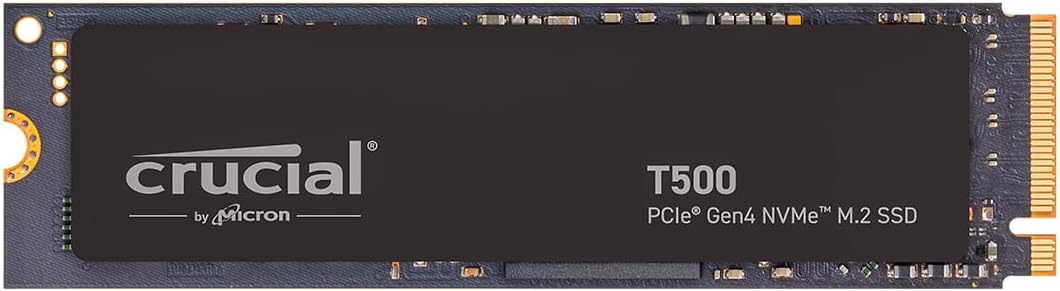
The T500 stands out with its TLC NAND architecture providing more consistent performance than QLC alternatives. It is engineered for professionals and gamers who need top-tier speeds for heavy workloads.
We may earn a commission when you buy through this link, at no additional cost to you.
Read and write speeds reach up to 7300MB/s and 6800MB/s respectively which accelerates file transfers and rendering tasks. The inclusion of Adobe Creative Cloud adds significant value for creative users needing immediate access to tools.
While the price point is higher the benefits of faster sustained writes and better endurance justify the investment. It effectively bridges the gap between consumer storage and workstation-grade performance in a compact size.
Content creators and power users seeking a balance of speed and software value should strongly consider this model. It delivers exceptional results for video editing and complex application performance without compromising system stability.
TLC NAND ensures faster sustained writes and better longevity making it superior for heavy professional workloads.
One month of Adobe Creative Cloud access provides immediate utility for designers and video editors upgrading their workflow.
We may earn a commission when you buy through this link, at no additional cost to you.
This 2TB variant offers substantial storage for users requiring extensive space for large game libraries or media archives. It maintains the core performance benefits of the P310 series in a higher capacity format.
We may earn a commission when you buy through this link, at no additional cost to you.
With PCIe 4.0 x4 bandwidth it ensures rapid data throughput suitable for modern operating systems and demanding applications. The 3D NAND technology supports reliable operation even as the drive fills up over time.
While detailed benchmark data is less explicit than smaller models the architecture guarantees robust performance. It is an excellent choice for users needing more room without sacrificing the speed advantages of NVMe interfaces.
Professionals managing large datasets or gamers with extensive libraries will find this capacity highly practical. It serves as a versatile solution for expanding system storage while keeping access times minimal.
The 2TB capacity accommodates massive file collections allowing users to store more without frequent external backup needs.
Built with reliable 3D NAND ensuring consistent performance levels even during intensive data write operations.
We may earn a commission when you buy through this link, at no additional cost to you.
The P510 brings PCIe 5.0 performance to the market at a highly competitive price point. It targets users with next-generation hardware who want to exploit the highest possible data transfer rates available today.
We may earn a commission when you buy through this link, at no additional cost to you.
Read speeds hitting 11000MB/s offer a massive leap over previous generations which is vital for rapid file access and streaming. The TLC NAND ensures durability and consistent write speeds even during long transfers.
While current compatibility is limited to specific newer motherboards the drive supports backward compatibility with Gen4 systems. This ensures a smooth transition path for users planning future hardware upgrades without immediate obsolescence.
Early adopters and tech enthusiasts seeking the fastest storage technology at a reasonable cost will appreciate this model. It represents a strong step forward for high-speed internal storage in professional and gaming environments.
This drive doubles the theoretical bandwidth of Gen4 allowing for extremely fast data movement and system responsiveness.
It offers next-gen performance at a price that makes early adoption feasible for a wide range of users.
We may earn a commission when you buy through this link, at no additional cost to you.
This model pushes the boundaries of storage technology with read speeds reaching 14900MB/s. It is designed for users who demand absolute maximum performance for complex creative workflows and intensive gaming sessions.
We may earn a commission when you buy through this link, at no additional cost to you.
The inclusion of AES-256-bit hardware encryption protects sensitive data effectively without impacting system speed. Optimized for latest Intel and AMD platforms it ensures stable operation during sustained high-load workloads.
Thermal management is critical at these speeds and users should utilize compatible heatsinks to prevent throttling. The premium price reflects the cutting-edge technology and robust features tailored for enthusiast and professional use cases.
Hardcore gamers and media professionals who need uncompromising speed and security will find this drive exceptional. It sets a new standard for high-performance internal storage in demanding computing environments.
The T710 delivers the highest read speeds in the lineup enabling near-instantaneous access to large datasets.
Integrated hardware encryption ensures sensitive files remain protected against unauthorized access efficiently.
We may earn a commission when you buy through this link, at no additional cost to you.
The E100 offers an economical entry point into NVMe storage for users needing basic speed improvements. It delivers Gen4 performance in a smaller capacity package ideal for systems where space is limited.
We may earn a commission when you buy through this link, at no additional cost to you.
Read speeds up to 4700MB/s provide a significant upgrade over traditional hard drives improving boot times and application responsiveness. Its compact M.2 design ensures it fits into most modern laptops and small form factor desktops.
While capacity is limited to 480GB it is sufficient for operating systems and essential applications. This drive is a practical solution for users prioritizing budget and speed over massive storage volume.
Users needing a simple upgrade to breathe new life into an older laptop or entry-level desktop will appreciate this model. It balances cost and performance effectively for general daily computing requirements.
Provides a noticeable performance boost over SATA or mechanical drives at a very accessible price point.
The small M.2 size allows installation in devices where space for larger storage is restricted.
We may earn a commission when you buy through this link, at no additional cost to you.
This version leverages Micron QLC NAND technology to provide high density storage in a standard form factor. It is engineered to handle typical daily computing tasks with consistent and dependable performance.
We may earn a commission when you buy through this link, at no additional cost to you.
The 232L Micron QLC NAND ensures efficient storage usage while maintaining respectable Gen4 speeds for boot and launch times. It balances capacity and speed well for users who do not require enterprise-level write endurance.
While it may not match TLC drives in heavy sustained write scenarios it handles everyday loads without issue. The drive serves as a reliable upgrade for home users seeking better speed than traditional mechanical drives.
Users looking for a straightforward 1TB upgrade without extra frills will find this model appropriate. It offers a solid balance of performance and capacity for general office and home entertainment needs.
Utilizes QLC NAND to deliver high capacity in a compact space suitable for extensive personal media.
Optimized for typical desktop and laptop workloads ensuring smooth operation during standard daily routines.
We may earn a commission when you buy through this link, at no additional cost to you.
Combining the speed of the T500 with PS5 optimized features this drive ensures top-tier gaming performance. It brings TLC NAND benefits to console storage with a heatsink to manage heat effectively during play.
We may earn a commission when you buy through this link, at no additional cost to you.
Read speeds of 7300MB/s are fully compatible with PlayStation 5 requirements delivering seamless asset loading. The integrated heatsink ensures stability preventing thermal throttling during intense gaming sessions without needing extra parts.
While more expensive than basic options the build quality and software value justify the cost. Creative users on desktops also benefit from the high IOPS and included Adobe subscription adding versatility beyond gaming.
PlayStation 5 owners looking for the most reliable high-speed expansion should choose this model. It offers a premium experience with guaranteed performance and thermal protection for next-gen gaming needs.
Designed specifically to meet the rigorous demands of next-gen console storage expansion requirements.
The built-in heatsink maintains optimal operating temperatures ensuring consistent speeds during extended use.
We may earn a commission when you buy through this link, at no additional cost to you.
This model delivers exceptional read speeds of 11700MB/s making it ideal for hardcore gamers and professionals. It leverages the full power of PCIe 5.0 to ensure minimal latency and rapid file access.
We may earn a commission when you buy through this link, at no additional cost to you.
Designed for Intel and AMD Ryzen platforms it offers broad compatibility with modern high-end systems. The TLC NAND ensures stable performance even under heavy loads providing a reliable foundation for demanding tasks.
Installation requires a Gen5 slot and potentially a good cooling setup to maintain peak speeds consistently. Users upgrading to the latest hardware will appreciate the raw performance gains over previous generation drives.
Gamers and content creators who need maximum throughput for large assets will find this drive outstanding. It represents a significant leap forward in internal storage performance for cutting-edge computing setups.
Delivers extreme read speeds that drastically reduce load times and improve overall system responsiveness.
Built to leverage new platform capabilities ensuring long-term relevance for high-performance users.
We may earn a commission when you buy through this link, at no additional cost to you.
Selecting the right storage upgrade involves considering several critical factors to ensure compatibility and optimal performance for your specific hardware and software needs.
PCIe Gen4 and Gen5 drives offer faster data transfer rates compared to older standards. Ensure your motherboard supports the specific generation you plan to buy to avoid speed bottlenecks.
Matching the drive interface with your system capability is essential for unlocking full performance potential.
Choose a capacity that fits your storage requirements ranging from 480GB to 2TB. Larger capacities are better for gamers storing many large titles or professionals handling big video files.
Aim for at least 1TB if you want enough space for a modern operating system and a decent library of apps.
TLC NAND offers better endurance and sustained performance compared to QLC NAND. While QLC is more cost-effective TLC is superior for workloads with heavy write operations.
Evaluate your usage patterns to decide if the added reliability of TLC is worth the extra cost.
NVMe drives generate heat during operation which can cause throttling if not managed properly. Some models come with integrated heatsinks which is helpful for consoles or compact desktop cases.
Ensure your system has adequate airflow or use a heatsinked drive to maintain consistent performance.
Many drives include useful software such as cloning tools or creative cloud subscriptions. These extras can save money and simplify migration to a new drive.
Check what software is included to see if it adds value to your specific workflow or needs.
Most internal NVMe SSDs use the M.2 2280 form factor which fits standard slots. Verify that your device has the correct physical space and mounting points for the drive.
Confirm physical dimensions and mounting requirements before purchase to ensure a smooth installation.
Reputable brands offer warranties that protect against early failures. A longer warranty period indicates confidence in product reliability.
Review warranty terms and support options to ensure you have coverage should issues arise later.
Compare the cost per gigabyte alongside speed ratings to find the best value. Sometimes a slightly slower drive offers better value for everyday use.
Balance your budget with performance needs to choose a drive that offers the best return on investment.
Install the drive into a free M.2 slot on your motherboard and secure it with the appropriate screw. Ensure the slot matches the NVMe standard supported by your system for correct connectivity.
Use provided cloning software or migration tools to transfer your data and operating system to the new drive. This helps maintain your setup without needing to reinstall applications manually from scratch.
Keep the system firmware updated to ensure stability and peak performance. Avoid filling the drive completely to maintain optimal write speeds and prolong the lifespan of the device.
Yes specific models like the P310 and T500 with heatsinks are designed to meet PlayStation 5 specifications. They install directly into the console expansion slot for seamless storage expansion and improved loading times.
Gen5 drives offer significantly higher data transfer speeds compared to Gen4 models. However they require a motherboard with Gen5 slots and may need better cooling to maintain performance without throttling.
Cloning is an option to keep your existing setup intact but fresh installs can also be beneficial. Cloning software included with some drives simplifies the process of moving your OS and files to the new SSD.
Most of these drives use the standard M.2 form factor suitable for modern laptops with available slots. Check your laptop specifications to ensure it supports NVMe drives and has the necessary physical space.
NVMe SSDs are much faster and more durable than traditional mechanical hard drives. They offer faster boot times and application launches while being less susceptible to physical damage from movement.
The included software often contains cloning tools and creative subscriptions which save money on separate purchases. This value adds practical utility for users migrating data or needing access to professional tools immediately.
Overheating can lead to reduced performance as the drive throttles to protect itself. Using models with heatsinks or ensuring good case airflow helps prevent thermal issues during heavy usage.
Yes high-end models like the T500 and T700 are optimized for content creators. They provide the speed and stability required for video editing and rendering large assets efficiently.
The Crucial P310, T500, and T710 stand out as top contenders offering a range of speeds and capacities for various needs. Whether you need budget-friendly storage or top-tier Gen5 performance there is a suitable option.
Prioritize interface compatibility and thermal management to ensure your upgrade delivers the expected speed boost. Selecting a drive that matches your system and workflow will maximize productivity and enjoyment.
Always check current availability and pricing as these figures change frequently based on market conditions. We hope this guide helps you find the perfect storage solution for your computer needs.