
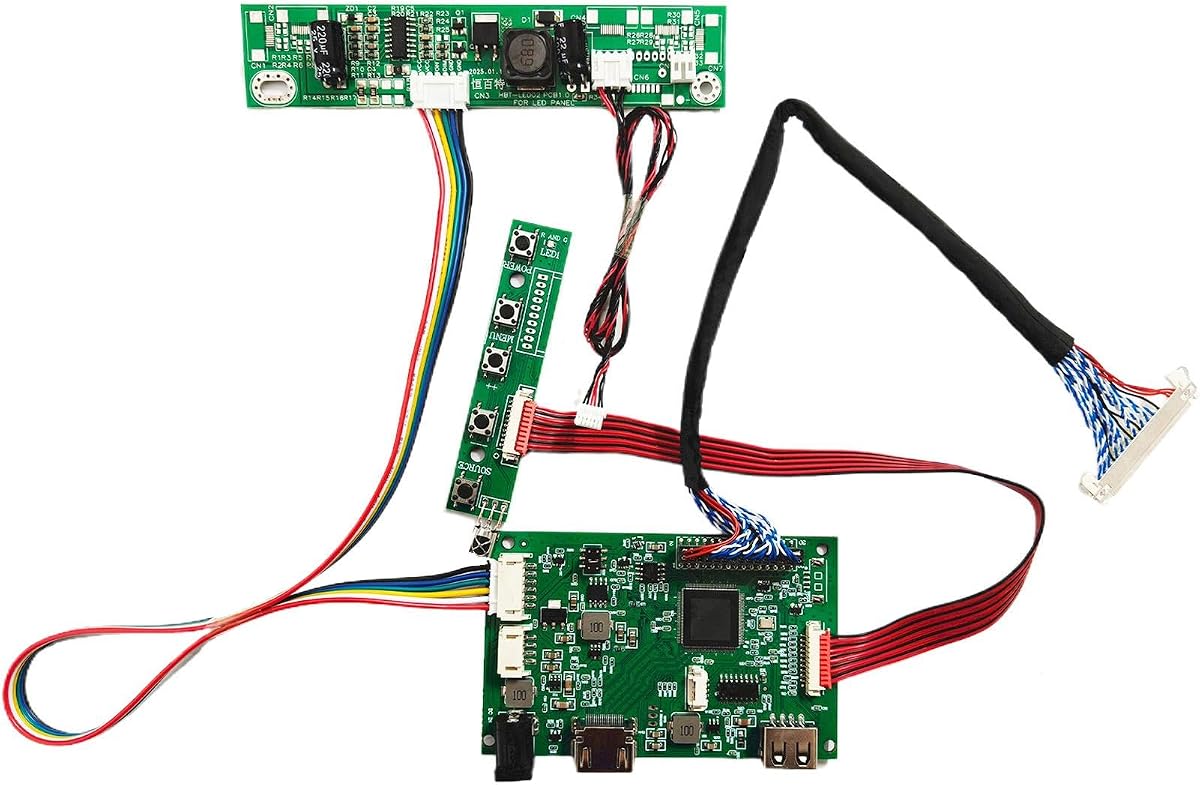
VSDISPLAY H/D VGA DVI LVDs Controller Board 40Pin
4.4Editor score
Compatible with 15.6 inch screens
Accepts VGA and DVI inputs
Includes speaker connector for audio
Finding the right LCD controller board for your laptop screen can transform a broken display into a functional monitor. These boards convert video signals from your computer into a format the panel understands. Choosing the correct model depends on matching resolution and interface types like eDP or LVDS precisely.
We compared ten highly rated controller boards based on compatibility, input options, and user feedback. Each product supports different screen sizes and resolutions ranging from eleven inches to seventeen inches. Our analysis focuses on reliability, ease of installation, and signal stability for DIY projects.
Each pick in this list highlights specific use cases such as budget repairs or high-resolution needs. You will find detailed breakdowns of supported models and connection types to guide your decision. Please note that product availability and costs may change over time on retailer sites.
4.4Editor score

4.4Editor score

5.0Editor score
As an Amazon Associate we earn from qualifying purchases.
This table provides a side-by-side comparison of all ten controller boards reviewed in this guide. Each entry lists key specifications and supported screen models to help you quickly identify the right match for your laptop panel.



This board is designed for users needing to revive laptops with 1366×768 panels. It uses the 30 pin eDP interface which is common in modern mid-range laptops. The rating of 4.4 indicates strong user satisfaction with its stability and video output quality.
We may earn a commission when you buy through this link, at no additional cost to you.
The standout feature is its precision targeting for specific HD resolutions. This ensures that the image fits the panel perfectly without scaling artifacts. The pre connected signal cable simplifies installation significantly for beginners who might struggle with loose wires.
One trade-off is the strict resolution limit which means it cannot support FHD screens. This is acceptable given the lower cost and specific use case it serves. Users must verify their panel model carefully before purchase to avoid incompatibility.
This is an excellent choice for DIY repairs on older laptops or budget monitors. It delivers reliable performance when matched correctly with the right screen model. We recommend it for anyone prioritizing ease of use and stable video output.
The board delivers a stable HD signal that prevents flickering during use.
Pre connected cables and clear pin markings reduce setup time significantly.
We may earn a commission when you buy through this link, at no additional cost to you.
This controller board offers a very affordable way to connect older laptop screens to PCs. It supports VGA and DVI inputs which are standard on many desktop graphics cards. Users appreciate the low cost and reliable performance for basic display needs.
We may earn a commission when you buy through this link, at no additional cost to you.
The 40 pin LVDS interface matches many classic 15.6 inch panels like the LP156WH2 series. It includes a speaker connector so audio can be routed directly to external speakers. This adds versatility to the build without needing extra sound cards.
The lack of HDMI or USB inputs limits its use with modern devices without adapters. This is a minor drawback considering the price point and target market. Users should have a VGA or DVI source available for this board to function.
It is ideal for budget conscious builders who need a simple display driver. The board handles standard resolutions well and is easy to install with included guides. We recommend it for anyone looking for a cost effective repair solution.
Supports VGA and DVI inputs which remain useful for older PCs.
Built in speaker connector allows direct audio output to devices.
We may earn a commission when you buy through this link, at no additional cost to you.
This board is perfect for upgrading a laptop screen to full HD resolution easily. It uses the 30 pin eDP interface which is standard for most 1080p panels. Users can expect crisp text and clear images when connected to a VGA source.
We may earn a commission when you buy through this link, at no additional cost to you.
The compatibility list includes popular models like the B156HAN01.1 and LP156WF4 series. This flexibility makes it a strong choice for generic repair kits where exact models may vary. The LED indicator helps verify power and signal status quickly.
Using VGA input means you might need converters for HDMI sources which adds a step. Proper resolution settings are critical to avoid white or black screens during setup. Careful attention to pin alignment prevents connection errors.
We suggest this for those needing 1080p support without high end HDMI features. It performs well for office or media use when paired with the right cables. It is a solid mid-range option for DIY screen projects.
Delivers sharp 1920×1080 images for better visual clarity.
Works immediately without installing software on your computer.
We may earn a commission when you buy through this link, at no additional cost to you.
This board targets larger screens typically found in professional or legacy displays. It supports 1280×1024 resolution which is common for 17 to 19 inch panels. The high rating suggests users find it very reliable for daily monitor tasks.
We may earn a commission when you buy through this link, at no additional cost to you.
Inputs include both VGA and DVI allowing flexibility with older graphics systems. The speaker connector provides simple audio output without external devices. It is designed to handle higher power needs for larger panels effectively.
The limitation to 1280×1024 resolution means it is not suitable for high resolution work. However for text or basic gaming this resolution is often sufficient. Users should check their screen model number before ordering to ensure fit.
Ideal for restoring older desktop monitors or specialized industrial displays. The self check feature helps diagnose issues quickly during setup. We recommend it for users needing large screen support on a budget.
Tuned for 17 to 19 inch panels to prevent flickering.
Works with both VGA and DVI signals for broader compatibility.
We may earn a commission when you buy through this link, at no additional cost to you.
This controller is built to drive larger 21.5 to 23.8 inch displays efficiently. It handles full HD resolution with ease which makes it great for media viewing. Users note the inclusion of a USB cable which can be useful for touch screens.
We may earn a commission when you buy through this link, at no additional cost to you.
It uses the 30 pin LVDS interface which fits many large format laptop panels. The compatibility list includes specific models to reduce guesswork for buyers. A dedicated inverter board helps manage power for the backlight system.
The absence of HDMI means you will need an adapter if you want modern connectivity. This is a reasonable trade off for the price and performance offered. Ensure you have a strong 12V power supply to avoid restart issues.
We recommend this for anyone repurposing a large laptop screen into a desktop monitor. It delivers sharp images and reliable performance for home office setups. It is a solid choice for standard 1080p display needs.
Provides crisp 1080p visuals on screens up to 23.8 inches.
Includes USB cable to support touch functionality on compatible panels.
We may earn a commission when you buy through this link, at no additional cost to you.
This board offers high definition support for laptops with 30 pin eDP ports. It is optimized for 1080p panels which are popular in newer budget laptops. Users appreciate the clear instructions and included signal cables for setup.
We may earn a commission when you buy through this link, at no additional cost to you.
It covers a wide range of sizes from 11.6 inches to 17.3 inches. This versatility makes it useful for various repair scenarios. The power requirement is standard ensuring it fits most power adapters found at home.
The trade off is the exclusion of 1366×768 panels which use similar connectors. This is acceptable as it focuses on higher resolution clarity. Users should double check their model number before installation to ensure accuracy.
We recommend this for those seeking a reliable upgrade for laptop screens. It handles video signals well and provides stable operation. It is a great pick for converting laptop screens to external monitors.
Designed specifically for sharp 1920×1080 display output.
Supports screens from small 11.6 inch to large 17.3 inch.
We may earn a commission when you buy through this link, at no additional cost to you.
This board stands out because it includes HDMI input which is rare in this category. It supports a massive range of screen sizes from 10 inches to 65 inches. Users value the multi language support for international builds or diverse teams.
We may earn a commission when you buy through this link, at no additional cost to you.
The chipset is well known in the industry for handling various panel types. It allows for custom projects where exact model compatibility might not be documented. The controls are simple with basic power and volume buttons for easy access.
Because it is universal you may need to configure settings manually for best results. This requires a bit more patience but pays off in flexibility. Ensure your LVDS interface matches the board before purchase.
We suggest this for creative projects involving large screens or custom enclosures. It offers great value for the included HDMI port and versatility. It is perfect for makers who need a flexible driver solution.
Offers HDMI input for modern devices without adapters.
Menu supports multiple languages for international users.
We may earn a commission when you buy through this link, at no additional cost to you.
This board brings unique value by supporting USB video playback directly. Users can play videos from a flash drive without needing a computer. The perfect rating reflects strong satisfaction with its performance and features.
We may earn a commission when you buy through this link, at no additional cost to you.
It supports 1080p resolution on standard 21.5 to 23.8 inch screens. The image rotation feature is useful for portrait mode displays which adds utility. It also includes audio support for a complete multimedia experience.
The USB feature is convenient but limited to video and text files. It cannot run complex software but serves well for digital signage. Users should ensure their USB files are in compatible formats.
We recommend this for digital signage or media playback stations. It combines HDMI with USB for versatile content sources. It is an excellent pick for those needing standalone display features.
Plays videos and images directly from USB drives.
Supports 180 degree rotation for flexible mounting.
We may earn a commission when you buy through this link, at no additional cost to you.
This board focuses on 15.6 inch panels with standard 1366×768 resolution. It offers both HDMI and VGA inputs making it flexible for modern and older PCs. The description highlights optimized image quality for vivid colors and details.
We may earn a commission when you buy through this link, at no additional cost to you.
It includes rapid response controls which reduce input lag during operations. This is useful for interactive displays or basic gaming setups. The board also monitors current and voltage to protect the hardware from overload.
The lack of extensive model compatibility lists requires careful checking by users. This is a common trade off for boards that focus on general optimization rather than specific lists. Ensure your panel matches the 40 pin interface.
We recommend this for users needing HDMI on a 15.6 inch screen. It offers a balanced mix of features for a standard laptop panel. It is a good option for general purpose monitor conversions.
Supports HDMI and VGA for versatile device connections.
Monitors power to prevent hardware overload and extend lifespan.
We may earn a commission when you buy through this link, at no additional cost to you.
This kit is designed specifically for 17.3 inch laptop panels with full HD resolution. It offers a complete matrix solution including power management for low power operation. Users appreciate the high quality design and precise interface matching.
We may earn a commission when you buy through this link, at no additional cost to you.
It supports HDMI and VGA inputs ensuring compatibility with modern and legacy sources. The small size and high integration make it suitable for tight builds. It is rated 5.0 which indicates excellent user satisfaction with performance.
The focus on a single model means less flexibility than universal boards. This is acceptable for those repairing specific high end 17.3 inch displays. It ensures perfect fit and signal integrity without trial and error.
We suggest this for premium repairs where stability and fit are critical. It is worth the investment for larger screens requiring dedicated support. It is the best choice for high resolution 17.3 inch panel projects.
Tailored specifically for 17.3 inch laptop screens.
Supports low power mode to extend battery or adapter life.
We may earn a commission when you buy through this link, at no additional cost to you.
Selecting the right controller board requires careful attention to your panel's specifications and your desired input sources.
The controller must match your screen's resolution exactly to display images correctly. For example using a 1366×768 board on a 1080p panel will result in display errors. Always check the model number on the back of your panel before buying.
Always verify that the board supports your panel's specific resolution.
The interface type connects the board to the panel and is critical for compatibility. Common types include 30 pin eDP and 40 pin LVDS. A mismatch here will prevent the screen from working regardless of other settings.
Check the connector count and pin layout on your panel to match the board.
Consider what devices you want to connect to your new monitor. VGA and DVI are common on older PCs while HDMI is standard on modern devices. Some boards only support one type so ensure it fits your setup needs.
Choose a board with inputs compatible with your graphics source.
Most boards need a 12V DC adapter but amperage may vary from 2A to 3A. Insufficient power can cause flickering or restarting issues. Check the board's manual for exact power specs before selecting an adapter.
Ensure your power adapter meets the board's voltage and current needs.
Boards are often optimized for specific size ranges like 11.6 inch to 15.6 inch. Using one outside this range may result in poor image scaling or brightness issues. Confirm the supported sizes in the product description.
Select a board that covers your panel's physical size.
Some controllers include speaker connectors for direct audio output. This is useful for multimedia monitors without extra speakers. Others may not support audio so you will need a separate solution for sound.
Check if audio output is included based on your needs.
Look for boards with pre connected cables and clear pin markers. This reduces the chance of connection errors during setup. Models with plug and play features save time and frustration for beginners.
Prioritize boards with clear wiring guides and included cables.
Reputable brands like VSDISPLAY offer reliable support and better build quality. User reviews often highlight stability and longevity issues. Checking feedback helps avoid faulty units that might fail after a few weeks.
Read reviews to confirm the brand's reliability before purchasing.
Begin by confirming the panel model and connector type match the board's specifications. Connect the signal cable to the board and align pin one with the red marker. Secure the cable so it does not come loose during use.
Plug in the power adapter and ensure the voltage matches the board's requirement. Connect your video source to the appropriate input port like VGA or HDMI. Turn on the board and wait for the LED to indicate a stable signal.
Adjust brightness and contrast using the onboard buttons for best visibility. Avoid moving the board excessively to prevent connector damage. Keep the area dry and dust free to maintain performance over time.
No you cannot use any board with any screen. You must match the resolution and the connector type like 30 pin eDP or 40 pin LVDS. Using a mismatched board will not display an image correctly.
Most boards require a 12V DC adapter with at least 2A of current. Always check the product details for specific amperage requirements. Using a weak adapter may cause the screen to flicker or restart.
No driver installation is required for these boards. They operate as hardware solutions that work with standard video signals. Simply connect your computer via VGA or HDMI to use the screen.
eDP is a newer interface commonly found in 30 pin connectors. LVDS is older and often uses 40 pin connectors. The board must match the specific interface of your panel.
No one controller board supports a single LCD panel only. You will need a separate board for each screen you want to connect. Some boards have multiple inputs but they output to one screen.
This usually indicates a cable connection error or wrong resolution. Check that the signal cable is fully inserted and pin alignment is correct. Adjust the resolution on your computer to match the panel.
The model number is usually printed on the back of the LCD panel. You may need to remove the bezel to see it clearly. Look for codes like LP156WH2 or B156HAN01.1 on the label.
Yes these boards are designed for continuous operation when powered correctly. Use the recommended power adapter and keep the area ventilated. Avoid touching the board while it is powered on.
This guide reviewed ten top options for LCD controller boards suited to various laptop screens. Each model offers unique benefits depending on resolution interface type and input needs. Whether you need HDMI support or specific LVDS compatibility there is a match here.
Prioritize matching your panel's specs to the board to ensure reliability. Consider your input sources and power requirements before making a purchase. A correct match will give you stable performance for years to come.
Remember to verify current stock and details on retailer sites before ordering. Availability may change so double check the product pages for latest info. Happy building with your new display setup.