
Hyperkin Trooper 2
4.1Editor score
Ergonomic USB design
Atari style feel
Affordable price point
Discover the top Mac game joysticks for 2026. This guide compares flight sticks, arcade fighters, and controllers optimized for macOS gaming experiences.
Finding the right Mac game joystick can transform your gaming setup significantly. Whether you prefer flight simulators, fighting games, or general console gaming, the right controller ensures precision and comfort during extended play sessions on your Apple device.
We evaluated ten top-rated controllers compatible with macOS to bring you this curated list. Our comparison considers build quality, connectivity options, button mapping flexibility, and overall performance across different genres to help you make an informed decision for your specific needs.
Each pick below highlights unique strengths tailored to various gaming styles and budgets. Keep in mind that availability and specific configurations may change over time, so always verify the latest details before making your final purchase to ensure the best match for your Mac.
4.1Editor score
4.6Editor score

4.0Editor score
The following table provides a side-by-side overview of all ten selected joysticks. This comparison highlights key specifications and compatibility features to help you quickly identify which model aligns best with your Mac gaming setup and preferences.


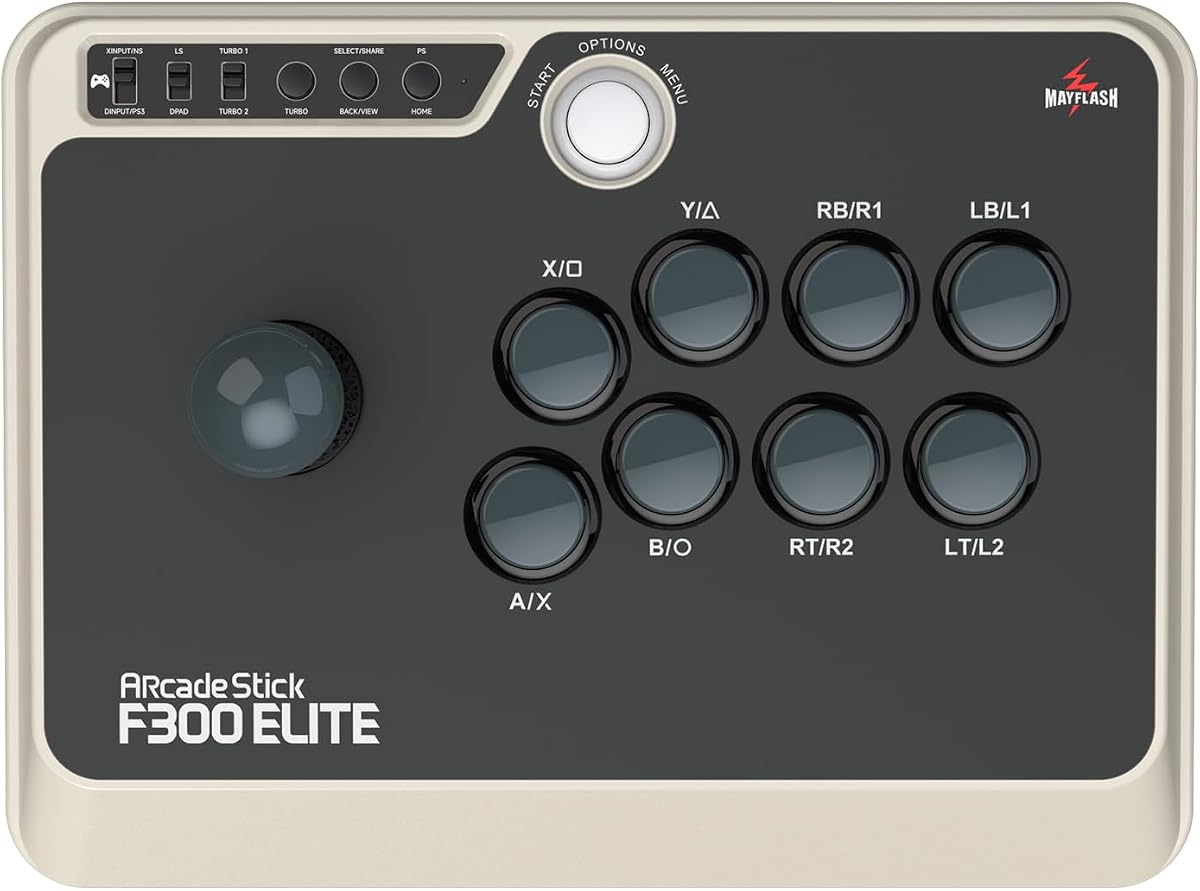
The MAYFLASH F300 Elite stands out as a top contender for Mac gamers seeking arcade-quality input. With a rating of 4.6 stars, users praise its responsiveness and build integrity. It combines high-end Sanwa components with broad platform support including macOS.
We may earn a commission when you buy through this link, at no additional cost to you.
Key strengths include the precision 4-way joystick and nine responsive buttons that ensure reliable strikes every time. The ability to swap parts allows users to tailor the stick to their specific playstyle, making it a long-term investment for serious players.
While the price is higher than basic options, the durability and customization potential justify the cost. The only minor trade-off is the large desk footprint, which might be a consideration for compact setups, but the performance benefits outweigh this limitation.
This stick is ideal for fighting game enthusiasts or anyone wanting a professional arcade feel on their Mac. If you value precision and longevity in your gaming hardware, the F300 Elite is a highly recommended choice for your collection.
Using official Sanwa parts ensures that every button press and joystick movement feels consistent and responsive over years of use.
The accessible internal platform allows for easy swaps of buttons and sticks, letting you update the feel without buying a new unit.
We may earn a commission when you buy through this link, at no additional cost to you.
For those seeking an affordable entry into joystick gaming on Mac, the Hyperkin Trooper 2 offers a classic arcade experience. Rated 4.1 stars, it provides a nostalgic feel with modern durability. It connects easily via USB to macOS systems.
We may earn a commission when you buy through this link, at no additional cost to you.
Its primary strength lies in the ergonomic design and chamfered corner grips that ensure comfort during long sessions. The joystick movement is quiet and responsive, making it suitable for various retro games and emulators without requiring complex driver installation.
The build is mostly plastic which keeps costs down but may feel less premium than higher-end units. While it lacks advanced programmable features, the simplicity makes it plug-and-play friendly for users who just want to start playing immediately.
This controller is perfect for casual gamers or retro enthusiasts who want a dedicated joystick without spending much. If you value simplicity and value for money, the Trooper 2 is an excellent starting point for your Mac gaming setup.
The retro design complements older arcade games perfectly, providing an authentic feel that matches the style of classic titles.
Ergonomic shaping reduces hand strain, allowing for extended play sessions without discomfort or fatigue.
We may earn a commission when you buy through this link, at no additional cost to you.
The Logitech G X56 H.O.T.A.S brings professional-grade flight simulation control to your desk. With a 4.0 rating, it is praised for its accuracy and extensive programmability. While primarily marketed for PC, users adapt it effectively for Mac flight simulators.
We may earn a commission when you buy through this link, at no additional cost to you.
Its standout features include 16-bit axis precision and over 189 programmable controls that map complex flight maneuvers. The RGB lighting adds visual appeal and helps distinguish buttons in low light environments enhancing immersion during night missions.
The setup involves software configuration which can be time-consuming initially. Additionally, using both the joystick and throttle requires two USB ports which might be tight on some laptops without a hub. However the performance for serious pilots is unmatched.
This system is best for users dedicated to realistic flight simulation on their Mac. If you demand precision and have the space for a full cockpit setup, the X56 offers a comprehensive solution that justifies its premium price.
New mini analog stick surfaces allow for detailed control of pitch roll and yaw giving pilots nuanced command over their aircraft.
RGB backlighting helps identify critical controls during dark phases of flight adding both style and functional visibility.
We may earn a commission when you buy through this link, at no additional cost to you.
The MAYFLASH F300 is a versatile arcade stick that works seamlessly across many platforms including macOS. Rated 4.5 stars, it is known for reliability and ease of use. It supports both XINPUT and DINPUT on PC for maximum flexibility.
We may earn a commission when you buy through this link, at no additional cost to you.
Its primary benefit is broad compatibility without needing adapters. The stick supports Sanwa components for customization allowing users to upgrade parts if desired. The turbo functions help with repetitive tasks in certain game genres improving gameplay efficiency.
The stock buttons are not Sanwa grade which might feel different to pros but are durable enough for general use. The cable is non detachable which is a minor convenience issue but ensures a secure connection during intense sessions.
Ideal for cross platform gamers who want a single stick for console and Mac. If you want a reliable arcade experience that grows with your setup the F300 is a solid balanced choice for most users.
Works natively on macOS and consoles reducing the need for multiple controllers in your collection.
The open platform design allows for future component swaps to tailor feel and responsiveness over time.
We may earn a commission when you buy through this link, at no additional cost to you.
The abxylute C6 Wireless offers the freedom of wireless play on macOS with high precision sensors. Rated 4.3 stars, it uses Hall Effect sticks to prevent drift ensuring long term performance. It supports wired Bluetooth and dongle modes.
We may earn a commission when you buy through this link, at no additional cost to you.
Its standout feature is the 1000Hz polling rate in wired or dongle mode minimizing lag for competitive play. The gyro sensors and vibration settings add depth to gameplay on supported devices enhancing immersion without extra accessories.
Bluetooth alone may introduce slight latency compared to wired but the dongle option solves this for critical moments. The battery life is strong allowing up to 18 hours of play so charging is infrequent and convenient.
This is perfect for gamers who want a clean desk setup without sacrificing performance. If you value wireless freedom and modern sensor tech the C6 is a smart choice for your Mac and mobile gaming needs.
Hall Effect technology ensures that the joysticks remain accurate over years of use without physical wear.
Multiple connection modes allow you to switch between systems effortlessly without needing extra drivers.
We may earn a commission when you buy through this link, at no additional cost to you.
The Thrustmaster T-Flight Stick X is a solid entry into flight simulation on macOS. Rated 4.2 stars, it offers a plug and play experience with immediate recognition by your system. Its ergonomic design helps with long flight session comfort.
We may earn a commission when you buy through this link, at no additional cost to you.
Key strengths include adjustable resistance for fine tuning stick tension to match your flying style. The weighted base keeps the unit stable during aggressive inputs preventing slides or tips on your desk during critical moments.
The control options are limited compared to high end units with fewer programmable buttons which restricts complex mapping. However for casual flight enthusiasts or newcomers it offers a straightforward path to starting without technical setup headaches.
This stick is ideal for beginners wanting to try flight sims on Mac. If you want a simple reliable tool to get airborne quickly the T-Flight Stick X is a dependable and affordable choice.
No drivers are needed allowing you to jump straight into your favorite simulator without frustrating delays.
A heavy weighted base ensures the stick remains firmly planted providing confidence during intense maneuvers.
We may earn a commission when you buy through this link, at no additional cost to you.
The Moonag Wireless PC Controller delivers modern features like Hall Effect sensors and RGB lighting for Mac users. Rated 4.3 stars, it supports both Bluetooth and 2.4G modes. The design prioritizes comfort with textured grips for long play.
We may earn a commission when you buy through this link, at no additional cost to you.
Its standout attributes include drift free sticks and ultra low latency via the wireless dongle. The vibration feedback and turbo functions make it suitable for action games offering a rich tactile experience without needing extra peripherals.
Note that it does not support Xbox consoles but works well with Switch PC and Mac. You may need to download software for some macro features but the setup is straightforward and the functionality is extensive.
Best for gamers wanting a stylish and functional controller that looks as good as it performs. If you appreciate RGB aesthetics and high precision tech the Moonag is a strong contender for your Mac setup.
Dynamic RGB lighting around sticks and buttons creates an engaging gaming atmosphere that complements your screen.
The 1000Hz polling rate ensures minimal input lag giving you a competitive edge in fast paced games.
We may earn a commission when you buy through this link, at no additional cost to you.
The Thrustmaster SimTask FarmStick provides specialized control for farming simulation games on Mac. Rated 3.7 stars, it mimics heavy machinery controls for a lifelike experience. It features Hall Effect sensors for precise and durable operation.
We may earn a commission when you buy through this link, at no additional cost to you.
Its main benefits are the realistic 3-axis movement and thirty-three programmable inputs allowing deep interaction with complex game systems. This setup makes managing tractors and harvesters much easier than using a keyboard and mouse.
The niche focus means it may not be ideal for general gaming but excels in its specific purpose. Some users find the initial configuration requires time to map all the functions to the machine controls they need.
This joystick is perfect for serious farming simulator enthusiasts on Mac. If you want to operate heavy equipment with the accuracy of a real machine the FarmStick is a specialized tool worth considering.
The 3-axis joystick delivers smooth control for operating construction equipment adding depth to simulation gameplay.
Multiple buttons and switches let you manage machine functions efficiently without relying on the keyboard.
We may earn a commission when you buy through this link, at no additional cost to you.
The 8Bitdo Ultimate 2 is a modern controller praised for its stability and precision on Mac and Apple devices. With a 4.5 rating, it features TMR joysticks and a dedicated wireless technology. It includes a charging dock for convenience.
We may earn a commission when you buy through this link, at no additional cost to you.
Key strengths include the 2.4G connection providing low latency and strong anti-interference performance. The trigger mode switch lets you adjust between linear and tactile feedback enhancing versatility for different game types.
The higher price reflects the premium build and extra features like back paddles. Some users prefer fully linear triggers but the toggle is a useful compromise. Overall it remains one of the most reliable wireless options available.
Ideal for users wanting a polished wireless experience on Mac. If you value stability and modern sensor technology the Ultimate 2 is a top choice for daily gaming.
The 2.4G connection offers rock solid reliability with no lag ensuring smooth gameplay.
TMR joysticks provide better durability and precision than traditional potentiometers.
We may earn a commission when you buy through this link, at no additional cost to you.
The SPEEDLINK Competition PRO offers a nostalgic design inspired by classic arcade machines for Mac gamers. Rated 3.9 stars, it is a digital USB joystick built for retro games. The anniversary edition includes classic games for download.
We may earn a commission when you buy through this link, at no additional cost to you.
Its main appeal lies in the authentic retro feel which brings back the look and feel of old arcade cabinets. The buttons are responsive and the overall build is sturdy enough for frequent use in classic game scenarios.
Digital input limits modern game support compared to analog sticks which might affect performance in some titles. However for arcade purists the authentic design and simple setup make it a charming and effective tool for nostalgia.
This is best for collectors or fans of classic arcade gaming. If you want a controller that looks and feels like the old days the Competition PRO is a fun and affordable addition to your setup.
The original competition pro arcade style offers a genuine look and feel that appeals to retro fans.
The anniversary edition comes with classic games ready to download adding immediate value to the purchase.
We may earn a commission when you buy through this link, at no additional cost to you.
Selecting the right joystick requires considering compatibility, build quality, and features that match your gaming style.
Ensure the joystick explicitly supports macOS. While many devices list Windows only, select ones work natively or via standard HID drivers on Mac. Always check product details for OS compatibility before purchasing.
Always confirm macOS support before buying to avoid driver issues.
Wired USB offers reliable latency-free performance ideal for competitive gaming. Wireless options provide convenience but may add slight lag. For flight or fighting games, wired connections are often preferred for consistency.
Choose wired for competitive play to minimize input latency.
Hall Effect sensors prevent drift and increase durability compared to traditional potentiometers. These sensors use magnets to detect position, ensuring long-term accuracy. For serious players, this feature is a significant advantage.
Look for Hall Effect sensors to prevent stick drift over time.
The number and placement of buttons should match your game genre. Flight sims need multiple programmable controls while fighters prefer tight layouts. Ensure the buttons are accessible and have a satisfying tactile response.
Match button layout to your preferred gaming genre.
A comfortable grip is essential for long sessions. Look for textured surfaces and a balanced weight distribution. Poor ergonomics can lead to hand fatigue, reducing enjoyment during extended play.
Prioritize comfort to avoid fatigue during long sessions.
Being able to map buttons to specific actions enhances gameplay flexibility. Some sticks offer onboard memory to save profiles. Check if the software is compatible with macOS for full customization.
Ensure macros and mappings work on macOS for customization.
Build quality affects how long the stick lasts. Metal components and high-quality plastics withstand heavy use. A durable unit saves money long term as you won't need frequent replacements.
Invest in quality materials for long-term reliability.
Balance cost with features. Entry-level sticks cover basics while premium ones offer high-end sensors and customization. Determine your budget and needs to find the best value for your specific gaming requirements.
Balance features with budget to find the best value.
Connect your joystick to your Mac via USB or Bluetooth. If prompted, install any necessary drivers or software from the manufacturer website. Test the controls in your Mac game settings to ensure all buttons are recognized correctly.
Keep the joystick clean by dusting it regularly with a soft dry cloth. Avoid exposing the stick to liquids or extreme heat. Check cables for wear over time and replace them if necessary to prevent connection issues.
Calibrate the joystick using system settings if available. Ensure the center point is accurate for precise control. Store the device in a safe place when not in use to prevent accidental damage or component stress.
Not all flight sticks are compatible with macOS. Look for explicit Mac support or standard USB HID compatibility. Some require specific software that may only run on Windows so verify this before buying.
Connect the device and go to System Settings or Game Controller settings. Use the calibration tool to adjust the center point and sensitivity. Restart the game to apply changes properly.
Wireless joysticks offer convenience but can introduce slight latency. For competitive gaming, wired connections are often preferred. Use a dongle mode if available for a stable connection.
Many modern controllers like Xbox and PlayStation work on Mac via Bluetooth. Check specific compatibility as some features might not be supported. You may need software for button mapping.
Hall Effect sensors use magnets to detect joystick movement preventing physical wear. This technology eliminates stick drift common in traditional potentiometers. It is a key feature for durability.
Drift often results from sensor wear or debris. Clean the sticks carefully with compressed air. If using older technology, replace the joystick module. Newer controllers with Hall Effect sensors avoid this issue.
Choosing the right joystick depends on your gaming style and specific needs. Whether you prioritize arcade precision flight simulation or simple connectivity there is a model that fits. We highlighted top picks for different categories to simplify your search.
Focus on compatibility and sensor technology to ensure long-term performance. A quality build will save you from frequent replacements and frustration. Invest in what aligns best with your most played games and setup.
Prices and availability can vary so always check current listings before purchasing. This guide aims to provide a reliable starting point for your decision. Enjoy your enhanced gaming experience on Mac.