
Kids Microphone with Stand
4.6Editor score
Rotating light ball base
Adjustable height range
Kid-friendly durable design
Discover the top light up LED mic stand options for streaming and gaming. This guide compares features, stability, and lighting effects to help you choose.
Finding the right microphone setup is crucial for creators who want to stand out. A light up LED mic stand adds visual flair to your streaming desk while providing essential support for your audio gear. These stands combine functionality with vibrant lighting effects that enhance your content.
We compared ten top-rated products based on stability, lighting modes, and compatibility. Each option offers unique features designed to meet different needs, from budget-friendly choices to premium gaming setups. Our analysis ensures you get reliable performance and impressive visuals for your broadcasts.
Each pick highlights specific strengths and ideal use cases for different creators. Prices and availability can change frequently, so verify details before purchasing. This guide helps you navigate the options to find the perfect illuminated stand for your microphone and workspace.
4.6Editor score
4.5Editor score

4.9Editor score
This side-by-side comparison highlights the key specifications and features of each product to help you make an informed decision based on your specific needs.


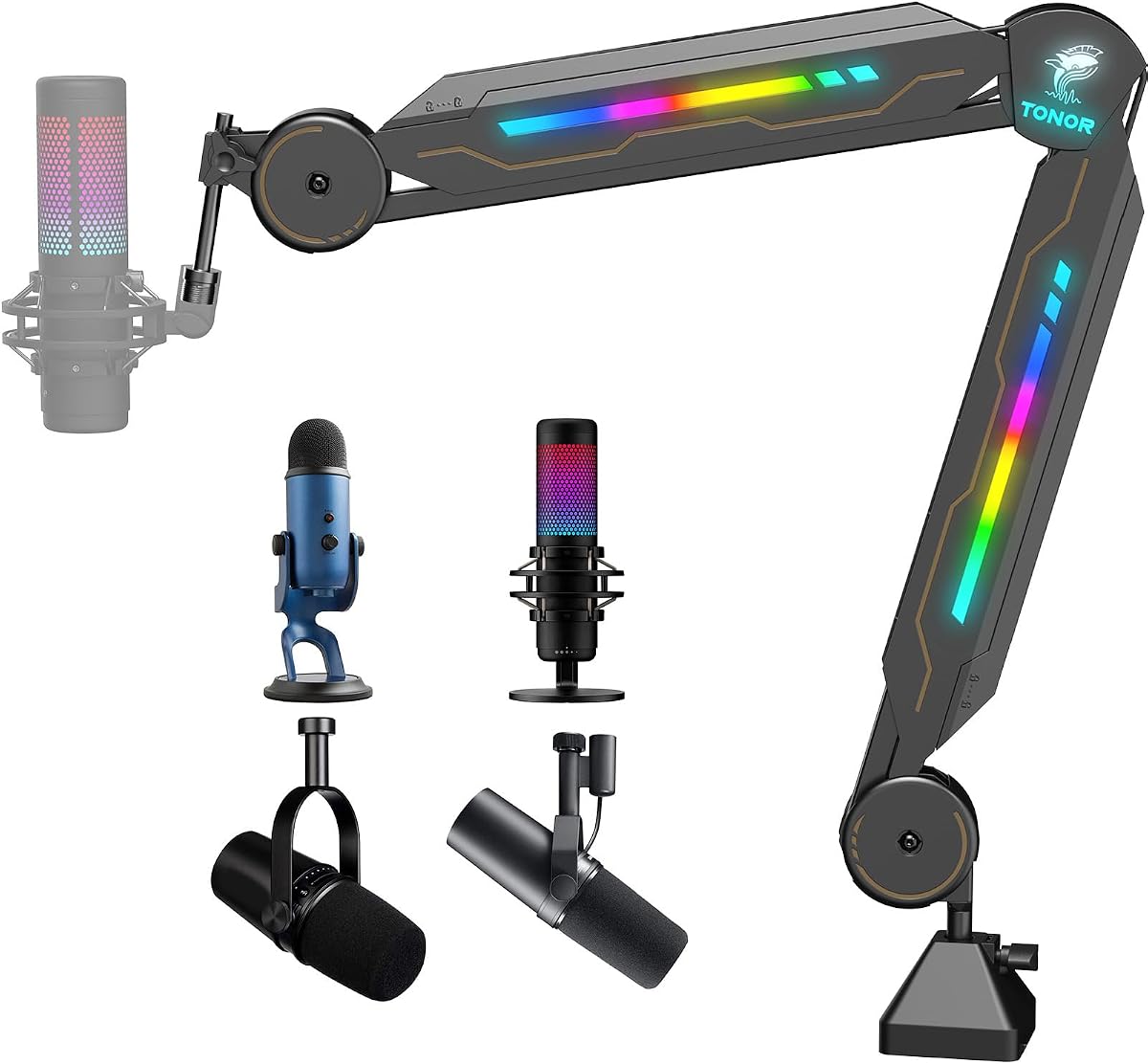
The TONOR T90 RGB scissor mic stand stands out as the top choice for creators wanting visual flair. With a 4.5 rating, it delivers reliable performance and immersive lighting effects that elevate your desk setup instantly.
We may earn a commission when you buy through this link, at no additional cost to you.
Its 11 light modes allow you to set the perfect vibe with simple taps. The strong steel construction supports up to 2kg while the 360 rotation ensures flexible positioning for any microphone.
The main trade-off is that it needs USB power for lights, which requires an outlet nearby. This is acceptable given the visual impact and the convenience of the built-in cable channel keeping your desk tidy.
Streamers and podcasters who want an easy upgrade with style should buy this stand. It balances quality and aesthetics perfectly for a vibrant streaming experience.
The variety of light modes creates a dynamic environment that engages your audience visually during streams.
Hidden cables prevent clutter and ensure a professional look for your broadcast setup.
We may earn a commission when you buy through this link, at no additional cost to you.
This microphone set offers an affordable way to get light effects on a stand. With a 4.6 rating, it brings concert vibes to any room with colorful flashing lights that entertain young performers.
We may earn a commission when you buy through this link, at no additional cost to you.
The base features a rotatable light ball that simulates a real stage atmosphere. The adjustable stand height ensures comfort for children of various ages while safe materials protect little hands.
Adults seeking a serious mic stand may find this too playful, but for family fun it excels. The trade-off in durability is minimal given the low cost and fun factor it provides.
Parents looking for a fun gift that encourages singing should choose this set. It offers unique lighting fun at a price everyone can afford.
The light ball turns living rooms into stages and sparks imagination in young singers.
Smooth edges and durable plastic ensure worry-free play for children of all ages.
We may earn a commission when you buy through this link, at no additional cost to you.
For those seeking top tier features, this arm delivers unmatched control and visuals. Its 4.9 rating reflects exceptional build quality and intelligent lighting that reacts to your voice in real time.
We may earn a commission when you buy through this link, at no additional cost to you.
The intelligent pickup feature adjusts lights based on sound rhythm creating immersion. With over 100 modes and app control, you can tailor colors and brightness to fit any style perfectly.
The higher cost is justified by the advanced tech and robust steel construction supporting heavier mics. Users might need to install an app for full control but the benefits outweigh this minor step.
Pro streamers wanting advanced lighting sync should invest in this premium option. It offers the best combination of performance and visual customization available.
Lights flicker and change with your voice for a truly immersive audio visual experience.
Use the remote or app to fine tune colors and modes without interrupting your flow.
We may earn a commission when you buy through this link, at no additional cost to you.
This stand offers solid reliability for general use though it lacks built-in lights. With a 4.4 rating it provides exceptional stability and height flexibility for diverse performers.
We may earn a commission when you buy through this link, at no additional cost to you.
The heavy steel base prevents tipping even with heavy mics attached. The adjustable boom arm rotates 360 degrees allowing perfect positioning for any singing or speaking scenario.
While it does not have LED lights, you can add separate lighting to match your setup. This trade-off keeps the price low while delivering professional grade stability and durability.
Performers needing a versatile floor stand for various venues should choose this model. It pairs well with external lights for a complete performance setup.
The thickened steel poles and heavy base ensure your mic stays put during use.
Disassembles easily into a compact bag for transport to any gig location.
We may earn a commission when you buy through this link, at no additional cost to you.
A sturdy floor stand that prioritizes durability and support for heavy microphones. It earns a 4.3 rating for its robust construction and reliable performance across various stages.
We may earn a commission when you buy through this link, at no additional cost to you.
The weighted base provides extra stability preventing unwanted wiggle during live performances. The 180 degree rotatable clip makes angle adjustments quick and precise for perfect sound capture.
It lacks lighting but its thickened steel arm holds heavy mics without deformation. This reliability makes it ideal for singers who need solid support above aesthetic lighting effects.
Musicians requiring a dependable stand for concerts should consider this option. It focuses on essential stability and strength for professional singing use.
The metal gasket and non-slip pads ensure secure footing during every performance.
Thickened arms withstand the weight of studio grade microphones without bending.
We may earn a commission when you buy through this link, at no additional cost to you.
This product is actually a microphone with a stand base rather than just a stand. With a 4.6 rating it delivers stunning RGB lighting integrated directly into the microphone body.
We may earn a commission when you buy through this link, at no additional cost to you.
The dynamic lighting effects create immersion while noise cancellation ensures clear audio quality. Its one-click mute and gain control provide easy management during intense gaming sessions.
Note that this is a mic unit and not a separate stand arm. Buyers looking for just a stand should skip this but gamers wanting an all-in-one solution will love it.
PC gamers seeking a complete mic and lighting setup should choose this model. It combines quality audio with striking visuals in a single plug and play device.
Adjustable smart noise cancellation removes background noise for professional audio.
Breathing and solid color modes match your gaming vibe effortlessly.
We may earn a commission when you buy through this link, at no additional cost to you.
This set offers two stands in one package which is rare and useful for duos. With a 4.4 rating it provides solid metal construction and universal compatibility for various microphones.
We may earn a commission when you buy through this link, at no additional cost to you.
The compact metal base offers balance while the lightweight design ensures easy transport. Adjustable height settings allow smooth raise and lower changes depending on the user needs.
It does not feature lights but offers great value by providing two units. This makes it a practical choice for home studios needing multiple setups at a reasonable cost.
Musicians needing multiple stands should buy this pair. It saves money and provides reliable performance for dual performance or recording scenarios.
Getting two stands for one price covers multiple positions or performers instantly.
Standard threading ensures it works with most handheld and desktop microphones.
We may earn a commission when you buy through this link, at no additional cost to you.
This boom arm combines lighting and volume control for a unique desk experience. With a 4.4 rating it offers a striking visual setup with a infinity mirror effect in the joints.
We may earn a commission when you buy through this link, at no additional cost to you.
The volume knob lets you adjust levels with one hand while RGB modes add flair. Its reinforced metal structure prevents wobbling ensuring reliable positioning during long sessions.
The limited 26 modes are fewer than others but the visual design stands out. Installation is quick without tools making it friendly for beginners who want aesthetics.
Streamers wanting a mix of style and function should choose this arm. It delivers a striking look with practical volume access for daily use.
Infinity mirror effect and RGB strip create a captivating gaming desk vibe.
Adjust volume quickly without reaching for software during streaming.
We may earn a commission when you buy through this link, at no additional cost to you.
A stand designed for speakers but usable for lighting effects on a rig. With built-in LED lighting on the legs it transforms any venue with pulsing light modes.
We may earn a commission when you buy through this link, at no additional cost to you.
The remote control lets you switch colors and modes for sync with music. Heavy duty steel supports loads securely and the non-slip feet ensure stability.
It is not a standard mic stand but versatile for larger setups needing flair. This trade-off suits DJs who want lighting integrated directly into their gear support.
Mobile DJs needing lighting support should consider this unique option. It combines audio stand function with visual effects for parties.
RGB lighting on legs instantly enhances the atmosphere at any event.
Easily switch modes without touching the stand during performances.
We may earn a commission when you buy through this link, at no additional cost to you.
This arm brings vibrant flow light effects via Bluetooth app for customization. With a 4.3 rating it offers decent support and flexibility for most gaming microphones.
We may earn a commission when you buy through this link, at no additional cost to you.
The extension tube adds height to fit over monitors easily. Color and brightness are adjustable to match your environment without complex hardware needed.
App setup is required for full lighting control which may be extra for some. However the extension tube feature provides practical flexibility for taller desk setups.
Gamers wanting height and lighting control on a budget should choose this. It delivers a unique lighting feature with practical height extension for any desk.
Adjust light effects via phone app for seamless desktop integration.
Extension tube raises the arm for perfect viewing angles during sessions.
We may earn a commission when you buy through this link, at no additional cost to you.
Choosing the right mic stand requires evaluating key factors beyond just the lighting features.
Look for stands that offer a variety of light modes such as static, strobe, or reactive effects. Some allow app control while others use physical buttons or remotes.
Choose options that offer flexibility to match your streaming style without cluttering your desk with extra controllers.
Ensure the stand can support your microphone weight with a generous margin. Steel construction and weighted bases prevent tipping during movement.
Prioritize robust materials like steel to avoid wobbling that can ruin recordings.
Check if the stand supports clamp or screw mounting for your desk. Height adjustability ensures the mic is at a comfortable speaking level for your body.
Select an adjustable arm that extends enough to position the mic correctly without blocking screens.
Integrated cable channels help keep your desk clean and reduce clutter for a professional look. This feature is vital for visible streaming setups.
Look for designs that route cables neatly to maintain focus on you during broadcasts.
Verify that the stand includes standard adapters like 3/8 and 5/8 screws to fit your mic. Universal compatibility saves you from buying extra parts.
Choose stands with adapters for popular brands to ensure a secure fit.
Quick setup without tools saves time and frustration when changing positions. Some models allow tool-free installation in under minutes.
Prioritize designs that are easy to assemble so you can start streaming faster.
Consider whether the lights require USB power or batteries for operation. Portability matters if you move between rooms or venues.
Select battery or USB powered lights that suit your power access.
Strong steel or aluminum ensures long life for daily use in studios. Avoid plastic parts that may crack under frequent adjustments.
Choose metal arms for durability to maintain stability over time.
When using your new stand, ensure all arms and joints are tightened to prevent sagging. Check that the clamps are secured firmly to your desk before placing your microphone to avoid accidents.
For maintenance, wipe down the steel arms with a soft cloth to remove dust and keep the finish clean. Clean the LED lenses gently to avoid scratches that could dim the light output.
Store your stand in a dry place when not in use to prevent moisture damage to the electronics. Regularly check power cables and adapters for wear to ensure safe operation during use.
Most light up mic stands need USB power to run the LED lights. Some may use batteries but USB is standard for consistent brightness.
Yes but check the load capacity before buying. Look for steel arms rated for at least 4 pounds to ensure safe support.
Many models allow color changes via buttons or apps. Some even sync lights to sound for a dynamic effect during streaming.
Most boom arms attach via a clamp that bolts to your desk. Tighten the clamp securely and ensure no sharp edges damage your surface.
Most stands come with 3/8 and 5/8 adapters. Verify your mic's thread size to ensure it fits properly.
Floor stands are great for live use but desk arms work best for studio or desk setups. Check stability for movement scenarios.
The TONOR and YOUSHARES stands lead the pack with vibrant lighting and robust build quality for creators.
Prioritize stability and control options based on whether you need portability or a fixed studio setup.
Always check current prices and availability before buying to ensure you get the best deal.