
HDMI KVM Switch 3 Monitors 2 Computers 4K@60Hz
4.0Editor score
Supports 4K at 60Hz resolution
Four USB 3.0 ports included
Wired controller for clean desk setup
This guide compares ten top KVM switches for triple monitors, evaluating resolution support, USB sharing, and switching ease for seamless multi PC desktop
Managing multiple computers with a single set of peripherals can be challenging. A high quality KVM switch for triple monitors simplifies this task by allowing seamless transitions between systems.
We evaluated ten leading models based on resolution support, connection types, and ease of use. Our comparison highlights the most reliable options for home offices and professional workstations.
Each pick shows specific strengths like 4K support or USB data speeds. Prices and availability change frequently, so verify current details before making your final purchasing decision.
4.0Editor score

4.9Editor score

3.9Editor score
The following table offers a side by side view of key specifications for all ten models analyzed in this guide to help you compare features quickly.





The AV Access KVM Switch offers an impressive all-in-one solution for users managing two computers with three monitors. It stands out by combining a docking station with a KVM switch, reducing desk clutter significantly.
We may earn a commission when you buy through this link, at no additional cost to you.
This unit supports up to 8K resolution at 60Hz for desktops and provides 100W power delivery via USB-C for laptops. It also keeps both computers connected to the network, allowing background tasks to continue uninterrupted.
While the price is higher than basic models, the added features like SD card readers and audio jacks justify the cost for professionals. Mac users should note extended display limitations with this device.
If you need a robust solution that handles video, data, and charging efficiently, this is a top choice for power users who value a clean workspace and high performance.
This KVM replaces separate hubs and docks, offering SD card access and audio jacks alongside USB ports for a streamlined desktop setup.
Unlike many switches that cut network access, this model keeps the Ethernet connection active on both PCs so downloads continue seamlessly.
We may earn a commission when you buy through this link, at no additional cost to you.
This HDMI KVM switch provides a cost-effective way to share three monitors and USB devices between two computers. It is ideal for users who need basic switching without paying for premium features like 8K support.
We may earn a commission when you buy through this link, at no additional cost to you.
It supports resolutions up to 4K at 60Hz and includes four USB 3.0 ports for fast data transfer. The package includes a wired remote and a DC adapter to ensure stable operation for powered devices.
Although it lacks hotkey support, the panel buttons and remote make switching straightforward. Users must ensure their computers support three HDMI outputs to utilize all displays simultaneously.
For those on a tight budget who still want multi-monitor capability, this model offers reliable performance and essential features at a very accessible price.
This switch allows you to share peripherals and displays without buying extra hardware, making it a smart choice for budget-conscious users.
The included 12V adapter ensures USB devices like webcams and drives get enough power, preventing disconnects during operation.
We may earn a commission when you buy through this link, at no additional cost to you.
The UGREEN KVM switch is designed for users who demand the highest resolution and refresh rates. It supports 8K at 60Hz and includes gaming features like VRR and FreeSync for smooth visuals.
We may earn a commission when you buy through this link, at no additional cost to you.
This model uses two DisplayPort and one HDMI inputs to drive three monitors. It supports HDR10+ and ensures compatibility with high frame rate content up to 240Hz for gaming.
While premium, it requires a PC that supports three outputs and specific cables. The included cables help ensure proper connection for maximum resolution without buying extra accessories.
If you have high-end monitors and need seamless switching between two systems, this switch delivers the performance and build quality expected from a premium product.
With support for VRR and G-Sync, this switch minimizes screen tearing for gaming setups that use multiple high-refresh-rate monitors.
The package includes necessary HDMI and DP cables which simplifies setup and ensures signal integrity from the start.
We may earn a commission when you buy through this link, at no additional cost to you.
This model stands out by allowing four computers to share three monitors instead of the usual two. It is a rare option for environments where multiple users need access to the same display setup.
We may earn a commission when you buy through this link, at no additional cost to you.
It supports 8K resolution at 60Hz and includes a full set of USB and video cables for easy installation. The remote control allows you to place the switch away from your main desk area.
Setting up four inputs requires careful port management but the included cables reduce extra costs. It is a practical choice for shared workspaces or testing labs.
If you need to connect more than two systems, this switch provides a practical solution without sacrificing resolution or data transfer capabilities.
Unlike most models, this switch allows four desktops to share three monitors, making it ideal for shared offices or test environments.
The package includes all necessary USB cables which ensures you can start using the device immediately without buying extra hardware.
We may earn a commission when you buy through this link, at no additional cost to you.
This KVM switch supports 8K resolution at 30Hz and 60Hz using DP 1.4 and HDMI 2.1 ports. It also offers a dedicated power switch to restart the unit if signal issues occur.
We may earn a commission when you buy through this link, at no additional cost to you.
It supports gaming features like VRR and G-Sync and provides four USB 3.0 ports for high-speed data transfer. It is compatible with most operating systems and devices.
Users should note that long cables may affect 8K performance and recommend shorter lengths. Active adapters may be required if using HDMI to DP conversion.
For users wanting 8K support without complex setup, this model offers a balance of high resolution and usability for demanding workflows.
The physical power switch allows you to reset the device without unplugging it, which simplifies troubleshooting signal issues.
Support for VRR and G-Sync ensures smooth gameplay across multiple monitors without tearing or stuttering.
We may earn a commission when you buy through this link, at no additional cost to you.
This docking station style KVM allows seamless sharing of displays and peripherals between a laptop and a desktop. It supports 8K at 60Hz and includes a SD card reader for media workflows.
We may earn a commission when you buy through this link, at no additional cost to you.
It keeps both computers connected to the network so background tasks continue while you switch. The 100W power delivery means you do not need a separate charger for your laptop.
While expensive, it consolidates multiple devices into one unit. Mac users should be aware of extended display limitations but the features justify the cost for professionals.
If you need a clean desk and high performance for two systems, this is an excellent choice that handles both video and power efficiently.
By combining a dock and KVM, this unit reduces cable clutter and replaces multiple separate devices on your desk.
Network tasks like updates and downloads continue on the unselected computer ensuring no interruption to background work.
We may earn a commission when you buy through this link, at no additional cost to you.
This HDMI KVM switch supports 8K resolution at 60Hz and 4K at 120Hz for high-end display needs. It includes a wired controller to keep your desk clean and organized.
We may earn a commission when you buy through this link, at no additional cost to you.
It features four USB 3.0 ports for fast data transfer and is compatible with various peripherals like printers and scanners. It works well with Windows and Linux systems.
While it lacks keyboard shortcuts, the remote and panel buttons offer reliable switching. You must use HDMI 2.1 cables to achieve maximum resolution performance.
If you need high resolution and stable connectivity without complex setup, this model offers a straightforward solution for dual PC users.
The wired controller allows you to place the switch out of reach, maintaining a tidy workspace while ensuring easy access to controls.
USB 3.0 ports provide fast file transfers which is useful when sharing large files between two connected systems.
We may earn a commission when you buy through this link, at no additional cost to you.
This model allows three computers to share three monitors and USB ports which is rare compared to two computer options. It supports 8K resolution and includes a remote for easy control.
We may earn a commission when you buy through this link, at no additional cost to you.
It includes USB and video cables to simplify setup. The 5Gbps USB transfer speed ensures fast data access for shared peripherals like storage and printers.
While limited to three inputs, it is versatile for small teams. Ensure your computers support three displays to take full advantage of the available ports.
If you have three systems to manage, this switch provides a practical solution without requiring extra hardware or complex wiring.
Unlike standard two-input switches, this model allows three PCs to share one set of displays which is useful for multi-user workspaces.
The package includes USB cables which reduces the need to purchase extra hardware for a complete working setup.
We may earn a commission when you buy through this link, at no additional cost to you.
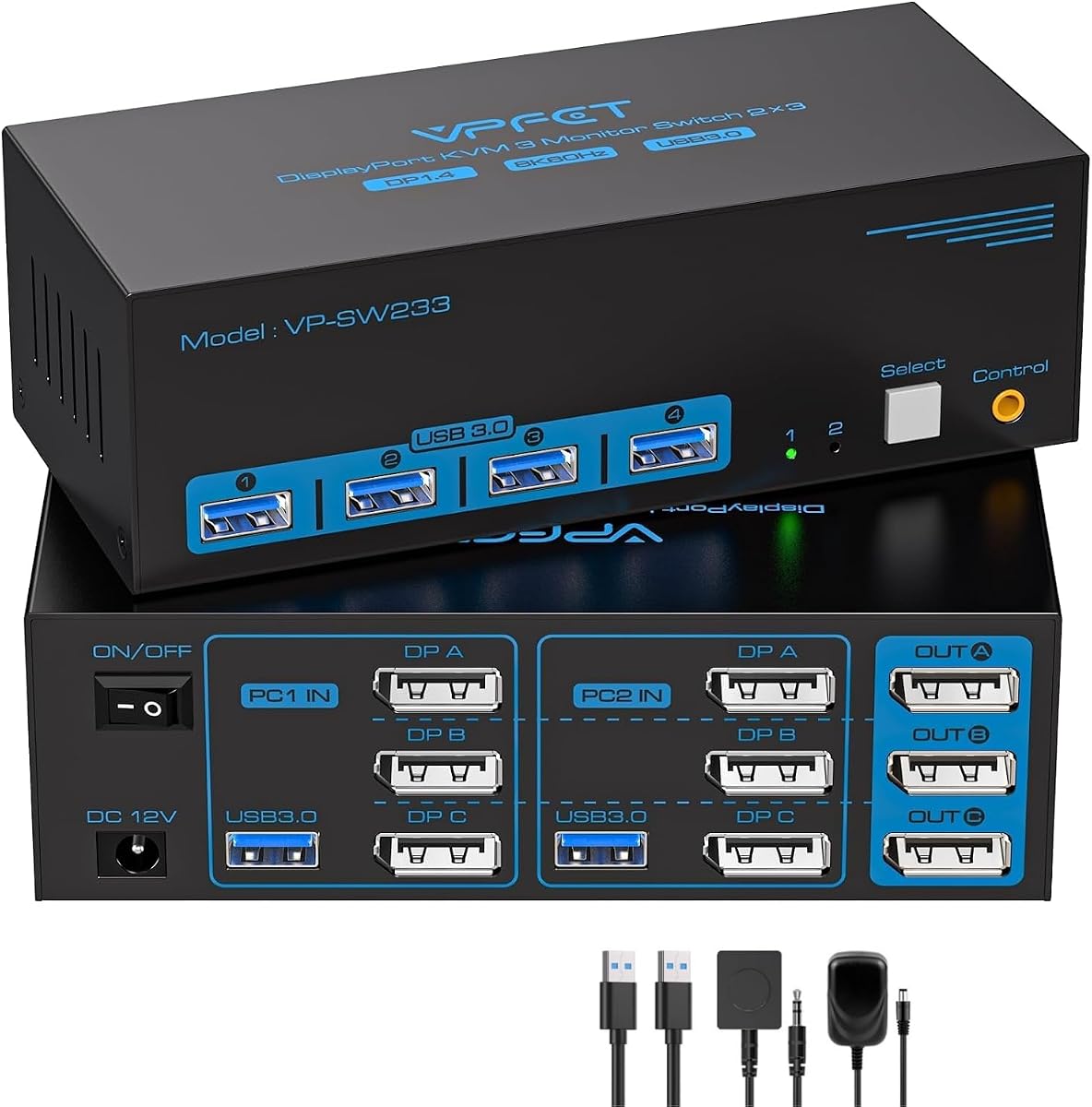
This DisplayPort KVM switch supports 4K at 144Hz for smooth visuals which is ideal for creative work or gaming. It uses a wired controller to switch between two systems easily.
We may earn a commission when you buy through this link, at no additional cost to you.
It offers reliable signal transmission and supports USB 3.0 for fast peripheral sharing. The setup is straightforward with a plug and play design that requires no drivers.
Because it uses only DisplayPort, ensure your computers have three DP outputs. This limits compatibility with HDMI-only devices without converters.
If you prioritize high refresh rates and need stable connections, this switch is a strong choice for professional workstations and creative setups.
Support for 144Hz ensures fluid motion which is valuable for video editing and gaming across multiple monitors.
DisplayPort offers a stable connection that reduces signal drops and ensures consistent performance during heavy workloads.
We may earn a commission when you buy through this link, at no additional cost to you.
This KVM switch supports both HDMI and DisplayPort inputs allowing flexibility for different monitor types. It includes all necessary cables for a quick and easy setup process.
We may earn a commission when you buy through this link, at no additional cost to you.
It supports 8K resolution at 60Hz and comes with a one-year warranty for added peace of mind. The remote and LED indicators make switching between computers simple.
It does not support EDID emulation which may cause compatibility issues with some displays. Ensure your PCs support triple outputs for best performance.
If you need a versatile switch with high resolution and good support, this model is a solid option for dual PC multi-monitor setups.
The package includes HDMI and DP cables which saves time and money on buying extra hardware for a complete setup.
A one-year warranty offers protection and support for the device giving confidence for long-term use.
We may earn a commission when you buy through this link, at no additional cost to you.
Selecting the right KVM switch requires evaluating resolution needs, connection types, and USB capabilities to ensure compatibility with your existing hardware and workflows.
Check whether the KVM supports your monitor resolution such as 4K or 8K and the required refresh rate. Higher refresh rates are vital for gaming and smooth motion while higher resolution supports detailed work like design or editing.
Ensure the KVM matches your monitor specs to avoid downgrading your display performance.
Verify that the KVM switch has the correct video inputs like HDMI, DisplayPort, or USB-C for your computers. Each computer typically needs three inputs to drive three monitors so confirm the port count meets this requirement.
Select a model with the right video inputs to avoid needing extra adapters or converters.
Look for USB 3.0 or higher ports to ensure fast data transfer for shared devices like storage or webcams. USB 3.0 supports speeds up to 5Gbps which is essential for high throughput tasks.
Prioritize USB 3.0 ports to maintain quick file access and reliable peripheral operation.
Consider how you want to switch between computers such as panel buttons, wired remotes, or hotkeys. Wired remotes allow you to place the KVM switch away from your desk for a cleaner workspace.
Choose a switching method that fits your desk layout and workflow habits.
Many KVM switches require an external power adapter to provide enough power for connected USB devices. Internal power may not be sufficient for high-draw devices like external hard drives or webcams.
Ensure the KVM includes a stable power adapter to prevent disconnections or device failures.
Confirm the KVM switch works with your operating systems like Windows, macOS, or Linux. Some models may have specific requirements for video output or display modes that could impact usability.
Select a model compatible with your OS to avoid software or driver issues.
Some advanced KVMs include features like Ethernet sharing, SD card readers, or audio jacks. These can replace other devices and reduce clutter but often increase the price significantly.
Decide if additional features justify the cost based on your specific workspace needs.
Look for a warranty period that offers protection against defects. Reliable customer support helps resolve setup or compatibility issues quickly which can save time and frustration.
Choose brands with good support and warranty terms for peace of mind.
Connect your computers to the KVM switch using the correct video cables. Ensure each PC has enough video outputs for all three monitors to function properly.
Plug your shared USB devices into the KVM ports and connect the KVM to the computers with USB cables. Verify power is connected if the unit requires an external adapter.
Use the included remote or panel buttons to switch between computers. Check your operating system settings to ensure displays are correctly configured for extended or duplicate modes.
Most models support HDMI and DisplayPort inputs so you can mix cable types if your KVM switch supports them. Check the product details to confirm which inputs are available before buying.
Yes each computer connected to the KVM must support three independent displays to use all three monitors simultaneously. If a PC only supports one or two displays some screens may remain inactive.
External power adapters ensure USB devices receive enough power especially high-draw devices like external drives. Internal USB power from the host may not be sufficient to keep devices stable.
Some models do not support keyboard hotkeys for switching. Most offer panel buttons or wired remotes to avoid accidental switches and maintain a clean workspace.
Advanced KVMs with Ethernet ports allow shared network access. This keeps both computers online so background tasks like downloads continue even while you switch focus.
MacBooks often support mirrored displays but not extended displays on multiple external monitors through a KVM switch. Verify compatibility with your specific model before purchasing.
This guide reviewed ten reliable KVM switches for triple monitors offering options for budgets and performance needs. The AV Access docking station led in features while the HDMI KVM offered affordability.
Prioritize resolution support and port configuration to ensure your monitors function as expected. Additional features like power delivery and Ethernet can simplify your setup further.
Prices and availability fluctuate frequently so check current offers and verify your system requirements before buying to ensure compatibility and best value.