Treedix Cable Tester Board
4.6Editor score
Affordable Maintenance Solution
LED Pin Indicators
Portable Acrylic Housing
This guide compares the top HDMI Signal Tester models for 2026, evaluating features like 4K support, cable testing, and portability to help you choose the
Finding the right HDMI signal tester is crucial for technicians and enthusiasts who need to verify cable integrity and video output quality. These devices help diagnose issues like signal loss, color shifting, or HDCP errors before they become major problems in your setup.
We have analyzed ten top-rated models available today, focusing on their ability to handle modern resolutions like 4K and 8K. Our comparison looks at ease of use, battery life, and the range of test patterns offered by each unit to ensure you get reliable performance.
Each pick in this list highlights specific strengths such as budget friendliness, professional grade capabilities, or compact portability. Keep in mind that product availability and pricing can change frequently, so always check the latest details before making your final purchase decision.
4.6Editor score

4.5Editor score

4.5Editor score
The following table provides a side-by-side comparison of all ten products reviewed in this guide, highlighting their key specifications and capabilities to help you quickly identify the best fit for your specific testing needs.


The STEREN Handheld HDMI Tester stands out as a top choice for professionals who need reliable on-site verification without relying on a monitor. It holds a solid 4.5 star rating and offers an integrated HD LCD screen that displays both audio and video output clearly.
We may earn a commission when you buy through this link, at no additional cost to you.
Its primary strength lies in its ability to confirm set-top box installation correctness independently. The tempered glass display is resistant to scratches and shattering, making it ideal for job sites where equipment might take a beating. The built-in 2300mAh battery provides three to four hours of continuous use.
While the device is robust, its weight and size can be slightly cumbersome for technicians carrying many tools. However, this is a reasonable trade-off for the durability and the convenience of having a self-contained testing unit with multiple ports for complex continuity checks.
This tool is perfect for installers and AV technicians who frequently work in locations without easy access to a display. If you need a standalone solution that combines audio visual checking with cable continuity testing, this unit is a strong recommendation for your kit.
You can verify set-top boxes and sources without needing an external TV which saves time during installations.
The hybrid dual layer housing and tempered glass ensure the device survives drops and harsh working environments.
We may earn a commission when you buy through this link, at no additional cost to you.
The Monoprice HDMI Signal Generator and Display Analyzer is an excellent tool for those who need to simulate specific video signals and test HDCP compliance. It receives a 4.0 rating and supports high resolutions like 4K at 60Hz with various color subsampling options.
We may earn a commission when you buy through this link, at no additional cost to you.
Its standout feature is the flexible HDMI content testing which includes HDCP OFF, 1.4, and 2.2 outputs. This allows technicians to troubleshoot encryption issues that often cause black screens on modern TVs. The DIP switches make changing resolution settings quick and intuitive.
On the downside, this unit focuses primarily on signal generation rather than full cable continuity testing. It may not be the only tool you need if you also want to check wire integrity. However, for signal validation and HDCP debugging it performs very well.
If you are building a test station or need to verify that sources are outputting the correct signals before they hit a display this device is highly useful. It bridges the gap between basic testers and expensive professional analyzers effectively.
Testers can toggle between different HDCP versions to identify compatibility issues with modern displays and sources.
Simple DIP switches allow quick changes between 4K and 1080p settings without needing complex menus.
We may earn a commission when you buy through this link, at no additional cost to you.
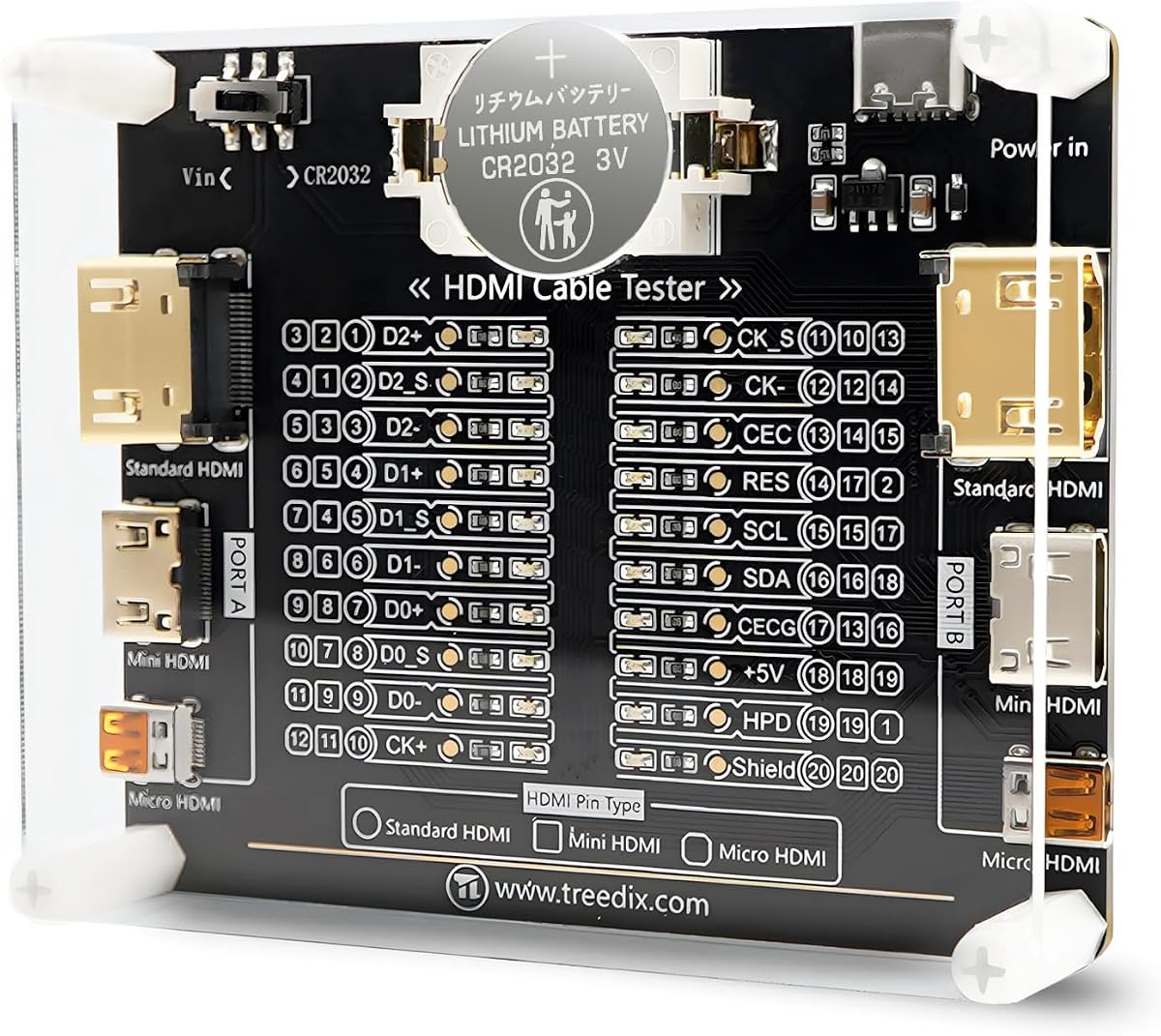
For those on a tight budget, the Treedix Cable Tester Board offers a straightforward way to check HDMI cable continuity. With a 4.6 rating, it uses a simple board design with LEDs to indicate which pins are connected correctly or showing faults like shorts.
We may earn a commission when you buy through this link, at no additional cost to you.
It supports a wide range of HDMI versions from 1.0 to 2.1 and handles Type A, C, and D interfaces. The acrylic housing protects the internal components and the device can run on batteries or an external power supply which adds versatility for field work.
While it lacks the ability to test video or audio signals it is incredibly effective for ensuring wires are not crossed or broken. This makes it a great secondary tool for technicians who already have a display checker but need to verify cable integrity quickly.
This board is ideal for home enthusiasts or professionals who need a quick reference tool for cable repairs. Its simplicity and low cost make it an essential addition to any toolbox where budget is a primary concern.
The twenty LED indicators map directly to the HDMI pins making it easy to spot exactly where a fault is.
Support for HDMI 1.0 through 2.1 ensures it works with older and newer equipment equally well.
We may earn a commission when you buy through this link, at no additional cost to you.
The HDMI Tester Portable High Definition Network Cable Tester Checker is a versatile device for technicians who work with both video and network cabling. It has a 4.4 rating and allows you to test HDMI and RJ45 cables using a main and remote unit setup.
We may earn a commission when you buy through this link, at no additional cost to you.
It scans up to 19 wires in the HDMI connector to detect shorts or open circuits efficiently. The remote unit attaches to the main unit for storage, which keeps things compact. You can power it via a battery or USB charger for flexibility during long work days.
One limitation is that it does not display video or audio so you will still need a monitor to check the signal content. However for cable integrity testing it is reliable and covers both common connection types in a single device saving space in your bag.
This is a great choice for network installers who also handle AV cables. If you need one tool to verify that your Ethernet and HDMI runs are physically intact before connecting equipment this device offers excellent value and convenience.
Combine your network and AV testing tools into one compact unit that handles both cable types easily.
The remote unit storage on the main body ensures you don't lose parts while moving between job sites.
We may earn a commission when you buy through this link, at no additional cost to you.
For professional installers working with cutting edge displays, the JTECH HDMI Test Signal Generator is a powerhouse. It boasts a 4.5 rating and supports 8K at 60Hz with HDR and 40Gbps bandwidth capabilities which are essential for next gen AV systems.
We may earn a commission when you buy through this link, at no additional cost to you.
It provides 64 video resolutions and 33 test patterns allowing for precise signal verification. The device also handles HDCP 2.3, CEC control, and EDID read/write functions giving you deep control over how your source interacts with the display. It includes a large battery for field use.
The main drawback is the high price point which may not be justified for casual users. Additionally the feature set is complex and might be overkill for simple cable checks. However for serious professionals it offers capabilities rarely found at this price tier.
If you are working in high end home theater or commercial installations where signal fidelity is paramount this tool is unmatched. It ensures your setup meets the latest standards and can troubleshoot advanced protocol issues effectively.
Test HDMI 2.1 features like 8K and HDR to ensure your setup is ready for future content.
Advanced timing and InfoFrame analysis help you debug complex signal issues that basic testers miss.
We may earn a commission when you buy through this link, at no additional cost to you.
The 2K/4K HDMI Signal Generator serves as both a source and analyzer making it useful for verifying signal quality. With a 4.2 rating it supports 18Gbps bandwidth and scales 4K down to 1080p for various displays ensuring compatibility testing is accurate.
We may earn a commission when you buy through this link, at no additional cost to you.
It includes EDID management and HDCP compliance checks which are vital for modern setups. The tool analyzes source video and timing to help you determine if a display is receiving the correct data format. This makes it more than just a continuity checker.
While it offers advanced features, it may not have the ruggedness of the STEREN or the advanced 8K capabilities of the JTECH. It sits comfortably in the middle, offering a balance between price and performance for technicians who need reliable 4K testing.
This unit is a solid choice for businesses installing 4K content systems. It provides the necessary tools to ensure your sources and displays are communicating correctly without needing to buy two separate devices.
Ensure your cables meet the 18Gbps requirement for 4K signals to prevent dropouts.
Manage display EDID settings to test how different devices respond to resolution requests.
We may earn a commission when you buy through this link, at no additional cost to you.
This HDMI Cable Tester Checker is designed for quick diagnostics on the go. It holds a 3.9 rating and offers two test modes to choose from allowing you to balance speed and detail based on your immediate needs during a job.
We may earn a commission when you buy through this link, at no additional cost to you.
It supports HDMI and RJ45 connectors so you can test network cables alongside video ones. The auto shut down function helps save battery life by turning off the device after ten minutes of inactivity which is a thoughtful energy saving feature.
While the ratings are slightly lower than competitors it remains a functional tool for basic wire checks. It may not offer the same durability or advanced features as higher priced models but it gets the job done for simple connectivity verification.
Ideal for DIYers or light professional use this device is a practical option for those who need a secondary checker. It is best used when you need to verify cables quickly without needing detailed signal analysis.
Switch between fast scan for speed and full display for a complete view of the cable status.
Automatic shut off keeps your device ready for longer periods by conserving battery power.
We may earn a commission when you buy through this link, at no additional cost to you.
The Jonard Tools HDMI-100 is focused on precision wire evaluation which is critical for ensuring clean data transmission. With a 4.4 rating it evaluates each wire pair to identify shorts or open circuits with high accuracy across various HDMI versions.
We may earn a commission when you buy through this link, at no additional cost to you.
Its remote unit is detachable allowing you to test cables up to 500 meters in length effectively. This makes it useful for long runs in home theaters or commercial installations. The scan mode lets you see individual connections while full display shows the whole cable status.
You will need to provide a 9V battery for operation which is a minor inconvenience. However the ability to test long cables without needing another person to hold the other end is a significant advantage for solo technicians.
This is a strong choice for installers dealing with long cable runs or custom wiring. If your primary goal is ensuring the physical wiring is perfect before connecting it to gear this device offers reliable and detailed feedback.
Test cables up to 500 meters to ensure signal integrity over long distances.
See exactly how each wire pair is connected to identify and fix wiring errors quickly.
We may earn a commission when you buy through this link, at no additional cost to you.
The UT681 HDMI Cable Tester is a lightweight portable option that excels at checking Mini and Micro HDMI cables. It earns a high 4.8 rating and supports multiple HDMI versions making it versatile for cameras and portable displays.
We may earn a commission when you buy through this link, at no additional cost to you.
It scans 19 wires to identify faults quickly and includes a warning light for low battery so you are never caught off guard. The separate transceiver allows one person to handle testing efficiently even in tight spaces where access is limited.
While it does not provide video feedback the focused design makes it excellent for physical cable checks. Its compact size and low weight ensure you can keep it in a pocket without adding bulk to your toolkit.
For those who work with cameras or portable devices that use smaller connectors this tool is a practical solution. It ensures your cables are physically sound so you can rely on them in the field.
Ideal for testing Mini and Micro HDMI cables found on cameras and portable devices.
Weighing only 175 grams it is easy to carry and use in any location.
We may earn a commission when you buy through this link, at no additional cost to you.
The Parts Express HDMI Cable Signal Tester is a simple device designed to diagnose common signal issues like color shift or missing pictures. With a 4.3 rating it is easy to use by plugging cables into the DVI and HDMI connectors directly.
We may earn a commission when you buy through this link, at no additional cost to you.
It displays the status of each HDMI signal component which helps you pinpoint whether the problem is with the signal itself rather than just the wiring. This is particularly helpful when dealing with older equipment or complex setups.
It is compact and portable so you can keep it in your tool bag without taking up much space. However it focuses more on signal health than physical continuity so it might be best paired with another tool for wire checks.
This is a great tool for troubleshooting signal quality issues quickly. If you are dealing with a system that is showing visual artifacts this device helps confirm whether the source output is the culprit.
See exactly which part of the signal is failing to narrow down your troubleshooting steps.
Small size and easy plug and play design make it a quick addition to any diagnostic toolkit.
We may earn a commission when you buy through this link, at no additional cost to you.
Choosing the right HDMI signal tester depends on your specific needs whether you are a casual user checking a home theater or a professional installing commercial systems. Here are the key factors to consider.
Ensure the tester supports the resolutions you work with. For modern setups this means at least 4K at 60Hz. Professional tools may offer 8K and HDR support which is vital for next gen displays. If you work with older equipment 1080p support might suffice.
Match the tester to the highest resolution you are likely to encounter to avoid future compatibility issues.
Some devices only check if wires are connected correctly while others verify the actual video signal. For simple cable checks basic LED testers are enough. For installation verification look for units with displays or signal analysis capabilities.
Decide if you need to check wire integrity or signal content before purchasing to get the right tool for your job.
Modern content often requires HDCP encryption which can cause black screens if not supported. Look for testers that can verify HDCP 2.2 or 2.3 compliance. This ensures your sources and displays will communicate correctly with protected content.
HDCP support is crucial for streaming and playback applications to prevent common display errors.
Check the ports available on the device. Some units have multiple HDMI ports for pass-through testing or network RJ45 jacks for combined use. More ports offer flexibility for complex setups and long cable runs.
Select a tester with the port types you need to avoid needing multiple adapters or tools.
If you work in the field battery life is essential. Look for rechargeable batteries or support for external power. Devices with auto shut off features help conserve power during idle times.
A reliable power source ensures you are not left without a tool in the middle of a critical job.
Installers often work in challenging environments. Rugged housing with shock and scratch resistance can protect your investment. Portable designs should also be easy to handle and store in tool bags.
Invest in a sturdy build if you plan to use the device frequently on job sites.
Advanced tools offer features like EDID management and CEC control which help debug complex interactions between devices. Test patterns and resolution scaling capabilities add further value for professional diagnostics.
Consider these advanced features if you need deep control over how your equipment interacts.
Prices range significantly from basic boards to high end analyzers. Determine your budget and balance it against the features you truly need. Sometimes a cheaper unit is sufficient for simple checks while others require premium options.
Choose the best value option that meets your technical requirements without overspending on unused capabilities.
Start by connecting the tester to your HDMI source and display or between two cables depending on your goal. For signal verification ensure the device is powered on and set to the correct resolution using any provided switches or menus.
Check the LED indicators or screen output to confirm the signal status. If a light is red or a warning appears inspect the cable for damage or try a different cable to isolate the issue. Always test the source device first to ensure it is functioning correctly.
After use disconnect cables carefully to avoid damaging the ports. Store the device in a protective case to prevent scratches or impact damage. Keep firmware or batteries up to date to ensure ongoing reliability.
A signal generator creates video and audio signals to test how a display responds. A cable tester checks the physical integrity of the wires like shorts or open circuits. Some units combine both features for comprehensive diagnostics.
Yes but you need a tester that supports 4K at 60Hz or higher. Basic testers might only support 1080p so check the specifications to ensure compatibility with your TV's capabilities.
Not all do. Professional grade testers often include HDCP verification to ensure encryption is working. Basic cable testers might not have this feature so look for HDCP support in the product description.
It varies by model. Some use 9V batteries while others have rechargeable lithium ion packs. Always check the manual for power requirements and carry spares if needed for long work sessions.
Some testers offer dual functionality for HDMI and RJ45 cables. If you need to test Ethernet as well ensure the device supports network testing to save on buying separate tools.
Use a continuity tester to check for shorts or open wires. If the LEDs do not light up correctly or you see visual artifacts on screen the cable may be damaged or too long for the signal.
We reviewed ten top HDMI signal testers ranging from budget boards to professional generators. The STEREN Handheld model stands out for its all in one design while the JTECH generator offers cutting edge 8K support.
When making your choice prioritize the resolution and encryption support you need most. If you work on site durability and battery life are equally important factors to ensure your tool performs when you need it.
Prices and availability can change so always verify the current specifications before purchasing. With the right tester you can save time and frustration by quickly identifying and fixing HDMI connectivity issues.