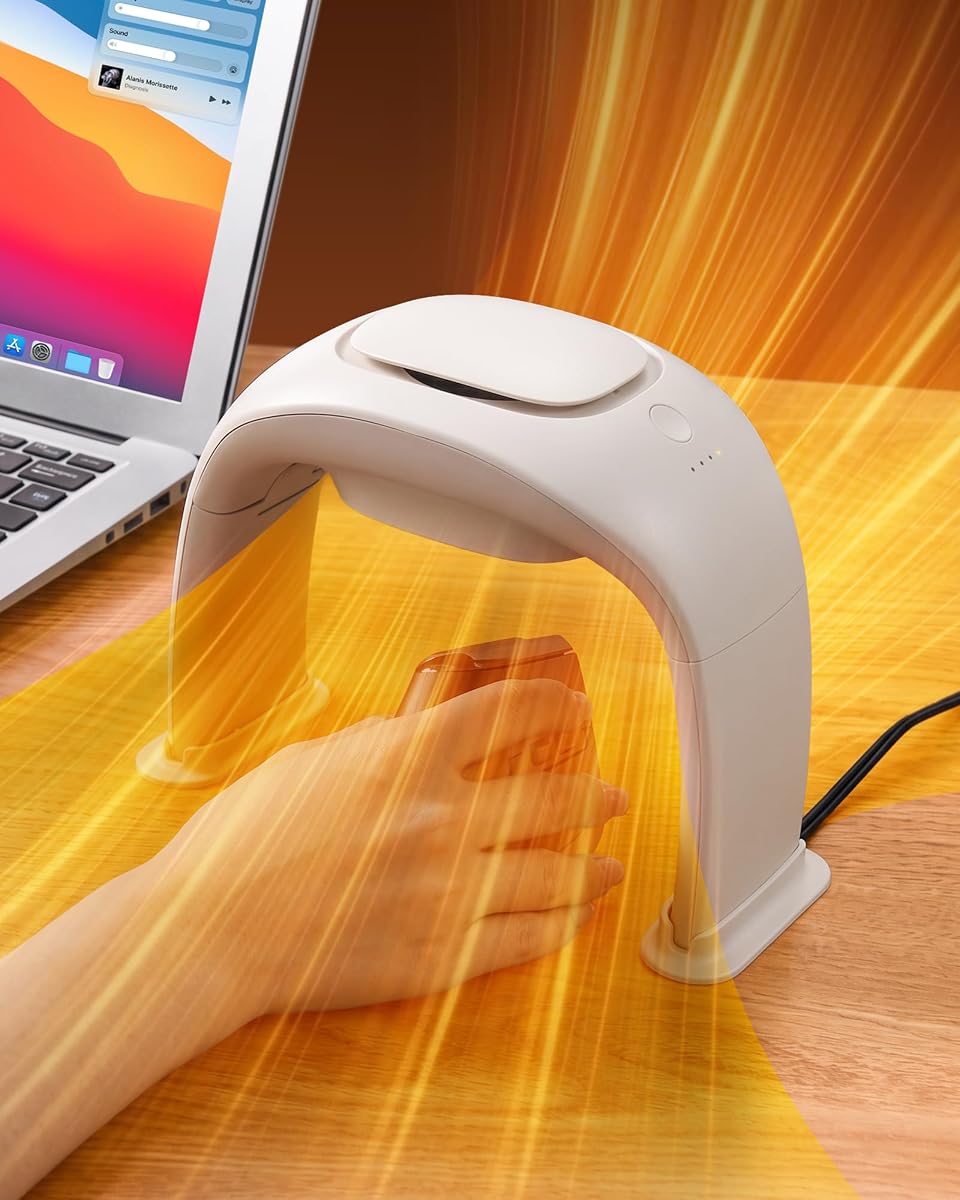
Desk Hand Warmer Over Mouse
4.5Editor score
Super quiet operation
Ceramic heating element
Foldable compact design
This guide compares the top 10 hand warmer mouse pad options for 2026, evaluating heating technology, safety features, design comfort, and user ratings to help
Cold hands at your desk can slow down productivity and make long work sessions uncomfortable. A hand warmer mouse pad provides consistent heat directly where you need it, keeping your fingers and wrists cozy while you type or game. These devices combine functionality with comfort, making them essential for anyone facing chilly office environments.
We have carefully evaluated ten leading models available in the market today. Our comparison focuses on heating speed, temperature control, safety mechanisms, and overall build quality. Each product was assessed based on user feedback and technical specifications to ensure reliability and performance during daily use in various settings.
Each pick in this list highlights unique strengths tailored to different needs and preferences. From budget-friendly USB options to premium insulated designs, you will find a range of choices. Please note that prices and availability can change frequently, so verify current details before making your final purchase decision online.
4.5Editor score

4.2Editor score

4.5Editor score
The following table provides a side-by-side comparison of all ten products reviewed in this guide. It highlights key specifications such as heating technology, temperature range, power source, and unique features to help you quickly identify the model that best suits your specific workspace requirements.


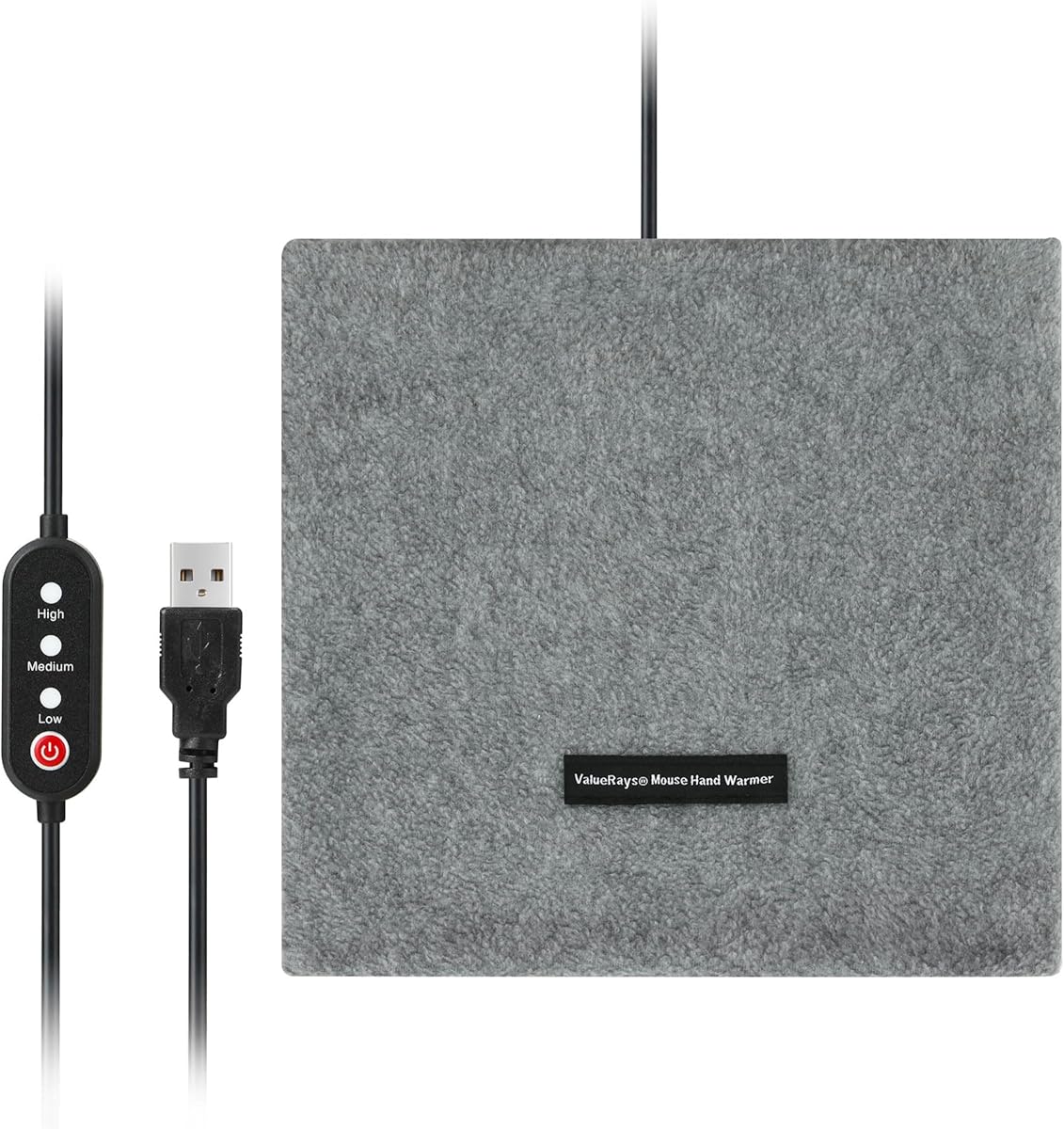
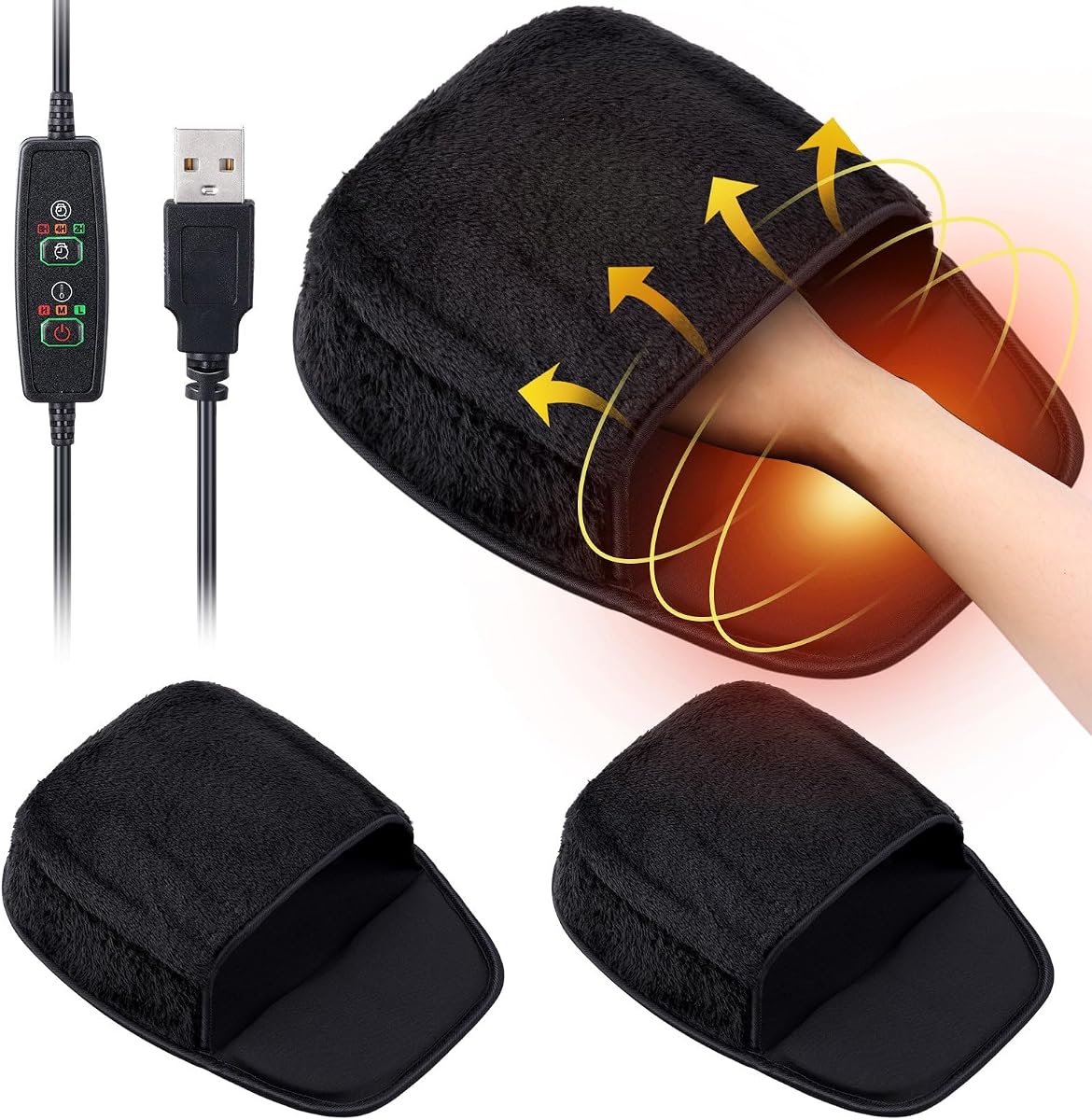

This heated mouse pad stands out as the top choice due to its enclosed design that wraps your entire hand in warmth. Unlike flat mats that only touch your wrist, this model uses a soft neoprene shell to keep fingers and knuckles cozy. It is ideal for users who need consistent heat during long work or gaming sessions.
We may earn a commission when you buy through this link, at no additional cost to you.
The product features three distinct temperature levels ranging from 110 degrees to 145 degrees Fahrenheit. You can select the perfect comfort level for your needs. Additionally, it includes built-in auto shut-off timers for safety. The PTC heating element distributes heat evenly without hot spots, ensuring a comfortable experience throughout the day.
One trade-off is the weight and the included controller cord, which might add some clutter to a minimalist desk. However, the removable heating element makes cleaning easy, and the non-slip base keeps it stable. These minor inconveniences are outweighed by the superior warmth and comfort it provides compared to standard pads.
Anyone who suffers from cold hands while working at a computer will find this product highly beneficial. It is a practical gift for remote workers, students, or gamers. The ergonomic wrist rest also reduces strain, making it a comprehensive solution for desk comfort during colder months.
The design fully encloses your hand in insulated neoprene, ensuring no part of your hand gets cold unlike open mats.
Built-in timers and compliant certifications ensure safe usage without worrying about overheating or leaving it on too long.
We may earn a commission when you buy through this link, at no additional cost to you.
This model is an excellent budget-friendly option that offers powerful heating without breaking the bank. It uses advanced ceramic technology to generate warmth quickly and efficiently. The design allows your hand to move freely within a dedicated space, providing full 360-degree warmth without restricting mouse movement.
We may earn a commission when you buy through this link, at no additional cost to you.
It operates at a very low noise level, making it suitable for quiet offices or bedrooms. The three heating modes let you adjust the warmth from gentle to intense depending on the weather. Safety features like auto shut-off when tipped over add peace of mind during daily use in active environments.
While it requires a standard wall plug which limits placement compared to USB models, the higher wattage ensures faster heating. The foldable design helps mitigate its size when not in use. For users needing a robust heater rather than a simple pad, this offers exceptional value for money.
This hand warmer is perfect for those who want a dedicated heating device that covers the hand fully. It is great for cold offices where USB ports might be occupied. The quiet operation ensures it does not distract from work or gaming sessions while keeping your hands perfectly warm.
Operating at less than 20 decibels, it provides warmth without the noise of traditional space heaters.
Smart energy-saving chips and tip-over protection ensure the device shuts off safely if accidents occur on the desk.
We may earn a commission when you buy through this link, at no additional cost to you.
This heated desk pad offers a premium experience with its large surface area and durable PU leather construction. It covers a significant portion of your desk, warming your hands, keyboard, and mouse area simultaneously. The waterproof material ensures longevity and ease of cleaning, making it a practical choice for daily office use.
We may earn a commission when you buy through this link, at no additional cost to you.
With three distinct heating levels, you can choose the right amount of warmth for your comfort. The auto shut-off feature after four hours adds a layer of safety for users who might forget to turn it off. It is certified by UL and FCC, giving you confidence in its electrical safety and performance standards.
While it is designed for stationary use with a standard plug, the large size means it replaces multiple desk accessories. The heating is consistent and reliable across the surface. This makes it an excellent investment for home offices or dedicated workstations where desk real estate is abundant and comfort is a priority.
Users looking for a comprehensive desk warming solution will find this mat highly effective. It is ideal for winter months when the entire workspace feels cold. The smooth surface also works well for mouse movement, ensuring that functionality is not sacrificed for warmth during extended working hours.
The expansive 31.5 inch width ensures your keyboard and mouse area are both warm, improving overall desk comfort.
UL and FCC certifications confirm that the heating element meets high safety standards for electrical products.
We may earn a commission when you buy through this link, at no additional cost to you.
This electric hand warmer offers a solid balance of performance and portability. It uses MCH technology combined with PTC ceramic heating to keep your hand warm while working. The foldable design is a key feature, allowing you to store it easily when not in use without taking up much desk space.
We may earn a commission when you buy through this link, at no additional cost to you.
It features a smart chip that maintains a constant temperature once set, which helps in energy efficiency. The noise level is kept very low, ensuring it does not disturb your concentration. Safety features like tip-over protection ensure that the unit cuts power if it gets knocked over accidentally.
The anti-skid silicone base keeps the device stable on smooth surfaces like glass or wood. While it is not the largest device on the market, it is effective for targeted warming. The compact size makes it suitable for smaller desks or laptops where space is at a premium.
This model is great for students or remote workers who need a reliable but unobtrusive heating solution. It is easy to operate with a simple button interface. If you want something that provides warmth without dominating your desk, this is a practical and efficient choice for winter days.
The ability to fold the device means it can be tucked away in a drawer when the weather warms up.
The smart chip adjusts power usage to maintain set temperature, saving energy while keeping hands warm.
We may earn a commission when you buy through this link, at no additional cost to you.
This product stands out because it provides two heated mouse pads in one package, offering great value for money. The pads are large enough to allow flexible mouse movement without consuming too much desk space. They come with a plush wrist rest that adds comfort while you use the heated function.
We may earn a commission when you buy through this link, at no additional cost to you.
Connection is simple via USB to your computer, making it easy to start warming your hands quickly. The material is skin-friendly and soft to the touch, which is pleasant during extended use. It is designed to keep hands warm without needing complex controls or settings.
One consideration is that the heater and the pad are separate components, which requires assembly. The rating is lower than premium options, but the price reflects this. It is a good entry-level option for those who want to try a heated pad without a large investment.
Ideal for families or offices where multiple warmers are needed, this two-pack ensures everyone has access. The large internal space accommodates different mouse sizes well. If you are looking for a cost-effective way to warm your hands while using a computer, this set offers a straightforward solution.
Buying two pads at once makes it perfect for homes with multiple workstations or a couple of computers.
The plush material and wrist rest provide a soft surface that supports your hand comfortably.
We may earn a commission when you buy through this link, at no additional cost to you.
This option focuses on comfort with its thick plush material that feels soft against the skin. It is designed to keep your hands warm while you work or play games using a computer. The heating pad is detachable, which allows for easy cleaning of the cover, extending the life of the product.
We may earn a commission when you buy through this link, at no additional cost to you.
Each package includes two pads, making it a generous offering for the price. The large size provides ample room for mouse movement, ensuring that your work is not restricted. It connects easily to USB ports on laptops or desktops for immediate warmth without setup hassles.
While it offers excellent comfort, it does not have variable temperature control, so the heat is consistent. The durability of the heating element might be limited compared to higher-end models, so regular unplugging is recommended. However, the softness and value make it a popular choice for gift-giving.
It is a thoughtful gift for friends or family members who spend time at their desks. The ease of use makes it suitable for anyone, regardless of technical skill. If you prioritize a soft feel and a good deal over advanced temperature settings, this model will meet your needs well.
The plush surface feels cozy and comfortable, reducing friction and fatigue on your wrists.
Because the heating element is removable, you can wash the fabric cover to keep it fresh and clean.
We may earn a commission when you buy through this link, at no additional cost to you.
This device delivers powerful heat with its 100W ceramic heating element, ensuring quick warming for cold hands. It is designed to be very quiet, operating at levels that do not disrupt your environment. The foldable legs allow for easy storage when not in use, keeping your workspace tidy.
We may earn a commission when you buy through this link, at no additional cost to you.
Safety features include over-heating and tip-over protection, ensuring it shuts off automatically if unsafe conditions occur. The three temperature settings allow you to choose the perfect warmth for the day. It is compatible with both left and right-handed users due to its wide design space.
While it requires a standard outlet instead of USB, this allows for higher power and more consistent heat. The lightweight design makes it easy to carry to different rooms or offices. It is a robust option for those who need significant warmth during very cold winter conditions.
Users who need a reliable and quiet heater for their desk will appreciate this model. It combines performance with safety, making it a trusted choice for office environments. If you want a device that heats up fast and stays quiet, this fits the bill perfectly.
The 100W output ensures that the device reaches desired temperatures quickly, even in very cold rooms.
Foldable legs and light weight make it easy to move from the office to the living room as needed.
We may earn a commission when you buy through this link, at no additional cost to you.
This hand warmer uses infrared technology to provide warmth to your hands while using a computer. It is controlled by a simple manual switch, making it very easy to operate. The USB power source means you can plug it directly into your laptop or desktop without needing extra cables.
We may earn a commission when you buy through this link, at no additional cost to you.
The compact design ensures it does not take up much room on your desk. It is suitable for users who prefer a no-fuss approach to heating their hands. While detailed specifications are limited, the focus is on providing reliable warmth through established heating methods.
It is a straightforward choice for those who do not need complex temperature settings. The infrared technology is known for efficient heat transfer. For anyone wanting a basic solution to cold hands, this offers a direct and practical way to stay comfortable.
Ideal for simple setups, this pad is great for occasional use. It works well in home offices or dorms where space is limited. If you value simplicity and basic functionality over advanced features, this model offers a convenient option for winter comfort.
Infrared heating provides direct warmth to your hands efficiently without heating the surrounding air unnecessarily.
A single manual switch allows you to turn the heat on and off quickly without navigating menus.
We may earn a commission when you buy through this link, at no additional cost to you.
This pack includes two pads with advanced features like three temperature modes and auto off timers. The built-in wrist cushion helps reduce strain during long typing or gaming sessions. It uses USB power to provide consistent warmth without requiring a wall outlet.
We may earn a commission when you buy through this link, at no additional cost to you.
The auto-off timers allow you to set the duration for heating, which saves energy and prevents overheating. The non-slip rubber base ensures the pad stays in place even when you move your mouse quickly. This adds to the stability and usability of the product.
While the rating is lower than top competitors, the feature set is quite robust for the price. It offers a good balance of comfort and functionality. The two-pack nature means you have a spare or can use them in different locations easily.
Ideal for users who need specific temperature settings for comfort, this pad is versatile. The wrist cushion adds an ergonomic benefit that many other pads lack. If you want a feature-rich option in a bundle, this provides a lot of value for the investment.
The wrist cushion fits the natural curve of your wrist, reducing pressure points during long work sessions.
Auto off timers let you set the heat for specific durations, ensuring you do not waste power.
We may earn a commission when you buy through this link, at no additional cost to you.
This heated desk pad combines multiple functions into one elegant product. It features a large PU leather surface that protects your desk from scratches and stains. The three temperature settings allow you to adjust the warmth according to your comfort needs during the day.
We may earn a commission when you buy through this link, at no additional cost to you.
The non-slip base ensures stability for your mouse and keyboard. It can be used as a mouse pad, keyboard pad, or even a desk pad when the heat is off. This versatility makes it a practical addition to any workspace, especially during colder months.
While there is no rating data available yet, the design includes essential safety features like auto-off. The durable leather material makes it easy to clean and maintain. It offers a stylish look that complements modern desk setups effectively.
Users looking for a versatile desk accessory that provides warmth and protection will find this useful. It is great for those who want a large mat that also heats. If you want a multifunctional solution for your desk, this product provides a lot of utility.
The high-quality leather covers your desk to prevent damage from spills or scratches.
At over 30 inches wide, it covers a wide area for both your mouse and keyboard.
We may earn a commission when you buy through this link, at no additional cost to you.
Choosing the right hand warmer mouse pad depends on several factors including how you work, your budget, and the level of warmth you need. This guide outlines the key aspects to consider before making your purchase decision.
Different models use various heating technologies such as PTC ceramic, infrared, or traditional coils. PTC ceramic is often more energy-efficient and safer, while infrared heats up quickly. Consider which technology aligns with your safety preferences and heating speed requirements.
Look for technology that offers consistent heat without hot spots.
Some pads are USB powered, which is convenient for laptop users, while others use wall outlets for higher power. USB models are portable, but wall-powered models often provide more intense heat. Determine which power source fits your workspace setup best.
Choose USB for portability or wall power for stronger warmth.
Not all hand warmers allow you to adjust the temperature. Models with multiple settings let you choose the perfect warmth for the weather. If you plan to use it all day, variable control can prevent overheating or discomfort.
Prioritize models with adjustable settings if you have varying needs.
Safety is paramount when using electrical heating devices. Look for features like auto shut-off timers, tip-over protection, and certifications like UL or FCC. These features reduce the risk of accidents if the device is left on or knocked over.
Always verify safety certifications before buying to ensure reliability.
Consider whether you prefer an enclosed cocoon design or a flat pad. Enclosed designs cover more of your hand but may be heavier. Flat pads are simpler but might leave parts of your hand cold. Also check for ergonomic wrist rests if you spend long hours at your desk.
Select a design that covers your hand adequately for your specific use case.
The size of the pad matters for your desk space. Some are compact, while others cover the whole desk. Ensure the dimensions fit your workstation without crowding other peripherals. Foldable options are great if you need to store it away frequently.
Measure your desk space before selecting to avoid clutter issues.
Materials like PU leather or neoprene affect durability and comfort. Waterproof or washable covers are easier to maintain. Check if the heating element is removable for cleaning. High-quality materials ensure the pad lasts longer under daily use.
Invest in durable materials if you plan to use it every day.
Prices vary significantly between basic pads and advanced heaters. Decide your budget and weigh it against features like temperature control and brand reputation. Sometimes paying more for safety and reliability is worth it. Consider two-packs if you need multiple units for value.
Balance your budget with essential features for the best value.
Start by plugging the device into a suitable power source such as a USB port or wall outlet. Ensure the power cable is not twisted or strained to prevent damage during use. Check that the surface is clean and dry before placing your hands on it to avoid slipping.
Adjust the temperature settings if your model allows. Start with a lower setting to gauge the heat level and increase gradually. If the device has an auto shut-off timer, set it according to your usage needs to ensure safety and energy saving while you work.
To clean the pad, remove the heating element if possible and wipe the surface with a damp cloth. Do not submerge the entire unit in water unless specified by the manufacturer. Store it in a dry place when not in use, and fold it carefully if it has a collapsible design.
It is generally recommended not to leave them on overnight even with auto shut-off timers. Most models have safety features like timers to turn off after a few hours. To be safe, turn it off manually when you leave your desk to avoid any electrical risks.
Yes, most heated mouse pads are designed to be ambidextrous. The heating area usually covers the space where your hand moves regardless of handedness. Check the product description if you need a specific shape, but standard models accommodate both.
Heating time varies by model but typically ranges from 30 seconds to a few minutes. Ceramic and PTC technologies usually heat up faster than older coils. Check the specifications for exact warm-up times before deciding on a model.
If the pad is USB powered, it may lose power when your computer sleeps. Ensure your USB port stays active in sleep settings if you want continuous heat. Wall-plugged models will keep working independently of your computer's power state.
Most pads are designed to be safe for skin contact with controlled temperatures. However, if you have very sensitive skin or circulation issues, test it at a lower setting first. Consult a doctor if you have specific medical concerns about heat therapy.
They are generally energy efficient and use low wattage compared to standard space heaters. USB models are especially low power. Wall models use more but still much less than room heaters. They are economical for individual hand warming.
It depends on the model. Some allow you to remove the heating element to wash the cover. Others may only allow wiping with a damp cloth. Always check the manufacturer's instructions to avoid damaging the electrical components.
With proper care and regular unplugging when not in use, they can last several years. The heating element might wear out over time in lower-end models. Durability depends on usage frequency and how well you follow maintenance guidelines.
We have reviewed ten diverse options ranging from simple USB pads to large heated desk mats. The USB Heated Mouse Pad Hand Warmer stands out as the best overall due to its enclosed design and safety features. For those needing a powerful wall heater, the Desk Hand Warmer Over Mouse is a top contender.
When choosing, prioritize safety features like auto shut-off and proper certifications for peace of mind. Consider your desk space and whether you need a portable USB option or a more powerful outlet-powered model. Comfort and temperature control are also key for long-term satisfaction.
Remember that prices and availability can change so check current listings before purchasing. We hope this guide helps you find the perfect hand warmer for your workspace. Stay warm and productive this season with the right accessory for your desk.