
Delinx 12V 4-Pin PWM PC Fan Speed Controller
4.9Editor score
Auto and manual dual mode support
Digital display for temperature and RPM
Wide voltage compatibility for safety
This guide compares the top front panel fan controllers for PC cooling, detailing features like LCD displays, PWM control, and temperature sensors to help you
Managing your PC cooling system is essential for performance and longevity. A front panel fan controller gives you immediate access to adjust fan speeds and monitor temperatures directly from your case without opening it up or relying on software.
We evaluated ten real products based on their build quality, control options, display clarity, and safety features. Each unit was analyzed for its ability to handle multiple fans, display critical data, and protect your hardware from overheating.
This list shows the top picks for different needs, from budget-friendly options to premium RGB models. Keep in mind that availability and pricing can change, so always verify details before making your final purchase decision today.
4.9Editor score

5.0Editor score

4.2Editor score
The following table provides a side-by-side overview of all ten controllers we reviewed. It highlights key specifications such as channel count, display type, and special features to help you compare them quickly.
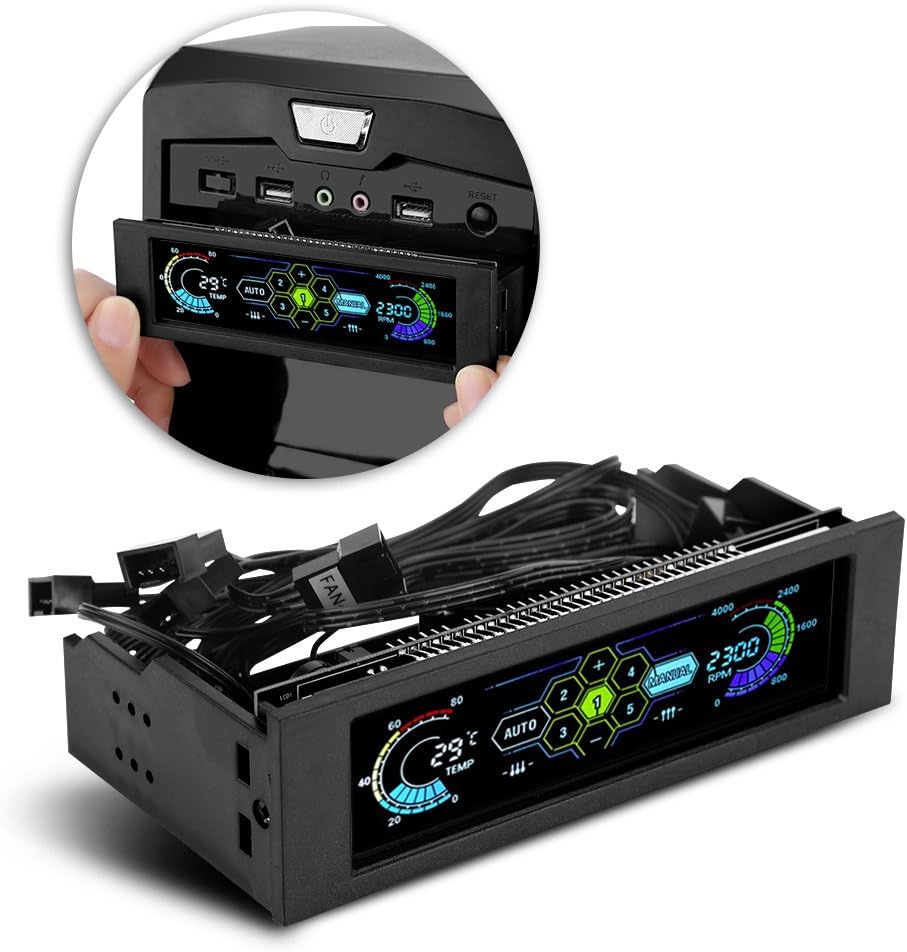


The STW-6041 stands out as a top contender in the front panel fan controller space with its perfect rating. It offers a reliable 5.25 inch optical drive bay installation and a clear LCD display to monitor your system. This model is designed for users who want straightforward control without unnecessary complications.
We may earn a commission when you buy through this link, at no additional cost to you.
Its standout quality is the comprehensive monitoring capability. The LCD screen shows four sets of fan speeds and four sets of temperatures simultaneously. This allows you to keep a close watch on every critical component of your PC. The over temperature warning system adds an extra layer of security for your hardware.
The build quality is impressive with an aluminum alloy panel that has undergone multiple matt treatments. This ensures it fits well in any chassis while resisting wear and tear. The PWM circuit helps reduce high frequency noise effectively which keeps your workspace quieter during operation.
Anyone looking for a dependable and quiet cooling solution should consider this unit. It balances functionality with durability and provides all the essential features needed for effective thermal management. We recommend it for anyone building a stable and efficient PC system.
The LCD screen provides real time data on fan speeds and temperatures so you can spot issues before they become critical problems.
High specification capacitors and a robust aluminum panel ensure the controller withstands high temperatures and long term use without failure.
We may earn a commission when you buy through this link, at no additional cost to you.
The Delinx 12V 4-Pin PWM offers exceptional value for those seeking an efficient controller without breaking the bank. It supports auto and manual modes and features a digital display for easy monitoring. This unit is perfect for DIY projects and compact builds where space is limited.
We may earn a commission when you buy through this link, at no additional cost to you.
Its key strengths include a wide voltage range and robust safety protections. The controller supports 5V to 30V inputs and includes over voltage and reverse polarity protection. This makes it versatile for various setups beyond just PC cooling including servers and aquariums.
While it lacks the traditional optical drive bay design it compensates with flexibility and ease of integration. The compact size allows it to be mounted anywhere in your system. However users should note it requires a USB-C PD charger or similar power source for operation.
Budget conscious buyers will appreciate the performance per dollar this controller delivers. It provides precise thermal management and safety features that are often found in more expensive units. We suggest this for anyone needing a reliable and affordable fan control solution.
The wide voltage input allows this controller to work with various power sources making it suitable for diverse applications like NAS and greenhouses.
Built in protections against over voltage and reverse polarity ensure stable long term use even in demanding environments.
We may earn a commission when you buy through this link, at no additional cost to you.
The Thermaltake Commander F6 brings premium features to your front panel with its RGB LCD screen and six channel control. It is designed for users who want both performance and aesthetics in their PC build. The included sensors allow for accurate thermal monitoring across your system.
We may earn a commission when you buy through this link, at no additional cost to you.
This unit stands out with its six voltage control knobs and temperature sensors. Each knob allows you to independently adjust a specific fan channel. The RGB LCD screen adds a modern touch to your rig and the controller supports LED strips for a cohesive look.
While it comes with a higher price tag the build quality justifies the investment. The warning alarm and short circuit protection ensure your hardware stays safe. However it relies on manual control rather than software integration which might limit advanced users.
Enthusiasts who prioritize visual appeal and manual control will love this option. It offers a high level of customization and a premium feel. We recommend it for builds where style and direct hardware control are top priorities.
The RGB LCD screen and LED strip compatibility allow you to match the controller with your existing lighting theme for a unified look.
Six voltage control knobs give you precise manual adjustment for every fan channel ensuring optimal cooling for every component.
We may earn a commission when you buy through this link, at no additional cost to you.
The V BESTLIFE Fan Speed Controller is a practical choice for users who want to monitor more than just fans. It features a big LCD screen that displays hard disk state alongside temperature and fan speed data. This extra information helps you track overall system health effectively.
We may earn a commission when you buy through this link, at no additional cost to you.
Its ability to control up to five fans makes it suitable for larger cases with multiple cooling points. The alarm temperature range can be manually set between 40 and 90 degrees to suit your specific cooling needs. It alerts you immediately if a fan breaks down.
The auto and manual mode switch gives you flexibility depending on your usage scenarios. When automatic mode is engaged the system adjusts speeds based on temperature. In manual mode you can set specific speeds for quiet operation or high performance.
This controller is ideal for users who value comprehensive monitoring at a reasonable price. The hard disk state feature is a unique addition that sets it apart from many competitors. We suggest this for builds with multiple drives and fans.
The LCD screen shows hard disk state and other critical data so you can monitor the whole system from one place.
Switch between automatic and manual modes to balance noise and cooling performance as needed for your workload.
We may earn a commission when you buy through this link, at no additional cost to you.
The SaiDian controller offers a unique touch by including a date and time display on its LCD screen. This feature adds a practical utility beyond just thermal management. It fits into a standard 5.25 inch optical drive bay and allows for manual and automatic control settings.
We may earn a commission when you buy through this link, at no additional cost to you.
Its main function is to manage three groups of fans with clear visual feedback on temperature and speed. The fan jam alarm sounds immediately if a fan fails to dissipate heat. This alerts you to potential overheating issues before they cause damage to your hardware.
The alarm temperature range can be manually set to prevent hardware damage from overheating effectively. It can slow down speed when high temperature and fan abnormal. The power supply interface is straightforward and makes installation relatively simple for most users.
This controller is a budget friendly option for those who want extra utility like the time display. While it has fewer channels than others it covers the basics well. We recommend it for casual users who need simple and effective fan management.
The date and time display adds a practical feature that makes your front panel more useful than just a fan controller.
The fan jam alarm and temperature settings help protect your system from overheating in a straightforward and reliable way.
We may earn a commission when you buy through this link, at no additional cost to you.
The Ejoyous Computer Fan Controller provides a solid four channel setup for users who need multiple fan zones. Its PWM circuitry allows for precise control and reduces annoying high frequency noises effectively. This makes it a strong choice for quiet and efficient cooling systems.
We may earn a commission when you buy through this link, at no additional cost to you.
The wide LCD display lets you keep an eye on RPM and four temperature values conveniently. If the measured temperature exceeds 60 degrees Celsius an acoustic alarm alerts you immediately. This double safety function supports more reliable operation without constant monitoring.
The panel is made of aluminum alloy with multiple matte finishes for a robust appearance. High temperature capacitors support a long lifespan and reliable function inside your PC case. It balances functionality with a sturdy build that is designed to last.
Users who prioritize low noise levels will find this unit particularly appealing. The PWM operation ensures smooth fan adjustments without harsh sounds. We suggest this for anyone looking to build a quiet PC with clear thermal monitoring capabilities.
The PWM circuitry reduces high frequency noise so you can enjoy a quieter workspace while maintaining effective cooling.
An aluminum alloy panel and high temperature capacitors ensure the controller withstands heat and lasts for years.
We may earn a commission when you buy through this link, at no additional cost to you.
The ARCTIC Fan Controller takes a different approach by focusing on software integration rather than a front panel display. It offers ten ports with individual PWM control which is rare for this category. Native driver support for Windows and Linux enables compatibility with monitoring software.
We may earn a commission when you buy through this link, at no additional cost to you.
Its key strength is the ability to move beyond limited hub signals for customization. You can optimize airflow precisely by managing every fan individually through software. This centralized cable management ensures a cleaner build by eliminating the need for extension cables.
Unlike traditional controllers it supplies up to 2 A per port for a total maximum current of 4.5 A. This means you have more power available compared to standard motherboard ports. Magnetic or adhesive mounting gives you flexibility on where to place the hub.
Tech savvy users who prefer software control will appreciate this option. It provides precise management and superior performance for PC builds. We recommend it for anyone who wants deep control over their fan setup without cluttering the front panel.
Native drivers allow you to use popular monitoring tools to manage fans directly from your desktop for advanced control.
Each port supplies 2 A of power so high performance fans get the current they need without throttling.
We may earn a commission when you buy through this link, at no additional cost to you.
The Noctua NA-FC1 is a compact highly flexible controller designed for 4 pin PWM fans. It works as a manual speed reducer or alongside motherboard control. This allows you to achieve truly quiet operation even with high speed fans like Noctua industrialPPC series.
We may earn a commission when you buy through this link, at no additional cost to you.
Its unique No stop mode prevents the fan from falling below a speed of 300 rpm. This avoids BIOS fan errors that can occur when fans spin too slowly. It includes a 3 way splitter cable for controlling up to 3 fans simultaneously.
The build quality reflects Noctua reputation with a sturdy design and a 6 year warranty. It is small enough to fit inside the case without taking up valuable space. While it lacks a front panel display it offers reliable manual control inside the chassis.
Anyone who values simplicity and reliability should consider this controller. It is perfect for quiet builds where you do not need a front panel display. We recommend it for users who want a no fuss manual control solution.
The No stop mode keeps fans running above 300 RPM to prevent BIOS errors during low speed operation.
A six year manufacturer warranty ensures you are covered for a long time if any issues arise with the unit.
We may earn a commission when you buy through this link, at no additional cost to you.
The 4 Fans Computer Fan Controller offers a standard setup with date and time display. It fits into an optical drive bay and provides four channels for fan speed control. The alloy panel has been treated for a matte finish that suits most chassis designs.
We may earn a commission when you buy through this link, at no additional cost to you.
Its main feature is the alarm system that warns when the temperature exceeds 60 degrees. The temperature flashes and an alarm sounds to alert you immediately. The PWM circuit adjusts speed to reduce noise and lower power consumption effectively.
The LCD screen displays four sets of fan speeds and temperatures for easy monitoring. It includes high specification capacitors that are designed to handle high temperatures. This ensures a longer service life compared to cheaper alternatives.
This unit is a basic option for those who need simple date and thermal data. While it has a lower rating it covers the essential functions needed for cooling. We suggest it for casual users who do not require advanced features.
The LCD screen keeps track of fan speeds and temps so you can monitor your system at a glance.
High temperature alarms and PWM noise reduction help keep your system safe and quiet during operation.
We may earn a commission when you buy through this link, at no additional cost to you.
The 5-Fans Speed Computer Fan Controller is designed to handle large cooling setups. It controls the wind speed of 5 groups of fans which is ideal for extensive builds. The big LCD screen displays temperature fan speed alarm temperature and hard disk state.
We may earn a commission when you buy through this link, at no additional cost to you.
You can manually set up the alarm temperature range from 40 to 90 degrees. This allows you to customize the warning levels according to your hardware sensitivity. The auto and manual modes give you flexibility for different usage scenarios.
The hard disk state display is a useful addition for tracking system health alongside fans. When a fan breaks down and cannot cool the computer it will alert immediately. This ensures you are aware of cooling failures right away.
Users with multiple fans will find the five group control particularly useful. The date time display adds a nice touch to the front panel functionality. We recommend this for larger cases that require extensive fan management.
Control five groups of fans to manage airflow effectively in large cases with multiple cooling components.
Display hard disk state alongside fan speeds for a complete view of your system performance on the LCD screen.
We may earn a commission when you buy through this link, at no additional cost to you.
Selecting the right controller depends on your cooling needs and build preferences. Consider the following factors to find the perfect match.
The number of channels determines how many fans you can control independently. Basic models offer three to four channels while advanced units can handle up to ten or more for extensive setups.
Controllers come with LCD or digital displays that show temperature and fan speed. Some models also include date and time or hard disk state for a comprehensive system overview.
Look for units that offer both automatic and manual modes. Auto mode adjusts speeds based on temperature while manual mode lets you set speeds directly for quiet or high performance operation.
Safety features like over temperature warnings and fan jam alarms are crucial. They alert you to overheating or fan failure before hardware damage occurs.
A sturdy aluminum alloy panel and high temperature capacitors ensure longevity. Look for models that mention specific protective measures against heat and electrical issues.
Most controllers fit a standard 5.25 inch optical drive bay. Ensure your case has a compatible slot before purchasing a front panel unit.
PWM control allows for precise speed adjustments and noise reduction. Ensure your fans and controller are compatible with PWM signals for optimal performance.
Some controllers offer software support for Linux and Windows users. This is useful if you prefer managing fans through a desktop interface rather than a physical panel.
Connect the controller to a 12V power source and link the fan cables to the correct channels. Make sure you plug the temperature probe into the designated port for accurate readings.
Set your preferred alarm thresholds and modes through the front panel buttons. Regularly check the display to ensure all fans are spinning correctly and temperatures are within safe limits.
Keep the controller area free of dust and debris to prevent overheating. Inspect connections periodically to ensure they remain secure and there is no corrosion on the pins.
It allows you to adjust fan speeds and monitor temperatures directly from the front of your PC case. This gives you immediate control over cooling without needing to open the case or use software.
Most units fit into standard 5.25 inch bays and connect to your power supply. The process is straightforward and usually takes just a few minutes to set up.
Many controllers support 3-pin and 4-pin PWM fans. Always check the product specs to ensure compatibility with your specific fan connectors.
Alarms warn you when temperatures get too high or fans stop working. This prevents overheating and protects your hardware from damage during operation.
Yes many models have an automatic mode that adjusts fan speeds based on temperature readings. This helps maintain optimal cooling without manual intervention.
PWM allows for precise speed adjustments which reduces noise and power consumption. It ensures your fans run as fast as needed but no faster.
Most front panel units require a 5.25 inch optical drive bay. Check your case specifications to confirm you have the correct space before buying.
We have reviewed ten top options ranging from budget friendly units to premium RGB models. Each controller offers unique features to suit different cooling needs and build preferences.
Prioritize the number of channels and safety features that matter most to your specific setup. A good controller will help keep your system cool and quiet for years.
Remember to check current availability before making a final decision. Our list provides a solid starting point for finding the perfect cooling solution for your PC.