
TP-Link ER605
4.4Editor score
Five gigabit ports
Supports USB WAN
Advanced security features
This guide compares the top ten dual wan router models for reliability and speed. We evaluate features like load balancing and failover to help you choose the
A dual wan router ensures your network stays online even if one internet connection fails. These devices support multiple internet service providers for better reliability and performance in homes and businesses.
We analyzed ten top models based on port options, security features, and ease of use. Our team examined technical specs and user feedback to identify the most capable devices for various needs.
Each pick highlights specific strengths like budget value or enterprise features. Prices and availability change frequently so please check current listings before making your final purchase decision today.
4.4Editor score

4.4Editor score

4.2Editor score
We compare all ten models side by side to highlight key differences. This table shows essential specs like port counts and security options to help you make an informed decision quickly.



The Cudy R700 is a powerful multi-WAN router designed for users who want control. It supports up to five ISPs for maximum uptime and includes full OpenWRT support for advanced customization.
We may earn a commission when you buy through this link, at no additional cost to you.
Its standout feature is the ability to segment networks and apply custom firewall rules. The built-in VPN suite supports WireGuard and OpenVPN making it ideal for secure remote access.
While the interface is simple some features require technical know-how. This trade-off is acceptable because you gain enterprise-level control at an affordable price point.
This model is perfect for home labs and small offices needing flexibility. If you value customization and reliability the Cudy R700 is a top choice for your network.
Full OpenWRT support allows you to install community packages and customize your network behavior to suit specific needs.
Connect up to five ISPs to ensure your business stays online even if multiple internet connections fail simultaneously.
We may earn a commission when you buy through this link, at no additional cost to you.
The TP-Link ER605 offers reliable dual WAN capabilities at an entry-level price. It provides five gigabit ports and supports USB WAN backup for 4G connections.
We may earn a commission when you buy through this link, at no additional cost to you.
It includes essential security features like DoS defense and IP filtering. The VPN support covers IPsec and OpenVPN ensuring secure remote access for small teams.
While it lacks Wi-Fi and advanced customization it delivers core routing functions well. This simplicity makes it a strong choice for budget-conscious users.
If you need basic load balancing without breaking the bank this router fits the bill. It is a solid foundation for a wired home or small office network.
Connect a 4G modem to the USB port for instant failover when your main internet line goes down.
Built-in DoS defense and filtering protect your network from common threats without extra software.
We may earn a commission when you buy through this link, at no additional cost to you.
The NETGEAR PR60X delivers high performance with 10G and 2.5G ports for modern networks. It includes cloud management for easy remote monitoring and control.
We may earn a commission when you buy through this link, at no additional cost to you.
Its secure remote access features support IPSec and WireGuard ensuring safe connections for remote workers. The ability to manage up to 32 VLANs adds significant flexibility.
The cost is high but justified for businesses needing speed and centralized management. Most home users may not need these features but enthusiasts will appreciate the power.
If you require gigabit or multi-gig speeds with professional tools this router is ideal. It balances raw performance with convenient cloud-based administration.
Ports support 10G and 2.5G speeds to handle high bandwidth applications like 4K streaming or large file transfers.
NETGEAR Insight lets you manage your network from anywhere using a simple web interface or app.
We may earn a commission when you buy through this link, at no additional cost to you.
The Omada ER707-M2 is built to scale with your business needs. It features 2.5Gigabit ports and integrates seamlessly with the Omada ecosystem.
We may earn a commission when you buy through this link, at no additional cost to you.
It supports up to 500,000 sessions and 100 VPN tunnels making it powerful for busy networks. Remote access is easy with cloud tools and the Omada app.
A five year warranty provides peace of mind for long-term deployments. However it works best when you already use other Omada access points.
If you are building a unified network this router offers excellent scalability. Its balance of performance and management tools makes it a strong mid-range choice.
Integrates easily with other Omada devices for centralized network management across multiple sites.
Handle up to 500,000 concurrent sessions without slowing down your network performance.
We may earn a commission when you buy through this link, at no additional cost to you.
The ASUS RT-BE88U combines WiFi 7 speed with dual WAN capabilities. It offers two 10G ports and powerful AI features for network optimization.
We may earn a commission when you buy through this link, at no additional cost to you.
Its AiProtection Pro provides commercial-grade security and intrusion prevention. AI WAN detection helps you maintain always-on internet by choosing the best path.
The cost is significant but you get top-tier hardware and software. It is best for users who want the latest wireless tech alongside robust routing.
If you need cutting-edge speed and security this router is a powerhouse. It bridges the gap between advanced networking and wireless performance.
Multi-Link Operation and 4096-QAM boost throughput for demanding applications like VR and 8K video.
Automatically detects and switches to the best internet path to maintain consistent connectivity.
We may earn a commission when you buy through this link, at no additional cost to you.
The ASUS ExpertWiFi EBG15 focuses on security and simplicity. It features a Layer 7 firewall and intrusion prevention to block malicious traffic effectively.
We may earn a commission when you buy through this link, at no additional cost to you.
Setup is easy via the mobile app and web browser. It supports three WAN ports and USB backup for reliable connectivity in small offices.
While it offers strong security it may lack raw speed for high-demand environments. The free subscription to AiProtection Pro adds significant value for safety.
If you prioritize security over raw throughput this router is a smart pick. It provides commercial-grade protection without complex configuration steps.
Deep packet inspection and intrusion prevention stop threats before they reach your devices.
Assign ports to different VLANs to isolate sensitive traffic from the rest of your network.
We may earn a commission when you buy through this link, at no additional cost to you.
The D-Link DSR-250V2 is designed for secure remote access. It follows NDAA and TAA standards ensuring trust in government and regulated environments.
We may earn a commission when you buy through this link, at no additional cost to you.
It supports strong encryption and up to 75 VPN tunnels for reliable remote work. Management is simplified with web and SNMP tools.
User ratings are lower which may indicate reliability concerns. However its compliance and lifetime warranty offer long-term value for specific sectors.
If you need compliance and solid VPN features this router meets the bar. It is best suited for businesses with strict security and trust requirements.
Meets strict government standards ensuring trust for agencies and regulated businesses.
A limited lifetime warranty provides confidence in the longevity of your investment.
We may earn a commission when you buy through this link, at no additional cost to you.
The Peplink B-One is built for enterprise branches needing reliability. Its SpeedFusion technology ensures seamless failover and load balancing.
We may earn a commission when you buy through this link, at no additional cost to you.
It integrates with Starlink and offers robust WAN smoothing for smooth video calls. Automatic firmware updates keep security and performance at peak levels.
While costly it delivers unparalleled stability for mission-critical connections. This makes it a solid choice for businesses where downtime is not an option.
If you need a router that keeps your branch online 24/7 this is a top pick. Its focus on resilience and connectivity sets it apart from standard models.
Blends multiple internet connections into a single robust link for faster and more reliable throughput.
Integrates seamlessly with Starlink for backup or load balancing with other providers.
We may earn a commission when you buy through this link, at no additional cost to you.
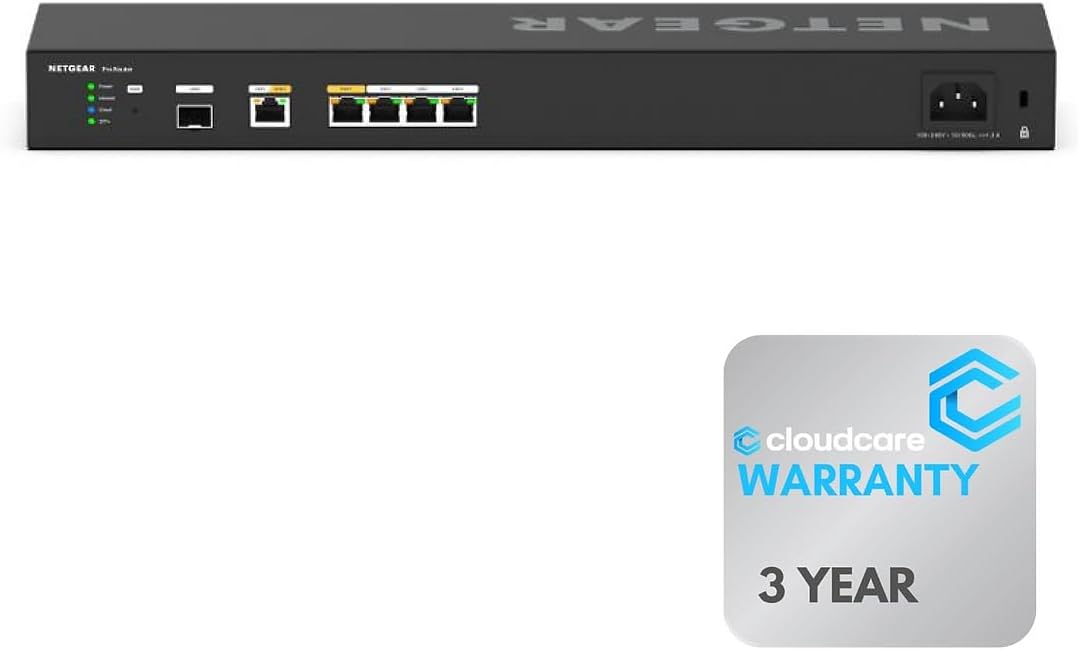
This version of the PR60X includes a rack-mountable design and Cloud Care warranty. It supports six 10G ports for maximum speed in professional setups.
We may earn a commission when you buy through this link, at no additional cost to you.
Management is done via Insight cloud offering remote control and visibility. The included warranty adds value by simplifying claims and support.
While expensive it provides all-in-one enterprise tools. If you need a server-ready router with professional support this model is highly effective.
It is ideal for data centers and offices requiring centralized control. Its performance and warranty make it a reliable investment for IT teams.
Streamlines claims and support with a unified warranty process for added peace of mind.
Designed to fit in standard racks for efficient space usage in professional environments.
We may earn a commission when you buy through this link, at no additional cost to you.
The Linksys LRT224 offers basic dual WAN and VPN features for small teams. It supports load balancing and failover for reliable internet access.
We may earn a commission when you buy through this link, at no additional cost to you.
With up to 50 IPsec tunnels it covers standard business needs. The interface is straightforward but may lack modern conveniences.
It is affordable but may show its age compared to newer models. For basic routing it remains a solid option for small shops.
If you need simple load balancing without complexity this router works well. It is best for users who prioritize ease of use over speed.
Supports up to 50 IPsec tunnels for secure site-to-site and remote connections.
Optimizes multiple broadband lines for smoother and more reliable performance.
We may earn a commission when you buy through this link, at no additional cost to you.
Choosing the right dual wan router depends on your bandwidth needs and technical skills. Here are the key factors to consider before making a purchase.
Check the number of WAN and LAN ports to ensure they meet your current setup. Some models offer 2.5G or 10G ports for high-speed connections.
Choose a router with enough ports to avoid needing extra switches or cables.
Failover switches to a backup line when the primary fails while load balancing splits traffic across multiple lines. Decide which feature matters more to your usage.
Both features improve reliability so look for automatic switching options.
Many businesses need secure remote access so check the types of VPNs supported like OpenVPN or WireGuard. Also consider the number of tunnels allowed.
More tunnels and modern protocols ensure better security for remote teams.
Look for firewalls intrusion prevention and DoS defense to protect your network. Advanced models include content filtering and VLAN support for segmentation.
Strong security features reduce the risk of unauthorized access or attacks.
Cloud management lets you control your network from anywhere while local web interfaces offer more detailed control. Choose what fits your management style.
Mobile apps and cloud tools simplify setup and ongoing maintenance for busy users.
Prices vary from budget-friendly models to high-end enterprise gear. Consider the features you actually need versus those you can live without.
A mid-range router often balances cost and performance best for small businesses.
If you already use specific access points or switches pick a router that integrates seamlessly. This avoids compatibility issues and simplifies management.
Sticking to one brand can make expansion and maintenance much easier.
Check the warranty length and availability of technical support. Lifetime warranties are rare but offer long-term protection.
Good support ensures help when issues arise so prioritize brands with strong reputations.
Set up your primary and backup internet cables in the WAN ports and follow the setup wizard for initial configuration. This ensures you are connected before adding advanced rules.
Configure failover or load balancing rules based on your needs. For failover set the priority so the backup line only activates when the main line drops.
Keep firmware updated to patch vulnerabilities and improve performance. Use the cloud interface or app for reminders and apply updates during off-peak hours.
A dual wan router connects to two internet sources for redundancy or speed. It ensures your network stays online if one connection fails or distributes traffic across both lines.
Some models include WiFi but many are wired-only. Check the product details if you need wireless coverage as you may still need separate access points.
Yes many models support USB WAN for mobile hotspots. You can plug in a 4G modem or phone to use mobile data as a backup source.
Load balancing splits internet traffic between multiple connections to maximize speed. It improves performance for bandwidth-heavy tasks like video streaming or large file uploads.
VLANs are optional but useful for separating networks. If you need guest or business traffic isolation enabling VLANs helps keep data secure and organized.
Most routers offer web interfaces or apps for setup. Basic steps involve connecting cables and following prompts. Advanced features may require network knowledge.
Check the router specs for tunnel limits. If you need more than the limit allow look for enterprise-grade models that support higher capacities.
Yes especially if you need reliable internet for remote work. However some models are complex. Simple units work best for users who just need failover.
The Cudy R700 TP-Link ER605 and NETGEAR PR60X lead our list with balanced features. Each offers unique strengths depending on your network size and technical skill.
Prioritize uptime and security features that match your business needs. Load balancing and failover ensure you stay connected while strong VPNs keep data safe.
Always verify current prices and availability before buying since deals change. The right router keeps your operations running smoothly no matter what happens with your internet.