
CENMATE Aluminum 4 Bay
4.3Editor score
Aluminum alloy cooling design
Supports up to 80TB total
USB A/C 3.0 compatibility
Direct Attached Storage offers a powerful way to expand your digital workspace without the complexity of networked solutions. It provides immediate access to vast amounts of data through a simple cable connection, making it ideal for professionals who need speed and simplicity.
We evaluated ten leading DAS enclosures based on transfer speeds, build quality, compatibility, and unique features like hybrid bays and hardware RAID. Our analysis focuses on real-world performance metrics and user experiences to help you find the perfect match for your storage needs.
Each selection highlights specific strengths such as silent operation, massive capacity, or innovative hybrid designs. While we strive for accuracy, availability and pricing fluctuate frequently, so please verify current details before making your final purchase decision today.
4.3Editor score

4.2Editor score

5.0Editor score
As an Amazon Associate we earn from qualifying purchases.
The following table provides a side-by-side comparison of all ten selected DAS enclosures. It highlights key specifications such as bay count, interface speed, maximum capacity, and special features to help you quickly identify the model that fits your requirements.


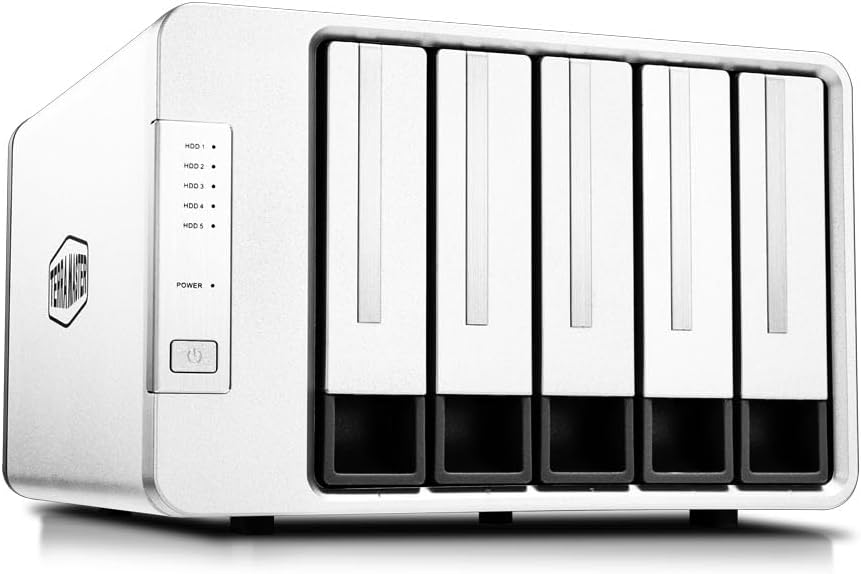


The TERRAMASTER D4-320 stands out as a premier Direct Attached Storage solution for users needing high-speed access without network complexity. Its robust construction and advanced thermal management make it a reliable choice for demanding workflows involving large media files.
We may earn a commission when you buy through this link, at no additional cost to you.
Featuring USB 3.2 Gen2, this enclosure delivers transfer speeds up to 10Gbps, enabling rapid movement of gigabyte-sized datasets. The tool-free drive trays with Push-lock design simplify maintenance and allow hot swapping, ensuring minimal downtime during drive changes or system reconfigurations.
While it lacks hardware RAID capabilities which might limit some enterprise users, its plug-and-play simplicity suits most professional and creative workflows. The intelligent cooling fan ensures drives stay within safe temperatures even during sustained heavy loads, protecting your valuable data.
This model is ideal for video editors, photographers, and IT professionals who need immediate access to multiple large drives. Its combination of speed, ease of use, and reliable performance makes it our top recommendation for general-purpose Direct Attached Storage.
The USB 3.2 Gen2 interface ensures you get maximum throughput from your SSDs and HDDs without bottlenecks.
Replace drives without shutting down the system, keeping your workflow uninterrupted during maintenance tasks.
We may earn a commission when you buy through this link, at no additional cost to you.
The QNAP TR-004 is uniquely positioned for users already invested in the QNAP ecosystem looking to expand storage capacity seamlessly. It offers hardware RAID functionality which is rare in budget DAS units, providing an extra layer of data protection for critical files.
We may earn a commission when you buy through this link, at no additional cost to you.
Its USB Type-C interface ensures modern connectivity while maintaining backward compatibility with older systems via adapters. The hardware RAID controller allows for RAID 0, 1, 5, and JBOD configurations, giving you flexibility in balancing speed and redundancy according to your needs.
While compatibility is restricted to specific QNAP NAS models requiring QTS 4.3.6 or later, this limitation ensures optimized performance within that ecosystem. The lockable drive bays add a security feature often missing in standard external enclosures for physical drive protection.
This unit is best suited for small businesses or home labs using QNAP NAS where expansion storage is required. It bridges the gap between simple DAS and full network storage by offering robust features in a compact form factor.
Built-in RAID controller protects data from drive failure without relying on software or host CPU resources.
Physical locks on drive bays prevent unauthorized access to internal drives in shared environments.
We may earn a commission when you buy through this link, at no additional cost to you.
The TERRAMASTER D8 Hybrid offers an innovative storage architecture that allows users to leverage the best of both world technologies. It accommodates four standard hard drives for massive storage alongside four NVMe SSDs for rapid access to frequently used files.
We may earn a commission when you buy through this link, at no additional cost to you.
This hybrid approach enables efficient data tiering where hot data lives on fast SSDs and cold data resides on cost-effective HDDs. The USB 3.2 Gen2 interface ensures the SSDs can reach speeds near 980MB/s which significantly accelerates workflows like video editing.
While the complexity of managing two drive types might be challenging for casual users, the performance benefits are substantial for professionals. The power on recovery feature ensures the device automatically restarts after power outages maintaining uptime without manual intervention.
This unit is perfect for power users who need both massive storage and blistering speeds in a single enclosure. Its unique configuration makes it a standout option for those looking to optimize storage efficiency and performance simultaneously.
Separate bays allow you to store active projects on SSDs and archives on HDDs efficiently.
Dedicated NVMe slots provide near-internal drive speeds for external storage tasks.
We may earn a commission when you buy through this link, at no additional cost to you.
For those seeking an economical solution to expand storage without sacrificing basic functionality, the CENMATE Aluminum 4 Bay delivers excellent value. Its aluminum construction helps dissipate heat effectively which is crucial for maintaining drive longevity during prolonged use.
We may earn a commission when you buy through this link, at no additional cost to you.
The enclosure supports both 2.5 and 3.5 inch drives making it versatile for various existing hardware collections. Hot swappable capability ensures you can swap drives without shutting down your computer keeping your workflow continuous and efficient.
While the USB 3.0 interface caps speeds at 5Gbps which is lower than newer standards, it remains sufficient for general file transfers. The active cooling fan maintains thermal stability though it can generate noticeable noise in quiet environments.
This model is ideal for home users and small businesses looking to scale storage on a tight budget. Its balance of capacity, cooling, and price makes it a compelling entry point into Direct Attached Storage solutions.
The metal body acts as a heat sink to protect drives during high load periods.
Supports both laptop and desktop drives allowing reuse of existing hardware components.
We may earn a commission when you buy through this link, at no additional cost to you.
The SABRENT 5-Bay USB-C docking station is engineered for users who need to manage a large number of drives simultaneously. With five bays it offers significant expandability supporting up to 100TB total which is rare for single-port external enclosures.
We may earn a commission when you buy through this link, at no additional cost to you.
Each bay has its own dedicated controller ensuring stable independent connections that prevent bottlenecks during simultaneous access. The USB-C 10Gbps interface ensures you get the fastest possible throughput available on consumer interfaces for large data transfers.
Hot swap capability combined with per-bay power switches gives you granular control over drive power and access. The daisy-chain feature allows you to connect multiple docks to a single port expanding your setup further without running out of host ports.
This unit is best for professionals managing massive datasets like video libraries or backup archives. Its high capacity and reliable independent drive management make it a superior choice for heavy-duty workstation environments.
Independent switches let you power specific drives on or off as needed without full reboot.
Support for 100TB total storage ensures long-term scalability without hardware upgrades.
We may earn a commission when you buy through this link, at no additional cost to you.
The TERRAMASTER D8 Hybrid 2 sets a new standard for external storage performance with its advanced hybrid architecture. It combines four SATA drive bays with four NVMe slots offering a balance of massive capacity and high-speed data access in one enclosure.
We may earn a commission when you buy through this link, at no additional cost to you.
Its proprietary TPM power management system optimizes power efficiency and ensures faster wake-up times for connected drives. This feature is particularly useful for professionals who need their storage to be instantly available without wait times after sleep mode.
The USB 3.2 Gen2 interface supports speeds up to 10Gbps ensuring that the NVMe SSDs perform at near-internal levels. With support for up to 152TB total capacity it remains relevant even as drive sizes increase over time.
This premium model is designed for creative professionals who cannot afford compromises in speed or storage volume. Its unique combination of features makes it the top choice for those willing to invest in the best external storage solution.
Proprietary technology optimizes power use and improves drive wake-up times significantly.
Combining NVMe and HDD allows for efficient caching and massive archival storage together.
We may earn a commission when you buy through this link, at no additional cost to you.
The TERRAMASTER D5-310 stands out for its dedicated hardware RAID system controlled by a simple physical knob on the back. This design simplifies complex RAID configuration allowing users to switch modes easily without navigating software menus or drivers.
We may earn a commission when you buy through this link, at no additional cost to you.
Supporting five drive bays it accommodates up to 120TB total which makes it suitable for large media libraries or backup servers. The inclusion of TPC Backupper software adds value by providing scheduled and differential backup options out of the box.
Smart features like hard drive sleep mode help conserve energy when drives are idle while temperature fans protect data integrity. The tool-free bays make maintenance quick and easy ensuring you can manage your storage without tools.
This model is ideal for users who need RAID protection but want a simpler setup process. Its combination of hardware RAID and easy management makes it a practical choice for non-technical users needing robust storage.
Physical knob allows instant switching between RAID modes without software complexity.
Included software enables easy automated backups directly to the external storage.
We may earn a commission when you buy through this link, at no additional cost to you.
The WAVLINK 4-Bay enclosure distinguishes itself with a built-in HDMI port that supports 4K resolution output directly from the drive. This unique feature transforms the unit into a multimedia hub capable of streaming content to a TV without a PC.
We may earn a commission when you buy through this link, at no additional cost to you.
Its USB 3.2 Type-C port ensures modern high-speed data transfer for backup and file management tasks. The aluminum chassis effectively dissipates heat and dual fans activate automatically to maintain safe operating temperatures during heavy loads.
Hot-swap switches allow individual drive management which adds flexibility for users needing to change drive often. Daisy-chain capability lets you connect additional devices to the same port keeping your workspace organized and clutter-free.
This unit is perfect for users who want both storage expansion and display capabilities in one device. Its multimedia focus makes it an excellent choice for home theater setups or presentation environments.
HDMI output lets you stream media files directly to a TV without extra hardware.
Dual fans and aluminum body ensure consistent drive cooling under sustained use.
We may earn a commission when you buy through this link, at no additional cost to you.
The ORICO 5 Bay enclosure is designed with convenience in mind featuring a magnetic cover that removes the need for screws entirely. This thoughtful design makes drive installation and maintenance quick and tool-free for home users.
We may earn a commission when you buy through this link, at no additional cost to you.
Its USB-C interface provides modern connectivity and it supports a massive 110TB total capacity ensuring long-term scalability for growing libraries. The honeycomb rear design aids passive cooling keeping drives safe during regular use without loud fans.
While Linux support is limited to single drive recognition at a time, it works flawlessly with Windows and macOS systems. This makes it highly suitable for home users who need reliable backup and media storage solutions.
This unit is ideal for families wanting to expand storage for photos and movies without technical hurdles. Its ease of use and high capacity make it a solid choice for general home expansion needs.
Magnetic cover allows quick drive changes without any tools or screws.
Supports up to 110TB ensuring room for years of photo and video accumulation.
We may earn a commission when you buy through this link, at no additional cost to you.
The QNAP TR-002 is a compact Direct Attached Storage solution tailored for users needing to expand their QNAP NAS storage capacity. Its small footprint saves space while offering robust features like hardware RAID and USB-C connectivity.
We may earn a commission when you buy through this link, at no additional cost to you.
Supporting two drive bays it provides a simple way to double storage space for personal or small business use. Hardware RAID ensures data redundancy for critical files making it a reliable choice for protecting valuable documents.
Lockable drive bays offer physical security ensuring drives remain secure even when the unit is accessible. The USB Type-C interface ensures high-speed data transfer making it efficient for backups or media access.
This unit is best for existing QNAP users needing an easy expansion option without network complexity. Its compact size and reliable features make it an efficient choice for light storage expansion tasks.
Two-bay design takes up minimal desk space compared to larger multi-bay units.
Lockable bays prevent accidental drive removal in shared workspace environments.
We may earn a commission when you buy through this link, at no additional cost to you.
Selecting the right Direct Attached Storage involves understanding your specific needs regarding speed capacity and features. This guide outlines the key factors to consider to ensure you choose a unit that fits your workflow perfectly.
The interface determines how fast data moves between your computer and the enclosure. USB 3.2 Gen2 offers 10Gbps which is ideal for SSDs and large file transfers whereas USB 3.0 caps at 5Gbps and may bottleneck high-speed drives.
The number of bays defines how many drives you can connect simultaneously. Single or dual bay units suit basic backup needs while four or five bay units provide room for growth and larger total capacities for professional workloads.
Ensure the enclosure supports the total capacity you plan to use. Modern enclosures support up to 100TB or more but older models might have lower limits. Check individual drive limits and total capacity to avoid compatibility issues later.
Some DAS units offer hardware RAID which protects data against drive failure without needing a separate NAS. If data redundancy is important for your work look for models that support RAID 1 or 5 configurations for added peace of mind.
Drives generate heat during operation which can reduce their lifespan. Look for enclosures with active fans or aluminum bodies to dissipate heat effectively. Also check noise levels if you work in a quiet environment to avoid distracting sounds.
Hot swap allows you to replace drives without powering down the system. This feature is critical for workflow continuity in environments where downtime is unacceptable. Verify the manufacturer explicitly states hot swap support for your chosen model.
Most enclosures work with Windows and macOS but some may have limitations with Linux or older systems. Ensure the unit is plug-and-play on your specific operating system to avoid needing extra drivers or complex configuration steps.
Aluminum enclosures generally offer better heat dissipation and durability than plastic. Look for sturdy designs with features like locking keys or reinforced ports to protect your investment and ensure long-term reliability in daily use.
Always connect the DAS enclosure to a stable power source using the provided adapter to prevent sudden power loss that could damage drives. Ensure the USB cable is firmly plugged into both the device and your computer to maintain a reliable connection.
Direct Attached Storage refers to a storage device connected directly to a computer via USB or Thunderbolt rather than over a network. It provides immediate access to data without requiring network configuration or server software.
DAS is often faster and simpler for single users or workstations since it connects directly to the host. NAS is better for multi-user access over a network but adds complexity and cost for basic storage expansion.
Most enclosures support standard SATA 2.5 or 3.5 inch HDDs and SSDs. Always check the maximum supported drive size and type before purchasing to ensure compatibility with your existing hardware.
Most modern DAS enclosures are plug-and-play and do not require additional drivers on Windows macOS or Linux. Some specialized features like RAID tools might require specific software to be installed.
Simply connect the enclosure to your computer and it will appear as an external drive. You can drag and drop files or use backup software to transfer data securely and efficiently.
Yes most enclosures allow mixing SSDs and HDDs in different bays. Some hybrid models even support NVMe SSDs for performance while keeping HDDs for capacity.
With proper care and adequate cooling external drives can last 3 to 5 years or more. Avoid physical shocks and extreme temperatures to maximize their lifespan and data reliability.
Most units support macOS but you may need to format the drives to APFS or Mac OS Extended. Always verify Mac compatibility and formatting requirements before purchasing to avoid issues.
The TERRAMASTER D4-320 QNAP TR-004 and CENMATE Aluminum 4 Bay represent the top choices for speed reliability and budget respectively. Each offers distinct advantages depending on whether you prioritize performance capacity or cost.