
8mm & Super 8 Film to Digital Converter
3.7Editor score
32GB SD card included
1080P digital files
No computer required
Preserving old home movies is essential for keeping family history alive. Digital converters for Super 8 and 8mm film allow you to transform fragile reels into modern video files. Choosing the right device ensures your memories remain safe and accessible for years to come without specialized equipment.
We evaluated ten leading converters based on ease of use, output quality, and compatibility with various reel sizes. Each product was assessed for features like built-in screens, file formats, and whether a computer is required. This list covers a range of options to suit different budgets and technical needs.
Each pick highlights key strengths and potential limitations to help you make an informed decision. Ratings reflect user feedback and performance metrics gathered from verified sources. Please note that availability and specific model features may change over time, so always check the latest product details before purchasing.
3.7Editor score

4.1Editor score

4.0Editor score
As an Amazon Associate we earn from qualifying purchases.
The following table provides a side-by-side comparison of all ten converters reviewed. It highlights key specifications such as screen size, reel compatibility, and output formats to help you quickly identify the model that fits your specific archiving needs.




The KODAK REELS Digitizer stands out as a top choice for converting 8mm and Super 8 film reels into 1080p HD MP4 video files. With a robust 8MP sensor, it captures frame by frame details to preserve the quality of your analog footage. Its rating reflects strong user satisfaction regarding ease of use and output clarity.
We may earn a commission when you buy through this link, at no additional cost to you.
A key strength of this device is its large 5 inch LCD screen with touch buttons, allowing you to adjust settings like exposure and sharpness directly on the device. This eliminates the need for external monitors or complicated editing software. It works with various standard reel sizes from 3 to 9 inches, making it versatile for different collection sizes.
However, the device does not support audio in the output files, which means the original sound from the film cannot be captured. Additionally, while it supports SD cards, one is not included in the package. These trade-offs are acceptable for users primarily focused on preserving visual memories without needing sound.
This converter is ideal for families or hobbyists who want to digitize their film collection without technical expertise. Its lightweight design and included accessory kit make it easy to set up and use right out of the box. We recommend it for those seeking a reliable standalone solution for film preservation.
The 8MP sensor ensures detailed frame capture for clear video files.
Touch buttons and on-screen prompts simplify the conversion process.
We may earn a commission when you buy through this link, at no additional cost to you.
This converter offers a straightforward way to transform old 8mm and Super 8 reels into 1080P HD digital videos. It captures footage frame by frame to create standard MP4 files suitable for modern devices. The included 32GB SD card allows you to start archiving immediately without extra purchases.
We may earn a commission when you buy through this link, at no additional cost to you.
The built-in 2.4 inch LCD screen lets you review converted movies instantly on the device. For a larger experience, you can connect it directly to a television using the included cable. It is designed to accommodate movie reels up to 9 inches, ensuring flexibility for larger collections.
One limitation is the lack of audio capture, meaning only the video portion is digitized. The device also requires proper mounting of media onto adapters before recording. These factors might affect users seeking full audiovisual preservation or those with delicate film that is hard to mount.
It is a solid choice for budget-conscious users who prioritize video digitization over sound. The seamless integration with Windows, Mac, and Linux systems makes sharing and editing files easy. Consider this model if you need a simple way to share family moments digitally.
The included SD card means you can start digitizing right away.
Use the TV cable to share converted films on a larger screen.
We may earn a commission when you buy through this link, at no additional cost to you.
The Magnasonic scanner automatically converts 3, 5, and 7 inch reels into digital MP4 files with ease. It is designed to bring back memories by preserving video quality through a push of a button. The vibrant screen allows for clear viewing of the film before and during scanning.
We may earn a commission when you buy through this link, at no additional cost to you.
You can playback scanned videos directly on the built-in screen or connect to a TV using the included RCA cable. The device allows you to adjust brightness, sharpness, and framing on the scanner itself, avoiding the need for complex editing software. This makes it very user-friendly for non-technical users.
The main trade-off is that it scans video only without capturing any sound from the original film. Additionally, you need to purchase an SD card separately up to 32GB. These limitations are minor for those focused on visual preservation and simplicity in the digitization process.
This product is perfect for users who want a reliable and easy-to-use scanner for their film reels. The simple setup ensures frustration-free operation right out of the box. It is a strong choice for anyone looking to modernize their home movie collection efficiently.
Fine tune brightness and sharpness directly on the scanner device.
View on the built-in screen or connect to a larger TV.
We may earn a commission when you buy through this link, at no additional cost to you.
This digitizer converts motion picture film strips into digital MP4 files for lifetime viewing. It features a full color LCD screen with touch buttons that let you change settings easily without expensive software. The 5 Megapixel sensor captures images with high clarity and color accuracy.
We may earn a commission when you buy through this link, at no additional cost to you.
You can transfer scans to a computer or television using the included Micro USB cable. The device supports reels from 3 to 9 inches and comes with a complete set including a film reel and power adapter. It is a thoughtful gift for families wanting to preserve old memories.
Despite its strong features, the scanner does not capture sound during the conversion process. Also, you must mount the film properly before recording to avoid errors. These constraints are manageable if your main goal is to save video footage for digital storage.
Ideal for users seeking a complete kit, this converter offers great value. The 24-hour technical support and warranty provide peace of mind. It is a good option for those who want a standalone solution with all necessary accessories included.
The 5 Megapixel sensor ensures detailed and clear digital files.
Everything you need is included to start scanning immediately.
We may earn a commission when you buy through this link, at no additional cost to you.
This fully automated digitizer converts old 8mm and Super 8 reels into digital videos without any computer connection. It supports 3, 5, and 9 inch reels and outputs 1080P videos. The built-in screen allows for viewing and saving files directly to the included SD card.
We may earn a commission when you buy through this link, at no additional cost to you.
Scanning saves digital movies directly to SD/SDHC cards up to 32GB, making it simple to manage your files. It is compatible with Windows, Mac, and Linux systems for easy editing and sharing. The device is designed to be a plug and play solution for archiving.
However, the audio channel is not captured during digitization which means sound is lost. Users must ensure the film is mounted correctly before recording to avoid issues. These trade-offs are minor if you are primarily interested in preserving visual content.
This model is suitable for users who need a basic and quick digitization tool. It is a good choice for those who do not have the technical skill to operate complex software. Consider it for your home archiving needs to keep videos safe.
No complex setup or software installation is needed to use this device.
Accommodates reels up to 9 inches for long conversion sessions.
We may earn a commission when you buy through this link, at no additional cost to you.
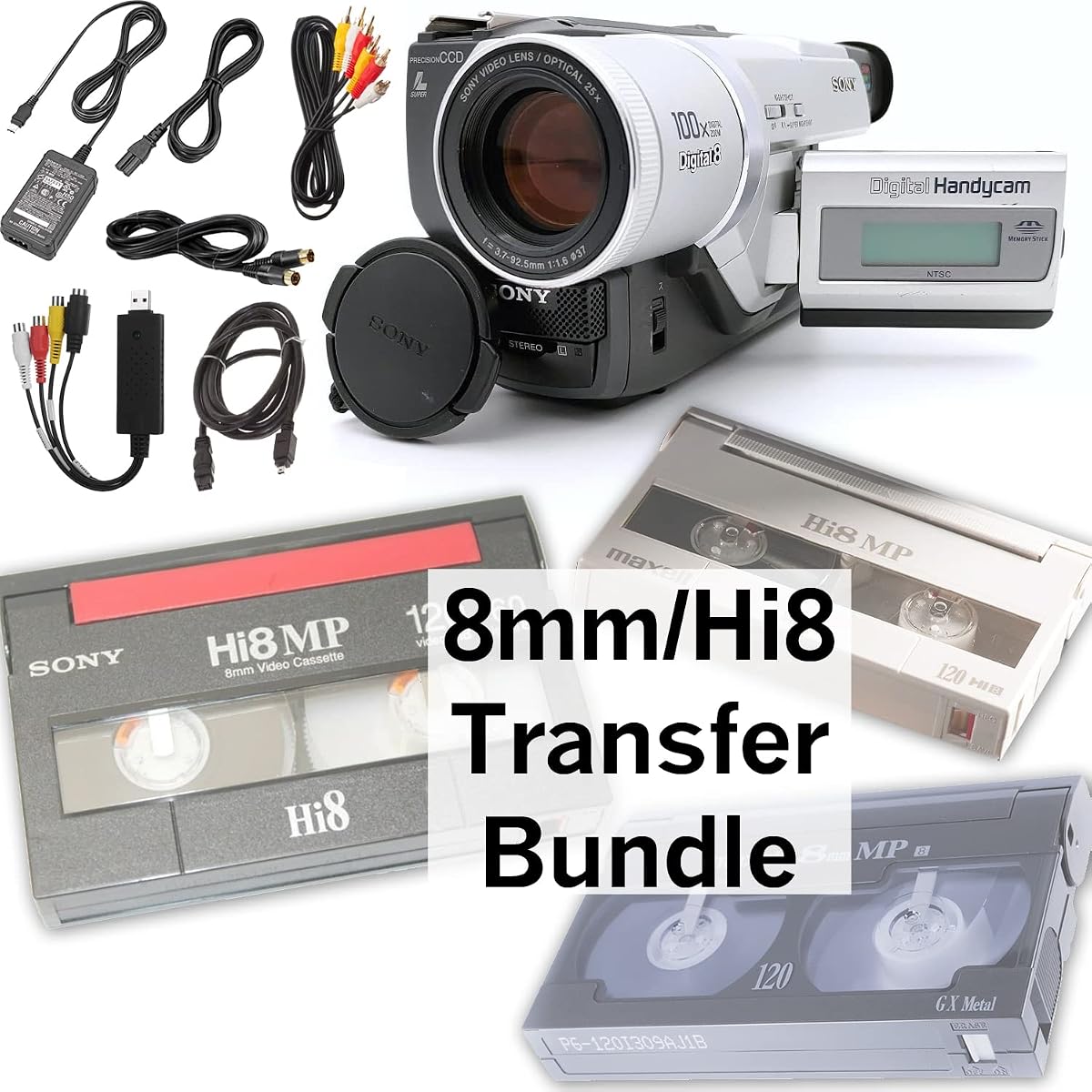
This bundle is designed to playback and transfer 8mm, Hi8, and Digital8 tapes to your computer or DVD. It includes a camcorder and a USB adapter for transferring tapes to computer files. The package comes with AV cables for transfer or TV playback.
We may earn a commission when you buy through this link, at no additional cost to you.
It is a complete solution for those with tape-based home movies rather than traditional film reels. The camcorder included ensures you have the necessary playback device. You can burn the transferred files to DVD for long-term storage.
Note that this bundle is specifically for tape formats and not for 8mm or Super 8 film reels. It requires a computer to capture the footage. If your collection is in tape form, this is a reliable option to digitize content.
Ideal for users with tape collections, this bundle offers a working solution with free returns. The guarantee ensures you receive a functional unit. It is a helpful choice for preserving older tape media.
Specifically designed for 8mm, Hi8, and Digital8 tape formats.
Includes camcorder and USB adapter for easy transfer.
We may earn a commission when you buy through this link, at no additional cost to you.
This bundle is designed to help you digitize 8mm, Hi8, and Digital8 tapes using a USB capture device. It transfers tapes to computer files or allows you to burn them to DVD. The package includes an 8mm tape and a camcorder to play back tapes.
We may earn a commission when you buy through this link, at no additional cost to you.
It is an all-in-one solution for users who need to preserve their tape collections. The blank tape included can be used for recording or testing purposes. It ensures you have everything required to start digitizing immediately.
Keep in mind this product is for tape formats and does not work with film reels. You will need a computer to process the transfer. This distinction is important if you are looking to convert physical film strips.
This bundle is suitable for those with existing tape media who want to save them. The guarantee and free returns offer confidence in the purchase. It is a solid option for preserving digital video tapes.
The bundle comes with a blank tape to facilitate transfer.
You can burn captured tapes to DVD for archival storage.
We may earn a commission when you buy through this link, at no additional cost to you.
This digitizer brings your old 8mm and Super 8mm films into the 21st century. It converts movie film strips into digital MP4 files for lifetime viewing. The built-in display allows you to play scanned videos or watch them on your TV.
We may earn a commission when you buy through this link, at no additional cost to you.
The device is simple to use with on-screen prompts for loading film. It does not require a computer or drivers for operation. This makes it accessible for anyone looking to preserve their memories quickly.
One limitation is the lack of available rating data and potential absence of sound capture. The process focuses primarily on visual digitization. Users should be prepared for a video only output from the device.
It is a great gift for grandparents or filmmakers celebrating milestones. The ease of use makes it a thoughtful present for preserving memories. Consider this scanner if you value simplicity and modern compatibility.
Follow on-screen prompts to load and transfer footage.
Watch your scanned videos on a TV with the included cable.
We may earn a commission when you buy through this link, at no additional cost to you.
This scanner is designed to convert 8mm and Super 8 films into JPEG images. It brings your old films into the 21st century with digital negatives capabilities. The display screen lets you view scanned content on the device or connect to a TV.
We may earn a commission when you buy through this link, at no additional cost to you.
It offers a simple process for transferring your footage to SD cards. No computer or drivers are required, making it a standalone solution. The device serves well for users wanting static images of film frames.
The conversion to JPEG images means this is not a video digitizer. This is a trade-off for those who need video files. It is better suited for preserving specific scenes as photos.
This product is ideal for grandparents or filmmakers who want images to share easily. The modern approach helps preserve memories for the present. Consider it if you want to turn films into digital photo albums.
Converts your films into digital negatives for modern viewing.
View content directly on the device without a computer.
We may earn a commission when you buy through this link, at no additional cost to you.
This package includes a full set with film reel, USB cable, power adapter, and TV cable. It converts your old 8mm and Super 8mm films into digital MP4 files. The built-in display allows for viewing scanned videos on the device.
We may earn a commission when you buy through this link, at no additional cost to you.
The device supports SD cards up to 32GB without requiring drivers or a computer. This simplifies the archiving process for anyone looking to preserve memories. It is designed to make digitization easy and efficient.
While it lacks audio support, the visual preservation is the main focus. Users should ensure they load the film correctly for stable digitization. It is a convenient tool for keeping old films relevant.
This is an ideal gift for family occasions or milestone celebrations. It helps bring the past into the present with modern technology. Consider this scanner to preserve your memories efficiently.
Everything needed for digitization is included in the box.
Bring your old films into the 21st century with ease.
We may earn a commission when you buy through this link, at no additional cost to you.
Choosing the right digital converter requires considering several factors to ensure your memories are preserved with high quality and ease of use.
Look for devices that support 1080p resolution to capture details in your old films. Higher resolution ensures that the digitized video looks clear on modern screens.
Standalone converters allow you to digitize film without a computer which simplifies the process. However if you need more control over editing you might prefer a computer based solution.
A built-in LCD screen lets you preview and adjust settings directly on the device. Larger screens make it easier to align frames and check video quality before saving.
Ensure the converter outputs MP4 files which are widely compatible with most devices and software. This makes sharing and editing your converted videos straightforward.
Check which reel sizes the device supports such as 3 5 or 9 inches. A versatile converter accommodates different film collection sizes without needing extra adapters.
Devices with SD card slots allow for flexible storage options. Some include a card but others require you to buy one separately depending on your storage needs.
Most film converters only capture video and not the original audio track. If sound is important to you be aware of this limitation before purchasing a specific model.
Select a device with intuitive controls and clear instructions for a smooth experience. Simple setup and operation reduce frustration when converting older film formats.
Start by loading your film reel onto the universal supply reel as directed in the manual. Ensure the film is properly threaded and aligned for smooth feeding through the scanner.
Power on the device and select the film type using the touch buttons or menu options. Adjust settings like brightness and sharpness to match the condition of your film before recording.
After scanning allow the film to rewind properly before removing it to prevent damage. Store the converter and accessories in a dry place to ensure longevity of the device.
Most standalone 8mm and Super 8 converters do not capture audio during the digitization process. They focus primarily on converting the visual frames into digital video files. You may need to add sound separately if it is important to your project.
Most modern converters output MP4 files which are compatible with most computers and media players. This format allows for easy sharing and editing of your converted videos on various platforms.
Many converters are standalone devices that do not require a computer for basic digitization. You can save files directly to an SD card and transfer them later for viewing.
Devices typically support 3 inch 5 inch and 7 inch reels with some accommodating up to 9 inches. Always check the specifications to ensure compatibility with your film collection.
Yes many converters include a video cable that lets you connect directly to a TV or monitor. This allows for instant viewing and sharing of your digitized movies.
Standalone converters generally do not need drivers to function as they save files directly to SD cards. This makes them plug and play for most users without technical setup.
Modern converters are designed with protective mechanisms to minimize damage if film jams or breaks. However it is important to handle film carefully to avoid permanent issues during conversion.
The KODAK REELS Digitizer offers a robust solution for high quality conversion with its touch screen interface and standalone capability.
When choosing a model prioritize ease of use and output quality to ensure your memories are preserved effectively for the future.
Always verify current availability and features as product details may change over time before making a purchase.