
Thermalright Assassin X120 Refined SE CPU Air Cooler
4.7Editor score
Four Heat Pipe Cooling Design
Low Noise PWM Fan Operation
Wide Intel AMD Compatibility
This guide compares the top 10 CPU Air Cooler Fan Heatsink models for performance, noise, and compatibility to help you choose the right cooling solution.
Finding the right CPU air cooler fan heatsink is essential for maintaining optimal system temperatures during demanding tasks. A good unit balances efficient heat dissipation with quiet operation to ensure stability.
We analyzed ten highly rated models based on thermal performance, build quality, noise levels, and socket compatibility to compile this comprehensive list of top performers available today.
Each pick highlights specific strengths like budget value or premium cooling. Please note that stock and specifications may change, so verify details before purchasing your next cooling upgrade.
4.7Editor score

4.8Editor score
4.7Editor score
Below is a side-by-side comparison of the top ten air coolers covering key specifications and standout features to help you decide quickly.


The Noctua NH-D15 chromax.Black stands out as a premier cooling solution rated at 4.8 stars by users who value silence and efficiency. Its dual tower design with wide 140mm fans delivers performance comparable to many liquid coolers.
We may earn a commission when you buy through this link, at no additional cost to you.
This model features six heat pipes and award winning NF-A15 fans with Low-Noise Adaptors for automatic speed control. It includes high-end thermal paste and a secure mounting system for Intel and AMD platforms.
While the price is higher than budget options, the 6-year warranty and proven track record justify the investment for users seeking long-term reliability without noise complaints.
It is the ideal choice for enthusiasts and professionals who need maximum cooling capacity while maintaining a quiet workspace environment during intensive computing tasks.
The extra-wide dual-tower design maximizes surface area for rapid heat dissipation even under heavy overclocking loads.
High quality fans and low noise adaptors ensure the system remains silent at idle while delivering full cooling power under load.
We may earn a commission when you buy through this link, at no additional cost to you.
The Thermalright Assassin X120 Refined SE offers a 4.7 star rating and serves as a fantastic entry point for users seeking efficient cooling without breaking the bank.
We may earn a commission when you buy through this link, at no additional cost to you.
Its AGHP technology on heat pipes solves inverse gravity effects allowing flexible orientation while maintaining performance. The TL-C12C PWM fan provides quiet operation with 66 CFM airflow.
Although it is a single tower model, it handles moderate thermal loads well and supports a wide range of modern sockets including AM5 and Intel LGA1700.
Choose this cooler if you need reliable temperature control for everyday computing and gaming on a tight budget.
AGHP technology ensures consistent cooling regardless of case orientation making it versatile for various build configurations.
The PWM fan adjusts speed automatically to balance cooling needs with noise levels effectively.
We may earn a commission when you buy through this link, at no additional cost to you.
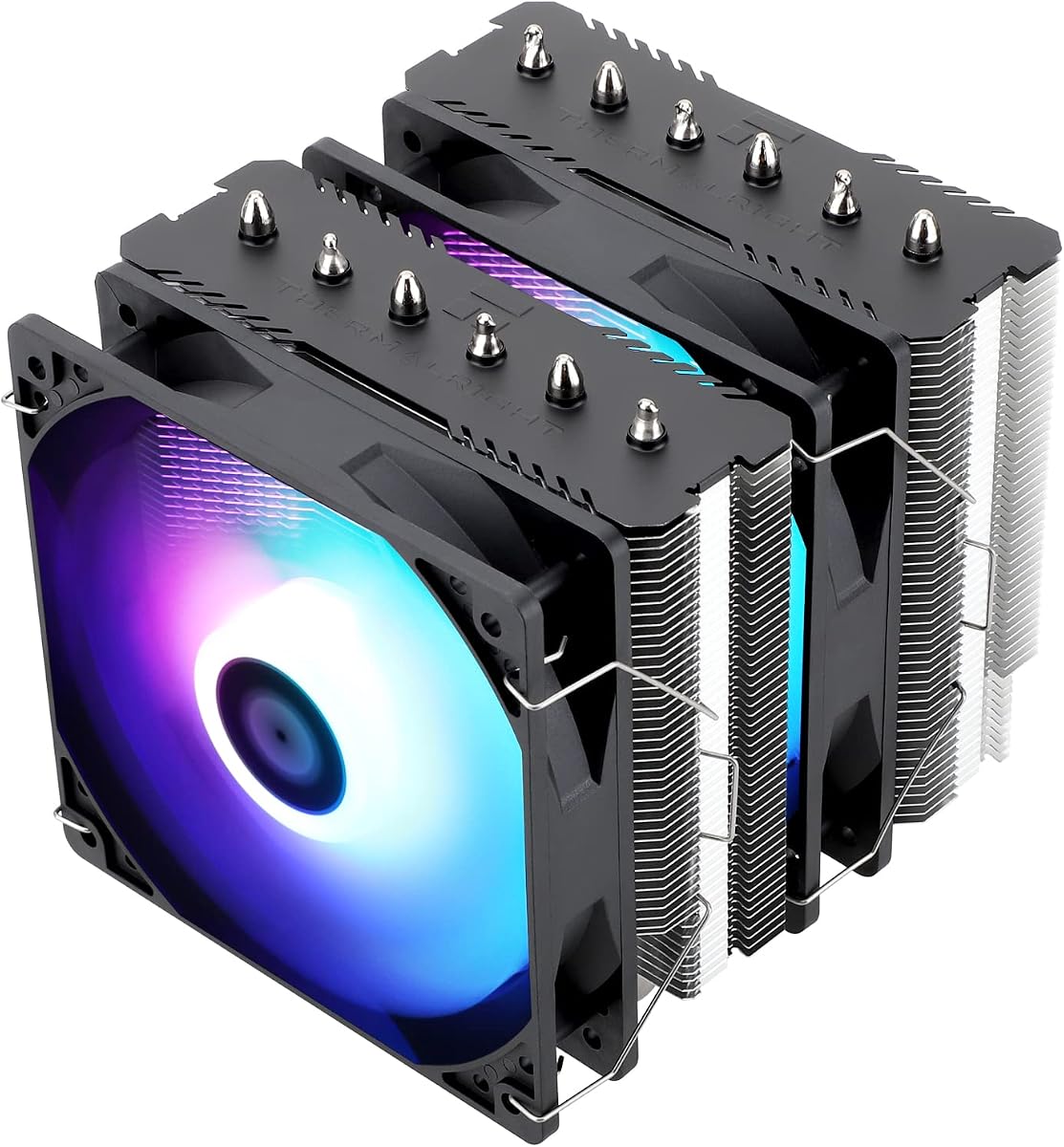
With a 4.7 star rating, the Peerless Assassin 120 SE ARGB combines high end cooling with vibrant aesthetics for users who want performance and visual flair.
We may earn a commission when you buy through this link, at no additional cost to you.
It features six copper heat pipes and dual PWM fans that deliver exceptional cooling for TDPs up to 245W. The ARGB lighting syncs with motherboards for a cohesive look.
While it offers near premium performance at a reasonable price point, users should verify RAM clearance due to the dual tower design width.
This unit is perfect for enthusiasts who want flagship cooling capabilities and modern lighting without paying top dollar for traditional premium brands.
Six heat pipes and dual fans ensure stable temperatures even during heavy workload spikes.
Colorful ARGB effects transform the internal look of the PC build without compromising thermal efficiency.
We may earn a commission when you buy through this link, at no additional cost to you.
This model holds a 4.8 star rating and focuses on raw thermal performance with six heat pipes and dual high airflow fans for efficient cooling.
We may earn a commission when you buy through this link, at no additional cost to you.
It features an offset layout that improves motherboard and GPU clearance compared to symmetric designs. The AGHP technology ensures reliable heat transfer regardless of orientation.
Users appreciate its robust construction and silent operation but may find the size challenging in smaller cases. It lacks RGB lighting for those seeking flashy aesthetics.
For users prioritizing cooling power over lighting effects this cooler delivers exceptional value and reliability for demanding desktop systems.
The asymmetric design leaves more room for graphics cards and motherboard components improving overall compatibility.
Dual fans and copper pipes handle intense thermal loads ensuring stable performance during stress testing.
We may earn a commission when you buy through this link, at no additional cost to you.
The classic NH-D15 earns a 4.8 star rating from over 250 awards and remains a benchmark for quiet dual tower cooling performance.
We may earn a commission when you buy through this link, at no additional cost to you.
It uses optimized NF-A15 fans with Low-Noise Adaptors for automatic speed control. The SecuFirm2 mounting system ensures secure and easy installation across platforms.
While it is expensive and uses a traditional color scheme its reliability and thermal efficiency make it a favorite for professionals.
Buy this if you need the most trusted air cooling solution available and prefer a classic aesthetic look.
Decades of refinement result in a cooler that consistently meets high standards for temperature and noise.
SecuFirm2 ensures the cooler stays firmly attached preventing vibration issues and uneven heat transfer.
We may earn a commission when you buy through this link, at no additional cost to you.
This variant earns a 4.8 star rating and features an asymmetrical single fan design that offers dual tower performance with improved memory clearance.
We may earn a commission when you buy through this link, at no additional cost to you.
It stands at 160mm height and clears 65mm of RAM making it suitable for many standard motherboards without blocking high speed modules.
Users get a classic Noctua design in black with premium noise control and efficient heat dissipation suitable for silent builds.
Select this model when you need maximum cooling but also require better access to RAM slots than standard dual towers provide.
The asymmetrical layout allows high profile memory to fit comfortably under the fan without obstruction.
Single fan design still delivers massive cooling power while keeping noise levels exceptionally low.
We may earn a commission when you buy through this link, at no additional cost to you.
With a 4.8 star rating the NH-U12A chromax.Black provides top tier performance in a 120mm size that fits most tower cases easily.
We may earn a commission when you buy through this link, at no additional cost to you.
It uses dual NF-A12x25 fans which are known for efficiency and low noise. The height of 158mm ensures it does not block PCIe slots or RAM.
Ideal for users needing a high performance tower cooler that maintains compatibility with standard components and modern motherboards.
Choose this when you want Noctua reliability and performance but need a more compact footprint than the NH-D15 series.
Dual state-of-the-art NF-A12x25 fans deliver high airflow while keeping acoustic noise minimal.
Designed to fit most ATX and Micro-ATX motherboards without interfering with other components.
We may earn a commission when you buy through this link, at no additional cost to you.
Rated 4.7 stars this unique cooler features a digital screen top cover that displays CPU temperature and usage for real time monitoring.
We may earn a commission when you buy through this link, at no additional cost to you.
It includes four heat pipes and a high speed fan with TRCC software support for displaying graphics card data directly on the unit.
The design combines high heat dissipation with modern aesthetics although the software setup might be complex for some users.
If you want a functional tech display in your build alongside strong cooling this is a compelling and innovative option.
The top cover screen allows you to track system temps without needing software overlays.
Four heat pipes and PWM fan ensure the CPU stays cool while the screen remains functional.
We may earn a commission when you buy through this link, at no additional cost to you.
This classic model earns a 4.8 star rating and features a slim 120mm design that combines outstanding cooling with excellent case compatibility.
We may earn a commission when you buy through this link, at no additional cost to you.
It uses a focused flow fan that directs air through the fins efficiently. The mounting system ensures it fits securely on various platforms.
Ideal for cases with limited clearance where larger dual towers simply will not fit. It maintains Noctua quality standards.
Choose this if you need a reliable cooling solution for smaller cases without sacrificing much performance.
The NF-F12 fan pushes air through the fins for better cooling in restricted spaces.
Does not overhang RAM or PCIe slots making it safe for dense motherboard layouts.
We may earn a commission when you buy through this link, at no additional cost to you.
Rated 4.7 stars this cooler combines strong cooling performance with excellent compatibility for HTPCs and Small Form Factor builds.
We may earn a commission when you buy through this link, at no additional cost to you.
It features a compact dual tower design that stands only 110mm tall. This height avoids overhang on most motherboards and slots.
Ideal for users needing dual tower power in tight spaces. The design ensures reliable cooling without blocking RAM or PCIe slots.
Choose this if you are building a mini PC or HTPC that still requires high performance cooling capabilities.
The 110mm height makes it perfect for cases where vertical space is extremely limited.
Despite small size the dual tower design maintains high efficiency for small form factor systems.
We may earn a commission when you buy through this link, at no additional cost to you.
Choosing the right air cooler involves balancing performance size and cost. This guide explains key factors to help you decide.
Look for models with more heat pipes and larger surface areas if you plan to overclock or run intensive tasks. Dual tower designs generally offer better cooling than single towers.
Prioritize coolers with high TDP ratings if your CPU generates significant heat.
Fans with PWM control adjust speed automatically reducing noise at idle. Check decibel ratings and reviews for real world quietness.
Select models with larger diameter fans as they often move air more quietly than smaller high RPM units.
Verify the cooler supports your CPU socket such as AM5 or LGA1700. Ensure it fits your case height and does not block RAM slots.
Check if the cooler provides necessary mounting hardware for your specific platform before purchasing.
High quality materials like pure copper pipes and aluminum fins improve heat transfer. A sturdy frame prevents flexing under pressure.
Look for products backed by long warranties to ensure long term reliability and support.
Some models include RGB lighting for visual customization. Decide if you want lighting effects or a minimalist look for your build.
Digital displays on newer units offer functional tech aesthetics but require software setup for full use.
Set a budget range to find options that fit your financial needs. Entry level coolers can handle most tasks while premium ones suit enthusiasts.
Remember that a slightly higher initial cost often pays off in better reliability and resale value.
Clear instructions and secure mounting systems make setup simple. Some kits include backplates to simplify installation.
Choose models that do not require complex modifications to fit your motherboard or case layout.
Trusted brands often provide consistent quality and customer support. Research reviews to see how models perform over time.
Consider established manufacturers with proven records of reliable thermal solutions.
Before installation clean the CPU surface thoroughly to ensure good thermal paste contact. Apply a thin even layer of paste to prevent air gaps that reduce cooling efficiency.
Mount the cooler securely using the provided brackets ensuring even pressure across the processor. Check that all cables are routed away from fans to avoid noise or obstruction.
Regularly dust the heatsink fins and fans using compressed air to maintain airflow. Periodically check the fan operation to catch any bearing issues early before they cause overheating.
Yes you should dust the fins and fans every few months to prevent heat buildup. Also check fan bearings for noise as they may degrade over time.
Yes aftermarket coolers offer superior cooling performance and quieter operation. They handle heat loads better allowing for more stable performance under load.
Check your case height limit and the cooler height before buying. Ensure RAM clearance is available as some designs may overhang memory slots.
Most air coolers last many years if kept dust free. Fans may need replacement after several years but the heatsink usually remains effective.
High performance dual tower models are well suited for moderate overclocking. They dissipate heat efficiently which helps maintain stability during heavy tasks.
Yes PWM fans adjust speed based on load keeping noise low at idle. This automatic control helps maintain a quiet environment when high cooling isn't needed.
We highlighted ten top models ranging from budget friendly options to high end dual towers. Each offers unique strengths suited to different system needs and preferences.
Focus on compatibility and cooling power first before considering aesthetics. A silent reliable unit will serve your system better over time than flashy lights.
Please verify current availability and specs as offerings change frequently. Ensure your final choice matches your exact motherboard and case dimensions.