
FLYDIGI Direwolf 4 PC
4.5Editor score
Hall effect trigger switches
Adjustable joystick tension
Multiple connection modes
This guide compares the best controller for Star Wars Squadrons including HOTAS systems and gamepads to help you choose the right setup for immersive space
Finding the right controller for Star Wars Squadrons transforms your space combat experience from simple gameplay into immersive dogfighting. Whether you prefer a standard gamepad or a full flight stick setup, the right hardware ensures precise maneuvering and quick access to critical systems during intense battles.
We evaluated ten top-rated controllers based on ergonomics, input precision, compatibility, and build quality. Our comparison covers everything from affordable gamepads to high-end HOTAS systems, ensuring you find a solution that matches your play style and budget without compromising on performance or comfort during long sessions.
Each pick below highlights key features, pros, cons, and ideal use cases to guide your decision. Prices and availability can change frequently, so verify current listings before purchasing. We focus on verified specifications and user feedback to provide reliable recommendations for both PC and console players.
4.5Editor score

4.5Editor score

3.8Editor score
The following table provides a side-by-side overview of all ten controllers reviewed in this guide. Compare key specifications, compatibility, and unique features to determine which option best suits your specific gaming environment and performance requirements for Star Wars Squadrons.



The Controller Gear Star Wars Squadrons bundle delivers a highly thematic experience for fans of the franchise. It includes a limited edition Xbox wireless controller paired with a pro charging stand, offering both aesthetic appeal and practical utility for gamers dedicated to the series.
We may earn a commission when you buy through this link, at no additional cost to you.
Its design captures the visual essence of Star Wars while maintaining standard Xbox controller functionality. The textured grip ensures slip-resistant gaming sessions, and the 3.5mm headphone jack supports online communication. Battery life reaches up to 12 hours per charge, which is sufficient for extended flights.
However, the price point reflects its limited edition status rather than superior technical specs. It lacks the advanced customization options found in flight sticks. For players focused on visual immersion and official licensing rather than cockpit simulation, this remains a solid choice.
Buy this if you want a console-ready controller that celebrates the Star Wars universe. It suits casual pilots who prefer standard gamepad layouts but desire a unique look on their desk.
The limited edition design features official branding from Disney and Lucasfilm, making it a standout piece for collectors and fans alike.
The included charging stand keeps your controller organized and fully charged, reducing downtime between gaming sessions.
We may earn a commission when you buy through this link, at no additional cost to you.
The FLYDIGI Direwolf 4 PC stands out as an exceptional budget-friendly controller for those who need precision without a high price tag. It utilizes Hall effect technology in its triggers and offers adjustable joystick tension, bridging the gap between standard gamepads and specialized flight hardware.
We may earn a commission when you buy through this link, at no additional cost to you.
Its FORCEFLEX joysticks allow you to adjust tension from 40gf to 80gf, adapting the feel for different game genres. The triggers switch between Micro and Hall Effect linear modes, which is crucial for flight sims requiring smooth throttle control. Vibration feedback is stereo and immersive.
Compatibility is limited to PC and non-Xbox consoles, which excludes some users. The software is necessary for full customization, though the controller works out of the box. For PC gamers seeking value, this offers a near-premium experience at a fraction of the cost.
Choose this controller if you play Star Wars Squadrons on PC and want customizable controls without breaking the bank. It is ideal for budget-conscious gamers who still demand high performance and durability.
Hall effect sensors ensure accurate inputs and prevent stick drift over time, enhancing longevity and reliability during intense combat sessions.
Choose between wired, Bluetooth, or a 2.4G dongle to find the connection method that best fits your gaming setup and latency needs.
We may earn a commission when you buy through this link, at no additional cost to you.
The Thrustmaster ESWAP X 2 PRO brings mechanical precision to a standard gamepad form factor. Designed for responsiveness, its buttons activate significantly faster than standard membrane ones. This speed advantage is useful in fast-paced combat scenarios where every millisecond matters.
We may earn a commission when you buy through this link, at no additional cost to you.
It features two S5 NXG mini-stick modules endorsed by professional gamers for their surgical precision. Four additional back buttons can be remapped directly or via software, adding versatility for complex flight control mappings. The connection uses a stable 3-meter USB-C cable.
Despite its innovative features, the price is relatively high compared to standard Xbox controllers. User feedback on long-term reliability varies. It is best suited for players who want mechanical button speeds without transitioning to a full flight stick setup.
Consider this controller if you need responsive inputs and extra programmable buttons while keeping a compact form factor. It is a viable option for console gamers seeking performance upgrades.
Mechanical buttons activate up to 64% faster than standard membranes, providing a tangible advantage in reaction-heavy gameplay.
The modular approach allows for future customization and component replacement, extending the lifespan of the controller.
We may earn a commission when you buy through this link, at no additional cost to you.
The Logitech G X52 Flight Control System offers a robust entry into HOTAS flying for Star Wars Squadrons. It features magnetic non-contact sensors for longevity and an LCD display that keeps flight data visible without alt to your HUD. This is a strong choice for dedicated pilots.
We may earn a commission when you buy through this link, at no additional cost to you.
It provides 282 programmable commands across three modes, allowing deep customization of flight systems. The twist with rudder lock is essential for preventing accidental inputs. The ergonomic grip reduces strain during long sessions. However, it requires a separate throttle purchase for full control.
The lack of a bundled throttle can increase the total cost significantly. The setup may also be overkill for casual players. Despite this, it remains a highly regarded system for those willing to invest in a dedicated simulation experience.
Select this system if you want precise magnetic sensors and a display for command management. It suits players focused on technical precision and command organization over full cockpit setups.
Non-contact magnetic sensors ensure high precision and durability, preventing wear and tear over years of intense use.
The multifunction LCD allows you to verify programmed commands and track your flight plan directly from the stick.
We may earn a commission when you buy through this link, at no additional cost to you.
The Thrustmaster T-Flight Hotas One delivers a complete flight control experience in a single package. It includes both a joystick and throttle, making it ideal for players who want hands-on flying without complex setups. This model is particularly strong for its seamless plug-and-play compatibility.
We may earn a commission when you buy through this link, at no additional cost to you.
Its ergonomic design features adjustable resistance to suit different aircraft types, from commercial jets to combat fighters. The detachable throttle allows versatile setups, enabling lap use or desk placement. It integrates well with other Thrustmaster peripherals for future expansion.
While durable, the materials may feel less premium than higher-end models. The throttle is fixed during use, limiting flexibility compared to dual-detach systems. For most users, however, it offers the best balance of features and ease of use.
Recommend this for anyone seeking a reliable HOTAS system that works out of the box. It is perfect for new sim pilots or those upgrading from a gamepad.
The modular design allows you to use the throttle on a desk or attach it to the stick for integrated control.
Future expansions like rudder pedals are compatible, allowing you to build a more realistic cockpit over time.
We may earn a commission when you buy through this link, at no additional cost to you.
The Turtle Beach VelocityOne H.O.T.A.S represents a modern approach to flight simulation hardware. It combines a flightstick with dual throttle controls, offering 73 programmable inputs and 15 Hall-effect axes for precise control. The flight management display keeps critical data at your fingertips.
We may earn a commission when you buy through this link, at no additional cost to you.
A unique feature is its customizable RGB lighting, which lets you match your cockpit style. The swappable dual throttle detents provide tactile reference points for different thrust levels. The setup is expandable to include pedals, making it a complete solution for serious enthusiasts.
Being a newer product, it lacks a track record of user feedback. The price is steep for many gamers. However, its feature set and build quality suggest it will compete well with established premium systems in the market.
Choose this if you want a full-flight setup with modern visual features like RGB lighting. It fits players who prioritize aesthetics alongside advanced simulation capabilities.
15 Hall-effect axes ensure that your controls remain accurate over time, free from the wear issues affecting traditional potentiometers.
A full-color display provides real-time data, reducing the need to look away from your main screen during flights.
We may earn a commission when you buy through this link, at no additional cost to you.
The GameSir Tarantula 8K PC is engineered for maximum responsiveness with an 8000Hz polling rate. This ensures instant input registration, which is crucial for competitive gaming. It features Hall effect triggers and an included gyroscope, offering performance typically reserved for high-end devices.
We may earn a commission when you buy through this link, at no additional cost to you.
Its trigger stops let you switch between analog and micro switch modes for different game types. The controller includes two lockable back buttons and mini bumpers for extended control. Software allows deep customization of macros and button mapping.
To achieve the 8K polling rate, a wired connection is required. This limits mobility but guarantees stability. For PC players who need the lowest possible latency, this controller is unmatched in the gamepad category.
Select this if speed is your top priority and you play on a desktop. It is ideal for competitive pilots who need every advantage in reaction times.
The ultra-high polling rate ensures smooth control and instant response, giving you a competitive edge in fast-paced combat.
Switch between Hall Effect analog for precision and micro switch for quick clicks to adapt to different combat scenarios.
We may earn a commission when you buy through this link, at no additional cost to you.
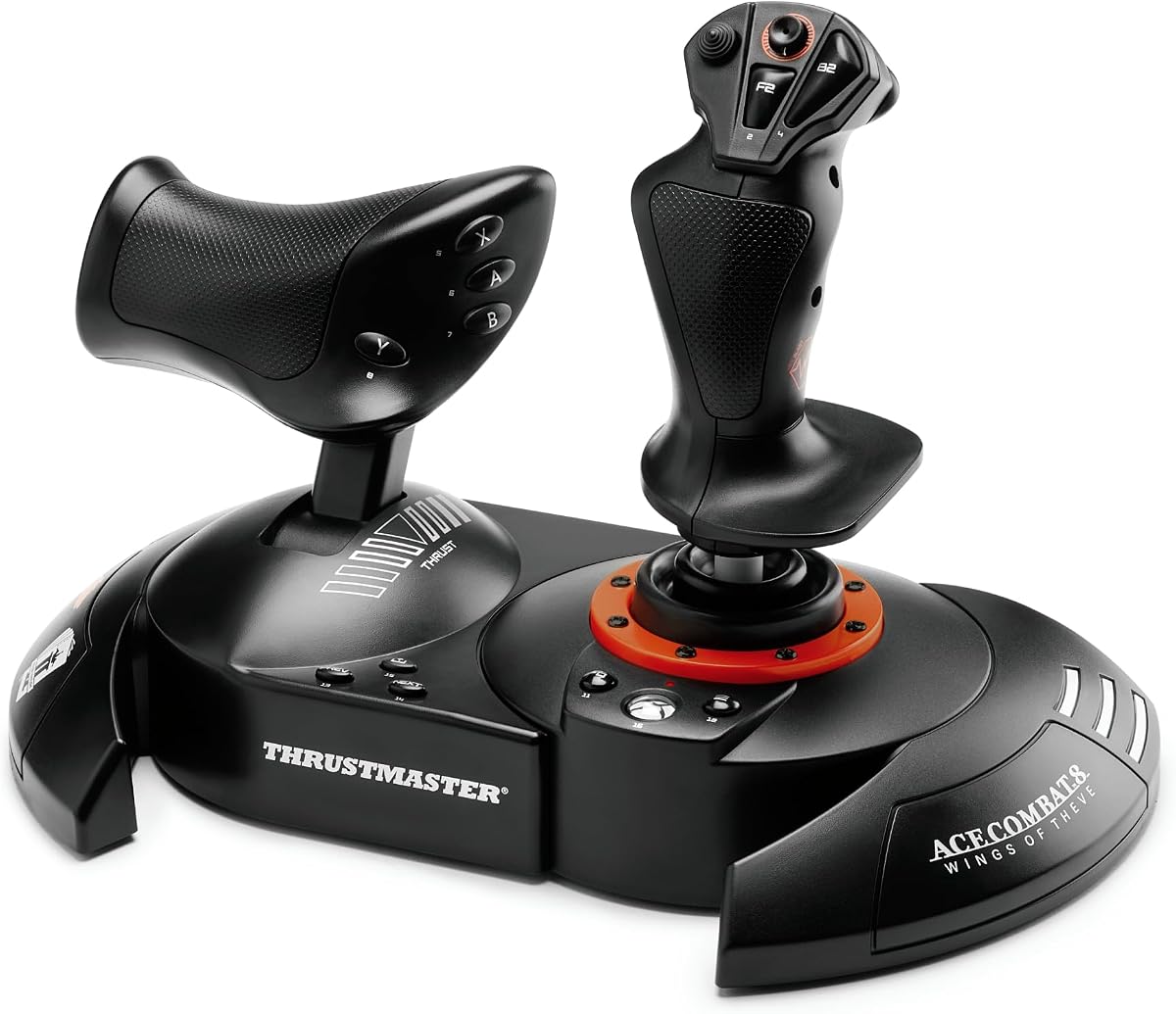
The Thrustmaster T.FLIGHT HOTAS NEO is a licensed edition inspired by Ace Combat 8, offering a specialized flight controller for console and PC users. It combines joystick and throttle with vibration feedback for immersive combat. The system uses Thrustmaster's proprietary H.E.A.R.T. technology for precision.
We may earn a commission when you buy through this link, at no additional cost to you.
With 16-bit technology and 16 action buttons, it supports detailed control schemes. The detachable throttle allows you to rest the stick on your lap for comfort. It features a dual rudder system, providing options for controlling rotation via joystick or throttle lever.
As a newer release, its long-term reliability is yet to be fully tested by the community. The price is higher than standard models due to licensing. It appeals to fans looking for a themed yet functional simulation setup.
Choose this for a balance of official theme and functional design. It suits players who want a reliable HOTAS with the added appeal of a licensed edition.
Hall Effect AccuRate Technology guarantees precision inputs that do not degrade over time, ensuring consistent control during long sessions.
Built-in vibration feedback lets you feel missile impacts and turbulence, enhancing the realism of every combat encounter.
We may earn a commission when you buy through this link, at no additional cost to you.
The Logitech G X56 H.O.T.A.S is a top-tier flight simulator controller offering a complete throttle and joystick system. It provides over 189 programmable controls, making it ideal for managing complex starfighter systems. The unit features RGB backlighting for aesthetic customization.
We may earn a commission when you buy through this link, at no additional cost to you.
Its 4-spring system allows you to adjust stick force to match different aircraft types. Twin throttles with friction adjusters offer precise throttle management. The design places controls under your fingers for intuitive operation without needing to shift hands.
The complexity of setup and the sheer number of buttons may overwhelm casual users. This is a renewed unit, so condition varies. For dedicated enthusiasts willing to invest time, it offers a high-end simulation experience.
Buy this if you want a comprehensive control system for advanced flight simulation. It suits players who demand maximum customization and professional-grade features.
Adjustable spring resistance lets you tailor the stick force to match different aircraft, from agile fighters to heavy bombers.
Set RGB lighting colors to match your gaming rig, creating a cohesive visual setup on your desk.
We may earn a commission when you buy through this link, at no additional cost to you.
The FLYDIGI Vader 5 Pro PC offers advanced customization with hall effect joysticks and FORCEFLEX tension adjustment. It delivers low latency response via wired and wireless modes, making it competitive with more expensive devices. The controller includes 8 extra buttons for expanded control.
We may earn a commission when you buy through this link, at no additional cost to you.
Four-motor vibration provides detailed feedback for recoil and impacts. The triggers support both micro and hall effect modes. It works across multiple platforms including PC and Switch, offering flexibility for various setups. Software supports deep profile customization.
Xbox compatibility is not supported, which limits its utility for console players. The charging dock requires a separate purchase. For PC and Switch users, it provides a high-performance alternative to standard controllers.
Choose this if you want a versatile controller with adjustable mechanics and multi-platform support. It is best for players who value customization and low latency.
Adjust joystick tension from 40gf to 100gf to find the perfect balance between speed and control for any game type.
Connect via wired, Bluetooth, or 2.4G to use the controller with PC, Switch, and Android devices seamlessly.
We may earn a commission when you buy through this link, at no additional cost to you.
Selecting the right controller requires understanding your preferred play style, platform, and budget. This guide breaks down the essential factors to consider before making your decision.
First, confirm the controller supports your gaming device. Many flight sticks work on both PC and Xbox, while others are PC-exclusive. If you play on Xbox Series X or S, ensure the controller is listed as compatible to avoid driver issues.
Always verify platform support before purchasing to ensure seamless integration with Star Wars Squadrons.
Decide whether you want a Hands-On Throttle and Stick (HOTAS) system or a traditional gamepad. HOTAS systems offer separate throttle and stick for realistic control, while gamepads are compact and easier to use on a couch.
Choose HOTAS for simulation depth and gamepads for casual comfort.
Look for controllers with high-quality materials like metal gears and durable switches. Flight simulators involve constant adjustments, so the hardware must withstand repeated use without loosening or breaking over time.
Prioritize durability to ensure the controller lasts through many gaming sessions.
Star Wars Squadrons requires managing shields, weapons, and speed. Controllers with extra programmable buttons or paddle remapping allow you to assign these functions to easily accessible inputs for quick reactions.
Adequate button mapping is essential for efficient combat management.
Wired connections provide the lowest latency, crucial for competitive play. Wireless options offer convenience but may introduce input lag. Check if the controller supports wired connections for the most responsive experience.
Opt for wired modes when performance is your priority.
Adjustable stick tension and resistance help customize the feel to your preferences. Some controllers allow you to modify spring force to match different aircraft weights, improving comfort and accuracy.
Adjustable features enhance comfort and control precision.
Robust software allows for button remapping and profile creation. Good software lets you save setups for different games or aircraft types without needing physical adjustments on the controller.
Quality software makes customization straightforward and accessible.
Prices range from under $100 to over $250 depending on features. Determine how much you are willing to spend and focus on controllers that meet your core needs within that range.
Set a budget to narrow your options effectively.
Connect your controller via USB or wireless dongle as instructed by the manufacturer. If you are using software, install it to configure your button mappings and calibration settings for optimal performance.
During gameplay, adjust the resistance and tension settings to match the aircraft you are piloting. Regularly update the firmware through the official software to maintain compatibility and access new features.
Clean the controller gently with a microfiber cloth and avoid exposing it to liquids. Store it in a dry place and use a charging stand or protective case when not in use to extend its lifespan.
No, it is not necessary but highly recommended for immersion. A standard gamepad works well, but a HOTAS system offers more realistic control over throttle and pitch. You can decide based on your preference for realism versus convenience.
Yes, many flight sticks support Xbox Series X and S. However, you must check the product specifications for official compatibility. Some models may require specific drivers or software to function correctly on Xbox consoles.
Hall Effect sensors use magnetic fields instead of physical contacts, reducing wear and drift. This ensures your controller remains accurate over years of use. Standard potentiometers rely on physical contact which can degrade over time.
Extra buttons allow you to map complex commands like shield toggles or weapon switches. This reduces the need to pause or open menus during battle. They provide faster access to critical flight functions.
Most work out of the box as basic input devices. However, software is needed to map buttons or adjust settings. Using the official software unlocks the full potential of the hardware for Star Wars Squadrons.
Stick drift is common with standard sensors. Hall Effect controllers prevent drift by using magnetic technology. If you have a standard stick, avoid pressing the joystick too hard and replace the module if drift becomes noticeable.
We have reviewed ten top controllers ranging from affordable gamepads to premium HOTAS systems. The Thrustmaster T-Flight Hotas One stands out as the best all-in-one system, while the FLYDIGI Direwolf 4 offers great value for budget-conscious gamers.
Prioritize compatibility and button programmability when making your choice. Whether you choose a simple gamepad or a full flight rig, ensure it matches your play style and setup requirements for the best experience.
Remember that prices and stock change frequently. Check current listings and reviews before finalizing your purchase to ensure you get the best deal available today.