
PowerA Solo Charging Stand
4.6Editor score
Officially licensed design
Includes rechargeable battery
Compact single slot stand
Find the best controller charging station for Xbox with our guide comparing top docks, battery packs, and fast chargers for seamless gameplay.
Keeping your Xbox controllers powered is essential for uninterrupted gaming sessions. A reliable charging station ensures your devices are always ready when you want to play without fumbling for batteries. This guide explores the top options available to help you choose the right dock for your setup.
We evaluated each product based on charging speed, battery capacity, build quality, and overall value. Our analysis includes dual charging docks, single stands, and kits with rechargeable batteries. We looked at compatibility across Xbox One and Series X S models to ensure you get a solution that fits your needs perfectly.
Each pick highlights unique features like LED indicators, safety certifications, and included accessories. You will see detailed breakdowns of pros and cons to help you make an informed decision. Please note that prices and availability can change frequently so check the current listings before purchasing.
4.6Editor score

4.6Editor score

4.4Editor score
This side by side comparison lists all ten products with their key specifications to help you quickly find the right fit for your gaming needs.

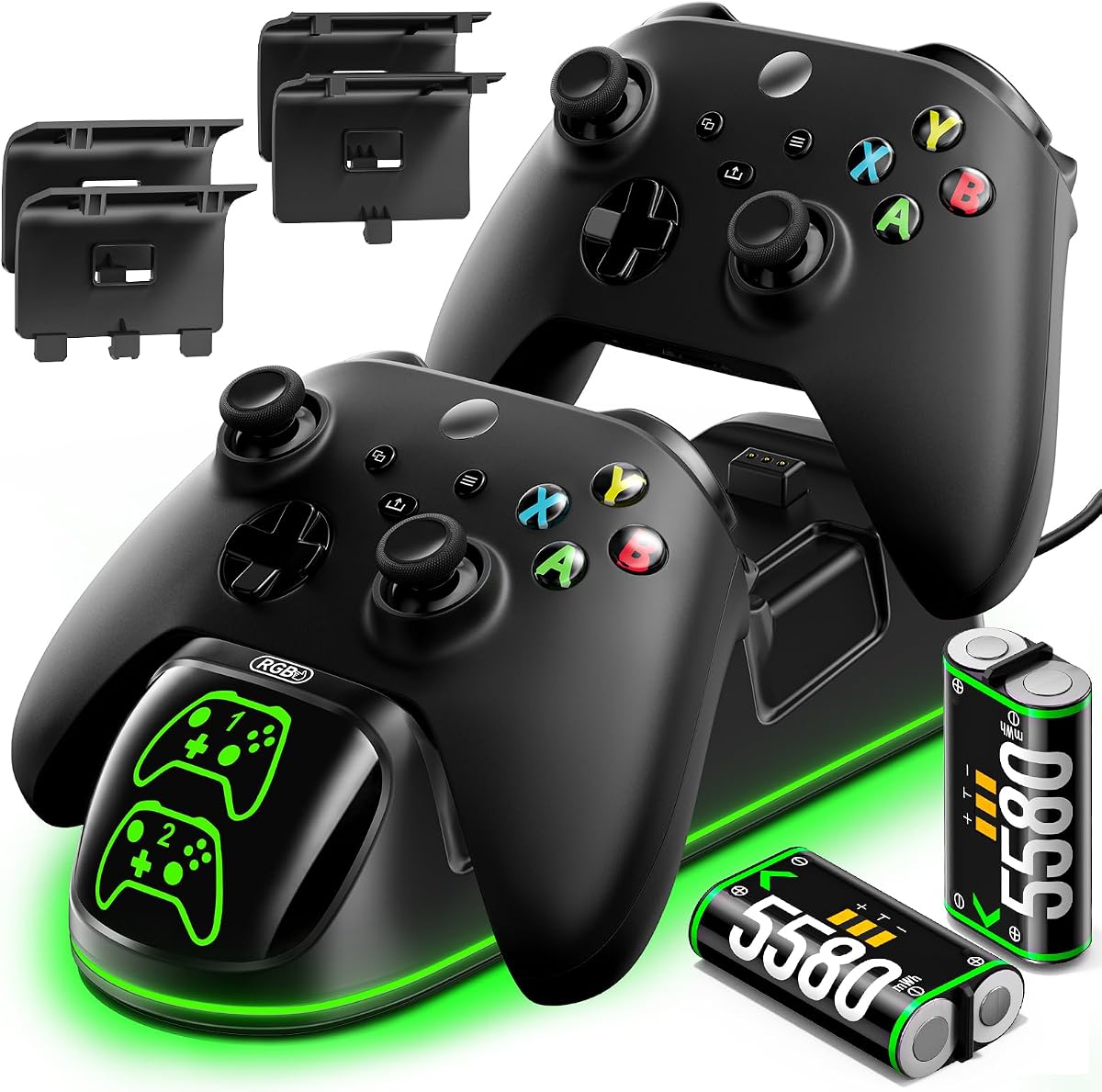


The Upgraded Controller Charger Station stands out as a top choice for Xbox gamers looking for reliability. It comes with two high capacity battery packs and a dual slot dock to keep your controllers powered. The unique X shaped LED indicators provide clear status updates without being too bright during use.
We may earn a commission when you buy through this link, at no additional cost to you.
Each battery offers up to 25 hours of playtime which is impressive for extended gaming sessions. The dock includes covers for both Xbox One and Series X S models ensuring broad compatibility. Safety features like overcharge and overheating protection give peace of mind when leaving controllers on the dock.
While the unit does not include the controller itself the battery packs are robust and easy to install. The base is sturdy enough to hold controllers securely though it may take up some desk space. This trade off is acceptable given the long battery life and dual charging capability.
This station is ideal for families or competitive gamers who need multiple controllers ready at all times. The combination of capacity safety and ease of use makes it a strong recommendation. We highly suggest this model for anyone wanting to eliminate battery anxiety during play.
The 6200mWh capacity ensures you can game for hours without needing to swap batteries frequently.
LED lights show charging status clearly so you know exactly when your controllers are ready.
We may earn a commission when you buy through this link, at no additional cost to you.
Fosmon offers a straightforward and reliable solution for charging Xbox controllers. The dual dock accepts Series X S and One models with ease. SGS certification on the batteries and dock adds a layer of trust regarding safety and performance standards.
We may earn a commission when you buy through this link, at no additional cost to you.
You get two batteries with enough capacity for over forty hours of play on a single charge. The smart charging board stops power flow when full preventing any damage to the cells. A limited lifetime warranty shows the company stands behind the quality of this product.
The main limitation is that it does not support the Xbox Elite 2 controller which has a different form factor. If you are using standard controllers this dock works perfectly well. The design is simple but functional fitting into most gaming setups without distraction.
This station is great for budget conscious buyers who do not want to compromise on safety. The long play time and warranty make it a smart investment for daily use. It is a solid pick for anyone needing a dependable dual charger.
SGS certification ensures the batteries meet strict safety and quality guidelines for user protection.
With up to forty five hours of playtime you can game for days on a single charge.
We may earn a commission when you buy through this link, at no additional cost to you.
The PowerA Solo Charging Stand is designed for users who prefer official accessories. It matches the look of your Xbox console and controller for a cohesive setup. The stand charges one controller at a time making it suitable for single player gamers or as a secondary station.
We may earn a commission when you buy through this link, at no additional cost to you.
It includes a rechargeable battery and the necessary doors to install it easily. The USB cable is included so you can plug it directly into the console or a wall adapter. A two year limited warranty provides additional support for the product.
The battery capacity is smaller compared to dual docks so expect around fourteen to fifteen hours of play. For many users this is enough for a long session but heavy gamers might need more. The compact size is a plus for smaller desks or limited spaces.
This stand is the best choice for those who want a guaranteed fit and official branding. It is simple to use and reliable for daily charging needs. If you need a single slot solution this is a top tier option.
Officially licensed by Microsoft ensures perfect compatibility and design alignment with Xbox hardware.
The single slot design takes up minimal space on your desk or entertainment center.
We may earn a commission when you buy through this link, at no additional cost to you.
OlVO provides a complete kit with a dock and two high capacity batteries. It supports a wide range of Xbox controllers including Elite models which is a plus. The charging time is notably fast at just two and a half hours for both batteries.
We may earn a commission when you buy through this link, at no additional cost to you.
Batteries can be recharged over three thousand times making them durable for long term use. The package includes battery covers for both One and Series X S controllers so you are covered regardless of your console. LED indicators show status clearly during charging.
You will not find controllers in the box so this is purely for charging existing devices. The charging time and high cycle count are strong points for frequent gamers. It is a practical solution for keeping your current controllers ready to go.
This charger is excellent for those who want speed and durability in their setup. The inclusion of multiple covers adds value for households with mixed console generations. It is a well rounded product that meets core charging needs efficiently.
Fully charge two batteries in just two and a half hours so you are never kept waiting.
With three thousand recharge cycles the batteries are built to last for years of use.
We may earn a commission when you buy through this link, at no additional cost to you.
The 8BitDo Charging Dock features a magnetic system that makes attaching your controller easy. It holds the controller securely so it does not fall off during charging. The design complements the Xbox aesthetic making it a visually appealing addition to your setup.
We may earn a commission when you buy through this link, at no additional cost to you.
It comes with one rechargeable battery and doors for installation. The LED indicator shows when the controller is charging or fully charged. Since it is officially licensed you can be sure it works well with Series X S and One controllers.
The magnetic connection is convenient but requires the controller to be placed correctly. The battery capacity is modest compared to larger kits which means more frequent charging for heavy users. For casual play it is sufficient to keep your controller powered.
This dock is perfect for those who value design and ease of use. The magnetic feature reduces wear on charging ports and ensures a stable connection. It is a good choice for a single controller station with a premium feel.
Magnets hold the controller in place for a stable and reliable charging experience.
Licensed by Microsoft ensures a seamless look and reliable performance with your console.
We may earn a commission when you buy through this link, at no additional cost to you.
This charger station features a robot helmet aesthetic that adds a touch of style to your desk. It supports two controllers simultaneously with two included high capacity battery packs. The LED indicators help you track charging status easily without guessing.
We may earn a commission when you buy through this link, at no additional cost to you.
Safety protections prevent overcharging and short circuits to keep your devices safe. It comes with four battery covers to fit both Xbox One and Series X S controllers. The charging time is around four hours which is standard for these capacities.
The design might not suit everyone but it offers a fun look for fans of themed accessories. The base is quite large to accommodate the batteries and dual slots. Make sure you have enough space before placing it on your setup.
It is a great choice for those who want a bit of personality in their gaming gear. The dual charging and battery capacity are practical benefits that enhance usability. This dock is a solid option for maintaining multiple controllers.
The robot helmet design stands out and adds a cool look to your gaming station.
Charge two controllers at once with included batteries to minimize downtime during play.
We may earn a commission when you buy through this link, at no additional cost to you.
The Nyko Charging Station offers dual slots and an extra USB port for additional convenience. It is a simple drop and charge design that works well for most Xbox controllers. The included batteries provide decent play time for casual to moderate gaming.
We may earn a commission when you buy through this link, at no additional cost to you.
Having an extra USB port allows you to charge other devices or power lights without using console ports. The LED lights clearly show when charging is complete so you can pick up your controllers easily. It is a straightforward solution for basic needs.
The batteries are on the smaller side compared to high capacity options which may require more frequent charging. The build is mostly plastic which keeps costs down but may not feel as premium. For the price it offers good functionality.
This station is ideal for gamers who want an extra USB port in their setup. It handles two controllers without issues and is easy to use. If you need a simple and affordable dual charger this is a viable option.
An additional USB port lets you charge other gadgets without using your console ports.
Just place the controller on the dock and charging starts automatically without cables.
We may earn a commission when you buy through this link, at no additional cost to you.
This stand is designed to match the Pulse Red controller for a coordinated look. It uses a magnetic contact system to ensure a secure charge every time you dock. The ergonomic design allows you to navigate the dashboard while the controller is charging.
We may earn a commission when you buy through this link, at no additional cost to you.
Since it is officially licensed you can trust it to work reliably with your console. The included battery provides enough power for typical gaming sessions. The stand is compact and fits well on most surfaces without taking up too much room.
If you do not have a Pulse Red controller the color might not match your setup perfectly. The single slot limits you to one controller at a time which is not ideal for multiplayer. For single user setups it is a stylish choice.
This stand is best for those who want a matching accessory for their specific controller color. The magnetic feature and navigation ease are practical benefits for daily use. It is a good option for style conscious gamers.
The stand matches the Pulse Red controller to maintain a cohesive and stylish look.
Magnets ensure the controller is properly aligned for a stable and safe charge.
We may earn a commission when you buy through this link, at no additional cost to you.
Razer offers a premium charging stand that charges your controller in under three hours. The magnetic design keeps the controller secure while it charges. It matches the color of your controller for a seamless look on your desk.
We may earn a commission when you buy through this link, at no additional cost to you.
You can navigate the dashboard using one hand while the controller is docked which is very convenient. The overcharge protection ensures your controller is safe even if left on the dock for long periods. It works with almost all Xbox controllers for broad utility.
The price is higher than many other options which may be a barrier for some buyers. Since it is a single slot stand it is not the best for households with multiple players. The design quality justifies the cost for those who value style.
This stand is a great choice for those who want a high end accessory. The quick charge and navigation features add real value to daily use. If budget is not a concern this is a top tier single dock.
Get back to gaming quickly with a full charge in less than three hours.
Use the controller with one hand while it docks for easy menu access.
We may earn a commission when you buy through this link, at no additional cost to you.
This charging station features customizable RGB lighting with nine different modes to choose from. It includes two high capacity batteries to keep your controllers powered for long sessions. The dual slots allow you to charge two devices at once efficiently.
We may earn a commission when you buy through this link, at no additional cost to you.
The stand can adjust output power to protect your controllers from overcharging or damage. When not in use it serves as a display stand to keep your setup neat. The RGB lights add an immersive feel to your gaming environment.
The lights can be turned off if you prefer a more understated look. The battery capacity is excellent but the unit is larger to accommodate the features. Make sure to check the size before buying to fit your desk.
It is a perfect pick for those who want style and function in one device. The RGB options let you match your theme while providing reliable charging. This station is a strong choice for immersive gaming setups.
Choose from nine lighting modes to match your room or gaming theme perfectly.
Auto power adjust protects your controllers from overcharging and extends battery life.
We may earn a commission when you buy through this link, at no additional cost to you.
Selecting the right charging station involves several factors that affect performance and convenience. This guide outlines key aspects to consider before making your purchase.
Battery capacity determines how long your controller will last between charges. Look for packs with at least 2200mAh or higher for extended sessions. Larger capacities reduce the need for frequent recharging during long gaming nights.
Prioritize higher capacity batteries if you play for many hours at a time.
Charging speed affects how quickly your controllers are ready to use again. Faster docks can charge in under three hours while others may take four or more. Check the stated charge time to ensure it fits your schedule.
Choose a dock with fast charging if you need to swap batteries quickly.
Some docks charge one controller while others support two or more. Dual slots are ideal for households with multiple gamers or for swapping controllers mid game. Single slots save space and are sufficient for solo players.
Decide based on whether you need to charge multiple controllers simultaneously.
Safety features like overcharge and overheating protection are vital for device longevity. Docks with smart charging boards will stop power flow when the battery is full. Certifications like SGS add an extra layer of trust in the product.
Always choose a dock with built-in safety mechanisms to protect your controllers.
Ensure the dock supports your specific Xbox controller model. Some docks work with Series X and S while others include Elite models. Check the product description for compatibility with your generation of controller.
Verify that the dock lists your controller model to avoid fit issues.
The physical design and footprint of the dock matter for your setup. Some stations have LED lights or RGB features that add style but may take up more space. Consider the layout of your desk or entertainment center.
Measure your available space and choose a design that fits your aesthetic.
Some kits include battery covers USB cables and storage cases. These extras can add value and make setup easier. If you already have accessories you might prefer a dock without them to save money.
Check what is included to see if it offers good value for your needs.
A good warranty provides peace of mind in case of defects. Look for at least a one year warranty and some brands offer lifetime coverage. Read the terms to understand what is covered and for how long.
Choose a product with a strong warranty to protect your investment.
First ensure the dock is placed on a stable flat surface to avoid tipping. Connect it to your console or a wall adapter using the included cable. Make sure the USB port on the console is powered when you are using it for charging.
Second place your controller onto the dock aligning the contact points correctly. The LED indicators should light up to show that charging has started. Avoid forcing the controller onto the dock as this may damage the contacts or casing.
Third unplug the dock if you will not be using it for long periods to save energy. Clean the contacts occasionally with a dry cloth to remove dust or debris. Do not expose the dock to moisture or direct sunlight as this may damage the electronics.
Most charging stations allow you to charge the controller directly with the battery inside. You simply place the controller on the dock and it starts charging. This makes it easy to switch between gameplay and charging without tools.
The dock will show an LED indicator turning green or white when fully charged. Some models stop charging automatically to prevent overcharging. Always check the lights or status on the dock to confirm it is ready.
Most docks are designed for official Xbox controllers and may not work with third party ones. Check the product description to see if it supports specific third party models. Official controllers ensure the best fit and reliable charging.
Modern docks have smart charging that stops power flow when the battery is full. This prevents overcharging and damage even if left connected for a long time. It is safe to leave your controller on the dock when not in use.
It is normal for batteries to get slightly warm during charging but they should not be hot. If they feel excessively hot unplug the dock and let them cool down. Check for dust or obstructions that may be causing the heat.
Yes most docks work with any USB power source including a PC. However charging from a console may be slightly slower than a dedicated adapter. Ensure your PC stays on or in sleep mode if it is the power source.
Yes most docks use standard replaceable batteries that can be swapped out if needed. You can buy additional batteries if the included ones wear out over time. Check the model compatibility to ensure a proper fit for replacements.
Choosing the right charging station depends on your play style and setup needs. The Upgraded Charger Station offers great value while the PowerA Solo Stand provides official simplicity. Each option has unique features to help you power your controllers reliably.
Prioritize safety and battery capacity to ensure a smooth gaming experience. A dock with smart charging and protection features will extend the life of your controllers. Consider how many controllers you need to charge at once when deciding.
Prices and stock can change so review the current listings before buying. Always check the latest reviews and warranties to ensure you get the best deal. We hope this guide helps you find the perfect charger for your Xbox setup.