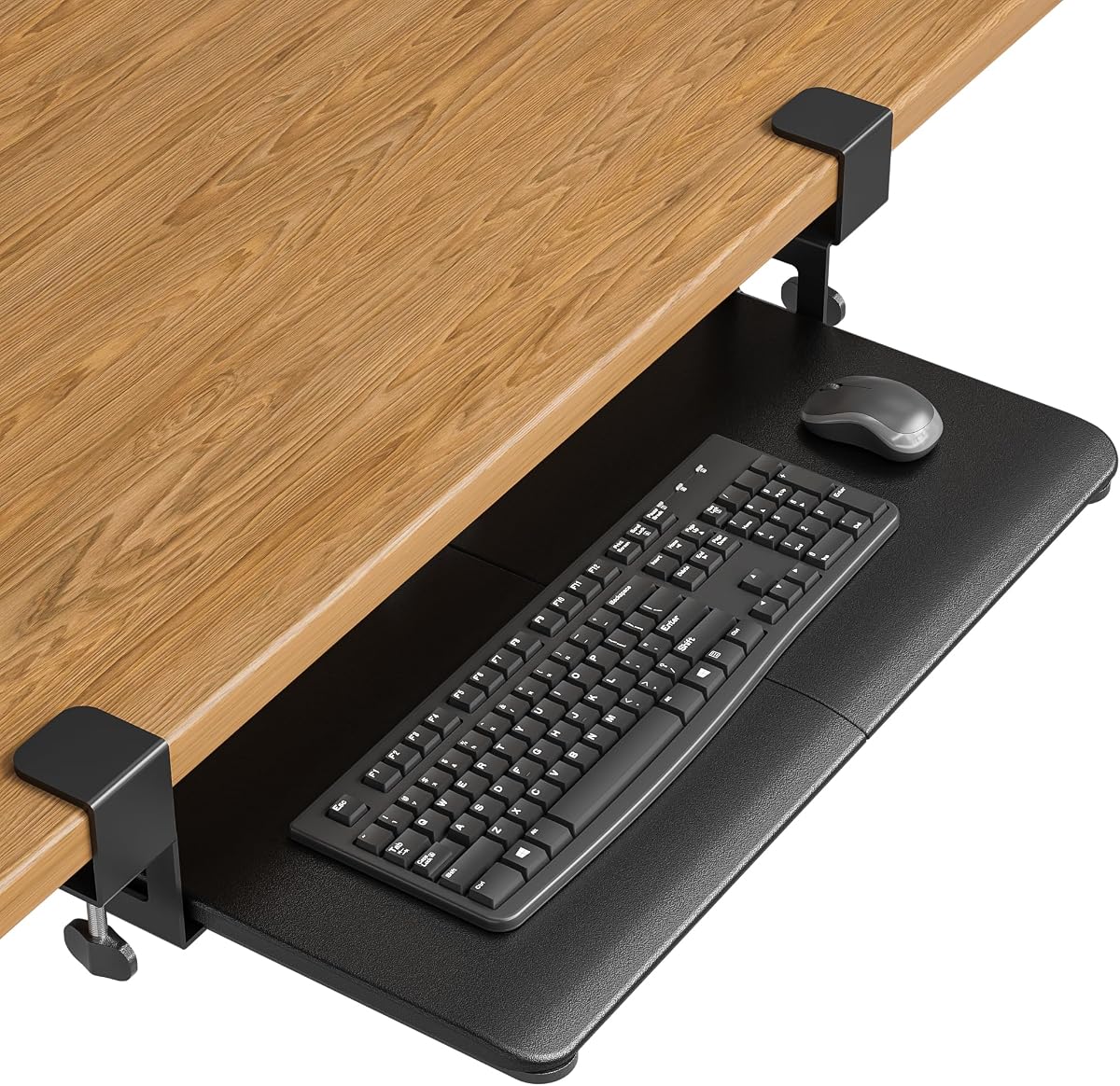
BONTEC Under Desk Keyboard Tray Pull-Out Keyboard and Mouse Platform
4.4Editor score
No-drill installation
Supports up to 11 lbs
Spacious platform design
Protective pads included
This comprehensive guide compares the top 10 clamp on keyboard tray models available in October 2026 to help you choose the perfect ergonomic solution for your
Finding the right clamp on keyboard tray can transform your workspace by freeing up valuable desk space and improving your ergonomic setup. These under-desk solutions allow you to position your typing surface at a comfortable height while keeping your monitor and documents within easy reach for maximum productivity.
We have carefully evaluated the leading options on the market based on build quality, ease of installation, adjustability features, and overall user satisfaction. Our analysis focuses on models that offer sturdy clamps, smooth sliding mechanisms, and sufficient space for both keyboards and mice without compromising on stability during daily use.
Each pick in this list highlights specific strengths such as tilt adjustment, corner compatibility, or extra storage features to help you match the tray to your unique desk setup and typing preferences. Please note that product availability and pricing may change over time so check current details before making your final purchase decision.
4.4Editor score

4.4Editor score

4.3Editor score
This side-by-side comparison highlights key specifications and features across all ten selected models to help you quickly identify which tray fits your desk dimensions and ergonomic needs best.


The VIVO MOUNT-KB05E is a top rated clamp on keyboard tray designed to free up workspace while improving your typing posture. With a solid 4.4 star rating from numerous users this model stands out for its reliable construction and straightforward assembly process.
We may earn a commission when you buy through this link, at no additional cost to you.
Its under-desk design holds your keyboard and mouse below the desktop creating valuable room for monitors or documents. The tray slides smoothly and extends up to 8.5 inches from the desk edge offering a comfortable reach without compromising stability during heavy typing sessions.
While it works well for most flat desks users with beveled edges may find it incompatible. The maximum desk thickness of 1.25 inches is also something to check before purchasing to ensure a secure fit without damaging your workstation surface.
This tray is ideal for office workers or home users seeking an affordable ergonomic upgrade. Its combination of space saving design and sturdy mounting makes it a reliable choice for daily use across various desk setups.
By moving your input devices under the desk you reclaim surface area for other essentials while maintaining easy access to your keyboard and mouse during work.
Positioning the tray at a lower level helps align your wrists and shoulders naturally reducing tension that often builds during long periods of computer use.
We may earn a commission when you buy through this link, at no additional cost to you.
The VIVO Mount-KBST1 offers unique flexibility with height and width adjustments that cater to different desk depths and user heights. This model allows you to customize the tray position more precisely than many standard clamp on options available today.
We may earn a commission when you buy through this link, at no additional cost to you.
It accommodates desks up to 3.4 inches thick which is broader than most competitors and includes a wrist pad mouse pad and mouse wrist rest for enhanced comfort. The split tray design also provides dedicated space for your keyboard and mouse separately.
Users should note that like other VIVO models this tray does not work with beveled desk edges. The installation process is straightforward but ensuring your desk has the right clearance and flat edge is essential for a secure clamp.
Best for those needing extra adjustability this tray is a strong choice for shared workstations or environments where desk thickness varies. Its additional accessories add value for users prioritizing wrist support and customizable positioning.
The ability to adjust height and width means you can tailor the tray to your specific ergonomic needs regardless of your desk's unique dimensions.
Having a wrist pad and mouse rest included in the package saves you from buying these accessories separately while ensuring immediate ergonomic support.
We may earn a commission when you buy through this link, at no additional cost to you.
The VIVO MOUNT-KB04CB stands out for its 360 degree rotating clamp which allows you to pivot the tray fully for flexible placement under your desk. This feature is particularly useful when you need to move the keyboard out of the way temporarily.
We may earn a commission when you buy through this link, at no additional cost to you.
When not in use the tray can be rotated under the desktop to save space which is a clever solution for smaller workstations. Its single clamp design makes installation simple and it holds up to 11 lbs securely for typical keyboards and mice.
However the requirement for 32 inches of clearance around the rotation path may limit where you can place it. Additionally the surface area is slightly smaller than standard trays so larger ergonomic keyboards might not fit as comfortably.
This model is best suited for users who value flexibility and compact storage over maximum typing surface. If you need to clear your desk space quickly or work in a tight area this rotating tray offers a practical solution.
Rotating the tray allows you to position it exactly where you need it or hide it away completely to free up the desk for other tasks.
Pushing the tray underneath the desktop when not typing keeps your workspace tidy and ensures no extra hardware is visible during meetings or calls.
We may earn a commission when you buy through this link, at no additional cost to you.
The BONTEC Under Desk Keyboard Tray offers excellent value for users seeking an ergonomic solution without breaking the budget. With a solid 4.4 star rating it delivers on core functionality like sturdy mounting and smooth sliding motion.
We may earn a commission when you buy through this link, at no additional cost to you.
Its no-drill installation with C-clamps and protective pads ensures your desk remains undamaged while providing a secure hold up to 11 lbs. The spacious platform accommodates most standard keyboards and mice comfortably for daily tasks.
Prospective buyers should verify their desk has a flat unobstructed underside as curved or beveled edges can cause fit issues. Measuring width and depth before ordering is also recommended to ensure the tray slides smoothly in and out.
This tray is ideal for renters or home offices where permanent modifications are not possible. Its straightforward design and reliable performance make it a top budget-friendly choice for improving workspace ergonomics.
Despite its lower cost this tray provides the essential ergonomic benefits and sturdy build quality needed for effective daily use in various settings.
The included protective pads and clamp system prevent any scratches or marks on your desk surface keeping it looking new even after long-term use.
We may earn a commission when you buy through this link, at no additional cost to you.
The VIVO MOUNT-KB05HT elevates the standard tray experience with nine adjustable tilt settings that allow you to find the exact angle for comfortable typing. This premium model is built to accommodate desks up to 3.4 inches thick with ease.
We may earn a commission when you buy through this link, at no additional cost to you.
Swivel clamps that rotate 90 degrees independently make it versatile for corner or standard desk setups. The height adjustable side brackets further enhance clearance and fit while the tray sits 0.25 to 7 inches below your desk surface.
While the price is higher than basic models the added tilt functionality justifies the cost for users with specific ergonomic needs. It is not compatible with beveled edges so check your desk surface before purchasing.
This tray is perfect for professionals who spend long hours typing and need precise angle control to reduce strain. Its premium features and durable construction make it a long-term investment in your workspace health.
Having nine tilt settings ensures you can adjust the keyboard angle to match your natural wrist position which helps reduce fatigue over time.
Swivel clamps and height adjustable brackets allow you to place the tray precisely where it fits your unique desk layout and usage style.
We may earn a commission when you buy through this link, at no additional cost to you.
The VIVO MOUNT-KB10C is specifically designed for L-shaped corner desks with swiveling C-clamps that rotate 90 degrees independently to secure to the workstation. This unique feature solves a common challenge for users with non-standard desk setups.
We may earn a commission when you buy through this link, at no additional cost to you.
Installation is easy with all hardware provided and the tray holds up to 11 lbs securely without damaging the desktop surface. It saves desk space by moving your keyboard and mouse below the main work surface for a tidier environment.
Users should be aware that the maximum desk thickness is 1.25 inches and it is not compatible with beveled edges. Ensuring your corner desk meets these specs will help you avoid any installation issues or instability during use.
This tray is the go-to choice for office corners or gaming stations where standard trays fail to fit properly. Its tailored design ensures a stable platform for typing while maintaining the flexibility needed for corner setups.
The swiveling clamps allow you to attach the tray securely to angled surfaces where traditional straight clamps would not work effectively.
By mounting under the desk you keep the corner space open for other activities while still keeping your input devices accessible.
We may earn a commission when you buy through this link, at no additional cost to you.
The VIVO MOUNT-KB05-4D combines a standard keyboard tray with a 17 inch pencil drawer offering extra storage for small accessories like pens and cables. This dual-purpose design helps keep your desk tidy and organized efficiently.
We may earn a commission when you buy through this link, at no additional cost to you.
The tray holds up to 11 lbs and extends up to 8.5 inches from the desk edge with the combined tray and drawer extending up to 18.5 inches. It attaches with sturdy C-clamps that secure tightly without damaging your desk surface.
Users must ensure their desk is under 1.25 inches thick and check that there is enough depth to accommodate the extended drawer. Also note that beveled edges are not compatible so verify your desk shape first.
This model is ideal for users who want to consolidate storage and typing surfaces into one unit. The added drawer provides convenience for office workers who need quick access to small supplies while working.
The pencil drawer keeps small office items organized and out of sight reducing clutter on your main desk surface during work.
When fully extended the combined depth ensures you have ample space for both typing and accessing stored items without reaching far.
We may earn a commission when you buy through this link, at no additional cost to you.
This ergonomic mouse and keyboard tray offers a compact 20 by 11.8 inch surface that fits well under smaller desks while still providing space for a keyboard and mouse. The upgraded slide mechanism ensures smooth extension and retraction every time.
We may earn a commission when you buy through this link, at no additional cost to you.
Its adjustable dual C-clamps work with desks up to 2.76 inches thick which is among the thickest compatibility in this category. A built-in back baffle prevents the keyboard from sliding off during use improving safety and stability.
While the surface area is smaller than some competitors it is sufficient for standard setups and helps reduce desk clutter effectively. Measuring your desk length before buying is crucial since the total clamp to clamp length is 25.9 inches.
Ideal for tighter workspaces this tray balances size and function well. Users seeking a simple reliable solution for ergonomic typing without taking up too much room will find this model a practical choice.
The back baffle ensures your keyboard stays in place preventing accidental slips that could interrupt your workflow or cause damage.
Accommodating desks up to 2.76 inches thick expands compatibility to a wider range of desk styles compared to standard trays.
We may earn a commission when you buy through this link, at no additional cost to you.
The VIVO DESK-EXT24 functions as a versatile desktop extender that can serve as a keyboard tray or extra storage surface for printers and speakers. Its foldable design allows you to fold it out of the way when not in use saving space.
We may earn a commission when you buy through this link, at no additional cost to you.
With a high weight capacity of 44 lbs and support for desks up to 3.5 inches thick this model is built to handle heavier items. The reinforced K-shaped brackets provide rigid support for a trusted writing or resting surface.
Installation is straightforward with C-clamps that do not require drilling and the product comes with a limited 3-year manufacturer warranty for added peace of mind. It is not compatible with lipped or beveled edges though.
This extender is perfect for users needing flexible workspace expansion beyond just a keyboard tray. Whether you need extra surface area for documents or a dedicated spot for peripherals this model offers robust support and versatility.
Folding the extender when not needed clears your desk space completely allowing you to reclaim the surface for other tasks instantly.
The high weight limit makes it suitable for heavier equipment like monitors or printers that standard keyboard trays cannot support securely.
We may earn a commission when you buy through this link, at no additional cost to you.
The Mount-It! Keyboard Tray offers a secure no-drill clamp-on installation suitable for renters and shared offices. With a generous 27 by 11 inch platform it provides ample room for full-size keyboards and smooth mouse movement for daily use.
We may earn a commission when you buy through this link, at no additional cost to you.
Its push-pull slide-out design allows you to access the keyboard easily and retract it under the desk when not typing. The tray positions your keyboard below the desktop to help align wrists and elbows at a natural height for comfort.
One of its standout features is the lifetime warranty and US-based support team ready to assist with setup questions. While it fits desks up to 2.2 inches thick it is not compatible with glass desks so verify your surface type first.
This tray is excellent for users prioritizing long-term reliability and support. Its durable construction and comprehensive warranty make it a smart choice for those who want a secure ergonomic solution that will last.
Having a lifetime warranty ensures your investment is protected against defects and gives you confidence in the product's long-term durability.
The slide-out mechanism is designed for stable daily use so you can access your keyboard effortlessly without struggling with stiff rails.
We may earn a commission when you buy through this link, at no additional cost to you.
Choosing the right clamp on keyboard tray involves considering several factors that impact fit comfort and functionality in your workspace.
Most trays specify a maximum desk thickness ranging from 1.25 inches to 3.4 inches. Always measure your desk surface before purchasing to ensure the clamps can secure the tray firmly without slipping.
Choosing a model that matches your desk thickness ensures stability and prevents damage to the desktop during installation and daily use.
Tray width and depth determine how much space you have for your keyboard and mouse. Standard trays measure around 27 by 11 inches but compact options may be smaller to fit tight spaces.
Select a size that accommodates your devices with room to spare while fitting under your desk's available clearance for smooth operation.
C-clamps are the most common mounting style and typically require a flat edge. Some models offer swiveling clamps for corner desks or rotating clamps for flexible placement options.
Ensure the clamp style matches your desk shape whether it is flat corner or rounded to avoid installation issues or instability.
Look for trays with tilt adjustments or height settings that let you position the keyboard at a comfortable angle for your wrists and shoulders.
Adjustable ergonomic features help reduce strain during long typing sessions and are essential for users prioritizing workplace health.
Smooth sliding rails allow you to extend and retract the tray easily without jerking. Check reviews for mentions of sticking or wobbling during extension.
A reliable slide mechanism ensures the tray moves freely when you need to access your keyboard and stays secure while you type.
Most trays support up to 11 lbs which covers standard keyboards and mice. If you plan to place heavier items like tablets or accessories on the tray verify its limit.
Choosing a tray with sufficient load capacity prevents sagging and ensures long-lasting stability for your input devices.
Some trays come with built-in pencil drawers or accessory slots to help organize small office items. This added storage reduces clutter on your main desk surface.
If you need extra organization consider a model with storage features to keep your workspace tidy and efficient.
Look for trays that include all necessary hardware and clear instructions for no-drill installation. A solid warranty like lifetime or multi-year coverage indicates manufacturer confidence in the product.
Easy assembly and strong warranty support save time and protect your purchase against potential defects or issues.
Start by measuring your desk thickness and surface width to confirm compatibility before assembling the tray. Ensure your desk has a flat unobstructed edge for the clamps to grip securely without wobbling.
Attach the clamps to the underside of your desk and tighten them evenly until the tray feels stable. Test the slide mechanism by extending and retracting the tray several times to ensure it moves smoothly without resistance.
Regularly clean the rails and clamp surfaces to prevent dust buildup that might hinder movement. Check the tightness of the clamps every few months to maintain a secure fit and avoid accidental loosening.
Most trays use rubber or protective pads on the clamps to prevent scratching and damage. However it is important to choose a model rated for your desk thickness and ensure you tighten the clamps evenly for even pressure.
Many clamp on keyboards require a flat surface and may not fit beveled edges properly. Look for models that specify compatibility with beveled desks or use a desk extender instead for a secure fit.
Installation typically involves attaching C-clamps to the underside of your desk and tightening them by hand. Ensure your desk is flat and the clamps are secure before placing your keyboard on the tray.
Most trays have enough space for standard mice but gaming mice with large bases may require more room. Check the tray width and depth to ensure your mouse fits comfortably alongside your keyboard.
Most clamp on keyboard trays support up to 11 lbs which covers standard keyboards and mice. Some robust models may support more but always verify the manufacturer specifications before placing heavy items on the tray.
Use a soft cloth to wipe down the rails and remove any dust or debris that may hinder movement. Occasionally lubricating the slide tracks with a light silicone spray can keep extension smooth and prevent sticking.
Whether you need a basic space-saving tray or a premium model with tilt adjustment there is a clamp on option to fit your workspace. The top picks in this guide offer reliable builds and ergonomic benefits tailored to different desk types and budgets.
Prioritize desk compatibility ergonomic features and stability when making your selection to ensure long-term comfort and usability. Models like the VIVO MOUNT-KB05E and BONTEC Under Desk Keyboard Tray stand out for their balance of price and performance.
Always verify current product details and availability before purchasing as specifications and stock may change over time. Investing in a quality tray can significantly improve your daily work setup and help maintain better posture during typing tasks.