
NETGEAR Nighthawk C7000
4.2Editor score
DOCSIS 3.0 Standard
AC1900 WiFi Speed
Easy App Setup
This guide compares the top cable modem wifi router combos for 2026, evaluating speed, coverage, and provider compatibility to help you choose the right home
Finding a reliable cable modem wifi router combo can simplify your home network setup while saving money on monthly equipment rental fees. These devices combine two essential components into one sleek unit, offering streamlined installation and centralized management for your internet connection.
We have evaluated ten top-rated models based on their DOCSIS standards, WiFi generation, coverage area, and compatibility with major providers like Xfinity and Spectrum. Our analysis focuses on real-world performance metrics and user feedback to ensure you get the most value for your investment.
Each pick highlights specific strengths such as gaming performance, whole-home coverage, or budget-friendly pricing. Please note that product availability and pricing can change frequently, so always verify current details with the retailer before making your final purchase decision.
4.2Editor score

4.1Editor score

3.9Editor score
The following table provides a side-by-side comparison of all ten models, highlighting their key specifications and capabilities to help you quickly identify the device that best fits your specific internet needs and home size.





The NETGEAR Nighthawk CAX30 stands out as the top choice for modern households needing robust internet performance. With a 4.1 rating and DOCSIS 3.1 capabilities, it handles high-bandwidth activities like 4K streaming and online gaming with ease.
We may earn a commission when you buy through this link, at no additional cost to you.
Its WiFi 6 technology ensures efficient data transmission even when multiple devices are connected simultaneously. The unit supports plans up to 1Gbps and covers up to 2000 square feet, making it ideal for medium to large homes.
While the device is not compatible with DSL or fiber connections, it is designed specifically for cable users who want speed and reliability. The setup process is straightforward with the dedicated app, simplifying network management for all users.
If you are looking for a device that future-proofs your network with the latest standards, this model is an excellent investment. It balances performance and features effectively to meet the demands of today's connected lifestyles.
The inclusion of OFDMA technology allows the router to communicate with multiple devices at once, reducing lag and improving responsiveness during peak usage times.
Built-in WPA3 encryption and firewall protection ensure your home network remains secure against potential online threats and unauthorized access.
We may earn a commission when you buy through this link, at no additional cost to you.
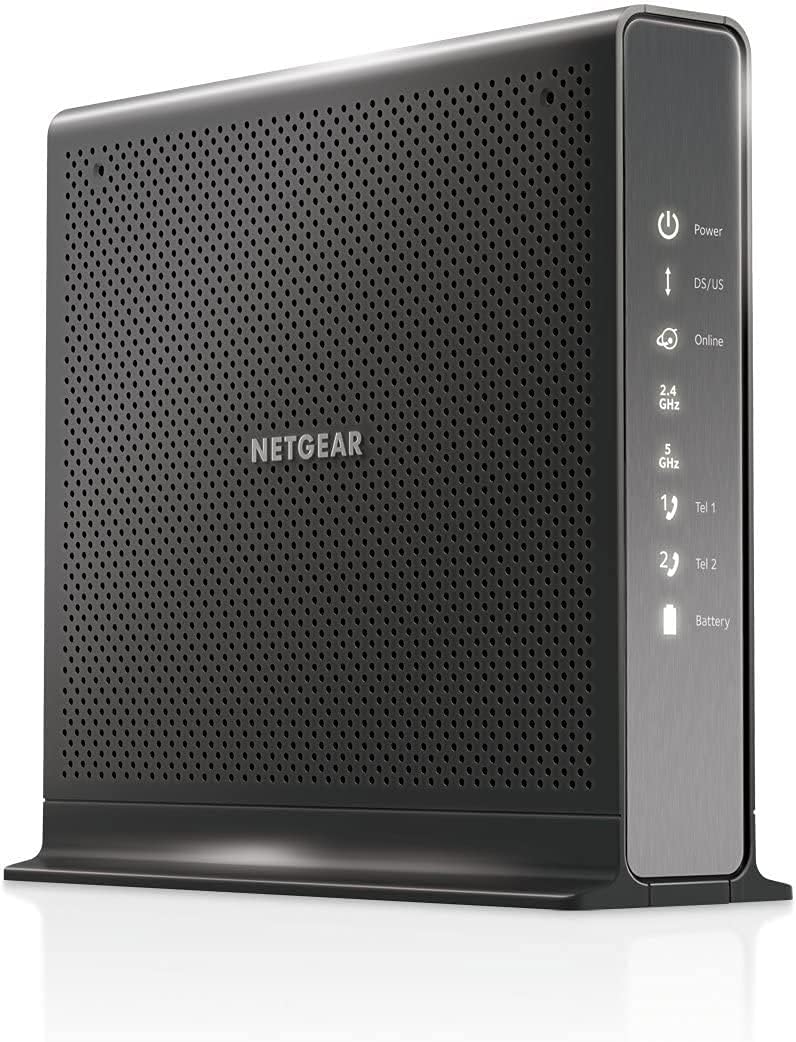
The NETGEAR Nighthawk C7000 offers a budget-friendly solution without compromising on essential connectivity features. With a 4.2 rating, it is well-suited for households that need reliable internet for everyday browsing and streaming.
We may earn a commission when you buy through this link, at no additional cost to you.
It supports cable plans up to 800Mbps and provides AC1900 speeds across dual bands. The Beamforming+ technology helps boost range and reduce dead spots, ensuring consistent connectivity throughout your home environment.
While it uses an older WiFi 5 standard, it remains a strong performer for general use. The USB port allows you to connect external storage or printers, adding extra versatility to the network setup.
For users seeking a cost-effective combo that still delivers solid performance, this unit is a practical choice. It provides the necessary tools to manage your network efficiently without breaking the bank.
The Nighthawk app lets you pause internet on devices and run speed tests, giving you full control over your home network from your smartphone.
Automatic firmware updates keep your device secure and up-to-date without requiring any manual intervention from the user.
We may earn a commission when you buy through this link, at no additional cost to you.
This renewed version of the NETGEAR Nighthawk CAX30 provides the same powerful specifications as the new model at a reduced cost. With a 4.2 rating, it is a smart pick for those willing to consider refurbished electronics for savings.
We may earn a commission when you buy through this link, at no additional cost to you.
It supports DOCSIS 3.1 and WiFi 6, ensuring you can take advantage of faster internet plans. The link aggregation feature allows for combined speeds, which is beneficial for users needing maximum throughput.
While it is a renewed item, it offers the same coverage and connectivity features as the standard model. You get four Gigabit Ethernet ports and strong wireless performance to handle multiple devices efficiently.
Choosing this option allows you to access premium features without paying the full price. It is a compelling choice for budget-conscious buyers who still want the latest technology in their home network.
This feature allows multiple connections to work together, increasing overall bandwidth for tasks that require significant data transfer.
Buying renewed products helps reduce electronic waste by giving high-quality devices a second life in homes that need reliable connectivity.
We may earn a commission when you buy through this link, at no additional cost to you.
Another variant of the popular CAX30 model delivers consistent high-speed performance for demanding users. With a 4.1 rating, it continues to impress with its ability to handle modern internet traffic loads.
We may earn a commission when you buy through this link, at no additional cost to you.
The inclusion of a USB 3.0 port allows for faster data transfer with external drives, which is a nice upgrade for home media centers. Coverage remains strong at 2000 square feet with support for over 25 devices.
It is designed to replace both your modem and router, simplifying your hardware setup. The compatibility with major providers ensures you can use it with most standard cable internet plans easily.
For those prioritizing speed and connectivity features, this unit meets the bar effectively. It combines reliable hardware with intuitive software tools to manage your home network.
The USB 3.0 port enables quick backups and media streaming directly from attached storage devices to your local network.
Four Gigabit Ethernet ports plus USB connectivity offer plenty of wired and wired options for your various devices.
We may earn a commission when you buy through this link, at no additional cost to you.
The ARRIS Surfboard G34 is designed for users who need faster cable speeds with DOCSIS 3.1 technology. With a 3.7 rating, it offers modern features like WiFi 6 but may vary in performance depending on the network environment.
We may earn a commission when you buy through this link, at no additional cost to you.
It supports internet plans up to 2.5 Gbps and provides AX3000 speeds for wireless devices. The compact design makes it easy to fit into small spaces while maintaining efficient performance.
Setup is straightforward with simple LED indicators that guide you through the activation process. It works with major providers like Xfinity and Spectrum, offering reliable connectivity for most households.
If you are on a higher-tier cable plan, this model ensures you can utilize the full speed of your service. It combines modern standards with a user-friendly interface for daily use.
The compact footprint allows you to place the device in tight spaces without sacrificing wireless performance or range.
Simple LED lights show power and connection status, making it easy to troubleshoot basic issues without technical knowledge.
We may earn a commission when you buy through this link, at no additional cost to you.
This renewed C7000 model brings classic performance to buyers on a tight budget. With a 4.2 rating, it remains a trusted option for households looking for basic networking needs without paying premium prices.
We may earn a commission when you buy through this link, at no additional cost to you.
It provides AC1900 speeds and covers up to 1800 square feet, which is sufficient for most standard homes. The device supports 30 connected devices, ensuring everyone can get online simultaneously.
While it does not have the latest WiFi 6 features, it is a solid workhorse for everyday tasks like browsing and streaming. The renewed status helps lower the cost significantly for budget shoppers.
If you need a reliable connection for essential services without extra frills, this unit is a practical pick. It offers the essentials of modern networking at a very accessible price point.
Buying a renewed device can save you money while still providing a dependable connection for all your daily internet activities.
The proven design of this model ensures stable performance for streaming, gaming, and general web usage.
We may earn a commission when you buy through this link, at no additional cost to you.
The NETGEAR Nighthawk CAX80 is designed for those who demand top-tier performance and maximum coverage. With a 3.9 rating, it offers robust features for power users who need to handle heavy network loads.
We may earn a commission when you buy through this link, at no additional cost to you.
Its AX6000 speed provides massive wireless capacity, and the 2.5 Gigabit port is a standout feature for high-speed wired connections. It covers up to 2500 square feet, making it suitable for large homes.
While it is expensive, the hardware supports plans up to 2 Gbps and offers significant headroom for future upgrades. It ensures that even with many devices connected, speeds remain fast and consistent.
If budget is not a constraint and you want the best performance available, this model is worth considering. It is engineered to handle the most demanding home network environments effectively.
The AX6000 standard delivers significantly higher bandwidth for multiple devices streaming and gaming without congestion.
The 2.5G port allows you to connect high-speed desktop PCs or NAS drives for fast local data transfer.
We may earn a commission when you buy through this link, at no additional cost to you.
The NETGEAR Nighthawk C7100V is unique for its support of voice plans, making it ideal for Xfinity subscribers. With a 4.2 rating, it integrates home phone service directly into your modem router combo.
We may earn a commission when you buy through this link, at no additional cost to you.
It supports up to 600Mbps internet plans and includes battery backup for up to 8 hours of standby. This ensures you stay connected for phone calls even during power outages.
While it uses AC1900 speeds, the voice feature is the standout capability for specific users. The USB ports provide extra connectivity options for printers or external storage devices.
For those needing home phone service alongside internet, this unit is a practical solution. It simplifies your setup by handling both data and voice needs in one device.
Two voice ports allow you to connect cordless phone bases directly to the modem for seamless phone service.
The optional battery backup keeps your phone service running for hours when the power goes out.
We may earn a commission when you buy through this link, at no additional cost to you.
The NETGEAR C6250 is perfect for smaller homes or apartments with lower speed plans. With a 4.2 rating, it provides reliable connectivity without unnecessary complexity for basic users.
We may earn a commission when you buy through this link, at no additional cost to you.
It supports plans up to 300Mbps and covers 1500 square feet, which is sufficient for small to medium spaces. The AC1600 speed ensures smooth streaming and browsing for everyday activities.
Parental controls and security protocols help keep your network safe for all users. The USB port lets you share files or connect a printer across your home network easily.
If you need a simple and dependable device for entry-level internet plans, this is a solid option. It offers essential features that meet the needs of most standard households.
Built-in parental controls help manage internet access times and content for younger users on the network.
The small design ensures it fits on a shelf or desk without taking up much space in your home.
We may earn a commission when you buy through this link, at no additional cost to you.
The ARRIS SBG7600AC2 is a reliable choice backed by a brand known for connectivity solutions. With a 4.3 rating, it offers AC2350 speeds that support plans up to 800 Mbps effectively.
We may earn a commission when you buy through this link, at no additional cost to you.
It includes four Gigabit Ethernet ports and robust parental controls to manage your home network easily. The SURFboard Central App helps with setup and monitoring of connected devices.
While it uses DOCSIS 3.0, it provides stable performance for most standard internet needs. Users appreciate the simple setup process and clear indicators for network status.
If you prefer a trusted brand with proven reliability, this model is a strong contender. It offers the necessary features for a stable home internet connection.
The app provides real-time monitoring of devices, helping you keep track of your network usage and connected users.
Enhanced parental controls let you set time limits to manage when and how your family accesses the internet.
We may earn a commission when you buy through this link, at no additional cost to you.
Selecting the right cable modem wifi router combo involves considering several technical factors to ensure compatibility and performance for your specific internet needs.
The DOCSIS standard determines the maximum speed your modem can handle. DOCSIS 3.1 is required for plans over 800Mbps and future-proofs your connection against upgrades.
Look for DOCSIS 3.1 for high-speed plans or 3.0 if your plan is below 500Mbps.
WiFi 6 (802.11ax) offers better efficiency and range compared to WiFi 5 (802.11ac). It handles multiple devices better and reduces congestion in busy households.
Choose WiFi 6 for better future compatibility and performance with smart home devices.
Not all modems work with every provider. Always check that the device is approved for your specific ISP like Xfinity or Spectrum before purchasing.
Verify compatibility lists to avoid returns and ensure seamless activation with your account.
The physical size of your home dictates the range you need. Devices cover between 1500 and 2500 square feet, so match the spec to your floor plan.
Select a device with coverage slightly larger than your home to ensure signal strength in all corners.
Wired connections are often more stable than wireless. Look for at least four Gigabit Ethernet ports to connect gaming consoles or desktop PCs directly.
More ports provide flexibility for hardwiring critical devices that need low latency.
Modern combos include WPA3 encryption and firewalls to protect your network. Some brands also offer subscription-based security tools like NETGEAR Armor.
Prioritize devices with built-in security to keep your personal data safe from online threats.
User-friendly setup apps simplify configuration and maintenance. Look for options that allow remote management and guest network creation easily.
An intuitive app helps you control your network without needing technical expertise or a computer.
Buying your own device saves money over time compared to monthly rental fees. While the upfront cost is higher, it pays off within a year for most users.
Calculate the potential savings based on your ISP's rental fee to determine the ROI for your purchase.
Start by placing the device in a central location with good airflow to prevent overheating. Ensure it is away from walls or metal objects that could block the wireless signal.
Connect the coaxial cable to the wall outlet and the power adapter to a surge protector. Plug in the ethernet cable from your computer to the modem if you are doing the initial setup.
Follow the activation instructions provided by your ISP via their website or app to register the device's MAC address. This step is essential before your connection will become active for use.
No, these devices are generally only compatible with cable providers like Xfinity, Spectrum, or Cox. They do not work with DSL, fiber, or satellite services. Always check the approved provider list on the product page to ensure compatibility with your specific internet plan.
Most providers charge between $10 to $15 monthly for modem and router rentals. Buying your own device typically costs between $100 and $300 upfront, which usually pays for itself within a year. Over three years, this can save you hundreds of dollars in rental fees.
WiFi 6 offers faster speeds, better efficiency with multiple devices, and improved security compared to WiFi 5. It is better suited for modern homes with many smart gadgets. If you are on a newer internet plan, WiFi 6 is recommended for future-proofing.
You can use standard coaxial cables, but ensure they are in good condition and not damaged. DOCSIS 3.1 requires a stable signal, so using high-quality cables ensures optimal performance. Most homes already have compatible coaxial cabling for this standard.
If you have bundled voice plans, you may need a specific combo with phone ports like the C7100V. Standard combos usually do not support voice lines. Check with your provider if your specific plan requires voice hardware before purchasing a data-only device.
Modern devices update automatically to keep your network secure. However, you can check the manufacturer app manually to ensure you have the latest features. Keeping firmware up to date helps protect against vulnerabilities and bugs.
The NETGEAR Nighthawk CAX30 leads the pack with its modern WiFi 6 and DOCSIS 3.1 support, making it the best overall choice for most users seeking speed and reliability.
For budget-conscious buyers, the C7000 series provides excellent value, while the CAX80 is perfect for power users needing maximum coverage and multi-gigabit speeds.
Remember that pricing and availability fluctuate frequently, so always check the current product page for the most up-to-date details before finalizing your purchase decision.