
MAYFLASH F300 Arcade Fight Stick
4.5Editor score
Wide platform compatibility
Sanwa component support
Turbo function support
This expert guide compares the top 10 arcade fight sticks for Switch 2 to help you find the best controller for competitive gaming and arcade classics.
Finding the right arcade fight stick for Switch 2 can transform your gaming experience significantly. Whether you love Street Fighter or classic retro titles, a quality controller offers precision and comfort that standard pads cannot match.
We have analyzed ten top-rated fight sticks based on compatibility, build quality, and features. Our selection includes wired and wireless options from trusted brands to ensure you have a reliable tool for competitive play.
Each pick highlights key strengths and potential trade-offs to guide your decision. Please note that availability and specific details may change over time, so verify current specs before purchasing your next fight stick.
4.5Editor score
4.7Editor score

4.6Editor score
The following table provides a side-by-side comparison of all ten selected arcade fight sticks for Switch 2. Review the specifications to identify the model that best fits your gaming style and platform needs.




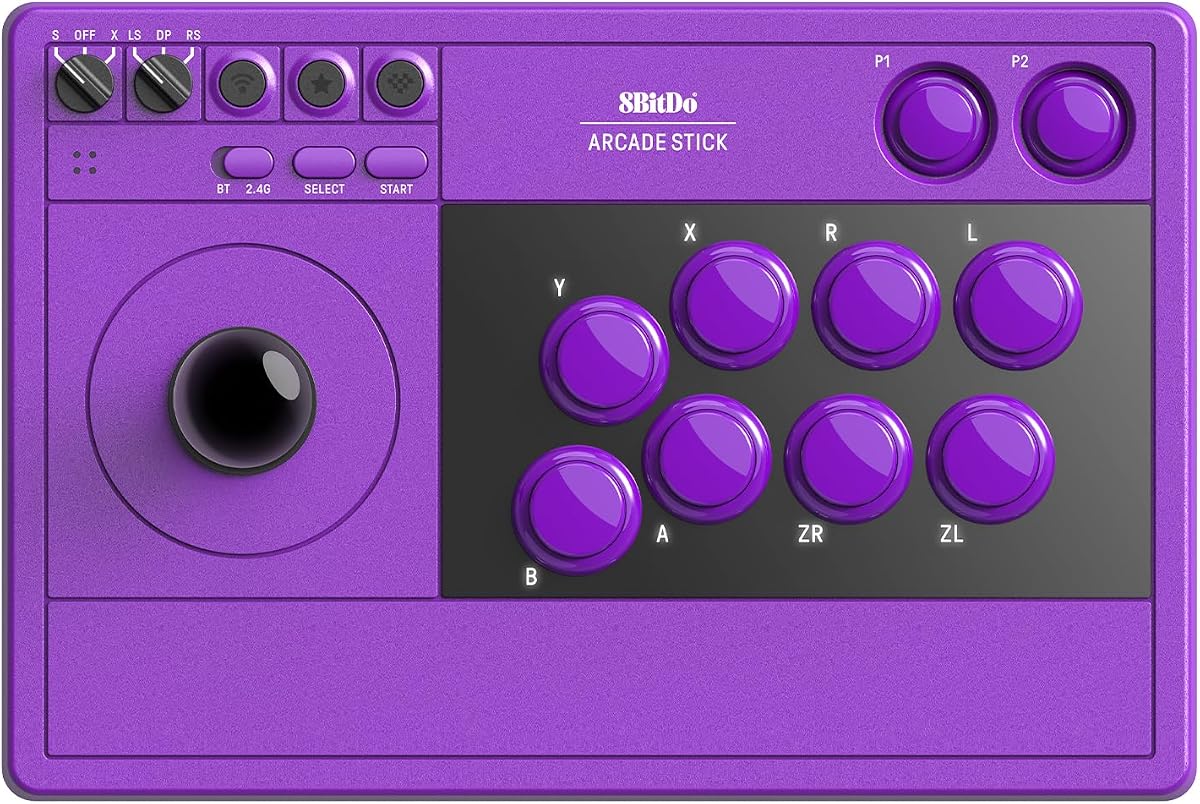
This 8BitDo stick ranks as our top pick for Switch 2 gamers due to its optimized features and build quality. With a 4.7 rating, it stands out for its premium materials and seamless software integration across modes.
We may earn a commission when you buy through this link, at no additional cost to you.
The tempered glass faceplate provides a smooth, scratch-resistant surface that feels premium during intense sessions. Dynamic button layout ensures you never confuse inputs when switching between Switch and PC XInput modes.
While the price is higher than entry-level sticks, the durability and software features justify the investment. The hidden compartment for the 2.4G receiver keeps your setup clean and organized.
If you want the best fighting experience on Switch 2 without compromises, this stick is the clear recommendation. Its wireless reliability and customization options make it ideal for competitive play.
The button labels update visually to match your current mode, preventing input confusion during play.
Tempered glass and high-grade plastics ensure long-lasting performance and a premium look.
We may earn a commission when you buy through this link, at no additional cost to you.
The F300 offers exceptional value for players seeking a reliable fight stick without spending a fortune. Its 4.5 rating reflects solid performance across multiple platforms including Switch 2 and PC.
We may earn a commission when you buy through this link, at no additional cost to you.
It supports both XINPUT and DINPUT on PC, making it versatile for different game types. The ability to use Sanwa parts means you can upgrade components later if desired.
However, it lacks a built-in battery since it relies on wired power for most connections. This limits mobility but ensures stable performance during long gaming sessions without battery anxiety.
For beginners or those on a tight budget, this stick delivers the core arcade experience effectively. Its wide compatibility ensures it works well even if you switch consoles.
Works with Switch 2, PS4, Xbox, PC, and Steam Deck for maximum flexibility.
Standard mounting allows future upgrades to Sanwa parts for enhanced feel.
We may earn a commission when you buy through this link, at no additional cost to you.
This elite model brings professional-grade components to the home setup for serious competitors. The 4.6 rating highlights its precision engineering and reliable performance in fighting titles on Switch 2.
We may earn a commission when you buy through this link, at no additional cost to you.
Premium Sanwa buttons and joystick ensure crisp inputs and consistent feel. The full-size anti-slip rubber mat keeps the stick firmly in place during rapid inputs.
The weight and price reflect its premium positioning, which may not suit casual players. However, for those who demand accuracy and build quality, it is unmatched in this list.
If you are investing in a stick for competitive play, this model provides the hardware reliability needed. Its compatibility with Switch 2 ensures you stay competitive on modern platforms.
Authentic Sanwa parts provide the standard used in real arcade cabinets for accuracy.
Heavy base and rubber mat prevent sliding during intense competitive matches.
We may earn a commission when you buy through this link, at no additional cost to you.
This versatile stick balances features and compatibility for players using multiple platforms. With a 4.6 rating, it offers solid performance for Switch 2 and PC gaming environments.
We may earn a commission when you buy through this link, at no additional cost to you.
The Ultimate software allows deep customization of macros and button mappings. Dynamic button layout updates visual labels to match your active mode automatically.
While it works on Switch 2, it is not the dedicated 2 version which may lack specific optimizations. The modding support is a strong point for enthusiasts wanting to tweak hardware.
If you play heavily on both Switch and PC, this hybrid model offers the flexibility you need. Its software tools enhance the experience beyond standard fight sticks.
Use Ultimate Software to create macros and save profiles for different games.
Universal mounting plate makes it easy to swap joystick and button components.
We may earn a commission when you buy through this link, at no additional cost to you.
Designed for extended play sessions, this stick offers impressive battery life for a wireless fight stick. The 4.5 rating reflects its reliability and robust feature set for Switch 2.
We may earn a commission when you buy through this link, at no additional cost to you.
Two dedicated macro buttons simplify access to complex combos during play. It supports both Bluetooth and 2.4G connections with a hidden compartment for the receiver.
Charging takes a few hours, which might interrupt short gaming sessions if unplanned. The retro design aesthetic is appealing but slightly bulkier than modern minimalist options.
For long weekend marathons, the battery capacity ensures you stay in the zone. Its compatibility with Switch 2 and PC makes it a versatile choice for hybrid players.
P1 and P2 buttons allow instant access to programmed macro combos.
Up to 40 hours of play time on 2.4G ensures uninterrupted sessions.
We may earn a commission when you buy through this link, at no additional cost to you.
This stick stands out for its visual display and audio features that enhance user experience. The 4.6 rating indicates strong user satisfaction with its unique design and capabilities.
We may earn a commission when you buy through this link, at no additional cost to you.
The display screen shows settings like volume, lighting, and language options clearly. A 3.5mm audio jack allows direct headphone connection for private gaming on Switch 2.
Macro recording up to 18 keystrokes is powerful but may be overkill for casual users. The display can be distracting for players who prefer a classic look.
If you want a stick with more tech features beyond standard controls, this is ideal. Its broad platform support ensures it works well across mobile and console setups.
Plug headphones directly into the stick for game audio and chat.
The display provides quick access to battery and setting adjustments.
We may earn a commission when you buy through this link, at no additional cost to you.
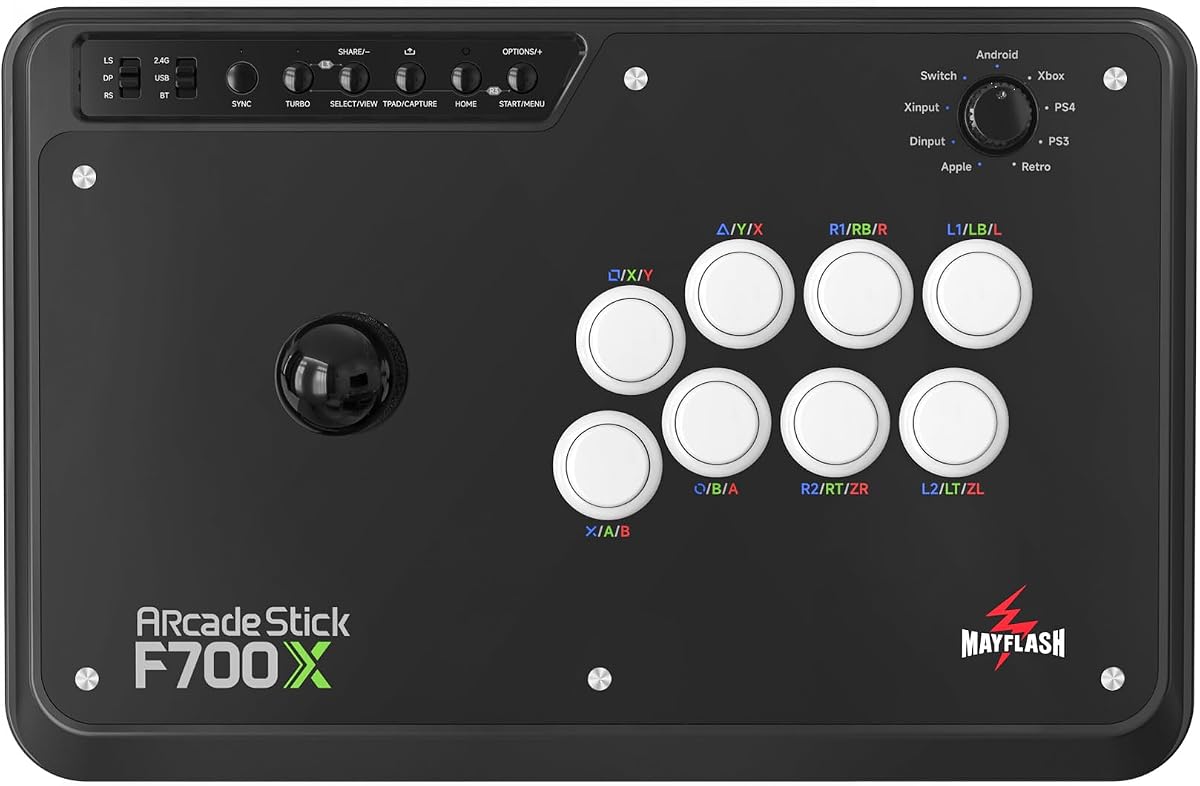
The F700 is engineered primarily for fighting games on PS5 and Switch 2. Its 4.5 rating supports its effectiveness in titles like Street Fighter 6 and Tekken 8.
We may earn a commission when you buy through this link, at no additional cost to you.
It includes wired headset support for outputting background music and chat on PS5. Sanwa compatibility allows you to tweak the joystick and buttons to your taste.
It does not work with Xbox Series X/S wirelessly, which limits multi-platform flexibility. The focus on fighting games means it lacks features for other genres.
For serious fighting fans with a Switch 2 and PS5 setup, this stick delivers. Its firmware updates ensure long-term compatibility and performance improvements.
Designed specifically for titles like Tekken 8 and Street Fighter 6.
Connect wired headsets for audio chat directly through the stick.
We may earn a commission when you buy through this link, at no additional cost to you.
This X variant is the preferred choice for players who prioritize Xbox Series X/S alongside Switch 2. It maintains the features of the F700 line with Xbox-specific optimization.
We may earn a commission when you buy through this link, at no additional cost to you.
It works wirelessly with Xbox Series X/S and Switch 2 via Bluetooth or 2.4G. Sanwa part compatibility ensures you can customize the hardware to your liking.
It lacks PS5 wireless support, which differentiates it from the standard F700 model. The rating is slightly lower, possibly due to mixed feedback on wireless latency.
If you have a mixed ecosystem of Xbox and Switch 2, this stick covers both well. Its design follows familiar layouts for users switching between consoles.
Supports Xbox Series X/S wirelessly for full console integration.
Accepts standard Sanwa parts for easy customization and repair.
We may earn a commission when you buy through this link, at no additional cost to you.
As an official licensed product, this stick offers compatibility assurance for Switch 2 and Switch Lite. The 4.1 rating reflects decent performance with traditional design choices.
We may earn a commission when you buy through this link, at no additional cost to you.
The metal shaft joystick provides stability during play. You can print custom facecards to personalize the look of your controller.
Using AA batteries limits playtime and increases long-term cost compared to rechargeable units. The lack of advanced wireless features makes it less versatile than newer models.
For those wanting official Nintendo assurance and simplicity, this is a safe option. Its cable storage feature is practical for tournament-style wired play.
Ensures compatibility and official branding for Nintendo systems.
Print your own facecard to personalize the controller appearance.
We may earn a commission when you buy through this link, at no additional cost to you.
The V3 edition brings refinements to the popular 8BitDo arcade stick line. While no official rating is available yet, it builds on the strengths of previous models.
We may earn a commission when you buy through this link, at no additional cost to you.
It features a tempered glass faceplate and 1000mAh battery for sustained use. The profile management system allows switching between different game settings easily.
The design is similar to the V2 model, which might not excite long-time users. However, the firmware updates ensure compatibility with new Switch 2 titles.
For fans of the 8BitDo ecosystem, this V3 update is worth considering. Its focus on fighting games makes it suitable for competitive titles on Switch 2.
Tempered glass faceplate provides a durable and smooth touch surface.
Save multiple controller profiles and switch between them instantly.
We may earn a commission when you buy through this link, at no additional cost to you.
Choosing the right fight stick involves evaluating several factors beyond brand reputation. This guide outlines the critical considerations to help you select a controller that fits your needs.
Ensure the stick explicitly lists Switch 2 support to avoid connection issues. Some older models may work via generic modes but lack optimized settings for the new console.
Verify compatibility with any other systems you own to maximize the value of the purchase.
Decide between wireless freedom and wired stability. Bluetooth and 2.4G offer mobility, while USB-C provides the lowest latency for competitive play.
Consider the convenience of charging for wireless models or the freedom from cables for wired setups.
Look for sturdy materials that withstand intense button mashing and joystick movement. Metal shafts and reinforced bases prevent wobbling during games.
Higher-quality materials often translate to longer lifespan and more consistent performance over time.
Check if the stick allows you to swap buttons and joystick parts. Sanwa compatibility is a strong indicator of future upgrade potential for enthusiasts.
Customization lets you tailor the hardware feel to your personal preference without buying a new unit.
Software tools for mapping macros and profiles can greatly enhance gameplay efficiency. Look for dedicated software that supports Switch and PC modes.
Advanced features like dynamic button layouts reduce confusion when switching between platforms.
For wireless models, battery capacity impacts playtime. Aim for sticks offering at least 30 hours of usage to avoid frequent charging interruptions.
Rechargeable batteries are more cost-effective than AA cells over the long term.
Set a budget that balances your needs with available funds. Entry-level options offer basic functionality, while premium models provide better components and features.
Invest more if you play competitively to get better reliability and input precision.
Some sticks include features like storage for cables or anti-slip mats. These small details matter if you plan to play in competitive environments.
Stability during high-intensity sessions can affect your comfort and performance in tournaments.
Start by connecting your stick to the Switch 2 via USB-C or wireless pairing depending on your model. Navigate to the controllers menu on your console to ensure it is detected correctly.
Use the included software to map buttons and create macros for your favorite games. This step is crucial for optimizing controls to match your playstyle and game requirements.
Keep the joystick and buttons clean by wiping them with a dry cloth regularly. Avoid liquids and store the stick in a dry place to prevent internal damage over time.
Yes, all ten products in this guide are confirmed to support Switch 2 either natively or via updated firmware. However, specific features may vary, so check product details for full compatibility before buying.
No, all sticks come ready to use out of the box. However, if you want custom colors or specialized joystick parts, you may need to purchase replacement components separately.
Wired USB-C generally offers the lowest latency and most stable connection. For convenience, 2.4G wireless is excellent, while Bluetooth works well but may have slightly higher input lag.
Most of the selected sticks support both Switch 2 and Windows PC. Look for models that mention XINPUT or DINPUT support for seamless PC gaming integration.
Some sticks like those from 8BitDo require their specific software to program macros. Others may allow basic turbo functions without extra installation on your computer.
Most wireless models include a USB-C cable for charging. Plug the stick directly into the console or a wall adapter to charge the internal battery when needed.
Sanwa components are industry standards known for durability and precision. Generic parts are cheaper but may wear out faster or feel different during intense gameplay.
No, a single stick supports one player. For local multiplayer on Switch 2, you will need additional controllers or sticks for each participant.
The top picks offer a range of options from budget-friendly entry-level sticks to premium tournament-grade controllers. Each model brings unique strengths to suit different playstyles and platform needs.
Prioritize features like compatibility, battery life, and build quality to ensure you get the best experience. Choosing the right stick can significantly improve your performance and enjoyment.
Keep in mind that prices and availability may change frequently. Always verify current specs and deals before making your final purchase decision to get the best value.