
ASUS VM670 27 All in One Desktop Computer
5.0Editor score
32GB DDR5 RAM
50-TOPS NPU AI
1TB SSD Storage
This guide compares the top All in One Desktop PC with Touchscreen models for performance, display quality, and features to help you choose the right device.
All in One Desktop PCs with Touchscreen technology combine powerful computing with intuitive touch interaction in a sleek design. These devices eliminate clutter by integrating the computer hardware directly into the display panel. Finding the right model requires balancing screen size, processing power, and tactile responsiveness for your specific needs.
We evaluated ten top-rated models based on processor speed, display quality, memory capacity, and user interface features. Each product was analyzed for its ability to handle multitasking, creative work, and daily productivity tasks efficiently. Our goal is to provide a clear comparison to streamline your decision-making process.
Each entry in this list highlights key strengths, potential trade-offs, and ideal use cases for different users. Prices and availability can fluctuate frequently so please verify current details before making a purchase. We recommend checking the official product links for the most up to-date specifications and offers.
5.0Editor score

4.7Editor score

4.5Editor score
The following comparison table provides a side-by-side overview of the top ten All in One Desktop PCs with Touchscreen capabilities. We have selected key specifications to help you quickly identify which model best fits your performance requirements and workspace constraints.




This HP All in One Desktop ranks as our top pick for its seamless integration of AI tools and powerful hardware. The AMD Ryzen AI 7 processor ensures swift performance for complex tasks. Users appreciate the responsive touchscreen and high-bandwidth DDR5 memory.
We may earn a commission when you buy through this link, at no additional cost to you.
The Copilot key offers dedicated access to AI assistance which streamlines workflows significantly. The 27-inch FHD display provides ample space for multitasking while the anti-glare coating reduces eye strain. Connectivity options include Wi-Fi 6 and Bluetooth 5.4 for modern peripherals.
While the price is higher than entry-level models the included accessories add significant value. The bundle features a touchscreen pen and USB flash drive which saves immediate setup costs. Some users may prefer a more adjustable camera tilt for video calls.
This device is ideal for professionals needing reliable AI-driven productivity tools in a clean workspace. The combination of speed and interface quality makes it a strong investment. We recommend it for those prioritizing efficiency and modern connectivity features.
The dedicated Copilot key allows instant access to AI assistance enhancing workflow efficiency significantly without extra navigation steps.
The adjustable stand and anti-glare panel ensure comfortable viewing angles even during extended work sessions.
We may earn a commission when you buy through this link, at no additional cost to you.
The ASUS VM670 stands out with its exceptional 32GB of DDR5 memory which is rare in this category. This configuration supports heavy multitasking and professional creative workloads efficiently. The AMD Ryzen AI 7 processor delivers on-device acceleration for advanced tasks.
We may earn a commission when you buy through this link, at no additional cost to you.
Its 27-inch FHD display offers 100% sRGB coverage ensuring accurate colors for design projects. The HDMI-in port allows the screen to function as a secondary monitor for consoles. Security features like BIOS protection add an extra layer of safety.
Premium pricing is justified by the high-end memory and dedicated AI capabilities. Users needing rapid data access will appreciate the 1TB NVMe SSD speed. However, the non-upgradeable nature of some components might limit future expansion.
This model is best suited for power users requiring top-tier specs in a compact form factor. The blend of performance and security makes it a robust choice. Consider this if you demand maximum processing power and visual fidelity.
With 32GB of DDR5-5600MHz RAM you can run dozens of browser tabs and apps without lag.
The inclusion of HDMI-in and HDMI-out ports adds unique flexibility for multi-display setups.
We may earn a commission when you buy through this link, at no additional cost to you.
The Dell 23.8 model provides a solid entry point for those seeking a touchscreen All in One PC. The Intel Core 5 processor handles daily tasks like web browsing and media streaming smoothly. Its narrow border design enhances the viewing experience.
We may earn a commission when you buy through this link, at no additional cost to you.
ComfortView Plus technology reduces harmful blue light which is beneficial for extended usage. The speakers deliver clear audio with Dolby Atmos support making it great for media consumption. The Windows 11 Home setup is intuitive for general users.
While storage and memory are modest they are sufficient for standard home computing needs. Users looking for intensive gaming or editing might find it limiting but it works well for general use. The onsite service option offers peace of mind for new buyers.
We recommend this unit for families or students needing a reliable computer for school and leisure. The balance of features and cost makes it a practical choice. It is an excellent starting point for digital learning at home.
ComfortView Plus hardware solution reduces blue light without changing color accuracy for long viewing sessions.
Dual Bluetooth speakers with Dolby Atmos provide rich sound without needing external speakers.
We may earn a commission when you buy through this link, at no additional cost to you.
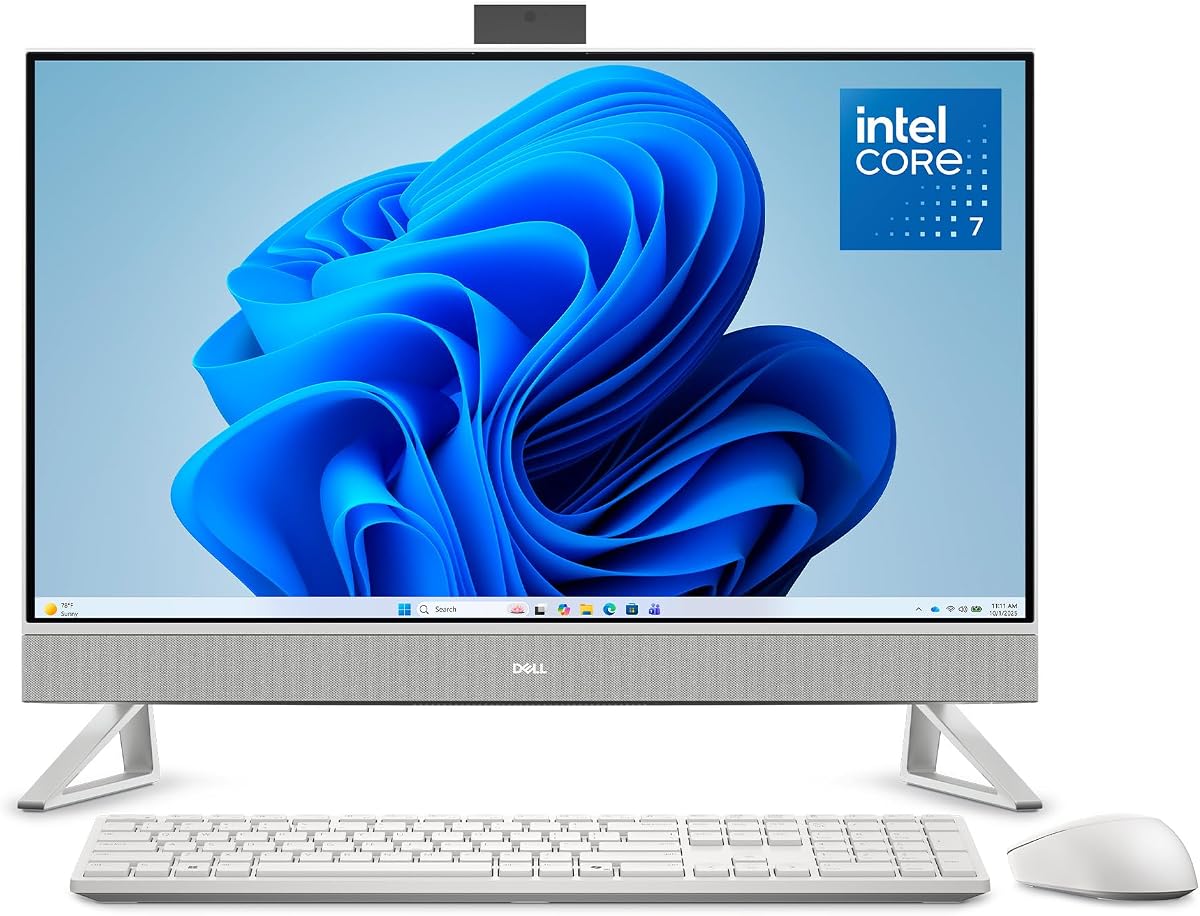
This Dell model is optimized for professional environments with Windows 11 Pro pre-installed for better security. The Intel Core 7 150U offers robust multitasking capabilities for business applications. A privacy camera that physically hides adds a layer of security.
We may earn a commission when you buy through this link, at no additional cost to you.
The 10-core processor ensures that heavy spreadsheets and video calls run without delay. Port accessibility is improved allowing easy connection to peripherals without cable management issues. The included keyboard and mouse provide a ready-to-use experience.
Storage might be tight for large local files but cloud integration often mitigates this. The smaller screen size keeps the footprint compact for smaller desks. Users needing more space may want to consider the 27 inch variants instead.
It is highly recommended for office workers prioritizing privacy and system management features. The Pro edition supports advanced networking needs and remote work tools. This is a reliable tool for structured professional workflows.
Professional features like Remote Desktop and BitLocker encryption enhance security and remote access capabilities.
The push-down camera mechanism provides a physical barrier against unwanted surveillance during meetings.
We may earn a commission when you buy through this link, at no additional cost to you.
This ASUS model is a powerhouse for creative professionals needing high color accuracy and speed. The IPS display with 100% sRGB ensures that visuals are true to life. With 32GB of memory rendering and editing apps run smoothly.
We may earn a commission when you buy through this link, at no additional cost to you.
The responsive touchscreen allows direct interaction with design tools which speeds up workflows. Noise-canceling microphones ensure clear audio during client video calls. The build quality supports heavy daily use without performance degradation.
While the price reflects the premium specs it is a worthwhile investment for serious creators. The only drawback is the limited adjustability of the camera which may require extra care in positioning. Overall the performance outweighs minor ergonomic limitations.
We suggest this device for graphic designers and video editors working from a single desk. The combination of color fidelity and speed creates an efficient creative environment. It is a top choice for those who value visual quality.
The 100% sRGB coverage ensures your designs look exactly as intended across different digital platforms.
Use your fingers or pen to interact directly with design software for faster and more intuitive editing.
We may earn a commission when you buy through this link, at no additional cost to you.
This Dell All-in-One is designed for modern business environments requiring connectivity and mobility. The Wi-Fi 7 support ensures fast network speeds essential for cloud workflows. The Intel Ultra 7 processor provides efficient performance for business apps.
We may earn a commission when you buy through this link, at no additional cost to you.
Pen support makes it ideal for signing documents or taking handwritten notes directly on screen. The compact design fits well in collaborative spaces or home offices. VESA mount compatibility adds flexibility for different setup configurations.
The slightly higher cost is offset by the future-proof connectivity features. Users benefit from longer software support due to the newer CPU generation. It is a smart choice for companies looking to upgrade their tech stack.
We recommend this model for business users prioritizing connectivity and secure input methods. The combination of speed and modern standards makes it a durable investment. It supports both remote and in-person work scenarios effectively.
Next-generation wireless speeds ensure seamless streaming and file transfers without network bottlenecks.
Use the included pen for precise input and handwriting on the touchscreen display for notes.
We may earn a commission when you buy through this link, at no additional cost to you.
The HP 27-inch model excels in providing a large viewing area for entertainment and work. The AMD Ryzen 5 processor handles streaming and daily apps with ease. Its bright display makes it suitable for well-lit rooms.
We may earn a commission when you buy through this link, at no additional cost to you.
Windows 11 Pro offers enhanced security features which are valuable for personal or business use. The included wireless keyboard and mouse reduce cable clutter on the desk. Built-in speakers provide sufficient audio for casual listening.
While the onboard memory might limit heavy multitasking it is adequate for most general users. The lack of upgradeable RAM is a trade-off for the thin design. This unit is best for those who prefer simplicity and space-saving setups.
We suggest this model for households needing a versatile device for media and light work. The screen size enhances the experience for watching content or browsing web pages. It is a convenient solution for shared family use.
The 27-inch diagonal offers ample screen real estate for spreadsheets and media content.
Professional security features like BitLocker provide robust protection for your personal data.
We may earn a commission when you buy through this link, at no additional cost to you.
This Dell model offers a large screen and significant memory for demanding tasks. The Intel Core 7 processor ensures that multitasking across windows is smooth. The stand is designed to hold the keyboard underneath saving desk space.
We may earn a commission when you buy through this link, at no additional cost to you.
With 32GB of RAM you can keep many applications open without performance drops. The audio quality is strong enough for conferencing and media playback. The narrow bezel enhances the immersive feel of the display.
The price is higher but the specs justify it for power users needing screen space. The stand design is clever but limits vertical adjustment options. Users who need ergonomic height changes might prefer an adjustable arm mount.
We recommend this for users working with extensive spreadsheets or data analysis. The combination of screen real estate and memory creates a productive workflow. It is a solid choice for home offices with ample room.
The innovative stand design provides a dedicated space to tuck the keyboard under the monitor.
With 32GB of RAM you can run multiple resource-heavy applications simultaneously without slowdowns.
We may earn a commission when you buy through this link, at no additional cost to you.
This HP model is tailored for educational needs and household tasks. The N100 processor is efficient for web browsing and document editing. It features a clean white design that blends well in modern home decor.
We may earn a commission when you buy through this link, at no additional cost to you.
The 16GB of DDR4 RAM provides enough buffer for multiple student apps running at once. Storage is generous with a 1TB SSD ensuring plenty of room for files. Bluetooth connectivity allows easy pairing with wireless headphones.
While it lacks high-end speed it is perfectly adequate for schoolwork and streaming. Users needing faster rendering might find it slower but general tasks are smooth. The value proposition is strong for budget-conscious families.
We suggest this for students and families looking for a reliable learning device. Its compact size makes it ideal for shared spaces or bedrooms. It is a practical choice for digital literacy and online classes.
Designed for home and school this unit supports learning apps and video conferencing tools efficiently.
The white finish offers a sleek look that complements various interior design styles.
We may earn a commission when you buy through this link, at no additional cost to you.
This ASUS model is a robust choice for those focusing on AI-enhanced tasks. The dedicated Copilot key and NPU make it easy to access smart tools. The AMD Ryzen AI 7 ensures fast processing for daily workloads.
We may earn a commission when you buy through this link, at no additional cost to you.
Its 27-inch IPS display is bright and clear with anti-glare coating reducing eye fatigue. The 32GB DDR5 memory supports heavy multitasking with ease. HDMI-in allows it to double as a display for external devices like consoles.
Users looking for future-proof AI capabilities will find this system highly capable. The price reflects the high-end components but the performance justifies it. It is a top pick for tech enthusiasts and professionals alike.
We recommend this unit for those wanting the latest AI features in a desktop. The combination of hardware speed and software integration sets a new standard. It is a powerful addition to any modern workspace.
The dedicated Copilot key gives instant access to AI tools without needing to navigate menus.
Use HDMI-in to connect a gaming console and use the display for entertainment purposes.
We may earn a commission when you buy through this link, at no additional cost to you.
The MSI Business Desktop focuses on productivity and connectivity for corporate environments. Its support for dual external monitors allows for an expanded workspace. The 1.2TB storage provides ample room for business documents and media.
We may earn a commission when you buy through this link, at no additional cost to you.
Pre-installed Windows 11 offers enterprise features beneficial for remote work management. Wireless peripherals ensure a clean desk setup for professional meetings. The Intel Core 7 processor handles standard business software efficiently.
The 8GB RAM might feel limited for heavy multitasking but can be upgraded. Users prioritizing screen real estate and storage will appreciate this configuration. It is a practical choice for growing businesses needing flexible setups.
We recommend this model for small business owners needing a versatile workstation. The dual monitor capability is a key differentiator in this category. It is a solid investment for productivity-focused professional environments.
Connect two external displays to expand your workspace for improved multitasking capabilities.
Enterprise features in Windows 11 ensure robust security and management for corporate use.
We may earn a commission when you buy through this link, at no additional cost to you.
Selecting the right All in One Desktop PC with Touchscreen involves considering several technical and ergonomic factors to ensure it meets your needs.
The processor is the heart of your system determining how fast tasks are completed. Look for Intel Core or AMD Ryzen models with recent generations for efficiency. AI-enabled processors can significantly boost productivity with modern tools.
Aim for at least 16GB of RAM for smooth multitasking especially if you keep many tabs open. SSDs are essential for fast boot times compared to traditional hard drives. Higher capacity storage reduces the need for external drives.
Screen resolution and color accuracy are vital for visual work. IPS panels generally offer better viewing angles and color reproduction than others. Anti-glare coatings help reduce eye strain during long working sessions.
A good touchscreen should react instantly to touch without lag for intuitive control. Multi-touch support allows for gestures that can speed up navigation. Ensure the glass is durable to resist scratches over time.
Built-in microphones and speakers are critical for video conferencing and media consumption. Look for noise-canceling technology to improve call clarity. HD cameras enhance the professional look during virtual meetings.
Check for USB-C and HDMI ports to connect external monitors and accessories. Wi-Fi 6 or newer ensures fast and stable internet connections. Bluetooth allows easy pairing with wireless mice and headsets.
An adjustable stand helps position the screen at eye level for comfort. A compact footprint saves desk space which is valuable in home offices. VESA mounting options add flexibility for different desk configurations.
Windows 11 Pro offers advanced security and networking features for business use. Home versions are suitable for personal and educational tasks. Ensure the OS receives regular updates for long-term support.
To maximize the lifespan of your touchscreen device avoid pressing too hard on the screen surface. Use soft microfiber cloths to clean fingerprints and smudges regularly to maintain clarity. Keep liquids away from the base to prevent damage to internal components.
Regularly update your software and drivers to ensure security and performance. Use built-in power management settings to put the PC to sleep when not in use. This helps reduce energy consumption and extends hardware longevity.
Ensure the ventilation slots are not blocked by dust or debris to prevent overheating. Position the PC in a cool environment away from direct sunlight to avoid screen glare and heat buildup. Following these practices will keep your device running smoothly.
The main advantage is the streamlined design that saves space while offering intuitive interaction. Touchscreen capability allows for easier navigation and direct control over apps. It combines computing power with a sleek aesthetic for modern workspaces.
Yes many models offer high-resolution displays with accurate color reproduction suitable for design. Look for specs like 100% sRGB coverage and ample RAM for rendering. Touch support also aids in precise editing with a stylus.
Most models support external monitors via HDMI or DisplayPort connections. This allows you to expand your workspace beyond the built-in screen. Check the specific model specifications to confirm video output capabilities.
Many modern All in One PCs have onboard RAM that is not easily upgradeable. Some high-end models may allow upgrades but it depends on the chassis design. Always verify upgrade options before purchase.
Use a soft, dry microfiber cloth to wipe the screen gently. Avoid using harsh chemicals or abrasive materials that could damage the coating. If needed use a slightly damp cloth with distilled water.
Most manufacturers offer a standard one-year limited warranty covering hardware defects. Extended service plans are often available for purchase to cover accidental damage. Check the product details for specific warranty terms.
Pro offers advanced features like remote desktop and better security tools useful for business. Home is sufficient for general use and entertainment. Choose Pro if you need enterprise-level management features.
Most standard touchscreens require skin contact and may not work with gloves. Some models support stylus input which allows usage without direct touch. Check specifications for multi-touch compatibility before assuming it will work.
We have reviewed ten top models that balance performance with user-friendly touch interfaces. The HP 27 All in One and ASUS VM670 stand out for their premium specifications. Whether you need budget efficiency or top-tier power there is a suitable option.
Prioritize processor speed and memory if you handle heavy workloads regularly. For home users display quality and audio features might take precedence. Ensure the device fits your ergonomic needs to maintain comfort during long sessions.
Always check current pricing and availability as these figures can change frequently. We recommend visiting the product links for the latest details before buying. Choosing the right All in One PC will enhance your daily computing experience significantly.