
LG UltraFine evo 32U990A-S
4.5Editor score
Thunderbolt 5 High Speed Data
Nano IPS Black Technology
DisplayHDR 600 Certified
Finding the right display for high-resolution work can be challenging in today's market. A 6K monitor offers exceptional clarity and pixel density ideal for creative professionals needing precise color and detail for their daily tasks.
We evaluated ten leading models based on panel technology, color gamut coverage, connectivity options, and ergonomic features. Our analysis focuses on real-world performance for design, editing, and productivity workflows to help you choose wisely.
Each selection highlights unique strengths like touch capabilities, curved immersive views, or Thunderbolt hubs. Note that pricing fluctuates frequently, so verify current offers before purchasing to ensure you get the best value for your specific needs.
4.5Editor score

3.9Editor score

3.7Editor score
As an Amazon Associate we earn from qualifying purchases.
This side-by-side comparison details the key specifications and unique selling points of the ten selected 6K monitors. Use this overview to quickly identify which model aligns best with your specific workflow requirements and budget constraints.




The ASUS ProArt PA32QCV stands out as a top contender for professional creatives seeking high fidelity visuals. With a 31.5-inch 6K display and factory calibration delivering Delta E under 2, it ensures your work looks exactly as intended.
We may earn a commission when you buy through this link, at no additional cost to you.
This monitor excels in color performance with 98% DCI-P3 coverage and a dedicated preset for MacBook users. The dual Thunderbolt 4 ports support high wattage power delivery and daisy-chaining making it ideal for laptop-centric setups.
While it lacks the high refresh rates found in gaming monitors the versatile connectivity and ergonomic design make up for it. The built-in Auto KVM switch simplifies workflow between multiple machines reducing clutter on your desk.
If you prioritize color accuracy and seamless integration with Apple devices this model is a strong recommendation. Its comprehensive feature set justifies the investment for professionals who rely on precise visual output daily.
Calman Verified factory calibration ensures consistent color performance right out of the box saving time on manual adjustments.
Dual Thunderbolt 4 ports offer up to 96W power delivery allowing you to charge your laptop while transferring data and video.
We may earn a commission when you buy through this link, at no additional cost to you.
This Dell monitor redefines the workspace with a colossal 52-inch curved 6K display that immerses users in their content. The IPS Black panel technology delivers deep blacks and vibrant colors enhancing the viewing experience significantly.
We may earn a commission when you buy through this link, at no additional cost to you.
Productivity is boosted by the expansive screen real estate and the inclusion of a robust Thunderbolt 4 hub. This allows for charging devices up to 140W and connecting multiple peripherals through a single cable to your computer.
The 120Hz refresh rate provides smooth motion which is beneficial for both video editing and casual gaming. However the large size may not fit smaller desks and the premium price reflects its high-end specifications.
For users needing an immersive and powerful station this model offers unmatched visual presence. It balances professional color accuracy with modern connectivity features making it a top tier choice for demanding environments.
The curved design and wide aspect ratio wrap around your vision reducing eye strain during long sessions.
Integrated USB-C ports and Ethernet allow for a clean desktop setup by consolidating connections through the monitor.
We may earn a commission when you buy through this link, at no additional cost to you.
The G32P delivers stunning visual quality with 500-nit brightness that brings HDR content to life. Its high pixel density ensures text and details remain crisp which is essential for detailed graphic design work.
We may earn a commission when you buy through this link, at no additional cost to you.
Color performance is robust with nearly full coverage of sRGB and DCI-P3 standards. This makes it a reliable choice for editors who need accurate representation of colors across different media formats.
While the refresh rate is limited to 60Hz the overall build quality and cooling design ensure stability. The aluminum body helps manage heat effectively maintaining consistent performance over extended use periods.
If your focus is on visual fidelity rather than high-speed gaming this monitor excels. The combination of brightness and color accuracy provides a solid foundation for creative professionals seeking quality on a reasonable budget.
Peak brightness levels allow for accurate previews of HDR video and photo projects before final delivery.
The CNC-machined aluminum chassis not only looks sleek but also aids in passive heat dissipation.
We may earn a commission when you buy through this link, at no additional cost to you.
Samsung brings the first 6K gaming monitor to the market with the Odyssey G8 offering a unique blend of resolution and speed. The Dual Mode feature allows users to choose between 6K visuals or higher frame rates depending on their game.
We may earn a commission when you buy through this link, at no additional cost to you.
With a 1ms response time and G-Sync compatibility this monitor minimizes motion blur and tearing during intense gameplay. The Fast IPS panel ensures wide viewing angles and vibrant colors which enhance the overall gaming immersion.
While it lacks the specialized color calibration of professional displays its gaming optimizations are significant. The input options include DP 2.1 and HDMI 2.1 ensuring compatibility with next-gen consoles and modern graphics cards.
Gamers who want high resolution without sacrificing refresh rates will find this compelling. It is a unique device that bridges the gap between professional displays and high-performance gaming screens.
Switch between 6K at 165Hz or 3K at 330Hz to prioritize resolution or speed instantly.
Near-instant response times reduce ghosting ensuring clear visuals during fast-moving scenes.
We may earn a commission when you buy through this link, at no additional cost to you.
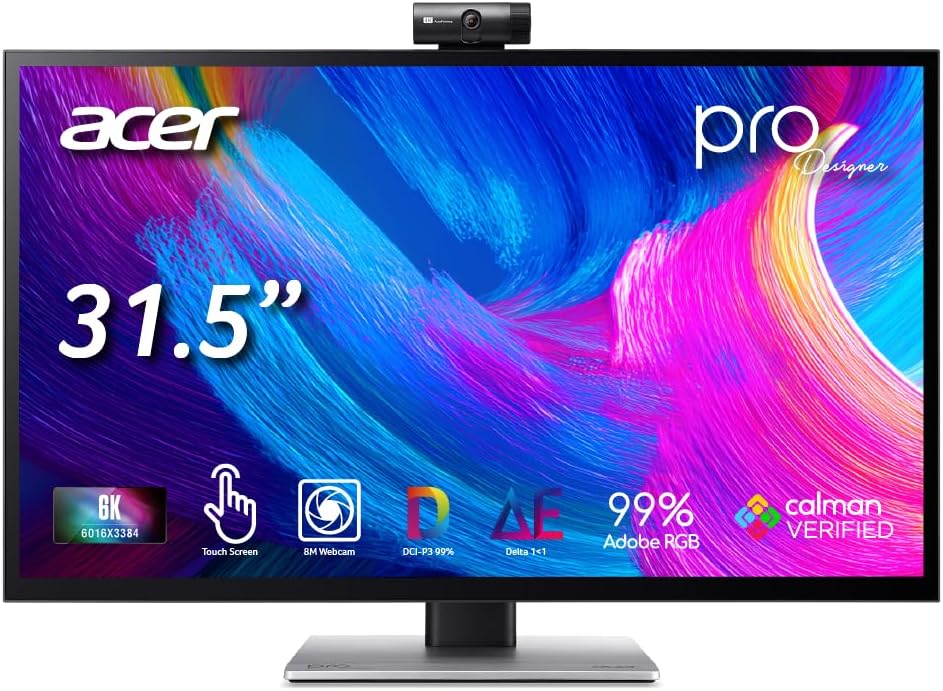
The Acer ProDesigner stands out by integrating touch and stylus input directly into a professional 6K display. This eliminates the need for separate tablets allowing artists to draw directly on their canvas without switching devices.
We may earn a commission when you buy through this link, at no additional cost to you.
Color accuracy is a key focus with factory calibration ensuring Delta E values below 1. Combined with wide Adobe RGB coverage this makes it ideal for print and digital workflows requiring precise color reproduction.
Additional features like a built-in 8MP webcam and microphone simplify meetings and client reviews. The DisplayHDR 600 certification ensures you can preview content as it will appear on other HDR enabled devices.
Designers and illustrators will appreciate the all-in-one nature of this unit. It simplifies the creative setup while maintaining high standards for color fidelity and connectivity.
MPP 2.0 compatibility allows for precise pressure sensitivity during digital sketching and editing tasks.
Built-in hardware reduces desk clutter by removing the need for external cameras during remote collaboration.
We may earn a commission when you buy through this link, at no additional cost to you.
The G32X offers a streamlined approach to 6K displays focusing on essential performance and build quality. With a 218 PPI count it delivers sharp text and images suitable for both work and entertainment purposes.
We may earn a commission when you buy through this link, at no additional cost to you.
Its anti-glare coating helps reduce reflections which is beneficial for environments with varied lighting conditions. The sturdy CNC-machined aluminum body ensures durability and maintains a sleek aesthetic on your desk.
Color performance remains consistent with strong coverage of standard color spaces. This makes it a reliable tool for everyday professional tasks without unnecessary bloat in features or software.
Users seeking a no-nonsense high-resolution display will find this model appealing. It balances simplicity with high-end performance making it a practical choice for those prioritizing visual clarity.
High pixel density ensures text appears sharp reducing eye fatigue during long reading or writing sessions.
The premium materials used in construction reflect a commitment to long-term durability and style.
We may earn a commission when you buy through this link, at no additional cost to you.
This Dell model expands the desktop with a 52-inch wide screen offering significant horizontal workspace. The IPS Black panel enhances contrast and color depth ensuring your content pops even in dark room conditions.
We may earn a commission when you buy through this link, at no additional cost to you.
As a Thunderbolt Hub it supports high-power delivery and data transfer allowing for efficient peripheral management. KVM functionality enables you to control multiple systems with one set of inputs increasing workflow efficiency.
The inclusion of remote control and software management tools adds convenience for enterprise users. However the vertical resolution is lower than square 6K monitors which may limit certain editing layouts.
Professionals needing wide horizontal space for timelines or code will benefit from this layout. It is a functional choice for specific workflows where horizontal real estate takes precedence.
The 21:9 aspect ratio provides extra room for toolbars and multi-window setups without clutter.
Switch between computers effortlessly to maintain productivity across different operating systems.
We may earn a commission when you buy through this link, at no additional cost to you.
LG introduces Thunderbolt 5 to the market with this UltraFine model promising future proof connectivity. The data transfer speeds and power delivery capabilities are unmatched providing fast charging and data access for modern laptops.
We may earn a commission when you buy through this link, at no additional cost to you.
The Nano IPS Black panel offers exceptional contrast and color accuracy with wide Adobe RGB coverage. This makes it suitable for cinema delivery and high-end print work where color precision is non-negotiable.
High pixel density reduces the need for zooming during design work significantly improving workflow speed. The KVM feature further enhances utility by allowing control of multiple systems from a single desk setup.
For professionals who need the latest in connectivity and color quality this monitor is a top tier choice. It invests in future standards ensuring compatibility with upcoming devices and workflows.
Thunderbolt 5 offers up to 80Gbps transfer speeds allowing for rapid file movement and device charging.
Near complete Adobe RGB coverage ensures your digital work matches physical print outputs accurately.
We may earn a commission when you buy through this link, at no additional cost to you.
This Dell UltraSharp bundle offers a reliable option with an extended protection plan for added peace of mind. The resolution is sharp and the connectivity allows for easy integration with various laptop configurations.
We may earn a commission when you buy through this link, at no additional cost to you.
With 450 nits of brightness it performs well in standard office lighting. The response time is sufficient for general use ensuring smooth scrolling and minimal input lag during standard operations.
The inclusion of an extended service plan is a significant benefit for business environments needing uptime assurance. It simplifies maintenance and reduces the risk of long downtime due to hardware issues.
Companies looking for dependable displays with support coverage will find this bundle valuable. It balances performance with practical support features suitable for standard office deployment.
The two-year enhanced service ensures quick resolution of hardware issues to maintain productivity.
USB Type-C connectivity simplifies cable management by combining data and power in one link.
We may earn a commission when you buy through this link, at no additional cost to you.
For budget conscious buyers this renewed option offers access to high-end specs at a lower entry price. The curved 6K display provides immersive viewing while the Thunderbolt 4 hub maintains connectivity capabilities.
We may earn a commission when you buy through this link, at no additional cost to you.
Since it is sold without a stand users can pair it with their own VESA arm for a cleaner setup. This flexibility allows for customization based on desk space and personal ergonomic needs.
The 120Hz refresh rate ensures smooth visuals which is beneficial for video editing and casual gaming tasks. While the condition is renewed the core features remain identical to the new version.
This model is best for those who already have mounting solutions or prefer a custom arm setup. It provides high performance features at a more accessible price point for the discerning buyer.
The VESA mount only design allows you to integrate the monitor into any custom workstation setup.
Renewed options offer significant savings while retaining the high-resolution benefits of the full model.
We may earn a commission when you buy through this link, at no additional cost to you.
Selecting a 6K monitor requires balancing resolution with other critical factors like color accuracy and connectivity. This guide helps you prioritize features based on your specific professional needs.
Look for IPS panels with wide color gamuts like DCI-P3 or Adobe RGB to ensure your creative work looks authentic. Factory calibration with a Delta E under 2 is essential for professional tasks requiring precise color reproduction.
Prioritize panels that offer true 10-bit color and HDR support for better detail in dark and bright areas.
For laptop users check that the monitor supports Thunderbolt 4 or USB-C with high wattage power delivery to charge your device while in use. Daisy-chaining capabilities can help keep your desk clean by connecting multiple displays.
Ensure you have enough ports to connect your peripherals directly to the monitor for a streamlined workflow.
While 6K is standard for design a higher refresh rate like 120Hz can improve fluidity in video editing. For gaming models consider options with fast response times to reduce motion blur during dynamic scenes.
If you only do static work 60Hz may be sufficient allowing you to focus more on resolution and color.
A 32-inch 6K screen offers a high pixel density of over 200 PPI which ensures text is crisp and easy to read. Larger curved screens provide immersion but may require more desk space and a viewing distance check.
Choose a size that fits your room and viewing distance to prevent eye strain during long work sessions.
Look for stands that offer height tilt swivel and pivot adjustments to maintain a comfortable posture. Proper ergonomics are vital to prevent strain when working closely with high-resolution displays for hours.
VESA mount compatibility allows you to use third-party arms if the included stand does not meet your needs.
Some monitors include touch or stylus support which can streamline tasks like photo retouching or annotation. KVM switches allow you to control multiple computers with one keyboard and mouse saving space and effort.
Decide if these specialized features justify the cost based on your daily workflow requirements and budget.
Certifications like TÜV low blue light and flicker-free backlighting help reduce eye fatigue over long periods. This is especially important for professionals who spend many hours staring at the screen daily.
Auto brightness sensors that adjust to room lighting can also help maintain comfort throughout the day.
Professional monitors often come with longer warranties or bundled service plans to protect your investment. Check the terms for panel coverage and response times to ensure support is available when needed.
Consider the brand reputation for customer service to guarantee a smooth experience if technical issues arise.
Start by connecting your computer via the highest quality cable available like HDMI 2.1 or Thunderbolt to ensure you get the full 6K resolution without compression or errors in your signal chain.
Calibrate your display using built-in tools or professional software to match the color standards required for your specific projects before beginning critical work or client deliverables.
Clean the screen with a soft microfiber cloth to avoid scratches and never use household glass cleaners as they can damage the delicate coating on your high-resolution panel.
A 6K monitor provides significantly higher pixel density which results in sharper text and finer details. This reduces the need to zoom in during editing tasks and offers more screen real estate for multitasking.
Yes driving a 6K resolution requires a modern graphics card and processor to handle the rendering load. Ensure your system has sufficient RAM and GPU capabilities to maintain smooth performance.
Not all models are created equal so look for high DCI-P3 and Adobe RGB coverage along with factory calibration. Professional monitors often include specific settings for accurate color reproduction.
Yes many high-end models support Thunderbolt daisy-chaining which lets you connect multiple displays using a single cable to your computer. This reduces desk clutter significantly.
Curved screens offer immersion for large displays but flat screens are often preferred for precision editing to avoid geometric distortion. Choose based on your primary use case.
Use a dry or slightly damp microfiber cloth to wipe away dust and fingerprints. Avoid spraying liquid directly onto the screen and never use abrasive chemicals.
Our top picks highlight the versatility of 6K technology ranging from the color accuracy of the ASUS ProArt to the immersive experience of the Dell 52-inch models.
Prioritize panel technology and connectivity options to ensure your monitor supports your workflow for years to come.
Always check current pricing and availability before purchasing as these values fluctuate frequently in the tech market.