
TP-Link AC600 USB WiFi Adapter
4.4Editor score
Dual band 2.4 and 5 GHz
Adjustable 5dBi high gain antenna
Supports Windows 7 through 11
Discover the top 5GHz WiFi dongles for speed and range. This guide compares ten adapters to help you choose the best one for your desktop or laptop needs.
Finding a reliable 5GHz WiFi dongle can transform your desktop experience. Modern adapters offer faster speeds and reduced interference compared to older models. Choosing the right one ensures smooth streaming, gaming, and browsing without constant dropouts.
We compared ten top-rated adapters based on speed, range, antenna design, and compatibility. Each product was evaluated for real-world performance in typical home environments. Our list covers everything from compact nano models to high-gain external antenna options.
Every pick highlights specific strengths like USB 3.0 support or WiFi 6 technology. Prices and availability change frequently so check current listings before buying. These reviews help you match a dongle to your router and usage requirements.
4.4Editor score

4.4Editor score

4.1Editor score
This side by side comparison shows key specs for all ten adapters. Look at band speeds antenna types and system compatibility to find your match.


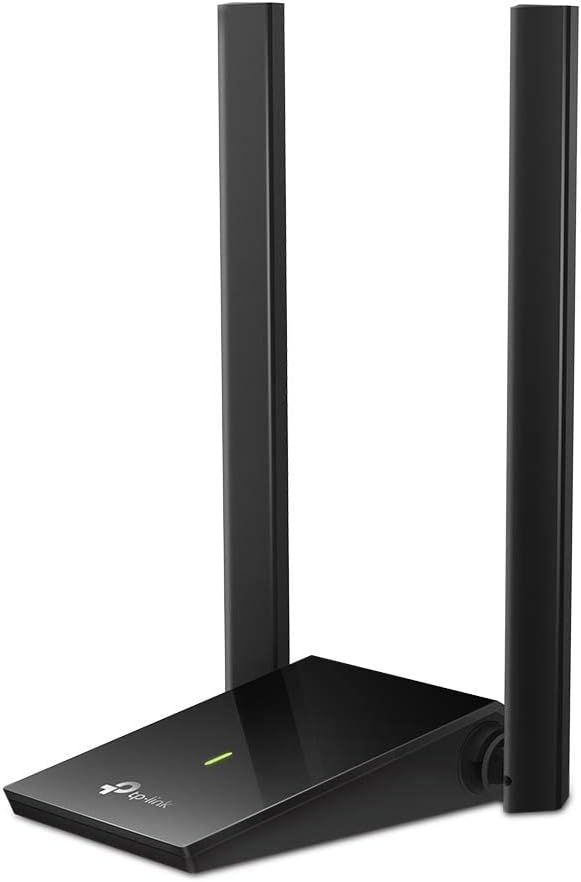


The TP-Link AC600 USB WiFi Adapter stands out as a versatile choice for desktop users seeking reliable wireless connectivity. With a solid 4.4 star rating it delivers consistent performance across both 2.4GHz and 5GHz bands. Its adjustable antenna allows you to optimize signal reception based on your room layout.
We may earn a commission when you buy through this link, at no additional cost to you.
Key strengths include the 5dBi high gain antenna which significantly improves range and stability compared to built-in laptop antennas. The 433Mbps speed on the 5GHz band handles streaming and video calls smoothly. Users appreciate the friendly user interface that makes installation straightforward even for less technical folks.
Trade-offs involve the USB 2.0 interface which limits maximum throughput compared to newer USB 3.0 models. It also supports Windows only excluding Mac users. These limitations are acceptable given the budget friendly price and the fact that most daily tasks do not saturate USB 2.0 bandwidth.
This adapter is ideal for home office setups or gaming PCs where stable 5GHz connectivity matters more than peak theoretical speeds. If you need a reliable upgrade from an aging network card without breaking the bank this model offers excellent value and performance for most users.
The multi-directional antenna can be rotated to face your router directly improving signal strength and reducing dropouts in hard to reach spots.
Access both 2.4GHz and 5GHz bands to balance range and speed ensuring you get the best connection for your specific internet tasks.
We may earn a commission when you buy through this link, at no additional cost to you.
The TP-Link Nano AC600 is perfect for users who want wireless capability without adding bulk to their desktop or laptop. Its miniature size allows it to stay plugged in without obstructing adjacent ports. With a 4.5 star rating it proves that small devices can still deliver strong performance.
We may earn a commission when you buy through this link, at no additional cost to you.
This adapter supports both Windows and Mac systems making it a great choice for mixed environments. The 5GHz band provides up to 433Mbps which is sufficient for HD streaming and browsing. The industry leading two year support ensures help is available if drivers need updating.
Without an external antenna the range is naturally limited compared to models with high gain antennas. It works best when the router is in the same room or nearby. For laptops or small desks this trade-off is worth the convenience of a nearly invisible dongle.
Choose this if portability and minimalism are your priorities. It fits seamlessly into tight spaces and maintains a clean workspace. While not the fastest on paper it offers reliable connectivity for everyday tasks without the clutter of larger adapters.
Sleek design allows you to plug and leave the device in place without worrying about it getting knocked off or blocking other ports.
Compatible with Windows and Mac OS X providing flexibility for households or offices with multiple types of computers.
We may earn a commission when you buy through this link, at no additional cost to you.
The TP-Link AC1300 USB WiFi Adapter brings faster speeds with its AC1300 dual band capabilities. It leverages USB 3.0 for ten times faster data transfer than USB 2.0 which is crucial for handling high throughput tasks. Beamforming technology focuses the signal toward your device for better efficiency.
We may earn a commission when you buy through this link, at no additional cost to you.
This model supports Windows and Mac systems offering broad compatibility across different platforms. The mini portable size makes it easy to carry for travelers or remote workers. You get 867Mbps on the 5GHz band which supports 4K streaming without buffering in most home networks.
Performance depends on having a USB 3.0 port available to realize the full speed potential. Some users may need to download drivers manually depending on their OS version. These are minor hurdles considering the performance boost over older AC600 adapters.
Ideal for power users who need consistent high speed connections for gaming or large file transfers. The combination of USB 3.0 and beamforming ensures you get the most out of your internet plan. It balances speed and portability effectively for desktop and laptop users.
Delivers focused connections to multiple devices simultaneously reducing congestion and improving overall network performance when many devices are active.
Mini and portable size allows you to carry the device everywhere ensuring fast wireless connectivity whether at home or on the go.
We may earn a commission when you buy through this link, at no additional cost to you.
The Nineplus Wireless USB WiFi Adapter offers a budget friendly way to upgrade to AC1300 speeds with dual high gain antennas. It provides stable connections even at greater distances making it suitable for homes with thick walls or multiple floors. The USB 3.0 port ensures rapid data transfer.
We may earn a commission when you buy through this link, at no additional cost to you.
With two 5dBi antennas the adapter captures signals accurately ensuring reliable connectivity in challenging environments. Users can access online setup support which includes video call guidance if drivers need installation. This extra help layer is rare at this price point.
It does not support Mac or Linux which limits its use to Windows machines. Manual driver installation might be needed for older Windows versions like Windows 7. However most Windows 10 and 11 systems detect it automatically making setup simple for modern users.
Choose this if you need extended range and dual antennas without paying a premium. It is a solid choice for desktops located far from the router where standard adapters struggle. The combination of speed and support makes it a reliable upgrade for home networks.
Equipped with dual 5dBi antennas that enhance signal capture ensuring a stable connection even at greater distances from the router.
Offers online tech support with installation guidance and video call help to resolve driver issues quickly if automatic detection fails.
We may earn a commission when you buy through this link, at no additional cost to you.
The UGREEN AX900 USB WiFi 6 Adapter brings next generation WiFi technology to desktops at an accessible price. It supports transmission speeds up to 600Mbps on the 5GHz band enabling lightning fast video streaming with low latency. Built-in drivers mean you can install without needing external discs.
We may earn a commission when you buy through this link, at no additional cost to you.
This adapter is designed for Windows 10 and 11 systems with X86 or X64 architecture. It supports WPA3 encryption for secure browsing and includes features like receive and transmit two in one for sharing internet connections. These features enhance security and flexibility for modern home setups.
To achieve AX900 speeds you must use a WiFi 6 router which might not be standard in all homes yet. It also lacks Mac and Linux support limiting its user base. These constraints are acceptable if you are already invested in the Windows ecosystem and plan to upgrade your router soon.
Ideal for users wanting future proof tech without overspending on premium models. It delivers improved efficiency over older WiFi 5 adapters in crowded networks. If you have a compatible router this dongle provides a smooth reliable connection for high definition media and online work.
Just supports Windows 10 and 11 with CD-free installation saving time and worry since no driver downloads are required for setup.
Supports WPA3 encryption modes ensuring your browsing stays safe while maintaining fast low latency transmission for video and calls.
We may earn a commission when you buy through this link, at no additional cost to you.
The Tenda AX900 U11Pro delivers WiFi 6 performance with an external 6dBi high gain antenna that significantly improves reception. This is ideal for environments with significant interference where built-in antennas fail. Pre-loaded drivers enable instant setup on Windows systems so you can get online quickly.
We may earn a commission when you buy through this link, at no additional cost to you.
It supports AP mode allowing you to turn your PC into a hotspot for up to eight devices. This flexibility makes it useful for offices or gatherings where wired internet needs to be shared wirelessly. The intelligent algorithm helps maintain stable transmission over wider distances.
The external antenna adds some bulk which might not suit minimalist setups but it pays off in range. AP mode only supports the 5GHz band so 2.4GHz devices must connect directly to the router. Despite these small caveats it offers strong performance for the price.
Choose this if range and antenna power are critical to your setup. It outperforms AC600 adapters by a notable margin for streaming and gaming. For Windows users needing a robust connection that handles weak signal areas this adapter is a reliable and efficient choice.
The external omnidirectional high-gain antenna provides multi-dimensional rotation improving weak signal reception compared to built-in options.
AP Mode allows the adapter to turn your PC into a Wi-Fi hotspot supporting up to 8 devices connected to it simultaneously.
We may earn a commission when you buy through this link, at no additional cost to you.
The BrosTrend AX1800 USB WiFi 6 Adapter delivers the highest speeds on this list with 1800Mbps wireless throughput. It is 38 percent faster than AC1300 adapters making it perfect for high bandwidth tasks like 4K streaming and competitive gaming. Dual 5dBi antennas ensure strong signal reception through multiple walls.
We may earn a commission when you buy through this link, at no additional cost to you.
A unique feature is the included 3.3-foot USB 3.0 extension cable which lets you place the adapter optimally for signal reception. This flexibility is key for desktops hidden behind desks where direct USB ports are hard to reach. OFDMA technology further reduces lag and improves efficiency.
It costs more than standard adapters and only works on Windows systems. Linux is not supported which limits its audience. However for users who need raw performance and flexibility in placement the included cable and high speed make these trade-offs worthwhile.
Ideal for power users who demand top tier performance for gaming and media. The combination of fast speeds and flexible placement ensures you get the best possible connection. If budget is not a constraint this model offers a premium wireless experience for your desktop.
Comes with a 3.3-foot USB 3.0 extension cable allowing you to place your adapter in a spot with optimal signal reception.
OFDMA and MU-MIMO technologies enable the most efficient connection on PC say goodbye to buffering during online activities.
We may earn a commission when you buy through this link, at no additional cost to you.
The TP-Link AC1300 Dual High Gain Antenna Adapter combines speed and flexibility for desktop users. It offers 867Mbps on the 5GHz band to meet gaming and streaming needs. Dual high-gain antennas improve range and signal quality making it ideal for larger rooms.
We may earn a commission when you buy through this link, at no additional cost to you.
Adjustable multi-directional antennas enable flexible deployment so you can rotate them for the best reception. The USB 3.0 port delivers up to 10x faster transfer speeds than older standards. It supports Windows and macOS ensuring it fits into diverse hardware environments.
The desktop design occupies more space on your desk than smaller models. Driver installation may be required for macOS depending on the version. These are minor drawbacks given the robust performance and dual antenna setup that handles signal obstruction well.
Choose this if you want strong signal performance with manual adjustment options. It is perfect for stationary desktops where antenna placement is not an issue. The balance of speed range and brand reliability makes it a solid recommendation for most users.
Dual high-gain antennas improve range signal quality and transmission performance ensuring a stable connection for your desktop PC.
Super Speed USB 3.0 port provides up to 10x faster transfer speeds than USB 2.0 for smoother data handling.
We may earn a commission when you buy through this link, at no additional cost to you.
The UGREEN AX1800 WiFi Adapter focuses on speed and security with support for the latest WPA3-SAE encryption. It delivers blazing-fast dual-band performance with 1201 Mbps on the 5GHz band. Advanced WiFi 6 technologies like MU-MIMO and OFDMA ensure efficient connectivity in crowded environments.
We may earn a commission when you buy through this link, at no additional cost to you.
Back ventilation holes provide superior heat dissipation to maintain reliable performance during long sessions. It supports AP mode to share your internet as a mobile hotspot seamlessly. The built-in driver simplifies installation on Windows 10 and 11 systems without extra downloads.
It only works with Windows machines and lacks support for Mac or Linux. This limits its appeal to mixed OS households. However for Windows users prioritizing security and sustained performance the cooling design and fast speeds are significant benefits.
Ideal for users who need a fast secure connection for work and media. The cooling system ensures stability during heavy usage while AP mode adds flexibility. If you value data privacy and consistent high speed this adapter is a strong contender.
The USB WiFi adapter benefits from WPA3-SAE encryption for secure browsing during long sessions with heat dissipation.
Switch to AP mode to share your internet as a mobile hotspot with other devices seamlessly using dual mode flexibility.
We may earn a commission when you buy through this link, at no additional cost to you.
The BrosTrend AX900 Mini USB WiFi 6 Adapter is the smallest option in our guide with dimensions of 1.4 by 0.7 by 0.3 inches. It enhances your PC WiFi with flexibility offering up to 600Mbps on the 5GHz band. The tiny size ensures it integrates seamlessly into your workspace.
We may earn a commission when you buy through this link, at no additional cost to you.
WiFi 6 technologies like OFDMA and MU-MIMO enable fast reliable performance even with limited physical space. It comes with a pre-loaded driver for Windows 11/10/7 so you do not need to install anything from a CD. Just plug it in and install.
While it supports USB 2.0 which limits peak speeds compared to USB 3.0 it is still faster than AC600 models. Mac and Linux are not supported which restricts compatibility. For basic users who value minimalism this trade-off is often acceptable.
Choose this for laptops or tight desks where space is at a premium. It provides a future-proof upgrade without adding bulk to your setup. If you need a discreet and effective wireless solution for standard tasks this tiny adapter delivers solid performance.
With a compact design measuring 1.4 × 0.7 × 0.3 inches this dongle ensures both portability and a clutter-free workspace.
WiFi 6 technologies such as OFDMA MU-MIMO and 1024-QAM enable fast and reliable WiFi performance for your PC.
We may earn a commission when you buy through this link, at no additional cost to you.
Selecting the right 5GHz WiFi dongle depends on your specific usage needs and hardware setup. Consider these key factors to find the adapter that fits your budget and performance expectations.
The speed of a dongle is measured by its AC or AX rating. AC1300 and AC600 offer good speeds for standard use while WiFi 6 AX1800 provides faster throughput. Look for higher numbers if you stream 4K video or game online.
Match the adapter speed to your internet plan to avoid bottlenecks. Higher speeds cost more but ensure you use your full subscription bandwidth.
Antennas determine how far your signal can reach. High gain antennas like 5dBi or 6dBi improve range and penetration through walls. Internal antennas are compact but may struggle with distance.
Choose external adjustable antennas if your PC is far from the router. Fixed internal antennas work best for laptops or desks close to the source.
USB 3.0 ports support higher data transfer rates which is essential for fast adapters. USB 2.0 can limit throughput even with a high speed dongle. Check your desktop or laptop ports before buying.
Ensure your PC has USB 3.0 for best performance. If not consider a model with USB 2.0 support as a backup for older systems.
Most dongles support Windows 10 and 11 natively but Mac and Linux compatibility varies. Check the product details to confirm your OS is listed. Some require manual driver downloads for older systems.
If you use Mac or Linux prioritize adapters with explicit support. Windows users have more options with built-in drivers for easy installation.
Your adapter should match your router technology to get the best speeds. WiFi 6 adapters need WiFi 6 routers to reach top AX speeds. Older routers work with newer adapters but limit performance to older standards.
Plan to upgrade your router if you buy a high-end WiFi 6 dongle. This ensures you get the full benefit of the latest wireless tech.
Nano adapters are great for laptops but may have weaker antennas. Desktop users can accommodate larger dongles with external antennas for better range. Consider where you will place the adapter.
Choose based on your workspace. Compact models save space but larger models usually offer better signal stability for stationary setups.
Security features like WPA3 encryption protect your data from unauthorized access. Newer adapters support WPA3 while older ones use WPA2. Always check for the latest security standards when purchasing.
Prioritize models with WPA3 support if your router also supports it. This keeps your network secure against modern threats.
Prices range from budget friendly to premium. You can find solid AC600 models under twenty dollars while WiFi 6 models cost more. Determine your speed needs to avoid overspending on features you won't use.
Compare features against price to find value. A mid-range AC1300 adapter often offers the best balance for most home users.
Insert the dongle into a USB port on your desktop or laptop. If you have USB 3.0 use it for maximum speed. The system may automatically install drivers or you may need to download them from the manufacturer site.
Once installed go to your network settings to select your WiFi network. Enter the password to connect. Use the software provided to switch between 2.4GHz and 5GHz bands as needed for performance.
Keep the dongle and your PC ports clean and free from dust. Avoid bending the USB connector when plugging and unplugging to prevent breakage. Place the antenna vertically for best signal reception.
Most 5GHz dongles are backward compatible with older routers but you must ensure your router broadcasts a 5GHz signal. If your router only has 2.4GHz the dongle will not work. Check your router settings to confirm dual band support.
Yes many dongles are designed for laptops especially nano models. They plug directly into USB ports and provide better connectivity than built-in cards. Just ensure your laptop has an available USB slot.
Speeds depend on distance and walls which block 5GHz signals more than 2.4GHz. Also check that you are not on USB 2.0 which limits throughput. Move closer to the router to see improvements.
High speed adapters reduce lag for online gaming. Models with MU-MIMO and beamforming help maintain stable connections. Gaming requires low latency which 5GHz handles better than 2.4GHz.
Some newer dongles have built-in drivers for Windows 10 and 11 which install automatically. Others need downloads from the manufacturer. Check the product details to know if you need to prepare drivers.
Uninstall the old driver if needed then plug in the new dongle. Windows usually recognizes it quickly. If you face issues use the manufacturer site to get the latest support files.
Our top picks cover a range of needs from compact nano models to high-speed USB 3.0 adapters. The TP-Link AC600 offers great value while the BrosTrend AX1800 provides premium speeds for power users.
Prioritize antenna gain and USB 3.0 support if you need reliable performance in a large home. For laptops the Nano or Mini models save space without sacrificing basic 5GHz connectivity.
Remember to check current prices and availability as deals change often. Verify that your OS and router are compatible before purchasing to ensure a smooth setup experience for your desktop or laptop.