
FLASHFORGE Creator 5 Pro
4.0Editor score
4-toolhead multi-material
65C active heated chamber
CoreXY 600mm/s speed
Discover the top 3D printers for figurines and models. This guide compares speed, precision, and features to help you choose the perfect machine for detailed
Finding the right 3D printer for figurines and models requires balancing speed, precision, and ease of use. Whether you are a hobbyist or a professional, the right machine transforms digital designs into tangible art with incredible detail and reliability.
We evaluated ten leading printers based on resolution, build volume, multi-color capabilities, and user experience. Our analysis focuses on how each device handles intricate geometries, supports removal, and maintains consistency across long printing sessions for optimal results.
Each pick highlights specific strengths like auto-calibration, enclosed chambers, or rapid printing speeds. While prices and availability change frequently, these models represent the current best options for bringing your creative visions to life with confidence and clarity.
4.0Editor score

4.7Editor score

4.4Editor score
This side-by-side comparison highlights the key specifications and unique features of each top-rated printer to help you make an informed decision for your specific modeling needs.





The Bambu Lab A1 3D Printer stands out as a top performer for users seeking speed and precision without complexity. Its 4.7 rating reflects strong community approval for reliability and ease of use in daily printing tasks.
We may earn a commission when you buy through this link, at no additional cost to you.
Key strengths include its ability to accelerate at 10,000 mm/s2 while maintaining exceptional accuracy on intricate details. Active flow rate compensation ensures smooth surfaces, and full-auto calibration removes the hassle of manual tuning for consistent results.
While the open frame limits high-temperature materials like ABS, this is acceptable for most figurines and standard resins. The separate AMS lite purchase for multi-color printing is a minor trade-off for the overall performance and compact footprint.
This printer is ideal for hobbyists and beginners who want professional-grade output with minimal setup. It delivers reliable, high-quality prints that bring detailed models to life efficiently.
The high acceleration and flow compensation ensure that even complex figurine details are rendered sharply without sacrificing time.
With auto calibration and a simplified interface, you can focus on creating designs rather than managing machine settings.
We may earn a commission when you buy through this link, at no additional cost to you.
The Bambu Lab P2S Combo is a powerful tool for creators needing multi-material capabilities and robust engineering features. It earns a 4.7 rating for its advanced PMSM Servo Extruder and seamless workflow integration.
We may earn a commission when you buy through this link, at no additional cost to you.
Its Adaptive Airflow System allows precise cooling for overhangs or heat retention for engineering materials. The AMS 2 Pro adds built-in drying, which is crucial for maintaining filament quality and print consistency over long runs.
The price reflects its professional features, and beginners may find the setup slightly more involved than entry-level models. However, the speed and material support justify the investment for serious model makers.
This printer suits professionals or advanced hobbyists who need to print with diverse materials simultaneously. It ensures high-quality finishes and reliable performance for demanding projects.
Adaptive airflow and filament drying support advanced filaments like ABS and engineering grades without warping.
The AMS 2 Pro integrates seamlessly to enable vibrant, multi-material prints with minimal user intervention.
We may earn a commission when you buy through this link, at no additional cost to you.
The FLASHFORGE Creator 5 Pro brings industrial-grade power to hobbyist and professional workspaces. Its 4.0 rating indicates strong performance in specialized applications, particularly for multi-material and high-temperature printing.
We may earn a commission when you buy through this link, at no additional cost to you.
It features four independent toolheads with a FlashSwap changer that eliminates purge waste. The 65C heated chamber ensures advanced filaments like ABS and PC print without warping, delivering robust structural integrity for parts.
While the system is complex for new users, the savings on material waste and speed gains are significant. The rigid architecture minimizes vibration, ensuring high precision even at 600mm/s speeds.
This model is best for makers requiring industrial versatility and multi-color prints without material waste. It offers unparalleled control for creating functional and detailed models.
The FlashSwap system switches nozzles in seconds without flushing filament, saving money and time.
The heated chamber and toolhead options unlock printing with engineering-grade materials confidently.
We may earn a commission when you buy through this link, at no additional cost to you.
The Bambu Lab P1S offers a fully enclosed design that supports a wider range of materials than open-frame printers. With a 4.5 rating, it is trusted for reliable, high-speed printing in diverse environments.
We may earn a commission when you buy through this link, at no additional cost to you.
Its speed reaches 500mm/s with high acceleration, ensuring quick turnaround for large batches. Auto bed leveling simplifies the start of every print, while the enclosure maintains thermal stability for better quality.
Users should note that multi-color printing requires the AMS accessory. Additionally, carbon fiber reinforced polymers are not recommended. Despite these limits, it remains a top choice for standard engineering tasks.
This printer is excellent for those needing a balance of speed, reliability, and material flexibility. It is a solid investment for expanding into more durable filament types.
The enclosed body retains heat for better printing with ABS, ASA, and PETG without warping.
High acceleration and speed allow for rapid prototyping and production of multiple figurines.
We may earn a commission when you buy through this link, at no additional cost to you.
The Flashforge AD5X 3D Printer brings multi-color capabilities to a budget-friendly tier without sacrificing speed. Its 4.4 rating reflects satisfaction among users looking for vibrant prints without high costs.
We may earn a commission when you buy through this link, at no additional cost to you.
It features IFS technology to print up to four colors simultaneously. The 300C nozzle supports a wide range of filaments, and the 600mm/s speed ensures quick results for prototyping or final models.
While the auto-leveling system is convenient, some users report occasional calibration drift. The open frame may require additional cooling for high-temp materials. Still, the value for money is impressive.
This printer is ideal for beginners or hobbyists wanting to try multi-color prints. It offers a low-risk entry into advanced printing techniques with strong performance.
IFS technology allows for vibrant models at a fraction of the cost of premium competitors.
A high-temperature nozzle enables printing with various plastics for different project needs.
We may earn a commission when you buy through this link, at no additional cost to you.
The Snapmaker U1 features a SnapSwap system that switches toolheads in just five seconds. Its 4.5 rating highlights reliability and precision in complex multi-material printing tasks.
We may earn a commission when you buy through this link, at no additional cost to you.
With four independent toolheads, it handles rigid and flexible materials seamlessly. The automatic tool changer minimizes waste, making it efficient for detailed models with multiple colors or support materials.
The learning curve for multi-material slicing can be steep for new users. However, the Orca software and calibration features simplify the workflow once understood. It is a robust choice for professional creators.
This printer suits those requiring high productivity and material versatility. It delivers consistent quality and reduced downtime for advanced modeling needs.
The SnapSwap system drastically reduces purge waste and change times for smoother workflows.
Multiple toolheads enable complex prints with water-soluble supports and flexible parts.
We may earn a commission when you buy through this link, at no additional cost to you.
The Creality SPARKX i7 introduces AI technology to automate the conversion of portraits into 3D models. With a 4.0 rating, it is praised for innovation and ease of setup for new users.
We may earn a commission when you buy through this link, at no additional cost to you.
AI capabilities allow users to generate custom figurines instantly. The built-in camera detects failures and alerts users, maximizing success rates. The system supports four-color printing with reduced waste.
The AI modeling features are still evolving and may require manual refinement. However, the quick setup and failure detection provide a solid foundation for learning and experimentation.
This printer is best for beginners interested in AI-assisted design. It simplifies the process from idea to physical object effectively.
AI software transforms images into printable models instantly for rapid prototyping and gifting.
Built-in AI camera detects and alerts on failures to save material and time.
We may earn a commission when you buy through this link, at no additional cost to you.
The Flashforge Adventurer 5M Pro simplifies maintenance with a 3-second quick-swap nozzle system. Its 4.0 rating reflects strong performance in home and office settings.
We may earn a commission when you buy through this link, at no additional cost to you.
CoreXY technology ensures high speeds up to 600mm/s with minimal vibration. The dual filtration system and quiet enclosure make it safe for indoor use, while the smart camera allows remote monitoring.
While multi-color capabilities are limited compared to others, the speed and ease of use are notable. It handles a wide range of standard filaments effectively with minimal fuss.
This printer suits home users needing reliable, quick printing. Its ease of maintenance and monitoring provide a smooth user experience.
Quick-swap nozzles make changing sizes easy without tools or downtime.
Dual filtration and quiet operation ensure a safe and pleasant workspace for everyone.
We may earn a commission when you buy through this link, at no additional cost to you.
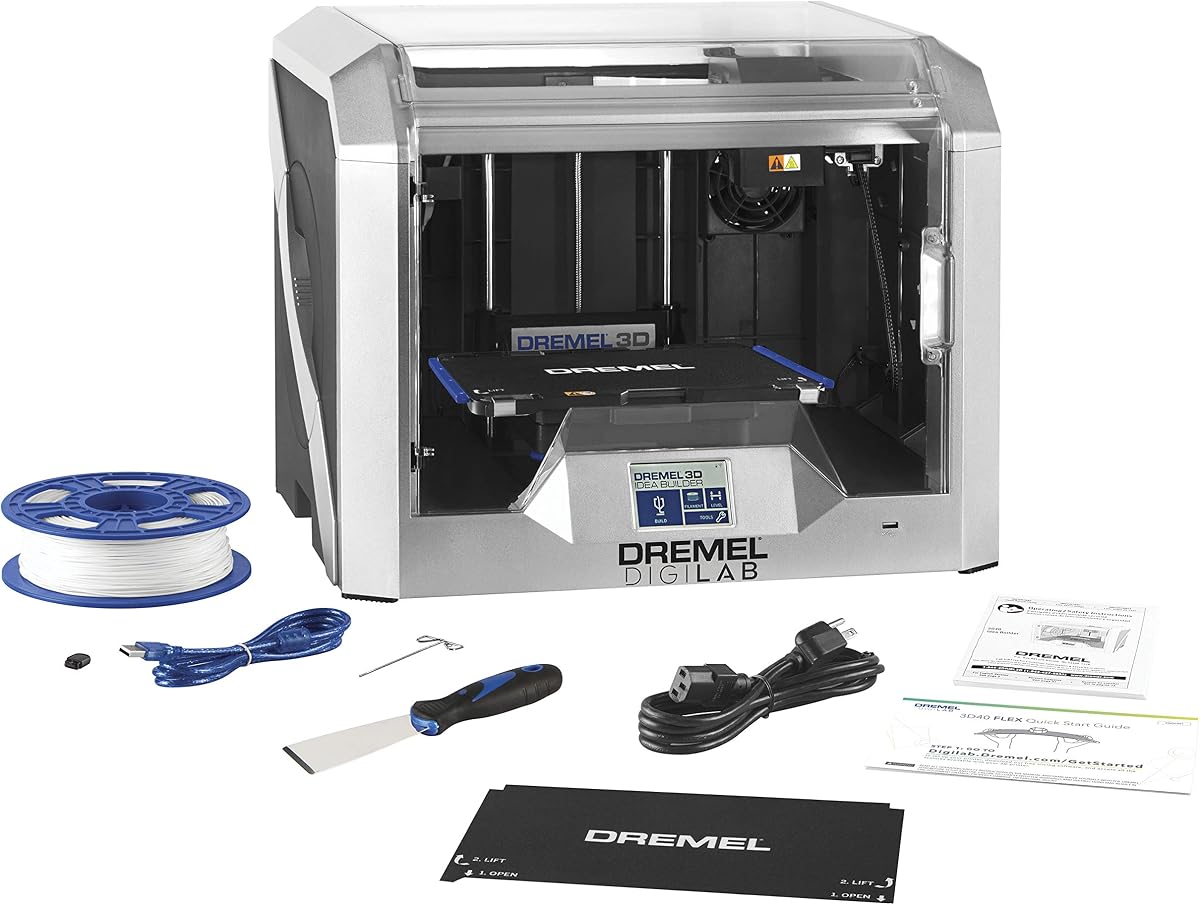
The Dremel 3D40 Flex offers a flexible build plate and fully enclosed design for safe, reliable printing. Its 4.4 rating highlights trust and consistency in classroom and home environments.
We may earn a commission when you buy through this link, at no additional cost to you.
With 50 micron resolution, it produces fine details suitable for small figurines. The 9-point leveling ensures a perfect first layer every time, and the enclosed housing protects users from moving parts.
While slower than high-speed options, it excels in ease of use and safety. The brand provides excellent support and a long warranty, reducing long-term worries for users.
This printer is ideal for education and casual hobbyists. It prioritizes safety and reliability without compromising on print quality.
High resolution and enclosure ensure safe, detailed prints for all skill levels.
Lifetime access to Dremel service provides confidence and long-term value.
We may earn a commission when you buy through this link, at no additional cost to you.
The Bambu Lab A1 Combo combines the standard printer with an AMS Lite for multi-color capability. With a 4.6 rating, it is highly favored for accessible, vibrant printing.
We may earn a commission when you buy through this link, at no additional cost to you.
Features like active flow compensation ensure precise extrusion for detailed models. Automatic calibration and quick-change nozzles reduce maintenance, while noise cancellation keeps the workspace quiet.
The open frame design may limit engineering materials, but for standard resins and PLA, it is perfect. The bundle offers significant value for those wanting multi-color out of the box.
This printer is best for enthusiasts seeking versatility and speed. It balances performance and usability perfectly for hobbyist modeling.
The AMS Lite bundle makes vibrant, multi-material printing available for every user.
Active flow compensation and auto calibration ensure high detail with minimal effort.
We may earn a commission when you buy through this link, at no additional cost to you.
Selecting the right printer requires understanding specific needs like resolution, material compatibility, and budget to ensure optimal results for your creative projects.
High resolution is essential for figurines to capture fine details like facial features and textures. Look for machines with 50-micron layers or better to ensure smooth surfaces.
Prioritize printers with precise stepper motors and calibration tools to avoid layer lines.
Multi-color printing brings models to life but requires systems like AMS or toolheads. Decide if you need simultaneous colors or if manual changes suffice.
Check compatibility with multi-filament systems to avoid compatibility issues.
Fast speeds are great for prototypes, but accuracy is key for final models. Balance acceleration with resolution to find a machine that fits your workflow.
High acceleration without precision often leads to artifacts in complex shapes.
Enclosed chambers protect from drafts and keep users safe from hot parts. This is vital for consistent results with sensitive materials like ABS.
Choose a printer with proper ventilation and air filtration for home use.
Ensure the build volume fits your largest intended prints. Larger volumes mean less assembly but require more space in your workspace.
Measure your available area before purchasing to avoid fit issues.
Different figurines need different plastics. Check if the printer supports high-temp filaments if you plan to use durable materials.
Nozzle temperature and bed heating should match your chosen resin or plastic.
Look for automatic leveling and intuitive interfaces to reduce frustration. Calibration can be time-consuming without the right features.
Software compatibility with your design tools is also critical for a smooth experience.
A strong user community provides tutorials and troubleshooting help. Manufacturers with dedicated support teams ensure longevity for your purchase.
Check warranty terms and customer service responsiveness before finalizing your choice.
Start by calibrating your bed level and setting the Z-offset properly. A well-leveled bed prevents the first layer from failing and ensures adhesion.
Regularly clean nozzles and check filament for moisture. Dry filaments prevent bubbles and ensure smooth extrusion for high-quality prints.
Store your prints in a dust-free environment and inspect for imperfections. Post-processing like sanding can further refine details for presentation.
Yes, a heated bed helps prevent warping and ensures better adhesion for detailed models. It is especially important for materials like ABS and PETG. Even PLA benefits from consistent bed temperature to reduce curling.
A 0.25mm or 0.3mm nozzle provides the finest details for small figurines. Standard 0.4mm nozzles work for larger prints but may lack sharpness on tiny features.
Use a printer with an automatic multi-filament system or plan manual swaps. Software settings must align with filament change points to ensure color transitions happen at the right layers.
Layer lines are often caused by incorrect Z-height or poor leveling. Increasing print speed too fast or using a coarse layer height can also make lines more visible.
Yes, most printers support temporary materials like PVA or standard support modes. Choose soluble supports for complex overhangs to preserve surface finish.
Allow the print to cool completely before removing to avoid warping. This ensures the model retains its shape and detail during the final removal process.
We reviewed ten top models ranging from the Bambu Lab A1 to the Dremel 3D40 Flex. Each offers unique strengths in speed, resolution, and ease of use for hobbyists and pros.
Prioritize resolution, support systems, and material compatibility when choosing. A printer that matches your specific needs will deliver better results and less frustration.
Remember to check current availability and support terms before purchasing. Prices and specs may change, so ensure you are buying the latest version of your chosen model.