
OBDLink EX FORScan OBD Adapter
4.7Editor score
Dealership-level diagnostics support
Electronic switch for simultaneous CAN access
Rock-solid connection avoiding data corruption
This comprehensive guide compares the top ten Forscan USB OBD2 adapters for Ford, Mazda, Lincoln, and Mercury vehicles to help you choose the right diagnostic
Finding the right Forscan USB OBD2 adapter is essential for owners who want to unlock hidden features and perform deep diagnostics on their vehicles without visiting a dealership. These tools connect directly to your car's onboard computer system to provide detailed readouts and configuration options that standard code readers simply cannot offer. Choosing the correct adapter ensures stable communication and reliable performance during critical programming tasks.
We have carefully evaluated ten distinct models based on their compatibility with FORScan software, data transfer speeds, build quality, and user feedback from the automotive community. Our analysis focuses on adapters that support both HS-CAN and MS-CAN bus systems automatically or via reliable switching mechanisms. We also consider factors like cable length, driver requirements, and overall stability during extended diagnostic sessions.
Each pick in this list highlights specific strengths such as automatic bus switching, robust hardware chips, or budget-friendly pricing without sacrificing core functionality. Keep in mind that while we provide detailed insights, vehicle compatibility can vary by year and region. Always verify your specific model requirements before purchasing to ensure seamless integration with your diagnostic software setup.
4.7Editor score

4.7Editor score

4.4Editor score
The following comparison table provides a side-by-side overview of all ten adapters evaluated in this guide to help you quickly identify the features that matter most for your specific vehicle and diagnostic needs.




The Vgate vLinker FS USB adapter stands out as the top choice for serious FORScan users who need reliability and performance. With a rating of 4.7 stars from thousands of verified buyers, this device delivers the stability required for complex diagnostics and module programming. It automatically identifies and connects to HS-CAN and MS-CAN buses, removing the need for manual toggling.
We may earn a commission when you buy through this link, at no additional cost to you.
One of its most significant strengths is the optimized stability for FORScan software, ensuring no lag or crashes during extended sessions. The high-speed data transfer supports up to 3 Mbps and full 4095-byte packets, which is crucial for retrieving large datasets without truncation. It also supports up to 18V output for ECU programming on select vehicles, making it a versatile tool for advanced modifications.
While it is priced higher than basic ELM327 cables, the investment is justified by the robust hardware and automatic features that prevent connection drops. Some users note that it works best with a proper Windows setup and the correct drivers installed. However, these are minor considerations given the overall performance and compatibility with Ford Lincoln and Mazda vehicles.
This adapter is ideal for DIY enthusiasts and professionals who require consistent performance when accessing deep vehicle modules. Whether you are clearing codes or configuring hidden features, the vLinker FS provides a seamless experience. We highly recommend this model for anyone prioritizing stability and advanced functionality in their diagnostic toolkit.
The automatic electronic switching feature allows FORScan to access all CAN buses simultaneously, enabling advanced functions not possible with toggle switch adapters.
With support for up to 3 Mbps and large packet sizes, this adapter ensures smooth real-time data streaming and complete DTC retrieval.
We may earn a commission when you buy through this link, at no additional cost to you.
The OBDLink EX is a premium adapter designed specifically for use with FORScan software and is recommended by the FORScan team itself. It offers dealership-level diagnostics capabilities by supporting all Ford protocols and modules. The electronic switch feature allows FORScan to access all CAN buses simultaneously, which is a significant advantage over traditional toggle switch adapters.
We may earn a commission when you buy through this link, at no additional cost to you.
Its maximum throughput is up to 20 times faster than standard toggle switch adapters, enabling quicker diagnostics and smoother data streaming. The rock-solid connection design avoids data corruption and dropped packets, ensuring that critical information is not lost during programming or live data monitoring. This makes it a reliable choice for professionals and serious enthusiasts alike.
While the price is higher than many competitors, the enhanced performance and reliability justify the cost for users who depend on their tool for frequent or complex tasks. It is important to note that this adapter is Windows only and may require specific driver setups. However, once configured, it delivers consistent results across a wide range of Ford and related brand vehicles.
For those seeking the highest quality and performance, the OBDLink EX is an excellent choice. It combines advanced hardware features with software optimization to provide a seamless diagnostic experience. We recommend this adapter for users who value speed, stability, and full protocol support in their automotive tools.
Unlike toggle switches, the electronic switch enables access to all CAN buses at once, unlocking advanced functions and improving workflow efficiency.
Support for all Ford protocols and modules means you can access nearly every vehicle system without limitations.
We may earn a commission when you buy through this link, at no additional cost to you.
The ELM327 USB Adapter offers an affordable entry point for owners who want to access FORScan software and unlock hidden features without spending a lot. It comes equipped with MS CAN and HS CAN toggle switches, enabling quick troubleshooting and configuration. Despite its budget-friendly price, it delivers stability that exceeds many wireless connections.
We may earn a commission when you buy through this link, at no additional cost to you.
This adapter supports all OBD2 protocols including J1850PWM HS CAN and MS CAN, making it compatible with the vast majority of supported vehicle models from 1996 onwards. It works well with Elmconfig FoCCCus and other diagnostic software, allowing you to access hidden features like global window functions Bambi mode and secure idle. The V1.5 hardware version ensures reliable communication with your vehicle's ECU.
Users should be aware that driver installation is required before use, which might be a hurdle for less technical individuals. Additionally it is designed for Windows systems only. However for those willing to set it up properly it provides excellent value and functionality for basic diagnostics and module configuration tasks.
If you are looking for a cost-effective tool to start your DIY automotive journey this adapter is a strong contender. It covers all essential features needed for reading codes clearing faults and modifying settings. We recommend it for beginners or occasional users who prioritize budget over premium features.
This tool allows you to unlock global window functions Bambi mode and other factory settings without visiting a dealership.
Manual toggle switches give you direct control over which CAN bus to access during specific diagnostic tasks.
We may earn a commission when you buy through this link, at no additional cost to you.
The OHP FORScan ELM327 USB diagnostic tool is designed to help owners save on repair costs by enabling DIY diagnostics. It supports ELM327 compatibility and offers connection speeds up to 500 kbit/s for reliable data transmission. This adapter is particularly effective for Ford Lincoln and Mercury vehicles with MS-CAN and HS-CAN bus systems.
We may earn a commission when you buy through this link, at no additional cost to you.
It reads interprets and clears Diagnostic Trouble Codes from various vehicle systems including engine transmission and ABS. Each code includes a fault description to help identify root causes so you can troubleshoot confidently. The tool is optimized for FORScan software but may require manual driver installation if auto-installation fails.
While it is a solid choice for Ford users it does not support newer Mazda 7th generation models or joint-venture models using non-Ford protocols. Additionally it is Windows only and cannot be used on macOS or mobile devices without a Windows environment. These limitations should be considered before purchasing to ensure compatibility with your specific vehicle.
For owners of older Ford or Lincoln models this adapter provides a cost-effective way to access detailed diagnostic information. It empowers you to perform basic maintenance and repairs without relying on a mechanic. We recommend it for those who need a straightforward tool for routine checks and basic modifications.
This tool allows you to read and clear codes from engine transmission and ABS systems to save money on repairs.
Specifically designed for Ford Lincoln and Mercury vehicles with strong compatibility for models up to 2022.
We may earn a commission when you buy through this link, at no additional cost to you.
The VGATE vLinker FS USB adapter is specially designed for use with FORScan and is recommended by the FORScan team. It offers lightning-fast data transfer speeds up to 3 Mbps and supports a serial buffer of 8192 bytes which helps meet needs for long frame communication. This makes it ideal for complex configurations and programming tasks.
We may earn a commission when you buy through this link, at no additional cost to you.
It features an automatic electronic switching mechanism that allows FORScan to access all CAN buses at the same time. This ensures seamless transitions between HS-CAN MS-CAN and Ford Car networks without manual intervention. Additionally it includes battery saver and protection technology to prevent drain when left plugged in.
The adapter is compatible with most 12V and 24V vehicles meeting OBD2 standards and supports third-party apps like ELMconfig and FoCCCus. While it is not cheap the extensive features and stability justify the investment. The 1-year warranty and lifetime firmware updates provide additional confidence in the product.
For users who need a robust adapter that can handle heavy-duty programming and diagnostics this model is highly capable. It balances speed stability and protection features to deliver a comprehensive diagnostic solution. We recommend it for enthusiasts who want reliability without compromising on advanced functionality.
Auto sleep and over-voltage protection ensure your vehicle battery is not drained even if the device is left plugged in.
With 3 Mbps transfer rates you can enjoy smoother graphics and real-time meters during live data monitoring.
We may earn a commission when you buy through this link, at no additional cost to you.
This Elm327 USB adapter is compatible with Forscan software and supports Ford F150 F250 and related Lincoln Mazda Mercury vehicles. It includes MS and HS CAN switches to access various vehicle protocols and enable hidden features like Bambi mode and tire size correction. It is a budget-friendly option for those looking to start diagnostics.
We may earn a commission when you buy through this link, at no additional cost to you.
The adapter works with all Windows versions from XP to 10 and supports standard OBD2 protocols. It allows you to read codes clear faults and configure settings without visiting a dealership. However user feedback suggests that reliability may vary and driver installation is a necessary step before use.
While it offers good value it may not provide the same level of stability as more premium adapters. Some users report connection issues that require troubleshooting. If you are comfortable with basic setup tasks this adapter can serve as a functional entry point for vehicle diagnostics and modifications.
For owners who need a simple tool for occasional use this adapter is worth considering. It covers the basics of reading codes and unlocking features at a low cost. We recommend it for beginners who prioritize price over high-end performance.
Access features like Bambi mode reverse tilt mirrors and heated steering wheel settings to personalize your driving experience.
Compatible with all major Windows versions ensuring broad accessibility for most PC users.
We may earn a commission when you buy through this link, at no additional cost to you.
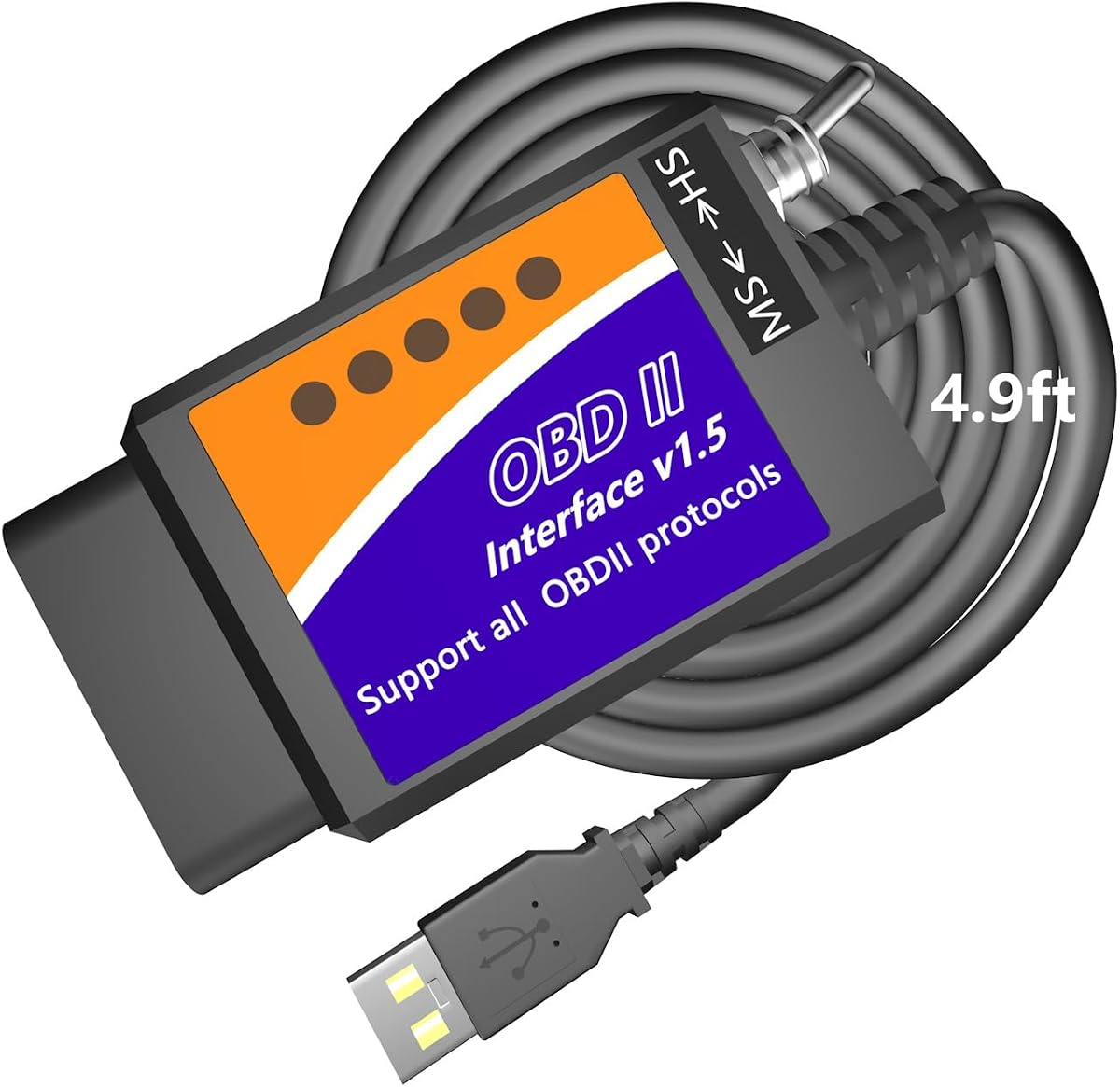
The MOCATEC USB OBD adapter features an extra-long 4.9ft cable which provides comfort and flexibility during diagnostics. It works with Ford Lincoln Mercury and Mazda vehicles to unlock hidden factory configurations and customize comfort settings. The included HS-CAN MS-CAN toggle switch allows seamless access to hidden modules.
We may earn a commission when you buy through this link, at no additional cost to you.
This adapter is designed for use with a standard Windows PC laptop and is not compatible with macOS or mobile devices. It supports reading and clearing Diagnostic Trouble Codes and viewing real-time sensor data. Users can also program OEM trailer brake controllers and customize Sync menus with ease.
The longer cable allows you to rest your laptop on your knees without feeling cramped and easily reaches the passenger seat. This design improvement makes the diagnostic process more comfortable especially when working in tight spaces. It is a practical choice for DIYers who need flexibility.
For those who value physical usability this adapter stands out due to its cable length and straightforward design. It provides essential features for diagnostics and modifications without unnecessary complexity. We recommend it for users who need a reliable tool for routine maintenance and customization tasks.
A 4.9ft cable lets you rest your laptop on your knees without feeling cramped during long diagnostic sessions.
Unlock features like digital speedometer readouts and daytime running light customization through the included toggle switch.
We may earn a commission when you buy through this link, at no additional cost to you.
The AntiBreak elm 327 adapter features an FTDI chip which provides reliable connection and avoids data corruption or dropped packets. It is compatible with Forscan software and supports MS-CAN HS-CAN switching for fast operation at speeds up to 500 kbit/s. This makes it a solid choice for professional-grade fault light programming.
We may earn a commission when you buy through this link, at no additional cost to you.
Users can disable features like double horn honk and enable mirror auto-fold along with other modifications. It supports all Windows versions and allows you to read fault codes clear check engine lights and monitor real-time sensor data. The hardware design is focused on stability and efficient communication with vehicle modules.
While it is affordable and functional it requires driver installation and is limited to Windows systems. Some users may need to troubleshoot driver issues if automatic installation fails. However for those who prioritize hardware reliability this adapter delivers consistent performance at a reasonable price point.
For owners who need a dependable tool for diagnostics and light programming tasks this adapter is a good option. It balances cost and hardware quality to meet common automotive needs. We recommend it for users who value stability in their diagnostic connections.
The built-in FTDI chip ensures a stable connection that minimizes data loss and corruption during transfers.
Modifying hidden settings and programming brake controllers is straightforward with this reliable interface.
We may earn a commission when you buy through this link, at no additional cost to you.
The Vgate vLinker FS USB adapter is designed for use with FORS-can software and features automatic electronic switching for all CAN buses. It delivers fast rock-solid USB connections with no dropped packets or data corruption. The device supports 18V programming voltage output and reaches up to 3 Mbps transmission rates for efficient diagnostics.
We may earn a commission when you buy through this link, at no additional cost to you.
Users benefit from smoother graphics and real-time meters due to the high baud rates supported by this adapter. It is recommended by the FORS-can team and offers improved support for USB 2.0 and USB 3.0 interfaces. This ensures broad compatibility with modern laptops and desktops.
The automatic switching eliminates the need for manual toggling which improves workflow efficiency during diagnostics. While it is priced higher than basic adapters the performance and stability make it a valuable tool for serious users. It works well with Ford Lincoln Mazda and Mercury vehicles requiring deep module access.
For those seeking a high-performance adapter that simplifies the diagnostic process this model is an excellent choice. It combines speed stability and advanced features to deliver a reliable experience. We recommend it for users who need consistent performance for programming and customization tasks.
This adapter automatically switches between HS-CAN and MS-CAN to access advanced functions without manual intervention.
Achieving up to 3 Mbps transmission allows for smoother graphics and real-time meters during live sessions.
We may earn a commission when you buy through this link, at no additional cost to you.
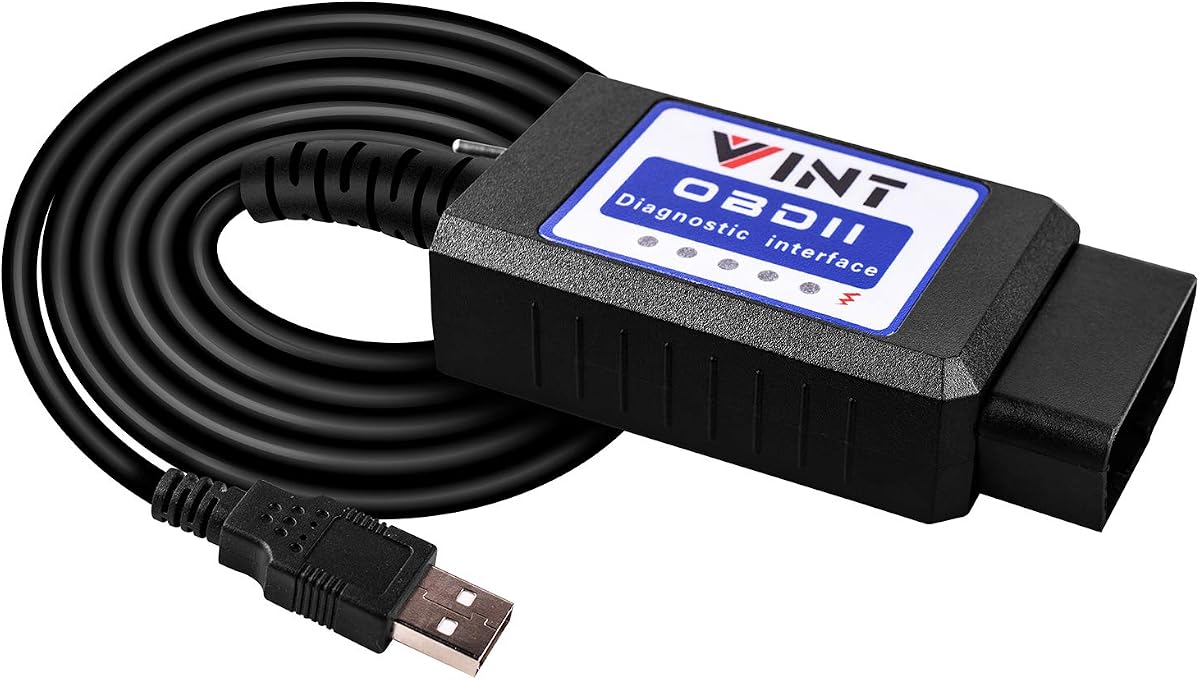
The OBD2 Adapter FORSCans VINT-TT55502 is a favorite tool among Ford owners for scanning programming and hiding modules. It includes an MS-CAN and HS-CAN toggle switch to conveniently access configure and diagnose the as-built data of your vehicle. It runs at a constant speed of 500kbit/s ensuring reliable communication.
We may earn a commission when you buy through this link, at no additional cost to you.
This tool supports endless mods with FORscans including global window features Bambi Mod and tire size correction. It retrieves both generic and car manufacturer-specific Diagnostic Trouble Codes to help overcome troubleshooting easily. The adapter is compatible with Windows systems and works with software like FoCCCus ELMconfig and FF2.
While it requires driver installation and is limited to Windows platforms it has been proven reliable for models like Ford F150 F250 and other light pickup trucks from 1996 and newer. The toggle switch allows you to navigate different networks effectively. This makes it a versatile option for DIY diagnostics.
For owners who need a classic and reliable tool for basic to intermediate diagnostics this adapter is worth considering. It offers good value and supports essential modifications without complexity. We recommend it for users who want a straightforward solution for routine vehicle checks.
The improved toggle switch allows you to conveniently access and communicate with existing modules in your vehicle.
Discover endless modifications like reverse tilt mirrors and secure idle to personalize your driving experience.
We may earn a commission when you buy through this link, at no additional cost to you.
Selecting the right adapter involves considering several key factors that impact performance compatibility and ease of use with FORScan software.
Your vehicle uses specific communication buses known as HS-CAN and MS-CAN which carry data to different modules. The adapter must support both systems to unlock hidden features or perform deep diagnostics. Automatic switching adapters are preferred because they switch seamlessly without manual intervention.
Ensure the adapter explicitly supports both HS-CAN and MS-CAN to avoid connection issues during programming tasks.
Most USB adapters require specific drivers to communicate with your computer. Some use FTDI chips while others use CH340T which may need manual installation. Verify that the drivers are available for your operating system before purchasing.
Check that the adapter is compatible with Windows if that is your platform since macOS support is limited.
Higher data transfer speeds result in faster diagnostics and smoother real-time data streaming. Look for adapters that support speeds up to 500 kbit/s or higher such as 3 Mbps. This is crucial for live data monitoring without lag.
Choose an adapter with high throughput if you plan on doing extensive live streaming or complex programming.
Robust build quality prevents connection drops and data corruption during critical operations. Features like over-voltage and battery protection ensure the device does not drain your car battery when left plugged in. Consider adapters with solid hardware ratings.
Prioritize adapters with battery saver technology to protect your vehicle from unintended drain.
A longer cable provides flexibility and comfort especially when using a laptop on your knees. Short cables can restrict movement and make it hard to reach the passenger seat. Look for cables that are at least 4 feet long.
Opt for adapters with longer cables to ensure comfort during extended diagnostic sessions.
Established brands like Vgate and OBDLink often provide better software support and firmware updates. User reviews can indicate reliability issues that may not be obvious from specs. Choose a brand with a track record of support.
Select adapters from well-known manufacturers to ensure better after-sales support and reliability.
Budget adapters may lack features like automatic switching or high-speed data transfer. Premium adapters cost more but offer better stability and advanced capabilities. Determine your needs before deciding on a price point to balance cost and functionality.
Weigh the extra cost of premium models against the value of additional features for your usage.
Some adapters may not support newer models or specific vehicle platforms like Mazda 7th gen. Always check compatibility lists for your specific make model and year. This ensures the adapter will work with your vehicle's modules.
Verify the adapter supports your specific vehicle model year to avoid compatibility issues.
Firstly connect the adapter to your vehicle's OBD2 port typically located under the steering column. Plug the USB end into your computer and wait for the drivers to install. If not automatic manually install the drivers from the manufacturer's website.
Next launch the FORScan software and configure the connection settings to recognize the adapter. Select the appropriate protocol and module options based on your vehicle. This ensures communication and access to all hidden features.
Always disconnect the adapter properly after use to avoid battery drain or software errors. Store the cable in a dry place away from extreme temperatures. Periodically update the drivers and firmware to maintain compatibility with new vehicle models.
Most adapters listed here require a Windows environment and do not support macOS or mobile devices directly. If you have a Mac you may need to run a Windows emulator or use Boot Camp to access the software. Always check the specific adapter compatibility details before purchasing.
HS-CAN stands for High-Speed Controller Area Network and MS-CAN stands for Medium-Speed Controller Area Network. These are two different communication systems in your vehicle that carry data to different modules. An adapter that supports both ensures full access to all systems.
Yes all these adapters can read and clear Diagnostic Trouble Codes or DTCs including check engine lights. They work with the vehicle's ECU to reset warning indicators after repairs. This is a standard function of any ELM327 compatible diagnostic tool.
Basic features are available with the standard FORScan license. However for advanced programming or customization you may need an Extended License which offers a free trial. Check the FORScan website for licensing details and how to activate the trial.
Yes these adapters are designed to communicate safely with your vehicle's systems. They do not modify emissions systems but require care during programming. Always consult service documentation before making critical changes to your vehicle.
If the connection fails check that the drivers are installed and the COM port is set correctly. Try lowering the COM port number in Device Manager to resolve detection issues. Restart your computer and the software after installing drivers to ensure proper recognition.
Some adapters support select CAN flow-controlled electric vehicles but compatibility varies by model. Always check the specific adapter compatibility lists for EV support. Not all electric vehicles are supported by these traditional ELM327 adapters.
These adapters are built to last several years if handled properly. Avoid exposing them to moisture or extreme heat which can damage the electronics. Regularly update firmware to maintain compatibility with newer software versions.
Choosing the right Forscan USB OBD2 adapter can transform your automotive DIY experience by unlocking hidden features and enabling deep diagnostics. The top picks like the Vgate vLinker FS and OBDLink EX offer robust features that suit both enthusiasts and professionals. Their automatic switching and high-speed data transfer ensure reliable performance during complex tasks.
When making a decision prioritize compatibility with your vehicle and operating system to avoid frustration. Factors like cable length and driver support are practical considerations that impact usability. Choose a model that balances performance with your specific needs and budget to get the best value.
Remember that vehicle compatibility can vary and prices may change over time. Always verify the latest specifications and reviews before purchasing to ensure the tool meets your requirements. With the right adapter you can confidently manage your vehicle diagnostics and modifications.