
Ubiquiti Unifi Security Appliance
4.5Editor score
Seamless Unifi Controller integration
Supports enterprise VoIP QoS
Compact desktop or wall mount design
This expert guide compares the top 10 firewall appliances for 2026, analyzing performance, security features, and connectivity options to help you choose the
Firewall appliances are essential hardware devices designed to secure network traffic by filtering data between trusted internal networks and untrusted external networks. They provide robust protection against cyber threats, unauthorized access, and malicious software attempts to enter your critical systems.
We evaluated ten top-rated models based on throughput performance, port configurations, security capabilities, and ease of management. Our analysis covers enterprise-grade solutions alongside compact options suitable for small offices, ensuring you find a match for your specific infrastructure needs.
Each selection highlights unique strengths like hardware acceleration, open-source compatibility, or integrated threat intelligence. Please note that pricing and availability fluctuate frequently, so verify current details before making your final purchase decision for your network environment.
4.5Editor score

4.6Editor score

4.4Editor score
The following table provides a side-by-side comparison of all ten selected firewall appliances, detailing their key specifications, port types, and primary use cases to simplify your selection process.


The Protectli Vault FW4B stands out as a versatile firewall micro appliance perfect for enthusiasts and professionals alike. With a 4.6 rating from verified buyers, it offers a robust hardware platform that supports various open-source firewall software solutions effectively.
We may earn a commission when you buy through this link, at no additional cost to you.
Its Intel Quad Core Celeron J3160 processor provides sufficient power for routing and packet inspection tasks while the AES-NI hardware support ensures encryption tasks run efficiently without taxing the CPU. The inclusion of 8GB RAM allows for smooth operation even under heavy load conditions.
A minor trade-off is that the unit does not come with an operating system pre-installed, requiring users to install pfSense, OPNsense, or similar software themselves. However, this flexibility appeals to advanced users who prefer controlling their own security environment completely.
For anyone seeking a balance of performance, silence, and open-source compatibility, the FW4B is the top recommendation. Its compact design and comprehensive port selection make it ideal for home labs or small office network protection needs.
The fanless design ensures completely silent operation while maintaining optimal thermal performance for continuous uptime in any environment.
Compatibility with pfSense, OPNsense, and Untangle means you can tailor the firewall exactly to your specific security requirements.
We may earn a commission when you buy through this link, at no additional cost to you.
The FortiGate-60F is a powerhouse designed for medium-sized businesses needing enterprise-level security features. Its 4.4 rating reflects strong performance in throughput and connectivity, making it a reliable choice for dense network environments.
We may earn a commission when you buy through this link, at no additional cost to you.
Equipped with ten Gigabit Ethernet ports including WAN and DMZ options, it supports versatile network segmentation. The system-on-a-chip acceleration delivers up to 1.4 Gbps IPS throughput ensuring fast secure traffic handling without bottlenecks.
While the hardware is robust, users must purchase separate subscriptions to activate advanced features like advanced threat protection and SSL inspection. This can increase total cost of ownership over time compared to free alternatives.
For organizations prioritizing high-speed secure networking with advanced visibility, the FortiGate-60F is a premium choice. It delivers consistent performance and integrates seamlessly into larger security fabrics for cohesive threat management.
With ten RJ45 ports including dedicated WAN and DMZ options, you can segment your network flexibly without additional switches.
Continuous threat updates from FortiGuard Labs ensure your defenses stay ahead of the latest known and unknown cyber threats.
We may earn a commission when you buy through this link, at no additional cost to you.
The Ubiquiti Unifi Security Appliance offers a cost-effective entry point into professional network security. With a solid 4.5 rating, it is beloved by users seeking simple management and deep integration with other Unifi devices.
We may earn a commission when you buy through this link, at no additional cost to you.
Its standout feature is the tight integration with the Unifi Controller which simplifies network management significantly. You can manage routing, firewall rules, and QoS settings through a single intuitive graphical interface rather than command lines.
However, compared to enterprise-grade units, it lacks advanced threat prevention capabilities and deep packet inspection features. It serves best as a firewall and router layer for small setups rather than a full security suite.
If you already use Ubiquiti Unifi hardware, this appliance is a natural fit that offers great value. It provides essential firewall protection and routing for homes or small offices without breaking the bank.
Manage your entire Unifi network including this firewall through a single controller dashboard for simplified administration.
Built-in QoS settings ensure voice calls maintain high quality by prioritizing VoIP traffic over standard data.
We may earn a commission when you buy through this link, at no additional cost to you.
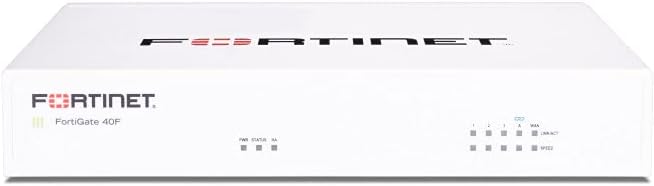
The FortiGate-40F brings enterprise-grade security features into a compact desktop device ideal for small businesses. With a 4.2 rating, users appreciate its balance of performance and space-saving design for branch offices.
We may earn a commission when you buy through this link, at no additional cost to you.
Its compact fanless design ensures quiet operation while delivering up to 1 Gbps IPS throughput. This throughput is sufficient for handling modern web traffic and encrypted communications without introducing noticeable latency.
Users should note that like other Fortinet models full security features require separate subscriptions. Additionally the five ports may require a switch if your network needs more physical connections than provided.
For small offices needing reliable security without a large footprint the FortiGate-40F is a smart investment. It delivers high performance in a package that fits easily on any desk or shelf.
The fanless desktop form factor minimizes noise and space usage while still delivering enterprise security performance.
Zero Touch Integration with Security Fabric simplifies initial setup and helps streamline management across multiple sites.
We may earn a commission when you buy through this link, at no additional cost to you.
The SonicWall TZ280 delivers impressive performance with 2.5 Gbps firewall inspection speed suitable for busy branch offices. Its 4.7 rating highlights strong satisfaction with throughput and reliability among network administrators.
We may earn a commission when you buy through this link, at no additional cost to you.
Using SonicWall's patented Reassembly-Free Deep Packet Inspection engine it inspects traffic efficiently without slowing down network speeds. The hardware includes eight Gigabit Ethernet ports and two SFP ports for fiber uplinks.
While the hardware supports zero-touch deployment the full threat protection services like sandboxing require an active subscription. This upfront cost can be a hurdle for budget constrained projects but ensures top protection.
For branches needing high speed connectivity with strong cloud management the TZ280 is a leading option. It balances speed with comprehensive security features in a manageable desktop appliance.
The Reassembly-Free Deep Packet Inspection engine analyzes packets quickly ensuring high throughput without compromising security.
Manage your device on-box or via Cloud Network Security Manager for remote administration and centralized monitoring.
We may earn a commission when you buy through this link, at no additional cost to you.
The Netgate 1100 pfSense+ Gateway provides a turnkey solution for open-source firewall enthusiasts. With a 4.1 rating, it appeals to those wanting a hassle-free pfSense experience without the build work.
We may earn a commission when you buy through this link, at no additional cost to you.
Pre-loaded with pfSense+ software it gets you running quickly with just unboxing and power. The dual core ARM Cortex-A53 processor delivers near-gigabit routing for typical home and small office internet traffic loads.
While powerful for many users the throughput is capped around 650 Mbps which might bottleneck very fast fiber connections. Additionally the ARM architecture limits advanced feature support compared to x86 variants.
For home labs and small offices needing a reliable pfSense gateway the 1100 is a great start. It removes software configuration hurdles so you can focus on securing your network right away.
With pre-loaded software and included support you can get your firewall active and configured in minutes.
Your purchase includes pfSense+ software updates for the product lifetime ensuring long-term compatibility and support.
We may earn a commission when you buy through this link, at no additional cost to you.
The FortiGate-100E offers robust protection against exploits and malicious sites with high-performance hardware capabilities. With a 4.7 rating, it is trusted for its ability to identify and mitigate diverse network threats reliably.
We may earn a commission when you buy through this link, at no additional cost to you.
Its system identifies thousands of applications allowing granular control over traffic flow and security policies. This ensures that critical business apps receive priority while unwanted traffic gets blocked effectively by the firewall.
While effective, maintaining full protection requires keeping threat databases updated which often means relying on vendor subscriptions. Users with technical expertise will find the configuration manageable for complex environments.
For businesses needing strong detection capabilities and reliable uptime the FG-100E is a solid investment. It delivers consistent security performance for organizations ready to manage their own infrastructure.
Identifying thousands of applications lets you enforce precise policies on traffic types across your network.
The appliance blocks known exploits and malicious websites to prevent infections from entering your internal systems.
We may earn a commission when you buy through this link, at no additional cost to you.
The Palo Alto PAN-PA-220 provides advanced threat prevention designed for enterprise environments needing strong security controls. With a 3.0 rating, it shows potential but may require significant expertise to configure fully.
We may earn a commission when you buy through this link, at no additional cost to you.
Its eight-port design offers ample connectivity for branching segments while the next-generation firewall engine inspects traffic for hidden threats. Centralized management options help administrators maintain security policies across multiple locations efficiently.
Users may find the learning curve steep compared to simpler appliances which impacts early user satisfaction ratings. Careful planning and training are recommended before deploying in production networks.
For organizations needing enterprise-grade controls and detailed visibility the PA-220 is a worthy candidate. It provides powerful tools for teams prepared to invest in proper setup and management.
Designed to meet strict enterprise requirements this appliance supports scalable security across large distributed networks.
Advanced features detect and block sophisticated threats before they can impact your critical data and assets.
We may earn a commission when you buy through this link, at no additional cost to you.
The Protectli Vault FW4C offers an upgrade in network speed with 2.5 Gigabit Ethernet ports on a compact chassis. With a 4.5 rating, it is a favorite for users wanting faster connectivity without full enterprise costs.
We may earn a commission when you buy through this link, at no additional cost to you.
Powered by an Intel J3710 Pentium Quad Core processor it handles routing tasks efficiently. The compact fanless design ensures silent operation which is perfect for quiet office or home environments.
While the 4GB RAM is sufficient for basic routing heavy virtualization or advanced traffic inspection may strain the system. Users should plan their OS choices carefully to match available memory resources.
For speed conscious users who value silence and open-source flexibility the FW4C is an excellent choice. It delivers modern port speeds in a small affordable package that performs well.
With four 2.5 Gigabit Ethernet ports you can future-proof your network for faster internet and internal transfers.
The fanless design ensures completely silent operation while maintaining thermal efficiency through advanced passive cooling.
We may earn a commission when you buy through this link, at no additional cost to you.
This FortiGate-60F bundle provides hardware alongside one year of security services making it a ready-to-deploy solution. With a 4.2 rating, users value the immediate protection and support that come included with the purchase.
We may earn a commission when you buy through this link, at no additional cost to you.
It includes FortiGuard Unified Threat Protection which secures against advanced threats via filtering and anti-botnet technologies. The FortiCare Premium support ensures high quality service if you encounter any issues during setup.
While the upfront investment is higher than hardware only units the included services save time on procurement. This is ideal for businesses wanting full protection without managing separate licenses immediately.
If you want a complete package with built-in protection and support this bundle offers convenience and reliability. It simplifies deployment for teams needing robust defense right from day one.
With the included one year of FortiGuard UTP you secure your network immediately upon installation.
FortiCare Premium ensures you receive dedicated high-quality technical assistance whenever needed.
We may earn a commission when you buy through this link, at no additional cost to you.
Selecting the right firewall appliance requires understanding your network needs and the technical capabilities required. This guide outlines key factors to help you make an informed decision.
Consider the total internet speed your network will handle and choose a device that exceeds that capacity. Higher throughput models ensure that security filtering does not slow down your connection speeds significantly.
Always select a firewall with a throughput rating higher than your internet connection to avoid bottlenecks during peak usage.
Evaluate how many physical connections your network needs including WAN, LAN, and DMZ segments. Some appliances offer dedicated ports for fiber or specific roles which simplifies physical cabling.
Choose a unit with enough ports to connect all your critical devices without requiring an extra switch.
Decide between proprietary systems and open-source solutions like pfSense or OPNsense. Open-source models offer more control but require technical setup skills while proprietary ones provide easier management.
Pick the software ecosystem that matches your technical expertise and management preferences.
Look for advanced features like intrusion prevention, malware protection, and application control. Ensure the model supports updates to keep definitions current against new threats.
Prioritize models with regular threat intelligence updates to protect against evolving cyber risks.
Determine where you will place the appliance whether it is on a desk or in a rack. Fanless designs are ideal for quiet environments while rack mountable units save space in server rooms.
Select a form factor that fits your physical space and cooling requirements.
Check if the manufacturer offers technical support and warranty coverage. Some models require separate subscriptions for support while others include it in the base price.
Ensure you have access to support resources for troubleshooting and future maintenance needs.
Compare the hardware price against ongoing subscription costs for features like threat protection. Some units require annual fees to unlock security updates and services.
Calculate the total cost of ownership over several years before making your final budget decision.
Begin by connecting the device to your internet modem and internal network switch using Ethernet cables. Ensure all ports are secure and powered on before accessing the management interface.
Configure initial security policies and rules based on your specific traffic needs. Most systems provide default configurations to start with which you can customize to fit your environment.
Regularly update firmware and threat definitions to maintain strong protection. Keep the appliance in a well-ventilated area to prevent overheating and ensure stable performance.
A firewall appliance is a dedicated hardware device that protects networks by monitoring and controlling incoming and outgoing traffic. It serves as a barrier between internal networks and the public internet to prevent unauthorized access.
Some appliances offer basic hardware protection without subscriptions but advanced features like threat updates often require yearly fees. Always check the pricing model before purchasing.
Yes, many appliances like those from Protectli support open-source operating systems like pfSense and OPNsense. This flexibility allows users to customize firewall rules and features freely.
Connect the device between your modem and switch then log into its management interface to set up rules. Most vendors provide detailed manuals to guide the initial configuration process.
Throughput refers to the amount of data the firewall can process per second without slowing down your connection. Ensure this number meets or exceeds your internet speed for optimal performance.
Buying hardware only is cheaper upfront but may lack protection services. Bundles with subscriptions offer immediate security and support which can save time and effort for businesses.
We have reviewed ten top firewall appliances ranging from budget-friendly mini PCs to enterprise-grade units. Each option offers unique strengths for different environments and user needs.
When choosing prioritize throughput and security features that match your network size. A device that fits your current needs will save you money while providing strong protection.
Remember to verify current pricing and availability as these values can change frequently. Your final selection will be more successful when you stay informed about market details.