
SABRENT USB 3.0 to 2.5in SATA Adapter Cable
4.7Editor score
USB bus-powered design
UASP support for speed
Compatible with 2.5 SATA drives
This guide compares the top laptop hard drive adapter kits for reliable data transfer, recovery, and backup across IDE, SATA, and modern drive types.
Finding the right laptop hard drive adapter kit is essential for anyone needing to access old data or upgrade storage. These tools allow you to connect internal drives externally via USB for quick file transfers without opening your device.
We evaluated ten top-rated kits based on compatibility, transfer speed, power supply stability, and ease of use. Our analysis covers both basic cables and full docking stations to help you choose the best solution for your specific needs.
Each pick highlights key strengths and potential limitations to ensure you get reliable performance. Remember that product availability and pricing can fluctuate, so always check current details before making a purchase decision.
4.7Editor score

4.6Editor score
4.6Editor score
This comparison table summarizes the core specifications and capabilities of all ten selected laptop hard drive adapter kits. Use it to quickly identify which model fits your drive type and connection requirements.


This adapter kit stands out as our top choice for its robust compatibility and reliable performance. It supports both IDE and SATA drives across different sizes making it versatile for various data recovery and transfer tasks. The included power supply ensures stable operation which is critical when dealing with older or larger drives that require more power than USB alone can provide.
We may earn a commission when you buy through this link, at no additional cost to you.
The inclusion of both USB 3.0 and Type C ports makes this kit highly adaptable to modern laptops that may lack traditional USB A ports. Users can connect directly or use the included adapter to switch between interfaces seamlessly. The design features an on off power switch that protects drives from electrical damage during transfers adding an extra layer of safety for valuable data.
While the kit is larger than a simple cable it offers significant benefits in terms of versatility and power management. The extra bulk allows for better cable management and heat dissipation during prolonged use which helps maintain drive health. The only trade off is the reliance on an external power source for 3.5 drives which limits true portability but ensures consistent performance.
This kit is ideal for home users IT enthusiasts or anyone needing to access data from old laptops or desktops. It handles large data transfers and backups efficiently without requiring technical knowledge to set up. If you need a reliable solution that works with both legacy and modern drives this model is the best option available.
The adapter supports 2.5 and 3.5 inch SATA and IDE drives allowing access to nearly any internal storage device.
With both USB 3.0 and Type C connections you can use this kit on almost any modern laptop or desktop computer.
We may earn a commission when you buy through this link, at no additional cost to you.
This compact adapter cable offers exceptional value for anyone needing to connect 2.5 inch SATA drives from laptops or SSDs. It is bus powered meaning it draws power directly from the USB port so no extra power brick is needed. This makes it perfect for quick file transfers or accessing data from old laptops on the go without carrying extra accessories.
We may earn a commission when you buy through this link, at no additional cost to you.
The support for UASP protocol ensures that data transfer speeds are optimized for compatible systems providing faster access to files compared to standard USB 2.0 connections. The simple design features a standard USB A connector that works seamlessly with most computers and operating systems. Users can hot swap drives easily allowing for quick access to multiple drives without restarting the computer.
The main limitation is that it only supports 2.5 inch drives so it cannot be used with desktop 3.5 inch HDDs or IDE drives. While this restricts its versatility it keeps the cost and size very low making it an ideal specialized tool for laptop drive access. The build quality is solid enough for regular use despite the minimalistic design.
This adapter is best suited for users who primarily work with laptop drives or SSDs and want a cost effective solution. It is excellent for one off data recovery tasks or regular backups of portable storage. If you need a simple reliable and affordable way to access 2.5 inch drives this cable is the top choice.
Its small size and bus powered design make it easy to carry in a laptop bag for data access anywhere.
UASP support ensures faster read and write speeds compared to traditional USB 2.0 adapters.
We may earn a commission when you buy through this link, at no additional cost to you.
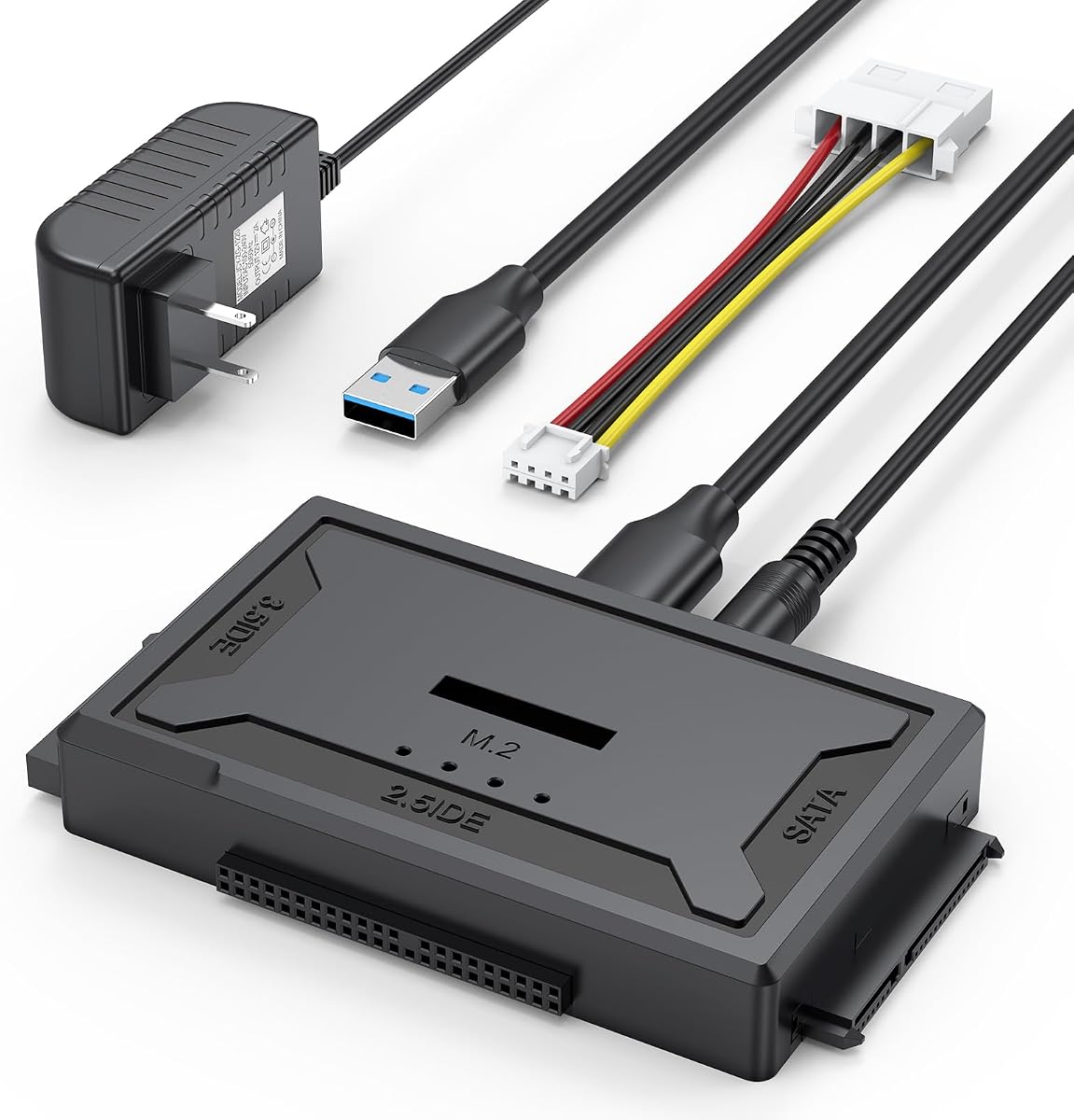
This advanced docking station supports M.2 drives in addition to traditional SATA and IDE interfaces offering unmatched versatility. The upgrade to 10Gbps transfer speeds for M.2 connections makes it ideal for users working with modern NVMe SSDs or high capacity laptop drives. It includes a comprehensive power solution ensuring stable operation even when accessing older IDE drives that require more power.
We may earn a commission when you buy through this link, at no additional cost to you.
The design features improved flexible cables that make it easier to connect to IDE drives which often have awkward port placements. Users can connect multiple drive types without needing separate adapters making this an all in one solution for mixed storage environments. The robust build quality ensures durability even with frequent drive changes and heavy data retrieval tasks.
While it is more expensive than basic adapters the extra value comes from its support for modern storage formats and high speed data access. The additional bulk is justified by the functionality it provides and the reliability of its power management. This makes it a premium choice for tech enthusiasts or professionals who need to access various drive generations.
This dock is best for users who need to access M.2 drives alongside legacy SATA or IDE drives. It is perfect for data recovery professionals or anyone upgrading old computers who wants a single tool that handles everything. If you need the most versatile and high performance option this premium dock delivers the best results.
Full support for M.2 NVMe and SATA protocols ensures compatibility with modern high speed SSDs.
Up to 10Gbps speeds for M.2 drives provide significantly faster data access compared to standard USB 3.0.
We may earn a commission when you buy through this link, at no additional cost to you.
This adapter stands out for its ability to connect two drives simultaneously making it perfect for direct cloning or quick file transfers. It supports both IDE and SATA interfaces allowing you to mix drive types during your operations. The dual drive capability saves time and hardware costs when moving data between old and new storage devices.
We may earn a commission when you buy through this link, at no additional cost to you.
The adapter includes a dedicated power supply which is critical for stable operation especially when two drives are running at once. LED indicators provide clear feedback on power and activity status helping you monitor the data transfer process. The design also includes an on off switch to protect drives from unnecessary wear when not in active use.
One limitation is that it uses a standard USB A connector which may require an adapter for modern laptops with only Type C ports. The build is robust to handle the simultaneous power demands of two drives but it is not as portable as single drive cables. Despite this the functionality provided is essential for users needing direct drive to drive access.
This model is ideal for users who regularly migrate data between old laptops and new systems. The ability to connect both drives at once eliminates the need for temporary storage or multiple connection steps. If you need a reliable tool for direct drive cloning this adapter offers the best solution available.
Connect one IDE and one SATA drive simultaneously for direct data migration without extra storage.
Dedicated power adapter ensures stable operation for both drives especially when accessing 3.5 inch HDDs.
We may earn a commission when you buy through this link, at no additional cost to you.
This kit offers wide compatibility with both USB 3.0 and Type C ports making it suitable for modern and older laptops. It supports massive drive capacities up to 20TB which is excellent for users dealing with large external backups or archival storage. The technical support team is ready to help troubleshoot any issues ensuring a smooth experience during data recovery tasks.
We may earn a commission when you buy through this link, at no additional cost to you.
The on off power switch protects drives from electrical damage when changing connections which is critical for long term drive health. The kit includes a detailed manual covering operation steps and common errors which helps users avoid setup problems. Compatibility with Windows Mac and Linux makes it a versatile tool for mixed operating system environments.
Transfer speeds are high for SATA drives but standard for older IDE connections which is expected due to interface limitations. Users should read instructions carefully especially when dealing with jumper settings on older IDE drives to ensure proper recognition. The build quality is reliable though it is slightly larger than basic cables due to the power adapter integration.
This kit is ideal for users who need to access large capacity drives across different platforms and laptop types. The support for 20TB capacity ensures you can connect any future drive upgrades without replacement. If you need a universal adapter that works on modern and legacy systems this is a strong candidate.
Supports drives up to 20TB making it future proof for large storage needs.
Works seamlessly across Windows Mac and Linux operating systems for universal access.
We may earn a commission when you buy through this link, at no additional cost to you.
This adapter is designed for data recovery tasks offering reliable performance for older IDE and SATA drives. It supports capacities up to 6TB which covers most laptop and desktop drive needs. The included 12V power supply ensures that drives spin up correctly which is essential for reading data from older drives that need more power.
We may earn a commission when you buy through this link, at no additional cost to you.
The compact design makes it easier to carry compared to bulkier docking stations while still offering full functionality. LED indicators show power and activity status helping you confirm when data is being read or written. Hot swap support allows you to change drives without restarting the computer saving time during multi drive recovery operations.
Some older IDE drives may require manual jumper settings which adds a step to the setup process but ensures proper recognition. The power adapter is a must for 3.5 drives so portability is limited but stability is maintained. Overall the kit provides a solid balance between performance and ease of use for standard data tasks.
This kit is suitable for users who need to recover data from old computers or upgrade storage without hassle. The included power supply removes the guess work from powering older drives which improves success rates. If you need a reliable tool for drive recovery or cloning this model offers great value and performance.
Designed specifically for retrieving data from older drives with stable power management.
Small footprint makes it easy to carry while maintaining full drive support.
We may earn a commission when you buy through this link, at no additional cost to you.
This adapter is a versatile tool suitable for IT enthusiasts and office workers needing reliable data access. It solves common issues like power shortages for 3.5 drives and mismatched Type C ports making it a reliable choice for various environments. The kit includes all necessary cables and instructions ensuring you can set it up quickly without extra purchases.
We may earn a commission when you buy through this link, at no additional cost to you.
The extended body design makes it easier to use with 3.5 IDE ports which are often cramped on larger drives. Flexible cables reduce strain during connections helping maintain the health of the adapter and drives over time. The on off power switch protects drives from electrical damage which is critical when working with valuable data.
Users may find the size slightly larger than simple cables but this design choice enhances durability and usability. The stable power supply ensures consistent performance which reduces the risk of data corruption during transfers. Support is available for technical questions which adds confidence when using the tool for professional data recovery.
This kit is best for IT professionals or advanced users who need a dependable solution for mixed drive types. The stability and support make it a smart choice for repeated use in an office or home lab. If you need an adapter that handles both legacy and modern drives reliably this model is excellent.
Designed to handle diverse drive types with stable power for consistent professional performance.
Includes all cables and power supplies so you can use it immediately without extra accessories.
We may earn a commission when you buy through this link, at no additional cost to you.
This docking station is perfect for users who frequently swap SATA drives without needing tools. The lay flat bay accepts drives easily making it convenient for daily backups or cloning tasks. It includes a power adapter which is necessary for 3.5 drives ensuring stable operation without interruptions during data transfers.
We may earn a commission when you buy through this link, at no additional cost to you.
UASP support ensures that speeds are optimized for compatible systems allowing for faster file access compared to standard USB 2.0. The LED indicator provides visual feedback on power and activity helping you monitor the process. Hot-swap capability allows you to change drives without rebooting which is essential for workflow efficiency.
The design is limited to SATA drives which means it will not work with IDE or M.2 drives. However for users focused on SATA SSDs or HDDs it offers a simple and effective solution. The included power adapter is reliable though you must have an outlet nearby to use 3.5 drives.
This station is best for users who need a dedicated tool for SATA drive management. It is ideal for backups or system upgrades where quick access to multiple drives is required. If you only work with SATA drives this dock offers the best balance of convenience and performance.
Open bay design allows you to insert drives without tools or screws for quick access.
UASP support ensures faster transfers for compatible systems compared to standard USB interfaces.
We may earn a commission when you buy through this link, at no additional cost to you.
This enclosure is designed for 2.5 inch SSDs providing a protective case and adapter in one. The support for UASP protocol ensures that SSD speeds are maximized when connected to modern USB ports. It features both USB Type C and Type A connectors making it easy to connect to laptops phones or desktops.
We may earn a commission when you buy through this link, at no additional cost to you.
The tool-free design allows you to slide the drive in and close the cover without screws which simplifies installation. The compact build is durable enough to protect the drive during transport while keeping it lightweight. Compatibility with Windows Linux and Mac ensures broad usability for different operating systems.
While it is limited to 2.5 inch drives it excels at providing a permanent portable solution for SSDs. The 18-month warranty offers additional peace of mind for the investment in a reliable enclosure. It is not suitable for older IDE drives but for modern SSDs it provides the best protection and speed.
This enclosure is best for users who want to turn a spare laptop SSD into a portable external drive. It is simple to use and provides consistent performance for daily file transfers or backups. If you need a solid case for a 2.5 SSD this model is the top choice.
Specifically designed to handle SSD speeds with UASP protocol for maximum performance.
Works with both USB Type C and Type A to ensure compatibility with all modern devices.
We may earn a commission when you buy through this link, at no additional cost to you.
This adapter offers a great balance of features and price making it a top value choice for many users. It supports connecting one IDE and one SATA drive simultaneously allowing for efficient data migration. The included power adapter ensures reliable operation for 3.5 drives which often require more power than USB alone can provide.
We may earn a commission when you buy through this link, at no additional cost to you.
The kit includes both USB 3.0 and Type C cables to adapt to modern laptops with limited ports. Hot swap support allows you to change drives without restarting the computer which saves time during recovery tasks. LED indicators show power and activity status giving you visual feedback during transfers.
Note that it cannot connect two IDE drives at once so planning your connections is necessary. The power adapter is required for 3.5 drives limiting true portability but ensuring stability. Despite these limitations it provides excellent functionality for users who need to access multiple drive types efficiently.
This adapter is ideal for budget conscious users who need reliable performance for mixed drive types. It is perfect for occasional data recovery or cloning tasks where versatility is key. If you want a capable tool that works with both old and new drives this is a smart buy.
Connect both IDE and SATA drives at the same time for faster data transfers and cloning.
USB 3.0 and Type C ports ensure compatibility with almost any laptop or desktop.
We may earn a commission when you buy through this link, at no additional cost to you.
Choosing the right adapter kit requires understanding your drive types and transfer needs. This guide covers the essential factors to consider before purchasing.
Ensure the adapter supports the interface of your drive whether it is SATA IDE or M.2. Older drives may use IDE with specific pin configurations while modern laptops use SATA or NVMe. Checking connector types prevents mismatches and ensures the drive can be read.
Always verify your drive connector matches the adapter's supported interfaces before buying.
3.5 inch desktop drives need external power adapters to spin up correctly while 2.5 inch drives often run on USB power. Kits with included power adapters ensure stability and prevent data loss during transfers. Without proper power older drives may fail to spin up or disconnect unexpectedly.
Look for a kit with a 12V power adapter if you plan to use 3.5 inch drives.
USB 3.0 offers up to 5Gbps speeds while newer interfaces may support 10Gbps for M.2 NVMe drives. UASP support improves read and write speeds for compatible systems. Faster speeds reduce the time needed for large backups or data recovery tasks significantly.
Prioritize adapters that support USB 3.0 and UASP for faster data transfers.
Modern laptops often have only Type C ports which may require an adapter or a dual port kit. Ensure the adapter includes a compatible cable or adapter for your computer's USB ports. Missing the correct connector can prevent the adapter from working with your system.
Check if the kit includes Type C cables or adapters for modern laptop compatibility.
Flexible durable cables reduce strain during connections and extend the adapter's lifespan. Robust housings protect the adapter electronics from physical damage. High quality connectors ensure a reliable connection that won't disconnect during critical data transfers.
Choose adapters with flexible cables and sturdy housings for better durability.
Plug and play functionality without drivers simplifies setup for all users. LED indicators and on off switches add convenience and protection. Hot swap support allows easy drive changes without rebooting the computer.
Look for plug and play support and useful features like LED status lights.
Ensure the adapter supports the capacity of your drive which may range from 500GB to multiple terabytes. Some adapters limit capacity which could prevent larger drives from being recognized. Most modern kits support up to 2TB or more which covers typical laptop drives.
Verify that the adapter supports your drive's capacity to avoid recognition issues.
A solid warranty and responsive support team help resolve any issues quickly. Some kits include technical support which is valuable when dealing with complex data recovery. Ensure you have access to instructions or support if you encounter setup problems.
Choose brands that offer reliable warranty and technical support services.
Start by checking your drive connector type to ensure it matches the adapter's supported interfaces. For 3.5 inch drives connect the external power adapter first before connecting the drive to avoid power issues. For 2.5 inch drives the USB port usually provides enough power for operation.
Connect the adapter to your computer using the appropriate USB or Type C port. Wait for the drive to spin up which may take a few seconds especially with older models. Once the LED indicator shows activity you can access the drive in your file manager.
After use disconnect the drive safely through your operating system to avoid data corruption. Always turn off the drive before unplugging to protect the internal components. Store the adapter and cables carefully to prevent damage to connectors or internal wires.
No you need to match the adapter to your drive's interface. SATA drives require SATA connectors while older IDE drives need PATA connectors. NVMe drives require specific M.2 adapters. Always check your drive type before purchasing to ensure compatibility.
Only 3.5 inch drives typically require an external power adapter. Most 2.5 inch laptop drives can run on USB power alone. However some high capacity 2.5 inch drives may draw more power than a USB port can provide.
Yes USB 3.0 offers transfer speeds up to 5Gbps compared to 480Mbps on USB 2.0. This difference is significant when transferring large files or backing up entire drives. UASP support further improves performance for compatible systems.
Yes a laptop hard drive adapter lets you connect internal drives externally. This allows you to access data without physically installing a second drive. It is a great solution for data recovery or temporary storage expansion.
Check that the drive connector is seated properly and the power adapter is connected. Ensure the drive is initialized in Disk Management if it is new. For IDE drives verify jumper settings to set the correct master or slave configuration.
Connect the old drive to your current computer using the adapter. Access the files through your file manager and copy them to your new system. Ensure the drive is healthy to avoid data loss during the transfer process.
We recommend the Hard Drive Reader USB 3.0 & Type C to SATA IDE Adapter as the best overall choice for its reliability and dual port flexibility. For budget users the SABRENT USB 3.0 to 2.5in SATA Adapter Cable offers great value and simplicity.
Consider your drive types and computer ports when choosing. If you need to access M.2 drives look for the upgraded 4-in-1 dock. Otherwise standard adapters will serve most recovery and backup needs well.
Prices and availability change often so check the latest deals before purchasing. A right adapter ensures you can recover important data efficiently without costly hardware changes.