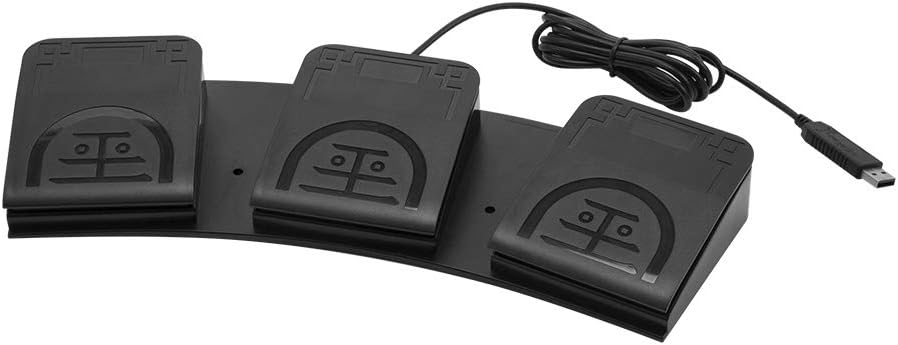
iKKEGOL Upgraded USB Triple Foot Pedal
4.4Editor score
Quiet optical switch mechanism
Programmable HID device
Non-slip TPU rubber base
This guide compares the top foot pedals for transcriptionists including durability comfort and software compatibility to help professionals choose the right
Transcriptionists rely on precise tools to turn audio into text efficiently. A quality foot pedal allows hands-free control, boosting speed and reducing fatigue during long sessions.
We evaluated ten leading models based on build quality, switch responsiveness, and software integration. Each option offers unique ergonomic designs tailored to diverse transcription workflows and budgets.
Every selection highlights key features, pros, cons, and ideal use cases. Note that pricing fluctuates frequently so verify current costs before making your final purchasing decision today.
4.4Editor score

4.5Editor score

4.1Editor score
This side-by-side comparison highlights the core specifications of each model to help you identify the best fit for your specific transcription software and workflow requirements.


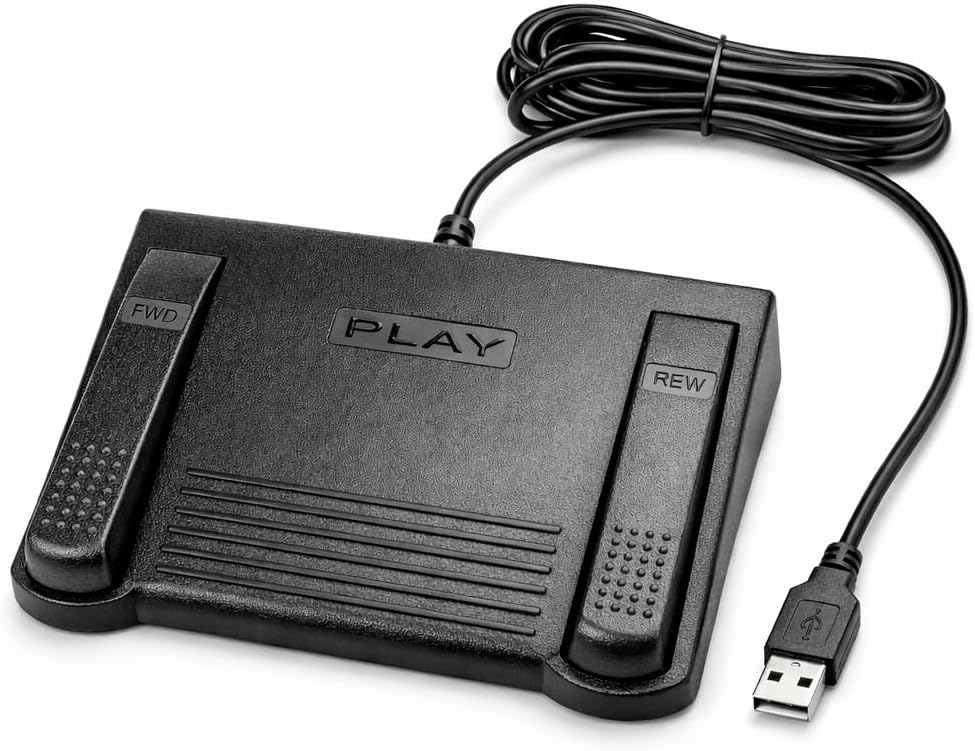


The Infinity 3 USB Foot Pedal Control stands out as a top choice for transcriptionists needing reliable hands-free operation. With a strong rating and sturdy build, it ensures countless hours of trouble-free performance during daily transcription tasks.
We may earn a commission when you buy through this link, at no additional cost to you.
Its ergonomic design features a wide central sloping play pedal that makes it easy to move your foot between play, fast forward, or rewind keys. The ultra-heavy-duty micro switches are designed for longevity, ensuring that every press registers accurately without sticking.
While it lacks advanced software configuration, its simplicity is a benefit for users who prefer straightforward plug-and-play functionality. The design prevents accidental presses by enabling easy foot movement between the large pedals, which reduces fatigue during long sessions.
This pedal is ideal for professionals who prioritize durability and comfort over complex programmability. It delivers consistent performance for medical legal or general transcription work, making it a solid investment for anyone needing a dependable foot control unit.
The wide central pedal allows natural foot positioning reducing strain on your feet during extended transcription sessions.
Ultra-heavy-duty micro switches ensure consistent response and longevity even with thousands of daily presses.
We may earn a commission when you buy through this link, at no additional cost to you.
The iKKEGOL Upgraded USB Triple Foot Pedal offers excellent value for transcriptionists on a budget. It provides quiet optical switches and a wide pedal design that ensures comfort during extended use. Its versatility as a programmable HID device allows for flexible key mapping.
We may earn a commission when you buy through this link, at no additional cost to you.
Its optical switch mechanism operates quietly which is beneficial for transcription environments where audio clarity matters. The wide pedal and large size enable long-lasting comfort for your feet. The TPU rubber base ensures the device stays right where you want it on hard floors.
The main drawback is the need to configure commands via ElfKey software before use which may be a hurdle for non-technical users. However once set up it performs reliably as a standard HID device. This flexibility makes it suitable for various uses beyond just transcription.
This pedal is best for those seeking an affordable customizable option. It handles heavy loads well and offers ergonomic design that minimizes fatigue. For transcriptionists who need a budget-friendly and adaptable foot switch this model delivers strong performance without breaking the bank.
Optical switches provide quiet operation ideal for transcription settings where noise can interfere with audio playback.
Program the pedal to execute key combinations or macros speeding up your workflow significantly.
We may earn a commission when you buy through this link, at no additional cost to you.
The Philips ACC2330 4-Pedal Foot Control is designed for professional dictation workflows requiring precise control. Its unique toe touch control and swing foot using heel features allow for nuanced operation. This unit integrates well with professional digital dictation systems.
We may earn a commission when you buy through this link, at no additional cost to you.
Increased width of the center pedal avoids unintended presses of other pedals which improves accuracy during transcription. The easy toe touch control lets you feel the control area change without looking. This reduces strain and allows for easy foot relax during pause times.
While this model comes at a higher price point it targets professionals who need robust features. The design prioritizes precision and ergonomic movement reducing physical strain during long transcription sessions. It is not as versatile for general software but excels in dedicated dictation environments.
Ideal for legal and medical transcriptionists using specific digital dictation software this pedal provides a premium experience. The foot relax feature and wide center design help maintain comfort over hours of use. Investing in this unit ensures you have a tool built for professional demands.
Feel it with your toe when you change the control area to reduce errors during transcription.
Designed specifically for digital systems ensuring seamless workflow with professional dictation software.
We may earn a commission when you buy through this link, at no additional cost to you.
The DAC 3 Function Foot Pedal offers a straightforward solution for transcriptionists needing basic playback controls. It features large labeled buttons that clearly define Next Job Rew/Play and Record functions. Its perfect rating suggests high user satisfaction regarding build and usability.
We may earn a commission when you buy through this link, at no additional cost to you.
This unit is compatible with certain computer software designed for foot control which makes it a targeted tool for specific transcription platforms. The large buttons ensure you can easily identify the correct pedal even in low light conditions. The USB connector ensures easy setup.
The main limitation is compatibility with certain computer software not all generic transcription programs will work with this unit. Also it may cost more than basic options despite its simpler functionality. However the clarity of button labels and job controls offers unique benefits for complex workflows.
This pedal is best for users who require specific Next Job controls alongside standard playback. It provides a reliable and ergonomic way to manage transcription tasks without reaching for your keyboard. Check your software requirements before purchasing to ensure it meets your needs.
Large labeled buttons make it easy to distinguish between Next Job and playback controls instantly.
A standard USB connector allows for easy plug-and-play setup with compatible computer systems.
We may earn a commission when you buy through this link, at no additional cost to you.
The Infinity USB Digital Foot Control is a compact unit designed for efficiency. It features a low profile design and greater non-slip surface area to ensure stability. This pedal fits well on crowded desks and maintains a strong rating for consistent performance.
We may earn a commission when you buy through this link, at no additional cost to you.
Its design focuses on minimizing desk space while maintaining usability. The non-slip surface area prevents the pedal from shifting during use. The USB connection ensures reliable digital control for your transcription software. It is a streamlined version of the Infinity line.
The compact size might be a drawback for users with larger feet who prefer broader pedal surfaces. It lacks specialized features like toe control but serves well as a reliable basic control unit. The low profile helps keep your workstation uncluttered.
This unit suits transcriptionists looking for a space-saving solution without sacrificing reliability. It provides essential playback control in a small footprint. If you need a discreet pedal that performs well with standard software this model is a solid choice.
Low profile design allows this pedal to fit easily under desks or on crowded workspaces.
Greater non-slip surface area ensures the pedal stays put during vigorous transcription sessions.
We may earn a commission when you buy through this link, at no additional cost to you.
The Express Scribe Transcription Foot Pedal is designed exclusively for use with Express Scribe transcription software. It features oversized pedal design to allow easy movement between play fast forward and rewind functions. The plug-and-play setup requires no configuration.
We may earn a commission when you buy through this link, at no additional cost to you.
Its custom hardware ensures seamless operation specifically engineered for Express Scribe. The oversized pedals support comfortable low-fatigue operation during dictation and transcription. It comes with a one year mail-in parts labor warranty which adds value to the purchase.
The limited software compatibility is the biggest drawback; it will not work with Case Catalyst or other general transcription programs. Users must be committed to Express Scribe to utilize this pedal effectively. Also the average rating suggests mixed user experiences.
This pedal is ideal for professionals dedicated to the Express Scribe ecosystem. It provides reliable control within that specific software environment. If you already use Express Scribe this dedicated hardware can streamline your workflow without additional setup.
Built specifically for Express Scribe to ensure precise playback control within that application.
Large pedals make it easy to transition between functions without straining your foot.
We may earn a commission when you buy through this link, at no additional cost to you.
The ECS-IN-USB-1 Foot Pedal delivers reliable hands-free audio playback control for transcriptionists and dictation professionals. It features a thoughtfully contoured layout designed to minimize strain and fatigue during extended use. It is compatible with most major transcription software platforms.
We may earn a commission when you buy through this link, at no additional cost to you.
Its ergonomic and fatigue-reducing design helps natural foot positioning. The pedal is ideal for medical legal insurance and public safety applications. It includes a one year mail-in parts labor warranty which adds confidence for daily transcription workloads.
The lower average rating indicates that some users may find the responsiveness or build quality inconsistent. However the ergonomic design and broad compatibility offer strong utility for general transcription tasks. It is a standard USB unit that aims for broad market fit.
This pedal is suitable for professionals seeking a general-purpose hands-free controller. If you prioritize comfort and broad software support it may meet your needs. Verify reviews regarding build quality before purchasing to ensure it matches your expectations.
Thoughtfully contoured layout supports natural foot positioning to reduce strain during long sessions.
Compatible with most major dictation platforms providing flexibility for diverse transcription workflows.
We may earn a commission when you buy through this link, at no additional cost to you.
The iKKEGOL Upgraded USB Triple Foot Pedal offers advanced mechanical switch control for complex workflows. It allows you to execute complex macros key combinations or mouse clicks with your feet. This triple pedal board is programmable using the ElfKey configuration software.
We may earn a commission when you buy through this link, at no additional cost to you.
The mechanical switch actuation uses a spring-loaded lever which physically closes an electrical circuit to send the signal. This provides tactile feedback and durability. It supports Windows Mac and Linux ensuring broad compatibility across different operating systems used by transcriptionists.
The need to download and configure the ElfKey software might be a hurdle for some users. Additionally it is a general HID device not specifically labeled for transcription which may affect software recognition. However the mechanical switches provide a solid build quality.
Ideal for tech-savvy transcriptionists who want customizable control this pedal offers speed and efficiency. It is also useful for gaming or coding which provides extra utility. If you need macro execution capabilities this model is a strong contender.
Execute complex macros key combinations or mouse clicks with your feet to speed up workflows.
Spring-loaded lever actuation ensures tactile feedback and consistent response during use.
We may earn a commission when you buy through this link, at no additional cost to you.
The Philips LFH-2330 Configurable USB Foot Control features a four pedal design that can be completely configured to suit you. It minimizes physical strain by lessening movement of foot due to slim design. An anti-slip bottom surface keeps it in the right place.
We may earn a commission when you buy through this link, at no additional cost to you.
A user-friendly wizard allows you to customize the pedals to fit your specific workflow needs. The ergonomic design reduces foot movement during transcription sessions which helps prevent fatigue. It connects via USB plug for easy setup.
Configuring the pedals requires using the wizard which may take time to set up correctly. It is priced higher than basic foot pedals which may be a consideration for budget-conscious buyers. However the flexibility and comfort features add value.
This unit is best for transcriptionists who need specific pedal configurations. The slim design and anti-slip base ensure stability and comfort. If you prioritize customization and ergonomic design this model provides a high-quality solution.
Use a user-friendly wizard to completely configure four pedals to suit your exact workflow.
Slim design minimizes physical strain by lessening movement of foot during transcription.
We may earn a commission when you buy through this link, at no additional cost to you.
The VEC in-USB-2 Infinity Digital Foot Control offers rechargeable battery power providing up to 1000 hours of digital recording time. It features a mechanical stop that prevents accidental triggering of the center pedal. It works seamlessly with most leading dictation and transcription products.
We may earn a commission when you buy through this link, at no additional cost to you.
Its ergonomic design allows you to comfortably rest your foot while dictating or transcribing. The large easy-to-use surface ensures precision. Built with heavy-duty components and precision switches designed for millions of depressions it ensures long-lasting performance.
While battery power offers portability you must remember to recharge it occasionally. The mechanical stop adds control but requires familiarity with the pedal layout. Overall the device provides reliable performance with wide compatibility across systems.
This pedal is ideal for transcriptionists who need reliable and long-lasting hardware. The rechargeable battery eliminates the need for wired power during use. If you value durability and broad compatibility this model is a practical choice.
Rechargeable battery provides up to 1000 hours of digital recording time for extended use.
Mechanical stop prevents accidental triggering of the center pedal while stepping on side pedals.
We may earn a commission when you buy through this link, at no additional cost to you.
Selecting the right foot pedal can significantly improve your transcription workflow and comfort. This guide outlines key factors to consider before purchasing.
Ensure the pedal works with your specific transcription software. Some models are exclusive to certain programs while others are universal.
Check the product description for compatible software lists before purchasing.
Optical switches are quieter and durable whereas mechanical switches provide tactile feedback. Choose based on your noise tolerance.
Optical switches are often preferred for quiet office environments.
A pedal with wide pedals and a sloping design reduces foot fatigue. Consider the size and layout for comfort during long sessions.
Look for wide pedals and contoured designs to minimize strain.
Heavy-duty components ensure the pedal can withstand thousands of presses daily. Check switch ratings for long-lasting performance.
Prioritize models with heavy-duty micro or precision switches.
Programmable pedals allow you to map keys or macros to fit your workflow. This is useful for complex tasks beyond playback.
Choose programmable HID devices if you need macro execution.
USB connection is standard and reliable. Some models may use Bluetooth but USB ensures consistent plug-and-play setup.
USB connectors provide the most stable connection for desktops.
Prices vary widely from budget to premium options. Determine what features are essential versus optional for your needs.
Balance cost with required features like battery or specific software support.
A one year warranty is common and offers protection against defects. This ensures confidence in the product's long-term reliability.
Look for at least a one year mail-in parts warranty.
Place the pedal on a flat surface near your desk ensuring your foot can reach it comfortably. Avoid clutter around it to prevent accidental bumps.
Connect the USB cable directly to your computer and install any required software. Some units require a wizard to map functions correctly.
Clean the surface periodically with a dry cloth to remove dust. Avoid using liquids directly on the pedal to prevent internal damage.
Foot pedals are highly recommended as they allow hands-free control of audio playback. This increases speed and reduces typing fatigue significantly during long sessions.
Most USB foot pedals are compatible with both Mac and Windows operating systems. Always verify specific compatibility in the product description before purchasing.
Optical switches are quieter and have a longer lifespan while mechanical switches provide tactile feedback. Choose based on your noise tolerance and preference.
Not all pedals work with every software. Some models are exclusive to specific programs. Verify compatibility with your specific software before buying.
Some pedals require a configuration wizard or software like ElfKey to map functions. Follow the manual steps to set up the desired key presses.
Rechargeable units offer portability but require charging. Wired USB pedals are simpler and never run out of battery which may be preferred for stationary work.
High-quality pedals can last for millions of depressions. Look for heavy-duty micro or precision switches to ensure durability over years of daily use.
Optical switches are designed to operate quietly. Mechanical switches may click slightly which could be audible in a quiet environment.
The top picks offer reliable performance for transcriptionists of all levels. The Infinity 3 USB Foot Pedal Control remains a standout choice for its ergonomic design and durability.
When choosing prioritize software compatibility and comfort to ensure a smooth workflow. A well-designed pedal can significantly reduce physical strain during long transcription sessions.
Verify current prices and specifications before purchasing as offerings may change. Investing in a quality pedal will pay off in productivity and comfort over time.