
MAYFLASH F300 Arcade Fight Stick
4.5Editor score
Compatible with many consoles
Sanwa button and joystick support
Affordable entry-level price
This guide compares the top 10 fight sticks for console fighting games to help you choose the right controller for your platform and play style.
Finding the right controller can make a huge difference in competitive fighting games. A high-quality fight stick offers precision, durability, and comfort that standard gamepads simply cannot match during intense matches.
We evaluated ten top-rated arcade sticks based on compatibility, build quality, button response, and customization options. Our analysis covers everything from budget-friendly options to premium tournament-grade gear for various consoles.
Each pick highlights key strengths and potential trade-offs to help you decide. Remember that availability and pricing change often, so check current listings before making your final purchase decision today.
4.5Editor score

4.6Editor score

4.2Editor score
Here is a side-by-side comparison of all ten fight sticks we reviewed. This table highlights key specifications and compatibility details to help you quickly identify the best fit for your setup.




The HORI PlayStation 5 Fighting Stick Alpha stands out as a top-tier controller for serious players. With a high rating and official Sony licensing, it delivers the reliability needed for competitive play across multiple platforms.
We may earn a commission when you buy through this link, at no additional cost to you.
Its standout feature is the use of HORI's proprietary Hayabusa components which offer exceptional speed and accuracy. The case opens easily for maintenance and the top panel artwork can be replaced to match your style.
While it comes at a premium price compared to budget options, the durability and performance justify the investment. Some users may miss wireless connectivity but the wired connection ensures zero latency during matches.
If you own a PlayStation 5 or 4 and want a tournament-ready stick out of the box, this is the best choice. It balances quality and features perfectly for both casual and competitive fighting game fans.
The Hayabusa joystick provides quick directional inputs essential for complex combos in modern fighting titles.
Open the case to swap buttons or panels without needing special tools for a personalized setup.
We may earn a commission when you buy through this link, at no additional cost to you.
The MAYFLASH F300 is an excellent entry point for players new to arcade sticks. It offers broad compatibility across consoles and PC at a price that is hard to beat in this category today.
We may earn a commission when you buy through this link, at no additional cost to you.
It supports Sanwa Denshi buttons and joystick which are industry standards for quality. This means you can upgrade parts easily if you want a better feel over time without buying a new stick.
The main trade-off is that it does not come with premium parts pre-installed. However, the case is designed to be opened and modified which adds value for those who enjoy tinkering with their gear.
Choose this if you want a reliable controller that works on almost any device without breaking the bank. It is perfect for learning the ropes or for players who plan to customize their stick later.
Works seamlessly with Switch PS4 Xbox and PC making it ideal for households with multiple consoles.
Screwless top panel allows quick access to internal components for easy button or joystick swaps.
We may earn a commission when you buy through this link, at no additional cost to you.
The Nacon Daija Arcade Fight Stick is designed with professional gamers in mind. It combines officially licensed status with high-end components to deliver a premium experience for serious fighting game enthusiasts.
We may earn a commission when you buy through this link, at no additional cost to you.
It includes two different joystick heads to suit your preference for tension and throw. The software allows full button mapping so you can tailor every input to match your specific play style and game requirements.
Features like the button lock prevent accidental presses during intense matches which is a thoughtful addition for competitive play. The audio jack lets you plug in a headset directly without needing extra adapters.
This stick is ideal for players who want top-tier performance and customization options on PlayStation platforms. While it requires some initial setup the results are worth the effort for dedicated fans.
Switch between joystick heads to find the perfect tension for your hand size and play style.
Plug in a headset directly into the stick for clear chat and game audio without extra gear.
We may earn a commission when you buy through this link, at no additional cost to you.
The 8Bitdo Arcade Stick brings modern convenience to retro and contemporary fighting games. Its wireless capability makes it perfect for playing on Switch without being tethered to a desk or console.
We may earn a commission when you buy through this link, at no additional cost to you.
It supports Bluetooth 2.4G and wired connections so you can choose what works best for your setup. The dynamic button layout changes visually based on the mode which helps avoid confusion during gameplay.
Users appreciate the ultimate software that allows deep customization of button mapping and macros. This level of control is rare in wireless sticks and makes it a versatile tool for many types of players.
If you value mobility and want to play fighting games from your couch or in handheld mode this is a great choice. It balances wireless freedom with the precision needed for competitive titles effectively.
Play anywhere with Bluetooth or 2.4G for a clutter-free setup without sacrificing response time.
Visual button mapping changes with modes so you always know the function of each press clearly.
We may earn a commission when you buy through this link, at no additional cost to you.
The MAYFLASH F700 offers a strong combination of wireless capability and broad platform support. It is specifically tuned for fighting games on PS5 which ensures optimized performance for titles like Street Fighter 6.
We may earn a commission when you buy through this link, at no additional cost to you.
It includes Bluetooth and 2.4G options so you can connect wirelessly to various systems including Switch and PC. The included receiver has a hidden compartment which keeps your setup tidy and safe from loss.
Users can output background music and chat audio through the stick which is a nice touch for online matches. However note that it does not support Xbox wirelessly so check your console before buying.
This stick is a solid choice if you play on PS5 or Switch and want the convenience of wireless without compromising on quality. It is feature-rich and handles modern titles well with minimal latency.
Designed specifically to work well with latest fighting games on PS5 for smooth performance.
Output game audio and chat directly through the stick for a complete audio experience without extra gear.
We may earn a commission when you buy through this link, at no additional cost to you.
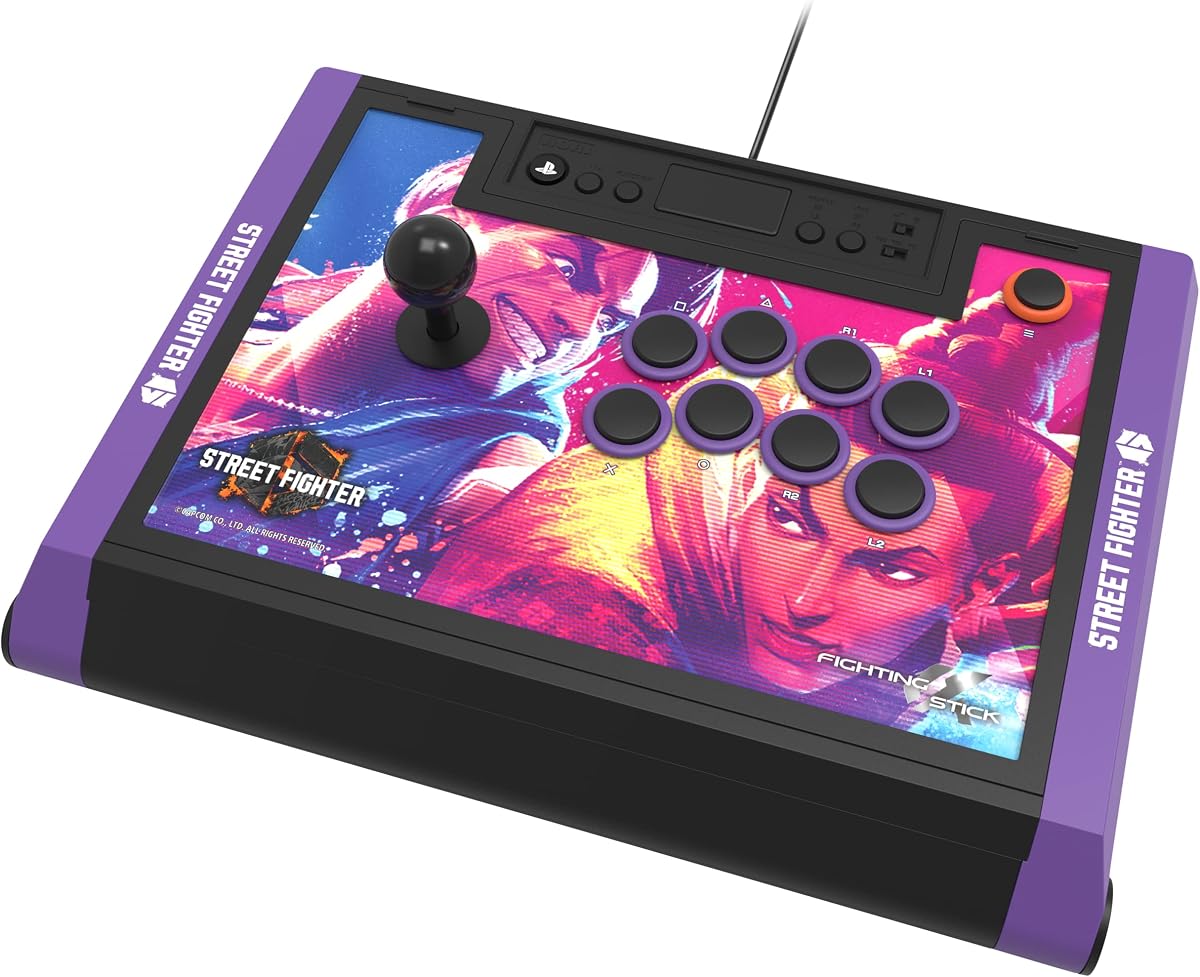
This special edition brings the same high-quality build as the standard Alpha but with Street Fighter 6 flair. It features exclusive artwork and downloadable images for customization that fans of the series will appreciate.
We may earn a commission when you buy through this link, at no additional cost to you.
The internal components remain the same with Hayabusa buttons and joystick ensuring tournament-grade performance. It is officially licensed by Sony and Capcom which adds a layer of authenticity and quality assurance for buyers.
While it costs more than the base model the value lies in the unique design and support for a major franchise. It is perfect for players who want their gear to reflect their favorite game while maintaining top specs.
Choose this if you are a Street Fighter fan and want a stick that looks as good as it performs. The combination of style and substance makes it a standout option for collectors and competitors alike.
Features exclusive Street Fighter 6 character designs that celebrate the latest installment of the classic series.
Officially licensed by Sony and Capcom ensuring compatibility and quality for both console and game.
We may earn a commission when you buy through this link, at no additional cost to you.
The Qanba Sapphire S1 offers a unique leverless design that appeals to players seeking a different tactile experience. It features adjustable throw distance buttons which let you customize the physical feedback for each input.
We may earn a commission when you buy through this link, at no additional cost to you.
It comes with a detachable memory foam wrist rest for comfort during long sessions. The leverless layout can help reduce fatigue for some players and offers a distinct edge in specific fighting games.
This model is officially licensed by Sony and features Juri artwork for a bold look. It also includes a shoulder strap and storage compartment which makes it more portable than traditional arcade sticks.
If you are looking for an innovative controller that stands out in tournaments and online lobbies this is a great option. The customizable buttons and comfort features make it a strong choice for dedicated fans.
Use 18 buttons with adjustable throw distance to match your personal preference for tactile feedback.
Includes a shoulder strap and storage compartment for easy transport to tournaments or LAN events.
We may earn a commission when you buy through this link, at no additional cost to you.
The MAYFLASH F500 Bundle includes a Magic Boots adapter which allows play on PS5 without a controller plugged in. This is a unique solution for players who want one stick for both PlayStation and Xbox systems.
We may earn a commission when you buy through this link, at no additional cost to you.
It supports a wide range of consoles from old 360 to new Series X and Switch which is rare in this market. The turbo functions and headset support add value for users who want extra features without buying separate gear.
Users should note that setup requires some understanding of the adapter which may be complex for beginners. However for those who need multi platform support at a reasonable price this bundle offers significant value.
Choose this if you play across multiple consoles and want a single fight stick for all of them. The included Magic Boots make it possible to play on PS5 and Xbox easily with one setup.
The included Magic Boots adapter enables PS5 play without needing to plug in an original controller.
From PS5 to Xbox Series X to Switch this stick covers nearly every major console on the market.
We may earn a commission when you buy through this link, at no additional cost to you.
This Tekken 8 Edition brings the same premium quality as the standard Alpha with exclusive artwork from the latest game. It is officially licensed by Sony and Bandai Namco ensuring it meets high standards for performance.
We may earn a commission when you buy through this link, at no additional cost to you.
The internal components are unchanged featuring Hayabusa buttons and joystick for consistent input. It comes with a link to alternate artwork so you can print and swap panels to refresh your setup whenever you like.
It is designed for tournament use so you can expect durability and accuracy during long matches. The special theme makes it a desirable item for Tekken fans who want to show their support while competing.
If you love Tekken and want a stick that reflects that passion while delivering top performance this is the choice. It combines fandom with function perfectly for players who want style without sacrificing quality or speed.
Officially licensed by Sony and Bandai Namco ensuring authenticity for Tekken 8 fans and competitors.
Downloadable alternate artwork allows you to print and swap panels to match your personal style easily.
We may earn a commission when you buy through this link, at no additional cost to you.
The PXN X8 Arcade Stick offers a unique approach with keyboard-like directional buttons and mechanical switches. This design provides a different feel that some players find more comfortable than traditional joysticks.
We may earn a commission when you buy through this link, at no additional cost to you.
It uses Blue-Switch Mechanical buttons which are known for durability and distinct tactile feedback. The switches are rated for high life so you can expect them to last through many hours of gameplay without wear.
This stick supports turbo functions and works on multiple platforms including Xbox PS4 and Switch which is great for variety. It is also very affordable making it a good option for those who want mechanical quality on a budget.
Choose this if you want a compact controller with mechanical switches and a non-traditional layout. It is a great way to try fight stick gaming without investing in a full-size arcade station right away.
Blue-Switch buttons offer a sharp tactile response similar to mechanical keyboard keys for precise input.
Keyboard-like directional buttons provide a different ergonomic experience compared to traditional arcade joysticks.
We may earn a commission when you buy through this link, at no additional cost to you.
Selecting the right fight stick involves considering compatibility build quality and features that match your play style. This guide breaks down the most important factors to help you make an informed decision.
Ensure the stick supports your specific console whether it is PlayStation Xbox Switch or PC. Some sticks require adapters for certain platforms so always check the official list of supported devices before buying.
Always verify that the stick is officially compatible with your console to avoid connection issues during play.
The joystick is the most critical component for directional inputs. Look for sticks that use high-quality parts like Sanwa Denshi or Hayabusa which are known for precision and durability in competitive play.
Invest in a stick with quality internal parts to ensure accurate inputs and long-term reliability.
Buttons should offer a responsive tactile feel without being too heavy or too light. Many premium sticks use mechanical or high-quality arcade buttons that provide clear feedback on every press.
Choose buttons that feel comfortable to your hands to reduce fatigue during long gaming sessions.
Wired sticks offer zero latency and are preferred for tournament play. Wireless options provide flexibility but may require charging and should be checked for connection stability during competitive matches.
Select wired for tournaments and wireless for casual play at home depending on your needs.
A good fight stick should allow you to swap buttons or panels easily. Check if the case opens without tools and if replacement parts are available from the manufacturer or third-party vendors.
Ensure the stick allows easy access to internals for upgrades and maintenance over time.
The stick should feel sturdy and not slide around the table during intense combos. A heavier base and quality materials ensure stability and durability over years of regular use.
Prioritize models with solid construction to withstand daily use and transport to events.
Look for extra features like turbo buttons audio jacks for headsets or button lock functions. These can enhance your experience but should not come at the cost of core performance.
Consider extra features like audio and turbo if they support your specific gaming style needs.
Determine a budget range but keep in mind that higher prices often reflect better build quality. Entry-level sticks can be good but may lack premium parts that matter for long-term satisfaction.
Balance your budget with the features you need to find the best value for your situation.
Connect the stick to your console using the provided cable or receiver. Ensure you select the correct mode if the stick has multiple settings for different platforms to guarantee proper input mapping.
Clean the stick regularly with a soft dry cloth to remove dust from buttons and the joystick. Avoid using harsh chemicals that could damage the internal components or surface coatings over time.
Store the stick in a safe place when not in use to prevent accidental damage. If you travel with it use a protective case or bag to keep it secure and free from scratches.
Many modern fight sticks work on PC via USB with XINPUT or DINPUT support. Always check the product details to confirm compatibility with your operating system before purchasing for PC use.
Yes many sticks support Xbox Series X S and Xbox One but some require adapters for PlayStation to Xbox conversion. Verify the stick supports Xbox natively or check if an adapter is included.
Wired sticks are generally preferred for tournaments due to zero latency and consistent connection. Wireless sticks are convenient for home use but may not be allowed in competitive settings.
Use a soft dry cloth or compressed air to remove dust and debris from around the buttons. Avoid liquids as they can seep inside and damage the electrical components of the controller.
For serious fighting game players a fight stick offers better precision and comfort than a standard pad. It is a worthwhile investment if you plan to play regularly or compete in tournaments.
Most modern sticks are plug and play and do not require drivers on consoles or PC. Some customization software may need installation on PC if you want to change button mappings or settings.
Yes most sticks have replaceable buttons and joysticks that can be swapped with standard arcade parts. Check if the manufacturer provides replacement kits or if you can use industry-standard components.
With proper care a quality fight stick can last for many years of regular use. Mechanical parts like buttons and joysticks are durable but may need occasional replacement depending on usage.
We have reviewed ten top fight sticks ranging from budget options to premium tournament-grade controllers. Each product offers unique strengths depending on your console and play style requirements.
Prioritize compatibility build quality and input responsiveness when making your choice. The right controller can significantly enhance your experience and performance in fighting games over time.
Check current pricing and availability before buying as deals and stock change often. Invest in a stick that fits your needs to enjoy the best possible gaming experience today.