
5.0 Inch Digital Magnifier 3X-48X Zoom
4.0Editor score
3X to 48X zoom
Simplified button controls
Foldable handle design
This guide compares the top digital magnifier for low vision devices to help you choose the right electronic reading aid for your specific needs.
Finding the right digital magnifier for low vision can transform daily tasks like reading and cooking. These electronic aids offer adjustable zoom and color modes to reduce eye strain significantly.
We compared ten highly rated portable magnifiers based on screen size, magnification range, and ease of use. Our list covers options for home use and portable needs.
Each pick highlights key features and real-world performance. Prices and availability change often, so check current listings before purchasing your new visual aid device today.
4.0Editor score

4.6Editor score
4.0Editor score
The following table provides a side by side comparison of all ten digital magnifiers. You can quickly see screen sizes, zoom ranges, and key features to find the best fit.


The Eyoyo 3.5 Portable Digital Video Magnifier stands out as a top choice for those needing a reliable visual aid. With a strong rating and practical features, it simplifies reading tasks effectively.
We may earn a commission when you buy through this link, at no additional cost to you.
It offers 2X to 25X zoom, making text larger and clearer. The eight color modes help users find the best contrast for their eyes, reducing strain during long sessions.
While the screen is smaller than some models, the portability makes up for it. The foldable bracket allows stable placement on tables for comfortable viewing without holding the device.
This device is ideal for quick reading of labels or newspapers. Its simplicity and affordability make it a great starting point for anyone exploring digital magnifiers.
The eight color modes allow users to switch between settings like white on black or blue on yellow to maximize text contrast and readability.
You can capture images to save for later reference using the built-in snapshot feature, which supports TF cards up to 32GB for extra storage.
We may earn a commission when you buy through this link, at no additional cost to you.
This 5 inch digital magnifier offers a larger viewing area which is beneficial for detailed reading tasks. The simplified buttons are designed for ease of use, especially for elderly users.
We may earn a commission when you buy through this link, at no additional cost to you.
It features 2X to 32X zoom, allowing for significant enlargement of text. The memory function remembers your preferred settings so you do not have to adjust them each time you use it.
The handle integrates with a foldable bracket for stability. This design helps prevent hunching, making it comfortable for extended reading sessions at home or while traveling.
Ideal for grocery shopping or reading menus, this device provides clear visuals. The color modes support various vision needs, enhancing the overall user experience significantly.
The simplified buttons remove unnecessary complexity, making it easier for users with limited dexterity or technology experience to operate the device confidently.
The handle and bracket design allows the device to lay on a page at an angle, reducing strain on your back and arms during use.
We may earn a commission when you buy through this link, at no additional cost to you.
This portable video magnifier is designed to support individuals with macular degeneration and other visual impairments. It offers a crisp 5 inch LCD screen for clear viewing.
We may earn a commission when you buy through this link, at no additional cost to you.
With a zoom range of 2X to 32X, users can adjust the view to suit different tasks. The 26 color modes help in finding the right contrast for comfortable reading.
The ergonomic foldable handle provides a comfortable grip. You can position the device at a perfect angle, which helps maintain good posture while reading books or documents.
Its high resolution ensures text remains sharp even at high magnification. This makes it a reliable tool for home use, offering clear visuals without distortion.
The high resolution HD LCD screen with advanced image processing ensures that text and details remain clear and true to life without blurring.
Users can save their preferred color and zoom settings so the device recalls them automatically, making daily use more efficient and less frustrating.
We may earn a commission when you buy through this link, at no additional cost to you.
This 5 inch aid is a practical tool for daily reading tasks. It features simplified buttons that make operation straightforward for users of all ages.
We may earn a commission when you buy through this link, at no additional cost to you.
It provides 2X to 32X zoom to help with labels, menus, and books. The device is designed to meet the needs of those with low vision or color blindness.
The screen offers clear visuals, though results can vary by user. Its lightweight build makes it easy to carry around for shopping or travel.
For those seeking an affordable option, this magnifier offers essential features. It allows users to stay independent in daily activities like cooking or reading mail.
The wide range of color modes and zoom levels makes this device versatile for different visual needs including color blindness and amblyopia.
By simplifying text reading, this tool helps users maintain independence in daily tasks like grocery shopping and following instructions.
We may earn a commission when you buy through this link, at no additional cost to you.
This VEVOR model stands out with its dual lens system that supports both near and far viewing. It offers a high zoom range for detailed close-ups and distant signs.
We may earn a commission when you buy through this link, at no additional cost to you.
The 5 inch screen provides clear visuals for reading. It supports 26 color modes to ensure comfortable viewing across different environments and lighting conditions.
Connectivity options include AV and HDMI outputs, allowing connection to a TV. This makes it easier to share images or view larger text for multiple users.
The device is versatile but may be heavier than others. It is best suited for home use where the extra features can be fully utilized.
The 13MP near and far lenses let you switch between reading a menu and viewing a sign without needing separate tools.
Using HDMI output allows you to cast the display to a television, providing an even larger view for comfortable reading or group use.
We may earn a commission when you buy through this link, at no additional cost to you.
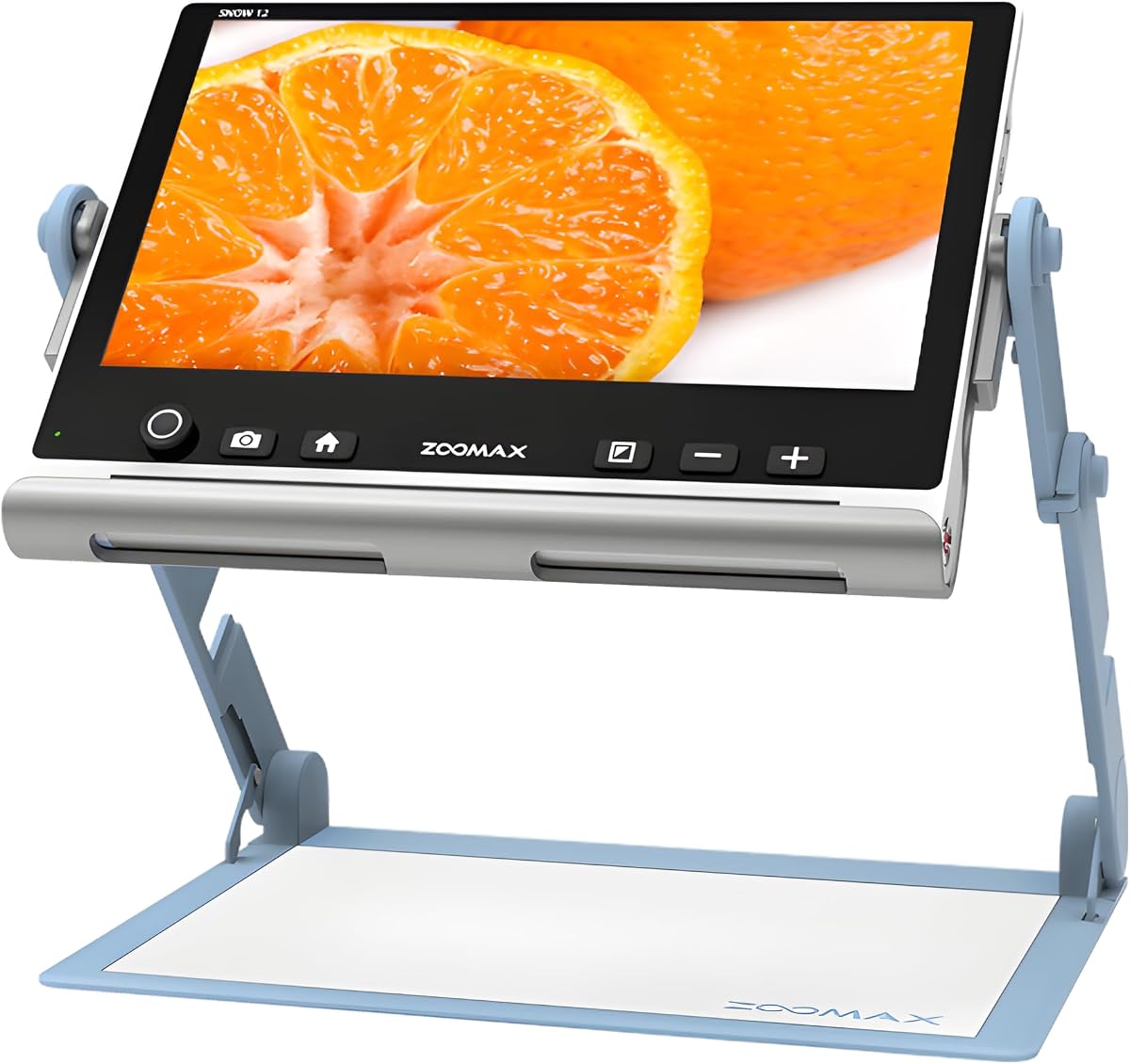
The Zoomax Snow 12 is a premium choice offering OCR technology that converts text to speech. This is ideal for users who need auditory access to printed materials.
We may earn a commission when you buy through this link, at no additional cost to you.
It features a large 12 inch HD display for clear viewing. The device is designed to be ultra portable, making it easy to carry to various locations.
Support for over 20 languages makes it versatile for diverse users. The high quality camera ensures detailed visuals for writing and reading tasks.
This model is an investment but offers independence through speech. It is perfect for those who need more than just visual magnification for reading.
OCR technology allows the device to read text aloud, enabling users with severe vision loss to access written content independently.
With support for over 20 languages, this magnifier can serve international users or those who read multiple languages regularly.
We may earn a commission when you buy through this link, at no additional cost to you.
This Eyoyo model is known for its long battery life, offering over four hours of use. It provides a clear 5 inch screen for reading various materials easily.
We may earn a commission when you buy through this link, at no additional cost to you.
With 4X to 32X zoom and 17 color modes, it meets many visual needs. The device remembers your preferred settings for quick access each time you start it.
The foldable handle ensures comfort during use. You can store images to a TF card for later review, adding flexibility to how you use the device.
It connects to a TV for larger viewing if needed. Its combination of battery and portability makes it a strong choice for extended sessions.
The 4500mAh battery supports long reading sessions without frequent charging, making it reliable for travel or busy days.
Save and revisit important images using the built-in photo capture function, which supports up to 32GB TF cards for storage.
We may earn a commission when you buy through this link, at no additional cost to you.
This device is designed for comfort with its ergonomic handle and bracket. The 5 inch screen provides clear visuals for reading without deformation at high zoom.
We may earn a commission when you buy through this link, at no additional cost to you.
It features 2X to 32X zoom and 26 color modes. The memory function saves your habits, so you do not have to adjust settings every time you use it.
Large buttons make it easy for elderly users to operate. The device supports connecting to a TV for greater visibility in shared spaces.
Ideal for home reading, it reduces eye strain. Its intuitive system ensures that users can focus on reading rather than troubleshooting settings.
The device remembers user habits before shutdown, ensuring that your preferred settings are restored automatically for consistent use.
Using a TV cable, you can connect this magnifier to a larger screen, making it easier to read text in a more visible format.
We may earn a commission when you buy through this link, at no additional cost to you.
The Eschenbach SmartLux is a lightweight and portable handheld video magnifier. It offers a clean design with specific zoom steps tailored for reading tasks.
We may earn a commission when you buy through this link, at no additional cost to you.
Zoom levels include 5X, 7X, 9X, and 12X. The five viewing modes help adapt to different tasks. It also supports image capture for saving text.
Its compact build makes it easy to carry. The included cleaning cloth ensures the lens stays clear. It is a reliable option for those who travel.
Ideal for users who prioritize weight and portability, this device provides clear visuals. It is a solid choice for on the go reading needs.
The lightweight design makes this magnifier easy to hold for long periods and carry in a bag for travel or outings.
Specific zoom levels like 5X to 12X provide a range of options suitable for different text sizes without overwhelming complexity.
We may earn a commission when you buy through this link, at no additional cost to you.
This model offers a high zoom range of 3X to 48X, suitable for various reading needs. Its simplified buttons make it accessible for users with limited dexterity.
We may earn a commission when you buy through this link, at no additional cost to you.
It features a memory function that saves user habits. The foldable handle helps with stable use, allowing for comfortable reading without holding the device constantly.
While it is budget friendly, the battery life may be shorter. It is best for short tasks like reading labels or maps rather than long novels.
This magnifier provides a cost effective solution for visual aid. It meets basic needs well and is a good option for those on a tight budget.
With zoom up to 48X, this device provides powerful magnification for small text that other devices may struggle to show clearly.
The device remembers user preferences, ensuring that your last settings are ready to use when you turn it on again.
We may earn a commission when you buy through this link, at no additional cost to you.
Choosing a digital magnifier requires evaluating your specific visual needs and daily tasks. This guide highlights the key factors to consider.
Screen size directly impacts how much text you can view at once. Larger screens like 5 inches or more are better for reading whole sentences, while smaller 3.5 inch screens offer greater portability for travel.
Choose a size that balances comfort with ease of carrying.
The zoom range determines how large text can appear. Look for models offering at least 2X to 32X zoom to cover common reading tasks like menus and books.
Higher ranges such as 48X are useful for very small print but may distort text if not used carefully.
Different users require different contrasts. A device with multiple color modes such as black on white or yellow on blue helps reduce eye strain and improve text clarity.
Ensure the device has enough modes to suit your personal vision preferences.
Simplified buttons and memory functions are vital for elderly users. Devices that save settings prevent the need for repeated adjustments each time you use the tool.
Prioritize devices with clear, intuitive controls for better daily experience.
If you plan to use the magnifier outside the home, check its weight and battery life. Foldable handles and lightweight designs make it easier to carry in a bag.
Ensure the battery lasts long enough for your typical usage time.
Some devices support AV or HDMI outputs to connect to a TV. This is useful if you need a larger display for shared viewing or comfort at home.
Consider this feature if you want a bigger screen beyond the device itself.
Snapshot functions allow you to save images of text for later review. This is helpful for following recipes or reading complex labels over time.
Check if the device supports TF cards to expand your storage capacity.
Electronic aids may need troubleshooting. Look for brands with strong after-sales service to ensure help is available if issues arise.
A solid warranty gives peace of mind for your investment.
To use a digital magnifier, place it over the text you want to read. Press the power button and adjust the zoom level using the designated buttons.
Select a color mode that makes the text stand out against the background. This helps reduce glare and improves readability significantly.
Store the device in a soft case when not in use to prevent scratches. Clean the lens with a microfiber cloth to maintain clear image quality.
A digital magnifier uses a camera to capture an image of the text or object. It then processes this image and displays it on a screen at a larger size with adjustable contrast and brightness.
Yes, many models are specifically designed for users with macular degeneration. They offer high contrast and large text, which help users read despite central vision loss.
Many devices support AV or HDMI outputs, allowing connection to a television. This provides a larger display for improved visibility when at home.
Battery life varies by model but typically ranges from 3 to 5 hours of continuous use. Some high capacity models last longer for travel needs.
Yes, several models include a snapshot function to save images of text. These can be stored on a TF card for later viewing or reference.
Optical magnifiers use lenses to enlarge text, while digital ones use cameras and screens. Digital models offer adjustable zoom and color modes for better adaptability.
We reviewed ten top digital magnifiers, highlighting their unique features and performance. From portable options to larger desktop models, there is a choice for every need.
Prioritize factors like screen size, zoom range, and ease of use. The right device can greatly enhance daily activities and improve independence.
Remember to check current prices and availability before purchasing. Deals and stock change often, so verify the latest information to get the best value today.