
Honeycomb Aeronautical Alpha Yoke
4.4Editor score
Realistic steel shaft rotation
Dampened self-centering mechanism
Integrated switch panel included
Discover the top Mac game flight controllers for simulation enthusiasts. This guide compares 10 top-rated flight sticks and yokes optimized for macOS gaming
Finding the right flight controller for your Mac can transform your simulation experience from basic to immersive. Whether you are flying civil aviation routes or engaging in combat maneuvers, the right hardware ensures precise input and comfort during long sessions.
We evaluated ten top flight controllers based on compatibility, build quality, ergonomics, and programmability. Our analysis focuses on devices that offer robust support for Mac systems alongside their primary Windows configurations to ensure seamless integration.
Each pick highlights key features and potential trade-offs to help you decide based on your specific needs. Prices and availability are subject to change so please verify current details before making your final purchasing decision online.
4.4Editor score

4.6Editor score

4.5Editor score
The following comparison outlines the core specifications and unique selling points of each selected flight controller to help you quickly identify the device that best fits your simulation requirements.




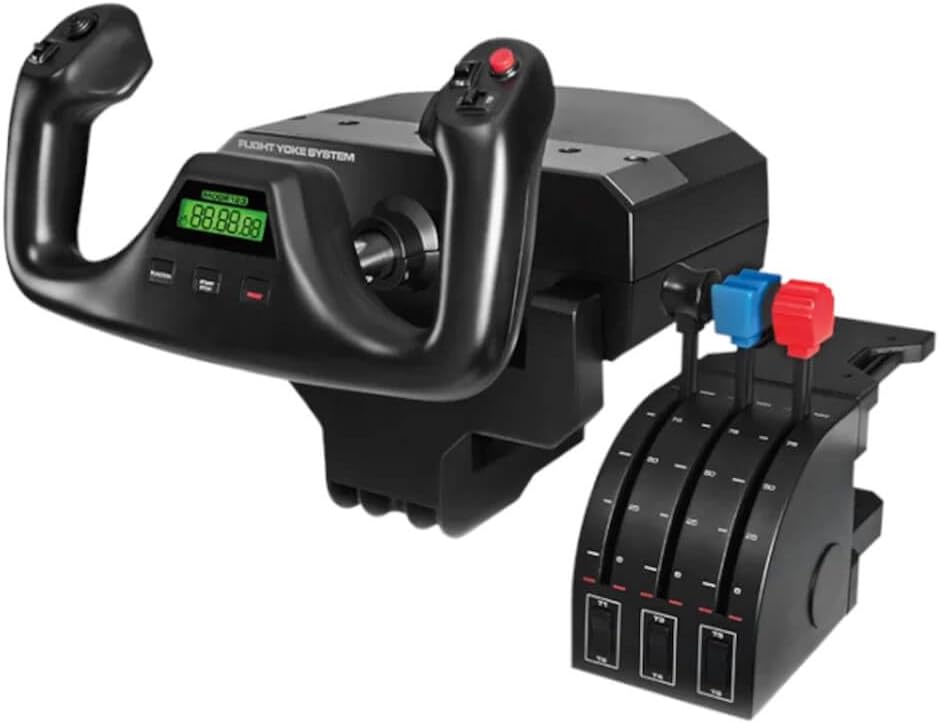

The Logitech G Pro Flight Yoke System Bundle stands out as the top choice for Mac users seeking an authentic simulation experience. With a high rating of 4.6 stars it delivers precision and durability in one complete package.
We may earn a commission when you buy through this link, at no additional cost to you.
This bundle combines a realistic yoke with programmable buttons and essential rudder pedals for full aircraft control. The stainless steel shaft ensures smooth pitch and roll while the adjustable pedals accommodate various foot sizes comfortably.
While the setup requires space and time the robust clamping force keeps your system secure during intense maneuvers. This trade-off is minimal for the level of realism and control it provides to serious flight simmers.
If you want a comprehensive solution that enhances muscle memory and immersion this bundle is the ideal purchase. It offers the best balance of features and performance for Mac gaming setups.
Having both yoke and pedals in one box simplifies your purchase and ensures all parts are compatible.
The steel shaft and heavy clamps provide a solid feel that mimics real aircraft cockpit controls.
We may earn a commission when you buy through this link, at no additional cost to you.
Honeycomb Aeronautical delivers a premium yoke designed by pilots and engineers for maximum realism. Rated 4.4 stars it offers 180 degrees of smooth rotation with ball bearings that ensure accurate control inputs.
We may earn a commission when you buy through this link, at no additional cost to you.
The switch panel included provides master avionics and light controls directly on your desk. You can also use the 3M suction pad for clamp-free mounting which is perfect for glass or delicate desks.
The lack of a center detent allows for more fluid movement but some pilots may prefer a return-to-center feel. The premium price reflects the high quality materials and design focused on professional simulation.
Choose this if you prioritize authentic handling and durability over budget considerations. It is the best choice for Mac users seeking a top-tier yoke system.
The dual linear ball bearings provide a frictionless feel that enhances precise adjustments during flight.
The included switch panel reduces clutter by keeping essential master and avionics switches within reach.
We may earn a commission when you buy through this link, at no additional cost to you.
The Thrustmaster T-Flight Hotas X offers excellent value for Mac users on a budget. Rated 4.5 stars it includes a programmable joystick and throttle that are comfortable for long sessions.
We may earn a commission when you buy through this link, at no additional cost to you.
The detachable throttle gives you the option to connect it for a compact desktop or separate it for a larger cockpit feel. The resistance dial lets you tune the stick tension to your personal preference.
While the build is plastic it feels sturdy enough for casual and intermediate use. It may lack the premium feel of expensive models but it is reliable and easy to set up quickly.
This controller is perfect for beginners or those testing flight sims before investing in higher end gear. It delivers great performance for its low cost.
The resistance dial allows you to customize the stick tension for a better feel during maneuvers.
Preconfigured controls mean you can start flying immediately without complex software setup.
We may earn a commission when you buy through this link, at no additional cost to you.
The Logitech G X56 H.O.T.A.S is built for pilots who need extensive control options. Rated 4.0 stars it offers 189 programmable controls to manage every aspect of complex flight or space sims.
We may earn a commission when you buy through this link, at no additional cost to you.
It includes twin throttles and a hall effect sensor joystick that ensures precision and durability. You can adjust the spring force for the joystick and customize RGB lighting to match your cockpit aesthetic.
The setup requires two USB ports and significant time to map all the buttons to your liking. The complexity may be overwhelming for casual users but it is a powerhouse for dedicated enthusiasts.
If you want maximum customization for advanced simulations this controller is an excellent choice. It bridges the gap between consumer and pro-level gear effectively.
With over 180 controls you can access every function without leaving your hands on the throttle.
The spring system allows you to change the stick resistance for different aircraft classes.
We may earn a commission when you buy through this link, at no additional cost to you.
The Turtle Beach VelocityOne Flightstick offers universal compatibility with PC and Xbox. Rated 4.2 stars it features an OLED display that shows real-time flight data for better situational awareness.
We may earn a commission when you buy through this link, at no additional cost to you.
The integrated touchpad allows for cursor control which is helpful for menu navigation during flights. It includes 27 buttons and 8 axes to cover most flight simulator needs comfortably.
Some users find the touchpad distracting during intense combat maneuvers and the plastic build feels less robust than metal options. However it is lightweight and versatile for various platforms.
Choose this if you want a single controller for multiple systems and appreciate visual feedback. It is a solid middle-ground option for many users.
The OLED screen keeps you informed about flight parameters without needing a secondary monitor.
The touchpad offers unique cursor control useful for managing cockpit menus and systems.
We may earn a commission when you buy through this link, at no additional cost to you.
The Logitech G Saitek X52 Pro is a classic controller favored for tactical simulations. Rated 3.9 stars it includes an LCD display and progressive throttle with afterburner detents.
We may earn a commission when you buy through this link, at no additional cost to you.
You can adjust the handle position to fit your hand size and the smart technology software allows detailed mapping for different games. The no contact technology on axes ensures smooth control.
As an older model it may require manual driver updates to work flawlessly with new Mac systems. The design is robust but lacks modern features like RGB lighting found in newer releases.
If you prioritize proven performance over the latest features this controller remains a strong option. It is reliable for dedicated pilots who value functionality.
The throttle resistance and detents give tactile feedback for throttle and idle settings.
Five position adjustments ensure a comfortable fit for various hand sizes.
We may earn a commission when you buy through this link, at no additional cost to you.
The Turtle Beach VelocityOne H.O.T.A.S offers extensive inputs and expandable features for serious simmers. Rated 2.6 stars it uses Hall-Effect sensors for durability and includes a color display for real-time data.
We may earn a commission when you buy through this link, at no additional cost to you.
It supports swappable throttle detents and adjustable stick tension for a customized feel. You can connect pedals and mounts to create a full cockpit setup for increased immersion.
The lower rating suggests some reliability issues or configuration challenges in early batches. It is a powerful system for those willing to invest time in setup.
Choose this if you need a highly customizable controller that grows with your needs. It is best for users who value expandability over simplicity.
The ecosystem supports pedals and mounting solutions to build a complete cockpit eventually.
These sensors provide high precision and long-term durability for the controls.
We may earn a commission when you buy through this link, at no additional cost to you.
The Logitech G PRO Flight Yoke System provides a solid standalone yoke for civil aviation simulation. Rated 4.4 stars it features 75 programmable controls and an integrated USB hub for peripherals.
We may earn a commission when you buy through this link, at no additional cost to you.
The stainless steel shaft ensures durability while the configurable throttle knobs allow precise power management. Three modes let you map different sets of controls for various aircraft types.
Note that the throttle quadrant is not included in this unit so you may need to buy it separately. It is a strong choice for pilots focused on yoke functionality.
Select this if you already have pedals or prefer a dedicated yoke setup. It balances performance and price well for dedicated users.
The three mode switch lets you switch between aircraft types quickly without software changes.
The built-in USB hub reduces cable clutter by connecting other devices directly to the yoke.
We may earn a commission when you buy through this link, at no additional cost to you.
The Logitech G Saitek PRO Yoke Renewed offers a budget-friendly entry into realistic yoke simulation. Rated 4.2 stars it features a digital chronograph and 14 buttons including a 3-position mode switch.
We may earn a commission when you buy through this link, at no additional cost to you.
Renewed items are tested to function like new but may show minor cosmetic wear. The integrated chronograph helps with instrument flight procedures like holds and approaches.
Check the condition carefully when buying renewed products as it can vary. It is a good way to get professional-grade features at a lower price.
Choose this if you are comfortable with refurbished goods and want a proven controller. It is a smart choice for cost-conscious pilots.
The integrated chronograph helps train for IFR procedures and cross-country timing.
Renewed products offer the same features as new models at a reduced cost.
We may earn a commission when you buy through this link, at no additional cost to you.
The Logitech G PRO Flight Yoke System is a reliable classic for simulation enthusiasts. Rated 4.3 stars it offers realistic controls and a durable build that withstands frequent use.
We may earn a commission when you buy through this link, at no additional cost to you.
The steel shaft provides accurate control and the 54 programmable controls give you flexibility for various aircraft. It is compatible with major sim titles and offers good software support.
The throttle uses a PS2 connector which is older tech but adapters are available. It is a trusted device for those who prefer proven hardware.
Pick this for a solid and dependable yoke that works well with Mac systems through USB. It is a safe choice for serious pilots.
The yoke and quadrant offer realistic inputs for building muscle memory.
Robust clamps and steel parts ensure long-term reliability on your desk.
We may earn a commission when you buy through this link, at no additional cost to you.
Selecting the right flight controller for your Mac involves evaluating compatibility, ergonomics, and feature sets. Use these factors to identify the device that matches your flying style.
Ensure the controller supports macOS or allows driver-free plug-and-play functionality. Most products list Windows compatibility first so check for Mac drivers or universal USB HID support to avoid connection issues.
Verify that the software provided for button mapping works with your macOS version before purchasing.
Choose between a HOTAS stick and a full yoke system based on the aircraft you fly. Yokes are ideal for airliners while sticks are better for fighter jets or general aviation.
Consider the desk space available since yoke systems require more room than compact HOTAS units.
Materials like stainless steel shafts and robust clamps contribute to longevity and realistic feel. Higher quality components reduce wobble and provide smoother control inputs over time.
Look for devices with metal or high-grade plastic parts that feel solid during intense maneuvers.
More programmable buttons allow you to manage complex systems without leaving the cockpit. Look for features like multi-mode switches and dedicated throttle controls for better workflow.
High count programmable inputs provide flexibility for diverse simulation scenarios.
An ergonomic design with padded grips and adjustable tension reduces fatigue during long sessions. The controller should fit your hand size comfortably to ensure precise movements.
Adjustable stick tension and handle positions improve comfort for various user sizes.
Determine your budget range since prices vary significantly between basic sticks and professional systems. Refurbished or renewed products can offer cost savings with reliable performance.
Invest in higher-end models only if you plan to fly regularly and require premium features.
Check if the manufacturer provides intuitive software for button mapping and calibration on your system. Easy-to-use software simplifies setup and customization for different aircraft.
Robust software support ensures you can customize controls to your specific flying needs.
Consider whether the controller supports future expansion with pedals or throttle quadrants. An expandable system lets you upgrade your cockpit setup over time without replacing the entire unit.
Look for ecosystem support for additional accessories that enhance immersion.
Install the provided software from the manufacturer's website and update drivers to your macOS version. Connect the controller via USB and allow your system to recognize the device before launching your simulator.
Use the configuration software to map essential flight controls like pitch roll and throttle to your preferred buttons. Adjust the stick tension and rudder sensitivity for comfortable handling during flights.
Regularly clean the controller surfaces with a soft dry cloth to prevent dust buildup. Store the device in a dry place when not in use to protect electronic components from moisture.
Many modern flight controllers support macOS via standard USB protocols or dedicated drivers. Always check the product specifications for macOS compatibility before purchasing to ensure proper functionality with your system.
Yes most flight controllers require mapping software to assign keys and adjust settings. Download the latest version from the manufacturer to ensure compatibility with your simulator software.
Yokes are better for civil aviation and airliners while HOTAS sticks suit combat and general aviation. Choose based on the aircraft types you fly most often.
Use a microfiber cloth to wipe down the surfaces gently. Avoid using liquid cleaners that can seep into electronic components and cause damage.
Most controllers work with any flight simulator that supports gamepad input. You may need to remap keys for different software using the configuration tool.
Few controllers are built exclusively for Mac but most universal USB models work well. Ensure you download compatible drivers for macOS to avoid setup issues.
We have reviewed ten top flight controllers ranging from budget-friendly options to premium systems designed for realism. Each offers unique features to enhance your flight simulation experience on Mac.
Prioritize ergonomics and compatibility with your favorite simulators to get the most out of your setup. Choosing a reliable device ensures smooth operation and long-term satisfaction.
Prices and availability change so check current listings before finalizing your purchase. Happy flying and enjoy the immersion of realistic controls on your Mac.