
Logitech B100
4.6Editor score
Ambidextrous shape for comfort
800 dpi precision tracking
Zero setup plug and play
This guide compares the best durable computer mouse options for 2026, analyzing build quality, battery life, ergonomics, and warranty coverage to help you
Finding a durable computer mouse ensures your daily workflow remains uninterrupted by hardware failures. A robust device withstands constant clicking, typing, and movement across various surfaces. Investing in quality means fewer replacements and consistent performance over years of use.
We evaluated ten top-rated models based on build materials, battery longevity, ergonomic design, and user feedback. Each product offers unique strengths for different hand sizes and usage scenarios. Our analysis highlights reliability factors that matter most for office and home environments.
Each pick includes detailed specifications, pros and cons, and real-world performance insights. Prices fluctuate frequently due to promotions and stock availability. Always verify the latest cost before purchasing to ensure you get the best value for your budget.
4.6Editor score

4.5Editor score

4.5Editor score
The following table provides a side-by-side comparison of all ten selected models. Review key specifications including connectivity type, battery life, sensor DPI, and ergonomic features to identify the right fit for your specific workflow needs.





The Logitech M705 Marathon stands out as a top choice for users needing a durable computer mouse that lasts. With a rating of 4.5 stars, it balances performance with long-term reliability. Its standout quality is the ability to go up to three years between battery changes.
We may earn a commission when you buy through this link, at no additional cost to you.
Durability is enhanced by its sculpted right-hand shape and customizable thumb buttons. The hyper-fast metal scroll wheel allows quick navigation through long documents without wear. Laser grade tracking ensures precision on surfaces where standard optical sensors might struggle.
A trade-off is that it is designed specifically for right-handed users, limiting accessibility. The size is also larger than compact models, which might not suit smaller hands. However, these are acceptable given the extended battery life and robust construction.
This mouse is ideal for office workers or professionals who need consistent performance over years. It minimizes downtime for battery swaps and provides comfort during extended use. For those prioritizing durability and ease of use, it remains a strong recommendation.
The M705 consumes less power than comparable wireless mice, enabling up to three years of use on a single battery.
Laser grade tracking delivers smooth cursor control even on polished or wood-grain tables for reliable daily use.
We may earn a commission when you buy through this link, at no additional cost to you.
The Logitech Signature M650 L offers a premium experience for users seeking durability and silence. Rated 4.5 stars, it excels in reducing click noise by 90 percent. This makes it perfect for shared workspaces or quiet home offices.
We may earn a commission when you buy through this link, at no additional cost to you.
Its contoured shape provides comfort for large hands with soft thumb area and rubber grips. The SmartWheel allows switching between precise and fast scrolling modes. Side buttons can be customized via Logitech Options+ for shortcuts like copy or paste.
One limitation is the higher price compared to budget models. It is also designed for large hands, so smaller users might find it bulky. These factors are balanced by the excellent build quality and long-term battery performance.
Buy this if you value quiet operation and comfort during long work sessions. It connects via Bluetooth or Logi Bolt receiver for versatile use. The durability and feature set justify the investment for professional environments.
Enjoy 90 percent less click noise with SilentTouch technology, promoting focus in open workspaces.
Connect via Bluetooth Low Energy or Logi Bolt USB receiver for instant pairing and multi-device support.
We may earn a commission when you buy through this link, at no additional cost to you.
The Logitech B100 is a reliable choice for those needing a durable computer mouse without extra cost. With a 4.6 star rating, it offers solid performance for everyday tasks. Its ambidextrous shape ensures comfort regardless of dominant hand.
We may earn a commission when you buy through this link, at no additional cost to you.
Built by Logitech, the mouse includes recycled plastic parts for sustainability. It features 800 dpi precision for smooth cursor control. The side-to-side scrolling plus zoom function aids in navigating spreadsheets efficiently.
Being wired means no battery changes but requires a USB port connection at all times. It lacks advanced buttons or wireless flexibility. However, these limitations are acceptable for users prioritizing simplicity and low cost.
Choose this for home offices or schools where reliability and price matter most. It works out of the box with Windows or Mac. The durability and comfort make it a top budget pick for daily use.
An ambidextrous shape feels good in either hand, providing comfort even at the end of the day.
Plastic parts include certified post-consumer recycled plastic, reducing environmental impact.
We may earn a commission when you buy through this link, at no additional cost to you.
The Logitech M185 provides a compact solution for travelers and small desks. Rated 4.4 stars, it feels great in either hand with a contoured shape. Its size makes it ideal for tight workspaces or busy desktops.
We may earn a commission when you buy through this link, at no additional cost to you.
It offers up to one year of battery life thanks to smart sleep mode. The nano USB receiver stays plugged into the computer for reliable connections. It works seamlessly with Windows and Mac without software setup.
The compact size might feel small for larger hands seeking full support. Advanced features like side buttons are absent. Still, the portability and ease of use make it a strong contender for basic needs.
This mouse is perfect for students or professionals on the go. It enhances productivity compared to using a touchpad. For those needing a lightweight durable computer mouse, it delivers solid value.
Compact size and smooth cursor control make it suitable for travel and tight workspaces.
Plug-and-play wireless with a nano receiver ensures a strong connection up to 33 feet away.
We may earn a commission when you buy through this link, at no additional cost to you.
The Logitech M510 is designed for comfort with soft rubber grips and curved sides. Rated 4.6 stars, it supports relaxed hand positioning throughout the day. Its ambidextrous design fits both right and left-handed users well.
We may earn a commission when you buy through this link, at no additional cost to you.
Battery life reaches up to two years with an On/Off switch to conserve power. Side-to-side scrolling plus zoom helps navigate maps and music libraries easily. The Unifying receiver stays in your laptop to avoid losing it.
Programming extra buttons requires Logitech SetPoint or Control Center software on some systems. The full size design might be too large for very small hands. However, these are minor drawbacks compared to the comfort and reliability.
This model suits professionals who spend hours on their computers daily. It offers a balance of features and ease of use. For a durable wireless option with great ergonomics, it is a top choice.
Contoured shape with soft rubber grips gives you the support needed for effortless control all day long.
Two years of battery life eliminates the need to replace batteries frequently.
We may earn a commission when you buy through this link, at no additional cost to you.
The Logitech Signature M550 L is optimized for larger hands with optimal fit design. It rates 4.5 stars for comfort and reliability. The contoured shape ensures a snug fit with soft thumb area and rubber grips.
We may earn a commission when you buy through this link, at no additional cost to you.
Switch modes on the SmartWheel for line-by-line or fast scrolling as needed. SilentTouch technology reduces click noise by 90 percent for focus. It connects via Bluetooth Low Energy or Logi Bolt receiver instantly.
Smaller hands might find this full-size mouse too large to grip comfortably. The price is higher than basic options. Yet the tailored comfort and silence make it worth the investment for specific users.
If you have larger hands and need a quiet durable computer mouse, this is ideal. It works across Windows, macOS, Linux, and Chrome OS. Its ergonomic design supports long work sessions effectively.
Get line-by-line precision or super-fast scrolling for long web pages with a flick of the SmartWheel.
Experience seamless compatibility with Windows, macOS, Linux, Chrome OS, iPadOS, and Android.
We may earn a commission when you buy through this link, at no additional cost to you.
The Acer Wireless mouse offers high DPI adjustments for detailed design work. Rated 4.3 stars, it provides stable connectivity up to 33 feet. Its 10 million click rating ensures long-term durability for daily tasks.
We may earn a commission when you buy through this link, at no additional cost to you.
Five DPI levels from 800 to 4000 allow flexibility for different workflows. Visual indicator lights show current DPI and battery status clearly. Forward and backward buttons help navigate web pages efficiently.
Users must check battery assembly and remove bottom film before first use. The AA battery is not included in the package. These initial steps are minor but important to note before use.
This mouse suits those needing adjustable sensitivity and durability on a budget. It works well for laptops and desktops. For a reliable option with high DPI versatility, it is a strong choice.
Five adjustable DPI levels give you the flexibility to choose the right sensitivity for detailed design work.
A visual indicator shows current DPI settings and low battery warnings to prevent interruptions.
We may earn a commission when you buy through this link, at no additional cost to you.
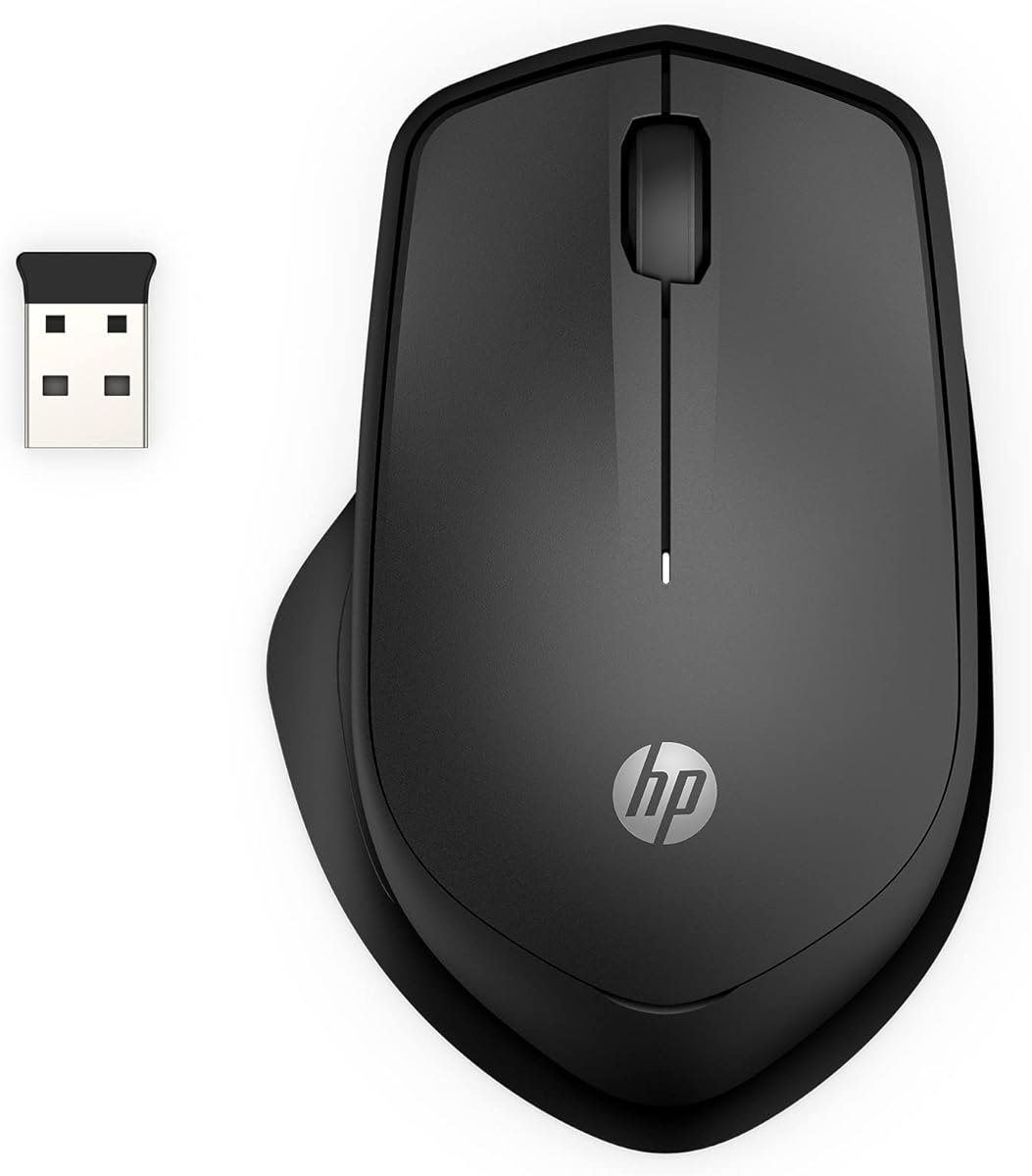
The HP 280 Silent delivers comfort with quiet clicking and ergonomic design. Rated 4.5 stars, it reduces button noise by 90 percent. This makes it ideal for open offices or shared spaces.
We may earn a commission when you buy through this link, at no additional cost to you.
Its ergonomic right-handed design supports productive all-day use. Multi-surface technology ensures smooth movement on various surfaces without a mouse pad. Up to 18 months of battery life reduces maintenance.
Being right-handed only limits use for left-handed individuals. DPI adjustments are limited compared to other models. Still, the balance of comfort and silence offers solid value for many users.
Choose this if you need a quiet durable computer mouse for office work. It connects via USB-A with a nano receiver stored in the mouse. For reliability and focus, it is a great pick.
Up to 90% noise reduction on buttons gives a satisfying click without distracting sound.
Multi-surface technology delivers smooth movement on virtually any surface without needing a mouse pad.
We may earn a commission when you buy through this link, at no additional cost to you.
The TECKNET Wired mouse offers precision and durability for office workflows. Rated 4.5 stars, it handles over 6 million keystrokes reliably. Tru-Wave technology ensures tracking on smooth surfaces like glass.
We may earn a commission when you buy through this link, at no additional cost to you.
Four DPI levels from 1000 to 6400 meet home and office needs. Six buttons including Back/Forward keys boost productivity. Soft rubber grips conform to the hand for comfortable holding.
The wired connection limits mobility compared to wireless models. Side buttons may not function on Mac systems. For desk-bound users, these constraints are minimal given the performance and price.
This mouse suits those needing reliability without battery concerns. It works on Windows, Chromebook, and most OSs. For durable wired productivity, it offers excellent value and features.
Tru-Wave technology provides intelligent cursor control on many surfaces including smooth glass.
Six buttons enable superior productivity with easy-to-reach Back/Forward for browsing.
We may earn a commission when you buy through this link, at no additional cost to you.
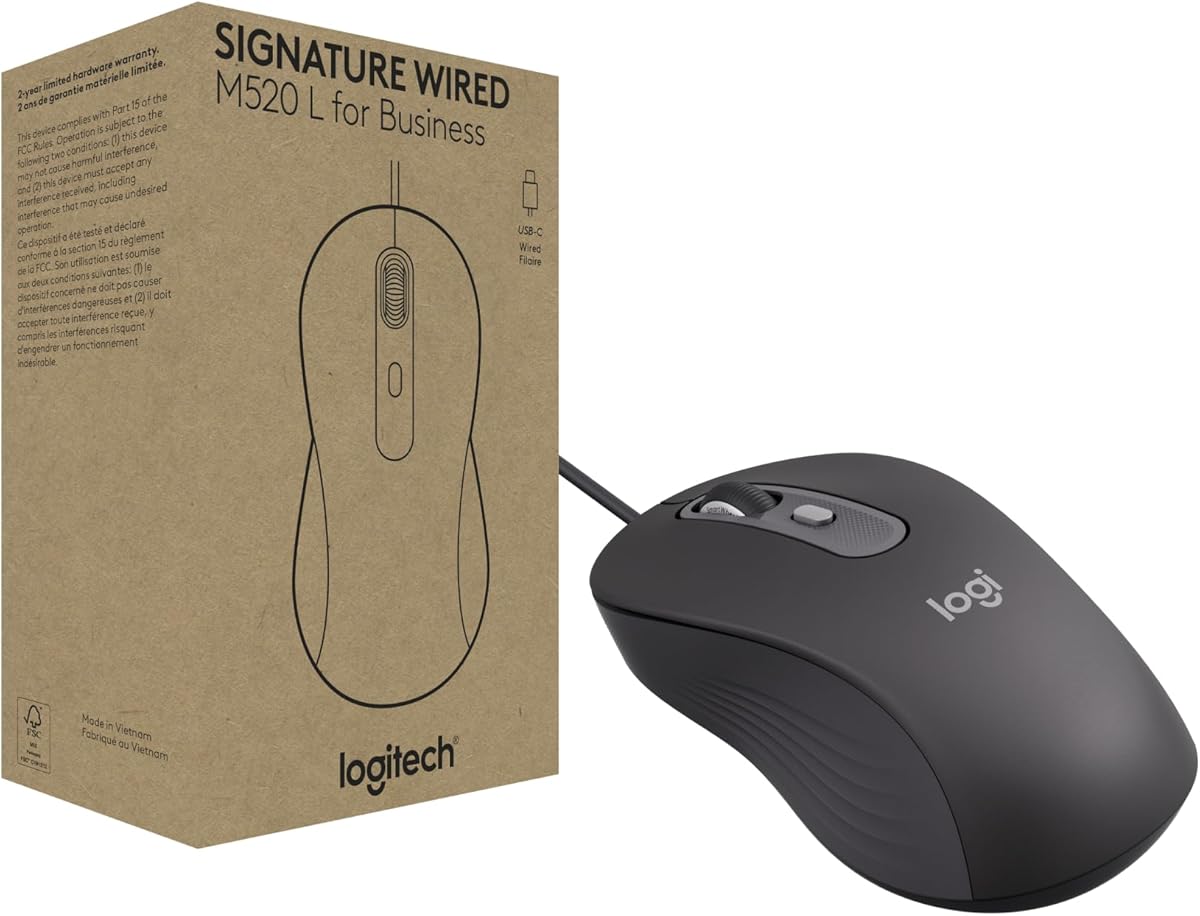
The Logitech Signature Wired M520 L is built for organizations needing wired stability. Rated 4.3 stars, it offers an ambidextrous design for left and right-handed users. USB-C connectivity ensures modern compatibility for industries like banking.
We may earn a commission when you buy through this link, at no additional cost to you.
Silent Touch technology reduces 90 percent of click noise. The SmartWheel allows switching between fast and precise scrolling easily. Customizable DPI button lets you adjust speed with one click.
It requires a USB-C port which may need adapters for older systems. Wired use limits mobility around a desk. Yet for secure business deployments, these trade-offs are acceptable.
This mouse fits corporate settings prioritizing sustainability and reliability. It includes 73 percent post consumer recycled plastic. For durable office use, it delivers strong performance and eco-friendly design.
USB-C wired connection is ideal for organizations and industries like banking requiring a wired solution.
Plastic parts include a minimum of 73 percent post consumer recycled plastic for eco-friendly use.
We may earn a commission when you buy through this link, at no additional cost to you.
Selecting a durable computer mouse involves evaluating build quality, ergonomics, and longevity. This guide outlines key factors to consider ensuring you invest in a reliable peripheral.
A durable computer mouse should use high-quality plastics or reinforced materials that resist cracking. Look for models certified with recycled content or high-grade polymers. Stronger materials ensure the device withstands daily drops or bumps.
Prioritize mice with sturdy construction and quality finish to extend lifespan significantly.
Check the rated click life to estimate long-term reliability. High-end models often specify tens of millions of clicks. This rating reflects internal switch quality crucial for heavy users.
Choose mice with high click ratings to avoid frequent replacements due to switch failure.
Comfort plays a major role in preventing strain during long work sessions. Ergonomic shapes with rubber grips support natural hand positions. Proper design reduces fatigue and improves overall durability of use.
Ensure the mouse fits your hand size for better comfort and longevity.
Wireless mice offer freedom but rely on batteries or charging. Wired models eliminate battery issues and ensure constant power. Consider your desk setup and need for portability.
Match connectivity type to your usage patterns to avoid interruptions or maintenance.
Long battery life reduces maintenance for wireless models. Some last up to three years on a single AA battery. This minimizes downtime and ensures consistent power for daily tasks.
Select mice with extended battery life for uninterrupted and reliable use.
Precision tracking ensures accurate cursor movement across different surfaces. Laser or high DPI optical sensors work better on glass or polished tables. Reliable sensors reduce frustration during precise tasks.
Invest in mice with quality sensors for smoother and accurate performance.
A robust warranty indicates manufacturer confidence in product durability. Look for at least a two or three-year coverage period. Good support ensures easy replacements if defects arise.
Choose brands offering strong warranties to protect your investment.
Ensure the mouse works with your operating system without extra drivers. Universal compatibility avoids software headaches and setup issues. Cross-platform support increases flexibility across devices.
Verify system compatibility before purchasing to ensure seamless integration.
Place the mouse on a smooth flat surface to ensure accurate tracking. Avoid uneven or slippery surfaces that cause jitter. Proper placement extends the life of internal sensors.
Clean the mouse regularly with a soft dry cloth to remove dust. Use compressed air for crevices to prevent debris buildup. Keeping it clean ensures smooth movement and button responsiveness.
Replace batteries promptly when low to maintain optimal performance. For wired mice, avoid bending the cable excessively. Proper care prevents physical damage and extends usability.
Durability depends on build materials, button switches, and construction quality. High-quality plastics and rated click life ensure longevity. Strong internal components resist wear from daily use.
A quality durable computer mouse should last several years with proper care. Many models are rated for millions of clicks. Consistent handling and cleaning extend its useful life significantly.
Wired mice often have fewer failure points like batteries but risk cable damage. Wireless models offer freedom but need battery management. Both can be durable depending on build quality.
800 to 1600 DPI is ideal for standard office tasks. Higher DPI is useful for large monitors or design work. Adjust based on your workflow precision needs.
Look for contoured shapes, soft grips, and comfortable palm support. Ergonomic mice reduce strain during long sessions. Check if it matches your hand size and dominant hand.
Most models listed are compatible with Mac, Windows, and Linux. Some require software for advanced features on macOS. Always check the product description for OS support.
The top picks highlight the best durable computer mouse options for varying budgets and needs. From the budget-friendly B100 to premium wireless models, reliability is key.
Prioritize ergonomics and battery life to ensure long-term satisfaction and productivity. Choosing the right fit prevents strain and frequent replacements.
Prices fluctuate so always check current deals before buying. This guide ensures you make an informed choice for your setup.