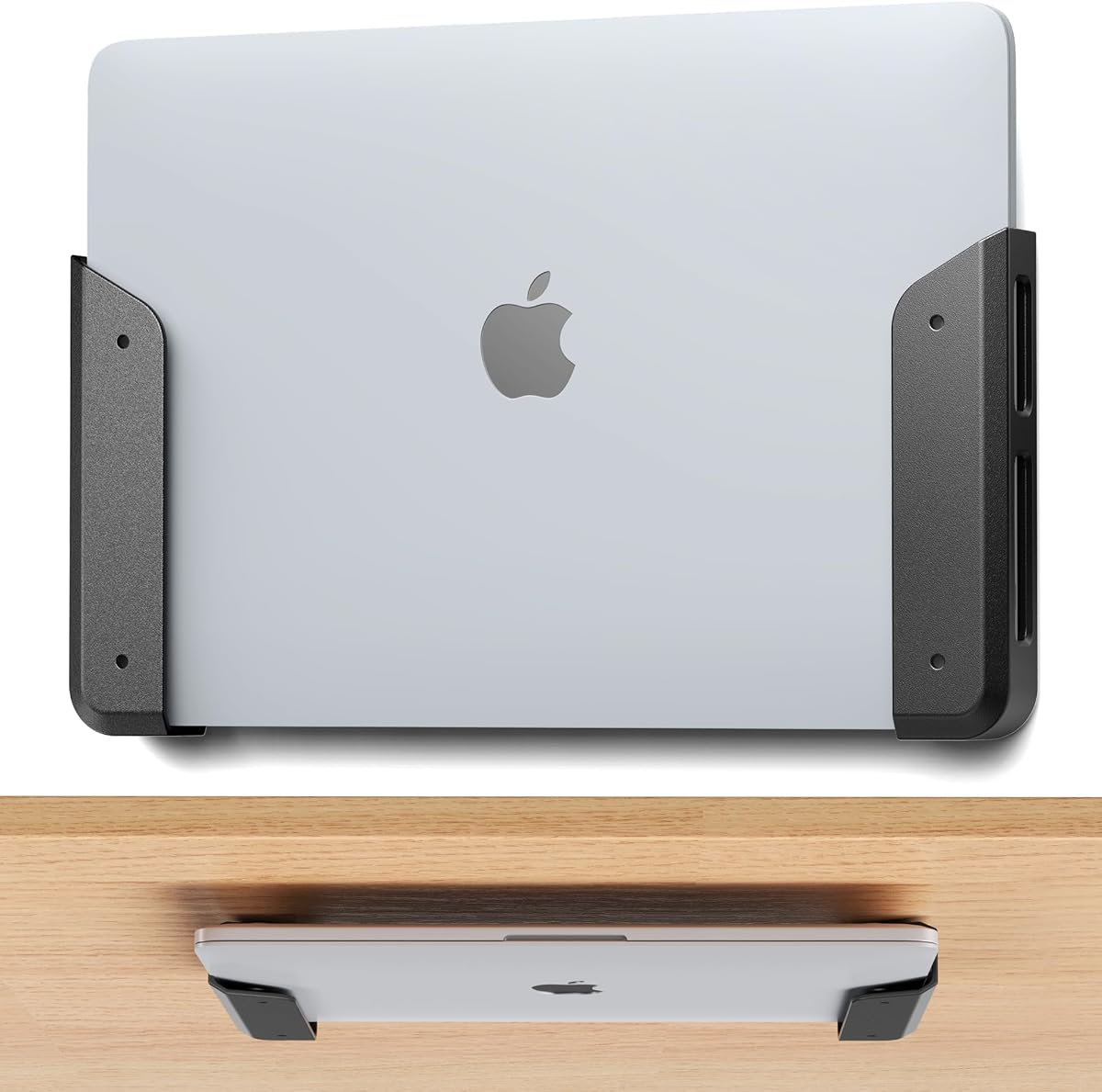
ELETIUO Wall & Under Desk Mount
4.2Editor score
Dual Adhesive or Screw Mounting
Universal Compatibility for Devices
Anti-Scratch Protection Pads
Finding the right laptop wall mount can transform your workspace into a streamlined and efficient environment. Whether you work from home or need a flexible setup for a classroom, these mounts free up valuable desk space. A good mount should offer stability, adjustability, and compatibility with your specific device sizes and weights.
We have analyzed ten top-rated laptop wall mounts based on user feedback, build quality, and functional versatility. Each product was evaluated for its ease of installation, range of motion, and ability to support various laptop and monitor sizes. Our goal is to highlight models that provide the best balance of performance and value for different user needs.
Each pick in this list showcases unique features tailored to specific use cases like gaming, office work, or medical settings. Please note that product availability and pricing can change frequently over time. We recommend checking the latest details on the official product pages before making your final purchase decision today.
4.2Editor score

4.6Editor score

4.5Editor score
As an Amazon Associate we earn from qualifying purchases.
The following table provides a side-by-side comparison of all ten selected laptop wall mounts to help you quickly identify the best fit for your specific needs and setup requirements.


The MOUNT PRO Laptop Wall Mount stands out as a top choice for users needing a versatile solution. It holds laptops from 11 to 17 inches and converts to a monitor arm for screens up to 32 inches. Its robust design supports devices weighing up to 19.8 lbs ensuring stability during use.
We may earn a commission when you buy through this link, at no additional cost to you.
This mount offers full motion adjustability allowing you to tilt, swivel, and rotate your device for the perfect viewing angle. The ventilated tray promotes airflow to prevent overheating while the integrated cable management system keeps your workspace tidy. The durable aluminum and steel construction ensures long-lasting stability for daily tasks.
While the mount is highly versatile, it requires mounting on a wood stud, cement, or concrete wall for maximum safety. Installation into drywall alone is not recommended which might limit placement options for some users. However, the included hardware and clear instructions make the setup process straightforward when these conditions are met.
This product is ideal for home offices, classrooms, and kitchens where space is at a premium. Whether you are working, viewing recipes, or displaying patient info, the flexibility of this mount adapts to your needs. We highly recommend it for anyone seeking a reliable and adjustable wall mounting solution.
The ability to switch between a laptop holder and a monitor arm makes this mount exceptionally useful for diverse setups.
Multiple ventilation slots in the tray ensure your device stays cool even during long and intensive work sessions.
We may earn a commission when you buy through this link, at no additional cost to you.
The ELETIUO Wall & Under Desk Laptop Mount offers an affordable way to free up desk space. It supports devices up to 26 mm thick including laptops, MacBooks, and tablets. The dual mounting options allow you to choose between adhesive strips for quick installation or screws for a permanent setup.
We may earn a commission when you buy through this link, at no additional cost to you.
This mount features anti-scratch pads to protect your device during insertion and removal. The cut-out design ensures full access to ports and buttons for seamless connectivity. It is designed to hold devices securely whether installed vertically or horizontally under a desk or on a wall.
The adhesive option is best for lighter devices and temporary use. For heavier laptops, the screw mount provides maximum security and stability. Some users might find the adhesive less robust on certain wall textures but the screw option compensates for this limitation effectively.
This mount is perfect for those on a budget who need a simple solution for mounting smaller devices. It works well for keyboards, tablets, and smaller laptops in bedrooms or kitchens. If you need a no-fuss and cost-effective way to mount your tech this is a great choice.
Choose between adhesive for temporary use or screws for a permanent and stable installation depending on your needs.
Designed to fit a wide range of devices from laptops to game consoles making it a versatile storage solution.
We may earn a commission when you buy through this link, at no additional cost to you.
This premium laptop wall mount features a gas spring arm that provides exceptional flexibility and reach. It supports laptops up to 17 inches and can be converted to a monitor mount by removing the detachable tray. The extended range allows you to position your device exactly where you need it for optimal ergonomics.
We may earn a commission when you buy through this link, at no additional cost to you.
The arm offers full motion adjustability with smooth and stable movements that reduce neck strain. The gas spring system ensures your device stays in place without sagging or drifting over time. This build quality makes it suitable for professional environments where reliability is key for daily use.
While it comes at a higher price point, the enhanced reach and adjustability justify the cost for many users. The installation requires a secure wall mount which is standard for heavy-duty arms. Some users might find the arm complex to adjust initially but it becomes intuitive with regular use.
This mount is ideal for workstations where traditional desktop setups are impractical. It is perfect for clinics, workshops, or small offices where every inch of space matters. If you need a robust and highly adjustable solution this premium option delivers exceptional performance and longevity.
The 3-section gas spring arm extends up to 27.83 inches allowing you to pull your laptop close or push it away easily.
The durable gas spring system keeps your device securely in place while allowing effortless adjustments without drift.
We may earn a commission when you buy through this link, at no additional cost to you.
This versatile wall mount functions as both a laptop holder and a monitor arm supporting devices up to 22 lbs. It is compatible with most 11 to 17 inch laptops and can convert to support monitors from 22 to 32 inches. The design maximizes space efficiency by lifting your device off the desk.
We may earn a commission when you buy through this link, at no additional cost to you.
The mount provides multiple adjustments including tilt, swivel, and rotation to ensure comfortable viewing. The open-frame ventilated tray allows airflow to prevent overheating during use. It includes a locking mechanism and adjustable clamps to keep your laptop secure in any position.
Installation is straightforward with all necessary hardware included. For maximum safety, mounting on wood studs or concrete is recommended. Some users may find the setup slightly more involved than basic mounts but the stability is worth the effort.
This mount is perfect for compact dorms, crowded workspaces, or home offices. It helps organize your environment and keeps your desk clean and organized. If you need a reliable solution for both laptops and monitors this mount delivers excellent functionality and durability.
Switch effortlessly between using it as a laptop mount or a monitor arm to suit your daily workflow needs.
The ventilated tray ensures proper airflow around your device preventing overheating during intensive tasks.
We may earn a commission when you buy through this link, at no additional cost to you.
This mount allows you to switch between a laptop wall holder and a monitor mount with ease. It supports laptops from 14 to 17 inches and monitors from 22 to 32 inches. The secure latch mechanism prevents your laptop from slipping ensuring a safe and stable setup for daily use.
We may earn a commission when you buy through this link, at no additional cost to you.
The ventilated tray maximizes airflow to keep your device cool during long work sessions. With a reach of over 20 inches and full motion adjustability you can position your screen comfortably. The design supports standard VESA patterns making it compatible with most monitors.
Installation requires mounting on wood studs or solid walls for best results. The included instructions are clear and all hardware is provided for setup. Some users might find the arm requires manual adjustment but once set it holds position well without sagging.
This product is ideal for small dorms, crowded offices, or home setups where space is limited. Whether you are working, gaming, or reading music this mount offers the flexibility you need. We recommend it for those wanting a secure and space-saving mounting solution for their devices.
The clever latch locks your laptop in place preventing slips or falls during work or gaming activities.
With full motion adjustments and extended reach you can view your device from any angle comfortably.
We may earn a commission when you buy through this link, at no additional cost to you.
This mount offers a high-grade monitor arm that supports laptops up to 17 inches and monitors up to 32 inches. It features full motion adjustments including tilt, swivel, and rotation for customizable viewing angles. The ventilated platform enhances airflow to prevent overheating during heavy workloads.
We may earn a commission when you buy through this link, at no additional cost to you.
The ergonomic design helps reduce neck and shoulder strain during extended use. By mounting your device directly on the wall you free up valuable desktop space for other essentials. It is ideal for compact home offices, dorm rooms, and shared work areas where organization is key.
Installation involves standard wall mounting procedures with provided hardware. Some users might find the arm adjustments slightly stiff initially but they smooth out with use. It is not recommended for drywall alone and should be anchored into studs for stability.
This product is perfect for remote workers, gamers, and professionals who need a clean and efficient setup. It supports a healthy posture and keeps your workspace tidy. If you need a reliable and ergonomic solution for your laptop or monitor this mount is a solid choice.
Engineered to reduce strain with smooth and stable positioning for comfortable use throughout the day.
By lifting your device off the desk you reclaim valuable surface area for other workspace essentials.
We may earn a commission when you buy through this link, at no additional cost to you.
This premium laptop holder features a detachable tray that supports laptops from 12 to 17 inches. The tray can be removed to convert the mount into a display wall mount for monitors up to 32 inches. It includes a concealed cable management system to keep your office environment aesthetically pleasing.
We may earn a commission when you buy through this link, at no additional cost to you.
The mount rotates left and right and offers a 250 mm height adjustment range for optimal positioning. Anti-scratch pads protect your laptop during contact ensuring a safe and secure fit. The ventilation holes contribute to heat dissipation when your notebook runs at high speed.
Installation requires wall mounting which ensures stability and longevity. The arm is fully adjustable allowing you to maintain correct posture for your neck and back. Some users may find the initial setup slightly involved but the result is a robust and versatile support system.
This mount is ideal for those who want flexibility between using a laptop and a monitor. It works well in offices, studios, and shared workspaces. If you need a durable solution that supports various devices while keeping your cables organized this is a great option.
Organize your cables neatly on the hanging arm for a cleaner and more professional looking workspace.
Strategic ventilation holes in the platform help dissipate heat and keep your device running smoothly.
We may earn a commission when you buy through this link, at no additional cost to you.
This deluxe single laptop pneumatic arm wall mount clears up valuable desk space efficiently. It features tool-less instant height adjustment allowing you to find perfect ergonomic viewing angles quickly. The mount fits laptops from 10 to 15.6 inches and supports up to 9.9 lbs in weight.
We may earn a commission when you buy through this link, at no additional cost to you.
The articulating arm offers tilt, swivel, and rotation capabilities for a variety of viewing options. Rubber tabs keep your device secure and protect it from scratches during use. The ventilated slots allow maximum airflow to prevent overheating during intensive tasks or gaming sessions.
Installation is simple with the removable VESA plate and provided hardware. Note that the counterbalance arm needs a minimum weight to function properly. Some users might find it less versatile than heavier duty options but it is excellent for standard laptops.
This product is ideal for small offices or personal spaces where quick adjustments are needed. The sturdy steel design is backed by a 3 year manufacturer warranty and friendly tech support. If you need a reliable and easy-to-use solution this mount delivers solid performance.
Adjust the height instantly without tools to find your perfect ergonomic viewing and typing angle quickly.
Rubber tabs and ventilation slots keep your device secure and cool during long periods of use.
We may earn a commission when you buy through this link, at no additional cost to you.
This laptop arm offers the unique option to mount on a wall or a round pole for flexibility. It supports laptops from 10 to 15.6 inches and can convert to a VESA monitor mount for displays up to 32 inches. The spring arm keeps your laptop planted firmly to prevent drifting or drooping.
We may earn a commission when you buy through this link, at no additional cost to you.
The mount provides full range of motion with swivel, tilt, and extension capabilities. Adjustable tension at the arm bolts lets you customize the firmness to match your preferences. The design is ideal for clinics, home offices, and studios where space is at a premium.
Installation requires anchoring into a stud or solid surface for the steadiest hold. The included hardware covers both wall and pole mounting options effectively. Some users might need to purchase a pole separately but the versatility is worth the extra step.
This product is perfect for those needing a versatile and stable mounting solution. It allows you to reclaim space under your laptop for a cleaner setup. If you value adjustability and robust support this ergonomic arm delivers excellent performance and reliability.
Adjustable tension bolts let you set the firmness to keep your device stable without drooping over time.
Choose between wall or round pole mounting for maximum flexibility in how you set up your workspace.
We may earn a commission when you buy through this link, at no additional cost to you.
This multifunctional electronics wall mount holds up to 22 lb devices including laptops, keyboards, and tablets. The two-tier shelf design allows you to store multiple devices at once such as a laptop and a keyboard. It is made of high quality metal with surface painting for durability and style.
We may earn a commission when you buy through this link, at no additional cost to you.
The mount features EVA pads to protect your electronics from scratches and damage during use. It maximizes workspace by mounting devices vertically on the wall freeing up valuable desk space. Installation is simple with provided screws and rubber plugs for various wall types.
While it lacks adjustable arms this mount offers solid storage for small and wide devices. It is ideal for living rooms, bedrooms, and offices where organization is key. Some users might find it less flexible than motion arms but its stability is excellent for static setups.
This product is perfect for keeping your electronics organized and easily accessible. It can also be used to store cutting boards or routers making it highly versatile. If you need a reliable and sturdy shelf solution for your devices this mount is a great choice.
Store multiple devices like a laptop and keyboard simultaneously to keep your workspace clutter-free.
Included pads protect your electronics from scratches ensuring they remain in pristine condition.
We may earn a commission when you buy through this link, at no additional cost to you.
Selecting the right laptop wall mount involves considering compatibility, adjustability, and durability to ensure a safe and ergonomic setup.
Ensure the mount supports your specific laptop size and weight to avoid damage or instability. Check the weight capacity and dimensions listed by the manufacturer to guarantee a proper fit for your device.
Always verify the compatibility details before purchasing to ensure the mount will securely hold your laptop or monitor.
Decide whether you need a wall-only mount or one that supports pole mounting for added flexibility. Consider your wall type and structure to determine if screws or adhesive strips are appropriate for your installation.
Choose a mounting method that aligns with your wall material and security needs for a stable setup.
Look for mounts with tilt, swivel, and rotation capabilities to achieve optimal viewing angles. Full motion adjustability helps reduce strain and allows you to position your screen comfortably for different tasks.
Prioritize models with multiple adjustment points to maximize ergonomic comfort during use.
High-quality materials like aluminum and steel ensure durability and stability over time. Avoid mounts made from cheap plastics if you plan to use them heavily or for extended periods daily.
Invest in sturdy builds that can handle the weight of your device without bending or breaking.
Vented trays or open designs help dissipate heat and prevent overheating during long work sessions. Good airflow is essential for maintaining your device's performance and extending its lifespan.
Choose a mount with ventilation features to keep your laptop cool and running efficiently.
Consider how easy the mount is to install and whether it requires special tools or expertise. Clear instructions and included hardware can save time and effort during setup for most users.
Look for models with straightforward installation processes to minimize setup frustration.
Built-in cable management systems help keep wires organized and your workspace looking tidy. This feature is essential for reducing clutter and preventing accidental tangles or damage to cables.
Select a mount with integrated solutions to manage cables effectively for a clean environment.
Set a budget that balances cost with the features you need to avoid overspending on unnecessary options. Higher-priced mounts often offer better durability and adjustability but basic models may suffice for simple needs.
Find a model that offers the best value for your specific requirements and financial limits.
To begin install the wall plate on a sturdy surface such as a stud or concrete using the provided hardware. Ensure all screws are tightened securely to prevent any movement or wobbling during use.
Place your laptop or monitor on the tray and adjust the arms to your preferred viewing angle. Check that the device is balanced properly before releasing it to avoid accidental drops or tilting.
Regularly inspect the mount for any signs of wear or loosening screws to maintain safety. Clean the tray and arms with a soft cloth to remove dust and keep the surface looking new.
Most laptop wall mounts require anchoring into a wood stud or solid surface for stability. While some offer adhesive options these are generally for lighter devices. Always check the product specifications before installing on drywall alone.
Weight capacities vary by model but many support between 10 to 22 pounds. Ensure your device falls within this range to prevent the mount from bending or failing during use.
Many models feature dual functionality allowing you to switch between laptop and monitor use. Look for VESA compatibility if you plan to use the mount with external displays.
Most mounts allow height adjustments by loosening specific bolts or using a lever mechanism. Refer to the installation guide for precise steps on adjusting the arm to your needs.
Yes many mounts offer sufficient range of motion to accommodate both sitting and standing positions. This flexibility helps reduce physical strain during long work hours.
Basic tools like a drill and screwdriver are typically needed for mounting the bracket securely. Some models are tool-free but check the package contents to confirm.
Most mounts are designed for wall or pole mounting rather than ceiling installation. Using them on a ceiling may void warranties or compromise stability.
Many mounts include protective pads or rubber tabs on the tray to prevent scratches. Ensure the laptop is seated properly on these pads to maintain its finish.
We have reviewed ten exceptional laptop wall mounts that cater to various needs and budgets. From versatile 2-in-1 designs to sturdy pneumatic arms each option offers unique benefits for your workspace.
Prioritize compatibility adjustability and build quality to ensure a safe and ergonomic setup. Whether you need a simple storage solution or a highly adjustable arm there is a model that fits your requirements.
Please check the latest pricing and availability as these details may change frequently over time. We hope this guide helps you make an informed decision to enhance your home or office environment.