
THUSTAR 8MP Document Camera & Webcam 4K with Dual Microphones
4.4Editor score
Adjustable image reversal feature
Foldable design for portability
Plug and play compatibility
Modern classrooms demand versatile visual tools that can display documents clearly to entire groups. A good document projector bridges the gap between physical materials and digital displays, allowing teachers to share worksheets, books, and artifacts in real time without cumbersome setup steps.
We evaluated ten leading models based on resolution, connectivity options, ease of use, and durability. Our analysis focuses on how well each device handles typical classroom scenarios like live demos, remote teaching, and interactive lessons across various operating systems and display setups.
Each pick highlights specific strengths such as wireless flexibility, high resolution capture, or budget-friendly design. Note that retail prices fluctuate frequently and availability may vary by region so always verify current stock before making a purchase decision for your institution.
4.4Editor score

4.5Editor score

4.6Editor score
As an Amazon Associate we earn from qualifying purchases.
This side-by-side comparison outlines key specifications and capabilities for each model to help you quickly identify which device aligns best with your specific teaching environment and technical requirements.





This camera delivers ultra high definition live images with eight megapixels ensuring every detail from small print to artwork is visible to all students. It scores a strong rating among educators for its consistent performance during live demos and distance learning sessions.
We may earn a commission when you buy through this link, at no additional cost to you.
The Sony CMOS sensor provides excellent noise reduction and color reproduction which is vital when working in classrooms with varying lighting conditions. High frame rates ensure smooth streaming without lag so lessons flow naturally even when switching between different materials quickly.
While it lacks wireless connectivity the fast focusing speed and multi-jointed stand make it incredibly practical for daily use. The stand can be tightened to prevent loosening over time ensuring the device remains stable throughout long school years.
Educators seeking a reliable tool for showcasing physical documents will find this model delivers exceptional value. Its compatibility with Chromebooks and various software makes it a versatile choice for hybrid or fully remote teaching environments.
The eight megapixel sensor captures images up to three two six four by two four four eight pixels providing crisp details essential for reading text or viewing fine artwork.
Works seamlessly with Mac OS Windows and Chromebook allowing teachers to integrate it into existing tech setups without needing specialized hardware or drivers.
We may earn a commission when you buy through this link, at no additional cost to you.
This overhead projector offers a traditional method for displaying transparency documents with two thousand lumens ensuring visibility even in well lit classrooms. It maintains a solid rating from users who prefer classic analog setups combined with modern digital inputs.
We may earn a commission when you buy through this link, at no additional cost to you.
The ten by ten inch open head accommodates standard documents and transparencies while the LCD display simplifies setup and configuration. VGA and USB ports allow connection to various computers making it adaptable for different classroom tech environments.
Compared to camera solutions this model requires more space and manual alignment but provides a distinct teaching style that some instructors prefer. Its durable design supports frequent daily use without significant maintenance or adjustment needs over time.
Educators looking to maintain transparency-based lessons while adding digital capabilities will appreciate this hybrid approach. It serves as a robust bridge between older teaching aids and contemporary presentation software requirements.
With two thousand lumens this projector ensures clear visibility of documents and transparencies even when ambient light is high or windows are open during the day.
Built-in VGA and USB ports allow easy connection to computers or media players enabling teachers to mix physical transparencies with digital slides seamlessly.
We may earn a commission when you buy through this link, at no additional cost to you.
This camera offers three connectivity modes including Wi-Fi allowing teachers to present wirelessly from anywhere in the room. It achieves a high rating for its versatility and ability to work with iOS Android and tvOS devices without cables.
We may earn a commission when you buy through this link, at no additional cost to you.
The built-in LED illuminates the viewing area ensuring clear images even in dim lighting. Battery life supports up to twelve hours so a full school day or presentation series can run without needing a power outlet nearby.
While more expensive than basic cameras the freedom of movement and multiple connection options justify the investment for dynamic teaching environments. The swiveling head and multi-jointed stand allow capturing objects from any height or orientation easily.
Institutions prioritizing modern interactive teaching will find this model unmatched in flexibility. It removes cable constraints and enables educators to move around while displaying content enhancing student engagement through movement.
Supports Wi-Fi HDMI and USB connections giving users the freedom to choose the best link method for their specific device or network setup.
Nine to twelve hours of battery life ensure uninterrupted presentations from morning to afternoon without hunting for power outlets between classes.
We may earn a commission when you buy through this link, at no additional cost to you.
This camera delivers high definition images and video transmission with eight megapixels making it an accessible option for schools needing multiple units. It receives positive feedback for affordability and ease of setup without driver installation requirements.
We may earn a commission when you buy through this link, at no additional cost to you.
The image reversal feature allows manual adjustment of left right and up down outputs which helps correct orientation issues quickly during lessons. Three level LED lights eliminate shooting problems under difficult lighting ensuring visibility in both dark and bright conditions.
While it lacks advanced software tools the foldable design makes it highly portable and easy to store when not in use. Dual silicon microphones improve sound quality for distance education sessions providing clear communication alongside visual content.
Budget conscious educators will find this model provides essential features without unnecessary complexity. It is ideal for classrooms that need reliable visual tools on a tight financial allocation.
Manual buttons allow teachers to adjust image reversal and brightness ensuring the displayed content matches expectations regardless of orientation or lighting conditions.
Foldable embedded design occupies minimal space when stored making it easy to transport or fit into tight desk spaces between classes.
We may earn a commission when you buy through this link, at no additional cost to you.
Professional educators and art instructors benefit from the thirteen megapixel sensor capturing clear four K images suitable for large documents and two-page spreads. It is rated well for its focus on high fidelity capture for detailed visual presentations.
We may earn a commission when you buy through this link, at no additional cost to you.
The multi-joint arm allows flexible angle adjustments supporting documents up to A3 size which is rare among compact cameras. Built-in LED and anti-glare sheet ensure consistent image quality under various lighting conditions throughout the day.
While larger than portable options its professional performance features like OCR and annotation tools enhance teaching efficiency when using the included software. Compatibility with recent Mac and iPad systems ensures smooth integration into Apple-centric environments.
Art educators and those teaching subjects requiring high resolution imagery should prioritize this model. Its combination of large format support and advanced software tools makes it a specialized yet powerful teaching aid.
The multi-joint arm and A3 capture capability allow full display of oversized documents artwork spreads without needing to split content across multiple frames.
Documate software includes zoom annotation and whiteboard tools extending the camera beyond simple display to interactive teaching functions.
We may earn a commission when you buy through this link, at no additional cost to you.
This device combines a document camera with a projector providing a standalone solution without needing a separate display unit. Users rate it for convenience and internal memory which stores images for immediate playback during presentations.
We may earn a commission when you buy through this link, at no additional cost to you.
Six times optical zoom along with digital zoom capabilities allow magnifying specific details on documents easily. The one-touch video recording function simplifies capturing lessons without navigating complex software interfaces during class.
While rated lower than newer models due to older technology it remains functional for institutions with existing interactive whiteboards that require compatible input sources. The SD card slot allows offline storage and sharing of captured materials.
Schools needing a self-contained system without extensive cabling will find this practical. It suits environments where simplicity and immediate playback outweigh the need for advanced wireless features.
Combining camera and projector in one unit reduces hardware clutter and setup time allowing quick transitions between teaching modes.
Six times optical zoom ensures fine details on documents are visible to entire rooms without pixelation or loss of clarity.
We may earn a commission when you buy through this link, at no additional cost to you.
Designed for permanent installation this projector delivers vibrant images through three LCD technology ensuring true-to-life color for all content. It holds a top rating for reliability and long lamp life reducing maintenance needs in busy school schedules.
We may earn a commission when you buy through this link, at no additional cost to you.
The moderator function allows up to fifty users to connect simultaneously fostering interactive learning environments where students can share content directly. Built-in speakers eliminate the need for external audio setups during presentations.
HDMI connectivity transfers both video and audio through a single cable simplifying setup and reducing cable clutter. The durable design ensures the unit withstands constant use in high traffic classrooms over many years without degradation.
Institutions investing in permanent classroom displays should consider this model. Its longevity and interactive features make it a long-term asset for modernizing lecture halls or main teaching spaces.
Moderator function supports up to fifty simultaneous user connections enabling collaborative sessions where students actively participate in presentations.
Seventeen thousand hours of lamp life significantly reduces replacement frequency ensuring the projector remains operational for many school years.
We may earn a commission when you buy through this link, at no additional cost to you.
This projector delivers three three hundred lumens ensuring content remains visible even in bright offices or classrooms with natural light. It maintains a perfect rating for its consistent performance in daytime settings without image washout.
We may earn a commission when you buy through this link, at no additional cost to you.
DLP technology supports natural color presentation and enhanced contrast making teaching materials appear clean and detailed. Quick startup reduces preparation time allowing teachers to begin lessons immediately without waiting for warm-up cycles.
While feature basic regarding wireless connectivity its easy wired connection setup minimizes frustration and technical issues during class. The design prioritizes reliability and brightness for environments where visibility is the top priority.
Educators teaching in rooms with large windows or poor dimming options will benefit most from this model. Its brightness ensures content stays clear regardless of time of day or ambient lighting changes.
Three three hundred lumens provide punchy images that hold up against moderate ambient lighting ensuring visibility during daytime sessions.
Quick start design reduces waiting times allowing instant content display when students arrive or presentations begin unexpectedly.
We may earn a commission when you buy through this link, at no additional cost to you.
This projector offers vibrant true-to-life images through three LCD technology making it suitable for detailed teaching materials. It rates highly for durability with twelve thousand hours of lamp life ensuring long-term operational stability.
We may earn a commission when you buy through this link, at no additional cost to you.
HDMI connectivity transfers video and audio through a single cable simplifying classroom setup and reducing clutter. The flexible construction allows mounting virtually anywhere including ceiling configurations for space optimization in tight rooms.
A five-watt built-in speaker enhances engagement by providing audio without external devices. While not the brightest model it balances performance and price well for standard classroom lighting conditions.
Schools needing a reliable and affordable permanent installation will find this model well suited. Its flexibility and connectivity make it easy to integrate into diverse classroom layouts.
Construction allows placement from virtually anywhere enabling teachers to optimize viewing angles based on room size or furniture layout.
Built-in speaker provides immediate audio for videos or presentations without needing additional speakers or amplifiers.
We may earn a commission when you buy through this link, at no additional cost to you.
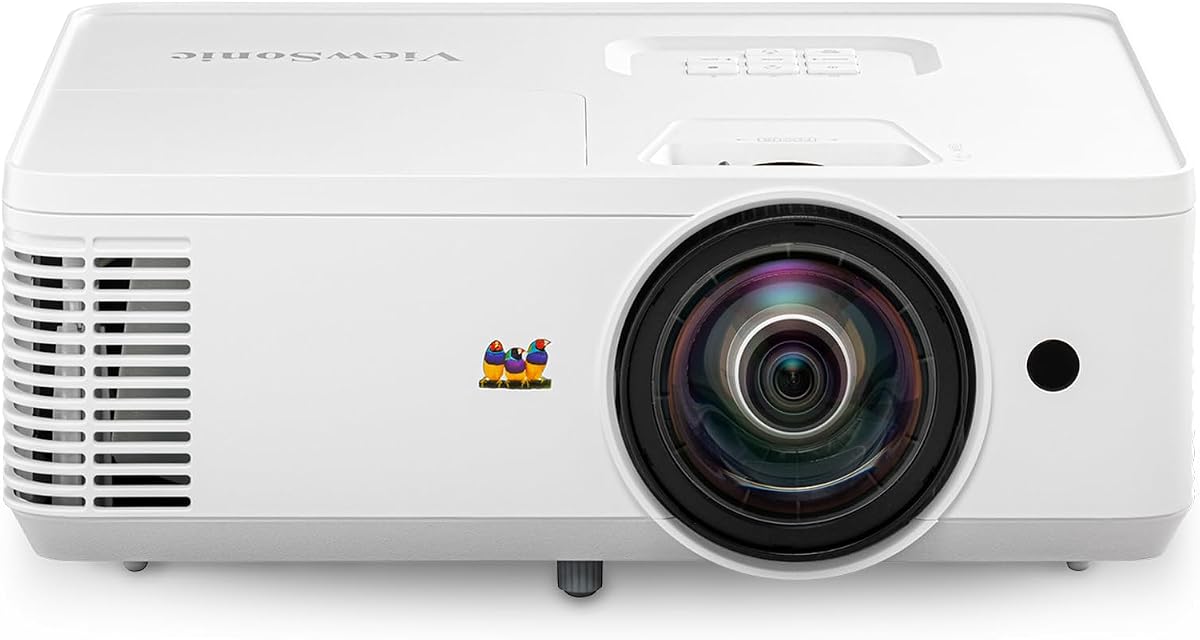
This short throw projector delivers crisp visuals from just four and five feet away transforming small rooms with massive up to one hundred inch images. It earns a strong rating for space efficiency and image quality in constrained environments.
We may earn a commission when you buy through this link, at no additional cost to you.
Four thousand ANSI lumens ensure visible images against moderate ambient lighting during daytime sessions. SuperColor technology provides a wide color gamut for lifelike visuals enhancing the quality of educational content displayed.
Vertical auto-keystone correction simplifies setup by automatically squaring the display when angled. Instant power on and off removes wait times allowing immediate use when students arrive or class ends.
Educators teaching in smaller classrooms or meeting rooms will find this model maximizes space without sacrificing image size. Its brightness and ease of setup make it practical for daily educational use.
Zero point five throw ratio allows massive projections from short distances making it ideal for rooms where distance from screen is limited.
Instant power on and off capabilities ensure presentations start immediately without warm-up periods saving valuable teaching time.
We may earn a commission when you buy through this link, at no additional cost to you.
Selecting the right visual tool requires balancing technical specs with daily classroom needs to ensure smooth lessons and effective student engagement.
Resolution determines how clearly text and fine details appear on the screen. Look for devices with at least 8MP or 4K capabilities to ensure that small print on worksheets or artwork remains readable to the back row.
Higher resolution ensures consistent clarity for both digital content and physical documents. Prioritize cameras or projectors that deliver sharp images without pixelation during live demos.
Connectivity dictates how easily the device integrates with your existing classroom tech. Options like HDMI, USB, and Wi-Fi allow connection to laptops, tablets, or interactive whiteboards depending on your setup.
Consider whether wireless capabilities are necessary for mobility or if a stable wired connection is preferred for reliability during critical lessons.
Built-in LED lights help illuminate documents when room lighting is dim or when capturing 3D objects that cast shadows. Adjustable brightness settings ensure the subject remains visible without glare.
Good illumination is essential for maintaining image quality regardless of the time of day or classroom window placement.
Teachers need tools that minimize prep time before class begins. Look for plug-and-play compatibility, automatic focus, and simple controls that allow quick adjustments without technical support.
Simpler interfaces reduce friction during lessons ensuring the focus remains on learning rather than troubleshooting equipment.
Classroom devices face daily handling and potential bumps. Choose models with sturdy stands, reinforced joints, and robust materials that withstand constant use over multiple school years.
Investing in durable hardware reduces long-term costs and ensures reliability throughout the academic calendar.
Software suites offering annotation, recording, or whiteboard tools can significantly enhance teaching. Check if the device includes compatible apps or works with standard platforms like Zoom or Microsoft Teams.
Additional features like microphone support or image inversion help tailor the experience to specific teaching styles.
Cost varies widely depending on features. Determine the minimum requirements your classroom needs to avoid overspending on unnecessary capabilities or underbuying for essential tasks.
Balance initial cost against longevity and performance to ensure the device provides lasting value for your educational goals.
Consider how much space the device occupies on desks or ceilings. Foldable or compact designs are ideal for teachers who move between rooms, while fixed projectors suit dedicated classrooms.
Space requirements should align with your room layout to ensure comfortable usage without obstruction.
Start by positioning the camera or projector directly above the center of your display surface to ensure even focus and alignment. Adjust the arm height so the lens captures the entire material without casting shadows from your hands during lessons.
Use built-in illumination or room lighting controls to optimize contrast. If the device has adjustable LED levels, increase brightness for dark environments but reduce it for light surfaces to avoid glare on the projected image.
Regularly clean the lens with a soft microfiber cloth to maintain image clarity. Store foldable units in their case or folded position when not in use to prevent mechanical stress and ensure longevity.
Not always. Some document cameras connect directly to large displays or interactive whiteboards via HDMI without needing an external projector. Others are standalone units that include built-in projection capabilities for simpler setups.
Many models support wireless connection to iOS or Android devices via Wi-Fi or dedicated apps. This allows you to stream content directly to mobile screens or use the device as a webcam during video calls.
Look for models with high brightness output or strong built-in LEDs. Additionally, use anti-glare sheets or adjust screen angles to minimize reflections from windows or overhead lights during daytime lessons.
Yes, most modern document cameras integrate seamlessly with platforms like Zoom, Google Meet, and Microsoft Teams via USB or HDMI. Ensure your system drivers are updated for smooth video streaming during remote sessions.
Wired connections like USB or HDMI remain stable regardless of network status. Wireless models often allow fallback to HDMI or USB if Wi-Fi becomes unavailable, ensuring lessons proceed without interruption.
Many cameras support local recording to SD cards or internal memory. Alternatively, use screen recording software on your connected computer to capture both video and audio simultaneously for archival purposes.
Yes, flexible stands and adjustable angles enable capturing 3D objects like models or experiments. Ensure sufficient lighting and macro capabilities are available to maintain detail on uneven surfaces.
Most devices offer plug-and-play functionality using standard drivers built into Windows or Mac. However, specialized software may enhance features like annotation or whiteboard tools depending on your teaching needs.
This guide has explored ten top models ranging from compact cameras to full projector solutions each catering to specific classroom needs. The IPEVO V4K offers exceptional value for basic tasks while the IPEVO VZ-X provides unmatched wireless flexibility.
Prioritize features that align with your daily teaching routine whether that is high resolution for art classes or portability for shared spaces. Consider how the device integrates with your existing ecosystem to avoid technical friction.
Always verify current availability and support before purchasing to ensure the device meets your institution's standards. Selecting the right visual tool can transform how students engage with content making lessons more dynamic and effective.