
Asgolion Printer Table
3.9Editor score
Compact 15 inch length
Four swivel casters
MDF and metal frame
Finding a cheap printer table that balances cost with quality can be challenging for home office users. You need a sturdy surface that protects your device while keeping your workspace organized and clutter free. A good stand should offer mobility and storage without breaking the bank or compromising stability during daily use.
We compared ten highly rated models based on construction, dimensions, and user feedback to identify the most reliable options. Each product was evaluated for its ability to support various printer sizes and provide accessible storage for supplies. Our goal is to help you find a unit that fits your space and budget effectively.
Each pick below highlights key features, pros, and cons to guide your decision-making process. You will see how different designs cater to specific needs like under desk placement or charging capabilities. Please note that availability and pricing can change over time so verify details before purchasing.
3.9Editor score
4.5Editor score
4.3Editor score
As an Amazon Associate we earn from qualifying purchases.
This side by side comparison highlights the core specifications and design differences across all ten models to help you choose the ideal solution for your specific workspace needs.




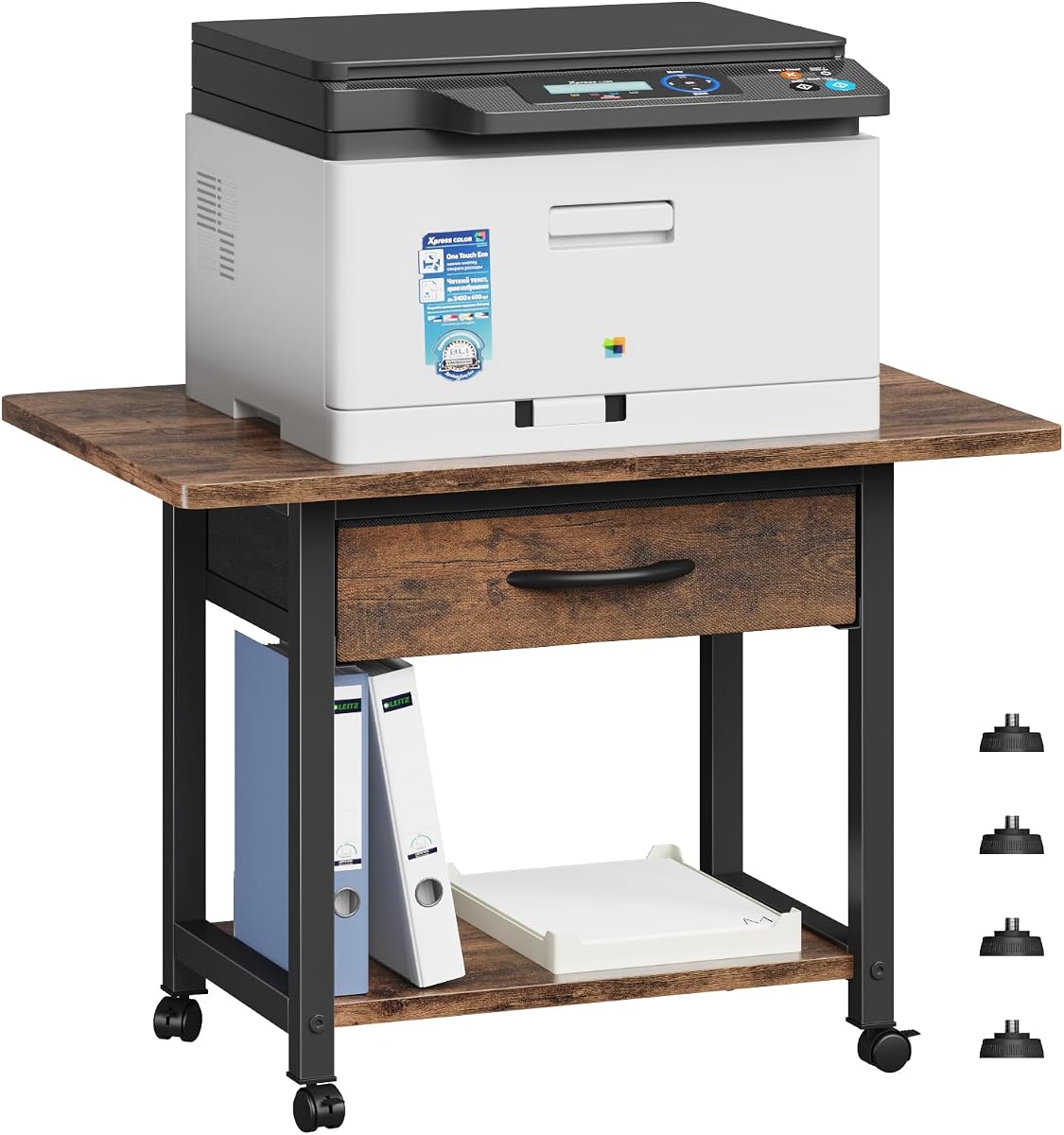
This YAOHUOO stand earns top marks for its generous surface area and hidden storage drawer. Users appreciate the ability to keep supplies organized without cluttering their workspace. The industrial frame supports heavy laser printers with ease.
We may earn a commission when you buy through this link, at no additional cost to you.
The dual tier design separates large stacks of paper from the printer itself. Four casters allow you to roll the unit into corners or out from under desks. Lockable wheels ensure it stays put during operation.
While the drawer is useful for small items it may not hold bulky supplies. The height is standard for under desk carts but check clearance if you have low furniture. Most users find it sturdy enough for daily printing needs.
Anyone needing a mobile station that maximizes vertical storage should consider this model. It balances affordability with robust construction better than many competitors in this price range. The waterproof finish is a practical touch for busy offices.
The enclosed drawer prevents small items from rolling off the shelf while keeping pens accessible.
Metal construction and waterproof MDF allow it to carry heavy printers without wobbling.
We may earn a commission when you buy through this link, at no additional cost to you.
The HUANUO stand is designed specifically for those who need to slide a printer under a desk. Its adjustable height feature means you can configure it to fit your specific clearance requirements. The top surface holds standard inkjet printers comfortably.
We may earn a commission when you buy through this link, at no additional cost to you.
Cable management helps keep cords organized which reduces tripping hazards in tight spots. The storage drawer includes dividers to sort supplies like paper clips or pens. Locking wheels provide stability once the cart is in position.
Due to its lighter weight capacity it is best for home office printers rather than industrial machines. The drawer mechanism is simple and may not withstand heavy daily use over time. Still it offers excellent value for small workspaces.
Buyers prioritizing space saving and ease of use will find this model appealing. It provides a clean setup without the cost of heavier frames. The compact dimensions make it ideal for apartments and dorm rooms.
Use fewer extensions to lower the cart if you have very low desk clearance.
No tools are needed to assemble this cart making setup quick for anyone.
We may earn a commission when you buy through this link, at no additional cost to you.
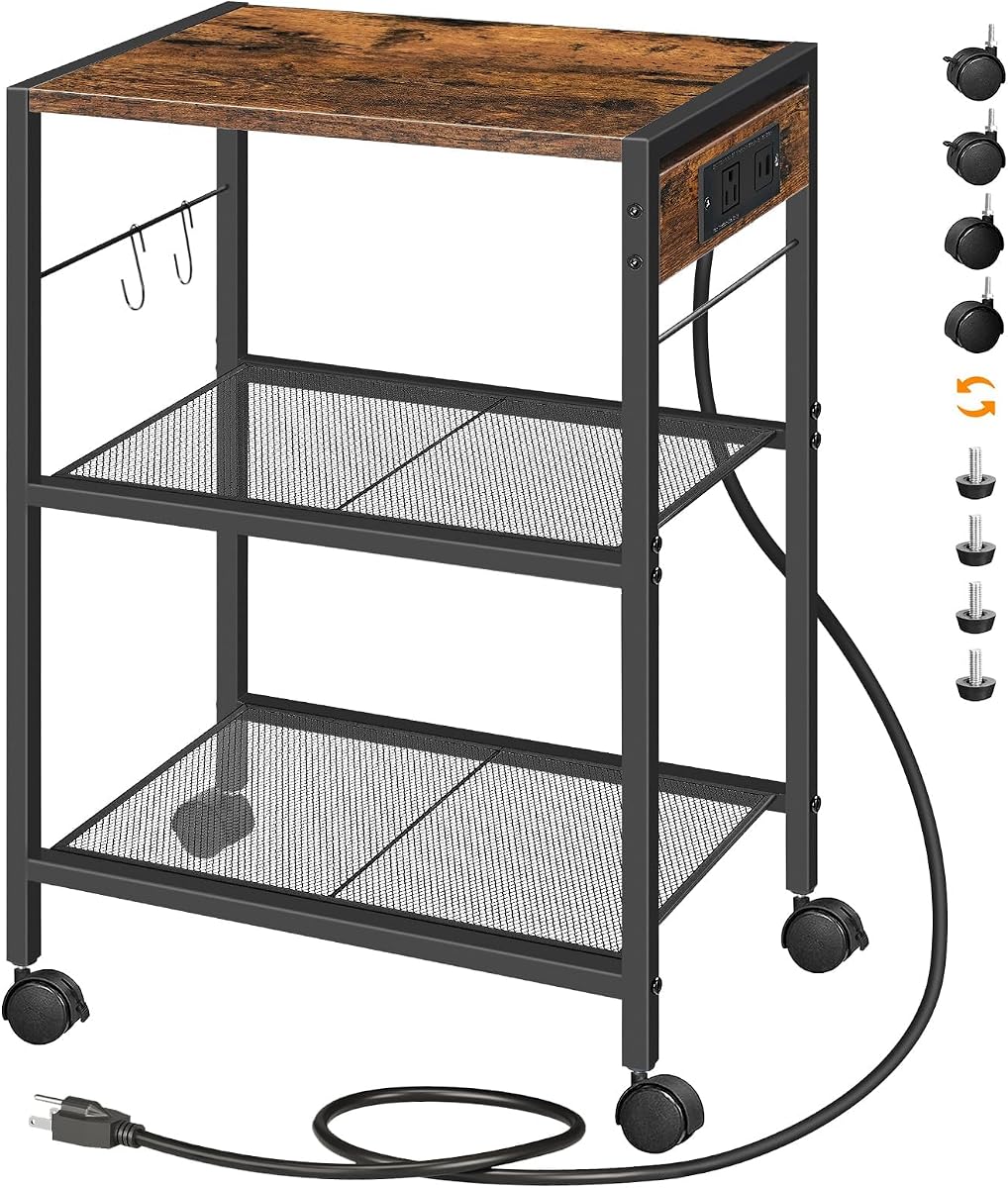
This HOOBRO model stands out with integrated power ports that eliminate the need for extra adapters. The three tier design offers ample vertical storage for printers and books alike. Its rustic finish adds a touch of style to modern offices.
We may earn a commission when you buy through this link, at no additional cost to you.
The top plate supports heavy devices while mesh shelves allow airflow for equipment. Hooks on the sides are perfect for bags or lanyards keeping hands free. Assembly is streamlined with numbered parts and included tools.
The open mesh design is great for ventilation but offers less protection against dust. The power strip location may require careful cable routing to avoid tangling. Overall it balances function and aesthetics better than most budget options.
If you value a clean desk with accessible charging this is a strong choice. It serves well as a living room cart or home office station. The build quality justifies the price compared to plastic alternatives.
Standard outlets and USB ports let you charge phones while you print.
Rustic wood and metal mesh blend well in living rooms or offices.
We may earn a commission when you buy through this link, at no additional cost to you.
The Asgolion printer table is designed for those with minimal floor space. Its narrow profile fits easily in narrow corners or beside desks. The simple two tier layout is perfect for small printers and essential supplies.
We may earn a commission when you buy through this link, at no additional cost to you.
Four swivel casters make it easy to move from room to room as needed. The surface is smooth and wipes clean easily which is helpful in shared spaces. Assembly requires basic tools and clear instructions.
Users have noted mixed feedback regarding long term durability compared to metal frames. The top may not support very heavy laser printers comfortably. It is better suited for lightweight inkjet models or temporary setups.
For buyers on a tight budget who need a simple cart this works well. It is a good option for rental apartments where mobility is key. Keep expectations realistic regarding weight limits and build quality.
A narrow footprint ensures it fits in tight corners without obstructing paths.
The lightweight construction makes it easy to reposition when rearranging rooms.
We may earn a commission when you buy through this link, at no additional cost to you.
VENNQD offers a spacious top that accommodates large printers and scanners without crowding. The fabric drawers keep small items private while maintaining a sleek look. This model supports significant weight ensuring stability for heavy office gear.
We may earn a commission when you buy through this link, at no additional cost to you.
The FSC certified wood reflects a commitment to sustainable materials which appeals to eco conscious buyers. Pull out drawers are convenient for quick access to toner or paper stacks. Adjustable feet and casters provide flexibility for floor types.
Fabric storage may require occasional vacuuming to prevent dust buildup on items. While durable the drawers are not sealed so they do not protect against spills. Overall it is a robust choice for shared home offices.
If you need a large surface for scanning and printing this is ideal. The design fits well in modern decor settings. Verify drawer capacity for your specific needs before ordering.
Spacious top allows room for scanning documents alongside the printer.
FSC certified wood ensures responsible sourcing for environmental awareness.
We may earn a commission when you buy through this link, at no additional cost to you.
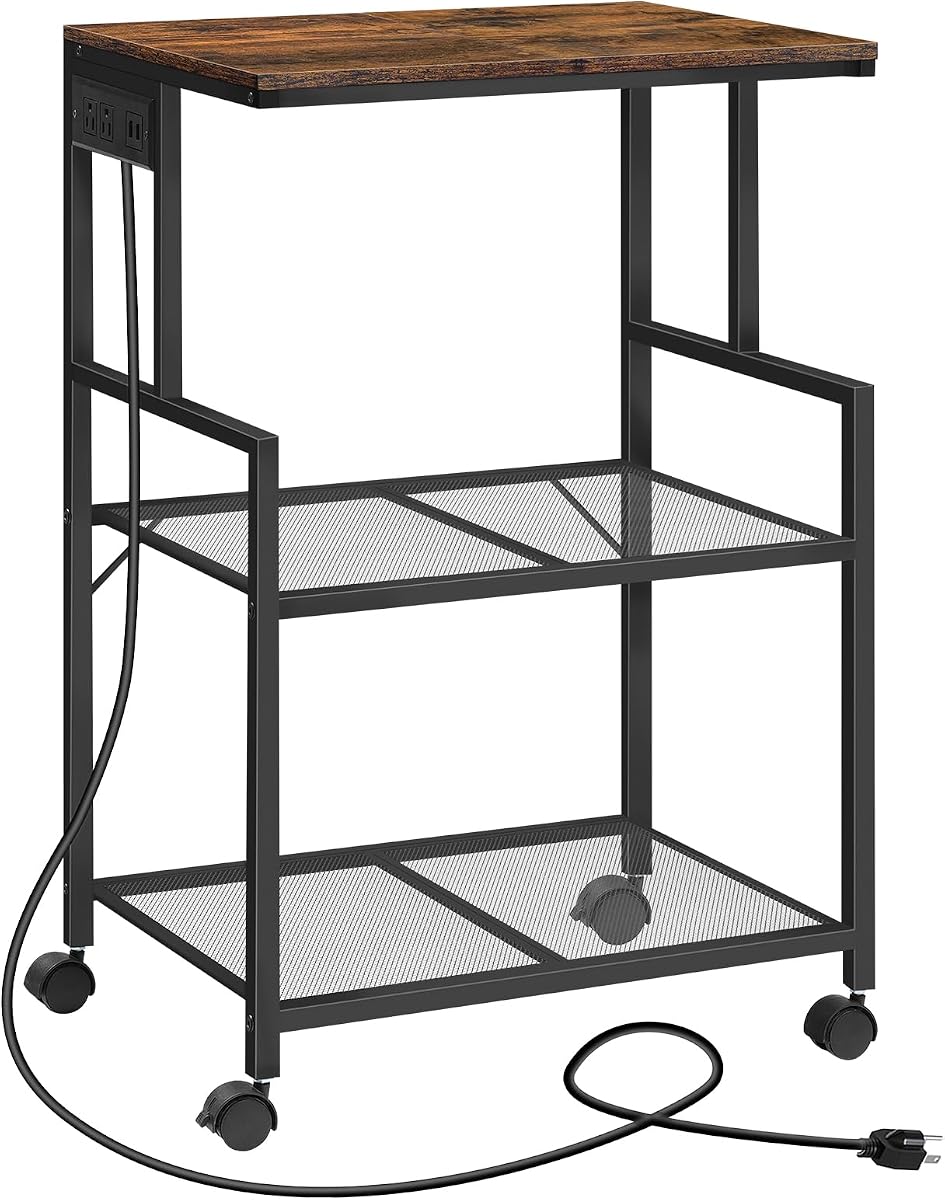
This MAHANCRIS unit features a practical power strip mounted under the top panel. This design keeps cords out of sight while providing easy access to outlets. The tall structure makes it suitable for use next to desks rather than under them.
We may earn a commission when you buy through this link, at no additional cost to you.
The anti tip device adds security which is important when storing heavy printers on top. Mesh shelves allow air circulation for electronics but offer less dust protection than solid shelves. The rustic brown finish complements many decor styles.
The height may be too tall for tight under desk spaces. Ensure your floor area is wide enough to accommodate the full width. It works well as a kitchen rack too due to the open shelves.
Buyers wanting a charging station with industrial aesthetics will like this model. It supports daily office tasks with reliable stability. Check cord length before finalizing placement in larger rooms.
Outlet location under the top panel keeps wires tidy and organized.
Anti tip device ensures stability when placing heavy equipment on the stand.
We may earn a commission when you buy through this link, at no additional cost to you.
Gewudraw delivers a compact stand that excels in weight capacity relative to its size. The sturdy metal frame ensures it won't wobble under heavy printers. Its low profile makes it perfect for tucking under low desks or beside sofas.
We may earn a commission when you buy through this link, at no additional cost to you.
Adjustable feet help level the stand on uneven floors which improves stability significantly. Non scratch pads protect flooring from scuffs which is vital for rental properties. Assembly is quick and tools are provided.
There is no secondary shelf so all storage is limited to the top surface. This simplifies the design but limits organization for supplies. It is best for users who prioritize stability over storage volume.
If you need a solid base for a heavy printer in a small room this is excellent. The build quality is impressive for the price point. Ensure you measure your clearance height carefully before buying.
Despite compact dimensions it supports heavy loads up to 120 lbs.
Feet can be adjusted to keep the stand stable on uneven surfaces.
We may earn a commission when you buy through this link, at no additional cost to you.
The CHOEZON stand offers a wide top that accommodates large printers and scanners with ease. The side X cross design adds rigidity to the frame preventing any flex. Users report high satisfaction with its stability and build.
We may earn a commission when you buy through this link, at no additional cost to you.
Lockable wheels ensure the cart stays in place during use while allowing mobility. Adjustable feet compensate for uneven floors which keeps the unit level. The simple design makes it easy to set up in minutes.
Lack of charging ports means you may need an extension cord nearby. The standard height works well for most desks but check your specific needs. It is a solid workhorse for high volume printing areas.
For those needing a wide stable surface this is a top contender. The sturdy construction justifies the rating among users. It provides a reliable base for heavy equipment without extra features.
Large top supports multiple devices or large paper stacks comfortably.
Cross supports on sides add rigidity to the metal frame.
We may earn a commission when you buy through this link, at no additional cost to you.
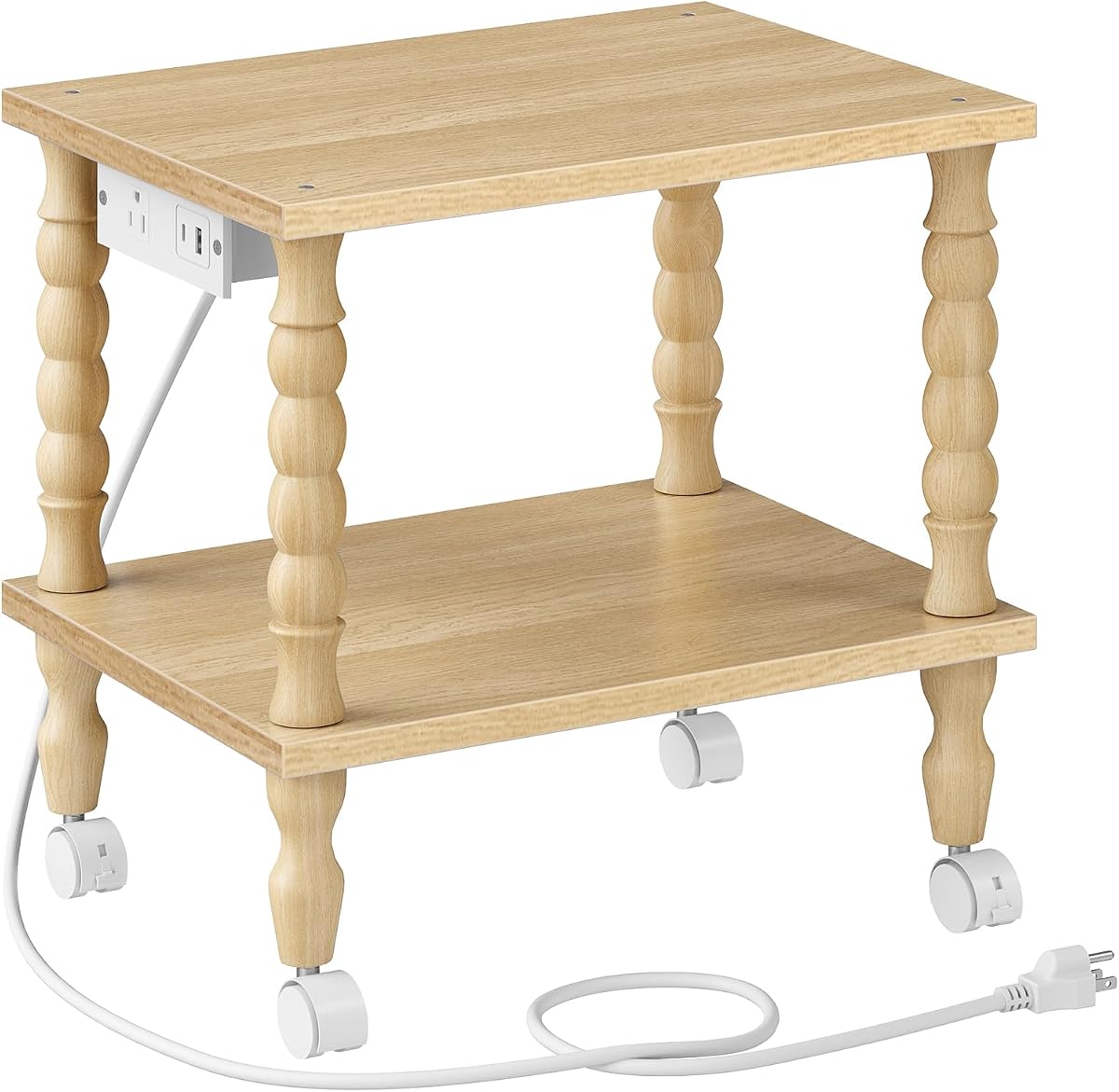
This HOOBRO model combines a classic look with practical charging features. Solid rubberwood legs provide a warm aesthetic that fits living rooms as well as offices. The power outlets make it easy to plug in devices immediately.
We may earn a commission when you buy through this link, at no additional cost to you.
The compact size allows it to slip under desks without taking up much space. The metal frame ensures durability while the wood accents add style. Users appreciate the ease of setup with labeled parts.
The wooden legs are fixed which limits mobility compared to wheeled options. Care should be taken to avoid water damage on the wood finish. It is best for stationary setups where style matters.
Buyers wanting a stylish solution that functions as a power hub will love this. The build quality is high and it looks great in modern homes. Consider placement to avoid water spills on the legs.
Rubberwood legs add a classic touch to a modern office setup.
Built in outlets allow easy charging of phones next to the printer.
We may earn a commission when you buy through this link, at no additional cost to you.
VASAGLE offers a reliable stand that supports a wide range of printers and supplies. The steel frame ensures longevity and the lower shelf holds paper reams efficiently. Most users find the build quality exceeds expectations for the cost.
We may earn a commission when you buy through this link, at no additional cost to you.
Locking wheels provide security for the unit while allowing mobility when needed. The assembly process is straightforward with clear tools and steps provided. It fits well under most standard desks.
The design is functional but not particularly styled for aesthetic focus. Cord management is standard so you may need to route cables separately. It is a practical choice for those prioritizing function.
For those seeking a durable and straightforward solution this is a strong pick. It balances price and performance better than many alternatives. Verify dimensions to ensure it fits your specific workspace.
Top shelf supports up to 99 lbs for heavy printers safely.
Steel frame ensures the stand remains stable over long term use.
We may earn a commission when you buy through this link, at no additional cost to you.
Selecting the right stand involves evaluating dimensions, materials, and features to ensure it fits your specific workspace and printer needs.
Measure the height and width of your printer and your desk clearance to ensure a proper fit. Under desk units typically range from 10 to 20 inches in height. Ensure the top surface is large enough to hold your device securely without overhanging.
Always check the total footprint of the cart to ensure it does not obstruct foot traffic in your room.
Check the maximum load rating for the top shelf to prevent the stand from bending or collapsing. Laser printers and all-in-one units are often heavier than compact inkjet models. Look for stands that explicitly state a weight limit exceeding your printer's actual weight.
A higher weight capacity ensures long-term stability and reduces the risk of tipping over.
Consider how much space you need for paper, ink cartridges, and office supplies. Some stands offer drawers while others provide open shelves. Drawers keep items hidden but may be shallow compared to open shelving units.
Choose a model with shelves that match your storage needs to keep your workspace tidy.
Decide if you need to move the printer frequently between rooms or desks. Casters allow for easy repositioning while fixed feet offer more stability. Look for locking wheels to prevent the cart from rolling unintentionally during use.
Rolling features are ideal for shared spaces or if you need to clear the floor often.
Some stands include built-in outlets or USB ports which can eliminate the need for power strips. This feature is useful if your workspace lacks nearby power sockets. Check if the included cord is long enough for your specific layout.
Integrated power solutions reduce cable clutter and make it easier to charge devices.
Metal frames generally offer better stability than plastic or particleboard constructions. Look for waterproof surfaces if you expect spills near the station. The combination of steel and MDF often provides a good balance of strength and cost.
Durable materials ensure the stand can support daily use without warping or breaking.
Check if tools are included and whether assembly requires significant effort. Pre-drilled holes and numbered parts make setup easier for everyone. Look for reviews that mention how long it took to build the unit.
A simple assembly process saves time and reduces frustration when setting up your new cart.
Consider the finish and color to ensure it matches your existing furniture. Rustic or industrial looks can blend well in home offices while sleek designs suit modern spaces. The visual appeal is important for long-term satisfaction.
Choose a style that complements your room decor to maintain a cohesive workspace look.
Once assembled ensure that all screws are tightened properly to maintain stability. Place the printer on the top shelf and check that it does not overhang the edges. Verify that the wheels are locked if you plan to keep the unit in one place.
Clean the surface regularly with a damp cloth to remove dust and debris. Avoid harsh chemicals that might damage the finish or scratch the material. Empty the storage drawers periodically to prevent clutter buildup.
If you need to move the unit remove heavy items from the shelves first to prevent tipping. Inspect the casters occasionally to ensure they roll smoothly without obstruction. Adjust the feet if you notice any wobbling on uneven floors.
Many of these models support weights well over 40 pounds. Check the specific weight rating for the top shelf to ensure it can handle your specific device. Steel and metal frames usually provide the best support for heavy office equipment.
Measure the vertical clearance under your desk and the width of the space. Compare these numbers to the height and width of the stand before buying. Ensure there is enough room for the printer to sit flat without hitting the desk top.
Most of the recommended models come with locking casters. This feature allows you to move the cart easily and then secure it in place. Always check the product details to confirm that the wheels have brakes.
Yes many of these carts are designed to fit living room decor. Some feature rustic finishes or open shelves that hold books and plants. The mobility feature makes it easy to move them for different events.
Many models include all necessary tools in the box. Some even offer tool free designs for simpler setup. Review the product description to see what tools are required before you start.
Open shelves allow easy access but may collect dust. Closed drawers hide supplies and protect them from view. Choose based on your preference for accessibility versus cleanliness.
We highlighted ten top choices for home office and living room setups in this guide. Each model offers unique features like storage drawers or power outlets to fit different needs. The top picks balance cost with functionality to deliver excellent value.
Prioritize weight capacity and dimensions to ensure the stand supports your printer safely. Consider mobility if you need to move the unit frequently. A sturdy frame will save you from stability issues over time.
Prices and availability can change so check the current status before buying. Verify that the dimensions fit your space to avoid returns. Investing in a reliable stand now will keep your workspace organized for years.