
Lenovo Smartcard Wired Keyboard II
4.4Editor score
Full-size layout with numeric keypad
Wired USB connection for reliability
Integrated smart card reader included
This guide compares the top ten keyboards with smart card readers for secure authentication and productivity, helping you find the best device for your needs.
Secure workstations often require specialized hardware to protect sensitive data and ensure authorized access. A keyboard with smart card reader integrates authentication directly into your typing interface, streamlining login processes and reducing security risks effectively.
We evaluated ten top-rated models based on compatibility, build quality, and reader standards. Our analysis considers ergonomic design, key feel, and certification levels to help you select a device that meets your specific security and comfort requirements today.
Each pick highlights unique features like spill resistance, ergonomic layouts, or TAA compliance for government use. Prices and availability may change frequently, so verify current details on the product pages before making your final purchasing decision online.
4.4Editor score
4.6Editor score

4.6Editor score
The following table provides a side-by-side comparison of all ten selected models. Use this overview to quickly identify key specifications and features that match your security and ergonomic needs.


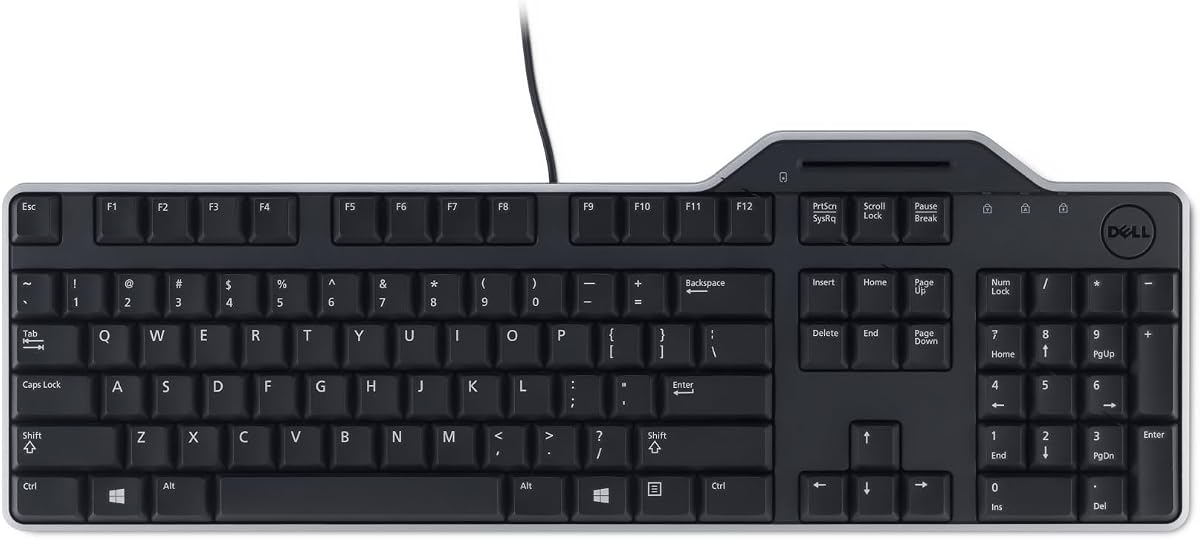
The Dell KB813 stands out as a top choice for secure workstations, earning a strong rating for its reliability. It integrates a smart card reader directly into a durable, spill-resistant design that protects your investment in busy office environments.
We may earn a commission when you buy through this link, at no additional cost to you.
Its ergonomic features include low-profile keys and a detachable palm rest, ensuring comfort during long typing sessions. The wired USB connection guarantees fast and secure data transfers without relying on batteries or wireless signals.
While it lacks advanced multimedia keys, the focus on security and durability makes trade-offs acceptable for professional settings. The sleek black design adds elegance to any workspace while maintaining functional simplicity for daily tasks.
Anyone needing a dependable keyboard with integrated authentication should prioritize this model for its balance of comfort and security. It remains a solid recommendation for businesses looking to standardize secure input devices across their fleets.
The built-in smartcard reader streamlines authentication for secure applications without extra hardware clutter.
Spill-resistant construction protects internal components from accidental liquid damage common in workspaces.
We may earn a commission when you buy through this link, at no additional cost to you.
The Adesso TruForm is ideal for government agencies needing TAA-compliant devices with secure authentication features. Its split ergonomic design encourages natural hand positioning, reducing strain during extended work hours effectively.
We may earn a commission when you buy through this link, at no additional cost to you.
Built-in smart card readers support multiple international standards including PC/SC and ISO7816, ensuring broad compatibility. The integrated palm rest and quiet membrane keys enhance comfort while maintaining a professional office atmosphere.
The split layout and hotkeys offer functionality but require desk space and adaptation time for new users. These features justify the cost for organizations prioritizing ergonomics and regulatory compliance over budget constraints.
Government contractors and security-focused professionals will find this keyboard aligns well with strict procurement and usability requirements. It is a robust choice for environments demanding both security and physical comfort standards.
TAA compliance ensures eligibility for U.S. government contracts and federal agency sourcing requirements.
Split zones and sloped shape help reduce wrist strain and improve posture during daily typing.
We may earn a commission when you buy through this link, at no additional cost to you.
The Cherry KC 1000 delivers certified security features at a competitive price point for enterprise users. Its FIPS 201 approval and secure PIN entry provide trusted authentication for accessing protected systems reliably.
We may earn a commission when you buy through this link, at no additional cost to you.
Thin design and driver support for Windows, macOS, and Linux make it versatile across different operating environments. The low contacting unit and one-handed operation improve accessibility and workflow efficiency in secure settings.
While it lacks modern aesthetics, the focus on protocol compliance ensures it meets strict security regulations for sensitive data. The trade-off in design is negligible compared to the robust security protocols it supports effectively.
Security-conscious organizations and IT departments should consider this keyboard for standardized secure access across mixed systems. It remains a reliable option for environments where compliance outweighs cosmetic or extra feature preferences.
FIPS 201 and EMV approvals ensure the device meets rigorous government and financial security standards.
Drivers available for major platforms ensure broad compatibility without additional software installation efforts.
We may earn a commission when you buy through this link, at no additional cost to you.
The Adesso EasyTouch 130SB combines mechanical precision with integrated smart card security for high-performance workstations. Red switches provide quiet tactile feedback rated for 50 million keystrokes, ensuring durability in intensive office environments.
We may earn a commission when you buy through this link, at no additional cost to you.
Unique features include a Copilot AI hotkey for instant access to coding assistance and large print keycaps for better visibility. This layout supports accessibility needs while maintaining robust authentication via built-in reader standards.
The mechanical nature adds weight and height compared to membrane options, which might impact portability or desk space. However, the enhanced durability and AI productivity tools make these trade-offs worthwhile for power users seeking efficiency.
Professionals needing durable hardware with AI tools should choose this model for its blend of comfort and performance. It serves well in modern workspaces where typing speed and secure login processes are equally important priorities.
Switches rated for 50 million keystrokes ensure long-term reliability even in high-frequency typing environments.
Copilot hotkey allows direct access to AI tools without navigating menus, streamlining creative workflows.
We may earn a commission when you buy through this link, at no additional cost to you.
The Dell Keyboard Smartcard USB offers reliable performance with essential security and comfort features at a low cost. Its wired USB connection ensures stable data transfer while eliminating the need for battery replacements over time.
We may earn a commission when you buy through this link, at no additional cost to you.
Features like spill resistance and a detachable palm rest protect against common office accidents and improve typing posture. The quiet keys minimize distractions, making it suitable for shared or collaborative work environments effectively.
It lacks advanced multimedia controls but focuses on core functions that meet everyday professional needs efficiently. The balance of security and comfort without extra complexity makes it a practical choice for standard deployments.
Budget-conscious buyers prioritizing stability should consider this model for secure typing without unnecessary add-ons. It remains a solid recommendation for workstations needing dependable hardware with basic security integration features.
Wired USB connectivity removes the need for batteries, ensuring consistent operation without interruptions.
Spill-resistant construction safeguards internal circuits from liquid damage common in office settings.
We may earn a commission when you buy through this link, at no additional cost to you.
The Kensington KB201C is built for federal institutions requiring TAA-compliant devices with robust security certifications. Its full-size layout and numeric keypad enhance productivity while maintaining secure access through a reliable CAC reader.
We may earn a commission when you buy through this link, at no additional cost to you.
The quiet-click design minimizes noise in shared spaces, and a three-year warranty provides peace of mind. Cross-platform compatibility with Windows, macOS, and ChromeOS ensures broad usability across different operating systems.
While ratings vary, the compliance features and warranty coverage make it a standard choice for regulated procurement needs. The lower rating may reflect specific usage contexts rather than functional deficiencies in core security capabilities.
Government IT managers needing certified hardware should prioritize this model for its adherence to federal security sourcing guidelines. It offers a secure and reliable solution for public sector deployment with long-term support.
TAA compliance and FIPS certification ensure eligibility for US Federal government contracts and procurement.
A three-year limited warranty covers defects and provides long-term reliability for institutional deployments.
We may earn a commission when you buy through this link, at no additional cost to you.
The Lenovo Smartcard Wired Keyboard II offers straightforward functionality with compact dimensions suitable for smaller desks. Its wired USB connection ensures stable performance without battery dependency, making it reliable for daily use.
We may earn a commission when you buy through this link, at no additional cost to you.
While detailed specs are minimal, the integration of a smart card reader supports essential authentication needs effectively. The package dimensions suggest a footprint that fits well in constrained workspaces or portable setups.
Basic construction and limited feature lists may not satisfy power users but serve standard office tasks adequately. The balance of size and security makes it a practical choice where space is a primary constraint.
Organizations needing space-efficient secure peripherals should consider this model for streamlined desk setups. It remains a viable option for workstations where compactness is valued alongside standard input capabilities.
Compact packaging and dimensions allow it to fit well in smaller office desks or limited workspace.
Wired USB connection ensures consistent power and data transfer without relying on wireless signals.
We may earn a commission when you buy through this link, at no additional cost to you.
The HP USB Business Slim focuses on essential business features with a slim profile and built-in spill drain. Its membrane switches offer a quiet typing experience while maintaining reliable connectivity through a standard cable interface.
We may earn a commission when you buy through this link, at no additional cost to you.
LED indicators and spill protection add practical value for daily office tasks in shared environments. The 104-key layout ensures all standard keys are available without unnecessary bulk on the desk surface.
While it lacks advanced customization, the focus on durability and basic functionality makes it suitable for standard users. The slim design may reduce stability compared to heavier boards but saves significant desk space effectively.
Users needing a quiet and clean keyboard for basic tasks should find this model meets their requirements well. It remains a practical choice for environments where spill resistance and low noise are priorities.
Built-in spill drain routes liquid away from internal components to prevent damage during accidents.
Membrane switches provide a low-profile and quiet typing experience suitable for open office settings.
We may earn a commission when you buy through this link, at no additional cost to you.
The Cherry Secure Board 1.0 is an intelligent security keyboard with integrated NFC readers for tags and cards. Its secure mode with authentication and encryption makes it ideal for thin clients and high-security environments.
We may earn a commission when you buy through this link, at no additional cost to you.
Support for ISO 7816 and ISO 14443 A/B ensures compatibility with a wide range of secure cards and protocols. GS Approval certification provides additional trust for professional and government-grade deployments worldwide.
While specialized, the device excels in protecting data through its encryption features and secure reader integration. The cost and complexity are justified by the level of protection it offers for sensitive systems.
Security-focused IT teams handling sensitive data should consider this model for its advanced encryption capabilities. It is a premium choice for environments where standard authentication is insufficient for security protocols.
Secure mode ensures encrypted authentication for protecting sensitive data in thin client environments.
Support for ISO 14443 and 7816 allows use with various NFC and chip card types.
We may earn a commission when you buy through this link, at no additional cost to you.
The NEW OEM Dell KB813t provides a fresh unopened option for Dell systems needing a secure keyboard. It features an integrated smart card reader and USB connectivity similar to the standard KB813 model.
We may earn a commission when you buy through this link, at no additional cost to you.
Being an OEM product ensures it matches original system standards and compatibility for enterprise environments. The English layout supports common typing needs, and the sealed packaging indicates it has not been used.
While specific specs may vary slightly from newer models, it remains a reliable choice for replacements. Buyers should verify compatibility with their specific Dell hardware before purchase to ensure fit and function.
Organizations needing immediate replacements or bulk purchases of secure keyboards should consider this OEM option. It offers a straightforward solution for restoring secure input capabilities without unnecessary feature bloat.
As an OEM product, it matches original system specifications for reliability and integration with Dell hardware.
Unopened packaging ensures the product is new and unused, providing confidence for immediate deployment.
We may earn a commission when you buy through this link, at no additional cost to you.
Selecting the right keyboard involves considering compatibility, build quality, and security certifications that match your organizational needs.
Look for devices that carry relevant security certifications like FIPS 201 or EMV approvals if your industry demands strict compliance. These standards ensure the hardware meets government or financial sector requirements for secure authentication.
Verify that the product supports PC/SC and CCID protocols to ensure smooth driver installation across operating systems.
Choose keyboards with detachable palm rests or split layouts if you type for long hours to reduce wrist strain. A comfortable design prevents repetitive stress injuries and improves overall productivity in office environments.
Prioritize models with quiet switches if you work in shared or open-plan offices to minimize noise disruption.
Invest in keyboards with spill-resistant designs or built-in drains to protect against accidental liquid damage in daily use. Mechanical switches often offer longer lifespans compared to standard membrane options for high-frequency typing.
Check warranty terms to ensure you have coverage for potential hardware failures over the device's lifespan.
Ensure the keyboard works seamlessly with your existing operating systems and security infrastructure without needing complex drivers. USB connectivity is generally reliable for stable data transfer compared to wireless alternatives in secure setups.
Confirm that the smart card reader supports the specific card types you use, such as CAC or PIV cards, to avoid integration issues.
If you operate in government or federal sectors, TAA compliance is essential for meeting sourcing and quality requirements. Devices lacking this certification may not be eligible for certain procurement contracts or federal agencies.
Look for explicit TAA labeling on product specifications to ensure eligibility for restricted government procurement.
Full-size layouts with numeric keypads are necessary for users working with numbers frequently to maintain productivity. Consider large print keycaps if visibility is a concern in low-light conditions or for users with visual needs.
Check for dedicated multimedia or AI hotkeys if your workflow requires quick access to specific functions or assistants.
Evaluate the materials used for keycaps and the casing to ensure they withstand daily wear in professional settings. High-quality builds often last longer and resist dust or debris accumulation over time more effectively.
Consider the weight and footprint of the device to ensure it fits comfortably on your desk without shifting during use.
Connect the keyboard to your computer using the provided USB cable and allow your operating system to install necessary drivers automatically. Once recognized, insert your smart card into the integrated reader slot to begin authentication processes.
Clean the keys and reader slot regularly using a soft, lint-free cloth to remove dust and prevent debris buildup that could interfere with functionality. Avoid using harsh chemicals or liquids directly on the device to protect internal components.
Store the keyboard in a cool, dry place when not in use to prevent heat or moisture damage to the electronics. Ensure the smart card remains inserted or stored securely to prevent loss or unauthorized access during breaks.
Not all models support every card type universally, so you must verify compatibility with your specific cards such as CAC or PIV. Most business-grade keyboards support ISO 7816 and PC/SC standards widely used in secure environments.
Most feature spill-resistant designs rather than full waterproof ratings, meaning they can handle minor accidents but not submersion. Always check for specific ratings or built-in drainage features to protect against liquid damage effectively.
Yes, many models include drivers compatible with macOS alongside Windows and Linux to ensure cross-platform functionality. Always download the latest drivers from the manufacturer to ensure full feature support on your system.
TAA compliance means the product meets U.S. Trade Agreement Act specifications for government procurement and federal agency use. It is essential for businesses and organizations contracting with the U.S. government for secure hardware.
High-quality models often boast lifecycles of 50 million keystrokes or more, ensuring durability even with intensive daily use. Proper care and avoiding harsh spills will further extend the device's operational lifespan significantly.
No, these keyboards typically use a wired USB connection for power which eliminates the need for batteries. This ensures continuous operation without interruptions caused by low battery levels or replacement requirements.
The Dell KB813 and Adesso TruForm stand out as top choices for balancing security with ergonomic comfort and compliance features. Selecting the right model depends heavily on your specific needs regarding certification and daily usage environments.
Prioritize devices that offer the necessary security standards and durability features to protect sensitive data effectively. Investing in a reliable keyboard ensures secure access and comfort for your team across various workflows.
Prices and availability change frequently so checking current listings on vendor pages will help you get the best deal. Verify your requirements against the selected model to ensure it fits your security and operational needs perfectly.