
Game Console Cooling Fan Efficient Heat
3.9Editor score
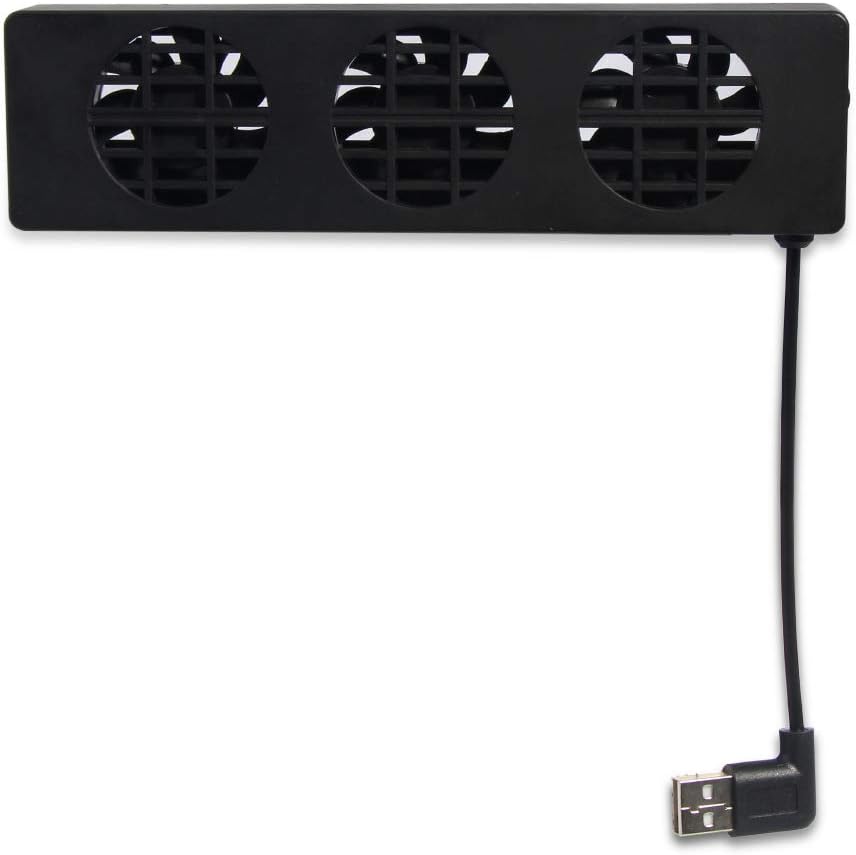
3000RPM turbo fan speed
Compact space-saving design
Simple USB power supply
Compare top cooling fan Nintendo Switch dock accessories for heat dissipation, noise levels, and dock compatibility in our detailed expert guide.
Keeping your console cool during extended gaming sessions is essential for performance and longevity. A dedicated cooling fan for the Switch dock helps prevent overheating and ensures smooth gameplay.
We analyzed ten top-rated accessories designed to improve airflow and temperature control. Our comparison covers features like fan speed, noise levels, and specific dock compatibility.
Each pick highlights key benefits and potential trade-offs to help you decide. Prices and availability may change, so verify details before purchasing your next accessory.
3.9Editor score

4.6Editor score

4.4Editor score
This side-by-side comparison lists all ten top-rated cooling fans to help you find the perfect match for your specific Switch dock model and gaming needs.




This top rated cooler stands out for its digital display that shows real time temperature and fan speed. It offers excellent protection against overheating for Switch 1 and 2 models.
We may earn a commission when you buy through this link, at no additional cost to you.
The adjustable speed lets you balance cooling power and noise. Under 2400 RPM it is nearly silent. The fixed pad ensures stability between the console and the dock base.
While the high speed setting generates some noise, it is necessary for maximum heat dissipation. The included joystick caps and anti-slip sponge add value to the package.
Ideal for serious gamers who want visibility into their system temperature. The LED display and stable fit make it a reliable choice for long sessions.
The digital LED display shows the current air temperature exiting the console in degrees celsius.
Insert the fixed pad between the Switch and the docking console base to stabilize the cooling fan securely.
We may earn a commission when you buy through this link, at no additional cost to you.
This cooler provides strong ventilation using three built-in fans. It lowers console temperature fast and is designed to fit the original dock seamlessly.
We may earn a commission when you buy through this link, at no additional cost to you.
The turbo and normal options let you choose performance or quiet. You just insert it onto the back of the dock and connect to the USB port for power.
The compact design keeps your setup tidy but the fans can be audible under load. It effectively prevents overheating malfunctions during intense gaming.
Recommended for owners of the original dock needing extra cooling power. Its straightforward design ensures quick setup for immediate heat dissipation.
Built-in 3 cooling fans provide strong ventilation performance to lower Switch console temperature fast and effectively.
Simply insert the product on the back of the original dock and connect to the dock USB port for power supply.
We may earn a commission when you buy through this link, at no additional cost to you.
Designed specifically for the Switch 2 charging dock this cooler combines active cooling with storage and charging features. It fits neatly into the dock design.
We may earn a commission when you buy through this link, at no additional cost to you.
The dual fans and 3 stage adjustment ensure stable performance. You get 6 card slots to access games quickly plus 3 USB ports to charge accessories.
The RGB lights add visual flair but can be turned off. The auto start feature ensures cooling begins as soon as you connect the console.
Best for Switch 2 users wanting an all-in-one station. The extra ports and card slots make it highly functional beyond just heat dissipation.
Equipped with 6 game card slots allowing you to insert game cards and aim for the game card at a glance.
Equipped with 2 USB-A output ports and 1 USB-C output port to easily connect and charge controllers and other accessories.
We may earn a commission when you buy through this link, at no additional cost to you.
This replacement cooler is built specifically for the 2021 OLED dock model HEG-007. It offers a seamless fit and a cool blue light aesthetic.
We may earn a commission when you buy through this link, at no additional cost to you.
The super turbo fans blow inwards to speed up air circulation directly onto the base surface. It effectively dissipates heat even during intense gameplay.
The 14 game card slots are very convenient for storing frequently played titles. The hard ABS shell makes it durable while remaining lightweight.
Ideal for OLED owners who want a tailored solution with storage. The precise fit ensures reliable cooling and the light adds a nice touch.
There are 14 game card slots on the top of the fan which can store the game cards you often use.
Following the design of the back cover of the official Switch OLED base it is easy to install and fits perfectly.
We may earn a commission when you buy through this link, at no additional cost to you.
This white cooler is designed for the SWITCH OLED MODEL base. It connects via the original power adapter header to the TYPE-C input port for power.
We may earn a commission when you buy through this link, at no additional cost to you.
The single high speed fan speeds up air circulation inside the base to achieve heat dissipation. The blue LED lighting effect matches the fan operation.
Installation is straightforward and the switch turns the fan on or off easily. The lighting effect also synchronizes so it looks clean on your setup.
Recommended for those who prefer a simpler solution with a clean look. It ensures your OLED stays cool and maintains its stylish white aesthetic.
Press the switch to turn on or off the fan and the lighting effect is also synchronized on or off.
This product base radiator has an adapter TYPE-C power supply cable which can be connected to the SWITCH OLED MODEL base.
We may earn a commission when you buy through this link, at no additional cost to you.
This super turbo fan accelerates airflow instantly to cool the dock for better heat dissipation. It is designed to keep your OLED running smoothly.
We may earn a commission when you buy through this link, at no additional cost to you.
The 3000R/min fan quickly cools your console during intense gameplay sessions. It is compact so your gaming setup stays tidy and does not clutter the space.
Power comes directly from the USB port on your OLED station which is simple to use. The white color and blue LED light match the OLED aesthetic.
Great for anyone needing quick cooling at a low cost. Its straightforward USB plug-in nature makes it an accessible upgrade for your station.
Enjoy hours of gaming with the 3000r/min fan that quickly cools your console ensuring optimal performance.
Simply plug the cooling fan into the USB port of your OLED docking station to keep your system cool.
We may earn a commission when you buy through this link, at no additional cost to you.
This bracket style base is equipped with three cooling fans inside to effectively dissipate heat. It keeps the console cool when gaming for long periods.
We may earn a commission when you buy through this link, at no additional cost to you.
There is a switch at the side of the cooler allowing you to adjust speed between turbo and normal. It is small and easy to set up.
The compact design ensures it does not take up much space. It is made from superior material so it is durable for regular use.
Good for console owners wanting multiple fans in a compact frame. The simple speed control lets you tailor performance to your session.
Equipped with 3 cooling fans inside it effectively dissipate heat and keep the console cool when gaming.
There is a switch at the side of the cooler you can adjust the cooling speed or turn it off.
We may earn a commission when you buy through this link, at no additional cost to you.
Built-in 3 cooling fans provide powerful ventilation to reduce game console temperature quickly. It increases airflow to the console for easy heat exchange.
We may earn a commission when you buy through this link, at no additional cost to you.
The Turbo Normal Off switch suits different needs like normal for decent games and turbo for heavy ones. It adopts power supply from one USB port so no extra is needed.
Inserting it onto the back of the dock is straightforward. The USB port drive makes it easy to carry and store when not in use.
Solid choice for extending the lifespan of your host through better airflow. The turbo mode ensures you have extra power during long sessions.
Built-in 3 cooling fans provide more powerful ventilation easy to reduce the game console temperature quickly and effectively.
It is driven via the USB port on the dock. Easy to insert and store with its size and shape.
We may earn a commission when you buy through this link, at no additional cost to you.
This cooler fits perfectly with the Switch original dock station and helps avoid unexpected pauses from overheating. It lowers operating temperature significantly.
We may earn a commission when you buy through this link, at no additional cost to you.
Equipped with LED display to show real-time fan speed RPM and exhaust temperature clearly. Support speed adjustment from 510RPM to 6000RPM to meet different needs.
Running nearly silent below 2400RPM balances performance and noise. The package includes a fixed stabilizer pad and joystick caps for stable placement.
Ideal for those who want detailed control over cooling intensity. The adjustable speed and clear display make it a flexible choice for daily use.
Support speed adjustment from 510RPM to 6000RPM to meet different heat dissipation needs.
Package includes fixed stabilizer pad. The sponge pad is anti-slip and can prevent the console from being scratched.
We may earn a commission when you buy through this link, at no additional cost to you.
This unit is designed as a cooling fan for the Switch OLED Model dock. It provides a black finish that complements modern console aesthetics.
We may earn a commission when you buy through this link, at no additional cost to you.
As an attachment unit it aims to improve heat dissipation effectively. Its design is tailored to fit the specific dimensions of the OLED station.
The black color adds a sleek look to your setup. It is compact and fits well without obstructing cables or ventilation paths.
Great for import enthusiasts wanting specialized gear. Its design ensures compatibility and helps maintain optimal console temperatures during use.
Designed specifically for the Switch OLED Model dock this cooling fan unit improves airflow effectively.
Features a stylish black finish that matches modern console aesthetics and complements your setup.
We may earn a commission when you buy through this link, at no additional cost to you.
Choosing the right dock cooler involves balancing airflow, noise, and compatibility. Use these factors to select a model that fits your needs.
Look for fans with adjustable speeds or turbo modes. Higher RPM provides better cooling but may increase noise. Turbo modes are great for intensive sessions.
Prioritize models that balance strong airflow with silence at lower speeds.
Ensure the fan matches your specific dock type. Some fit the original model while others target OLED or the new Switch 2. Precise fit prevents wobble.
Always check the product title for compatibility with HEG-007 or similar dock codes.
Most coolers use USB or Micro USB power from the dock. This keeps your setup cable-free. Check if your dock has a free port available.
Avoid units that require external power bricks unless necessary for performance.
Quiet fans are essential for immersive play. Some units are silent below 2400 RPM. Look for reviews mentioning fan spinning sounds.
Consider your room size. Larger spaces can absorb more noise than small rooms.
Some models show real-time temperature and RPM. This data helps you monitor heat levels. It adds transparency to the cooling process.
If you care about temperature tracking choose a unit with an LED display.
Durable plastics like ABS ensure longevity. Check for anti-slip pads that prevent scratches on your console. Stability prevents accidental falls.
Sturdy builds also protect internal components from vibration.
Extra features like card slots or USB ports add value. RGB lighting can enhance aesthetics but may distract during play. Choose based on utility.
Avoid features you will not use to keep the unit simple.
Look for warranties like lifetime coverage or quick 24-hour support. Good service ensures you can resolve issues quickly. It adds peace of mind.
Check the store ratings before purchasing the unit.
Attach the cooling fan to the back of your dock using the provided slot or pad. Ensure it is stable and aligned with the ventilation vents.
Connect the USB or Micro USB cable to the dock power port. Turn on the fan and adjust the speed to your preferred noise level.
Clean the fan blades regularly to remove dust buildup. Dust reduces airflow and cooling efficiency. Use a soft brush or compressed air.
No you do not need to turn it off. The fan helps prevent overheating during gameplay. Most units are designed to run continuously while docked.
High quality models fit precisely and do not block ports. Check the specs to ensure all ports remain accessible for controllers and cables.
Check the product title for specific model codes like HEG-007. If unsure compare your dock shape to the images provided in the listing.
It is optional but useful for monitoring temperature. If you do not track heat numbers you can choose a model without it to save cost.
Yes many units specifically support the OLED dock. Ensure you buy the version labeled for OLED to guarantee a proper fit and performance.
No the fan draws power from the dock via USB. It does not draw from the internal battery so your console charges normally.
Normal mode runs slower for lower noise. Turbo mode runs at higher RPM for maximum cooling. Use Turbo for heavy games and Normal for quiet sessions.
Our top picks range from simple units to feature rich stands. Each option addresses overheating with different levels of control and design.
Prioritize compatibility and noise levels when shopping. A well fitting cooler will last longer and integrate better with your entertainment setup.
Prices and stock change quickly so verify current details before you buy. Choose the model that best balances your budget and performance needs.