
Akai Professional LPK25
4.7Editor score
Responsive mini keys
Built-in arpeggiator
USB powered plug and play
Explore the top 25 key MIDI controllers for music production. We compare features, compatibility, and performance to help you choose the perfect controller
Finding the right 25 key MIDI controller can transform your music production workflow significantly. These compact devices offer portability without sacrificing essential controls for synthesis and sampling. Whether you are a beginner or a professional, having expressive tools matters greatly for creative output.
We evaluated ten leading models based on key response, integration capabilities, and overall build quality. Our analysis focuses on how well each unit handles modern software instruments and digital audio workstations. This ensures you get a controller that fits seamlessly into your existing setup.
Each selection highlights unique strengths tailored to specific production needs and budget ranges. You will find detailed breakdowns of controls, connectivity options, and included software bundles. Please note that product availability and pricing may change frequently over time.
4.7Editor score

4.6Editor score

4.6Editor score
This side-by-side comparison highlights the distinct features and strengths of each controller to help you make an informed decision quickly.



The Akai Professional MPK Mini MK3 stands out as a top contender in the compact controller market. Its high rating reflects consistent user satisfaction regarding its responsive mini keys and robust feature set. This unit is perfect for musicians needing reliable performance in a small package.
We may earn a commission when you buy through this link, at no additional cost to you.
Its standout strengths include the innovative 4-way thumbstick for pitch and modulation, offering precise control over your sound. The 8 backlit MPC-style pads are velocity-sensitive and ideal for programming drums or triggering samples. Additionally, the inclusion of MPC Beats and virtual instruments provides immediate value.
Trade-offs exist, such as the mini keys which may feel cramped for players used to full-sized keys. However, the compact form factor is intentional for portability. The lack of USB-C is a minor concern given its USB connectivity and widespread driver support.
This controller is best suited for producers seeking a versatile tool for beat-making and studio work. Whether you are on a budget or looking for an upgrade, it delivers professional capabilities. We recommend it for anyone wanting a complete music production starter kit.
The 4-way thumbstick allows for real-time pitch bending and modulation without lifting your hands from the board.
Native Kontrol Standard support ensures seamless compatibility with Native Instruments libraries and plugins.
We may earn a commission when you buy through this link, at no additional cost to you.
The Akai Professional LPK25 is an excellent entry-level option designed for songwriting and portable performance. Its impressive rating highlights its simplicity and effectiveness for creating melodies on the go. This controller focuses on core needs without unnecessary complexity or cost.
We may earn a commission when you buy through this link, at no additional cost to you.
Key features include responsive mini keys that allow for expressive playing despite their size. The built-in arpeggiator and clock enable creative control over sound sources with just a USB cable. Dedicated octave buttons and a sustain button add versatility for live or studio sessions.
While it lacks advanced inputs like MIDI ports, this keeps the unit streamlined and budget-friendly. The plastic build is functional but not rugged for heavy touring. For casual users or those starting out, these limitations are often negligible.
We recommend this for students or hobbyists wanting a simple tool for composing ideas. It integrates well with popular DAWs like Logic and Ableton. If you prioritize affordability and ease of use, the LPK25 is a solid choice.
The arpeggiator helps generate complex patterns quickly, enhancing your creativity without needing advanced theory knowledge.
Universal compatibility with Mac and PC means you can start creating music immediately after plugging in.
We may earn a commission when you buy through this link, at no additional cost to you.
The Novation Launchkey Mini 25 MK4 delivers premium features suitable for serious producers. Its high rating reflects strong performance in studio environments where precision matters. This controller is built for users who demand detailed control over their virtual instruments.
We may earn a commission when you buy through this link, at no additional cost to you.
Notable strengths include the 16 responsive FSR pads which support polyphonic aftertouch for expressive drumming. The Scale Mode ensures you never hit a wrong note, making it accessible yet powerful. Seamless integration with major DAWs like Ableton Live streamlines your workflow significantly.
The higher cost compared to budget models reflects the superior build quality and advanced feature set. Some users may find the depth of integration requires time to master fully. However, these tools provide significant long-term value for professional output.
This unit is ideal for producers working primarily within software environments. If you value tactile feedback and seamless software mapping, this controller excels. We recommend it for those looking to elevate their production capabilities with top-tier hardware.
Polyphonic aftertouch on the pads allows for nuanced expression while drumming or triggering samples.
Scale Mode locks keys to a specific scale, helping you compose melodies without music theory hurdles.
We may earn a commission when you buy through this link, at no additional cost to you.
The Arturia MiniLab 3 adapts to your unique style, ensuring a fluid creative experience. Its strong rating underscores user satisfaction with its responsive keys and intuitive interface. This controller is designed to minimize mouse interaction and maximize hands-on control.
We may earn a commission when you buy through this link, at no additional cost to you.
Features like the 8 programmable pads and 4 faders allow for dynamic mixing and track control. The velocity-sensitive keys respond well to touch, making composition feel natural and engaging. Arturia's software provides deep customization options for mapping and presets.
Users might find the initial setup of mapping slightly time-consuming compared to simpler models. The price reflects the premium build and advanced features offered. For those willing to invest time in setup, the payoff in workflow efficiency is significant.
We recommend this for users who prioritize customization and a unique design. It suits producers wanting a controller that feels like an extension of their creative flow. If you value aesthetics and functionality, the MiniLab 3 is a compelling choice.
Pads and knobs can be remapped easily, allowing you to tailor the device to your specific DAW needs.
The included 4 faders provide volume control and automation capabilities without reaching for a mouse.
We may earn a commission when you buy through this link, at no additional cost to you.
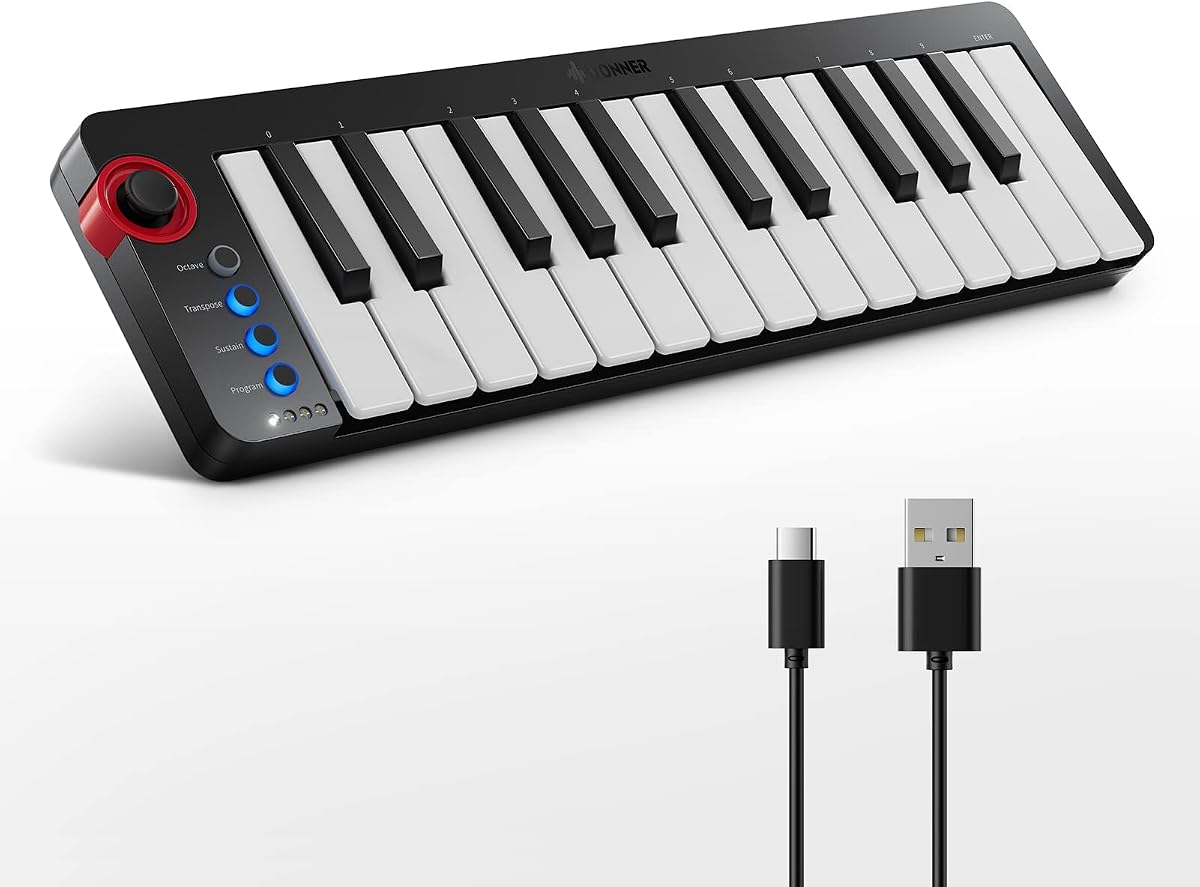
The Donner N-25 is designed to be a companion for beginners eager to start creating music. Its accessible price point makes it a popular gift for those new to production. The controller focuses on essential controls to encourage exploration and learning.
We may earn a commission when you buy through this link, at no additional cost to you.
Key strengths include the 40 entertaining keyboard-teaching courses which help novices grasp arrangement basics. The light-up buttons and pitch-bend wheel add a fun visual and expressive element to your performance. Compatibility with various DAWs ensures you can use it with popular software immediately.
The build quality is functional but may not withstand heavy use compared to professional models. Advanced users might find the feature set too basic for complex workflows. For learners, however, these trade-offs are minor given the educational focus.
We recommend this for students or hobbyists wanting an affordable starting point. It is excellent for casual use or teaching basic concepts. If you value education and affordability, the N-25 provides a great entry into MIDI control.
The included 40 lessons cover essential music arrangement tips, helping you learn as you play.
Light-up buttons provide visual cues during playback, making the experience more engaging and intuitive.
We may earn a commission when you buy through this link, at no additional cost to you.
The Rhymo 25-key portable MIDI keyboard offers a slim design for on-the-go music production. It focuses on convenience with USB-C power and Bluetooth MIDI support. This makes it an ideal choice for travelers or those with limited workspace.
We may earn a commission when you buy through this link, at no additional cost to you.
Its standout features include the X-Y joystick for pitch bend and modulation, adding expressiveness to a small unit. The loop function and arpeggiator allow for creative control without needing a computer. Class-compliant USB-MIDI ensures wide compatibility with Mac, PC, and iOS.
The build quality feels lightweight, which may not satisfy users looking for a rugged studio controller. Software support is minimal compared to major brands. However, for quick sketching ideas while traveling, it performs admirably.
We recommend this for musicians prioritizing portability and modern connectivity. It suits digital nomads or casual creators. If you need a backup controller that fits easily in a bag, this is a practical option.
Bluetooth MIDI support allows wireless connection to tablets or smartphones for mobile production setups.
The X-Y joystick provides dynamic pitch and modulation control, adding depth to your performances.
We may earn a commission when you buy through this link, at no additional cost to you.
The M-VAVE 25 Key USB MIDI Controller stands out for its true wireless functionality. With Bluetooth connectivity, you can compose in any location without cable restrictions. This feature appeals to users who value flexibility and mobility.
We may earn a commission when you buy through this link, at no additional cost to you.
Key strengths include the 16-hour battery life which supports extended sessions. The semi-weighted keybed offers a more substantial feel than typical mini keys. Smart chord features and 8 RGB backlit pads enhance the creative possibilities for beat making.
Users may experience occasional connectivity issues requiring pairing resets. The build quality is cost-effective but may not feel premium. For the price and wireless capability, these issues are generally acceptable for casual use.
We recommend this for bedroom producers who want freedom from wires. It is great for recording in different rooms without unplugging. If you prioritize wireless convenience over ruggedness, this controller offers excellent value.
The 2,000 mAh battery provides about 16 hours of continuous use for long recording sessions.
Smart chord functions allow users to play complex chords quickly by choosing keys and letting the controller handle the rest.
We may earn a commission when you buy through this link, at no additional cost to you.
The Akai Professional MPK Mini Play MK3 offers a unique standalone experience for musicians. It allows you to create music without a computer thanks to built-in sounds and a speaker. This makes it perfect for practice or on-the-go inspiration.
We may earn a commission when you buy through this link, at no additional cost to you.
Its standout features include the OLED display and internal instrument sounds like pianos and synths. The inclusion of MPC Beats and educational software provides a complete ecosystem for creativity. Battery operation ensures you can play anywhere without a power outlet.
When connected to a DAW, some functionality is limited compared to the standard MK3. The speaker is useful but not loud enough for performance. However, for standalone creation, it offers a versatile and engaging experience.
We recommend this for casual musicians who want to compose anywhere. It is ideal for sketching ideas before transferring to a studio. If you value a standalone capability, this is a unique option in the market.
You can compose beats and melodies directly on the unit without needing a laptop or desktop.
Included Melodics software download includes 60 free lessons to help improve your skills quickly.
We may earn a commission when you buy through this link, at no additional cost to you.
The Akai Professional MPK Mini MK3 in Black offers the same robust functionality as its white counterpart. It is designed for producers who want a sleek, modern look for their studio setup. The features remain consistent with the flagship model, ensuring performance.
We may earn a commission when you buy through this link, at no additional cost to you.
Key strengths include the 8 backlit pads and 4-way thumbstick for precise control. The inclusion of Komplete Select bundles adds significant value for sound design. Its compact design fits easily on any desk while maintaining a professional appearance.
Some users may find the black finish shows fingerprints easily. Aside from aesthetics, the performance is identical to other MK3 versions. For those wanting style without compromising features, it is an excellent option.
We recommend this for studio owners looking to match their gear's aesthetics. It suits anyone wanting the best features of the MPK line. If you value design along with functionality, this black variant is worth considering.
The sleek black finish complements modern studio equipment and adds a professional touch to your workspace.
Comes with Komplete Select bundles, giving you access to curated sound libraries immediately.
We may earn a commission when you buy through this link, at no additional cost to you.
The Akai Professional APC Key 25 MK2 is a controller designed specifically for Ableton Live users. Its high compatibility ensures seamless integration with clip launching and DAW controls. This makes it a preferred tool for producers within that ecosystem.
We may earn a commission when you buy through this link, at no additional cost to you.
Standout features include the bright 5×8 RGB pad matrix which provides visual feedback for launching clips. The 4 directional arrow buttons allow you to navigate your session quickly. Included software like Hybrid 3 adds immediate value for sound creation.
Its functionality is less versatile outside of Ableton compared to generic controllers. The keys are functional but light, which may not suit live performance. For dedicated Ableton users, these trade-offs are acceptable for the deep integration.
We recommend this for anyone focused on workflow in Ableton Live. It simplifies clip launching and track control significantly. If you work primarily in this DAW, this controller enhances your workflow effectively.
The RGB pads allow for instant clip triggering and scene launching, streamlining live performance workflows.
Arrow buttons let you scroll through tracks and scenes quickly, making navigation intuitive and fast.
We may earn a commission when you buy through this link, at no additional cost to you.
Selecting the right 25 key MIDI controller involves considering your specific production needs and environment. This guide breaks down the essential factors to help you make an informed decision.
Mini keys are common in 25 key controllers for portability. Look for velocity-sensitive keys to ensure dynamic control over your notes. A responsive keybed enhances expression and performance quality significantly.
Prioritize a controller with keys that feel comfortable for your hand size and playing style.
USB connectivity is standard, but USB-C offers faster data transfer and modern charging. Bluetooth MIDI allows for wireless flexibility with mobile devices. Ensure the controller supports your preferred connection method.
Check if the controller is class-compliant to avoid driver installation issues across different systems.
Drum pads enable beat-making without a mouse. Look for velocity-sensitive pads with note repeat functionality. Additional knobs and faders provide direct control over parameters like volume and effects.
More controls mean less reliance on your mouse, streamlining your mixing and production workflow.
Some controllers are designed specifically for DAWs like Ableton or Logic. Deep integration allows for direct transport control and clip launching. Check which software is pre-mapped to avoid complex setup.
A controller that integrates well with your primary software will save time and increase productivity.
Many controllers come with DAW lite versions and virtual instruments. These bundles can save money and provide immediate creative tools. Verify if the software supports your operating system.
Consider the value of included software when evaluating the overall cost and utility of the hardware.
If you plan to travel, lightweight construction is vital. However, durability should not be sacrificed for weight. Check materials and build quality to ensure longevity.
A sturdy build ensures your controller withstands regular use and occasional travel stress.
Advanced features like scale mode or arpeggiators can aid creativity. Standalone operation with internal sounds offers freedom from a computer. Evaluate if these specific features align with your workflow.
Unique features can differentiate a controller and provide a specific advantage in your creative process.
Prices range significantly based on features and brand. Determine your budget while considering long-term needs. Sometimes a slightly more expensive model offers better value over time.
Balance cost against features to find a controller that meets your needs without overspending.
Always connect your controller via a high-quality USB cable to ensure stable data transfer. Use the provided software or DAW preferences to map controls according to your workflow. This ensures you get the most out of every knob and pad.
Keep your controller clean by wiping it with a soft, dry cloth after use. Dust and debris can accumulate in the keys and pads over time. Regular maintenance helps prevent connectivity issues and extends the life of the device.
If using a portable controller, store it in a protective bag to avoid scratches. Ensure your device has sufficient battery power if it runs on batteries. Proper storage prevents damage during transport.
Most 25 key MIDI controllers require a computer to function as they send data to software. However, some models like the Akai MPK Mini Play MK3 offer standalone functionality with built-in sounds. Always check the specific features if you need offline capability.
Mini keys are smaller to save space, making the controller more portable. Full-size keys offer more space between notes which can be easier for larger hands. If you prioritize portability, mini keys are ideal. For classical piano, full-size is better.
Yes, many 25 key controllers support iPad connection via USB or Bluetooth MIDI. You may need a Lightning or USB-C adapter depending on your device model. Ensure your DAW app supports external MIDI input.
Yes, most controllers include DAW lite versions and virtual instruments. These tools are often enough to start making professional-sounding music. However, you may eventually want to upgrade to full versions for more features.
Velocity sensitivity detects how hard you press keys, affecting volume and tone. This allows for expressive performances that mimic acoustic instruments. It is essential for adding emotion and dynamics to your tracks.
Most modern controllers are class-compliant, meaning they work without drivers on Mac and PC. However, some advanced features may require specific software. Check the product manual for your specific operating system requirements.
Choosing the right 25 key MIDI controller depends on balancing portability with the features you need. The Akai MPK Mini MK3 remains a top pick for its versatility and strong community support. For budget users, the LPK25 offers exceptional value.
Prioritize controllers that integrate well with your primary DAW and offer responsive controls. Features like scale mode or wireless connectivity can significantly enhance your workflow. Ensure the build quality suits your usage frequency.
Prices and availability change frequently, so always check current deals before purchasing. Consider the included software bundles as they add immediate value to your setup. We hope this guide helps you find the perfect tool for your musical journey.