EG Starts Kaby Intel CPU Delid
4.6Editor score
Safest method for Intel CPUs
Compatible with Kaby and Coffee Lake
Includes relid tool for LGA sockets
This guide compares the top delidding kits for CPUs and GPUs, evaluating tools like der8auer and Thermal Grizzly to help you choose the best option for safe
Delidding kits are essential tools for enthusiasts seeking to improve thermal performance by removing the integrated heat spreader from processors. These specialized tools allow users to access the die directly, enabling superior cooling solutions that can significantly reduce temperatures under load.
We evaluated ten leading delidding kits based on build quality, compatibility, ease of use, and user feedback. Our comparison covers options ranging from budget-friendly scrapers to precision-engineered tools designed for specific CPU generations and console repairs.
Each pick highlights key features and potential trade-offs to help you make an informed decision. Prices and availability may change over time, so verify current details before purchasing to ensure you get the right tool for your specific hardware needs.
4.6Editor score

4.5Editor score

4.1Editor score
The following table provides a side-by-side comparison of all ten delidding kits included in this guide. Review the specifications and features to find the tool that best matches your hardware and repair requirements.


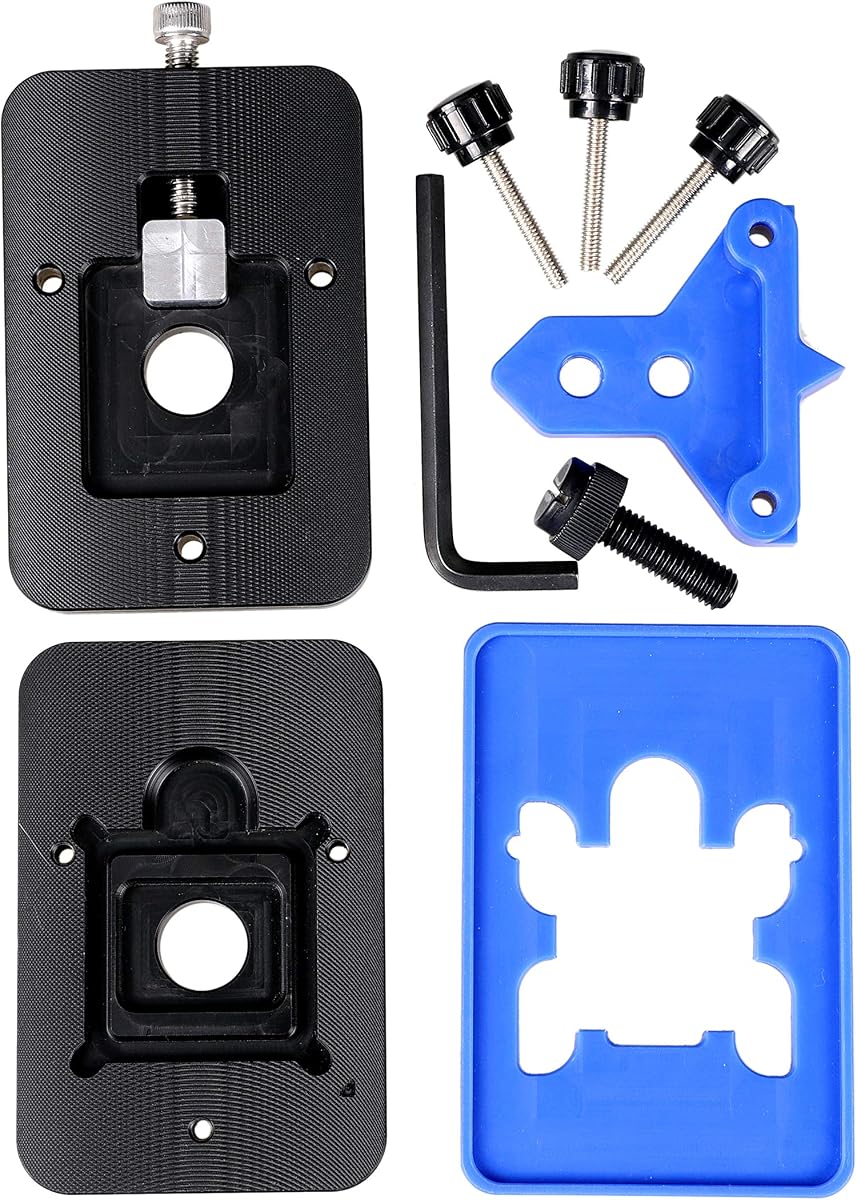
This thermal grizzly tool is our top choice for Intel users seeking maximum cooling performance. It features a solid metal construction that ensures safety during the delicate delidding process. Users report significant temperature drops when using direct die cooling methods with this kit.
We may earn a commission when you buy through this link, at no additional cost to you.
The tool is specifically engineered for 12th and 13th generation Intel Core processors. It allows for a clean removal of the integrated heat spreader without damaging the underlying silicon. The design prioritizes user safety while enabling advanced thermal modifications.
While the tool is excellent, it is limited to specific Intel socket types. You must verify compatibility before purchase to ensure it fits your CPU. Additionally, delidding voids the manufacturer warranty, so proceed only if you accept this risk.
If you are overclocking or running intensive workloads on recent Intel chips, this tool is highly recommended. It simplifies the process and provides the precision needed for successful modifications. Overall, it offers the best balance of safety and performance for enthusiasts.
By removing the heat spreader, the tool enables direct contact between the CPU die and the cooler. This significantly improves heat transfer and lowers operating temperatures under load.
Made from black and red anodized aluminum, the tool is built to last. The robust design ensures that the pressure applied during removal is consistent and controlled.
We may earn a commission when you buy through this link, at no additional cost to you.
This budget-friendly option offers a straightforward way to delid Intel processors without breaking the bank. It includes both the delidding tool and a relid cap for reassembly. Users find it effective for improving thermals on older Intel CPUs.
We may earn a commission when you buy through this link, at no additional cost to you.
The kit is compatible with a wide range of LGA sockets including 1150, 1151, and others. It is designed to be safe and easy to use for beginners. The included aluminum block helps distribute pressure evenly during the process.
Compared to higher-end tools, this option may require more manual precision. The materials are decent but not as robust as industrial-grade options. However, for the price, it delivers solid value for occasional users.
If you are on a tight budget and own an Intel CPU, this kit is worth considering. It provides the necessary components to remove and replace the heat spreader safely. It is an excellent entry point for DIY cooling enthusiasts.
The tool works with various LGA sockets from 775 to 1151. This broad compatibility makes it a versatile choice for users with older hardware.
A relid tool is included to help reinstall the heat spreader after delidding. This feature ensures you can restore the CPU to its original state if needed.
We may earn a commission when you buy through this link, at no additional cost to you.
This premium tool is designed for high-end Skylake-X and Kaby Lake-X processors. It focuses on safety and precision to prevent accidental damage to the CPU die. The build quality is exceptional, featuring anodised aluminum construction.
We may earn a commission when you buy through this link, at no additional cost to you.
The tool simplifies the removal process for users with expensive hardware. It ensures that the heat spreader is removed cleanly without bending or breaking the silicon. This is crucial for protecting your investment in high-performance CPUs.
The cost is significantly higher than budget options, which may deter some buyers. Additionally, it is only compatible with specific socket types. You must ensure your CPU matches the supported list before purchasing this premium tool.
If you own a high-end Intel processor and want the safest removal method, this tool is ideal. It minimizes risks and provides professional-grade results. It is the top choice for serious enthusiasts who prioritize protection.
The tool is engineered to protect the CPU die from physical damage during removal. This safety feature is critical for expensive high-end processors.
Developed by Roman der8auer Hartung, this tool reflects professional expertise. His experience ensures the tool meets the needs of advanced users.
We may earn a commission when you buy through this link, at no additional cost to you.
This tool is uniquely designed for repairing PlayStation 3 consoles with overheating problems. It comes with a thin blade and additional replacements for longevity. Users appreciate its specific focus on console maintenance rather than PC CPUs.
We may earn a commission when you buy through this link, at no additional cost to you.
The V3 version features a sharper and more flexible blade for better durability. It helps reduce risks compared to using makeshift tools like razor blades. The design ensures cleaner and more accurate delidding on console CPUs.
Since it is specific to PS3, it has limited use outside of console repair. You will need to handle the console casing carefully during the process. Despite this limitation, it is effective for its intended purpose.
If you are fixing a PS3 console, this tool is a reliable choice. It simplifies the repair process and helps improve thermal performance. It is an essential item for DIY console repair enthusiasts.
The tool is engineered specifically for PS3 CPUs. This focus ensures that the dimensions and force applied are suitable for console hardware.
Included blades ensure that you have spares when the current one wears out. This maintains consistent performance and safety over time.
We may earn a commission when you buy through this link, at no additional cost to you.
This kit is designed for general circuit board repair and BGA chip maintenance. It includes ultra-thin blades suitable for separating chips from baseplates. Users find it useful for removing adhesive and cleaning up after repairs.
We may earn a commission when you buy through this link, at no additional cost to you.
The blades are made from SK5 steel which can withstand heat up to 550°F. This durability ensures the blades stay sharp during extended repair sessions. The handle is designed for a non-slip grip to maintain control.
While versatile, the kit may require practice to use effectively. It is not a dedicated CPU delidding tool but can be used for similar tasks. Lower user ratings suggest it may be less intuitive than specific tools.
If you need a general-purpose repair knife for electronics, this kit is viable. It is affordable and covers multiple functions. However, for dedicated CPU delidding, a specialized tool might be safer.
The blades are hardened to resist heat and maintain sharpness. This is crucial when working with soldering or heated components.
Blades are thin enough to move between chips and baseplates. This precision is essential for delicate motherboard repairs.
We may earn a commission when you buy through this link, at no additional cost to you.
This scraper is designed to clean adhesive residue from delidded processors. It is made from acrylic which is safe for electronics. Users rate it highly for its ability to clean without scratching the CPU.
We may earn a commission when you buy through this link, at no additional cost to you.
The tool is ideal for removing silicone or indium solder after lid removal. It helps prepare the CPU for applying new thermal interface materials. The ergonomic design allows for comfortable handling during detailed work.
Note that this is a scraper not a tool to remove the lid itself. You will need a separate tool for the actual delidding process. However, it is a valuable accessory for completing the job.
For finishing touches after delidding, this scraper is highly recommended. It ensures a clean surface for optimal thermal conductivity. It is a cost-effective addition to any repair toolkit.
Acrylic is non-conductive and will not scratch the CPU die. This makes it safe for delicate cleaning tasks.
The narrow tip reaches small areas to remove stubborn adhesive. This helps ensure a uniform application of new thermal paste.
We may earn a commission when you buy through this link, at no additional cost to you.
This kit offers a comprehensive set of tools for mobile device repairs. It includes twelve different blade options for various tasks. Users working on iPhones find it helpful for lifting chips and cutting glue.
We may earn a commission when you buy through this link, at no additional cost to you.
The metal handle provides balance and stability during intricate work. The blades are designed to slide under components without damaging them. It is ideal for technicians who need a portable repair solution.
Since there are no user ratings yet, quality is based on specs. It may be best suited for those familiar with mobile repair. Beginners might find the variety of blades overwhelming.
If you work on smartphones or general electronics, this set is useful. It streamlines the workflow by offering multiple tools in one kit. It is a practical choice for repair stations.
The set includes angled and fine-point tips for different stages. This versatility supports a wide range of repair needs.
The non-slip handle reduces hand fatigue during long sessions. This helps maintain precision when working on small components.
We may earn a commission when you buy through this link, at no additional cost to you.
This tool is designed specifically for the RSX GPU in PlayStation 3 consoles. It allows access to the thermal paste for replacement. It helps reduce contact with the main board during removal.
We may earn a commission when you buy through this link, at no additional cost to you.
It works with Fat and Slim models but not Super Slim versions. Users can perform maintenance to address overheating issues. The tool ensures the working edge stays away from the board.
Since it is for GPU only, it will not work on the CPU. You must identify your PS3 model and chip type before purchase. It is a niche tool for console repair.
For PS3 RSX GPU issues, this tool provides the necessary access. It simplifies the removal of the integrated heat spreader. It is recommended for experienced console repairers.
The design keeps the tool away from the main board. This reduces the risk of accidental short circuits or damage.
Allows users to replace aged thermal paste. This is crucial for restoring cooling performance in older consoles.
We may earn a commission when you buy through this link, at no additional cost to you.
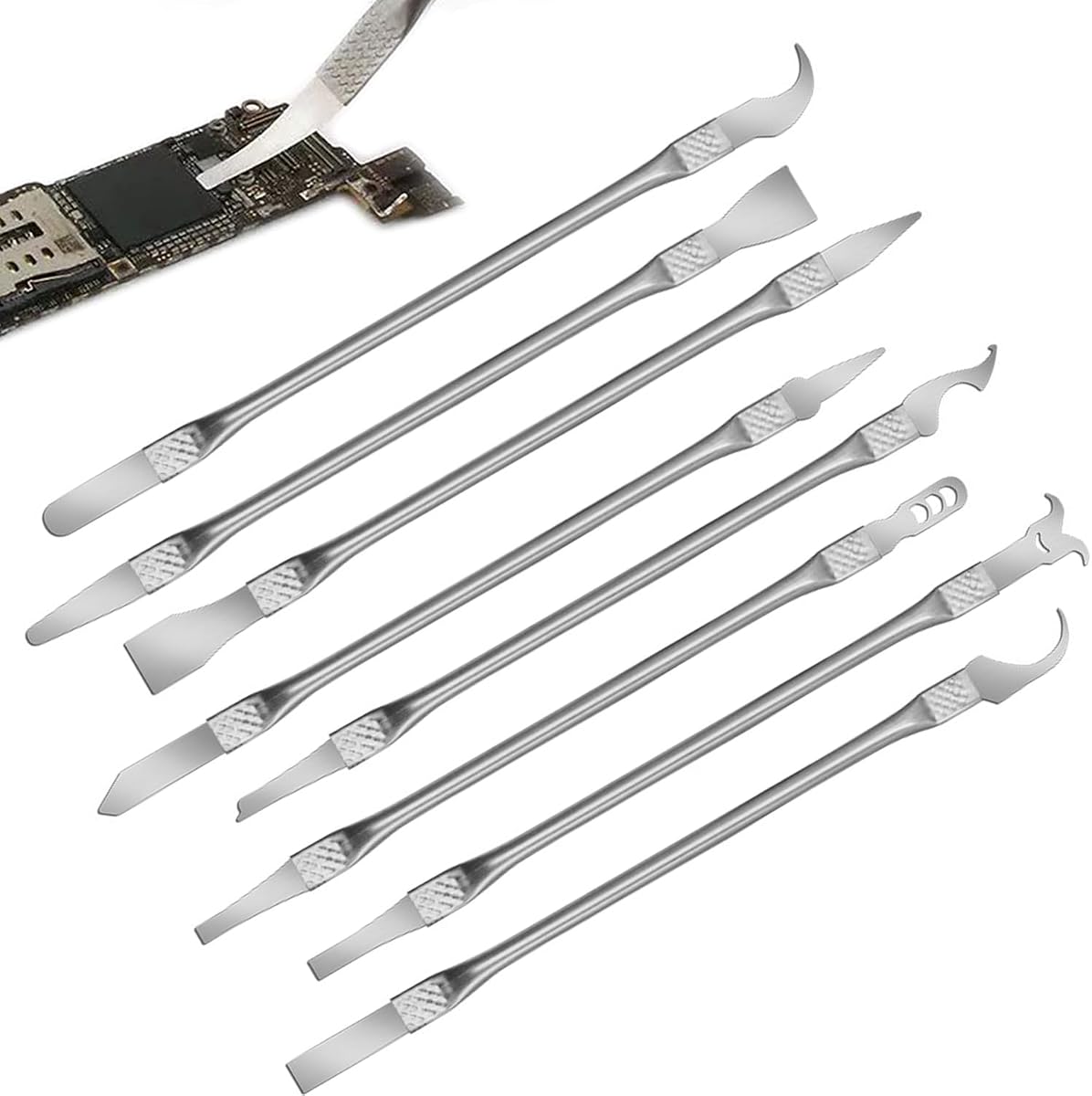
This set offers a range of tools for general electronic repair. It includes ultra-thin tools that allow maneuvering between chips. Users find it helpful for basic removal tasks on motherboards.
We may earn a commission when you buy through this link, at no additional cost to you.
The tools are made from alloy to resist corrosion and bending. They are integrated with handles to save time on assembly. The ergonomic design reduces fatigue during extended use.
Quality is basic compared to professional-grade tools. It is best for hobbyists or casual repairs. Some users may find the blades less sharp than higher-end options.
For those on a very tight budget, this set is a good start. It provides the basic tools needed for component removal. It is useful for maintaining a general repair collection.
The set offers multiple tools at a low price. This makes it accessible for beginners and occasional users.
Blades are attached to handles for immediate use. This saves time and simplifies the repair process.
We may earn a commission when you buy through this link, at no additional cost to you.
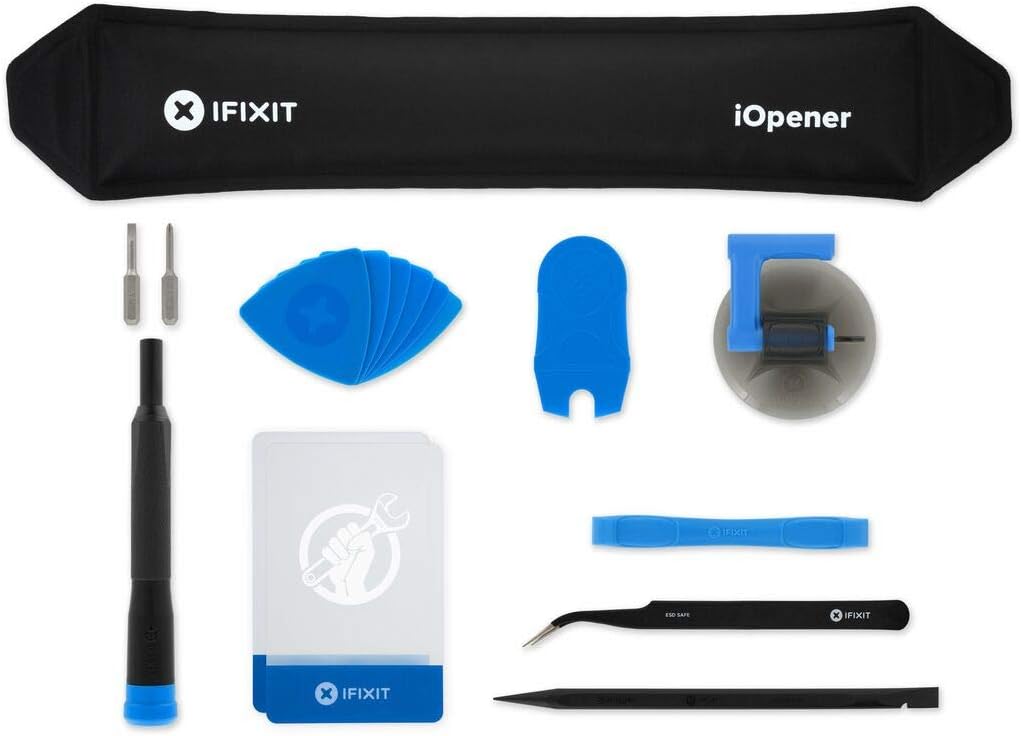
The iOpener is a heat pad used to soften adhesives. It applies heat evenly to screens or components. It is a safe way to prepare devices for disassembly without harsh chemicals.
We may earn a commission when you buy through this link, at no additional cost to you.
It works with many devices including phones and laptops. The package includes tools that are commonly used with it. Users appreciate its non-toxic and food-safe design.
Note that this is not a physical tool to remove heat spreaders. It is a companion tool for softening glue before using a delidding kit. It is useful for disassembly of the device chassis.
For repairing phones or laptops where adhesive is present, this is ideal. It prevents cracking screens during opening. It is a must-have for modern electronics repair.
It heats evenly without hot spots that could damage electronics. This ensures safe softening of adhesives.
Compatible with various brands and devices. This versatility makes it a staple in any repair kit.
We may earn a commission when you buy through this link, at no additional cost to you.
Choosing the right delidding kit requires considering your hardware, skill level, and goals. The factors below will help you select a tool that ensures safety and effectiveness.
Ensure the tool is designed for your specific CPU socket type. Many tools are specific to Intel generations or console models. Using the wrong tool can damage your hardware or be ineffective.
Always check the manufacturer's compatibility list before purchasing.
Look for tools made from durable materials like anodized aluminum or high-grade steel. This ensures the tool does not bend or break during use. Cheap materials can slip and damage the CPU.
Invest in higher quality tools if you plan to delid multiple units.
Safety is paramount as delidding can destroy the CPU. Tools should have features that protect the die from physical contact. Consider tools designed to reduce board contact or provide pressure distribution.
A safety feature can mean the difference between success and failure.
Consider how easy the tool is to operate. Some kits come with step-by-step instructions or ergonomic designs. Complex tools may require more skill and patience to use successfully.
Choose a tool that matches your technical skill level.
Delidding kits range from budget options to premium professional tools. Determine your budget while ensuring quality is not compromised. The cheapest option may lack necessary safety features.
A balance between cost and quality is usually best.
Check if the kit includes relid tools or cleaning scrapers. Having all necessary components in one package simplifies the process. You may need extra materials like thermal paste for the reinstall.
A complete kit saves you from buying separate parts.
Delidding voids the manufacturer warranty on most CPUs. Be aware of this risk before attempting the modification. If your CPU is under warranty, it may be better to wait.
Proceed only if you accept the loss of official support.
Begin by preparing a clean and static-free workspace. Remove the CPU from the motherboard carefully if you cannot access it in place. Ensure you have a fresh thermal paste ready for reapplication.
Follow the manufacturer's instructions for the specific tool you are using. Apply steady and controlled pressure to avoid cracking the die. If resistance is felt, reposition the tool rather than forcing it.
After delidding, clean the surface thoroughly with the included scraper. Apply new thermal interface material evenly on the die. Reinstall the cooler and test the temperatures to ensure success.
A delidding kit is a set of tools designed to remove the integrated heat spreader from a CPU or GPU. This allows access to the silicon die for applying better thermal paste directly. It is used to improve cooling performance and reduce temperatures.
Delidding carries a risk of damaging the CPU die. It should only be done if you have the right tools and skills. Using a high-quality tool designed for your specific CPU improves safety.
Yes, removing the heat spreader usually voids the manufacturer warranty. If your CPU is under warranty, it is not recommended. Always check the terms before attempting any modifications.
CPUs with thick integrated heat spreaders benefit most. This includes Intel Core processors from Kaby Lake and newer generations. Laptops and high-end desktop chips often see significant temperature drops.
Many tools are compatible with a range of sockets, but some are specific. Always verify the compatibility list provided by the manufacturer. Using a compatible tool ensures a proper fit and safety.
Temperature drops vary but can range from 10°C to 20°C in some cases. This depends on the original paste and the cooling setup. Delidding enables better heat transfer for improved performance.
We reviewed ten delidding kits ranging from budget scrapers to premium tools. The Thermal Grizzly Delid-Die-Mate stands out for Intel users, while the EG Starts kit offers great value. For PS3 consoles, the RSX tools provide specialized assistance.
Prioritize safety and compatibility when selecting a kit. Ensure the tool matches your hardware and that you accept the risks. The right tool can improve cooling without damaging your expensive hardware.
Prices and availability may change so check the current listings before buying. Use the links in this guide to find the best deals. With the right approach, delidding can be a rewarding upgrade.