
FANTECH Maxfit61
4.6Editor score
Supports 3 and 5 pin switches
Compact 60 percent layout design
Includes puller tools for maintenance
Discover the top 5 Pin Hot Swappable Keyboard models for October 2026. This guide compares features, build quality, and performance to help you choose the
Choosing the right mechanical keyboard involves understanding switch compatibility. A 5 Pin Hot Swappable Keyboard allows you to change switches without soldering. This flexibility is essential for enthusiasts who want to tweak their typing feel or repair damaged keys easily.
We evaluated ten top models based on build quality, switch compatibility, and user feedback. Our analysis covers wireless options, budget-friendly picks, and premium designs. Each product was selected for its ability to support standard 5-pin MX style switches effectively.
This guide details the strengths and weaknesses of every keyboard on the list. You will find honest assessments of typing experience and customization options. Prices and availability change frequently, so verify current details before making your final purchase decision.
4.6Editor score

4.4Editor score

4.5Editor score
The following table provides a side-by-side comparison of all ten selected models. Use this overview to quickly identify key specifications like layout size, switch type, and special features before diving into the detailed reviews.



The TECWARE Phantom+ Elite TKL stands out as a versatile choice for those seeking wireless freedom without sacrificing customization. It supports 5-pin hot-swappable switches and offers a unique triple-mode connectivity setup. Its build quality is robust, featuring PBT keycaps and sound dampening foam right out of the box.
We may earn a commission when you buy through this link, at no additional cost to you.
This keyboard shines in its ability to switch between Bluetooth, 2.4GHz, and wired modes seamlessly. The battery life is a major selling point, promising up to 250 hours of use on a single charge. The tactile switches included provide a satisfying typing experience that many users prefer for both work and play.
While the keyboard offers excellent hardware, the software for customization is somewhat basic compared to competitors. Additionally, the price point is higher than many wired alternatives. However, for those who prioritize wireless performance and battery longevity, these trade-offs are often acceptable.
You should buy this keyboard if you need a reliable wireless mechanical board with full hot-swap capabilities. It is an ideal choice for professionals who switch between devices frequently or gamers who want a clean desk setup. The included features make it a strong all-rounder in the wireless category.
The dual wireless modes ensure you can game without lag or work without cables. The battery capacity supports days of heavy use, reducing downtime significantly.
Multi-layer foam and V3 stabilizers create a deep, thocky sound profile. The PBT keycaps resist shine and provide a textured grip for long sessions.
We may earn a commission when you buy through this link, at no additional cost to you.
The Keychron V6 8K is designed for users who demand top-tier performance and full-size functionality. It features a groundbreaking 8000Hz polling rate that minimizes input lag to near zero. This makes it an exceptional choice for competitive gaming where every millisecond counts alongside professional typing tasks.
We may earn a commission when you buy through this link, at no additional cost to you.
Its hot-swappable sockets support almost all 3-pin and 5-pin MX style switches, giving you endless customization options. The included knob adds a layer of utility for volume control or scrolling, while the QMK firmware allows for deep key remapping. The build includes foam layers to dampen sound and improve stability.
The main drawbacks are the requirement for a wired connection and the significant desk space it occupies. The 8000Hz polling rate also requires a PC capable of handling the data throughput. For wireless users, this model is not suitable, and it may not fit on smaller desks.
This keyboard is perfect for enthusiasts who want the ultimate wired gaming experience without sacrificing typing comfort. It is also great for power users who rely on macros and specific key layouts. If you need a full board with high-speed performance, this is a top contender.
The 8000Hz polling rate ensures instantaneous response to your inputs. This level of speed is rarely found in consumer keyboards outside of elite esports gear.
With QMK support, you can program complex macros and layer functions. The rotary knob can be mapped to various tasks beyond just volume control.
We may earn a commission when you buy through this link, at no additional cost to you.
The FANTECH Maxfit61 is an excellent entry-level option for anyone looking to try a mechanical keyboard without breaking the bank. It features a classic 60% layout that maximizes desk space for mouse movement. The hot-swappable design allows you to change switches easily if you find the default blue ones too loud or clicky.
We may earn a commission when you buy through this link, at no additional cost to you.
It comes with pre-lubed stabilizers, which is a rare find at this price point. This detail ensures that larger keys like spacebar and shift feel smooth and do not rattle excessively. The RGB lighting adds a nice visual touch, with adjustable modes to suit your environment.
The primary limitation is the lack of dedicated arrow keys and a number row. Users must use a function layer to access these keys, which can slow down data entry tasks. However, the cost savings and portability make this a strong choice for gamers and travelers.
If you need a portable and budget-friendly mechanical board, this is a great place to start. It offers all the core benefits of hot-swap tech at a very low cost. It is ideal for those who prioritize desk space and are willing to adapt to the 60% layout.
The 60% layout removes the number pad and function row to create more room. This is perfect for FPS gamers who need wide mouse sweeps during gameplay.
Despite the low cost, the build includes decent stabilizers and a solid PCB. The included tools make it easy to modify without extra purchases.
We may earn a commission when you buy through this link, at no additional cost to you.
The Redragon K617 offers a feature-rich experience at an incredibly low price point. It is a compact 60% keyboard that includes hot-swap sockets and vibrant RGB lighting. The switches are rated for 50 million keypresses, ensuring durability even with heavy use in gaming or typing.
We may earn a commission when you buy through this link, at no additional cost to you.
Its software allows for deep customization, including advanced macros and lighting effects. This makes it a versatile tool for users who want to personalize their workflow. The 60% form factor saves significant desk space, allowing for better mouse movement in gaming scenarios.
The keycaps are made of ABS, which may develop a shine over time compared to PBT options. The software interface can also be a bit complex for beginners. However, these are minor issues given the price and performance the board delivers.
This keyboard is perfect for beginners or budget-conscious gamers who want a mechanical feel without a high cost. It provides all the basics for customization and performance. It is a solid choice for those who want to learn about mechanical keyboards without a large investment.
With 20 preset modes, the lighting is dynamic and vibrant. The software enables you to create custom effects that match your room aesthetic.
The 50 million switch rating ensures the board lasts through years of use. The white and grey colorway also adds a distinct look to your setup.
We may earn a commission when you buy through this link, at no additional cost to you.
The Keychron C1 is a straightforward and reliable tenkeyless keyboard designed for both Mac and Windows users. It features a clean white backlight and hot-swap sockets for customization. The build quality is solid, with an inclined frame and adjustable feet for comfortable typing.
We may earn a commission when you buy through this link, at no additional cost to you.
It comes with extra keycaps to support Mac layouts, which is a significant benefit for Apple users. The USB Type-C connection ensures a stable power supply and consistent performance. The Gateron G Pro switches provide a smooth tactile experience out of the box.
The lack of RGB and the use of ABS keycaps limit its appeal for those seeking flashy aesthetics. However, the functional design and compatibility make it a strong workhorse. The high user rating reflects its reliability and ease of use.
If you need a clean and functional keyboard for professional use, this is a great option. It balances cost and performance well. It is ideal for users who prefer a simple setup without the distraction of complex lighting.
Dedicated keycaps and layout switching make this versatile for any OS. You can easily switch between systems without reconfiguring hardware.
The inclined frame and adjustable feet help reduce wrist strain during long sessions. The Type-C cable ensures a reliable connection for all typing needs.
We may earn a commission when you buy through this link, at no additional cost to you.
The RK ROYAL KLUDGE RK61 is a robust 60% keyboard for users who want open-source customization. It supports QMK and VIA, allowing you to remap keys and create macros easily. The hot-swap PCB supports both 3-pin and 5-pin switches for maximum flexibility.
We may earn a commission when you buy through this link, at no additional cost to you.
Its compact design saves space while keeping all essential functions accessible through layers. The pre-lubed red switches provide a smooth and quiet experience. RGB lighting is customizable through software, adding a visual appeal to the setup.
The main hurdle is the learning curve associated with QMK and VIA firmware. Users not familiar with open-source tools might find the initial setup daunting. Additionally, the 60% layout requires adaptation to missing dedicated arrow keys.
This keyboard is perfect for enthusiasts who want full control over their key mapping. It is also a great budget-friendly choice for those willing to tweak their setup. The build quality and switch smoothness are impressive for the price.
QMK and VIA support allow for deep customization and community layers. You can download pre-configured profiles to get started quickly.
Pre-lubed red switches ensure a smooth feel right out of the box. The hot-swap sockets let you experiment with different types easily.
We may earn a commission when you buy through this link, at no additional cost to you.
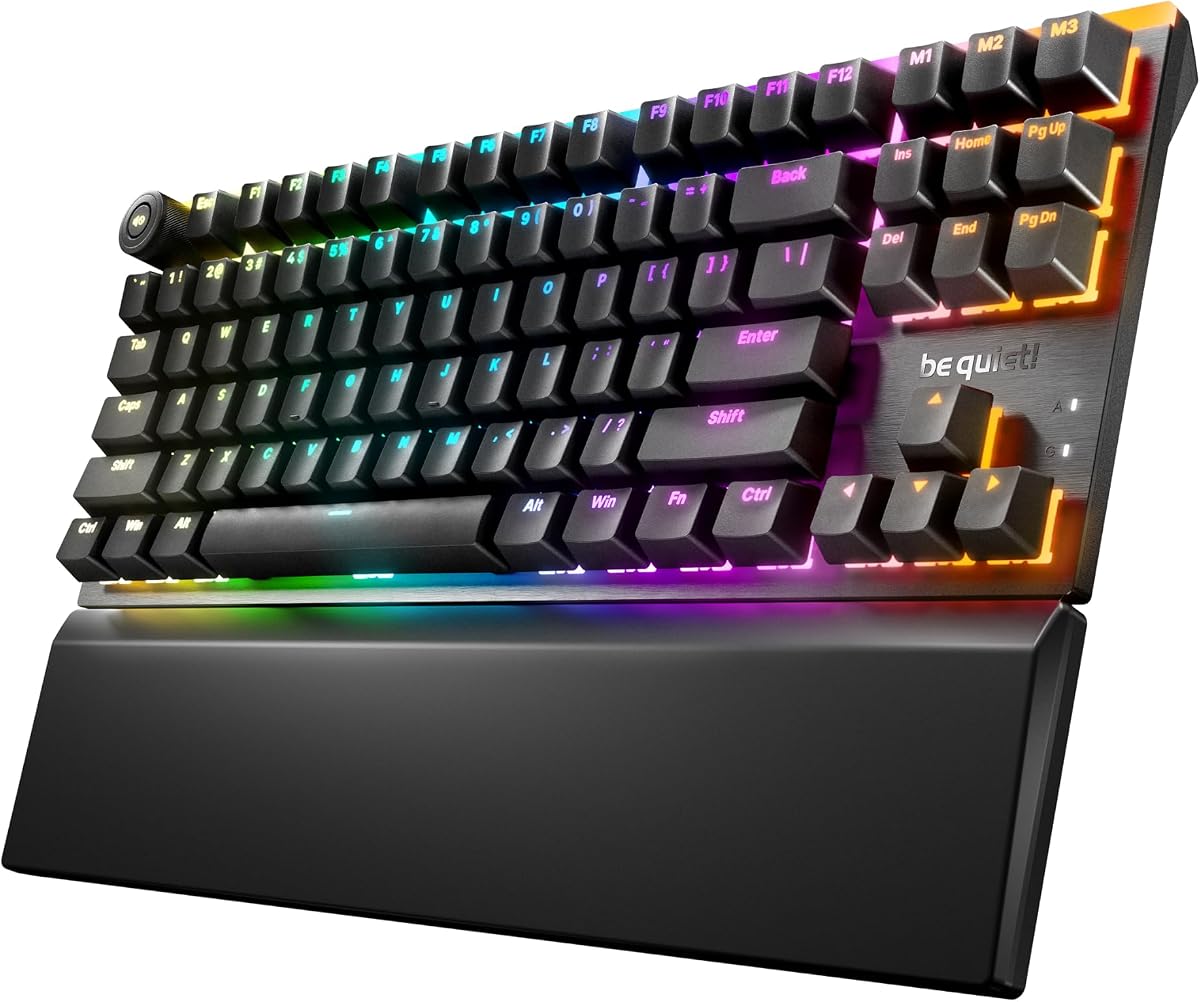
The be quiet! Light Mount TKL is designed for users who need a quiet mechanical keyboard in shared spaces. It features pre-lubed orange switches and three layers of sound dampening foam to minimize noise. The build includes a brushed aluminum top plate for a premium feel.
We may earn a commission when you buy through this link, at no additional cost to you.
Its hot-swap sockets allow you to change switches without soldering, keeping the keyboard versatile. The magnetic palm rest and media wheel add to the user experience. The software allows for advanced customization of lighting and macros.
The price is on the higher side compared to many competitors. The software suite is also quite large and may require a download. However, for those who prioritize silence and build quality, these costs are justified.
This is the ideal choice for office environments or shared apartments where noise is a concern. It delivers a premium experience with excellent attention to detail. If you want a quiet and solid board, this is a top option.
The multi-layer dampening creates a silent typing experience. This is rare for mechanical keyboards and is perfect for late-night use.
Brushed aluminum and PBT keycaps ensure durability. The magnetic rest adds comfort for long typing sessions.
We may earn a commission when you buy through this link, at no additional cost to you.
The Keychron C1 is a reliable and straightforward option for those seeking a simple mechanical keyboard. Its TKL layout offers a balance between desk space and functionality. The white backlight provides visibility without the complexity of RGB effects.
We may earn a commission when you buy through this link, at no additional cost to you.
It includes extra keycaps for Mac users, making it a strong choice for Apple devices. The hot-swap feature allows for future upgrades without needing a new board. The typing angle is adjustable for better ergonomics.
The ABS keycaps may shine over time, and the lack of RGB limits visual customization. However, the functional design and high reliability rating make up for these drawbacks. It is a solid tool for daily work and productivity.
If you want a keyboard that just works and is easy to use, this is a great pick. It is best for professionals who do not need flashy lighting. The focus on comfort and compatibility is its strongest asset.
The TKL layout and adjustable feet support ergonomic typing. The white backlight is subtle and professional for office use.
Mac and Windows layouts are both supported with included caps. This ensures you can use it on any computer without hassle.
We may earn a commission when you buy through this link, at no additional cost to you.
The X82 Wired Gaming Keyboard offers a unique feature set with a metal volume knob for quick audio adjustments. It uses a compact 66-key layout that saves space while keeping necessary keys. The hot-swap PCB supports both 3 and 5 pin switches.
We may earn a commission when you buy through this link, at no additional cost to you.
Its full anti-ghosting ensures that all key presses are registered accurately during gameplay. The RGB lighting is customizable through software to suit your style. The build quality is decent for the price, with a focus on functionality.
The limited key count may be a downside for users who rely on number pads. The software interface is also somewhat basic compared to high-end options. However, the convenience of the knob and low cost are strong benefits.
This keyboard is great for users who want a simple and functional board with extra convenience. It is ideal for gaming setups where space is limited. The value proposition is strong for those needing a reliable entry-level hot-swap board.
The metal knob allows for easy volume adjustments without software. This adds a tactile element that is rare in this price range.
Full anti-ghosting ensures no missed inputs during complex combos. The compact layout frees up room for mouse movement.
We may earn a commission when you buy through this link, at no additional cost to you.
The aikeec Black OSU is a specialized five-key keypad designed for gaming macros or quick actions. It supports software programming for autonomous macros, allowing for complex sequences. The compact form factor makes it easy to place next to a main keyboard.
We may earn a commission when you buy through this link, at no additional cost to you.
It uses USB connectivity for a stable connection without drivers. The RGB lighting adds a visual element to the device. While it is not a full keyboard, it offers utility for specialized tasks in games like OSU or MMOs.
The limited number of keys restricts its use as a primary typing device. The software installation requires a specific runtime which can be a hurdle. However, for the intended purpose, it provides good value.
This device is perfect for gamers who need a macro pad alongside their main keyboard. It is also useful for streamers needing quick controls. The specialized nature makes it a niche but effective tool for specific users.
Each button can be set to a different function via software. This is ideal for executing complex commands with one press.
The compact size allows for placement anywhere on the desk. It does not require much space but provides significant value for gaming.
We may earn a commission when you buy through this link, at no additional cost to you.
Selecting a 5 Pin Hot Swappable Keyboard requires understanding key features that affect performance and longevity. This guide outlines the critical factors to consider before making your final choice.
Ensure the keyboard supports 5-pin switches to avoid connection issues. While many boards support both 3 and 5 pin, verifying this is crucial for future upgrades.
Check for universal compatibility to allow for a wide range of switch brands and types.
Choose a layout that fits your desk space and usage needs. Full-size boards offer more keys while compact models save room for mouse movement.
Consider whether you need a number pad or arrow keys for your workflow before deciding on the layout.
Look for materials like metal plates and double-shot keycaps for durability. Solid construction reduces wobble and extends the life of the keyboard.
Inspect the stabilizers and sound dampening to ensure a smooth typing experience.
Decide if you need wireless or wired connectivity. Wireless offers flexibility while wired ensures low latency for gaming.
Check for Bluetooth or 2.4GHz support if you plan to use multiple devices.
Review the software options for macros and RGB settings. Open-source firmware like QMK offers more control than basic proprietary software.
Ensure the software is user-friendly to avoid a steep learning curve.
Decide if you need RGB or simple white backlighting. RGB allows for personalization but may increase cost.
Check for customizable modes to match your setup aesthetic.
Set a realistic budget to balance features and price. Entry-level boards offer great value for beginners without sacrificing hot-swap ability.
Compare specs across price ranges to find the best value for your specific needs.
Look for extras like programmable knobs or palm rests. These can improve comfort and functionality for your specific use case.
Ensure that added features do not compromise the keyboard's core reliability.
Always power off your computer before swapping switches to prevent damage. Use a switch puller to carefully extract pins without bending them.
Clean the keyboard regularly with compressed air to remove dust from the sockets. This helps maintain the connection quality over time.
Keep your software updated to access the latest features and bug fixes. Proper maintenance ensures long-lasting performance and reliability.
A 5 Pin Hot Swappable Keyboard allows you to change mechanical switches without soldering. It supports switches with five pins for a more stable connection, which is ideal for enthusiasts who want to customize their typing feel.
Yes, most modern 5 Pin hot-swap PCBs are compatible with 3 Pin switches. You simply need to align the three pins of the switch with the corresponding holes on the socket for proper installation.
Modern hot-swap sockets are designed to withstand multiple switch changes without failure. However, it is recommended to use a proper puller tool to avoid bending the pins or damaging the socket.
A switch puller is essential for removing switches safely. Some keyboards come with a puller, but you may also need a keycap puller if you want to swap keycaps as well.
Hot-swapping is generally better for beginners and those who like to experiment. It allows for quick changes without the risk of permanent solder damage or the need for a soldering iron.
Align the pins of the switch with the socket and press down gently until it clicks into place. Ensure the pins are straight before pressing to avoid bending them during installation.
Choosing the right 5 Pin Hot Swappable Keyboard depends on your specific needs for layout, connectivity, and budget. This guide has provided detailed reviews of ten top models to help you make an informed decision.
Prioritize features like wireless connectivity if you need flexibility or sound dampening if you work in a quiet space. Always ensure compatibility with the switches you plan to use for a seamless experience.
Remember to check the current price and availability before purchasing as these can vary. With the right choice, you can enjoy a customized typing experience that meets your standards.