
120mm AC Computer Cooling Fan
4.7Editor score
Plug directly into standard wall outlet
Includes built-in speed controller dial
Slim 120mm form factor for tight spaces
Your AV receiver works hard to deliver immersive sound and video. Over time, heat buildup can cause performance issues or shorten its lifespan. A dedicated cooling fan helps maintain safe operating temperatures.
We compared ten highly rated cooling solutions based on airflow, noise levels, and ease of installation. Each option fits different cabinet styles and power needs. Our analysis focuses on reliability and quiet operation.
Each pick below highlights key strengths and ideal use cases for your setup. We include detailed specs and real-world application notes to help you decide. Prices and availability may change over time.
4.7Editor score

4.8Editor score

4.4Editor score
As an Amazon Associate we earn from qualifying purchases.
The table below provides a side-by-side look at airflow, noise, and power options for each model. Use this to quickly identify which fan matches your specific AV cabinet and receiver needs.
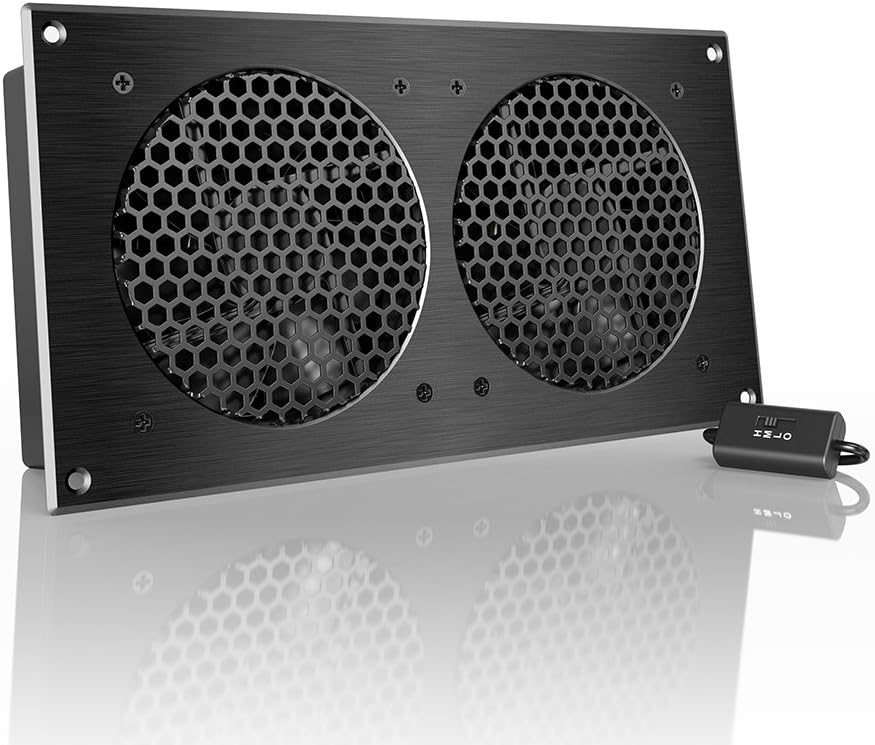


The AC Infinity AIRCOM S7 stands out as a top-tier cooling solution for AV receivers. With a 4.8 rating, it is trusted by users who demand reliability and silence. Its dual-fan setup ensures consistent airflow without disturbing your movie night experience.
We may earn a commission when you buy through this link, at no additional cost to you.
This system features PWM-controlled motors that minimize noise while maximizing cooling efficiency. You can program thermal trigger modes to activate fans only when needed, saving energy and reducing wear. The top-exhaust design pushes heat away from other components effectively.
While it costs more than basic USB fans, the build quality justifies the investment. Dual-ball bearings extend the lifespan significantly compared to standard sleeve bearings. The compact dimensions fit comfortably above most receivers without taking up extra shelf space.
Choose this fan if you want a set-and-forget solution that keeps your gear safe. It is ideal for home theater setups where noise is a critical factor. The programmable controls give you flexibility to match airflow to your specific heat output.
Set fans to turn on only when temperatures rise, keeping noise low during quiet scenes.
PWM motors and dual bearings reduce rattling and humming for a silent listening environment.
We may earn a commission when you buy through this link, at no additional cost to you.
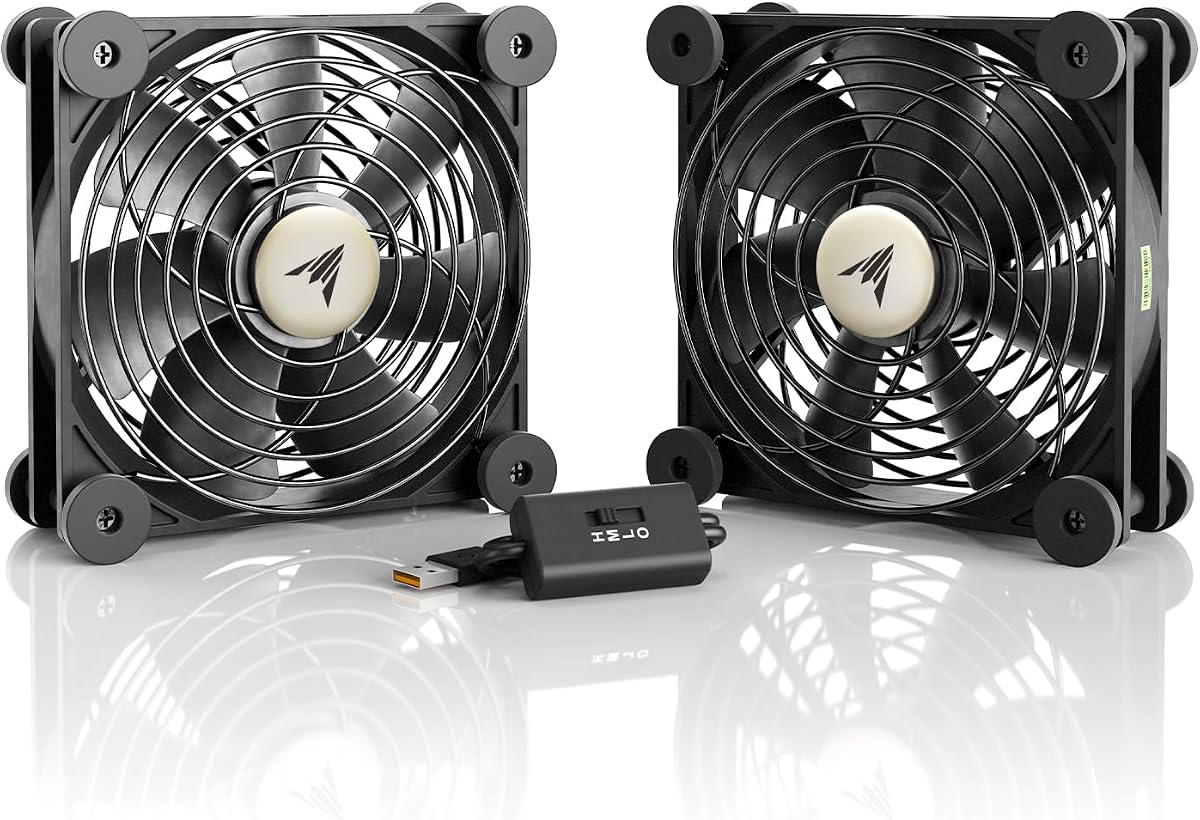
The AC Infinity MULTIFAN S7 offers a budget-friendly way to cool AV components without needing a wall outlet. It pairs two ultra-quiet USB fans with a speed controller for customizable airflow. This makes it perfect for tight spaces behind entertainment centers.
We may earn a commission when you buy through this link, at no additional cost to you.
These fans are UL-certified and feature dual-ball bearings rated for 67,000 hours of use. You can plug them into USB ports on your receiver or game console for a clean setup. The controller lets you adjust speed to balance noise and cooling needs.
Since it relies on USB power, ensure your device has an available port. While airflow is lower than AC units, it is sufficient for most receivers in ventilated cabinets. The flexible mounting options allow you to position fans exactly where heat builds up.
Buy this if you want reliable cooling without drilling holes or using extra outlets. It works well for routers and small AV gear alike. The low price point makes it easy to buy multiples for larger setups.
Fans can stand upright or lie flat to fit narrow gaps inside closed cabinets.
Connect directly to receiver USB ports to avoid managing extra power cords.
We may earn a commission when you buy through this link, at no additional cost to you.
The AC IN AIRPLATE S7 is designed specifically for installation into cabinet doors or side panels. It features a modern brushed black aluminum frame that blends with AV furniture. This model allows hot air to escape through controlled vents rather than pooling inside.
We may earn a commission when you buy through this link, at no additional cost to you.
Powered by either a wall outlet or USB port, it offers flexibility in placement. The included Turbo Adapter boosts performance by twenty-five percent when extra airflow is needed. You can adjust speeds with the controller to match your cooling requirements.
Installation requires cutting a hole in your cabinet, which limits suitability for renters. However, for permanent setups, this provides the cleanest look possible. The dual-ball bearings ensure long-term quiet operation without maintenance.
Choose this fan if you want a hidden cooling solution that maintains furniture aesthetics. It is ideal for enclosed media cabinets where passive airflow is insufficient. The aluminum build quality feels premium and durable over time.
CNC machined aluminum resists corrosion and looks professional in any home theater.
Upgrade airflow quickly during hot summer days without buying a new fan.
We may earn a commission when you buy through this link, at no additional cost to you.
The 120mm AC Computer Cooling Fan provides incredible value for those on a tight budget. It plugs directly into any standard wall outlet and comes with a built-in speed controller. This simplicity makes it a favorite for DIY projects and quick setups.
We may earn a commission when you buy through this link, at no additional cost to you.
The brushless motor delivers powerful airflow while staying remarkably quiet. You can adjust RPM to match your needs without complex wiring. A protective metal finger guard adds safety and durability for everyday use.
Though it lacks the polished look of premium brands, it cools effectively. The slim profile fits tight spaces where bulkier fans cannot. Installation is straightforward, requiring no assembly or special tools.
Buy this if you need a reliable cooler without spending much money. It works well for auxiliary cooling in warm cabinets. The low cost makes it easy to replace or add multiple units as needed.
Works with 110V to 240V outlets worldwide for versatile use.
Inline dial lets you fine-tune noise and airflow instantly.
We may earn a commission when you buy through this link, at no additional cost to you.
The Cabinet Cooling Fan No Drill solves the problem of cooling without damaging furniture. It uses existing door gaps to vent hot air from enclosed spaces. This is perfect for renters who cannot make permanent modifications to their cabinets.
We may earn a commission when you buy through this link, at no additional cost to you.
Powered by USB, it connects to power banks or available ports. The included speed controller helps you choose the right balance for your space. Airflow reaches over 77 CFM which is enough for smaller AV units.
Installation takes under a minute with included non-destructive brackets. The slim design ensures the cabinet door can still close without jamming. This preserves the look and value of expensive home theater furniture.
Choose this if preserving your furniture is a priority. It offers a practical middle ground between passive ventilation and full exhaust systems. While not as powerful as larger fans, it suffices for moderate heat loads.
Mounts against door edges to avoid drilling holes into wood.
Plug into any USB 5V source for instant cooling.
We may earn a commission when you buy through this link, at no additional cost to you.
This model features an ultra-slim profile that fits narrow cabinets where traditional fans fail. It mounts securely using existing gaps to improve airflow without damage. The design is optimized for media consoles and equipment enclosures with limited clearance.
We may earn a commission when you buy through this link, at no additional cost to you.
Noise levels are low to prevent distraction from audio content. USB power simplifies setup and reduces cable clutter. It works well with routers and small amplifiers that generate moderate heat.
The secure fit ensures the fan stays in place during cabinet movement. It is ideal for environments where drilling is not an option. Efficiency is good for preventing hot spots in smaller spaces.
Buy this if you have a tight cabinet and want a hassle-free install. It provides steady airflow for sensitive electronics. The compact footprint ensures it does not interfere with device access.
Gap design ensures air moves out efficiently without recirculation.
Clips hold firmly without scratching or denting cabinet surfaces.
We may earn a commission when you buy through this link, at no additional cost to you.
The Cabinet Cooling Fan No Drilling offers instant setup without any tools. It utilizes existing door gaps to exhaust hot air effectively. This is a smart choice for renters who want to protect their furniture while cooling gear.
We may earn a commission when you buy through this link, at no additional cost to you.
The specialized gap design pulls heat away from AV receivers and consoles. It remains virtually silent during operation to avoid disturbing your media experience. USB power makes it easy to plug into nearby electronics.
Setup is quick and requires no hardware skills. The brackets hold the fan securely in place. It works well in server racks and media centers where space is limited and drilling is impossible.
Choose this for a quick solution that keeps your gear safe. It is practical for temporary setups or permanent enclosures alike. The design ensures you do not need to modify cabinets to get airflow.
Setup in under a minute without drills or screwdrivers.
Uses door edges to maximize cooling path efficiency.
We may earn a commission when you buy through this link, at no additional cost to you.
The Noctua NV-FS2 brings flagship PC cooling tech to AV equipment. It uses an award-winning PWM fan known for balancing performance and silence. The set includes silicone pads and a gasket to reduce vibration effectively.
We may earn a commission when you buy through this link, at no additional cost to you.
It comes with a mains power supply for stable performance. You can adjust fan speed with the controller for near-silent operation. Pads ensure the fan runs smoothly without shaking the equipment below.
While it costs more than basic fans, the build quality is unmatched. It is designed for long-term reliability in critical setups. The flexible mounting options fit above or beside devices with ease.
Buy this if you want the absolute best in cooling and silence. It is ideal for high-end systems that generate significant heat. The included accessories ensure a professional installation without extra purchases.
Silicone pads minimize noise transfer to your AV cabinet.
PWM control ensures maximum airflow at minimum noise levels.
We may earn a commission when you buy through this link, at no additional cost to you.
The Wathai 140mm USB Fan provides dual-fan coverage for better cooling. It is ideal for consoles and routers needing steady airflow. The three-speed controller lets you customize output based on need.
We may earn a commission when you buy through this link, at no additional cost to you.
Fans can be daisy-chained to cool multiple devices at once. This reduces cable clutter and simplifies management. The low noise output ensures you can run them even during quiet scenes.
Although sleeve bearings are less durable than ball bearings, they are suitable for moderate use. The compact design fits easily on shelves. This model offers a practical solution for shared cooling.
Choose this if you need to cool several devices with one unit. It works well for entertainment centers with multiple consoles. The affordable price makes it easy to upgrade your ventilation.
Link multiple fans to share power and save outlets.
Two large fans provide steady cooling without taking much space.
We may earn a commission when you buy through this link, at no additional cost to you.
The GDSTIME 240mm Router Fan offers wide cooling coverage for multiple devices. It uses dual 120mm fans to move ample air across AV gear. This is helpful for racks containing routers, receivers, and amplifiers.
We may earn a commission when you buy through this link, at no additional cost to you.
Speed control allows low settings for silent operation at night. The hydraulic bearing ensures long-lasting quiet performance. It connects to USB for easy power without extra adapters.
The large footprint might not fit in small shelves but fits standard racks. It prevents overheating during heavy use effectively. The simple design means fewer points of failure over time.
Buy this if you need to cool a wide area. It is practical for networks that require steady airflow. The low maintenance design keeps your devices running safely for years.
Dual fans spread air to cover multiple devices at once.
Hydraulic bearings reduce wear and keep noise low.
We may earn a commission when you buy through this link, at no additional cost to you.
Selecting the right cooling fan depends on your setup and needs. This section covers key factors to consider before making a purchase decision.
Airflow is measured in CFM and determines how much air the fan moves. Higher CFM is better for larger receivers or enclosed cabinets. Check the specs to ensure it matches your heat output needs.
Look for fans with at least 100 CFM for adequate cooling. If your receiver is powerful, aim for higher airflow to prevent overheating.
Noise is measured in dBA and affects your audio experience. Fans under 20 dBA are ideal for home theaters. You want enough cooling to protect gear without distracting from movie sound.
Choose fans with PWM control or low-speed settings to reduce noise during quiet scenes.
Fans come with USB or AC power options. USB is convenient but depends on receiver port availability. AC allows steady cooling but requires a wall outlet near the cabinet.
Select based on your available ports and cable management preferences.
Some fans require drilling while others fit gaps. Non-invasive options are safer for furniture. Consider if you can modify your cabinet before buying.
Choose no-drill fans if you are renting or want to preserve furniture finish.
Fans that can stand flat or upright offer more placement options. This helps you find the best spot for airflow. Fixed position fans may limit where you can put them.
Look for adjustable mounts to adapt to your cabinet layout easily.
Speed controllers and thermal triggers let you manage performance. These features save energy and reduce wear on fans. You can adjust airflow based on temperature or time of day.
Prioritize fans with adjustable speed for better control over noise and heat.
Materials like aluminum and dual-ball bearings increase longevity. Cheaper plastic models may wear out faster. Invest in quality if you plan to leave the fan on daily.
Check reviews for durability feedback and motor lifespan details.
Ensure the fan fits in your cabinet or on your shelf. Measure your space before buying to avoid returns. Slim profiles work best for tight gaps and narrow cabinets.
Compare dimensions carefully to ensure proper fit with your equipment.
Position the fan to push hot air out or pull cool air in. Avoid placing it in a corner where air gets trapped. Align it with existing vents for best efficiency.
Keep the fan and vents free of dust. Use compressed air to clean blades periodically. Dust buildup can reduce airflow and cause noise over time.
Monitor your receiver temperature regularly. If it still feels hot, check fan speeds or add extra units. Ensure cables do not block intake or exhaust paths.
AV receivers generate significant heat during operation. Without ventilation, heat can cause shutdowns or permanent damage. A cooling fan ensures safe operating temperatures for long-term reliability.
Yes, but check power requirements first. PC fans often need DC power or complex wiring. USB or AC fans are easier to integrate with AV gear safely.
Most fans do not void warranties if used externally. Avoid drilling holes in the receiver itself. External fans are safe and recommended for protection.
Quality fans run below 20 dBA. This is quieter than most home systems. You may not hear them during normal movie playback.
Fans use very little electricity. The cost is negligible compared to the receiver. Cooling prevents overheating which could lead to expensive repairs later.
Fans last several years with daily use. Ball bearing fans last longer than sleeve bearings. Replace if noise increases or airflow drops significantly.
USB works for moderate cooling needs. It is convenient if ports are available. AC fans provide stronger airflow for larger setups.
Place fans above or behind the receiver where vents are. Align intake with cool air sources. Exhaust should point out of the cabinet clearly.
We reviewed ten top fans suitable for different needs and budgets. The AC Infinity models lead in performance and noise. Noctua offers premium quality for demanding users.
Focus on airflow and noise when deciding. A quiet cooler protects your gear without disrupting your entertainment. Choose power options that match your cabinet layout.
Always check current availability and pricing before buying. Prices may vary over time. Ensure the fan fits your space before finalizing your order.