
ATTACK SHARK X68 HE RT Mechanical Gaming Keyboard 60% Wired TKL-Black
4.6Editor score
True 8000Hz polling rates
Web driver customization
Compact 60% layout
Compare the top 10 best keyboards for Valorant featuring Hall Effect switches, rapid trigger technology, and precise actuation for competitive FPS gaming in
Finding the right keyboard for Valorant can make a huge difference in your aiming and movement precision. Competitive players need fast response times and reliable switches that handle rapid key presses without delay or ghosting issues during intense matches.
We have evaluated ten top-rated gaming keyboards based on their switch technology, polling rates, and build quality. Our comparison focuses on models that offer Hall Effect magnetic switches, rapid trigger capabilities, and customizable actuation points tailored for FPS titles.
Each product entry below highlights key features, pros, and cons to help you decide. Prices and availability may change over time so please check the latest details on the retailer site before making your final purchase decision today.
4.6Editor score

4.1Editor score

4.6Editor score
This section provides a side-by-side look at all ten keyboards. We compare their key specifications, switch types, connectivity options, and unique features to help you find the perfect match for your Valorant setup.

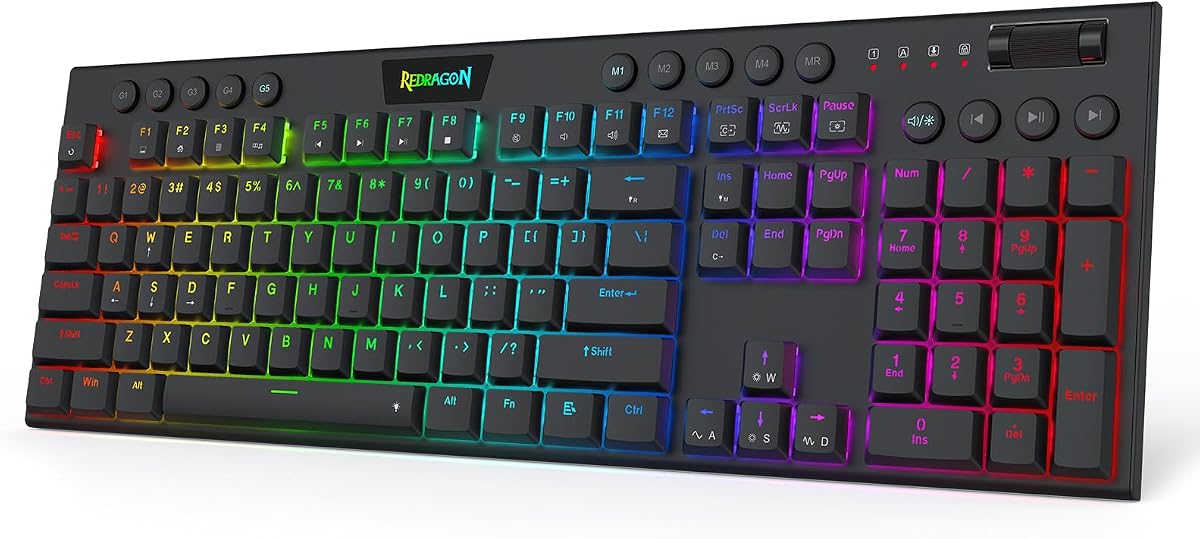





The Redragon K673 HE stands out as a top contender for Valorant players seeking high performance without breaking the bank. It features next-gen UltraMag POM magnetic switches that sense keypresses without physical contact, ensuring your peek-and-fire timing lands exactly when you mean it during intense gameplay.
We may earn a commission when you buy through this link, at no additional cost to you.
Its 8000Hz Hyper-Polling rate transmits inputs up to 8x faster than standard keyboards, while dynamic key activation cuts redundant keystrokes during quick direction changes. The software allows you to save multiple actuation profiles between 0.1mm and 3.4mm, so your setup stays consistent across games.
While it offers impressive speed, the wired connection limits mobility compared to wireless options. The software interface is functional but not as polished as premium brands. However, for competitive FPS, the responsiveness and magnetic switch reliability outweigh these minor drawbacks.
If you prioritize raw speed and precise control in Valorant, this keyboard delivers exceptional value. It is ideal for players who need rapid trigger capabilities and do not mind a wired setup for maximum stability during ranked matches.
Rapid trigger technology allows keys to reset instantly after release, enabling faster counter-strafing and movement adjustments crucial for Valorant mechanics.
The UltraMag POM magnetic switches eliminate physical contact wear, ensuring consistent actuation over time and reducing the risk of double-taps or missed inputs.
We may earn a commission when you buy through this link, at no additional cost to you.
The Redragon K686 HE offers a streamlined alternative with similar core technology to the K673. Its one-knob simplicity lets you adjust backlight brightness and media playback without memorizing extra key combos, making it convenient for long sessions.
We may earn a commission when you buy through this link, at no additional cost to you.
Built for the stop-and-shoot moment, it uses UltraMag POM magnetic switches that provide 8000Hz polling and rapid trigger support. The dual-module floating structure paired with dampening layers gives a soft, Hi-Fi bounce instead of a harsh clack.
It lacks wireless connectivity and extensive macro keys compared to other models. The software is functional but basic. However, its high rating and magnetic switch performance make it a strong choice for budget-conscious FPS gamers.
Choose this if you want reliable magnetic switching and rapid trigger features at an affordable price. It is best suited for players who prefer a wired setup for consistent performance in competitive titles like Valorant.
A single control knob adjusts backlight brightness and media playback, simplifying on-the-fly changes without interrupting gameplay or needing software access.
Noise dampening layers reduce harsh key clacks, making it more pleasant for quiet environments while maintaining the responsiveness needed for fast-paced gaming.
We may earn a commission when you buy through this link, at no additional cost to you.
The Redragon K618 HE brings low-profile speed with its 30% slimmer design. Built for counter-strafing, the shortest travel low-profile magnetic switches sense keypresses faster than standard switches, so your timing lands exactly when you mean it.
We may earn a commission when you buy through this link, at no additional cost to you.
It features 20 On-the-Fly Macro Keys without software required, plus a dedicated macro zone for instant adjustments. The rapid trigger technology ensures dynamic input cuts during quick direction changes.
Low-profile switches may feel different if you are used to traditional mechanical keyboards. The wired connection limits flexibility. However, the perfect rating and speed make it a standout for players who prioritize ergonomics and quick actuation.
This keyboard is ideal for those seeking a sleek, low-profile setup with magnetic precision. It works well for Valorant where movement speed and accuracy are critical.
Shorter travel distance allows keystrokes to register quicker, enhancing typing feel and reducing wrist strain during long gaming sessions.
On-the-fly macro recording lets you create combos instantly without installing software, streamlining gameplay customization for competitive use.
We may earn a commission when you buy through this link, at no additional cost to you.
The Corsair Clipper PRO MINI leverages MGX Hyperdrive Hall Effect switches with rapid trigger enabling instant 0.1mm reset for rapid taps. FlashTap SOCD enables cleaner directional inputs and sharper counter-strafing, ensuring every movement lands exactly when needed.
We may earn a commission when you buy through this link, at no additional cost to you.
Its IP57-rated durability handles water and dust, while dual-layer sound dampening keeps it quiet. The compact 60% layout maximizes mouse space for low-sensitivity aiming.
The 60% layout may take getting used to if you need arrow keys. It is also pricier than rivals. Still, its durability and precision make it a premium pick for FPS.
Opt for this if you need a rugged, compact keyboard with high-end Hall Effect tuning for competitive Valorant play.
Built to handle intense gameplay with water and dust resistance, allowing for longer sessions without worry of liquid damage.
FlashTap SOCD reduces finger fatigue and ensures consistent execution with cleaner directional inputs.
We may earn a commission when you buy through this link, at no additional cost to you.
The Razer Huntsman Mini uses Linear Optical switch technology registering presses at the speed of light. Razer Snap Tap prioritizes the latest input between assigned keys, offering responsive in-game movement essential for Valorant.
We may earn a commission when you buy through this link, at no additional cost to you.
It features full Chroma RGB customization with 16.8 million colors and durable aluminum construction. Programmable macros allow complex commands.
It lacks magnetic rapid trigger, but optical switches are still very fast. The 60% layout is compact. It is a strong choice if you want Razer ecosystem integration and premium build.
Choose this for its speed and extensive RGB features if you already use Razer gear.
Prioritizes the latest input between assigned keys for true responsive in-game movement, enhancing counter-strafing performance.
Optical beam-based actuation registers presses faster than traditional mechanical switches, improving reaction times.
We may earn a commission when you buy through this link, at no additional cost to you.
The Aula WIN60 HE features self-developed magnetic switches and a lightweight driver delivering up to 8000Hz polling. It leverages magnetic technology for precise actuation without physical contact.
We may earn a commission when you buy through this link, at no additional cost to you.
It offers Rapid Trigger with ultra-low RT step of 0.02mm. The web-based driver allows remapping and macros without downloads. Hot-swappable base supports customization.
Web driver dependency may be a hassle for some. It is newer than legacy brands. Yet, for value and magnetic precision, it is a strong contender.
Select this if you want hot-swap customization and magnetic performance at a budget price.
Supports easy switch replacement for personalized feel without soldering.
Accessible from any device with internet for seamless customization.
We may earn a commission when you buy through this link, at no additional cost to you.
The AULA WIN68 HE offers industry-leading 8000Hz polling and ultra-low latency of 0.3ms. Magnetic switches allow adjustable actuation points from 0.02mm to 3.44mm for personalized precision.
We may earn a commission when you buy through this link, at no additional cost to you.
Web driver enables RT/SOCD functions and RGB customization without downloads. It features south-facing LEDs for better visual effects.
Mac OS is not supported. The 60% layout saves space. It provides excellent speed for FPS.
Pick this for its fast trigger and magnetic customization if you use Windows.
Ultra-low latency ensures commands take effect instantly, giving you an edge in intense matches.
One-stop management of keyboard settings without bulky downloads.
We may earn a commission when you buy through this link, at no additional cost to you.
The AULA F75 Pro offers Tri-mode connectivity and hot-swap support for customization. It features pre-lubed Reaper switches and 4000mAh battery for long life.
We may earn a commission when you buy through this link, at no additional cost to you.
Side-printed PBT keycaps resist fading and feel smooth. The multi-function knob controls lighting and volume.
It lacks magnetic switches but is a strong wireless pick. The 75% layout retains arrow keys.
Ideal for those wanting versatility and wireless freedom in gaming.
Works with Bluetooth, 2.4GHz, and USB-C to connect multiple devices.
Hot-swappable base allows easy DIY without soldering.
We may earn a commission when you buy through this link, at no additional cost to you.
The ATTACK SHARK X68 HE features adjustable hall effect magnetic switches with true 8000Hz polling. It reduces latency to 0.125ms with rapid trigger for flexibility.
We may earn a commission when you buy through this link, at no additional cost to you.
Web driver allows full remap without install. PBT keycaps are durable. Top-mount structure ensures stability.
Build is basic compared to premium brands but value is high. It is excellent for tight budgets needing competitive performance.
Choose this if you want rapid trigger performance on a tight budget.
True 8000Hz polling makes it one of the fastest available at this price point.
Use online tools for remapping and lighting changes easily.
We may earn a commission when you buy through this link, at no additional cost to you.
The ASUS ROG Strix Scope II 96 combines full-size functionality with compact dimensions. It features ROG NX Snow linear switches that are pre-lubed for smooth keystrokes.
We may earn a commission when you buy through this link, at no additional cost to you.
It offers versatile Tri-mode connectivity and hot-swappable customization. Acoustic dampening foam absorbs pinging for better sound.
It is expensive but delivers premium build and wireless convenience. Ideal for pros needing full layout and wireless.
Opt for this if you need a full-sized wireless keyboard with premium quality.
Compact design retains the full-size function pad for efficient workflows.
Connect via Bluetooth, 2.4GHz wireless, or USB for flexibility across devices.
We may earn a commission when you buy through this link, at no additional cost to you.
Choosing the right keyboard requires understanding specific technologies that impact gameplay. Here are the key factors to evaluate before buying.
Switch type determines feel and speed. Magnetic Hall Effect switches offer rapid trigger and adjustable actuation ideal for competitive play. Optical switches are fast but lack magnetic adjustment. Traditional mechanical switches are reliable but slower to reset.
Look for Hall Effect or Optical switches with rapid trigger features for Valorant to minimize reset time.
Polling rate measures how often the keyboard reports to your PC. 8000Hz is becoming standard for high-end gaming. Higher rates reduce input lag and improve responsiveness.
Prioritize 8000Hz polling if possible for minimal latency in fast-paced scenarios.
Adjustable actuation allows customization of how far a key must be pressed to register. This can be set per key. It helps prevent accidental inputs or optimize speed.
Choose models with software that lets you save profiles to adjust actuation based on key function.
Wired connections provide the most stable signal but limit placement. Wireless offers freedom but may introduce latency. Tri-mode allows switching between options for versatility.
Use wired for competitive matches and wireless for casual play or desk aesthetics.
Layout affects desk space and access to navigation keys. 60% is compact but lacks arrows. TKL is standard with arrows. Full-size includes numpad. 96% is a balance.
Select based on your mouse sensitivity and whether you need dedicated arrow keys for in-game menus.
Build quality ensures longevity. PBT keycaps resist wear and shine better than ABS. Aluminum frames add stability. IP ratings protect against spills.
Invest in durable materials if you game daily to reduce maintenance and replacement costs.
Software allows macro creation, lighting customization, and profile saving. Web-based drivers are convenient. Some require installation. Check compatibility with your OS.
Ensure the software is user-friendly and supports the customization features you need.
Prices vary widely. Magnetic switches are often more expensive. Budget models may offer rapid trigger but fewer extras. Define your spending limit first.
Balance performance features with cost to find the best value for your specific needs.
Begin by connecting your keyboard to your PC. Install the driver software if required. Set your preferred actuation points for movement keys to enhance responsiveness in Valorant.
Regularly clean the keycaps to prevent dust buildup that can affect switches. Use compressed air or a soft cloth. Avoid spilling liquids near the unit.
Store the keyboard in a safe place when not in use. If wireless, recharge periodically. Check settings before tournaments to ensure profiles load correctly.
Rapid trigger allows keys to reset immediately upon release instead of requiring a full bottom-out. This reduces reset time significantly and improves counter-strafing accuracy in Valorant, giving you faster movement control.
Magnetic switches are generally better for competitive gaming as they allow adjustable actuation and rapid trigger. They have less mechanical wear and offer smoother performance than traditional mechanical switches.
Modern wireless technology like 2.4GHz has minimal latency. However, wired remains the safest bet for zero interference. If you have reliable wireless with 8000Hz support, latency will be imperceptible to most.
Yes, many Hall Effect keyboards support per-key actuation customization through software. You can set WASD keys to register earlier and other keys deeper for precise control.
60% or TKL layouts are popular because they free up mouse space for low sensitivity aiming. Ensure the layout retains essential navigation keys if needed for in-game menus.
Turn off the keyboard and unplug it. Use compressed air to blow out dust. Gently wipe keycaps with a soft cloth. Avoid harsh chemicals that could damage the finish.
Yes, PBT keycaps are more durable, resist shine and oil buildup, and feel better to the touch than ABS keycaps, making them ideal for frequent use.
Prioritize rapid trigger technology, high polling rate, and reliable connectivity. A layout that suits your mouse area is also crucial for competitive performance.
We compared ten top keyboards with features like rapid trigger and magnetic switches. The Redragon K673 HE and ATTACK SHARK X68 HE offer standout value with high polling rates.
Prioritize switch technology and polling rate for competitive play. Ensure the layout fits your desk and mouse sensitivity needs for optimal performance during ranked matches.
Prices change so check current details on retailer sites before buying. Investing in the right gear will improve your gameplay experience.