
Learning Resources Code & Go Robot Mouse
4.5Editor score
Screen free coding play
Easy sequencing practice
Classroom ready mazes
This guide compares the top coding toys for kids including screen-free robots and app-enabled kits to help you choose the best STEM learning tool.
Coding toys introduce children to programming logic through interactive play. High quality options encourage problem solving and creativity while keeping kids engaged without constant screen time. Parents value toys that grow with their child and offer real educational benefits.
We evaluated ten leading coding robots based on ease of use educational depth and durability. Each product was reviewed for its ability to teach sequencing loops and logical thinking. Our list covers screen-free options and app-enabled kits for various age groups.
Each pick highlights unique features and ideal use cases for different learners. We explain what makes each robot stand out in the current market. Prices and availability may change so check the links for the latest information before purchasing.
4.5Editor score

4.1Editor score

4.6Editor score
This table provides a quick side by side overview of all ten coding robots featured in our guide. Use it to compare key specs and choose the right toy for your child.






This robotic chameleon is a standout coding toy that combines engineering with animal mimicry. It received high marks for its screen-free approach and realistic movement capabilities. The kit includes action cards that let kids program sequences without a tablet.
We may earn a commission when you buy through this link, at no additional cost to you.
The color sensor allows the robot to change colors based on surroundings which teaches environmental awareness. Three play modes offer variety including wild mode for camouflage and pet mode for touch reactions. The build quality feels sturdy for regular use.
Younger kids may need help with assembly which adds time to the initial setup. The manual is detailed but some steps require patience and adult guidance. These trade-offs are acceptable given the educational value provided.
This toy is best for children aged eight and up who enjoy hands-on building. It suits families looking for engaging STEM activities that avoid screens. The award win highlights its quality and educational impact.
The robotic reptile design captures imaginations and encourages repeated play sessions.
Physical action cards teach programming basics without needing a digital device.
We may earn a commission when you buy through this link, at no additional cost to you.
Makeblock mBot is an entry-level robot kit designed to teach electronics and programming basics. It scored well for its clear building instructions and compatibility with various software tools. Kids can build the robot in minutes and start coding immediately.
We may earn a commission when you buy through this link, at no additional cost to you.
The kit supports learning from Scratch to Arduino which grows with the child's skills. Add-on packs allow customization and expansion making it a long-term investment. Remote control features add fun for immediate play after building.
The need for AA and CR2025 batteries means extra costs beyond the kit price. Assembly requires focus but the instructions are straightforward for most children. These minor cons do not outweigh the strong educational benefits.
Ideal for children aged eight to twelve who enjoy building and robotics. It fits families wanting a balance between immediate play and deep learning. The expandable nature keeps interest high over time.
Compatible add-on packs allow kids to customize and expand their robot.
Works with multiple apps including mBlock for versatile coding experiences.
We may earn a commission when you buy through this link, at no additional cost to you.
Sphero Mini packs powerful coding features into a tiny ball size. It received strong ratings for its intuitive draw-to-code interface and included accessories like cones. The app allows creating games which increases engagement for tech-savvy kids.
We may earn a commission when you buy through this link, at no additional cost to you.
Drive modes include joystick and tilt options that make controlling the robot fun. The included obstacles encourage setting up courses at home. It serves well as an introduction to robotics without complex setups.
Battery life offers about one hour of play which may be short for long sessions. Bluetooth connectivity is necessary for all features limiting offline use. These constraints are reasonable for such a small device.
This robot works best for kids aged eight and up who like gaming. It suits parents wanting a portable and fun learning tool. The small size makes it easy to store and take along.
Built-in arcade games and drive modes add immediate fun value.
Draw on screen to code movements for quick learning results.
We may earn a commission when you buy through this link, at no additional cost to you.
This mouse is designed for the youngest coders to explore sequencing logic. It was praised for its screen-free simplicity and clear programming buttons. The set includes mazes and walls that allow building different paths easily.
We may earn a commission when you buy through this link, at no additional cost to you.
Critical thinking skills improve as kids plan routes for the mouse. The activity guide supports learning objectives for home or classroom use. It provides a gentle entry into robotics without overwhelming details.
Advanced coding concepts like loops are not covered extensively. The mouse is limited to maze navigation which might bore older kids. These limits are acceptable for its intended young age group.
Best for children aged four and up starting their coding journey. It fits parents seeking an affordable first robot toy. The classroom-friendly design supports group learning activities effectively.
Designed for age four and up with simplified coding concepts.
Includes walls and tunnels to create diverse challenge paths.
We may earn a commission when you buy through this link, at no additional cost to you.
Mech-5 offers a true building project for future engineers ages ten and up. It received high marks for its mechanical coding wheel and hands-on assembly. The robot can throw lift and draw which adds interactive variety.
We may earn a commission when you buy through this link, at no additional cost to you.
The mission-based approach keeps kids engaged with clear goals and steps. Building the robot takes multiple hours which teaches patience and attention to detail. Once built the coding features allow testing different mechanical functions.
Younger kids may find the assembly too difficult or time consuming. The focus on mechanical engineering limits simple play options. These trade-offs are fine for the target older age group.
Suitable for children aged ten and up who enjoy construction. It fits families wanting a deep STEM experience. The challenge level supports learning complex principles effectively.
Detailed assembly instructions teach real engineering concepts.
Snap buttons onto wheel to code robot movements simply.
We may earn a commission when you buy through this link, at no additional cost to you.
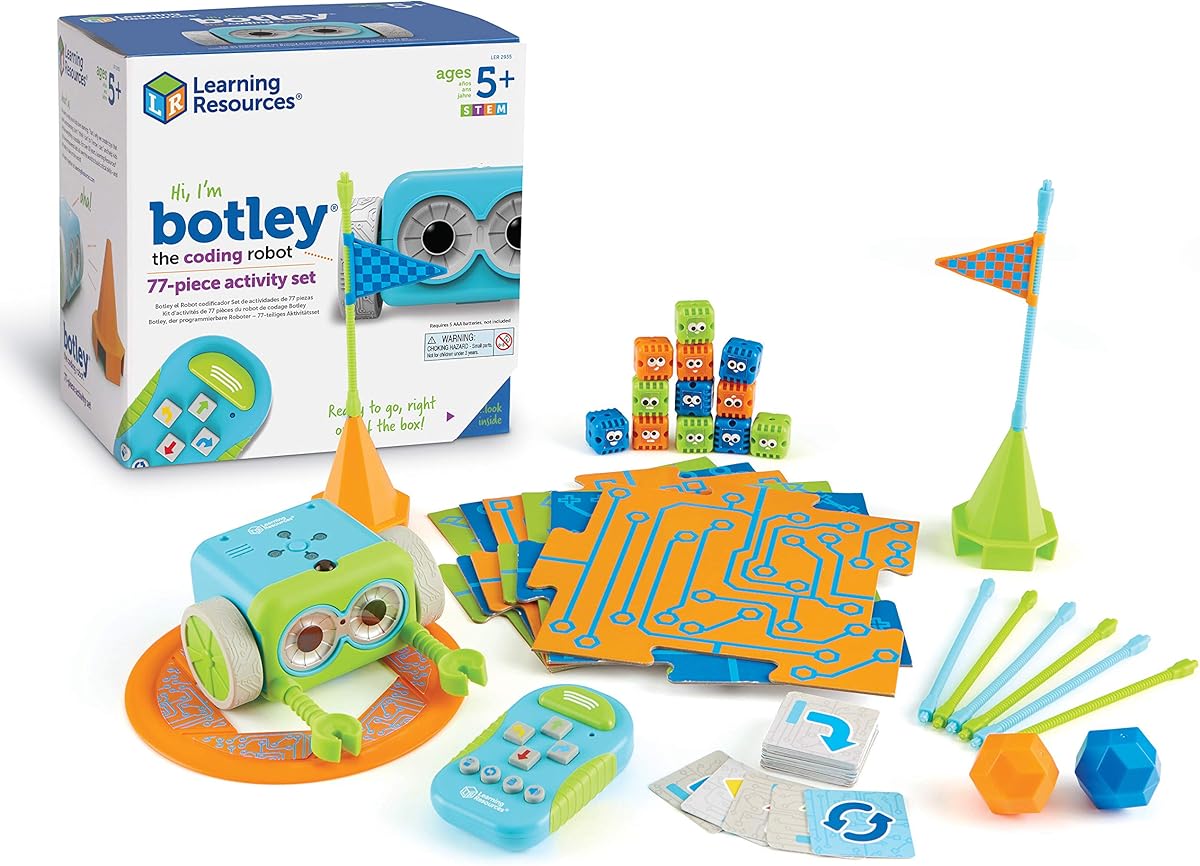
Botley is a screen-free coding robot that works with a remote programmer. It scored well for its object detection and ability to follow black lines. The set includes obstacles and tiles that allow creating custom challenges.
We may earn a commission when you buy through this link, at no additional cost to you.
Early STEM skills develop as kids program sequences without digital distractions. The remote allows sending commands and controlling the robot easily. It is ready to code right out of the box for immediate use.
Batteries are not included which adds a small extra cost. Assembly is needed but straightforward for most users. These minor issues do not impact the core educational value.
Best for children aged five and up who prefer tactile play. It fits parents wanting to limit screen time. The comprehensive set supports many activities at home.
Includes obstacle pieces and coding cards for varied play.
Teaches sequencing and logic through active screen-free play.
We may earn a commission when you buy through this link, at no additional cost to you.
Ozobot Evo introduces coding through color code markers and Blockly software. It was praised for its comprehensive educational resources and adaptable skill levels. The robot reads color lines to perform actions which teaches coding visually.
We may earn a commission when you buy through this link, at no additional cost to you.
Access to over 700 lessons supports long-term learning across subjects. The kit grows with children from beginner to master coding skills. Durable design makes it suitable for classroom environments.
The price is higher than basic toys but justified by the lessons. Markers are included but need replacement over time. These costs are manageable for the educational depth provided.
Ideal for children aged five to eleven in school or home settings. It fits educators seeking structured curricula. The lesson library ensures continued value over years.
Draw lines with markers to program robot movements.
Five skill levels allow growth from beginner to expert.
We may earn a commission when you buy through this link, at no additional cost to you.
Botley 2.0 builds on the original with enhanced object sensing features. It received high ratings for adding depth through multi-step paths and new challenges. The kit includes more obstacles and boards for creative building.
We may earn a commission when you buy through this link, at no additional cost to you.
Lights and sounds give the robot personality and engage children fully. The remote allows programming sequences without a screen which keeps focus on logic. It supports expanding play with custom mazes and stories.
The price increase may deter budget-focused buyers but adds value. Assembly is similar to the original which is manageable. These cons are minor compared to the added features.
Best for those wanting an upgrade from the original Botley. It fits children who mastered the basics. The new challenges keep interest high as skills grow.
Object sensing and lights add depth to basic coding.
Custom mazes and stories encourage open-ended play.
We may earn a commission when you buy through this link, at no additional cost to you.
Dash is a premium robot designed for immediate play out of the box. It scored highly for its five app ecosystem and lack of assembly requirements. Kids can sing dance and navigate obstacles using voice or app commands.
We may earn a commission when you buy through this link, at no additional cost to you.
The app-enabled learning covers concepts like variables and loops through games. Schools worldwide use Dash which validates its educational value. The battery life supports up to five hours of active play.
The price is on the higher end but matches the features. It lacks a camera which may limit some uses. These limits are acceptable for the robust app features.
Best for families seeking a premium ready-to-play experience. It fits kids aged six and up ready for app coding. The school use highlights its quality and reliability.
No assembly means immediate play for younger users.
Five apps provide diverse coding and gaming experiences.
We may earn a commission when you buy through this link, at no additional cost to you.
TaleBot Pro is tailored for toddlers aged three to five to learn while playing. It received praise for its interactive map and voice feedback features. The robot records voice commands which fosters creativity and storytelling skills.
We may earn a commission when you buy through this link, at no additional cost to you.
The map allows building shapes with Lego blocks and custom play. Up to 256 commands cover basic coding concepts for young learners. It supports ten languages making it accessible globally.
Recommended activity boxes cost extra which adds to the price. Batteries are not included for initial use. These are minor cons for the high educational value.
Ideal for toddlers and preschoolers starting their learning journey. It fits parents wanting early STEM exposure. The language support and storytelling make it versatile.
Build shapes and stories with compatible Lego blocks.
Record and play back commands for fun interaction.
We may earn a commission when you buy through this link, at no additional cost to you.
Selecting the right coding toy requires looking at several factors to match your child's age and interests. This guide breaks down key aspects to consider.
Check the manufacturer's age recommendations carefully. Younger kids need simple buttons and no screens while older kids can handle complex apps. Choosing the right age ensures safety and engagement.
Pick a toy that matches your child's current skills without overwhelming them.
Decide if you want screen-free play or app integration. Screen-free toys teach coding without devices while apps offer more features. Both approaches have educational benefits depending on your goals.
Consider your family's screen time rules when making this choice.
Look at which coding concepts the toy teaches like loops or sequencing. Basic toys cover simple commands while advanced ones teach variables. Understanding the concepts helps gauge educational value.
Select a toy that can grow with your child's learning needs.
Robust materials ensure the robot survives active play. Metal parts and sturdy wheels last longer than plastic. Durability is key for long-term use especially in classrooms.
Prioritize durable materials if the toy will be used frequently.
Check if batteries are included or needed separately. Rechargeable options reduce ongoing costs while disposable batteries offer convenience. Ensure the power source fits your routine.
Factor in battery costs when comparing total price.
See if the toy supports add-ons or extra parts. Expandable systems allow customization and longer interest. This feature adds value as your child wants more challenges.
Choose expandable toys for extended play value.
Review included guides or online lessons provided. Comprehensive resources support teaching and help parents. Good resources make learning smoother and more effective.
Look for kits with strong educational support materials.
Set a clear budget based on your needs. Basic models are affordable while premium ones cost more. Balance cost with features to find the best value.
Remember to include battery and accessory costs in your budget.
Read the manual fully before starting assembly. Follow instructions step by step to ensure proper setup. This prevents confusion and ensures the robot works correctly from the first use.
Store parts in a dedicated box to keep them organized. Use the included storage cases if available. Proper storage prevents lost pieces and maintains longevity.
Recharge or replace batteries as needed regularly. Clean the robot with a dry cloth to avoid damage. Regular maintenance keeps the toy in good working condition.
The Learning Resources Code & Go Robot Mouse is ideal for four year olds. It features simple buttons and screens-free operation that matches early learning needs. The maze activities teach sequencing without needing a screen.
Some coding toys like Sphero Mini need internet for app features. Others like Botley work completely offline with physical cards. Check product specs to confirm connectivity needs before purchasing.
Yes coding toys are valuable for homeschooling because they teach logic and problem-solving. Many offer comprehensive curricula that support STEM goals. They provide hands-on learning that complements traditional lessons well.
Battery life varies but most offer one to five hours of play. Rechargeable models may last longer between charges. Check specifications for estimated battery life before buying.
Coding toys can help improve math and logic skills that support school grades. They teach sequencing and variables which are key concepts in science and math. Consistent play builds these skills over time.
Coding involves writing instructions while robotics combines coding with physical machines. Coding toys often blend both by letting kids program a robot. This combination offers hands-on learning of computer science.
Use a dry soft cloth to wipe down surfaces. Avoid getting water inside the robot to prevent electrical damage. Clean sensors gently to keep them working accurately.
We highlighted ten top coding toys ranging from screen-free mice to app-enabled robots. Each offers unique strengths for different ages and learning styles. Our top picks include the Robotic Pet for creativity and Botley for young kids.
Prioritize toys that match your child's current skills and interests. Consider factors like battery life and expandability for long-term value. A good coding toy grows with your child's knowledge.
Remember to check current prices and availability before buying. Features and models may change over time. Use the links provided to find the latest offers on these excellent STEM tools.