
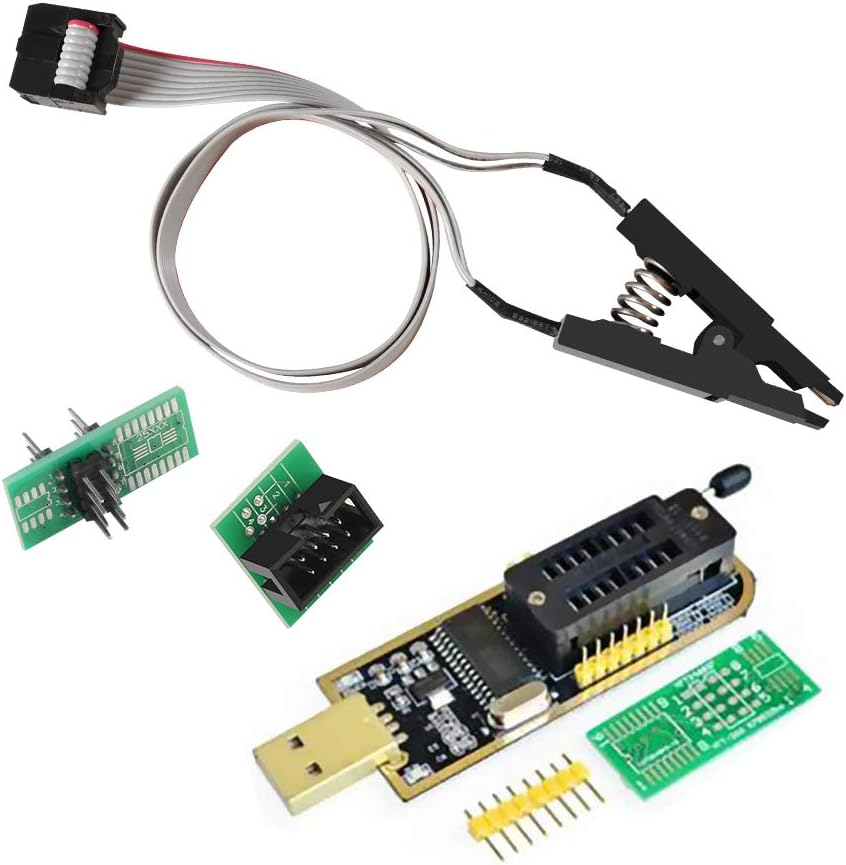
WWZMDiB CH341A EEPROM BIOS Programmer
4.1Editor score
Supports 24 25 series chips
Includes SOP8 clip for testing
No welding required for use
This guide compares the top Bios Flash Tool options for 2026, evaluating programmers and recovery kits for reliability, speed, and ease of use for technicians.
Selecting the right Bios Flash Tool is critical for IT professionals and enthusiasts who need to repair or update firmware efficiently. A reliable tool ensures safe access to system settings without risking hardware damage during critical maintenance tasks.
We evaluated ten top-rated products based on user feedback, technical specifications, and versatility across different hardware platforms. Our analysis focuses on compatibility, speed, and the ease of integrating these tools into existing repair workflows.
Each pick highlights unique strengths, from budget-friendly programmers to comprehensive recovery kits. Keep in mind that availability and pricing fluctuate regularly, so verify current stock before making your final purchasing decision today.
4.1Editor score
4.4Editor score

4.3Editor score
The following table provides a side-by-side comparison of the top ten Bios Flash Tool options available in the market. It outlines key specifications to help you quickly identify the right tool for your specific hardware needs.





The WWZMDiB CH341A programmer is a budget-friendly option for those entering the field of BIOS flashing. It offers essential functionality for backing up and erasing various software on compatible chips without breaking the bank.
We may earn a commission when you buy through this link, at no additional cost to you.
Its main strength lies in its compatibility with most 24 and 25 series SOP8 and SOP16 chips. The included test clip allows for non-invasive programming, which is a significant advantage for users who wish to avoid soldering components onto motherboards.
While it performs well for basic tasks, users must ensure the correct voltage is applied to prevent burning the chip. The product supports 3.3v and 5V switching, but care is required to confirm chip specifications before operation.
This tool is ideal for hobbyists and technicians needing a reliable backup solution for common flash chips. If you are looking for an affordable entry into BIOS programming, this kit provides the necessary hardware to get started immediately.
Priced at a very accessible level, it removes the financial barrier for beginners.
The SOP8 clip enables you to test chips without desoldering them from the board.
We may earn a commission when you buy through this link, at no additional cost to you.
The ACEIRMC SOIC8 SOP8 Flash Chip IC Test Clips kit is a comprehensive solution for technicians requiring reliable in-circuit programming. It simplifies the process of flashing BIOS by allowing direct access to the chip without disassembling it first.
We may earn a commission when you buy through this link, at no additional cost to you.
Its standout feature is the ability to work seamlessly with the CH341A programmer, enabling quick backup and programming of 24, 25, and 93 series chips. The inclusion of a double clip adds versatility for various testing scenarios.
However, some chips may be affected by peripheral circuits, preventing direct clipping. Users should verify chip locations and consider that ESMT SST class 25 chips can only be read, not written with this specific setup.
For those prioritizing efficiency and ease of use in a repair workflow, this kit offers a robust set of tools. It is highly recommended for professionals who need to handle BIOS repairs quickly and without soldering.
The clip enables programming without removing the chip from the motherboard.
Compatible with a wide range of common EEPROM and flash memory series.
We may earn a commission when you buy through this link, at no additional cost to you.
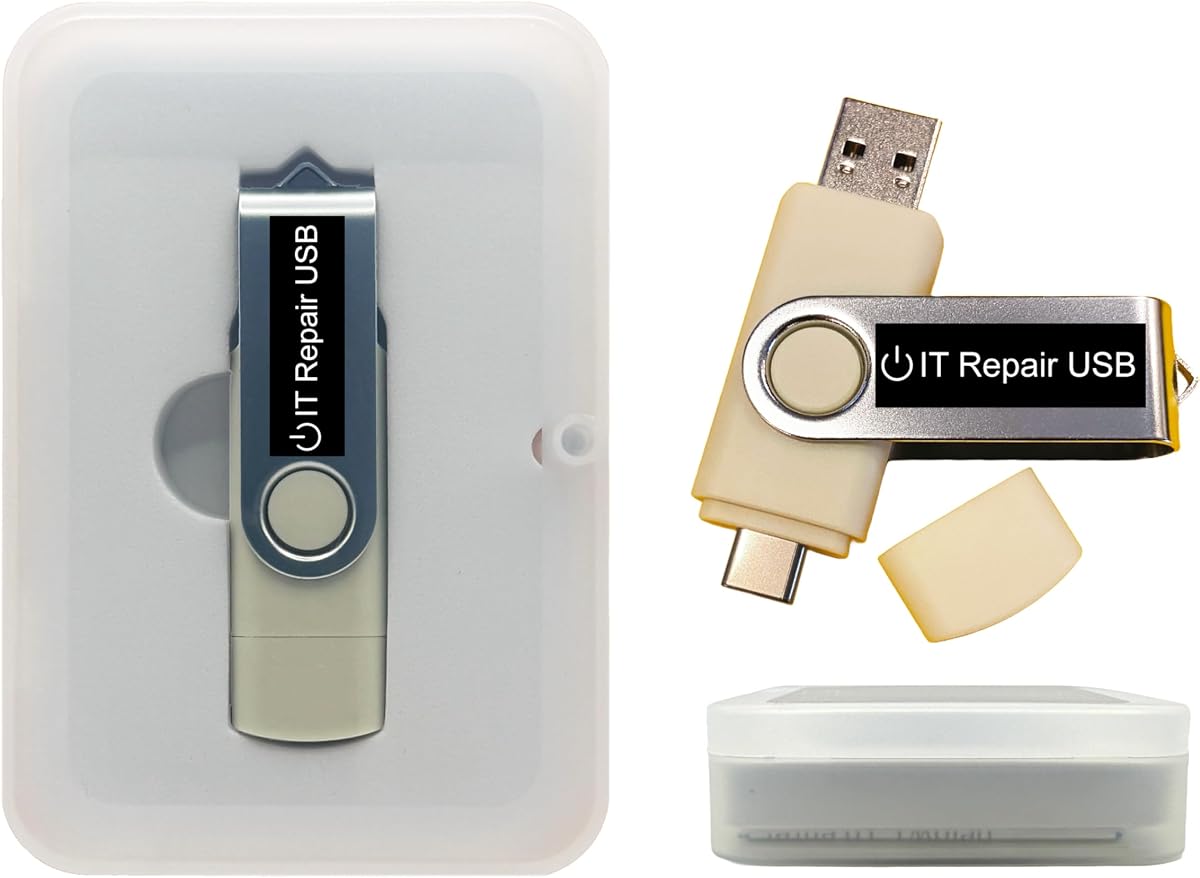
This Bootable USB Drive serves as a critical utility for IT professionals dealing with locked systems. It is designed to reset or recover forgotten passwords for Windows and Linux accounts without requiring a system reinstall or file loss.
We may earn a commission when you buy through this link, at no additional cost to you.
The device supports both Legacy BIOS and UEFI boot modes, making it compatible with a vast array of hardware from modern laptops to older servers. Its simple interface ensures that even less technical users can follow on-screen guidance easily.
While it excels at password recovery, its functionality is specialized rather than general purpose. Users seeking a broad flashing tool might find its capabilities limited to account management and basic system restoration tasks.
For administrators managing large fleets of devices, this tool provides a quick and secure way to restore access. It is a valuable addition to any emergency toolkit where speed and reliability are paramount.
Works with nearly all laptops, desktops, and mini-PCs via USB-A or USB-C.
Operates without an internet connection to maintain privacy during recovery.
We may earn a commission when you buy through this link, at no additional cost to you.
This Windows 11 Bootable USB Drive is tailored for users who need to install the OS without strict hardware checks. It allows for setup and recovery on systems that might otherwise be blocked by TPM requirements.
We may earn a commission when you buy through this link, at no additional cost to you.
Designed to be compatible with both UEFI and Legacy modes, it offers flexibility for older hardware. However, users must note that this is strictly an operating system installer and cannot diagnose or repair underlying hardware failures.
The product comes from a family-owned business, ensuring each drive is tested before shipping. This personal touch adds a layer of trust, though the limitations on hardware compatibility are clear and should be reviewed before purchase.
If your computer can power on and access the BIOS, this tool provides a streamlined path to a fresh Windows installation. It is an excellent resource for system builders who need to bypass standard security checks.
Allows Windows 11 installation without the Trusted Platform Module requirement.
Supports both UEFI and Legacy BIOS modes for broader hardware reach.
We may earn a commission when you buy through this link, at no additional cost to you.
This ACEIRMC kit offers a comprehensive package for programming 24 and 25 series FLASH chips. It includes the CH341A programmer along with adapters that make it suitable for amateur and professional users alike.
We may earn a commission when you buy through this link, at no additional cost to you.
The programming speed is significantly faster than standard ATMEGA8 solutions, reaching up to 2 to 3 times the speed. The included 1.8V adapter extends its utility to iPhone and motherboard flash memory requiring lower voltages.
Users should note the reliance on USB 1.1 comms, which may limit throughput on very high-speed systems. However, for most standard repair tasks, the speed is more than sufficient to get the job done efficiently.
If you need a kit that covers a wide range of voltage and chip requirements, this is a strong contender. The inclusion of the SOP8 to DIP8 adapter makes it versatile for various test scenarios.
Erase and programming speeds are optimized for rapid workflow efficiency.
The 1.8V adapter allows handling of low-voltage flash memory chips.
We may earn a commission when you buy through this link, at no additional cost to you.
The EZP2023 USB Programmer stands out as the fastest BIOS chip programmer currently on the market. It delivers exceptional read and write speeds, taking mere seconds to complete operations on common memory chips like EN25T80.
We may earn a commission when you buy through this link, at no additional cost to you.
Its automatic chip identification feature streamlines the workflow, reducing the risk of user error during selection. The package includes a set of 15 adapters, ensuring compatibility with a wide variety of chip configurations.
While the automatic detection is robust for 25 series chips, some 24 and 93 series chips may still require manual selection. Despite this minor constraint, the overall performance and support for various EEPROM types make it a premium choice.
For professionals who value speed and efficiency in a high-volume repair environment, this tool justifies its cost. It offers a seamless experience that reduces downtime and increases throughput significantly.
Achieves read and write times that set a new standard for the industry.
Comes with 15 adapters to handle diverse physical chip formats easily.
We may earn a commission when you buy through this link, at no additional cost to you.
This Windows PC Repair Bootable USB Toolkit is designed as a versatile all-in-one solution for various system issues. It allows users to diagnose and repair startup problems, remove malware, and recover files without modifying the installed OS.
We may earn a commission when you buy through this link, at no additional cost to you.
The drive is fully customizable, enabling administrators to add or replace ISOs to tailor it to specific needs. Its dual USB support ensures compatibility with modern and older hardware, extending its utility over time.
While it offers a comprehensive set of tools, the user rating suggests some variability in performance or ease of use. Users should be prepared to read the instructions carefully to maximize its potential.
For IT professionals managing a fleet of PCs, this toolkit provides a portable way to handle multiple repair tasks. It is an excellent option for those who want a single drive for diagnostics and recovery.
Run system diagnostics and fixes directly from USB without installing software.
Upgrade and modify the drive contents to fit changing repair needs.
We may earn a commission when you buy through this link, at no additional cost to you.
This SOP16 IC Test Clip is designed for users working with 16-pin flash chips commonly found in modern motherboards. It supports both wide and narrow body chips, ensuring compatibility with a broad range of components.
We may earn a commission when you buy through this link, at no additional cost to you.
The clip features a hardened design with a thick gold-plated layer for stable connections. A 40cm connection line provides ample length to connect to the programmer without straining the hardware during use.
Users should be aware that peripheral circuits on some boards may prevent online programming. In such cases, the chip must be removed for programming to succeed, which adds time to the repair process.
For technicians needing a reliable clip for 16-pin chips, this tool offers solid performance and durability. It is a specific but essential addition for those dealing with SOP16 packages frequently.
The gold-plated pins ensure consistent electrical contact during programming.
The 40cm line allows flexibility in positioning the chip and programmer.
We may earn a commission when you buy through this link, at no additional cost to you.
This Bootable USB drive focuses on providing a clean and official installation path for Windows 11 and 10. It automatically downloads genuine copies from Microsoft, ensuring that users do not end up with outdated or pirated ISOs.
We may earn a commission when you buy through this link, at no additional cost to you.
A standout feature is its compatibility with Secure Boot enabled. Many recovery tools require disabling Secure Boot in BIOS, but this drive works with it on, simplifying the boot process for modern systems.
Users should note that a Windows product key is not included, meaning a license must be purchased or existing to be used. Additionally, it does not support Legacy BIOS, which limits its use on older hardware.
For those looking to reinstall Windows with the latest updates without hassle, this tool is ideal. It is particularly useful for systems built after 2013 that rely on UEFI for secure operations.
No BIOS changes required as it works with Secure Boot enabled by default.
Downloads directly from Microsoft to ensure genuine and up to date files.
We may earn a commission when you buy through this link, at no additional cost to you.
This Kali Linux Bootable USB is tailored for ethical hackers and security researchers who need a portable suite of penetration testing tools. It comes pre-installed with over 600 tools for network and web auditing.
We may earn a commission when you buy through this link, at no additional cost to you.
The drive supports both Legacy BIOS and UEFI modes, allowing it to run on almost any desktop or laptop. Users can choose to run Kali directly from the USB or install it permanently for better performance.
While it is a professional-grade platform, it may be complex for users not familiar with Linux environments. The specialized nature means it is not a general-purpose repair tool but a focused security utility.
For security professionals and advanced users, this toolkit offers a reliable way to perform assessments and forensics. It is a trusted resource for those dedicated to securing systems and identifying vulnerabilities.
Includes over 600 pre-installed tools for comprehensive security analysis.
Choose to run the OS from USB or install it for long-term use.
We may earn a commission when you buy through this link, at no additional cost to you.
Selecting the right tool depends on your specific needs and the type of hardware you are working on. Consider these factors to ensure you purchase a solution that is reliable and effective.
Ensure the tool supports the specific memory chips you will encounter. Most options cover 24 and 25 series, but some specialized tools may support 93 or other formats. Check the datasheet of your chips before purchasing.
Verify that the programmer lists support for the exact chip models in your devices.
Speed is critical for efficiency in repair workflows. Higher-end programmers like the EZP2023 offer significantly faster read and write times. If you handle high volumes, investing in speed can save valuable time.
Look for models that advertise fast erasing and writing capabilities in the specs.
The quality of the test clip affects the success of in-circuit programming. Clips with gold-plated pins and sturdy construction are less likely to fail during use. Ensure the clip fits the pin count of your target chips.
Choose kits that include adapters for multiple pin sizes to avoid buying extra parts.
Many modern chips operate at different voltages, such as 1.8V or 3.3V. A tool that supports voltage switching or includes adapters for different levels is essential to prevent hardware damage.
Check if the device handles 3.3V and 5V or if it includes a specific adapter for low-voltage chips.
For USB-based recovery tools, support for both Legacy BIOS and UEFI is vital. Older systems may require Legacy boot, while modern ones use UEFI. Ensure the device covers both to maximize utility.
Look for products that explicitly state compatibility with both boot modes.
User-friendly interfaces and clear instructions reduce the risk of errors during flashing. Some tools come with simple software that automatically identifies chips, which is helpful for beginners.
Prioritize tools that offer clear software guidance to avoid complex manual setups.
Durability is key for tools that will be used frequently in professional settings. Check reviews for comments on the physical robustness of the clip and the connection stability.
High-quality connectors and cables ensure a reliable connection during the flashing process.
Reliable support can help resolve issues quickly if a tool does not work as expected. Companies that offer responsive assistance and warranties provide better protection for your investment.
Select brands that provide clear contact channels and helpful documentation for their products.
Before using any programmer, ensure you have installed the necessary drivers on your computer. This often involves downloading specific software provided by the manufacturer to facilitate communication with the chip.
Always verify the voltage requirements of the chip you are working with to avoid damaging the board. Use the correct clip and adapter for the specific pin count and configuration of your memory chip.
Keep the tools clean and store them in a dry place when not in use. Dust and moisture can affect the gold-plated pins and cause connection issues during future programming sessions.
While many tools are versatile, they are generally designed for specific chip series like 24 or 25. You must check if your motherboard uses a supported chip model. Some boards may require additional adapters to function properly.
Most modern tools allow for in-circuit programming using test clips, which means soldering is not always required. However, if the chip is heavily integrated, removing it may be necessary to get a clean signal.
Flashing BIOS carries risks, so it is important to follow instructions carefully. Ensure you have the correct firmware and a stable power source to avoid bricking the device during the process.
The CH341A is a budget-friendly option suitable for basic tasks. The EZP2023 offers faster speeds and automatic chip identification, making it better for professional and high-volume use.
Most programmers and recovery tools are designed to work on Windows systems. Some bootable utilities may support Linux, but the programming software typically requires a Windows environment to run effectively.
You should match the clip to the pin count and size of your chip. For example, an SOP8 clip is used for 8-pin chips, while a SOP16 clip is needed for 16-pin chips.
Tools focused on flashing or BIOS updates are generally not designed for file recovery. You should use dedicated recovery utilities to attempt to retrieve data from a drive or system.
Most devices do not require firmware updates as they are hardware-based. However, the accompanying software may need updates to recognize newer chip models effectively.
Choosing the right Bios Flash Tool depends on your specific needs and the types of hardware you encounter. Whether you need a budget-friendly programmer or a high-speed solution, the options reviewed here offer reliable performance.
Prioritize compatibility and speed when making your decision. Investing in a tool with robust features can save time and reduce the risk of errors during critical repair tasks.
Keep in mind that pricing and availability can change. Verify current stock and details before purchasing to ensure you get the best value for your investment today.