
Corded Landline Phones for Seniors
4.2Editor score
Photo dialing buttons
Loud ringer alert
No power required
This comprehensive guide compares the top captioned telephone models for seniors and hearing impaired users to help you find the right device for clear
Finding the right communication tool is essential for maintaining connections with loved ones. Captioned telephone devices offer a unique solution by displaying text alongside voice calls. This feature ensures clarity for those with hearing loss or cognitive challenges.
We have evaluated ten leading models available on the market today. Our analysis focuses on usability, sound quality, and accessibility features. Each product offers distinct advantages for different needs and environments.
Every selection below highlights key specifications and real-world performance. We aim to guide you toward the most suitable choice for your home. Please note that availability and costs may change over time.
4.2Editor score

4.3Editor score
4.5Editor score
The following table provides a side by side overview of all selected models. It highlights core specifications to help you quickly identify key differences between devices.


The Hamilton CapTel 2400iSPNBT stands out as a leading choice for users needing real time text support. It combines a large touchscreen with reliable captioning technology. This device ensures conversations remain clear and confident for hearing impaired individuals.
We may earn a commission when you buy through this link, at no additional cost to you.
Its ability to display captions during calls reduces misunderstanding significantly. Users can choose between auto or assisted captioning based on preference. The built in answering machine also supports voicemail captions for complete clarity.
While it requires high speed internet and registration, the benefits often outweigh these steps. The amplified sound ensures voices are heard clearly alongside the text. Customizable settings allow adjustments for comfort levels.
This model is ideal for those prioritizing accuracy and ease of use. It helps maintain strong connections with family members without stress. We recommend it for households seeking a robust captioning solution.
Real time captions ensure every word is understood accurately during calls.
Assisted captioning offers live operator support when needed for complex calls.
We may earn a commission when you buy through this link, at no additional cost to you.
This corded landline phone offers exceptional value for seniors needing straightforward communication. It features large picture buttons for easy dialing without memorization. The design supports those with memory loss or visual impairments effectively.
We may earn a commission when you buy through this link, at no additional cost to you.
The 110dB ringer ensures calls are never missed even in noisy rooms. Hands free calling allows comfortable interaction without holding the receiver. It operates directly from the phone line without needing batteries or power.
Although it lacks advanced features like voicemail captioning, it fulfills basic needs well. The setup process is quick and requires no technical knowledge. Reliable performance makes it a safe choice for daily use.
We suggest this model for users prioritizing simplicity and reliability. It provides a secure link to family members without complexity. Its affordability makes it accessible for many households.
Photo buttons allow users to dial contacts instantly without remembering numbers.
Operating without batteries ensures functionality during power outages or emergencies.
We may earn a commission when you buy through this link, at no additional cost to you.
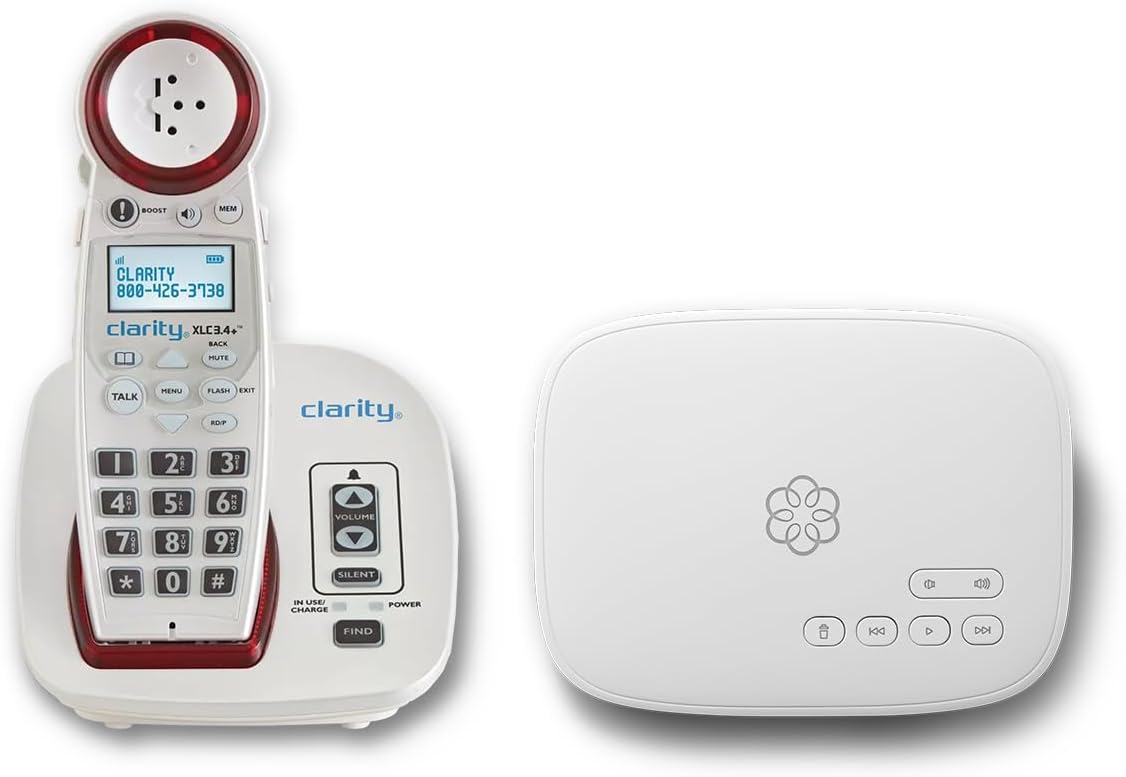
The Ooma Telo bundle combines premium service with an amplified cordless phone. It provides unlimited calling across the US with additional concierge support. This package offers peace of mind for seniors needing extra assistance.
We may earn a commission when you buy through this link, at no additional cost to you.
Features like call blocking and 911 text alerts enhance safety significantly. The hearing aid compatible design ensures clear audio quality for all users. Professional setup assistance simplifies the installation process for families.
While it involves a monthly subscription, the comprehensive support justifies the cost. The phone itself offers adjustable volume and visual ringer alerts. It serves as a complete communication solution for modern homes.
We recommend this for households seeking a high level of service. It balances technology with human support effectively. Ideal for those wanting reliable and safe communication options.
911 text alerts notify loved ones immediately when emergency services are called.
Concierge plan includes 24/7 service support for any technical issues.
We may earn a commission when you buy through this link, at no additional cost to you.
This home telephone focuses on hands free interaction using voice commands. It allows users to answer or dial calls without touching buttons. This design is particularly useful for individuals with mobility or vision challenges.
We may earn a commission when you buy through this link, at no additional cost to you.
The phone remains active to listen for specific commands like dial or hang up. It connects directly to the home phone line for standard operation. No buttons are required to activate the device functionality.
Users may need time to adjust to speaking commands consistently. The feature set is limited compared to standard telephones with screens. However, for specific needs, it offers unique accessibility advantages.
We suggest this for those who struggle with physical controls. It provides independence in communication through voice technology. Verify voice recognition works well in your specific environment.
Fully hands free operation supports users with limited hand strength or tremors.
Active listening mode ensures the device responds instantly to your voice.
We may earn a commission when you buy through this link, at no additional cost to you.
This model features large buttons designed for seniors with low vision. It includes replaceable picture buttons to store favorite contacts easily. The design supports users with dementia or cognitive impairments effectively.
We may earn a commission when you buy through this link, at no additional cost to you.
Volume control reaches up to 40dB for amplified sound. The phone can be mounted on walls to save space or prevent loss. Stored numbers remain safe even if the phone line is unplugged.
The lack of advanced digital features keeps the interface simple. However, this simplicity reduces confusion for users with limited tech experience. It focuses purely on essential calling needs.
We recommend this for caregivers needing a reliable daily phone. The picture feature makes it intuitive for memory challenges. It provides a secure way to stay connected at home.
Replaceable picture buttons allow users to see faces instead of numbers.
Wall mount capability keeps the device accessible and prevents it from sliding.
We may earn a commission when you buy through this link, at no additional cost to you.
This VoIP phone is designed for modern telephony needs with senior safety. It features customizable image keys that hold family photos for easy dialing. The volume reaches 110dB ensuring calls are heard clearly.
We may earn a commission when you buy through this link, at no additional cost to you.
Users can access emergency help via a dedicated one touch key. Visual red light alerts notify users of incoming calls effectively. The phone supports mounting on walls for secure placement.
It requires an active VoIP service rather than a traditional line. This means users must have internet phone setup ready before use. Those requirements may limit compatibility with some households.
We suggest this for homes using digital phone services. The photo keys support memory loss and improve independence. It balances tech features with accessibility needs well.
Dedicated help key provides instant access to pre programmed emergency numbers.
Red light alerts ensure incoming calls are noticed visually without sound.
We may earn a commission when you buy through this link, at no additional cost to you.
This phone offers high definition audio for clear voice transmission. It focuses on performance design to maintain call quality effectively. The device works with standard landline connections without special setup.
We may earn a commission when you buy through this link, at no additional cost to you.
Users can benefit from amplified sound levels for hearing loss. However, features are basic compared to more advanced models available. It provides standard calling functions without extra digital tools.
The user rating is lower than other options on this list. This may indicate potential issues with usability or reliability. Reviewing recent feedback is recommended before purchase.
We suggest this only if you need simple audio enhancement. It does not offer modern digital capabilities. Check current reviews to confirm performance matches your needs.
High definition audio ensures voices come through clearly without distortion.
Compatible with standard landline jacks for immediate plug and play use.
We may earn a commission when you buy through this link, at no additional cost to you.
This device includes voice dialing to make calls without touching keys. It stores up to 17 programmable voice memories for contacts. The talking caller ID announces names audibly when a call comes in.
We may earn a commission when you buy through this link, at no additional cost to you.
Visual LED indicators provide alerts for those with hearing difficulties. Volume options support up to 40dB for louder conversations. However, the user rating suggests challenges with performance or setup.
The memory backup feature ensures contacts are not lost easily. Still, voice recognition may require precise training for accurate results. It is a specialized tool for voice interaction enthusiasts.
We recommend caution when considering this model due to feedback. Verify voice functionality works reliably for your accent or voice. It suits specific needs over general convenience.
Programmable voice memories allow users to store names for dialing.
Talking caller ID helps identify callers without looking at a display.
We may earn a commission when you buy through this link, at no additional cost to you.
This phone offers one touch dialing with photo memory keys. It supports users with dementia by showing photos of contacts. Loud ringtones reach over 110dB ensuring calls are never missed.
We may earn a commission when you buy through this link, at no additional cost to you.
Hands free calling allows comfortable use for those with mobility issues. LED lights flash during calls to provide visual notifications. The setup process takes only four steps for easy programming.
It requires a traditional RJ11 phone line connection. This means it does not support internet or wireless connections. It focuses on reliable and simple communication for daily use.
We suggest this for those needing clear visual and audio cues. It provides peace of mind through simple and effective design. Ideal for family members needing regular contact.
Photo memory keys reduce cognitive load for users with memory loss.
Quick four step programming makes it easy to set up contact numbers.
We may earn a commission when you buy through this link, at no additional cost to you.
The VTech SN5147 combines corded and cordless options for flexibility. It features photo speed dial for easy contact access. Built in call blocking helps prevent unwanted robocalls and spam.
We may earn a commission when you buy through this link, at no additional cost to you.
Visual indicators ensure no missed calls even in noisy settings. The answering machine allows remote access to messages conveniently. It supports expandable handsets for multi room usage.
Users must have power for the cordless handset to function. This requires an outlet nearby. However, the hybrid design offers reliable backup during outages via base.
We recommend this for seniors wanting mobility at home. It balances accessibility with modern call management tools. A practical solution for varied communication needs.
Call blocker stops unwanted robocalls and unknown numbers automatically.
Cordless handset allows movement around the house without losing connection.
We may earn a commission when you buy through this link, at no additional cost to you.
Selecting the right captioned telephone involves several key factors. We break down the most important aspects to consider for your needs.
Captioned phones use internet services to display text in real time. Ensure the device supports the type of captioning you need. Some require subscription plans while others are included with the hardware.
Check if the service covers your specific region. Verify that the captions are accurate and fast enough for natural conversation.
Look for models with adjustable volume up to 40dB or higher. Amplified sound helps users hear voices clearly even with significant hearing loss. Speakerphone options can also reduce strain on the hands.
Test the volume settings to ensure they meet hearing thresholds. High volume ringing is also critical for alerting users to incoming calls.
Flashing lights are essential for users who may not hear ringing. Visual indicators should be bright enough to catch attention from another room. Some models use LEDs that sync with call activity.
Choose a device with customizable alert options. This helps reduce false alarms and ensures reliability during daily use.
Interfaces should be intuitive with large buttons or touchscreens. Avoid complex menus that require memorization. Photo dialing is a useful feature for memory impaired users.
Prioritize models with straightforward setup. The easier it is to configure, the less likely you are to need technical support.
Some devices need high speed internet or VoIP services to function. Others work solely on traditional phone lines. Understand your home infrastructure before purchasing.
Verify that your provider supports the connection type. Lack of compatibility can render advanced features useless.
Look for models that retain numbers even during power outages. Photo memory buttons help users dial contacts without recalling digits. Speed dial options reduce the time to connect.
Ensure the phone stores enough contacts for daily needs. Reliable memory prevents frustration when calling family members.
Emergency features like one touch dialing or help keys add a layer of security. Some bundles include concierge services for technical assistance. Check if the provider offers 24/7 support.
Consider models with call blocking to prevent harassment. Safety features should be easy to access when needed.
Wall mountable designs save space and keep phones secure. Ensure the device fits your home layout. Check if tools are needed for mounting.
Verify the power requirements. Some models need batteries or adapters that may not be included in the box.
Start by connecting the telephone to a compatible phone line or internet service. Follow the manual to power on the device. Test the ringer and volume levels to ensure settings match your hearing.
Familiarize yourself with the captioning service by making a test call. Adjust text size and brightness on the screen for comfortable reading. Use the help features to set up speed dial contacts.
Keep the device in a dry area away from direct sunlight. Clean the screen gently with a soft cloth. Check batteries regularly if your model uses them to prevent unexpected power loss.
Many captioned phones require high speed internet to display real time text. However, some models work on traditional phone lines. Check the specific device requirements before buying.
Some captioned services are offered at no cost to eligible users. Others may require a subscription or purchase fee. Verify with your local telecom provider for available programs.
Most models are compatible with hearing aids through telecoil settings. Look for hearing aid compatible labels on the product. This ensures clear audio without feedback.
Corded landline phones usually work during outages without battery. Cordless and internet models may lose functionality until power returns. Consider a backup battery or analog line.
Follow the device menu to assign numbers to buttons. For photo keys, insert the image and save the contact number. This process simplifies dialing for memory impaired users.
Many modern captioned phones include call blocking features. You can add numbers to a blacklist to prevent ringing. Some services offer automatic blocking of known spam numbers.
We have reviewed ten top captioned telephone models to help you decide. Each device offers unique features tailored to different needs and environments. Choose the one that best fits your home and lifestyle.
Prioritize sound quality and ease of use when making your decision. Features like photo dialing and visual alerts can significantly improve daily life. Ensure the device supports your specific hearing and cognitive needs.
Prices and availability are subject to change without notice. Check current listings for the most up to date information. We hope this guide helps you find a reliable communication solution.