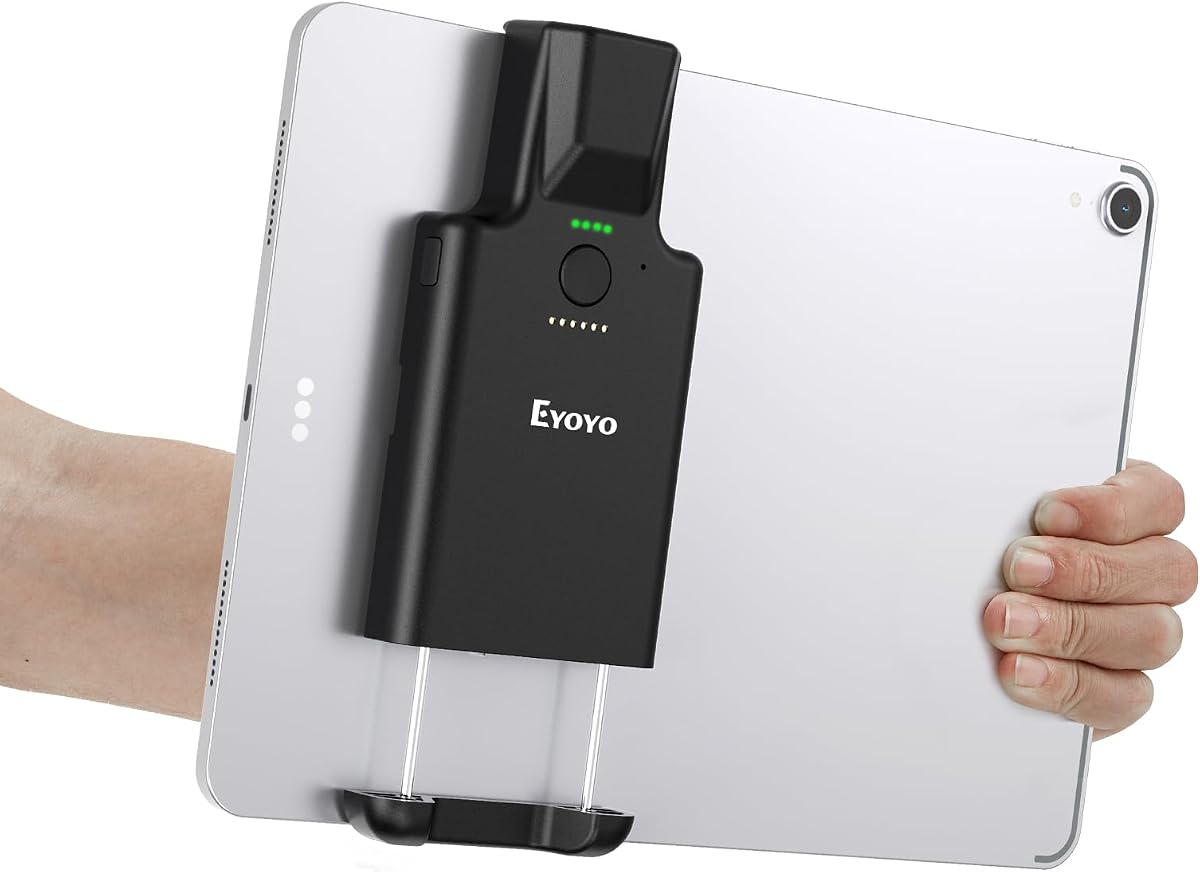
Eyoyo 1D 2D Portable Bluetooth Barcode Scanner Compatible with iPad Tablet
4.9Editor score
Clip design fits tablets
Up to 3000mAh battery
Advanced 1D and 2D scanning
This guide compares the top barcode scanner for iPad models to help you choose the best wireless device for inventory, retail, and library management needs.
Finding the right barcode scanner for iPad can transform how you manage inventory, track assets, or process sales. A good device offers seamless connectivity, reliable scanning accuracy, and long battery life to keep your workflow smooth.
We evaluated ten real products based on connectivity options, scanning technology, durability, and user feedback. Each pick was selected for its ability to pair effortlessly with iOS devices while handling various barcode types reliably.
Every product section highlights key features, pros, cons, and ideal use cases. Prices and availability change frequently, so check the linked pages for the most current offers before making your final purchase decision today.
4.9Editor score

4.4Editor score

4.3Editor score
This comparison table lists all ten scanners side by side with key specifications. Use it to quickly identify which model fits your budget, connectivity needs, and scanning volume requirements.


The NETUM Bluetooth Barcode Scanner earns our Editor's Choice for its versatile connectivity and reliable performance. It rates 4.4 stars from users and works well with iPads and other tablets.
We may earn a commission when you buy through this link, at no additional cost to you.
It supports Bluetooth 2.4G wireless and wired connections. The 2600mAh battery lasts long, and the CCD sensor reads damaged codes accurately. Storage mode holds up to 100000 barcodes when offline.
Users note it does not work with Square POS. Setting it up requires scanning specific configuration barcodes in the manual. But these limits do not affect most iPad inventory tasks.
Buy this if you need a flexible scanner for retail or library use. It handles daily scanning well and keeps data safe with storage mode until you sync back.
Choose Bluetooth 2.4G or wired to suit your workspace needs.
Scan up to 200000 times on a single charge.
We may earn a commission when you buy through this link, at no additional cost to you.
The Eyoyo Mini 1D Bluetooth Scanner is our Best Budget pick for those needing portability. It rates 4.3 stars and fits in a pocket due to its ultralight design.
We may earn a commission when you buy through this link, at no additional cost to you.
It connects via Bluetooth 2.4G or USB. The 650mAh battery lasts up to 10 days with auto-off. It reads common 1D codes well and supports silent vibration mode.
It does not scan 2D QR codes or codes on screens. For printed 1D barcodes only, it is an excellent choice for mobile use without bulk.
Buy this if you want a tiny scanner for quick checks. It pairs well with iPad and keeps costs low while delivering solid performance.
Weighs only 35 grams for easy carrying.
Auto-off extends battery life significantly.
We may earn a commission when you buy through this link, at no additional cost to you.
The Eyoyo 1D 2D Portable Bluetooth Scanner is our Best Premium pick with a unique clip design. It rates 4.9 stars and holds your iPad securely while you scan.
We may earn a commission when you buy through this link, at no additional cost to you.
It uses Bluetooth and USB with a 3000mAh battery. The 2D CMOS reads paper and screen codes. LED indicators show battery level clearly for convenience.
It lacks 2.4G wireless which some prefer. The price is higher but the clip feature justifies it for users who want hands free operation.
Buy this if you need stability and premium features. It is ideal for retail counters or library checkouts where keeping the iPad steady helps.
Fits devices from 5.7 to 7.1 inches.
Shows charge level at 25 percent increments.
We may earn a commission when you buy through this link, at no additional cost to you.
The Bluetooth 1D&2D Barcode Scanner offers quick scanning at up to 350 times per second. It rates 4.3 stars and supports 1D and 2D codes.
We may earn a commission when you buy through this link, at no additional cost to you.
It connects via Bluetooth 2.4G or USB. The 2600mAh battery lasts nine hours continuous. Storage mode holds over 100000 barcodes when offline.
It is not compatible with Square POS systems. For other retail or inventory needs, it delivers speed and flexibility at a low price.
Buy this if you need fast scans on a budget. It handles many code types well and pairs smoothly with iPad devices.
Processes codes up to 350 times per second.
Up to 70 meters in 2.4G mode.
We may earn a commission when you buy through this link, at no additional cost to you.
The NetumScan Desktop Barcode Scanner is a handsfree unit for fixed stations. It rates 4.6 stars and uses automatic sensing to read codes without triggering.
We may earn a commission when you buy through this link, at no additional cost to you.
It connects via USB with omnidirectional scanning. The base is non-slip and resists drops. It reads 1D and 2D codes accurately on paper and screens.
It lacks wireless so mobility is limited. For checkout counters or workstations, it improves speed and frees up your hands for other tasks.
Buy this if you need a stationary solution. It is plug and play and reduces wear from frequent handheld use.
Triggers when an item moves into the window.
IP54 rating protects against dust.
We may earn a commission when you buy through this link, at no additional cost to you.
The NetumScan Bluetooth Scanner with Charging Dock offers convenience with a combined dock. It rates 4.1 stars and supports 1D and 2D codes.
We may earn a commission when you buy through this link, at no additional cost to you.
The dock acts as a receiver and charger. The 1200mAh battery lasts long with auto-off. It connects via Bluetooth 2.4G or USB.
It is pocket sized but the dock adds bulk. Vibration mode is useful for quiet spaces like offices or libraries.
Buy this if you want a dock solution. It keeps your scanner charged and ready for daily retail or inventory work.
Receives data and charges in one base.
Fits easily in your pocket for mobile use.
We may earn a commission when you buy through this link, at no additional cost to you.
The NetumScan Bluetooth Scanner with Charging Doc improves control with dual buttons. It rates 4.9 stars and resists accidental shutdowns during work.
We may earn a commission when you buy through this link, at no additional cost to you.
The dock charges and receives data. It has 2 meter drop protection. Silent vibration helps in quiet spaces. Connects via Bluetooth 2.4G or USB.
It is not for Square POS. The button layout reduces mistakes when scanning many items in fast environments.
Buy this if you need reliability. It pairs well with iPad and stays tough in demanding retail or warehouse settings.
Separate buttons prevent accidental shutdown.
Built to withstand drops up to 2 meters.
We may earn a commission when you buy through this link, at no additional cost to you.
The Bluetooth Wireless Handheld Scanner with Base offers offline storage. It rates 3.8 stars and holds 50000 codes internally.
We may earn a commission when you buy through this link, at no additional cost to you.
It uses Bluetooth 2.4G or USB. The base acts as a receiver. Scan mode helps when out of range. It supports 1D and 2D codes.
It has a side switch to turn on. The rating is lower but storage is useful for large inventories.
Buy this if you need offline data. It pairs with iPad and handles many codes until you sync.
Holds up to 50000 codes locally.
Base connects scanner to computer wirelessly.
We may earn a commission when you buy through this link, at no additional cost to you.
The KUIIYER Bluetooth Barcode Scanner uses a CMOS sensor for clear reads. It rates 4.3 stars and handles 1D and 2D codes well.
We may earn a commission when you buy through this link, at no additional cost to you.
It connects via Bluetooth 2.4G or USB. The 2000mAh battery lasts long. IP54 rating protects against dust and water. It reads screens and paper.
It is not for Square. The CMOS sensor handles damaged or colorful codes better than older laser types.
Buy this if you need durability. It fits mobile use with iPad and resists tough conditions.
800×600 pixels capture clearer images.
IP54 rating resists dust and water.
We may earn a commission when you buy through this link, at no additional cost to you.
The Inateck 1D Bluetooth Barcode Scanner offers long range scanning. It rates 4.5 stars and connects to devices over 115 feet away.
We may earn a commission when you buy through this link, at no additional cost to you.
It uses Bluetooth only with a 2600mAh battery. The TPU case resists drops. It reads 1D barcodes well in various light.
It does not scan 2D codes. For 1D needs at large distances, it delivers reliability and endurance.
Buy this if you need range. It is great for warehouses where you stay away from your iPad.
Connects up to 115 feet without barriers.
Withstands repeated drops from 6 feet.
We may earn a commission when you buy through this link, at no additional cost to you.
Choosing the right scanner involves understanding your workflow needs. Here are key factors to consider before you buy.
Look for Bluetooth or 2.4G wireless to pair with iPad. Wired USB adds stability but reduces mobility.
Prioritize Bluetooth for mobile use and wired for fixed desks.
Decide if you need 1D or 2D QR code support. Most mobile tasks need both.
Choose 2D if you scan QR codes or digital screens.
Capacity matters for long shifts. Models with 2000mAh to 3000mAh last longer.
Pick larger capacity if you work full days.
Drop protection and IP ratings help in warehouses. TPU cases and metal parts add strength.
Look for IP54 or drop resistance if you work outdoors.
Some scanners store barcodes when out of range. This helps in large spaces with weak Wi-Fi.
Choose a model with offline storage if you move frequently.
Lightweight and compact designs reduce fatigue. Buttons should be easy to press.
Select ergonomic shapes if you scan many items daily.
Ensure it works with your iPad apps. Some POS systems limit scanner support.
Check app requirements before you buy.
Budget models save money but may lack features. Premium picks offer better build or clip designs.
Balance cost with the features you really need.
Pair your scanner via Bluetooth or USB. Follow the manual to enable iPad mode.
Charge the battery fully before first use. Use the dock or cable as needed.
Clean the lens with a soft cloth. Store in a dry place when not using.
Yes, most models listed support iPad and iPhone via Bluetooth. Verify iOS compatibility in product details before buying.
Models with 2D support can scan QR codes. Check if the specs list 2D or QR reading capability.
Many scanners work with apps and do not need drivers. Some use HID to appear as keyboards.
Battery life varies from 8 to 30 hours continuous use. Larger capacity batteries last longer on a charge.
Most models listed are not compatible with Square POS systems. Verify if your POS is supported.
Bluetooth models pair directly without a receiver. Some include a USB dongle for 2.4G mode.
Use storage mode to save barcodes when out of range. Sync later when the scanner reconnects.
Many sellers offer return policies. Check the specific seller terms on Amazon before purchasing.
We highlighted top picks including the Eyoyo Portable Bluetooth for premium features and the NETUM for versatility.
Prioritize battery, connectivity, and scan types that match your work. Avoid models unsupported by your POS.
Prices vary so check current offers on Amazon. The right scanner will keep your iPad workflow efficient.