
ASRock DeskMini X300 2.5G Series
4.2Editor score
AM4 Socket Ryzen support
Ultra-compact 1.92L size
Triple display output
Compare the top 10 Barebone Pcs with Amd for 2026, covering mini PCs, NAS kits, and gaming builds with expert insights on performance and value.
Barebone PCs with AMD processors offer a flexible foundation for custom builds without the cost of preloaded components. These systems let you choose your own RAM, storage, and operating system to match specific needs perfectly. Whether you need a compact office machine or a powerful gaming rig, AMD technology delivers strong efficiency and performance.
This guide evaluates ten leading barebone mini PC models powered by AMD chips ranging from Ryzen 5000 to Ryzen 8000 series. We examined connectivity options, expansion capabilities, thermal designs, and port availability to help you find the right match. Each entry includes detailed specs and real-world usage scenarios for informed decision-making.
Every product entry highlights key strengths, potential limitations, and ideal use cases based on official specifications and user feedback. Prices and availability change frequently, so verify current details before purchasing any component or kit. Use this resource to build a system that fits your workflow and budget without unnecessary compromises.
4.2Editor score

4.0Editor score

3.1Editor score
This comparison table lists all ten AMD barebone mini PCs side by side to highlight key differences in processor generation, connectivity, and expansion options for quick reference.





This AOOSTAR MACO mini PC stands out with the AMD Ryzen 7 PRO 8845HS processor and Radeon 780M graphics. It earns our Editor's Choice award for its balanced mix of performance, connectivity, and upgrade potential in a compact form factor.
We may earn a commission when you buy through this link, at no additional cost to you.
The Zen 4 architecture delivers up to 5.1GHz turbo speeds with 8 cores and 16 threads. It supports DDR5 RAM up to 128GB and dual M.2 NVMe slots for massive storage. OCuLink enables external GPU connections with low latency for gaming or graphics workloads.
While the barebone kit lacks RAM and storage, this allows full customization. The cooling system includes a VC heat spreader and smart frequency control to maintain stability under load. Ports include Dual USB4, HDMI, DP, and dual 2.5G LAN for networking redundancy.
Anyone needing a powerful base for a home office, media center, or light gaming rig should consider this model. The recycled aluminum chassis adds an eco-friendly touch. Pair it with quality components to unlock its full potential immediately.
The OCuLink port offers low-latency external graphics connections ideal for gaming or rendering without the overhead of USB4 or Thunderbolt.
Crafted with 100% recycled aluminum except the plastic cover, this PC reduces carbon emissions while maintaining durability and sleek aesthetics.
We may earn a commission when you buy through this link, at no additional cost to you.
The AOOSTAR GEM12+ offers similar Ryzen 7 PRO 8845HS power with added focus on multi-screen output and efficient cooling. Its vapor chamber design ensures stable thermal performance even during extended high-load sessions like video rendering or heavy multitasking.
We may earn a commission when you buy through this link, at no additional cost to you.
Users can adjust BIOS modes for Silent, Balanced, or Performance needs. The OCuLink port connects high-end external GPUs without sacrificing M.2 slots. Up to four 4K displays can run simultaneously thanks to HDMI 2.1, DP 1.4, and dual USB4 ports.
Energy-saving VAT architecture reduces consumption by up to 20% compared to standard designs. The compact chassis supports VESA mounting and includes an SSD cooling pad for improved storage stability. Dual 2.5G LAN ports ensure fast wired network access.
This model suits professionals who need multiple screens and GPU expansion. Remember that RAM, SSDs, and OS must be bought separately. Install compatible DDR5 RAM and NVMe drives to get started right away with your workflow.
Three BIOS options let you balance speed and noise levels depending on whether the PC sits in a quiet office or a dedicated workspace.
With HDMI 2.1 and USB4, this unit drives four 4K screens simultaneously for expansive multitasking or professional design environments.
We may earn a commission when you buy through this link, at no additional cost to you.
The GEM12+ PRO builds on the standard model with fingerprint unlock for fast, secure access. It retains the Ryzen 7 PRO 8845HS CPU and Radeon 780M GPU while offering DIY customization for memory and storage based on your specific needs.
We may earn a commission when you buy through this link, at no additional cost to you.
Dedicated software lets you monitor CPU, GPU, and RAM stats or set custom background images on the built-in display. OCuLink supports external GPUs for better graphics performance without internal expansion. The chassis includes vapor chamber cooling to handle sustained loads.
Ports include dual USB4, HDMI 2.1, DP 1.4, and dual 2.5G LAN. Built-in WiFi 6 and Bluetooth 5.2 provide wireless flexibility. The VAT architecture helps cut power costs by reducing energy draw during idle or moderate workloads.
This version fits users valuing security and system monitoring. Remember to purchase DDR5 RAM and NVMe SSDs to complete the build. With proper components, you get a secure, powerful mini PC ready for office or gaming.
Built-in recognition simplifies login without passwords, making frequent access easier while keeping sensitive data protected.
Custom software allows you to track system performance and personalize display backgrounds for a tailored user interface.
We may earn a commission when you buy through this link, at no additional cost to you.
ASRock DeskMeet X300 differs by offering a full PC motherboard inside a compact case. It uses AM4 sockets for Ryzen 5000 series CPUs and includes a 500W PSU plus PCIe 3.0 x16 slot for GPU or capture card expansions.
We may earn a commission when you buy through this link, at no additional cost to you.
Four DDR4 DIMM slots support up to 128GB RAM. Dual M.2 slots plus two SATA ports allow mixed storage solutions. USB 3.2 Gen2 Type-C and multiple USB-A ports cover daily connectivity. D-Sub, HDMI, and DisplayPort provide versatile video options.
This setup suits those who want traditional desktop upgrade paths without losing space efficiency. The 8-liter case fits most towers but still saves floor room. It needs separate CPU and RAM purchases but delivers excellent flexibility.
Choose this if you plan to add a dedicated GPU later. The included PSU removes one purchase hurdle. Confirm cooler height limits at 54mm before selecting a Ryzen CPU to ensure proper fit.
PCIe 3.0 x16 allows full-sized GPU or capture card installation unlike other mini PCs.
The 500W PSU is bundled, saving cost and hassle of finding a compatible unit separately.
We may earn a commission when you buy through this link, at no additional cost to you.
MINISFORUM X1 Lite-255 features Ryzen 7 255 with 8 cores and 4.9GHz boost. It supports triple displays via HDMI 2.1, DP 1.4, and USB4. DDR5 memory up to 128GB and dual M.2 2280 slots offer ample speed and capacity.
We may earn a commission when you buy through this link, at no additional cost to you.
PCulink port supports external GPUs with adapter plate included. The chassis uses PCM material in fans for stable thermal performance. Three-dimensional airflow keeps memory and SSDs cool during prolonged workloads like video rendering or gaming.
Connectivity includes 5 USB ports, 2.5G LAN, and Wi-Fi 6e. A 3-year warranty covers defects. The unit supports PD 65-100W input and provides 15W external output for flexible power options.
Ideal for workstation users needing multiple screens. Verify OCulink setup before plugging external GPUs. With compatible DDR5 modules, this mini PC delivers reliable performance for creative and daily tasks.
HDMI 2.1 and DP 1.4 allow three independent screens for collaborative work or media production environments.
Phase-change PCM in the CPU fan aids consistent cooling to prevent throttling during intense usage.
We may earn a commission when you buy through this link, at no additional cost to you.
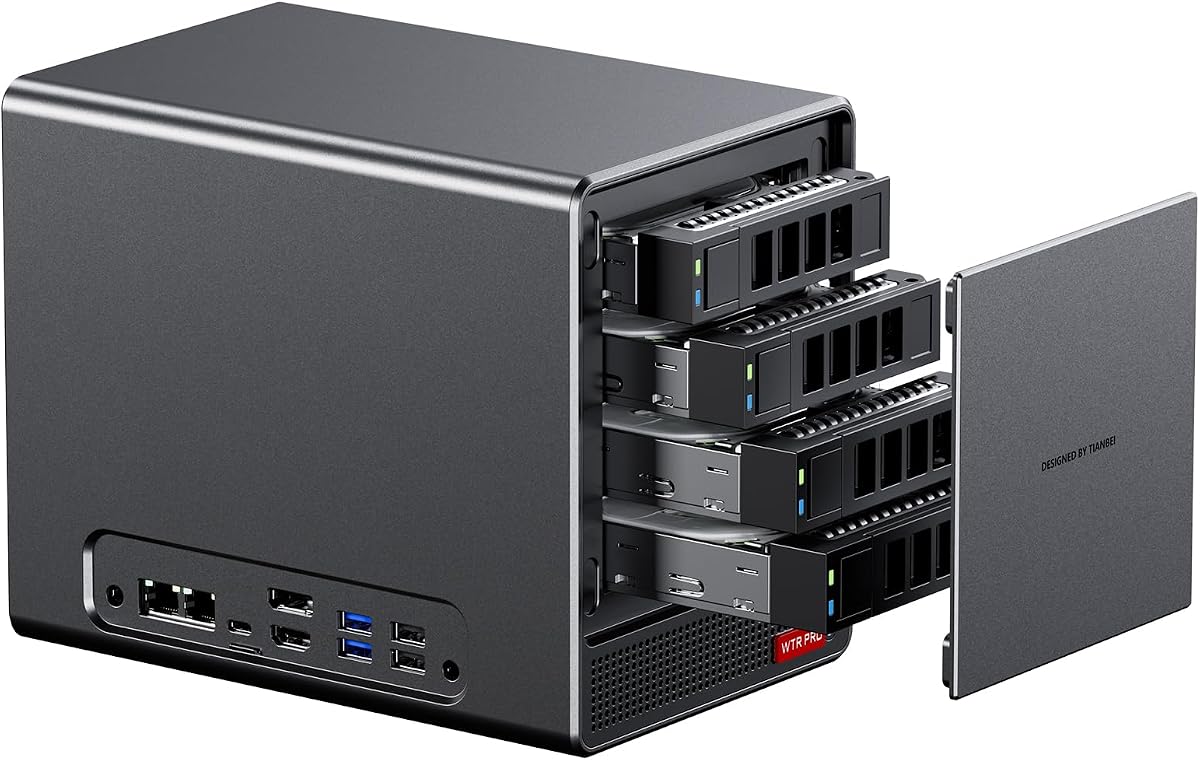
AOOSTAR WTR PRO NAS targets home storage with 4 SATA bays and 2 M.2 slots supporting up to 4x22TB drives. The Ryzen 7 5825U delivers efficient performance at 15W-25W for 24/7 operation.
We may earn a commission when you buy through this link, at no additional cost to you.
Through-the-wall cooling with 12CM fan keeps noise low while dissipating heat effectively. Triple 4K displays via DP 1.4 and HDMI 2.1 make it a workstation too. Wake on LAN adds remote management convenience.
DDR4 RAM up to 64GB is needed separately. Ports include USB 3.0, LAN, and audio jack. Dustproof construction ensures stable long-term runs. Ideal for soft routers or media servers with heavy I/O demands.
Select this for NAS or virtualization projects. Ensure proper drive cooling and OS installation. With compatible components, you get a quiet, expandable storage and compute solution for home use.
15W-25W draw ensures minimal electricity cost for always-on file or media servers.
Connect up to three 4K displays for media editing or multitasking alongside storage management.
We may earn a commission when you buy through this link, at no additional cost to you.
ASRock DeskMini X300 is one of the most affordable AM4 barebones. At just 1.92 liters, it fits almost anywhere. Supports Ryzen 5000 CPUs up to 65W. Offers triple display outputs via HDMI, DP, and D-Sub for multi-monitor setups.
We may earn a commission when you buy through this link, at no additional cost to you.
Storage includes two M.2 NVMe and two 2.5-inch bays for mixed media or OS + data drives. 2.5G LAN supports fast networking. An internal M.2 E slot adds Wi-Fi. Requires separate CPU, RAM, and storage installation.
It earns Best Budget for balancing cost and features. Ideal for office PCs or light media machines. Max DDR4 speed is 3200MHz which still works well for general tasks.
Choose this to save money on hardware. It suits users upgrading from older PCs or wanting a small secondary machine. Pair with affordable DDR4 RAM and M.2 SSD for solid value.
Small size allows placement on desks or shelves without taking much space in home or office.
HDMI, DP, and VGA support three screens for productivity or monitoring in tight spaces.
We may earn a commission when you buy through this link, at no additional cost to you.
ASUS PN54 brings Ryzen AI 300 series with XDNA2 NPU for 50 TOPS AI tasks. It supports up to four 4K displays and Wi-Fi 7 for future-proof networking. Chassis is 0.6L and eco-conscious for high-density setups.
We may earn a commission when you buy through this link, at no additional cost to you.
Toolless design eases component access. Dual 2.5G LAN ports allow redundancy. While pricing is premium, it targets enterprise or AI-heavy workloads needing robust compute without bloat.
Ryzen AI 300 series delivers efficient multitasking for agents or automation. The warranty covers long-term reliability. Requires DDR5 and M.2 NVMe SSDs which add to total cost.
This suits professionals needing AI acceleration or high bandwidth networking. Verify OS and memory before purchase. Despite lower rating, its specs are unmatched in the AMD barebone category.
XDNA2 NPU offers 50 TOPS for local AI tasks, making it faster than prior models.
Easy access to internals simplifies maintenance and upgrades for enterprise users.
We may earn a commission when you buy through this link, at no additional cost to you.
AOOSTAR WTR PRO 4+2 Bay supports 4 SATA and 2 M.2 bays with up to 96TB total. AMD Ryzen 7 5825U runs virtualization and routing. Dual 2.5G LANs handle traffic redundancy. Supports Windows, Ubuntu, OpenWrt, OPNsense.
We may earn a commission when you buy through this link, at no additional cost to you.
Linux users may need udev rules for full SATA speeds. Full-metal shell and 12CM fan maintain silence and cooling. Supports VT-x and VT-D for VMs. Ideal for complex home labs or business file servers.
Expandable storage and multiple OS options suit tech-savvy users. Ensure compatible RAM and drives for best results. Low power draw ensures efficiency during 24/7 operation.
This is for serious NAS users needing flexibility. Check udev notes before Linux install. With proper setup, you gain a versatile home server capable of file sharing and virtual machine hosting.
VT-x and VT-D enable running multiple VMs on Proxmox, Unraid, or OpenWrt smoothly.
Two LAN ports provide network redundancy or separate traffic streams for routers and NAS.
We may earn a commission when you buy through this link, at no additional cost to you.
ASUS PN54-S1 focuses on future-proof wireless with Wi-Fi 7 and BT 5.4. It uses Ryzen 200 Series CPU with Radeon 740M graphics. The 34mm slim chassis supports 24/7 operation. Tool-free design allows easy upgrades.
We may earn a commission when you buy through this link, at no additional cost to you.
Dual 2.5G LAN and six USB ports offer rich connectivity. Four 4K outputs support media or multitasking. While CPU is older, wireless capabilities exceed most rivals. Includes 3-year warranty for enterprise confidence.
This suits environments prioritizing network speed over raw compute. Ideal for thin-client setups or streaming stations. Ensure compatible RAM and storage for smooth operation.
Buy this for Wi-Fi 7 readiness. It bridges legacy CPU with modern networking needs. With proper components, it delivers reliable performance for thin-client or light media use.
Next-gen wireless ensures high bandwidth and low latency for future network setups.
34mm thin design and tool-free access simplify deployment in tight office or home setups.
We may earn a commission when you buy through this link, at no additional cost to you.
Choosing the right barebone mini PC involves matching your needs with processor power, connectivity, and upgrade paths. This section outlines essential factors to consider before buying.
AMD Ryzen 8000 series CPUs offer Zen 4 architecture and improved integrated graphics compared to Ryzen 5000. For general tasks Ryzen 5000 is sufficient. For AI and heavy workloads Ryzen 8000 delivers better performance per watt and AI acceleration.
Select the latest generation if you need future-proof performance; older CPUs still handle office tasks well.
DDR5 supports higher bandwidth and efficiency but costs more than DDR4. Check slot limits before purchasing since 128GB is often achievable with dual slots. Capacity affects multitasking and VM support.
Match RAM capacity to workload; 32GB suits daily use while 64GB+ helps for video editing or virtualization.
Most units offer M.2 NVMe slots for fast OS and app storage. Some also include SATA bays for larger media. Check total maximum storage to avoid hitting limits later.
Plan storage early because adding drives later is easier than replacing entire systems when limits are reached.
Ports like HDMI 2.1, DP 1.4, and USB4 determine display resolutions and count. For multi-monitor setups check how many 4K screens are supported simultaneously without bandwidth throttling.
Choose models with HDMI or DP 1.4 and USB4 to ensure smooth visual output across all screens.
OCuLink or Thunderbolt ports enable external graphics cards. OCuLink gives lower latency and higher bandwidth than USB4 for gaming or rendering workloads.
Use OCuLink for better eGPU performance; confirm power and thermal limits before buying external docks.
2.5G LAN ports improve wired transfer speeds. Wi-Fi 6e and Wi-Fi 7 provide high throughput and low latency wireless. Bluetooth 5.4 supports modern peripherals.
Prioritize dual LAN and Wi-Fi 7 for future networks if speed and redundancy matter.
Vapor chamber and PCM cooling maintain stability under load. Silent operation is critical for office use while high-performance cooling suits workloads.
Check cooling tech to avoid throttling and noise issues during extended usage.
Aluminum chassis offer durability and heat dissipation. Look for VESA mounting for flexible placement. Warranty and support terms impact long-term reliability.
Select models with 3-year warranties to cover defects and ensure peace of mind.
Install DDR5 or DDR4 modules into DIMM slots and secure M.2 SSDs before connecting power. Ensure screws are tightened to prevent vibration damage.
Use thermal pads if provided and set up BIOS for desired performance mode. Monitor temperatures regularly using software tools included with AMD drivers.
Keep vents clear of dust and run periodic OS updates to maintain performance and security.
A barebone kit includes the chassis motherboard power supply and sometimes cables. It does not include RAM storage or OS which you must buy separately.
Most use external GPUs via OCuLink or Thunderbolt since internal expansion is limited. Check OCuLink ports for lower latency connections.
Yes unless the package includes a free OS key. You must purchase Windows or install free Linux to use the system.
DDR5 speeds up to 5600MHz deliver best performance for Ryzen 8000 CPUs. Verify motherboard support before buying RAM.
OCuLink offers high bandwidth with low latency making external GPUs more efficient than Thunderbolt or USB4 solutions.
Windows 11, Ubuntu, OpenWrt, and OPNsense all work. Verify driver support before switching systems.
Check slot limits but many allow up to 4TB or more. Dual M.2 slots plus SATA expand storage significantly.
Clean dust occasionally with compressed air to prevent overheating. Check fan operation and ensure vents stay clear for stability.
The AOOSTAR MACO Ryzen 7 PRO 8845HS leads with OCuLink and strong connectivity for balanced use. Budget buyers will prefer ASRock DeskMini X300 for affordability and expansion.
Choose based on your need for AI, external GPU support, or multi-monitor workflows. Consider warranty and chassis design for long-term reliability.
Verify current prices and compatibility before buying since specifications and offers change frequently.