This comprehensive guide compares the top 10 document scanners for iPhone 18 users, evaluating portability, scan quality, and mobile compatibility for every
As an Amazon Associate we earn from qualifying purchases. We may earn a commission when you buy through links on this page, at no additional cost to you. Read our affiliate disclosure.As an Amazon Associate we earn from qualifying purchases.Purchases through our links may earn us a commission, at no extra cost to you. Read our affiliate disclosure.
Finding the right document scanner for iPhone 18 requires careful consideration of portability, connectivity, and scanning quality. As mobile workflows become increasingly essential, having a reliable tool to digitize papers on the go is crucial for professionals and students alike.
We evaluated ten top-rated scanners based on speed, size, software compatibility, and ease of use with iOS devices. Our analysis focuses on real-world performance metrics to help you choose the device that best fits your specific scanning needs and budget constraints.
Each product pick highlights key strengths and potential limitations to guide your decision-making process. Please note that pricing and availability fluctuate frequently, so verify current details before making your final purchase decision to ensure you get the best value.
Top 3 Picks for Best Document Scanner for iPhone 18
Best Budget
Portable Document Scanner – 900DPI Handheld Portable Scanner Image Scanner Scanning Wand A4 Colour Photo Mobile Scanners Handy Scan, JPG/PDF Format, with 16G SD Card (Blue)
Top 10 Best Document Scanner for iPhone 18 in 2026 Compared
The following table provides a side-by-side comparison of all ten scanners reviewed in this guide to help you quickly identify the most suitable option for your mobile documentation needs.
The Epson Workforce ES-50 stands out as a top choice for mobile scanning needs with a rating of 4.3 stars. Its compact form factor makes it ideal for users who need to digitize documents while traveling or working from various locations without sacrificing performance.
Pros
Fast scanning speed
Very lightweight design
No external power needed
Compatible with Mac and Windows
Easy software setup
Cons
No built-in battery
Single sheet feed only
We may earn a commission when you buy through this link, at no additional cost to you.
This scanner offers impressive speed by scanning a single page in as quickly as 5.5 seconds. The included Nuance OCR software allows you to create searchable PDFs and editable Word or Excel files which enhances productivity significantly. It handles documents up to 8.5 by 72 inches easily.
While it lacks an internal battery requiring USB power which limits use away from a computer the trade-off ensures consistent performance and reduces weight. The automatic feeding mode combines multi-page scans into one file seamlessly which simplifies your workflow greatly.
For professionals and students seeking a reliable portable scanner with strong software support this model is highly recommended. It balances speed, portability, and functionality better than most competitors in its class making it a solid investment for daily digitization tasks.
Effortless Scanning Speed
With scanning times as low as 5.5 seconds per page you can quickly digitize stacks of documents without waiting or losing momentum during busy work sessions.
Integrated OCR Capabilities
The included Nuance OCR transforms static images into editable text allowing you to search, copy, and reuse content from scanned documents effortlessly.
The Brother DS-640 offers exceptional value for budget conscious buyers seeking a capable mobile scanner. Rated at 4.3 stars it delivers fast performance with speeds up to 16 pages per minute making it suitable for high volume scanning tasks.
Pros
Excellent scanning speed
Compact and portable design
Works with Mac and Linux
Free iPrint&Scan app
Handles various paper sizes
Cons
Relies on USB power
No battery option included
We may earn a commission when you buy through this link, at no additional cost to you.
Its ultra compact design allows you to fit it easily in a bag or purse for convenient transport. The free iPrint&Scan desktop app enables scanning to multiple destinations including PC, network, cloud services, and email providing great flexibility.
Automatic image optimization features such as color detection and bleed through prevention ensure high quality results without manual adjustments. However the device requires a constant USB connection which may limit use in locations without easy access to a computer.
If you need a fast and affordable scanner for office or home use this model provides strong performance without breaking the bank. It is especially useful for those who prioritize speed and portability over independent power sources.
Blazing Fast Performance
Scanning up to 16 ppm means you can process large batches of documents quickly saving valuable time during busy workdays or deadlines.
Versatile Connectivity Options
The free software supports scanning to multiple destinations like cloud services and email streamlining your workflow and file management effortlessly.
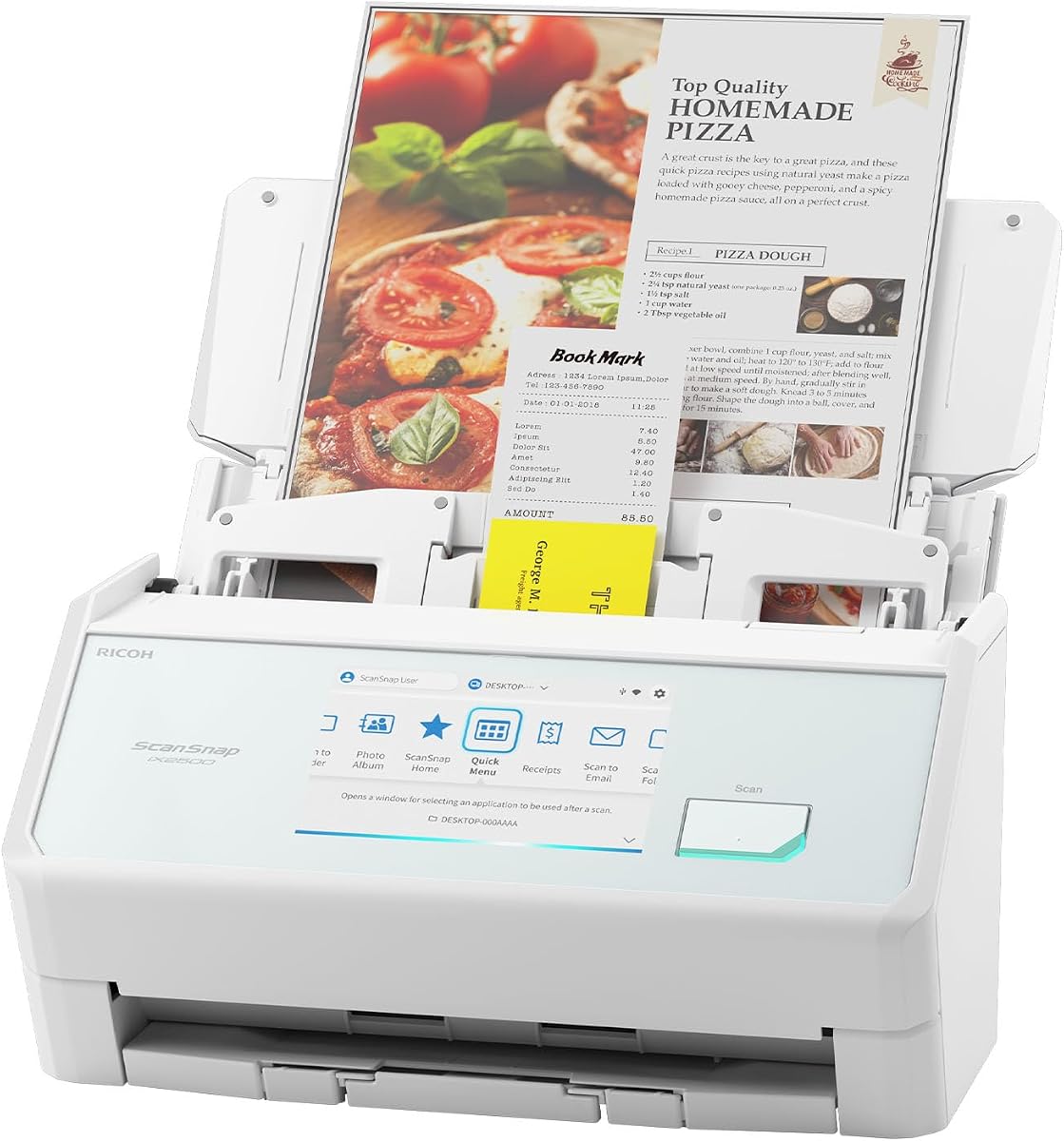
The ScanSnap iX2500 represents a premium solution for users needing high speed and advanced features. With a 4.4 star rating it boasts a 45ppm double-sided scanning speed and a 100-sheet document feeder which accelerates digitization significantly.
Pros
Extremely fast scanning
Large sheet capacity
Wi-Fi 6 wireless support
Touchscreen interface
Advanced paper handling
Cons
Higher price point
Larger footprint than portable options
We may earn a commission when you buy through this link, at no additional cost to you.
Its built-in Wi-Fi 6 ensures secure and fast wireless connections to smart devices or cloud services without requiring a computer nearby. The customizable touchscreen lets you select personalized profiles and send files directly to your favorite computer apps with ease.
The brake roller system and multi-feed sensor prevent paper jams and damage ensuring reliable operation even with mixed document types. While more expensive and larger than basic models the efficiency and convenience it offers justify the investment for heavy users.
Business professionals or anyone handling large volumes of paper will find this scanner invaluable for maintaining an organized digital workflow. Its ability to handle photos receipts and business cards makes it a versatile tool for diverse scanning needs.
Next Generation Wireless Speed
Built-in Wi-Fi 6 provides the fastest and most secure scanning connection allowing seamless transfers to devices and cloud services without cables.
Smart Organization Features
Automatic optimization naming and sorting of scanned files save time and keep your digital archive tidy without manual intervention.
The CZUR Shine Ultra is designed for users who need to digitize books and curved documents with precision. Rated at 4.2 stars it uses patented technology to flatten curved book pages after pixel transformation making it unique among portable scanners.
Pros
Patented flattening tech
Scans books and photos
AI auto cropping
Adjustable height neck
Portable design
Cons
Not compatible with iOS
Requires external power
We may earn a commission when you buy through this link, at no additional cost to you.
Its 13MP CMOS camera captures high resolution images with automatic cropping and smart paging features to ensure clean output. The USB Document Camera function allows it to work with Zoom and Google Meet adding value for remote teaching and learning environments.
Despite its advanced features the device is not compatible with iOS or Android devices limiting direct mobile use. It supports 180+ languages for OCR though some specific languages are not supported yet which may affect multilingual users.
For those needing to scan books or photos without damaging the spine this scanner offers an effective solution. Its adjustable height and lightweight design make it easy to transport and set up in various environments for diverse scanning tasks.
Book Friendly Design
Patented flattening technology handles curved book pages effectively preserving text clarity without requiring pages to be removed.
AI Enhanced Efficiency
Smart paging and auto cropping use AI to streamline the scanning process reducing manual edits and improving output quality.
The Brother DS-740D excels at scanning double-sided documents quickly with its duplex capability allowing scans in a single pass. With a 4.3 star rating it maintains a speed of up to 16 ppm regardless of color or black and white content.
Pros
Double-sided scanning speed
Compact footprint
Color scanning does not slow down
Free iPrint&Scan app
Bleed through prevention
Cons
No battery included
Requires USB power
We may earn a commission when you buy through this link, at no additional cost to you.
Its ultra compact design saves desk space thanks to the Desk Saving Design feature reducing the amount of space needed by 11 inches. The included software suite optimizes images with features like automatic color detection and bleed through prevention.
While it offers strong performance for mobile professionals the device requires a constant USB connection which can limit portability without a nearby power source. However the speed and quality it delivers make up for this minor inconvenience.
This scanner is ideal for users who frequently need to digitize contracts invoices or forms with two-sided content. Its reliability and compact size make it a practical choice for office desks or mobile workstations.
Time Saving Duplex Scanning
Scan both sides of a document in one pass doubling efficiency and reducing the time spent on double-sided paperwork.
Space Efficient Design
The Desk Saving Design reduces required desk space by 11 inches making it perfect for cramped workstations or travel setups.
The Canon imageFORMULA R10 offers a user friendly experience with simple setup and built-in software that requires no installation. Rated at 4.1 stars it provides duplex scanning and handles a variety of media types including receipts and plastic cards.
Pros
Simple setup process
Handles various media types
Duplex scanning capability
Built-in software included
Compact portable design
Cons
Limited daily volume
No battery power
We may earn a commission when you buy through this link, at no additional cost to you.
With a suggested daily volume of 500 scans it is suitable for moderate usage in offices or classrooms. The lightweight and small form factor allows you to take it anywhere from home offices to remote work locations with ease.
Built-in software enables you to adjust and organize scanned files directly after capture without needing additional tools. This efficiency helps maintain a streamlined workflow for users who need quick access to digital documents.
Ideal for mobile users seeking reliability and simplicity this scanner balances performance with convenience effectively. Its ability to handle embossed and plastic cards adds versatility that many portable scanners lack.
Effortless Setup and Use
No complicated setup or software installation is required allowing you to start scanning documents immediately after plugging it in.
Versatile Media Handling
Digitize receipts business cards and plastic cards effortlessly ensuring all document types are preserved digitally.
The Epson Perfection V19 II is designed for users prioritizing photo quality and document detail. With a 3.9 star rating it offers 4800 dpi optical resolution ideal for photo enlargements and scanning books without needing to remove pages.
Pros
High resolution for photos
Easy Photo Fix tech
Lightweight design
Kickstand for storage
Searchable PDF generation
Cons
Slower than sheet feeders
Flatbed only
We may earn a commission when you buy through this link, at no additional cost to you.
Its removable high-rise lid allows for scanning books and photo albums conveniently while the built-in kickstand saves space for vertical storage. Easy Photo Fix technology restores color to faded photos with one click simplifying restoration tasks significantly.
The compact and lightweight design makes it portable despite being a flatbed scanner. It generates searchable PDFs and editable Microsoft Office documents using OCR which adds value beyond simple image scanning.
If you need to digitize photos or mixed media this scanner provides excellent clarity and ease of use. Its USB powered operation ensures it remains portable and simple to set up anywhere.
Photo Restoration Made Easy
Restore faded photos quickly with one-click technology that corrects color without needing advanced editing skills or software.
Book Scanning Capability
The removable high-rise lid allows scanning bound books and photo albums without damage preserving important records safely.
The Epson Workforce ES-60W stands out with its wireless capability allowing scanning directly to iOS or Android devices without cables. Rated at 4.1 stars it scans a single page in as fast as 4 seconds making it one of the fastest options available.
Pros
Fastest scanning speed
Wireless capability
Supports iOS and Android
Compact and lightweight
Automatic feeding mode
Cons
Requires battery charging
Higher price than wired
We may earn a commission when you buy through this link, at no additional cost to you.
Its smart software detects connectivity automatically switching between USB and battery powered wireless without user intervention. The LCD displays wireless and battery status ensuring you always know when the device is ready for use.
The automatic feeding mode combines multi-page scans into one file which simplifies organization and reduces manual file handling. While it requires battery charging this trade-off offers significant mobility benefits for on-the-go professionals.
Ideal for users who need flexibility to scan wirelessly to multiple devices this model excels in speed and convenience. Its compact design ensures it fits easily into bags without adding much weight or bulk.
True Wireless Freedom
Scan critical documents wirelessly to iOS or Android devices allowing true portability without tethering to a computer.
Unmatched Scanning Speed
Capture a single page in as little as 4 seconds ensuring rapid digitization even during urgent work sessions.
This handheld portable scanner offers a simple solution for basic digitization needs with 900DPI resolution modes for clarity. Rated at 3.9 stars it is extremely lightweight at 0.31lb making it easy to carry for travel or quick tasks.
Pros
Very portable and lightweight
Multiple resolution options
No software installation required
Direct SD card storage
Affordable price
Cons
Manual scanning effort required
Limited to handheld use
We may earn a commission when you buy through this link, at no additional cost to you.
It supports storage up to 32GB on Micro SD cards allowing files to be stored directly without needing a computer. The plug and play feature requires no pre-installed software which simplifies setup for beginners.
While manual scanning requires steady hands for consistent quality it remains an affordable option for those with occasional scanning needs. The automatic completion after three minutes of inactivity adds convenience to the operation.
Perfect for students or professionals needing a basic tool for scanning documents on the go this device is practical and affordable. Its simplicity ensures anyone can use it immediately without technical hurdles.
Ultimate Portability
Weighing only 0.31lb this scanner is easy to carry in pockets or bags making it ideal for travel and field work.
Simple Plug and Play
No software installation is required allowing you to start scanning and storing files on the SD card instantly.
We may earn a commission when you buy through this link, at no additional cost to you.
Buying Guide – How to Choose the Best Document Scanner for iPhone 18
Selecting the right scanner involves considering various factors such as connectivity, speed, and software compatibility to meet your specific needs.
Connectivity Options
Check if the scanner supports wireless connections or USB for compatibility with your iPhone. Wireless models offer greater flexibility but may require charging.
Scanning Speed
Higher pages per minute ratings ensure quicker processing of documents which is crucial for high volume tasks or tight deadlines.
Portability
Look for lightweight designs that fit easily into bags if you plan to use the scanner while traveling or working remotely.
Software Compatibility
Ensure the scanning software works seamlessly with your iOS device and supports necessary features like OCR for editable files.
Paper Handling
Evaluate the types of media the scanner can handle such as receipts or double-sided documents to match your typical scanning tasks.
Resolution Quality
Higher DPI settings provide clearer images especially important for photos or detailed text that needs to remain legible.
Power Source
Decide between USB powered or battery operated models based on where you plan to use the scanner most frequently.
Budget Considerations
Balance the features you need against your budget to find a device that offers value without compromising essential performance.
How to Use and Care for Your Document Scanner for iPhone 18
Begin by installing the recommended software and connecting your scanner to your iPhone or computer via USB or Wi-Fi following the manufacturer setup instructions.
Place your document on the feeder or flatbed carefully aligning it to avoid jams and adjust scan settings like resolution or color mode in the app before scanning.
Regularly clean the scanner glass with a soft cloth to remove dust and debris ensuring high quality scans over time and extend the device lifespan.
Frequently Asked Questions
Can these scanners work directly with iPhone 18?
Most of the scanners listed support USB or wireless connectivity which allows them to function with iPhone 18 through compatible apps. Always check the product specifications for iOS compatibility before purchase.
What is the best scanner for scanning receipts on the go?
The Epson Workforce ES-50 or Brother DS-640 are ideal for receipts due to their compact size and fast scanning speeds which handle small documents efficiently.
Do all scanners include OCR software?
Not all models include OCR software so check the product details carefully. Many premium options include this feature to convert scans to editable text.
Which scanner is the most portable?
The handheld portable scanners are the most portable due to their lightweight design and battery power allowing for use anywhere without cables.
How do I scan without a computer?
Use a wireless model like the Epson Workforce ES-60W that can connect directly to your iPhone via Wi-Fi and scan using the dedicated mobile app.
What resolution is best for text documents?
A resolution of 300 DPI is generally sufficient for text documents but higher resolutions like 600 DPI provide better clarity for detailed text.
Final Thoughts on Choosing the Best Document Scanner for iPhone 18
We reviewed ten exceptional scanners ranging from compact handheld units to premium high-speed models to suit diverse needs and budgets.
Prioritize speed and wireless connectivity if you need efficiency on the go or focus on OCR capabilities for detailed document management.
Always check current prices and compatibility details before purchasing to ensure you select the right scanner for your specific workflow today.